
Three minutes apart on a Thursday morning in November, two AI agents on one Windows PC got an identical 205-word brief: turn one portrait into a 10-second rainy-rooftop shot, stop at a cheap draft, wait for a yes, then finish in 1080p. One was Tencent's WorkBuddy. The other was OpenClaw, the open-source assistant with 393,921 GitHub stars on November 5.
This WorkBuddy vs OpenClaw comparison is built on that run. Both agents used the same brain (DeepSeek V4 Pro) and the same skill folder, so the gaps you'll see come from the agents themselves: setup, billing, skill handling and safety. The last section covers the other agents people weigh against WorkBuddy.
Key Takeaways
- WorkBuddy is Tencent's installer-based desktop agent; OpenClaw is a free MIT-licensed agent you run yourself.
- Both agents ran the same Seedance 2.5 API draft-then-1080p brief once Atlas Cloud was connected.
- WorkBuddy bills credits unless you add a custom model; OpenClaw is free, and you payonlyyour model API.
- Skill folders crossed both ways in our test: OpenClaw loaded WorkBuddy skills, and WorkBuddy loaded OpenClaw's.
- OpenClaw docs saytotreat third-party skills as untrusted code, while WorkBuddysecurity-checksevery upload.
WorkBuddy vs OpenClaw at a Glance
Both agents act on your files and apps instead of only chatting. They start from opposite ends: one is a packaged product from a cloud giant, the other is a community project you host.
| WorkBuddy | OpenClaw | |
|---|---|---|
| Made by | Tencent | OpenClaw Foundation, a 501(c)(3) nonprofit |
| Source code | Closed | Open, MIT license |
| Runs as | Desktop app for Windows and Mac, plus a web app | Node.js service on macOS, Linux or Windows, with a browser Control UI |
| Where you talk to it | The app, or remotely from Discord, Slack and Telegram | 29 chat channels, including WhatsApp, Telegram, Slack and iMessage |
| First release | China March 9, 2026; international May 28, 2026 | GitHub repo opened November 24, 2025 |
| Version we tested | 5.9.4 | 2026.10.10 |
Tencent's global launch post calls WorkBuddy "the agentic AI workspace," and TechNode had described its March debut in China as an "OpenClaw-like" workplace agent. OpenClaw ships in the open on GitHub, where the 2026.10.10 release we tested went out on November 3.
Run One Seedance 2.5 Brief in Both Agents
Both agents reached Seedance the same way, through Atlas Cloud, which serves Seedance 2.5 and the DeepSeek model that ran each agent behind one API key. Here are the two finals side by side.
The brief used the reference-to-video endpoint with the portrait as Image 1 and draft mode switched on, so the first render came back at 480p with a draft ID.
The 1080p draft completion then renders that shot again from the draft's own prompt, seed and audio settings, any time within seven days. That gave each agent a natural place to stop and ask.
Method 1: Use the Atlas Cloud Skill in WorkBuddy
WorkBuddy installs skills from a folder or zip that contains a SKILL.md file; our WorkBuddy AI guide shows the upload. With the Atlas Cloud skill on, the desktop run took four moves.
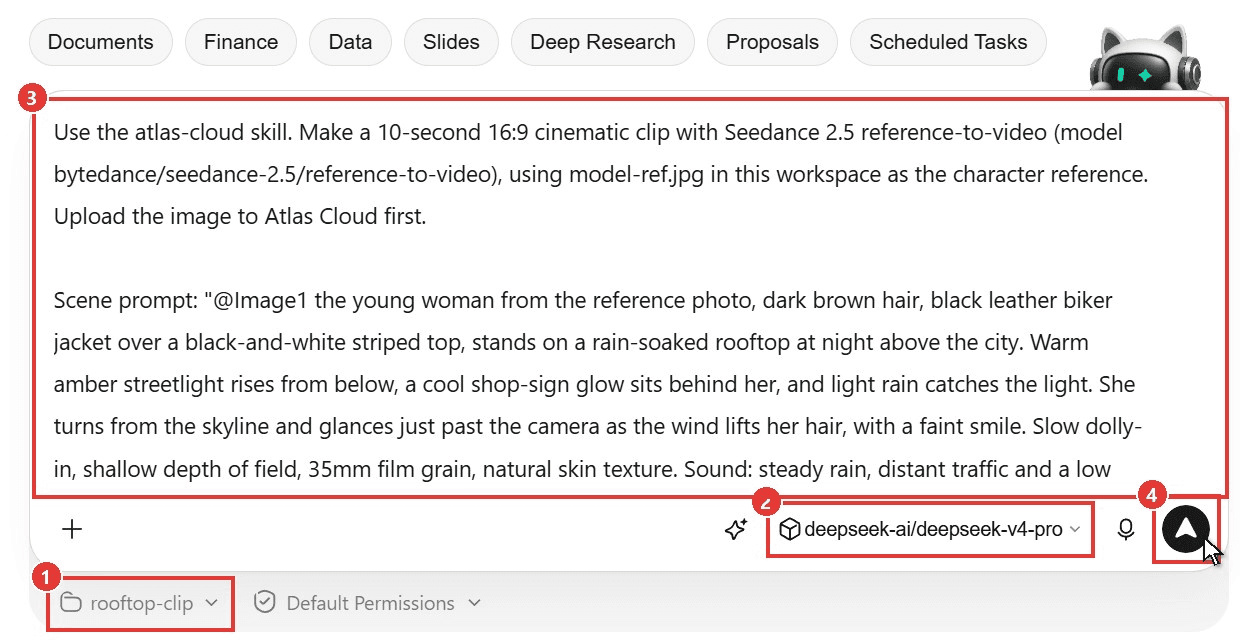
- Create a workspace and drop the reference photo into its folder. Ours was called rooftop-clip.
- Pick the model. We used DeepSeek V4 Pro, added as a custom model through Atlas.
- Paste the brief. Type the @Image1 tag last: in WorkBuddy's composer, @ opens the context picker and turns the tag into a chip.
- Click Send.
plaintext1Use the atlas-cloud skill. Make a 10-second 16:9 cinematic clip with Seedance 2.5 reference-to-video (model bytedance/seedance-2.5/reference-to-video), using model-ref.jpg in this workspace as the character reference. Upload the image to Atlas Cloud first. 2 3Scene prompt: "@Image1 the young woman from the reference photo, dark brown hair, black leather biker jacket over a black-and-white striped top, stands on a rain-soaked rooftop at night above the city. Warm amber streetlight rises from below, a cool shop-sign glow sits behind her, and light rain catches the light. She turns from the skyline and glances just past the camera as the wind lifts her hair, with a faint smile. Slow dolly-in, shallow depth of field, 35mm film grain, natural skin texture. Sound: steady rain, distant traffic and a low synth hum, no dialogue." 4 5Step 1: check the price with POST https://api.atlascloud.ai/api/v1/model/calculate, then generate a DRAFT only (draft: true, generate_audio: true, ratio 16:9, duration 10). Show me the draft video URL and the draft_id, then stop and ask me before spending more. 6Step 2: only after I approve, render the 1080p final with bytedance/seedance-2.5/draft-complete and save the final mp4 in this workspace. 7 8Use the REST API with ATLASCLOUD_API_KEY from the environment. Do not use the hosted MCP server. Reply in English.
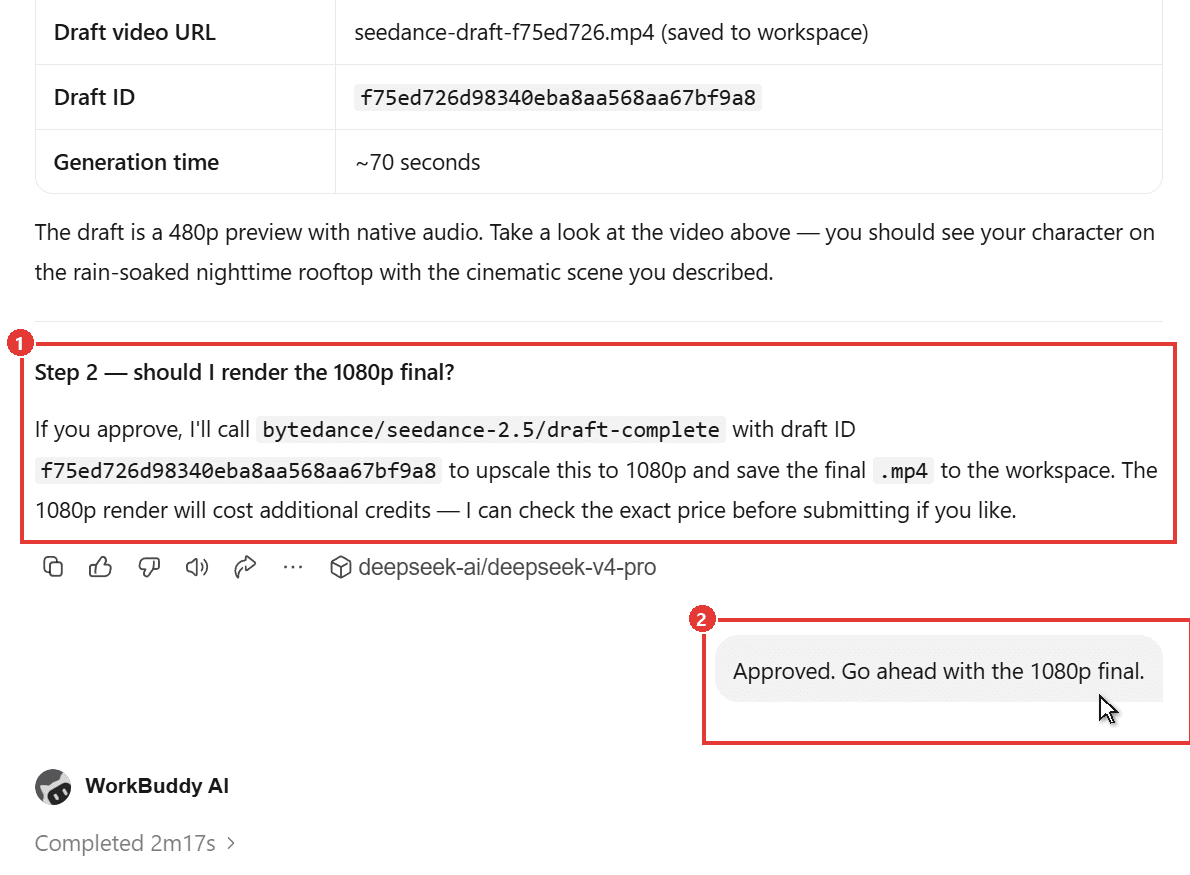
WorkBuddy uploaded the photo, priced the job, submitted the draft and stopped with a summary table and a direct question. After we typed "Approved," it rendered the 1080p final and saved both files to the workspace.
Method 2: Add the Atlas Cloud Skill to OpenClaw
We took OpenClaw's npm route on Windows. Its onboarding prints a tip that it "runs great on WSL2," but the native install handled this whole test.
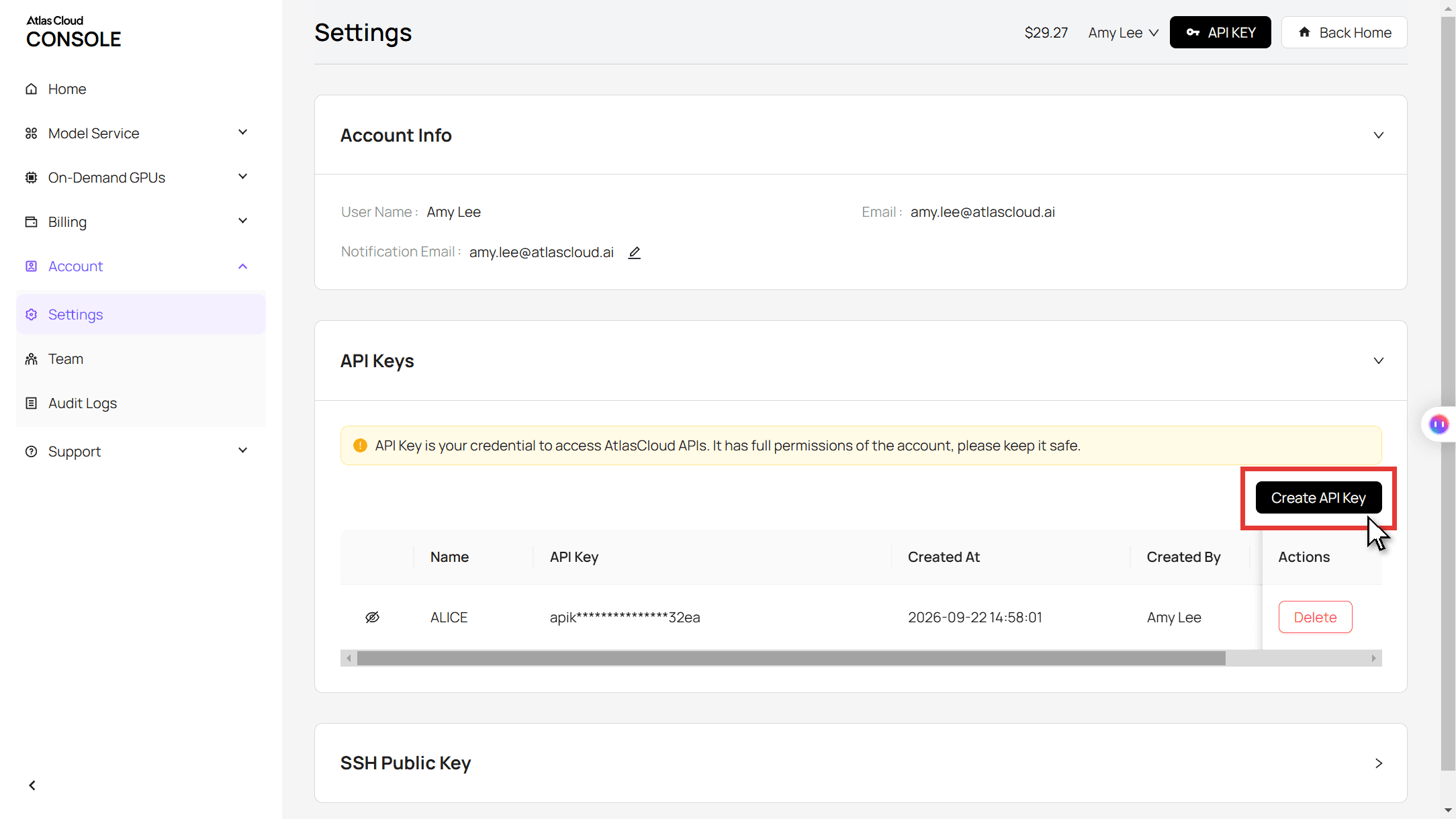
Step 1: Create an API key. In the Atlas Cloud console, open Settings, then API Keys, and create one. Save it as the ATLASCLOUD_API_KEY environment variable: the Atlas skill reads it from there in both agents, and OpenClaw's config can point to it instead of holding the key.
Step 2: Install OpenClaw and point it at Atlas. The Atlas docs list the model IDs; the base URL below is the OpenAI-compatible one. Drop the allow-scripts flag on npm 11.15 or older. Our OpenClaw custom API guide explains the provider block line by line.
plaintext1npm install -g openclaw@latest --allow-scripts=openclaw 2openclaw onboard --non-interactive --accept-risk --flow quickstart --auth-choice custom-api-key --custom-base-url https://api.atlascloud.ai/v1 --custom-model-id deepseek-ai/deepseek-v4-pro --custom-provider-id atlascloud-llm --custom-text-input --secret-input-mode ref --skip-channels --skip-search --skip-daemon 3openclaw config set models.providers.atlascloud-llm.apiKey '${ATLASCLOUD_API_KEY}'
Step 3: Add the skill and send the brief. Copy the same atlas-cloud folder into OpenClaw's skills directory, start the Gateway in one terminal, then send the brief from another. The last line opens the same session in OpenClaw's terminal UI, where you can read the draft summary and approve it.
plaintext1cp -r atlas-cloud ~/.openclaw/skills/ 2openclaw gateway run 3openclaw agent --session-key agent:main:seedance-brief --message-file brief.md 4openclaw tui agent:main:seedance-brief
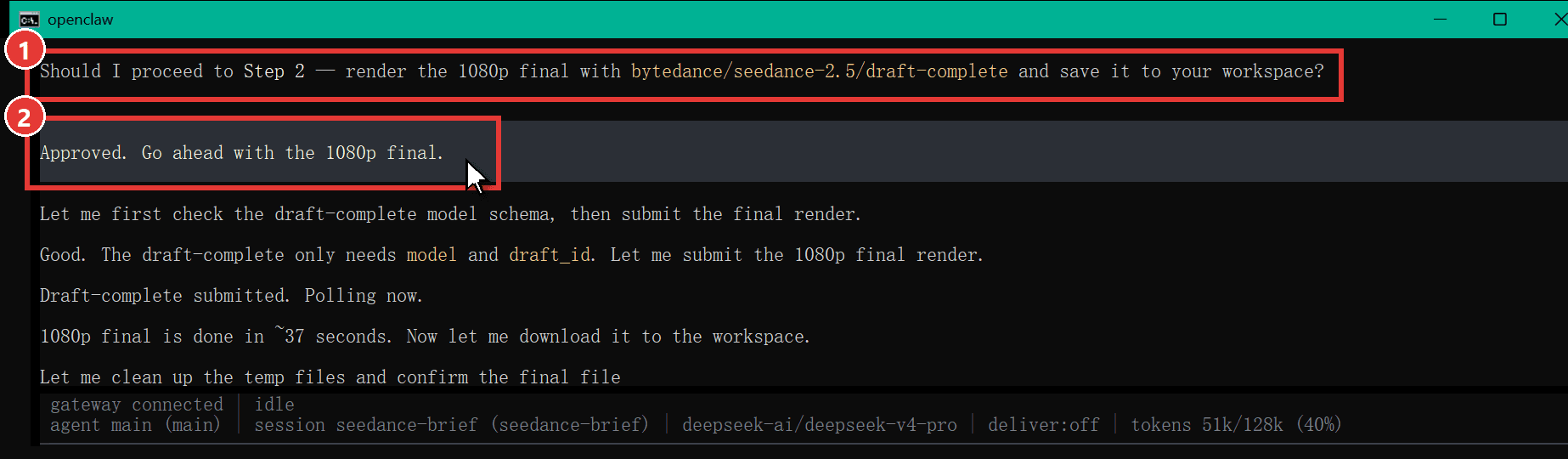
OpenClaw then wrote five throwaway PowerShell scripts for the model lookup, upload, price check, draft and polling, deleted them when done, and stopped with the draft ID and price. After the same "Approved," it saved a 1080p file to its workspace.
Because both agents call the same Atlas endpoints with one key, moving to another video model means editing the model string in the brief. The key and the endpoints stay put.
WorkBuddy vs OpenClaw Test Results From the Same Brief
Same brief, same model, same PC. Times are wall-clock, as each agent reported them.
| WorkBuddy 5.9.4 (desktop) | OpenClaw 2026.10.10 | |
|---|---|---|
| Install | 484 MB signed Windows installer | npm global install: 3 min 33 s, 360 packages |
| First-run setup | Sign in, then add the custom model in Settings | One onboarding command (32 s) and a Gateway that took 63 s to start |
| Brief to draft | 3 min 43 s | 6 min 32 s |
| Draft render on Atlas | 70 s | 85 s |
| Stopped to ask | Yes, with a summary table | Yes, with the draft ID and price |
| Approval to 1080p file | 2 min 17 s | 3 min 13 s |
| 1080p render on Atlas | 46 s | 37 s |
| Final file | 1920 x 1080, 10 s, with audio | 1920 x 1080, 10 s, with audio |
| WorkBuddy credits used | 0 (custom model) | Not applicable |
| Tokens reported | Not shown in the task view | 79,531 in, 9,854 out, 2.39M cached |
Atlas rendered both clips within 15 seconds of each other, so the gap came from the agents. WorkBuddy finished both turns in 6 minutes. OpenClaw needed 9 minutes 45 seconds, much of it spent writing and running its own scripts on native Windows. Both stopped exactly where the brief told them to, which matters more than speed when a mistake costs a 1080p render.
WorkBuddy Credits vs OpenClaw's Bring-Your-Own-Model Bill
The two agents charge for different things. WorkBuddy sells credits for its built-in models; OpenClaw costs nothing and passes every token bill to whichever provider you connect.
| WorkBuddy (international site, November 2026) | OpenClaw | |
|---|---|---|
| Free | 100 credits a month, plus a 30-credit daily reward marked promo | The whole app |
| Paid | Pro $10 a month or $96 a year; Team $40 per seat a month | No paid tier, hosted plan or token |
| Model costs | Built-in models burn credits at the rate shown in the model menu; custom models burn none | Billed by your model provider |
| Media generation | Billed by the provider behind the skill | Billed by the provider behind the skill |
Two details matter more than the plan prices. WorkBuddy's custom-model route turns it into a free shell around your own API key, as long as you stay on the desktop app where custom models live. OpenClaw's run report counted every token but showed a cost of $0, because a custom provider carries no price table until you add one, so check your provider's dashboard instead.
Do OpenClaw Skills Work in WorkBuddy?
Chinese tech coverage of the March launch said WorkBuddy is fully compatible with OpenClaw skills. No ranking page we found had tested it, so we moved skills both ways.
| Skill | Where it came from | Copied into | Result |
|---|---|---|---|
| atlas-cloud | Atlas Cloud's GitHub repo, already uploaded to WorkBuddy | OpenClaw's skills folder | Listed as ready, then ran the full brief |
| pptx-generator | WorkBuddy's skill market | OpenClaw's skills folder | Listed as ready, with no missing tools reported |
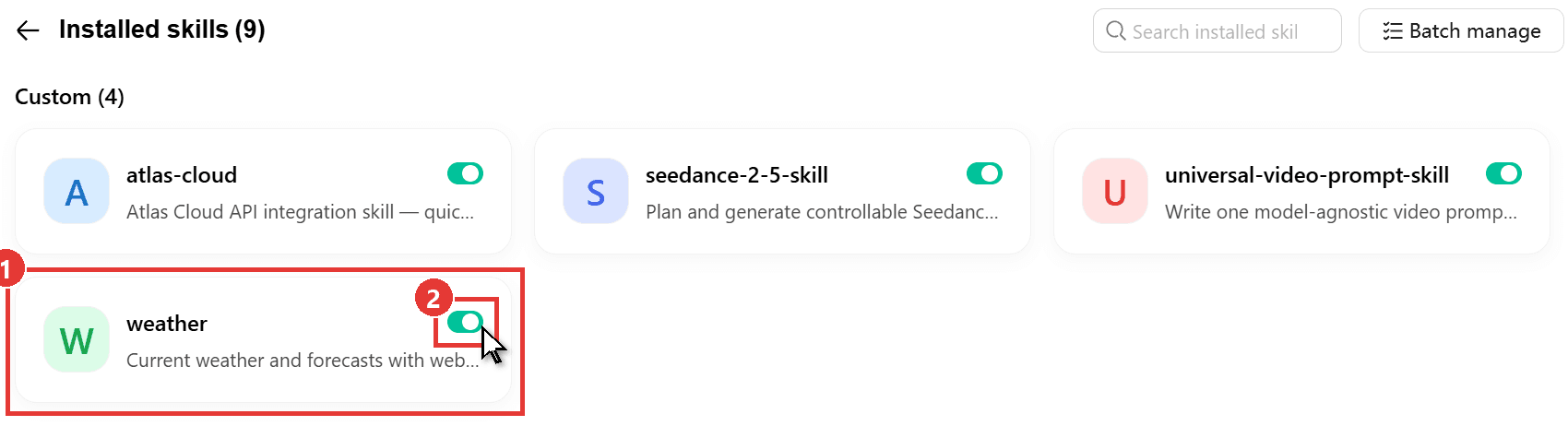
| weather | Bundled with OpenClaw | WorkBuddy's skills folder | Showed up under Custom skills and answered a Shanghai forecast in 42 seconds |
Both agents read the same format: a folder with a SKILL.md file whose header carries a name and description. WorkBuddy loaded the OpenClaw weather skill even though its header includes an install block written for OpenClaw.
WorkBuddy's own market already carries the overlap: 20 of its 215 skills listed ClawHub as their source when we pulled the catalog on November 4. Going the other way has limits. OpenClaw's migrate command imports from Claude Code and Hermes, with no WorkBuddy option, so skills move by copying folders.
Is WorkBuddy Safer Than OpenClaw?
The two take opposite stances. OpenClaw gives the agent your machine and documents the risk; its security guide says it "is not a hostile multi-tenant security boundary." WorkBuddy wraps the same powers in app-level checks.
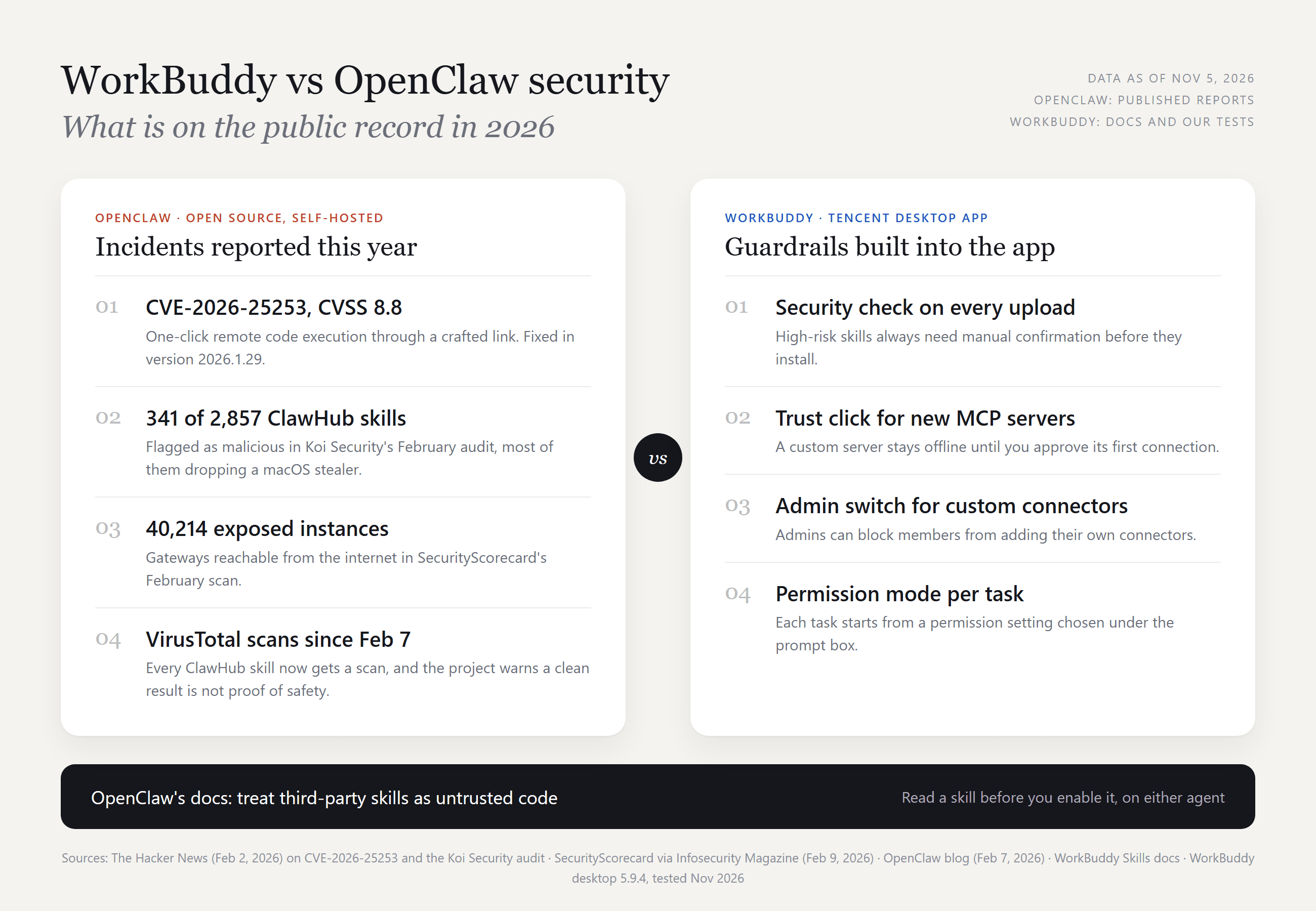
The Hacker News reported CVE-2026-25253, a one-click remote code execution bug rated 8.8 and fixed in version 2026.1.29, and separately covered a Koi Security audit that flagged 341 of 2,857 ClawHub skills as malicious.
OpenClaw now scans ClawHub uploads with VirusTotal and still warns that "a clean scan doesn't mean a skill is safe." Its skills docs put it more plainly: treat third-party skills as untrusted code.
The defaults we met were sensible. OpenClaw's browser dashboard stayed locked until it received the Gateway token, and its Gateway listened only on the local machine.
WorkBuddy runs a security check on every uploaded skill, always asks before installing one rated high risk, and in our earlier tests held a new MCP server offline until we clicked Trust. Neither agent removes the need to read a skill before you switch it on.
Is OpenClaw the Best WorkBuddy Alternative?
OpenClaw is the closest match if you want WorkBuddy's reach into files and apps without a vendor account. The other agents people compare with WorkBuddy split by where they run and who pays for the model.
| Agent | Where it runs | Entry price | Pick it if |
|---|---|---|---|
| OpenClaw | Your computer or server | Free, any model provider | You want full control and chat-app access |
| Claude Cowork | Claude desktop app | Pro plan, $20 a month | Your team already works in Claude |
| Claude Code | Terminal, IDE, desktop | Pro plan, $20 a month | The job is code |
| Codex | CLI, IDE, web, ChatGPT desktop | Free plan; Plus $20 a month | The job is code and you live in ChatGPT |
| ChatGPT Work | OpenAI's cloud | Paid ChatGPT plans at launch | Tasks should keep running with your laptop shut |
| Manus | Web, desktop, mobile | 300 free credits a day; Pro from $20 a month | You want a hosted agent with a cloud computer add-on |
| Kimi Claw | kimi.com cloud or a desktop app | Allegretto membership for one-click setup | You want OpenClaw without hosting it |
Prices are from each vendor's pricing or help pages in November 2026.
WorkBuddy vs Claude Cowork for Office Work
Claude Cowork is the closest product match to WorkBuddy. Both are desktop agents for knowledge work that read local files, take MCP connectors and install skill packages. Cowork needs a paid Claude plan while WorkBuddy has a free one, and they also split on models and platforms.
| WorkBuddy | Claude Cowork | |
|---|---|---|
| Models | Hy4, Hy3, DeepSeek, GPT, Grok, Gemini, GLM, Kimi and MiniMax in the menu, plus your own | Anthropic's Claude models |
| Desktop | Windows and Mac | macOS and Windows, Linux in beta |
Pick Cowork if your documents and habits already live in Claude. Pick WorkBuddy if you want a free tier or a model menu you can extend with your own key.
Frequently Asked Questions
Is WorkBuddy better than ChatGPT Work?
Neither wins outright, because they work in different places. ChatGPT Work, which VentureBeat reported launching in July 2026, reaches Gmail, Calendar, Slack and GitHub through MCP connectors from OpenAI's cloud. WorkBuddy opens local folders directly and has a free plan. Choose by where your files live.
Is Kimi Claw a WorkBuddy rival or just hosted OpenClaw?
It is hosted OpenClaw. Moonshot's help center describes Kimi Claw as OpenClaw running inside Kimi, and it can link an OpenClaw install you already run. Against WorkBuddy it is the same trade-off this article tests, minus the setup work. WorkBuddy, for its part, lists Kimi K3 and Kimi K3.1 Pro in its own model menu.
How does WorkBuddy compare with Manus?
Manus leans on the cloud: its 2.0 release added a Cloud Computer add-on next to the app, while WorkBuddy's desktop tasks run on your own machine. The two are also linked by money: Caixin reported in August 2026 that Tencent became Manus's largest shareholder after Meta's purchase was unwound.
Should developers pick WorkBuddy, Claude Code or Codex?
For code, Claude Code and Codex are built for the job, and both accept an API key from their maker. WorkBuddy's desktop app has a Code mode next to Work, which suits teams already living in WorkBuddy. OpenClaw ships a bundled coding-agent skill if you would rather drive coding tools from chat.
How much does the Seedance 2.5 draft workflow cost?
A 10-second 480p draft with audio cost $1.34 on Atlas Cloud, and completing it at 1080p cost $5.94, so an approved clip came to $7.28. Rendering straight at 1080p costs the same $5.94, so a draft adds $1.34 when the first try works and saves $4.60 for every idea you reject before the keeper.
Both prices include Atlas Cloud's current 20% discount, which had no posted end date as of November 5, 2026. The DeepSeek V4 Pro tokens behind both agents' four turns added about $0.95 in total.
Conclusion
Both agents turned one portrait into the same rainy-rooftop clip, paused at the draft and waited for a yes. The differences showed up around the edges: WorkBuddy asked less of us along the way, and OpenClaw asked more but handed back the whole stack.
That makes the WorkBuddy vs OpenClaw choice a question of who maintains the agent. Want an app? Pick WorkBuddy and add a custom model to skip credits. Want to own the stack? Pick OpenClaw and read every skill before you enable it. The media layer can stay the same either way, since one Atlas Cloud key and one skill folder carried this brief through both.


