Have you come across videos on TikTok or Instagram where a "ghost" appears in a selfie—either creeping up stealthily from behind or suddenly lunging forward? People have been using this ghost effect to prank their friends. I’ve spent the last couple of days looking into how to create these ghost effects using AI, and I’d like to share the method with you.
The video above showcases ghost effects that I created using ChatGPT and Veo 3.1. From left to right, they are:
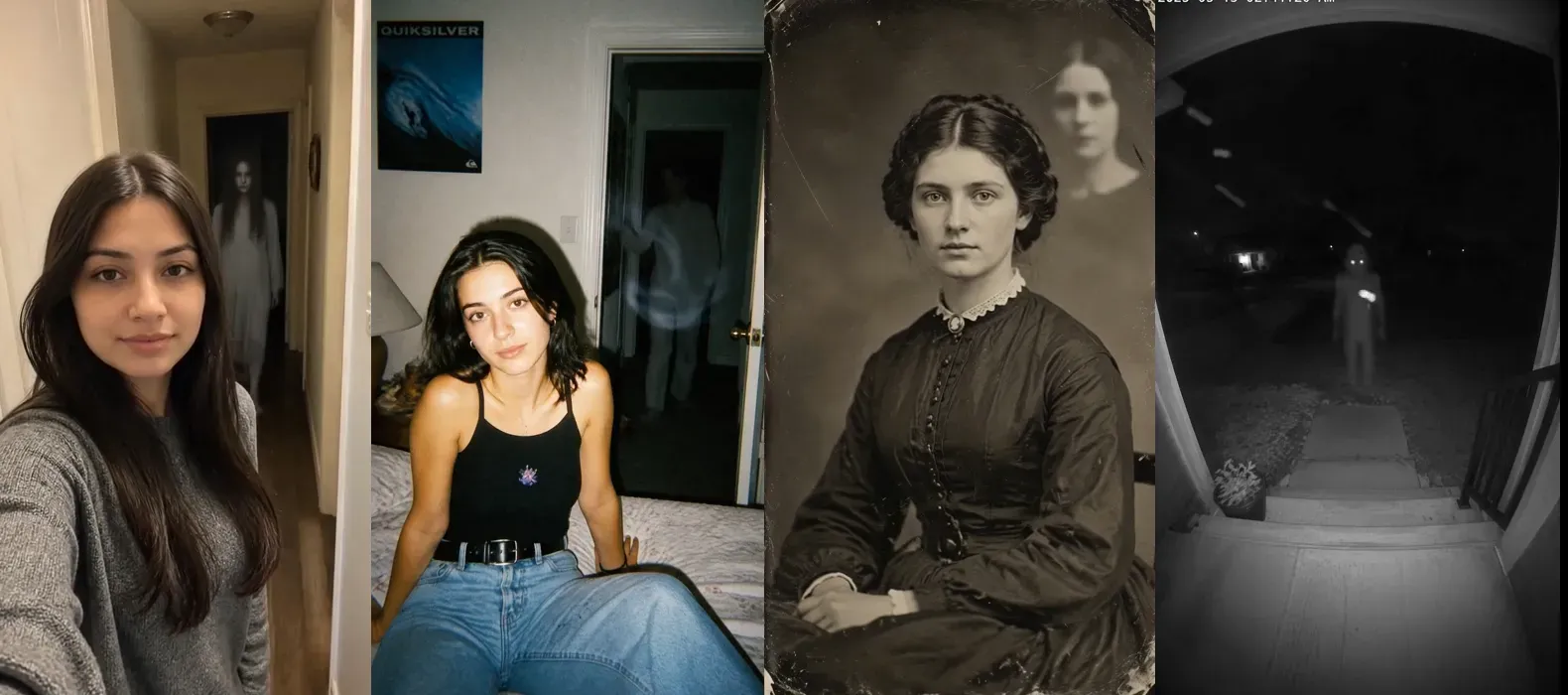
- Panel 1: Hallway Prompt Iteration (Testing transparency & likeness)
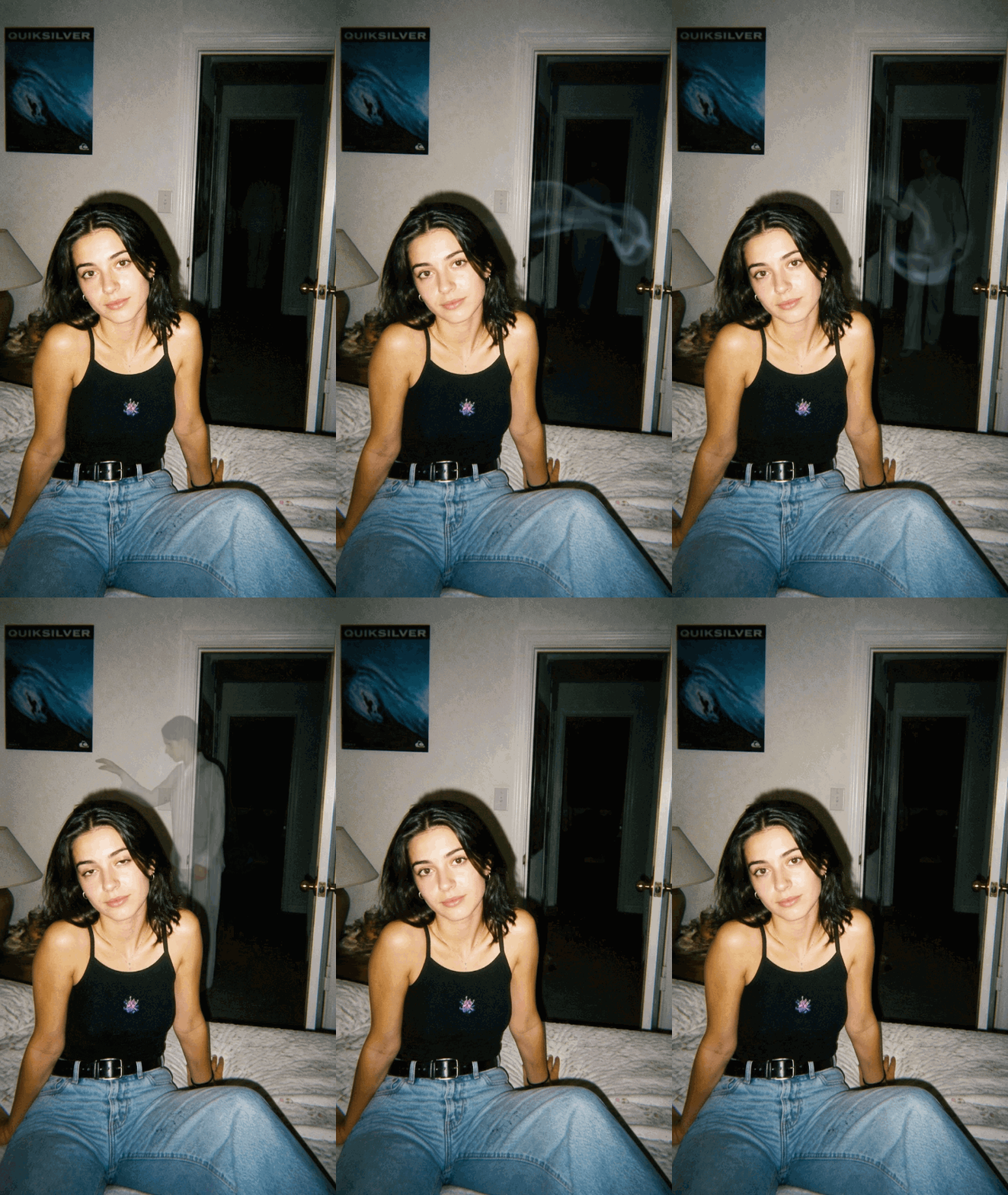
- Panel 2: Style 1 - 90s Disposable Flash Bedroom Lurker
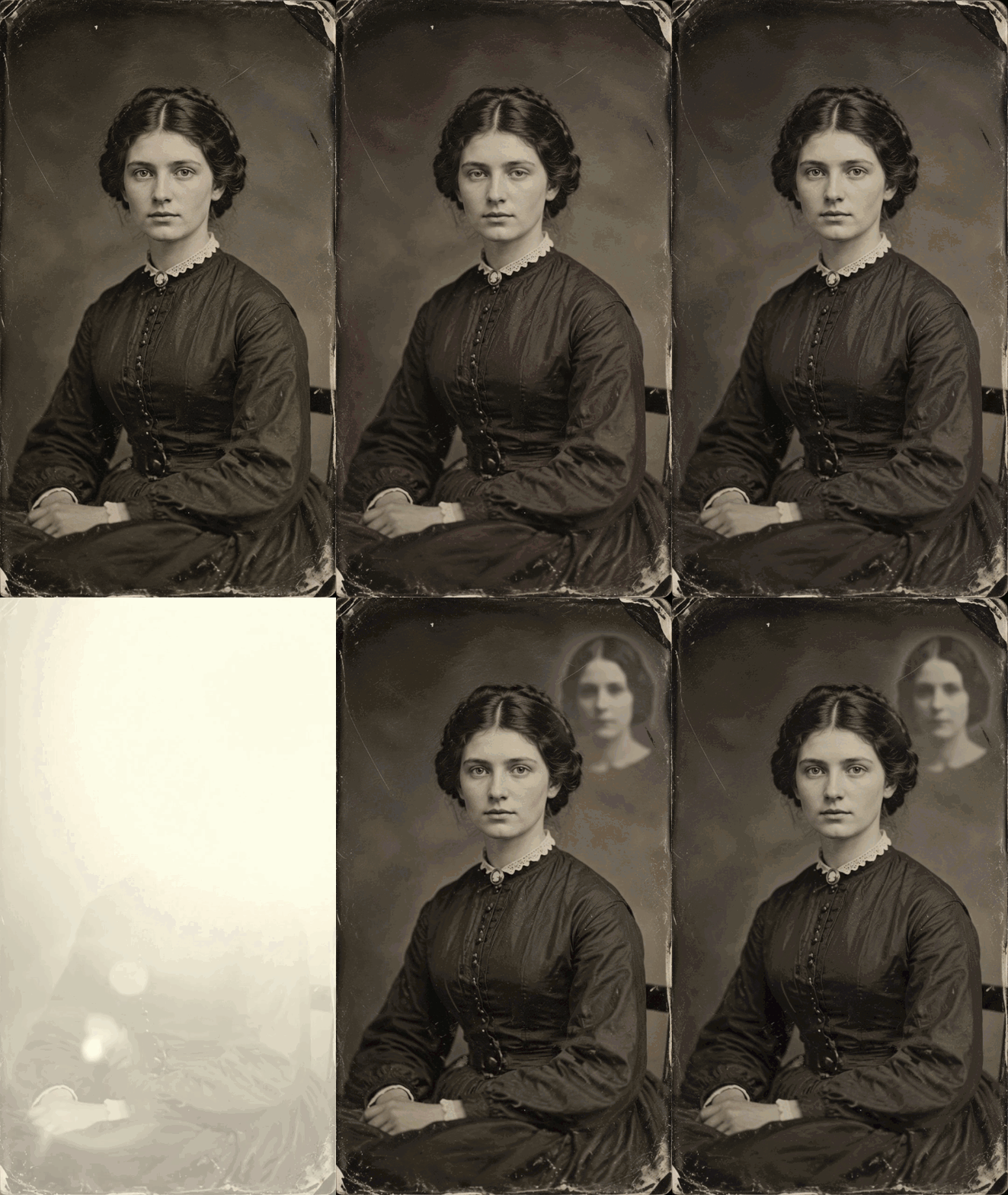
- Panel 3: Style 2 - Victorian Spectral Double Exposure
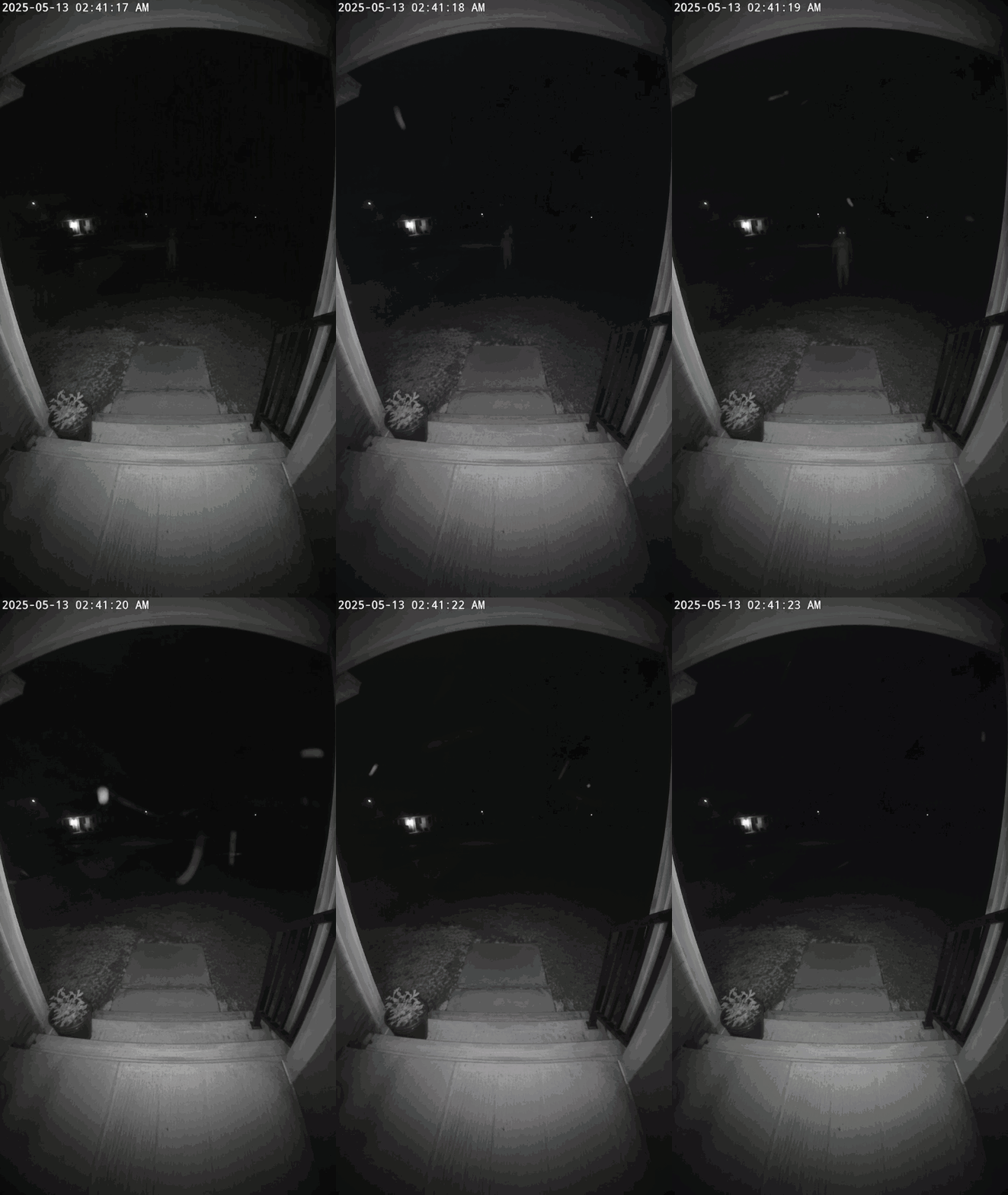
- Panel 4: Style 3 - Doorbell Cam Infrared Night Vision Glitch
Next, let’s take a look at how I made them.
Selecting the Right Source Photo for AI Ghost Video Generation
Most failed ghost transformations happen before you type a prompt. When you upload a tight, full-face selfie, diffusion models warp facial features into monsters instead of placing a separate figure behind the subject. A successful photo to ghost video workflow requires clean negative space.
Frame your subject from the chest up under flat, neutral lighting. Leave at least 30% of the background open. Empty doorways, dim hallways, and vacant corners give depth estimators distinct planes to render the apparition. Avoid busy floral wallpapers, crowded party shots, and low-resolution thumbnails. Heavy compression ruins edge detection and smears visual artifacts across the foreground subject.
Pre-Flight Photo Checklist
Run your source photo through this technical baseline before you start generating frames:
- Background space: Leave enough visible background beside or behind the subject to accommodate the ghost. A doorway or empty corner can help establish depth.
- Image resolution: Start with the resolution recommended by your chosen tool. Use a clear, well-lit source photo and avoid heavily compressed images.
- Facial expression: A relaxed expression may make it easier to preserve facial details, but results depend on the model and the source image.
- Subject placement: Keep the person clearly separated from the background where possible, especially around hair, shoulders, and hands.
Step by Step Workflow to Animate a Ghost from Any Photo
Feeding an everyday photo straight into a video generator ruins the output. Most photo-to-video models try to invent a ghost while simultaneously predicting camera movement. This tears the subject's face into liquid rubber. You eliminate face distortion by splitting the ghost filter video pipeline into two controlled stages.
Stage 1: Generate an Original Photo
Start by generating a standard, ghost-free image to serve as the starting point for your workflow. If you already have a suitable image, you can skip this step.
For this test, I am once again using ChatGPT Image 2.0, as it is cost-effective—a single low-quality image costs only $0.00971.
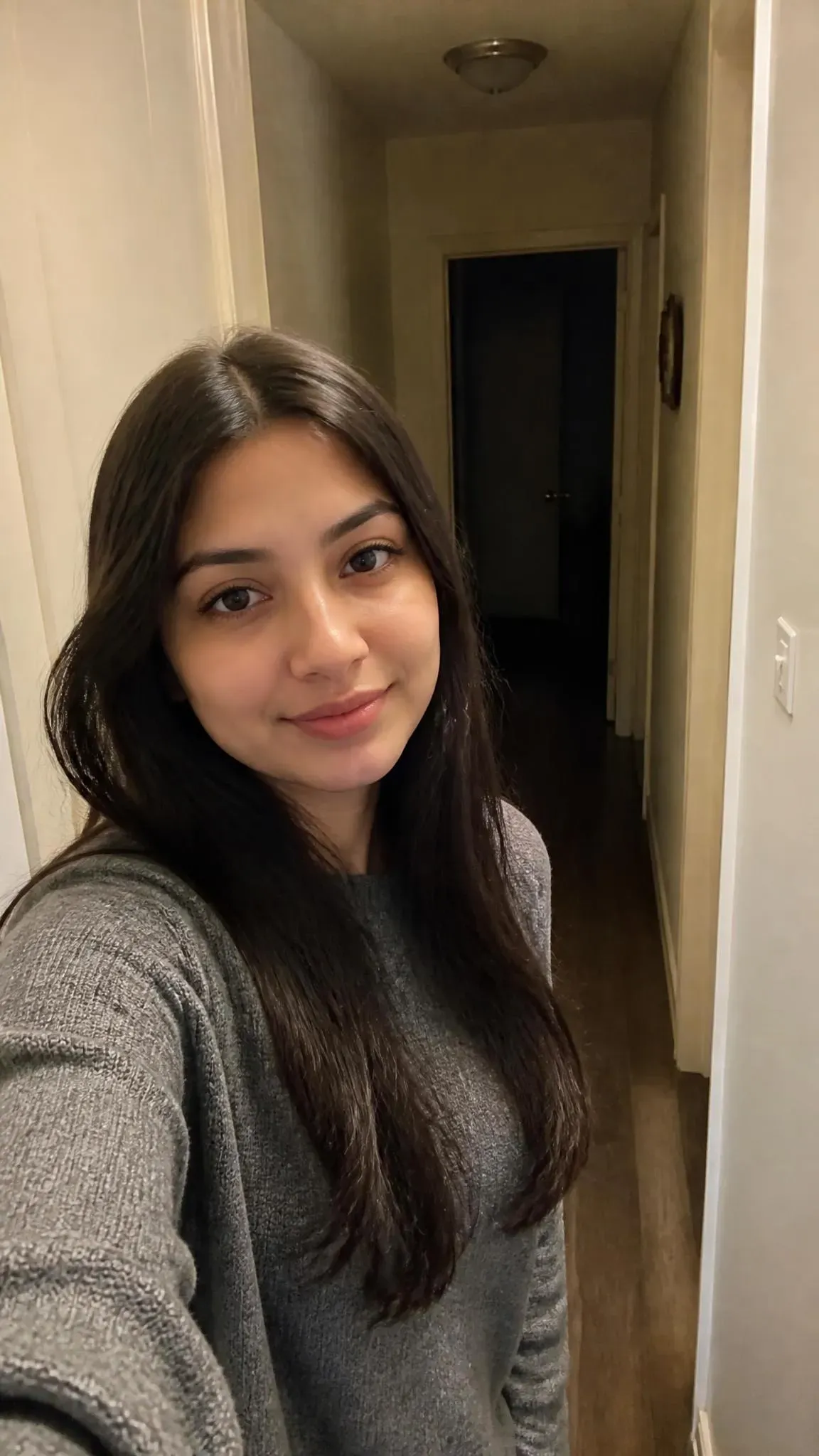
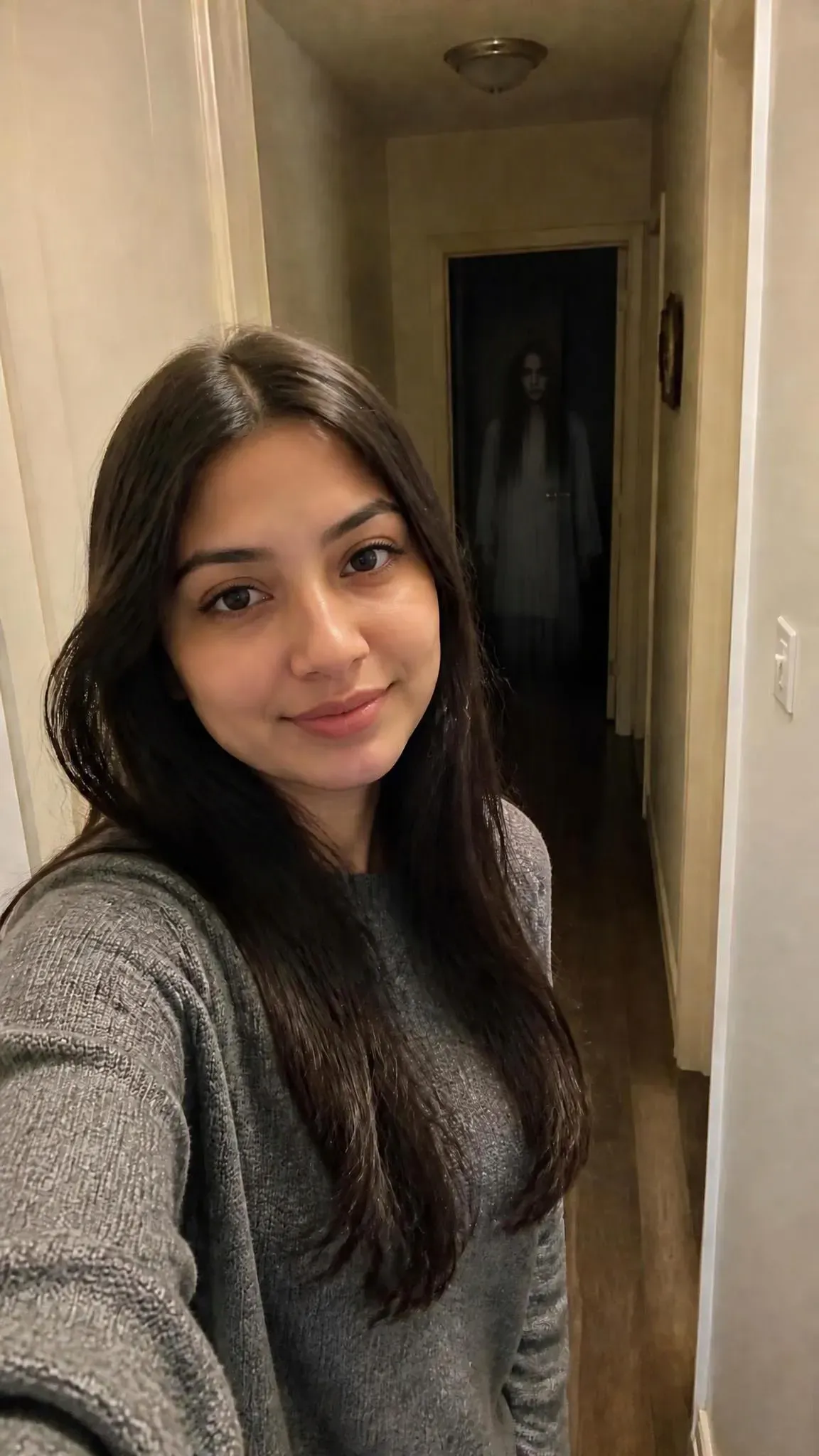
Stage 2: Configure Motion Diffusion
Next, I will upload the generated image back to ChatGPT and use its image-editing capabilities to create a photo that includes a ghost.
Stage 3: Animate the Ghost with AI Tool
I ran 3 prompts iterations in Veo 3.1 to generate this horror sequence, and test 3 is the one I’m most satisfied with.
Here are results:
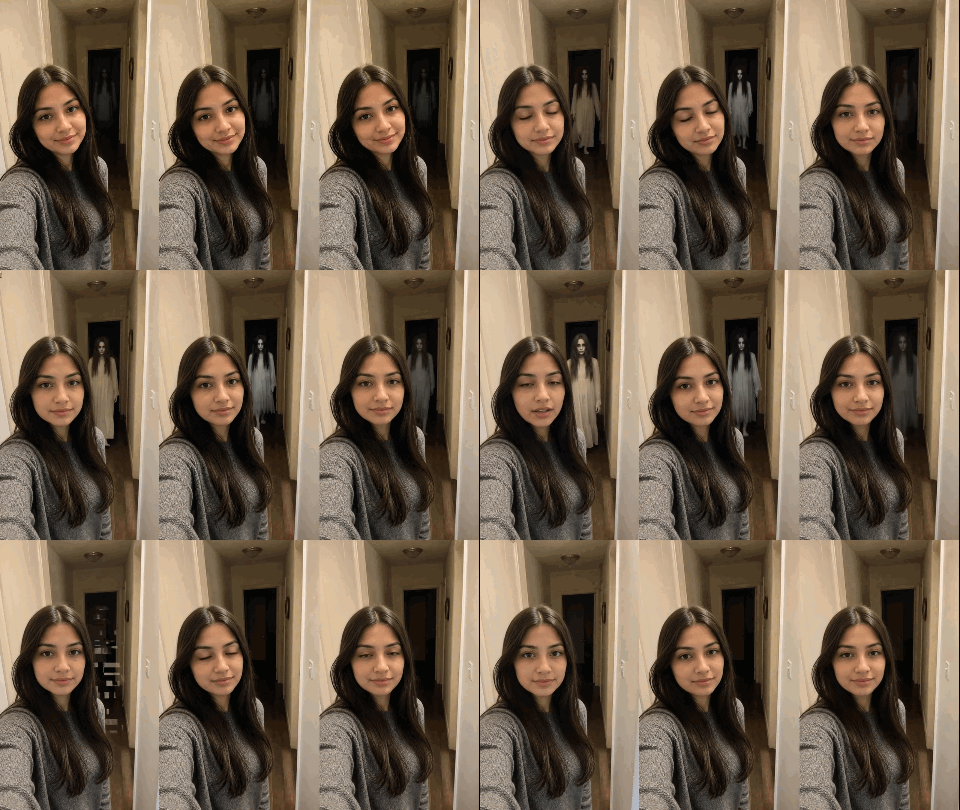
In the video, from left to right are: test1, test2, and test3.
Based on this test, I summarized the following key prompt insights for creating AI "ghost" videos:
1. Ghost Transparency Overriding the Solid-Actor Bias
- Use Optical Terms: Descriptive words like "ghost" or "spirit" render opaque actors in white clothing. Replace them with physical optical descriptors: faint translucent haze, optical double exposure, or 5% to 10% opacity. Force the diffusion engine to blend pixels.
- Enforce Background Pass-Through: Dictate background visibility explicitly: "Hallway walls and doorframe remain 90% visible THROUGH the figure." Lock scene geometry directly behind the entity.
- Suppress Facial Details: Block facial reconstruction. Mandate NO distinct eyes or sharp facial features. Stop the diffusion model from rebuilding high-contrast facial contours from the source image.
- Crucial Negative Prompts: Eliminate solid human geometry and grounded lighting: solid human, opaque body, real actress, solid white dress, clear face, floor shadow
2. Manifestation & Movement Dynamics
- Glide, Don’t Walk: Walking prompts trigger leg kinematics and cloth simulation. Command glides forward silently through the air.
- Phase and Flicker: Ambient shadows create false occlusion. Enforce direct alpha shifts: intermittently flickers between 0% (invisible) and 10% opacity. Drive true optical demanifestation across temporal frames.
- Anchor Vanishing Timestamps: Diffusion models drift on loose dissolution commands. Lock exact timeline coordinates: "At second 6, completely dematerializes into thin air, leaving the hallway 100% empty for the final 2 seconds." Enforce absolute background continuity after departure.
- Hard-Cut Jump Scares: Strip progressive blends. Mandate single-frame insertion: "Manifests instantly in a single frame at second X without transition." Suppress cross-frame interpolation and motion-blur ramp-ups.
3. Spatial Distance & Camera Framing
- Depth Boundaries: Specify fixed distance constraints, such as
strictly remains 6 to 8 feet behind the subject, to prevent the figure from gliding into the extreme foreground. - Fixing the Dual-Phone Bug: Define the perspective as
front-facing smartphone camera POV, camera handheld off-screenand addphone in hands, visible handsto negative prompts.
Modular Prompt Formulas for Different Ghost Aesthetics
Drawing on the experience mentioned above, I’ve experimented with creating ghost-themed videos in various styles. You just need structured prompt formulas to isolate the apparition while preserving facial likeness.
Use this five-part modular slot formula across multi-modal image and video engines:
Prompt = [POV Rig] + [Subject Anchor] + [Entity Optics] + [Entity Timeline] + [Negatives]
| Slot | Purpose | Syntax Tokens |
| POV Rig | Locks perspective off-screen; prevents extra phone generation. | POV front-facing smartphone camera, camera off-screen, empty hands |
| Subject Anchor | Freezes baseline expression; stops dynamic smile and face warping. | neutral baseline expression, subtle blink only, no smile transitions |
| Entity Optics | Enforces extreme transparency; removes sharp facial features. | 5%-10% opacity, see-through double exposure, no sharp face/eyes |
| Entity Timeline | Controls glide motion, spatial depth, flickering, and timed exit. | glides 6-8ft behind, flickers 0%-10%, dematerializes cleanly at 6s |
| Negatives | Blocks human physics, opaque cloth, shadows, and props. | solid human, opaque cloth, sharp face, floor shadow, phone in hands |
Style 1: The 90s Disposable Flash Bedroom Lurker
Point-and-shoot flash photography hides rough generative edges. The harsh light casts deep drop shadows against back walls. This shadow falloff gives your ghost filter prompt clean spatial grounding.
Target Look
Direct on-camera flash illumination, heavy Kodak 35mm grain, harsh wall drop shadows, and an ultra-faint, see-through spectral mirage drifting across the background shadows.
Copy-Paste Prompt Formula
plaintext11996 point-and-shoot camera POV, direct disposable flash, harsh wall drop shadows, heavy 35mm grain. Camera handheld off-screen, no devices in frame. 2Foreground {SUBJECT_DESC}. Strictly locks baseline neutral expression, subtle blinks only; no smiling, no expression transitions. 3In {SPATIAL_ANCHOR}, a faint translucent {ENTITY_FORM} (strictly 5%-10% opacity, see-through double exposure). Background remains 90% visible through it. Soft-edged, no sharp facial features, no eyes, no cloned face. 4Entity {TRAJECTORY} without leg motion. Opacity flickers 0%-10%. At second {VANISH_TIME}, completely dissolves into dark air, leaving the area empty. 5Negative Prompt: solid human, opaque cloth, sharp eyes, cloned face, floor shadow, walking legs, phone in hands, smiling.
Style 2: The Victorian Spectral Double Exposure
Modern indoor lighting often clashes with gothic aesthetics. The double exposure formula bypasses this problem by styling the entire frame as an antique tintype photograph. This produces an ethereal, fine-art ghost portrait.
Target Look
Monochrome daguerreotype scratches, silver halide textures, and a faint double-exposure spirit materializing through an exposure flash in the background.
Copy-Paste Prompt Formula
plaintext1Static 19th-century studio camera framing, authentic tintype aesthetic, silver halide grain, scratches, sepia tones. Zero camera movement. 2Foreground {SUBJECT_DESC}. Formal still pose, preserving exact facial identity from source image. Subtle breathing and slow eye blinks only. 3In {SPATIAL_ANCHOR}, an ultra-faint translucent ghostly haze (strictly 5%-10% opacity, double exposure effect). Blurry contour, NO sharp face, NO eyes. 4- 0 to {APPEAR_TIME}s: Subject sits calmly, background completely normal and empty. 5- {APPEAR_TIME} to {FLASH_TIME}s: Indistinct ghostly blur faintly drifts into view. 6- At {FLASH_TIME}s: Sudden bright magnesium flash fires, instantly freezing the scene into a static antique photograph for the remaining duration. 7Negative: solid human, sharp face, distinct eyes, modern digital lighting, color frames, moving after flash, cartoon.
Style 3: The Porch Doorbell Night Vision Creep
Surveillance footage triggers immediate viewer tension on social feeds. Low-resolution green or gray camera noise masks slight temporal artifacts during video generation, making this style ideal for viral prank loops.
Target Look
Doorbell camera POV, monochrome infrared night vision, digital timestamp overlay, and an uncanny pale presence materializing and dissolving in the distant yard shadows.
Copy-Paste Prompt Formula
plaintext1Static 9:16 doorbell infrared night vision, digital sensor noise, timestamp overlay. Zero camera motion. 2Foreground {FOREGROUND_OBJ} remains completely frozen, empty, and unaltered throughout. 3In {SPATIAL_ZONE} only: an ultra-faint, barely visible translucent {ENTITY_FORM} (strictly 5% opacity, IR sensor artifact). Background remains 95% visible through it. NO clothing texture, NO hoodie, NO glowing eyes, NO distinct face. 40 to {APPEAR_TIME}s: {SPATIAL_ZONE} is completely empty. 5{APPEAR_TIME} to {VANISH_TIME}s: The faint entity drifts slightly, strictly locked {DISTANCE}. No walking steps, no forward approach. 6At {VANISH_TIME}s: Instantly dissolves into black shadows, leaving the scene 100% empty until end. 7Negative Constraints: solid human, real person, hoodie, clothes, walking legs, approaching steps, glowing eyes, intruder, burglar, solid silhouette.
Fixing AI Artifacts and Preserving Facial Likeness in Ghost Videos
Video diffusion models frequently lock onto the wrong facial pixels during temporal processing, turning eyes into blurred cavities or stretching jawlines. These visual breakdowns ruin the realism of ai ghost videos. You can resolve these rendering errors by isolating the root failure mode before generating clips.
Diagnostic Matrix for AI Ghost Videos
| Visual Artifact | Root Cause | Immediate Operational Fix |
| Solid Humanoid / Actor | Opacity threshold set too high (>15%), triggering opaque mesh synthesis. | Lock opacity strictly to 5%-10%; replace clothing words with vapor glitch, optical smear, or double exposure. |
| Cloned Subject Face | Diffusion model borrows the strongest facial token from foreground anchor. | Add NO cloned face of subject, NO distinct eyes, no sharp facial features to Optics slot. |
| Approaching / Walking Motion | Model interprets human figure as physical pedestrian. | Add locked distance, glides without leg motion, NO walking steps, no approaching steps. |
| Wall & Scene Breathing | Unlocked sensor perspective. | Prompt zero camera motion, static camera framing, stationary background. |
The Negative Prompt Arsenal
Unchecked models introduce random visual debris into low-light scenes. Paste this dedicated negative block directly into your generator to protect facial geometry and filter out toy-like textures:
negative_prompt: [solid human, opaque body, real actor, walking legs, approaching steps, floor shadow, cloned face of subject, glowing eyes, hoodie, clothes texture, phone in hands, sudden smile, camera shake]
Seed Locking for Iterative Generation
Changing your prompt without locking the generation seed destroys subject consistency. Each random seed rebuilds the entire spatial layout, altering the subject's jawline, hair, and clothing. Copy the exact numerical seed from your initial successful base generation. Lock that integer in your generator settings before tweaking entity placement, shadow depth, or opacity values. This parameter lock isolates your prompt edits to the background apparition while preserving facial likeness across every test render.
Platform Specific Export Settings and Viral Pacing for TikTok and Reels
Fifteen-second slow burns destroy reach. Static frames trigger swipes within two seconds. Short-form algorithms prioritize completion rates and immediate loop replays. Second-eight apparitions lose the audience completely. High-retention ghost videos compress the entire visual payoff into a strict six-second loop.
The Three-Second Reveal Framework
Structure your video timeline around viral pacing rules to maximize retention and drive comment section debates:
| Timestamp | Visual Action | Viewer Psychology |
| 0:00 to 0:02 | Normal everyday scene. | Viewer focuses on the subject or reads the caption. |
| 0:02 to 0:04 | Apparition shifts or turns. | Viewer catches peripheral movement and does a double-take. |
| 0:04 to 0:06 | Subject stays oblivious. | Viewer replays the clip to verify the visual anomaly. |
This timing triggers algorithmic engagement. Viewers re-watch the clip to verify the background movement. Many pause on individual frames or argue in the comments about whether the footage is staged, which pushes the video to wider audiences on TikTok and Reels.
Technical Encoding Standards
Platform compression algorithms degrade low-contrast shadows and dark hallway details. You prevent compression artifacts by exporting your ai ghost filter video using platform specific export settings:
- Resolution: 1080×1920 px (strict 9:16 vertical ratio).
- Video Codec: H.264 in an MP4 container.
- Frame Rate: 24 fps or 30 fps. Higher frame rates expose synthetic motion flaws.
- Target Bitrate: 15 to 20 Mbps constant bitrate. Low variable bitrates cause blocky banding in dark corners.
The Instagram Carousel Growth Hack
Never post standalone clips to Instagram feeds. Build a two-slide carousel.
Set the unedited source photo on Slide 1. Load the rendered ghost video on Slide 2. Direct viewers to swipe left in the caption. Swiping between the innocent portrait and the spectral reveal logs multiple interaction events. The algorithm detects this high dwell time and re-serves the post to fresh audiences.
Putting the Formulas into Practice
Creating hyper-realistic AI ghost videos comes down to a simple balance: lock the foreground identity with negative space, constrain the apparition’s opacity strictly between 5% and 10%, and let physical timing do the storytelling.
Whether you’re opting for the harsh grit of 90s disposable flash, the fine-art decay of Victorian double exposure, or the unsettling realism of a smart doorbell glitch, this two-stage pipeline keeps facial likeness intact while eliminating solid-actor bias.
Try testing these modular formulas with your own portrait prompts, and test which aesthetic performed best on your feed!





