Clicking a single "buzz cut" button in most filter apps gives you one arbitrary hair length. It will not tell you whether your head shape looks better with a scalp-exposing #1 guard (3mm), a denser #3 brush cut (10mm), or a #4 top paired with a low drop fade at the temples.
Generic filters ignore head shape. With the AI Hairstyle Changer, you control the cut through prompts. Set your clipper guard, fade position, and edge-up, then review the generated styles before booking an appointment.
Why Generic Buzz Cut Filters Miss Guard Lengths and Fade Lines
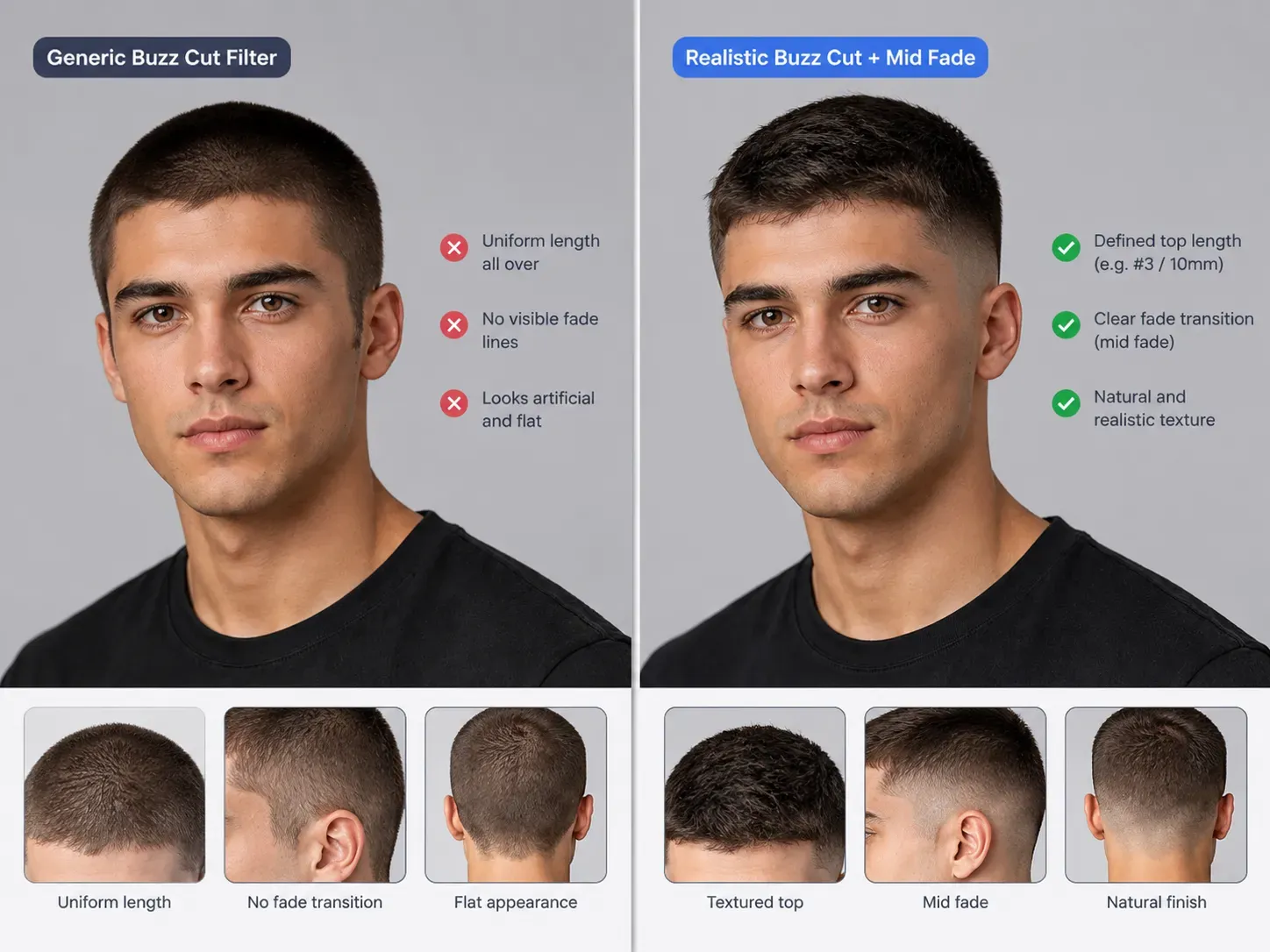
Most tools ranking for "buzz cut filter" fall into three technical categories. Only one of them lets you specify how short the top and sides should actually be:
| Filter Category | Representative Tools | How It Edits Your Hair | Guard Number & Fade Control | Best Use Case |
| Live AR Camera Lenses | TikTok & Snapchat Buzz Cut Effects | Uses real-time head tracking and virtual hair overlays to simulate shorter hair | Mostly fixed, with little control over guard lengths or fade placement | Quick hairstyle previews and reaction videos |
| Preset-Based AI Tools | YouCam Preset Mode, Media.io, AILabTools | Applies preset hairstyles or generates predefined short-hair looks from uploaded photos | Depends on available presets; some offer fade variations but limited detailed customization | Quickly comparing common buzz cut styles |
| Prompt-Driven AI Editors | Atlas Cloud Free AI Hairstyle Changer, Fotor Custom Prompt | Uses text instructions to generate customized hairstyles from uploaded photos | Can interpret guard numbers, approximate hair lengths, fade styles, line-ups, and hair colors | Testing specific haircut combinations before visiting a barber |
TikTok and Snapchat AR lenses often overlay a cap on your existing hair rather than replacing it. With thick, curly, or long hair, this can make your head look unnaturally wide.
Web-based filters work better on still photos, but generic buzz cut tools often ignore differences in guard lengths and fades. A #1 induction cut looks very different from a #4 buzz with a mid fade. For a completely shaved scalp, use a bald filter instead.
Clipper Guard Numbers and Fade Styles Translated Into AI Prompts
A simple 'buzz cut' prompt defaults to a uniform #2 or #3 length. To preview a specific style, define three details: top guard size, side fade height, and hairline shape.
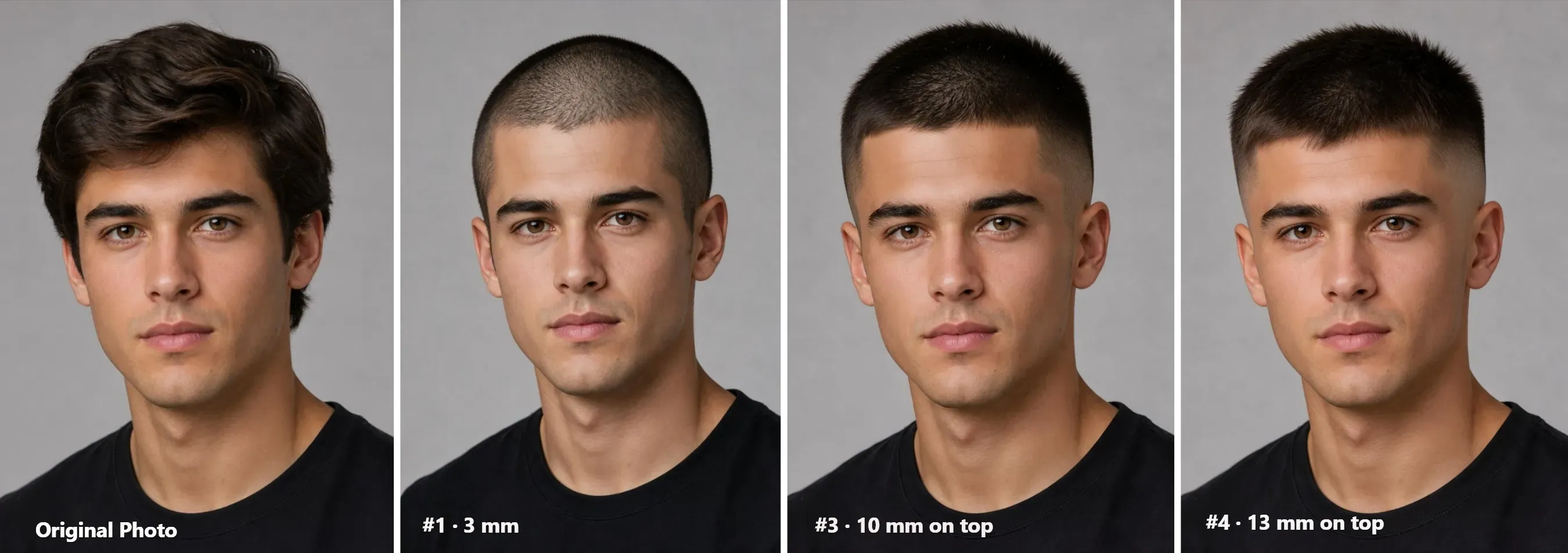
Top Guard Length and Scalp Visibility
Image models ignore millimeters. Describe the scalp coverage directly in your prompt:
- #0 to #1 Guard (1.5mm to 3mm): Close stubble with clear scalp show-through. The cut removes all hair bulk and outlines the raw head shape.
- #2 Guard (6mm): Solid dark stubble. Skin stays completely hidden. The hair sits flat against the head.
- #3 to #4 Guard (10mm to 13mm): Short, dense crop with visible texture. It covers flat spots on the crown and contrasts against faded sides.
- The 3-2-1 Rule: Run a #3 on top, blend a #2 on the upper sides, and taper to a #1 at the edges. This keeps the head from looking round.
Side Fades and Hairlines
A single-guard buzz cut runs one length all over. A fade cuts the sides shorter than the top:
- High Skin Fade: Shaves down to bare skin at temple level. Takes off the most side hair.
- Mid Drop Fade: Curves behind the ears toward the back. Leaves dark stubble around the temples.
- Low Taper: Only cleans up the sideburns and neckline. Keeps full hair density on the sides.
- Lineup vs. Natural: Prompt "crisp razor lineup" for squared edges. Prompt "natural hairline" to keep your own front edge.
Copy-Ready Prompt Reference Table for AI Hairstyle Changer
Paste any of the prompts below directly into the Hair request box in the Free AI Hairstyle Changer or other AI image edit tools:
#1 Induction Buzz: Very Short
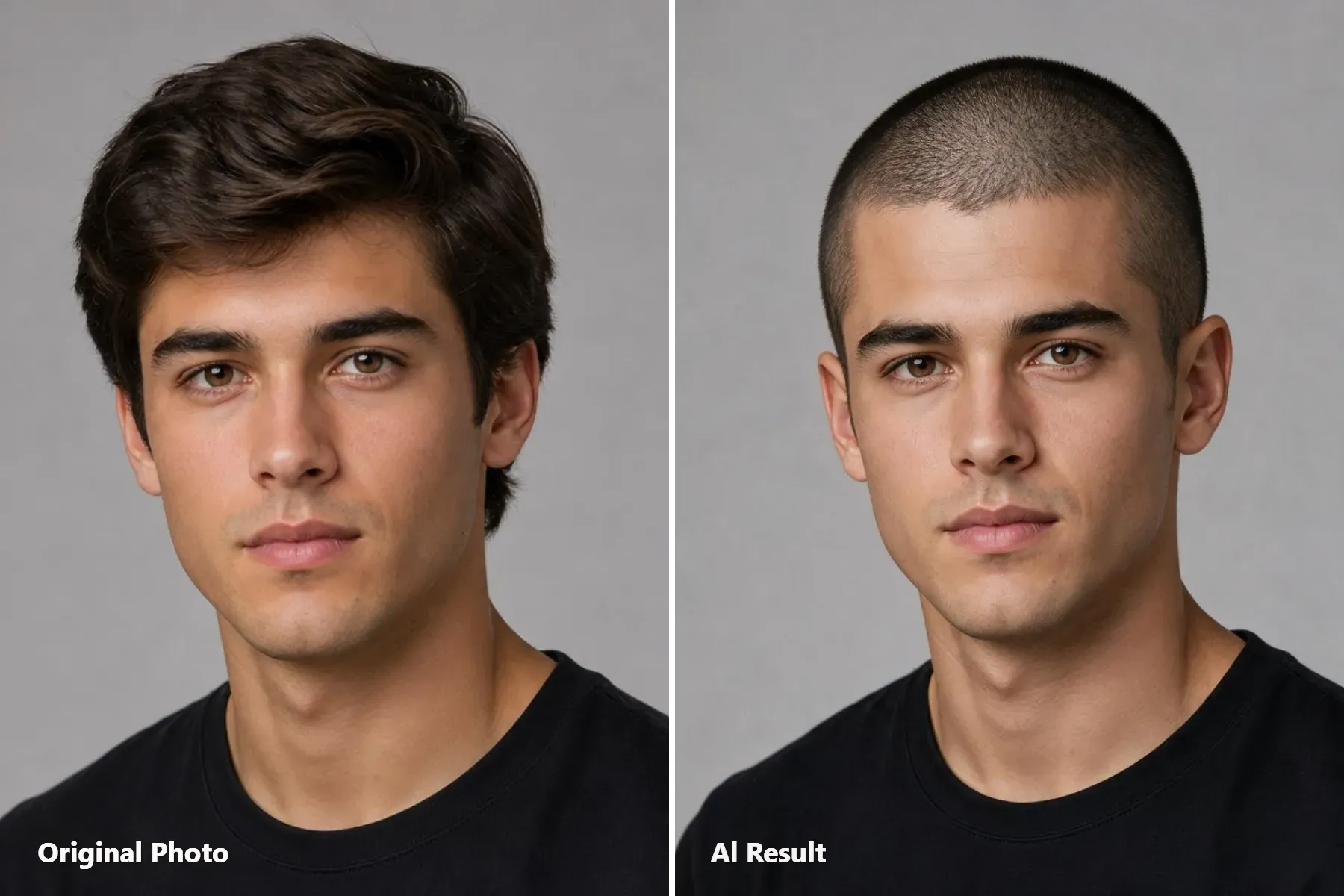
Guard Length: #1 · 3 mm
Cut Style: Uniform short length across the top and sides, with subtle scalp visibility.
Best Face Shapes: Oval faces, defined jawlines, and receding hairlines.
Copy-Ready Prompt:
plaintext1Change the hairstyle to a uniform #1 guard buzz cut, approximately 3mm long, across the entire head, including the top, sides, and back. Keep the hair very short with clearly visible fine stubble texture and slight scalp visibility between the hairs. Maintain an even length throughout, with no fade, taper, or extra length on top. Preserve the person's original hairline shape and natural hairline edges. Keep the face, facial features, ears, skin tone, lighting, and background unchanged.
#2 Buzz + Low Taper: Classic
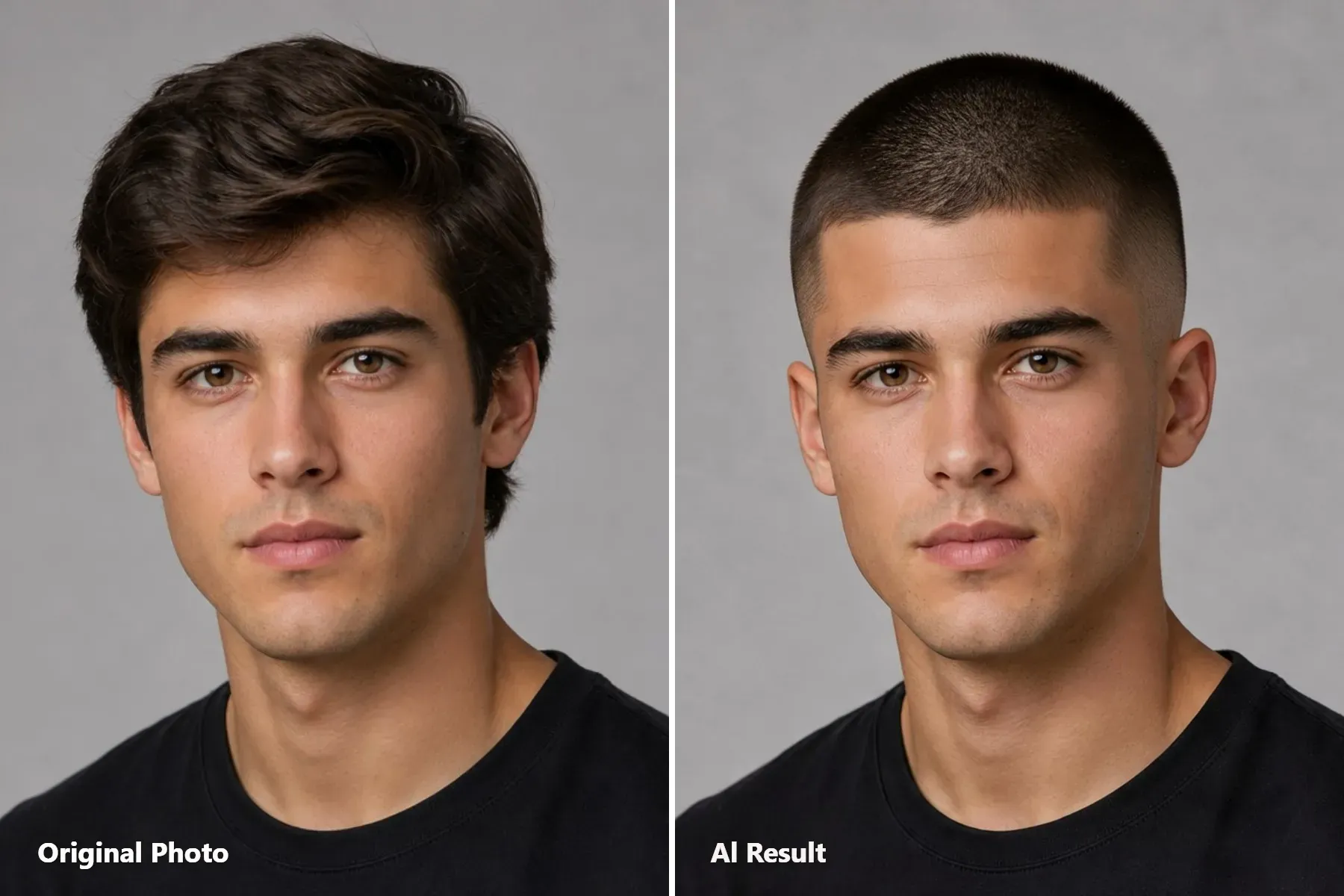
uard Length: #2 · 6 mm on top
Cut Style: Short, even top with a gradual low taper around the temples and sideburns.
Best Face Shapes: Long, oblong, and heart-shaped faces.
Copy-Ready Prompt:
plaintext1Change the hairstyle to a neat #2 guard buzz cut, approximately 6mm long, with an even length across the entire top. Add a subtle low taper fade starting just above the sideburns and around the temples, gradually blending the shorter hair into the longer hair above. Include a clean, natural taper around the neckline at the back. Keep the taper low and understated, without extending it high up the sides or creating a dramatic skin fade. Preserve the person's original hairline shape and natural contours. Keep the face, facial features, ears, skin tone, lighting, and background unchanged.
#3 Brush Buzz + Mid Drop Fade: Textured
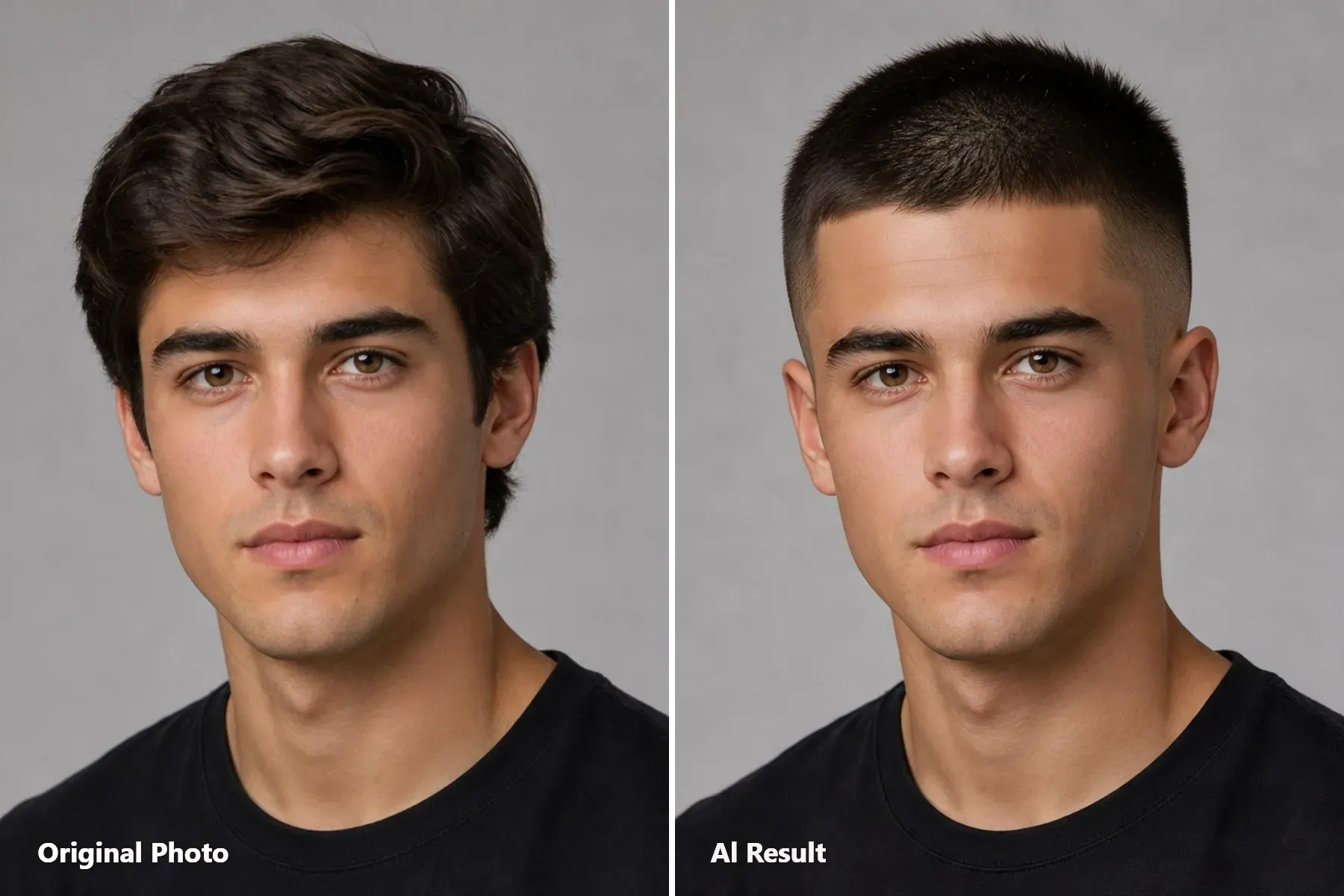
Guard Length: #3 · 10 mm on top
Cut Style: Slightly textured top with a mid drop fade that curves behind the ears.
Best Face Shapes: Most face shapes; safest first-time buzz cut to test.
Copy-Ready Prompt:
plaintext1Change the hairstyle to a #3 guard brush buzz cut, approximately 10mm long across the top. Keep the top short and evenly trimmed, with subtle natural hair texture and a slightly brushed-up finish rather than a long or voluminous style. Add a mid drop fade that starts around the temples and gradually blends shorter toward the sides and back, following a curved shape that drops naturally behind the ears and tapers toward the neckline. Create a clean but natural temple line-up without making the hairline look overly sharp or artificial. Preserve the person's original hairline shape and contours. Keep the face, facial features, ears, skin tone, lighting, and background unchanged.
#4 Buzz + High Skin Fade: Bold
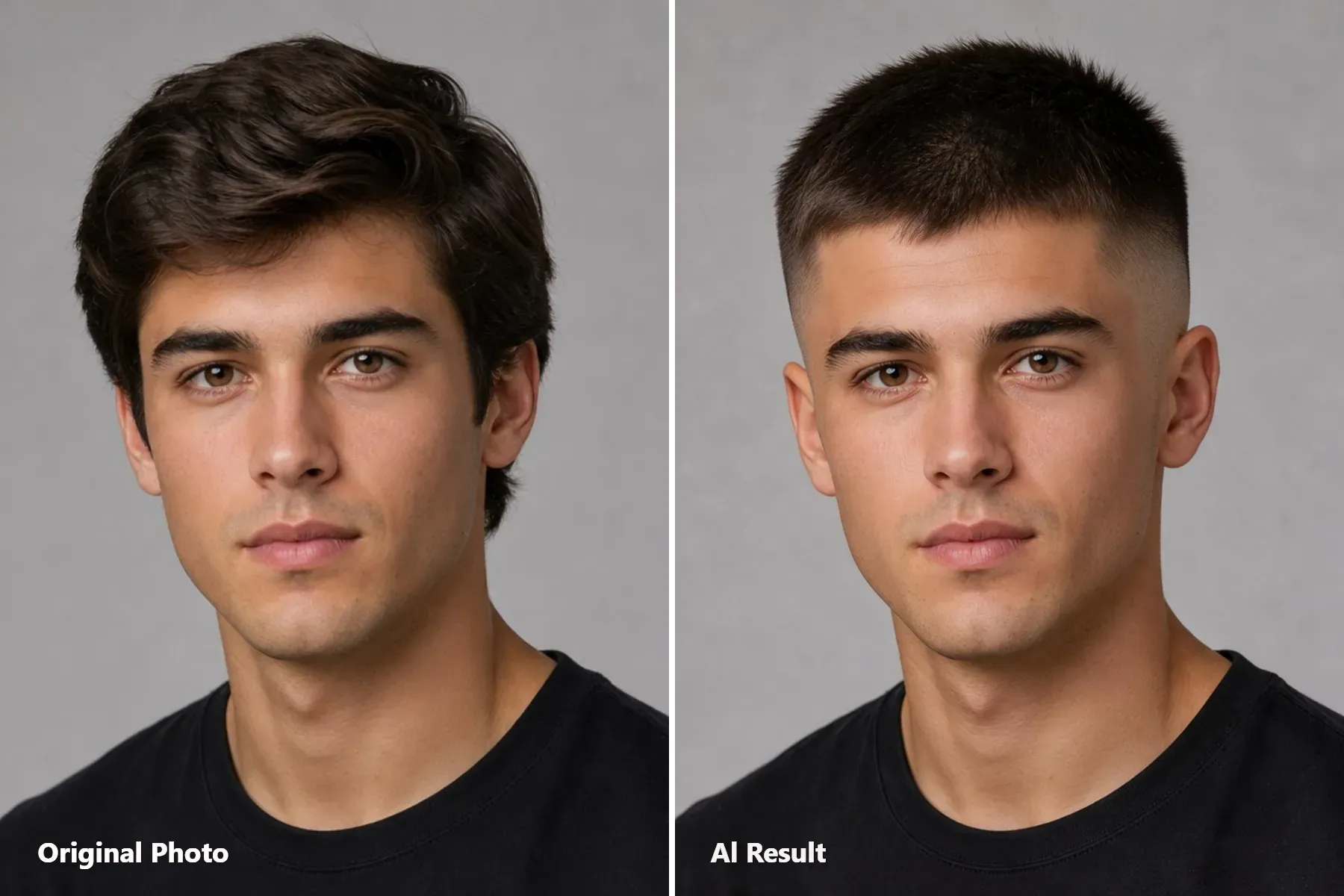
Guard Length: #4 · 13 mm on top
Cut Style: Fuller top with a high fade that gradually tapers down to bare skin on the sides.
Best Face Shapes: Round or full cheeks that benefit from vertical height.
Copy-Ready Prompt:
plaintext1Change the hairstyle to a #4 guard cut with approximately 13mm (1.3cm) of hair remaining on the entire top. The top must have clearly visible hair length, with individual short strands extending naturally from the scalp. Keep the hair slightly raised and textured rather than flat, tightly cropped, or reduced to fine stubble. Maintain a consistent 13mm length across the top without adding excessive volume or creating a long hairstyle. 2Create a distinct high skin fade on both sides and the back. The fade should begin high above the temples, transitioning smoothly from the longer top hair through progressively shorter lengths to completely bare skin around the lower sides and back. Preserve the original forehead hairline shape, with clean natural edges around the temples. Keep the face, facial features, ears, skin tone, lighting, and background unchanged.
Platinum Bleached #2 Buzz: Fashion-Forward
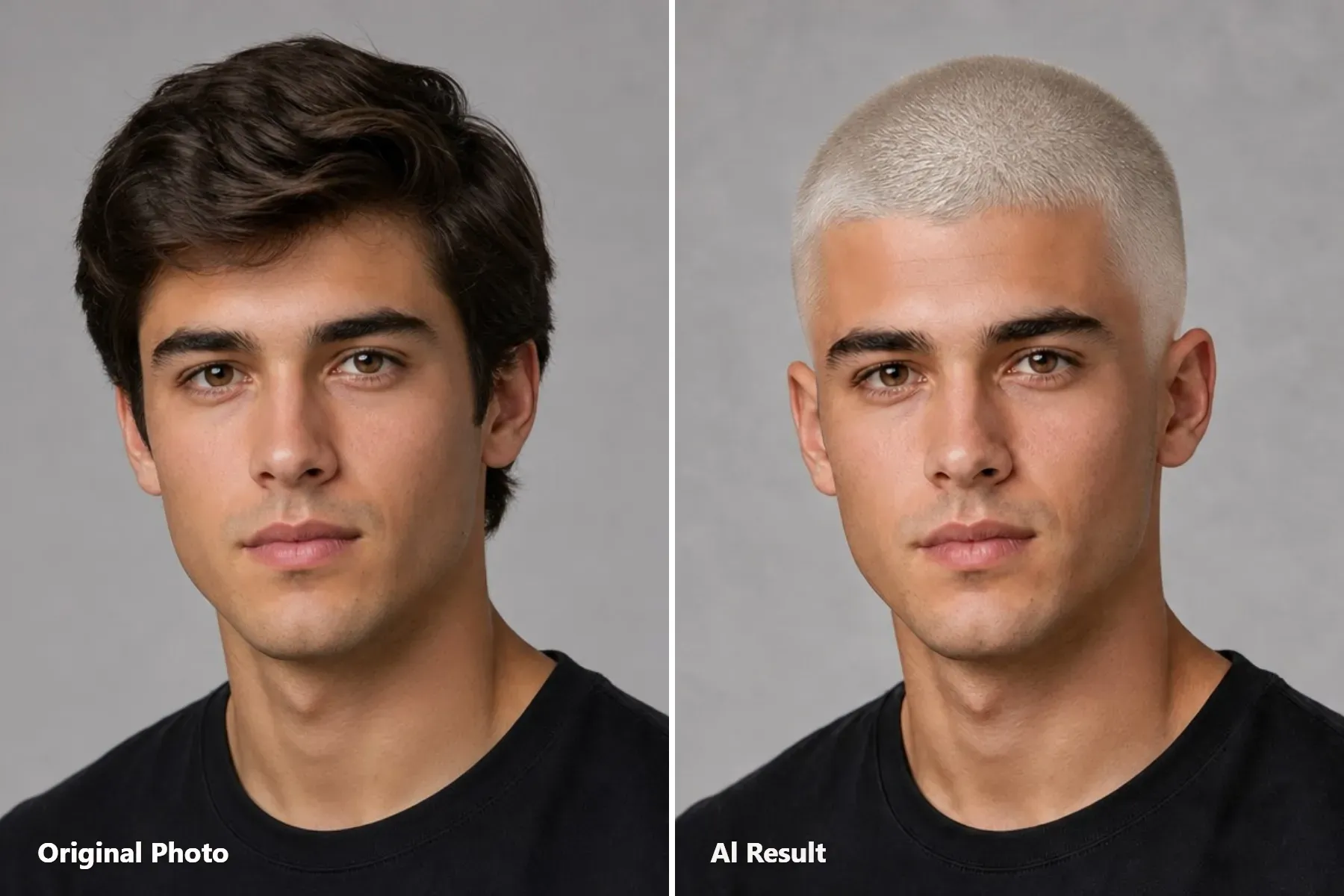
Guard Length: #2 · 6 mm
Cut Style: Uniform short buzz cut with an icy platinum blonde finish.
Best Face Shapes: High-fashion contrast for both men and women.
Copy-Ready Prompt:
plaintext1Change the hairstyle to a uniform #2 guard buzz cut, approximately 6mm long across the entire head, including the top, sides, and back. Keep the hair evenly trimmed with clearly visible short hair strands and natural buzz-cut texture. Dye all the hair an icy platinum blonde with a cool, pale blonde tone, avoiding silver-gray or pure white coloring. Ensure the platinum color covers the hair evenly without changing the scalp or skin tone. Preserve the original hairline shape and natural contours. Keep the face, facial features, eyebrows, ears, skin tone, lighting, and background unchanged.
How to Test a Buzz Cut on Your Photo With Atlas Cloud AI Hairstyle Changer
This Free AI Hairstyle Changer edits only your hair. It locks your face, skin tone, and background lighting. Sign in with Google, GitHub, or email to generate and download without watermarks.
Use this step to test guards and fades from front and side angles:
Step 1: Prep and Upload a Front Selfie or a 45-Degree Angle Photo
Input photos make or break the preview. Since a buzz cut removes all hair bulk, the tool must see your ears and head shape to place the cut correctly:
- Tie back long hair or wet it down flat. Side bulk distorts the final cut outline.
- Clear your forehead and ears completely. No hats, hoods, or bangs.
- Take two shots in even lighting: a straight front angle for the lineup, or a 45-degree angle for the side fade.
Step 2: Upload Your Photo and Enter a Hairstyle Prompt
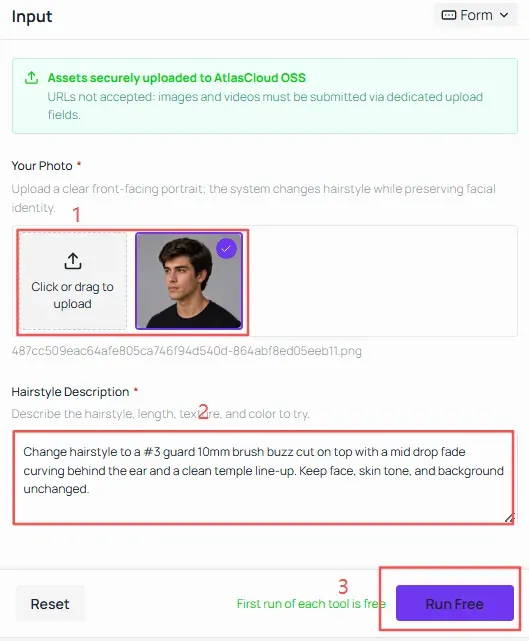
Start with a mid-length cut before testing an extreme shave. In the Hair request box, paste this prompt first:
plaintext1Change hairstyle to a #3 guard 10mm brush buzz cut on top with a mid drop fade curving behind the ear and a clean temple line-up. Keep face, skin tone, and background unchanged.
Click "Run free". Once you save the result image, keep the same uploaded selfie in place and swap only the guard number and fade height in the prompt box, for example, changing #3 guard 10mm brush buzz cut to #1 guard 3mm buzz cut all over. Comparing the two outputs side by side reveals whether your head shape looks more balanced with dark top density or a close uniform crop.
Step 3: Test Lower-Face Balance With a Beard Taper or Bleached Finish
Removing top hair shifts immediate visual weight down to your jawline, cheekbones, and eyebrows. Before closing the tab, run one variation prompt to test how lower-face framing or hair color changes the cut:
To test a buzz cut blended into facial hair:
plaintext1Change hair to a #2 guard 6mm buzz cut on top with a low skin fade at the temples that blends smoothly into a neatly trimmed short boxed beard. Keep eyes, nose, skin tone, and background unchanged.
To test a soft or dyed buzz cut on women's or longer-hair portraits:
plaintext1Change hair to a soft #3 guard buzz cut dyed warm platinum blonde following the natural feminine hairline contour, no harsh razor line-up. Keep face, eyebrows, earrings, and lighting unchanged.
Optional Step 4: Turn Your Still Preview Into a Head-Turn Check With Seedance 2.5
Turn your test into a quick video to see the cut in motion. Upload your original photo as the first frame and the buzz cut render as the last frame in Seedance 2.5. It generates a 5-second clip showing a natural head turn and before-and-after transition.
Why Your AI Buzz Cut Preview Looks Off and How to Fix It
When the AI cuts down to close stubble, uneven shadows and tilted angles warp your head shape. Match your bad render to the fix below:
| Preview Issue | Likely Cause | How to Fix It |
| Wide, bulbous head shape | Thick or puffy side hair distorts the head outline. | Tie long hair back, flatten puffy sides, and specify "follow the natural skull contour." |
| Dark forehead band or blurry patch | Bangs or harsh shadows obscure the natural hairline. | Use even lighting and pull bangs away from the forehead. |
| Fade looks like a uniform buzz | A straight-on photo hides the temple and above-ear areas. | Use a 30–45° three-quarter photo and specify the desired fade height. |
| #1 looks bald or #4 looks too long | Vague length descriptions confuse the model. | Specify both guard length and texture: "3mm stubble with slight scalp visibility" or "13mm dense brush texture." |
| Loose hair on neck or shoulders | Long hair falls outside the editing area. | Tie hair up or tuck it into clothing before taking the photo. |
The biggest improvement comes from how you prep thick or long hair before taking the photo. Try these adjustments directly in the AI Hairstyle Changer by swapping your input photo or adding the corrective phrase to your existing prompt.
Ready to try a new look? Upload your photo, test different buzz cut lengths and fades, and see which style suits you best before your next barber visit!


