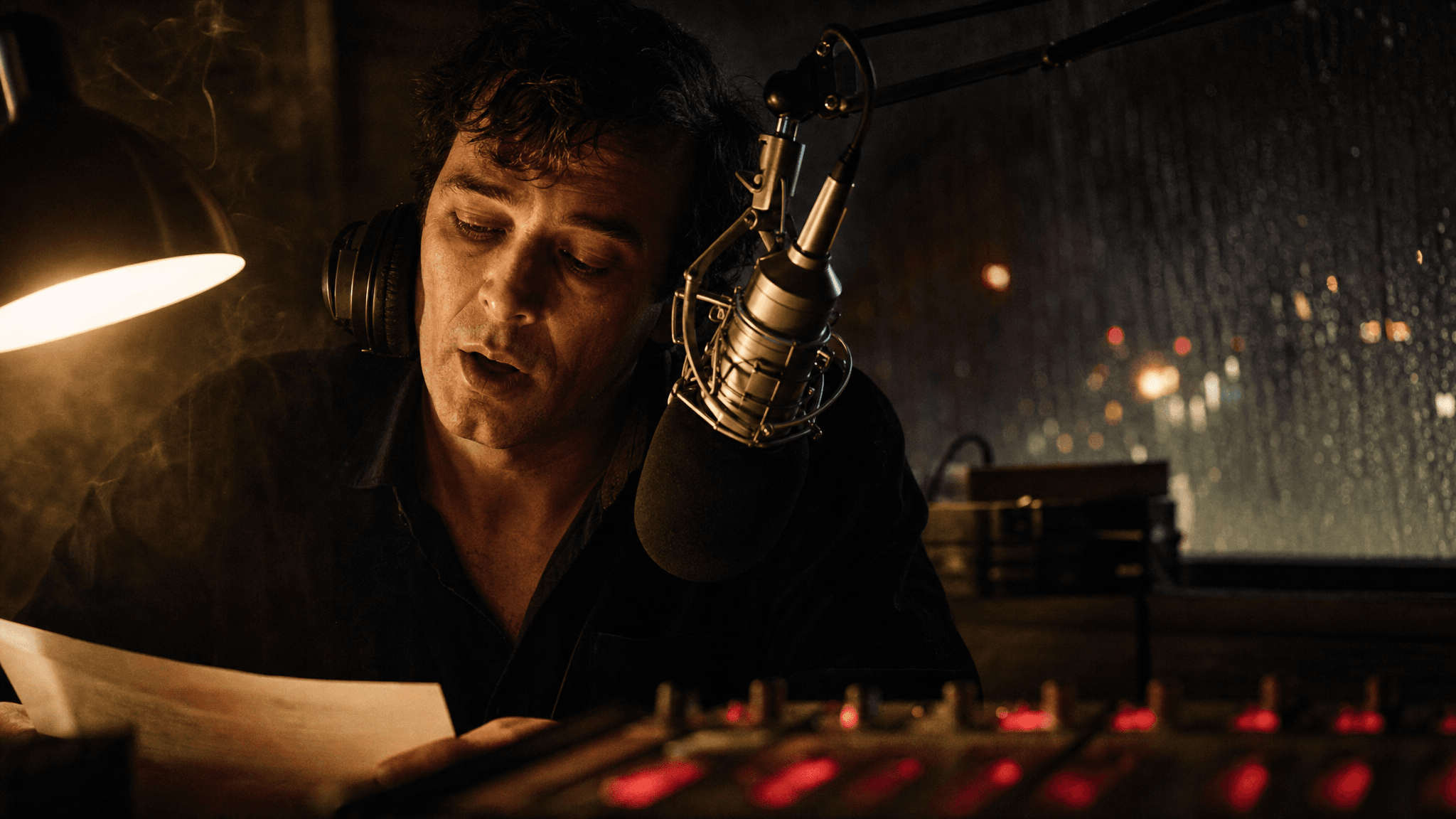
The night-shift radio frame that every take in this article starts from, generated with openai/gpt-image-2/text-to-image at quality high, 2048x1152
This single still is the input for the whole tutorial below. Generated with openai/gpt-image-2/text-to-image, quality high, 2048x1152.
Think about the last time you finished an 8-second shot and it came out silent.
You exported the clip. You opened a TTS tab and typed the line. You dug through a sound library for rain and room tone. You dragged all of it into a timeline and nudged the waveform left and right until the mouth stopped lying. Then you paid a separate lip-sync model to fix the mouth anyway. Four tools, three wav files, one hour, and the performance still felt dubbed, because it was.
That chain is what MiniMax H3 quietly deleted. Not because it "has audio" (plenty of models claim that), but because of one slot in the request body almost nobody tests: you can hand it a piece of audio you already own, for free, and get the voice back on a face.
Below is the two-take test that isolates that slot, the real prices of every step it replaces, the hard limits that will reject your request, and the actual bill.
Key takeaways
- One call returns picture, dialogue, room tone and lip movement together. Text, visuals and audio are encoded separately, then a single Omni Transformer jointly predicts the video and audio latents (Hugging Face model card, August 2026).
- Input audio is free. Input video is not: MiniMax bills reference video at the output rate, so the same 15 seconds of material costs $0 as a song and about $1.95 as a video clip.
- Hard limits: 3 audio clips max, each 2 to 15 seconds, 15 seconds total, and audio can never travel alone. It must ride with at least one image or video.
- At $0.14 per second for 2K on Atlas Cloud, a full 10-second shot with sound costs $1.40, which is less than paying a dedicated lip-sync model $0.22 per second to patch a clip you already rendered.
Sound On: Two MiniMax H3 Lip Sync and Audio Takes, One Six-Second Difference
Headphones on for this one. Both halves got the same base frame, the same two lines of dialogue and the same prompt, word for word. Only one of them heard a six-second recording of a voice first.
fXlyer__czg
Sound on, and use headphones: the left half (Take A, no reference audio) plays in your left ear, the right half (Take B, with a 6-second reference) in your right. Same frame, same lines, same prompt. Both takes: minimax/h3/reference-to-video, 2K, 10 seconds, delivered as 2560x1440 at 24fps with a 32 kHz stereo track.
Take A had nothing to go on but the words "calm, low, magnetic male broadcast voice" in the prompt, so it invented a voice. Take B was handed 6.19 seconds of a completely different sentence and told to treat it as a timbre anchor only. Neither take was dubbed afterwards. Neither one went near a lip-sync model. In both, the mouth follows whatever voice the model produced, because the mouth and the voice were produced together.
Judge the timbre with your own ears rather than taking my word for it. What I can state as fact is the mechanism, the settings, and the bill, and those come next.
Why MiniMax H3 Lip Sync and Audio Broke Everyone's Six-Step Dubbing Chain
The old chain was never really a workflow. It was a repair job.
ImGr2NgcCCY
Sound on. A 3D-animated toad and chameleon talking to each other inside a circus tent at night, with the ambience of the enclosure sitting under the dialogue. A MiniMax reference clip for H3 native audio. Mouth shapes on animated characters are the hardest case to fake, which is why this one is worth 20 seconds of your attention.
Three things kept breaking, and they broke for structural reasons rather than bad luck.
The timeline lived in your hands. A video model gave you frames. A TTS model gave you a waveform. Nothing in either output knew about the other, so alignment was a human judgement made at 30 frames per second, by eye, at 1am. Every re-render started that judgement over.
Patch-style lip sync has a ceiling. A dedicated lip-sync model only owns the mouth region of footage that already exists. It can make the mouth agree with the audio. It cannot make the jaw tense before a hard consonant, or put a breath before a line, or let the shoulders drop when the sentence ends, because those frames were rendered before anyone knew what the character would say. You get accuracy without performance, which reads as uncanny.
Sound design was a second project. Rain, room tone, chair creak, a bass line sitting under the dialogue. All of it arrived from a different source and had to be balanced against a voice that was itself pasted on.
What the Audio VAE Tells You About MiniMax H3 Lip Sync and Audio
Here is the part that is not marketing language, because you can see it in a filename.
In H3, text runs through the H3-Encoder, visual inputs run through both the H3-Encoder and the H3-VisualVAE, and audio runs solely through a standalone H3-AudioVAE. The H3-Omni-Transformer then jointly predicts video and audio latents, which get decoded into video and stereo audio separately. The AudioVAE shares one encoder and decoder across the left and right channels, processes each independently, recombines them for stereo, and compresses 32 kHz audio into a latent token sequence at a temporal rate of 40 Hz (Hugging Face model card).
When ComfyUI shipped day-0 support, that architecture showed up as two separate files in the VAE folder: minimax_h3_video_vae_fp16.safetensors and minimax_h3_audio_vae_fp32.safetensors, loaded by a dual VAE loader that takes a video path and an audio path (ComfyUI blog, August 2026). Audio is a modality the model was built around, not a post-process bolted to the end of one.
The leaderboards agree on where that shows up. Artificial Analysis put H3 first on its video editing leaderboard with audio at 1,130 Elo from 5,043 blind-preference samples, while placing it top three in both text-to-video and image-to-video (Artificial Analysis, July 2026). The gap between "very good picture" and "first place" in that particular ranking is the audio.
The MiniMax H3 Lip Sync and Audio Workflow, Priced Against the Chain It Replaces
The honest way to judge this is not vibes. It is to price the old chain step by step, using real per-second rates for a 10-second finished shot, and then price the replacement.
| # | The old chain, step by step | What ran it | What that step cost | With MiniMax H3 lip sync and audio |
|---|---|---|---|---|
| 1 | Render the silent picture | a video model, e.g. bytedance/seedance-2.0 at $0.112/s | $1.12 | same single call |
| 2 | Voice the lines | minimax/speech-2.6-hd | about $0.02 for ~250 characters | same single call |
| 3 | Find or make the score | minimax/music-2.6 | $0.15 per track | same single call |
| 4 | Layer ambience and spot effects | sound library plus your hands | your evening | same single call |
| 5 | Align everything on a timeline | editor plus your hands | your evening | does not exist |
| 6 | Mix | editor plus your hands | your evening | does not exist |
| 7 | Patch the mouth | sync/lipsync-v3 at $0.22/s | $2.20 | does not exist |
| Total | 4 models plus 2 manual passes | about $3.49 plus your evening | 1 call, $1.40 |
Read row 7 twice. Patching the mouth of a clip you already rendered costs $0.22 per second, while generating the entire shot with its voice, its ambience and its mouth movement costs $0.14 per second. The patch is more expensive than the original. That single comparison is the whole argument.
The asymmetry nobody mentions: your own audio is free, your own video is not.
MiniMax's pay-as-you-go pricing table lists input material separately from output. For H3, audio input is Free. The first five input images are free and each one after that is $0.04. Input video is billed by the input clip's duration at the output resolution's rate, which is $0.13 per second at 2K (MiniMax pricing docs, checked 3 August 2026). So the same 15 seconds of reference material costs nothing as a song, a voice memo or a client-supplied VO, and roughly $1.95 as a video clip.
That is the line that should change how you build. Reference audio is the cheapest control surface in the model, and it is the one nobody is testing.
| Reference input | How many | Per clip | Total | Billing (MiniMax) |
|---|---|---|---|---|
| Image | up to 9 | n/a | n/a | first 5 free, then $0.04 each |
| Video | up to 3 | 2 to 15s | 15s max | billed at the output rate, $0.13/s at 2K |
| Audio | up to 3 | 2 to 15s | 15s max | Free |
| Any mix | 12 files max | n/a | n/a | as above, per type |
| Audio on its own | not allowed. Audio must be accompanied by image or video input and cannot be used as the sole input |
Limits from the H3-Base-Ref2VA spec on the model card. The Atlas Cloud schema for minimax/h3/reference-to-video says the same thing in its own words: "At least one image OR video is required (audio alone is not allowed)."
Two footnotes on the Atlas side of the meter, both from my own runs rather than a docs page. Atlas bills a single flat $0.14 per output second for all three H3 endpoints, and a reference video I attached did not add a separate charge on top of that. That is one observation, not a policy, so budget for the MiniMax rule and treat the flat rate as a bonus. Atlas also accepts resolution: "768P" and bills it at the same $0.14, which is a discrepancy worth reading about in the MiniMax H3 API pricing breakdown rather than here.
Everything below runs in one browser tab on Atlas Cloud: the base frame, the voice reference and both H3 takes, on one API key with one poll loop. The three H3 endpoints differ only in the shape of their input, so refers becomes image becomes plain text and nothing else about your code changes.
MiniMax H3 Lip Sync and Audio, Step by Step
Five steps. Two of them are cheap setup, two are the actual test, and the last one costs nothing because it is designed to fail.
Step 1: Build the Base Frame With GPT Image 2
The demo is a night-shift radio host, chosen for one reason: a tight close-up on a mouth is the only framing where you can actually judge lip sync. A wide shot lets a model cheat.
Two things in this prompt are non-negotiable. The mouth must be slightly open mid-word, so the first frame already reads as speech, and there must be no text anywhere in the frame, so dynamic captions later do not fight with baked-in lettering.
plaintext1Photoreal cinematic still, 16:9, night-shift radio studio, tight chest-up framing on a 2man in his late thirties leaning into a vintage silver condenser microphone on a boom arm, 3foam windscreen inches from his lips, headphones half-off one ear. Warm tungsten desk lamp 4from camera-left carves his cheekbone; a red neon ON AIR sign burns out of focus behind his 5shoulder and bleeds crimson onto the mixing desk faders in the lower foreground. Rain streaks 6the studio window on the right, city lights smeared into bokeh. Thin cigarette smoke drifts 7through the lamp beam. Mouth slightly open mid-word, eyes down toward a paper script. Shot on 835mm, shallow depth of field, fine film grain, deep shadows, no text anywhere in the frame. 9
Settings on openai/gpt-image-2/text-to-image: quality high, size 16:9 at 2048x1152, one image. The $0.009 on the model list is a token-tier floor, not what you pay. At this size and quality the Run button quotes $0.1745 per draw, which you can read in the screenshot below.
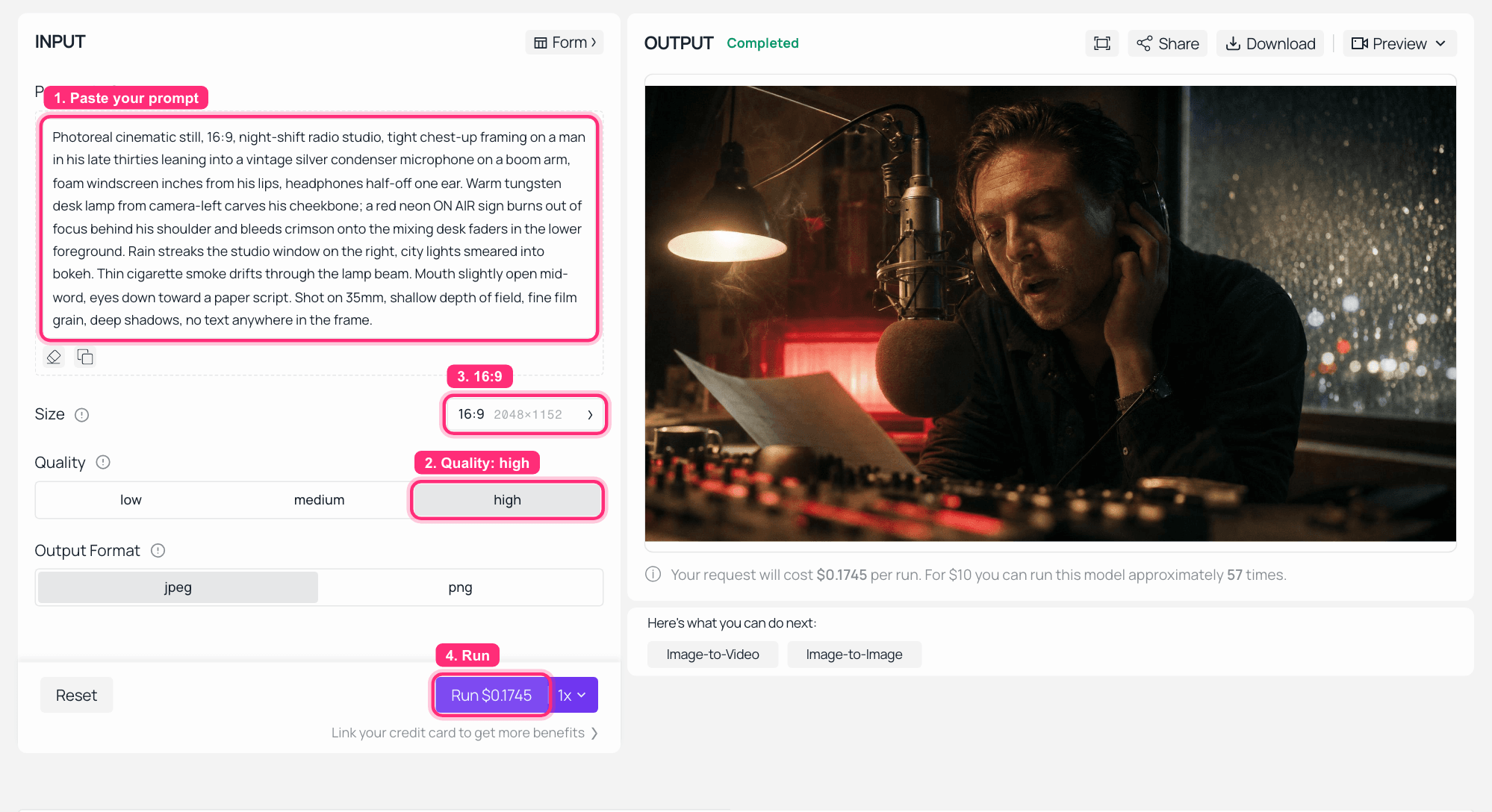
GPT Image 2 on Atlas Cloud with the radio-booth prompt typed in, quality high and 16:9 2048x1152 selected, and the finished base frame rendered in the OUTPUT panel_GPT Image 2 on Atlas Cloud: the exact prompt above, quality high, 16:9 at 2048x1152, and a second draw of the same frame in OUTPUT._
Step 2: Make the Six-Second Voice Reference
This is the step people get wrong, so read the reasoning before the prompt.
The reference audio must say a different sentence than the one you want in the video. It is a timbre anchor, nothing else. The lines come from the prompt. MiniMax's own reference-to-video example makes this split explicit: it labels one clip as the source track to partially reuse for music, and a second clip purely as "the voice timbre reference," with the new dialogue written inline in the prompt. If your reference says the same words you asked for, you are inviting the model to copy the track instead of transferring the voice.
plaintext1You're listening to Night Line, ninety-one point four, and it is coming up on 2three in the morning. 3
Settings on minimax/speech-2.6-hd: any calm low male voice works, and I picked Magnetic-voiced Male (English_magnetic_voiced_man). Set speed to 0.95 so the take lands inside the 2 to 15 second window with room to spare, leave vol at 1.0, and keep the mp3 output. The model is $0.08 per 1,000 characters, down from $0.10, a 20% discount valid as of August 2026. My line came back at 6.19 seconds and billed $0.00792.
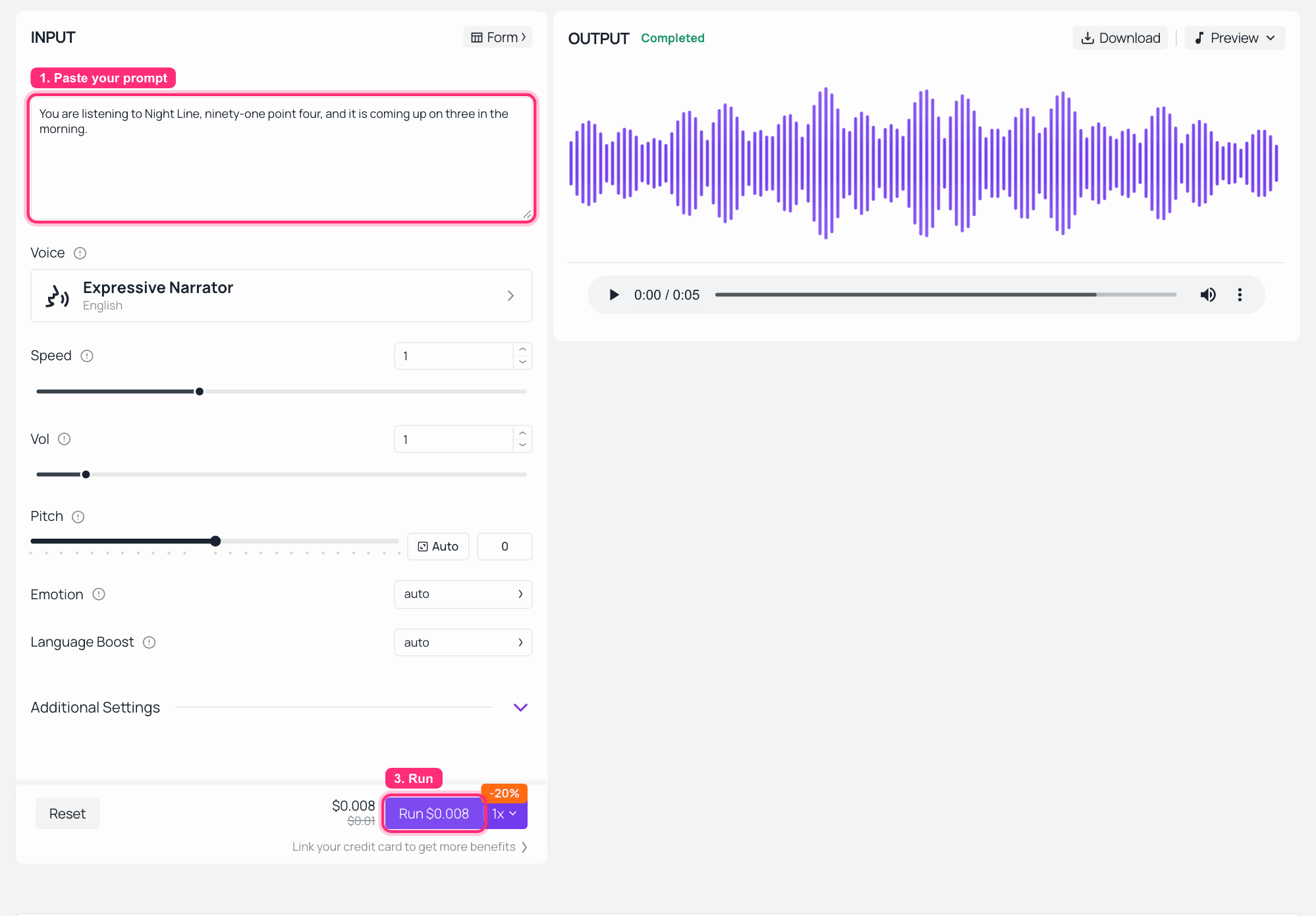
MiniMax Speech 2.6 HD on Atlas Cloud with the reference line typed into the text field and the rendered audio waveform in the OUTPUT panel
MiniMax Speech 2.6 HD on Atlas Cloud: one line in, one short mp3 out, with the 20% discount showing on the Run button. The screenshot was captured on the default Expressive Narrator voice, so switch the Voice picker to Magnetic-voiced Male and drop Speed to 0.95 before you run it.
Step 3: Run MiniMax H3 Lip Sync and Audio With the Reference Audio
Now both files go into refers together: the still from Step 1 and the mp3 from Step 2. This is Take B.
The prompt uses the sectioned structure H3 was trained on. subject_definitions names who and what the references are, detailed_description carries the dialogue inside <d>[English] ...</d> tags, and the two audio sections describe the mix. If the section names are new to you, the MiniMax H3 prompt guide covers the full structure. Only three fields matter for audio work, and they are all here.
plaintext1subject_definitions: 2<Subject 1> is the man at the radio microphone in <Picture 1>, late thirties, headphones 3half-off one ear, red ON AIR neon behind his shoulder. 4<Picture 1> is the opening frame of the target video. 5<Audio 2> is the voice timbre reference for <Subject 1>: a calm, low, magnetic male 6broadcast voice. Reference the timbre only; do not reuse its words. 7 8summary: 9[image reference + audio timbre reference] A single continuous 10-second close-up. <Subject 1> 10delivers two lines straight into the microphone in the voice timbre of <Audio 2>, while the 11camera pushes in slowly. The mouth movement, the breath before each line, and the room tone 12are generated together. 13 14detailed_description: 15The shot opens exactly on <Picture 1>. Warm tungsten from camera-left, red neon bleeding onto 16the mixing desk in the foreground, rain on the window behind. <Subject 1> takes a short breath, 17tilts a few degrees toward the windscreen, and speaks, <d>[English] It's three in the morning, 18and I know exactly who's still awake.</d> As he speaks, his jaw and lips move naturally with 19every syllable; the plosives on "three" and "morning" are visible. He glances down at the script, 20then back up past the lens, and continues, <d>[English] So let's keep this between us.</d> 21Exactly as his voice stops, his lips settle closed and he exhales through his nose. Throughout, 22the camera executes one slow, deliberate push-in; the neon flickers once, faintly, around second 23seven. No on-screen text. 24 25overall_soundscape: 26Close, dry, booth-treated voice with a touch of proximity effect from the microphone. Under it: 27a low electrical hum from the desk, rain steady against the glass, one distant car passing on 28the wet street, the soft creak of the chair as he leans in, and a single audible breath before 29each line. 30 31non_diegetic_music: 32A sparse, slow late-night jazz double bass, very quiet, well under the voice, entering around 33second two and never rising above the dialogue. 34
Settings on minimax/h3/reference-to-video: resolution 2K, duration 10, aspect ratio 16:9, and refers holding both files. Order inside the array does not matter, only that at least one of them is an image or a video. The Duration slider defaults to 8, so move it, and switch Aspect Ratio off adaptive if you want the frame you asked for.
Four parameter traps, three of which have cost me money. The key is ratio, not aspect_ratio, and getting it wrong returns a 400. Always send duration explicitly, because the schema default says 8 but a request without it came back as a 5-second file. On this endpoint, sending image alongside refers completes, bills in full, and silently drops one of them. And if you pass the audio as a base64 data URL, label it data:audio/mp3, not data:audio/mpeg. My first attempt died on exactly that:
plaintext1content[2].audio_url: invalid param: audio format ".mpeg" not allowed 2
That one at least is free, which brings us to the useful way to learn the limits.
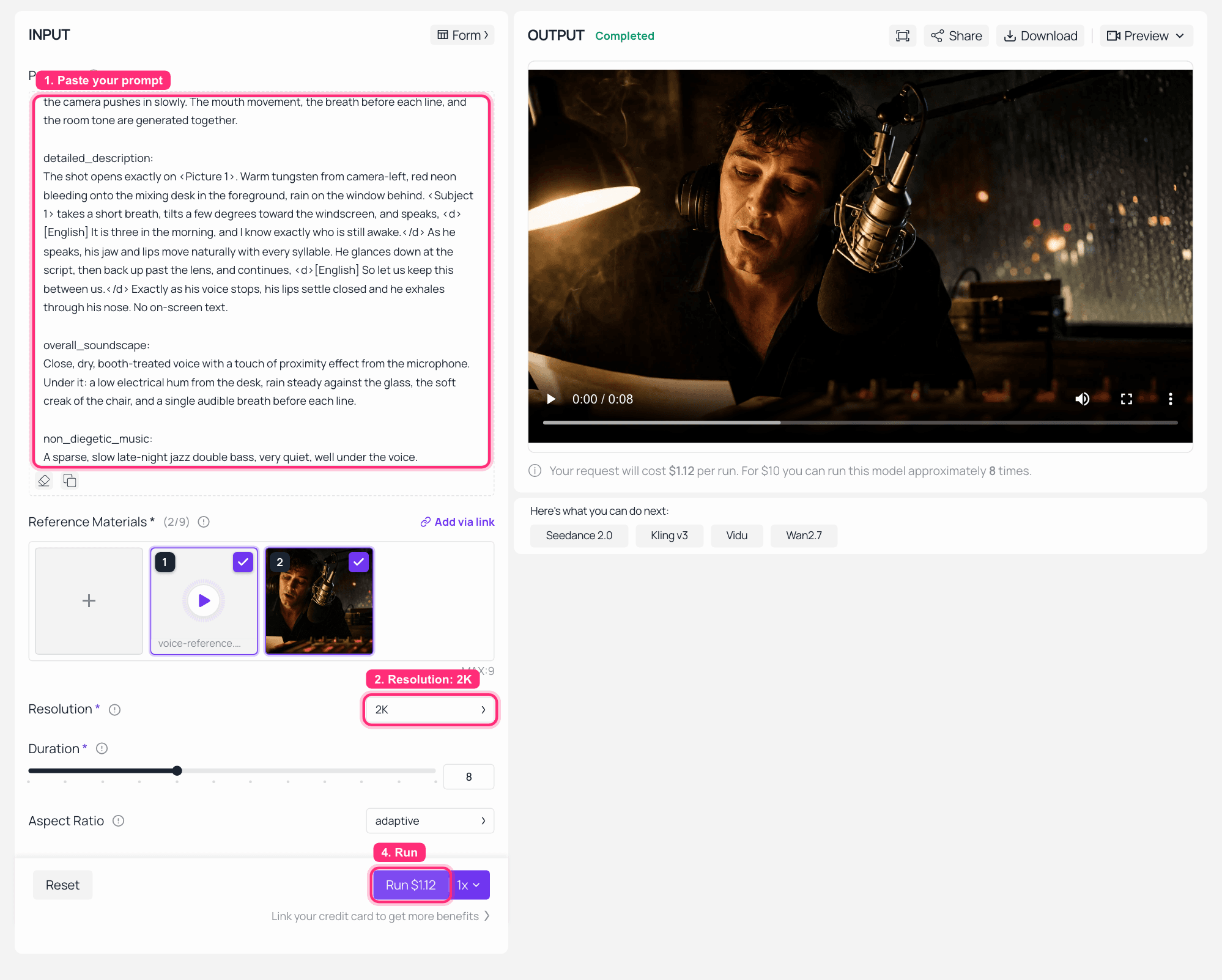
The MiniMax H3 reference-to-video playground on Atlas Cloud, with the mp3 in slot 1 and the base frame in slot 2 of Reference Materials, resolution 2K, and the finished clip playing in the OUTPUT panel
MiniMax H3 reference-to-video on Atlas Cloud: Reference Materials reads 2/9 with the mp3 in slot one and the still in slot two, resolution 2K, finished clip on the right. This capture ran at the playground's default 8 seconds, which is why the Run button says $1.12; my two takes above ran at 10 seconds for $1.40 each.
Step 4: Run the MiniMax H3 Lip Sync and Audio Control Take
Change one input and every mention of it. Drop the mp3 from refers so only the image is left, delete the <Audio 2> definition, cut the phrase "in the voice timbre of <Audio 2>" from the summary, and change the bracket tag to [image reference]. Nothing else moves, and the settings stay identical: 2K, 10 seconds, 16:9.
That is what makes it a control instead of a second attempt. The model now has no timbre anchor, so it invents a voice from the written description and lip-syncs to the voice it just made up. Both takes came back at 10.13 seconds and billed $1.40 each, to the cent.
WnfqR2I-a-8
Sound on. Take A on its own: same frame, same lines, no reference audio. The voice here is the model's invention, and the mouth still follows it.
Two takes, one variable. That is the cheapest experiment in this whole article and the only one that tells you what the audio slot actually does.
Step 5: Break MiniMax H3 Lip Sync and Audio on Purpose
The last step is free, and it is worth doing once so you recognise the failure at 2am.
Put the mp3 in refers and nothing else. No image, no video, just audio. Then submit.
plaintext1curl -s https://api.atlascloud.ai/api/v1/model/generateVideo \ 2 -H "Authorization: Bearer $ATLAS_API_KEY" \ 3 -H "Content-Type: application/json" \ 4 -d '{ 5 "model": "minimax/h3/reference-to-video", 6 "prompt": "A man at a radio microphone speaks two lines into the windscreen.", 7 "refers": [{"url": "https://example.com/voice-reference.mp3", "type": "audio"}], 8 "resolution": "2K", 9 "duration": 10, 10 "ratio": "16:9" 11 }' 12
Here is the part worth knowing, because it is not what the schema implies. The submit call returns HTTP 200 with a normal task id and "status": "processing", so a naive client thinks it worked. Twenty-three milliseconds later the task is dead:
plaintext1{ 2 "status": "failed", 3 "error_code": 1010001, 4 "error": "generate task failed, minimaxh3: reference-to-video requires at least one reference image or video", 5 "latency_ms": 23 6} 7
No price field ever appeared on that prediction, so it cost nothing. The practical lesson is about your code, not your wallet: a 200 on submit is not a success. Poll the id, and check status before you assume you have a clip.
Four More Ways to Push MiniMax H3 Lip Sync and Audio
The two-take test is the smallest useful experiment. Here is where the same slot goes next.
One shot, several languages. Keep the frame, keep the blocking, change the language tag inside <d>...</d> and run it again. The mouth follows the new language rather than the old one, because the mouth and the voice come out of the same forward pass. The model card lists stable dialogue support for 11 languages: Arabic, Chinese, English, French, German, Italian, Japanese, Korean, Portuguese, Russian and Spanish, with more supported to varying degrees. These two clips are the same trailer with two different voice tracks, and MiniMax also cut a French version and a narration-free version from the same setup.
hj7ZId3KOKk
Sound on. The English voice-over version: an astronaut close-up on a dust-orange planet, narration and score arriving with the picture. Trailer work is the same three prompt fields with a different soundscape.
Hv62FGyBNPM
Sound on. The Japanese version, frame for frame the same trailer. Nothing was re-dubbed and no separate VO session happened.
Singing, with a hook you already own. This is where free input audio stops being a footnote. Drop an existing hook or an instrumental into refers at 15 seconds or less, describe the performance, and the character performs to it. You are not paying for the music you bring.
zui3Zw_UWnY
Sound on. A band cut in a retro camcorder look, backstage into performance, with the track and the picture arriving together. That is the shape most music-video work actually wants.
Two people talking is harder than one. A single speaker in close-up is the easy case, which is exactly why this article used it. For dialogue between two characters, label them explicitly the way MiniMax's own example does, with <Subject 1> (S1) and <Subject 2> (S2) attached to each <d> line, and expect to re-roll when the model gets the order or the attribution wrong. Budget two runs per two-hander.
Ambience without a word spoken. overall_soundscape is a field on its own, and it works with no dialogue at all. Rain on glass, a chair creak, a fridge hum, the room itself. That makes the same endpoint a legitimate ASMR and ambience tool, and it is the one use where the mouth never matters.
One honest limit from my own two takes: same-pass generation means the mouth and the voice agree, and it does not mean every physical detail in the frame agrees with the sound. Long lines crammed into a short duration, vague performance direction, and multi-speaker scenes all degrade the result. Watch your clip before you ship it, the same way you would watch a take from a human actor.
What MiniMax H3 Lip Sync and Audio Actually Cost Me
Every figure below is a real charge on a real account, pulled after the fact. The price field on a prediction fills in late, so polling until completed often returns nothing. Re-fetch the id to get the number.
| Step | Model | What ran | Billed |
|---|---|---|---|
| 1 | openai/gpt-image-2/text-to-image | 1 base frame, quality high, 2048x1152 | $0.1745 (quoted on the Run button) |
| 2 | minimax/speech-2.6-hd | 99 characters, 6.19s of reference voice | $0.01 |
| 3 | minimax/h3/reference-to-video | Take B, 10s at 2K, image + audio in refers | $1.40 |
| 4 | minimax/h3/reference-to-video | Take A, 10s at 2K, image only | $1.40 |
| 5 | minimax/h3/reference-to-video | audio-only request, failed 23ms in | $0.00 |
| Whole experiment, both takes | about $2.98 |
Two accounting notes, because honesty is cheaper than a footnote. The bad audio/mpeg data URL in Step 3 also cost nothing, since it 400'd at submit. Rejections are free, but a well-formed request with a broken input is not, so a reference URL that quietly 404s will still bill you in full. And the playground capture in the Step 3 screenshot is a third H3 run at the panel's default 8 seconds, which billed $1.12 on top of the table. That run exists for this article, not for the experiment.
The old chain, priced in the table further up, was about $3.49 for one 10-second shot plus an evening of manual alignment. This was two complete 10-second shots with sound, a controlled A/B, and two deliberately broken requests, for less.
That said, H3 is the wrong tool for several jobs people will try to hand it, and the alternatives are cheaper.
| What you actually want | The right model | Price | Why |
|---|---|---|---|
| One portrait plus one existing audio file, into a talking head | bytedance/avatar-omni-human-v1.5 | $0.12/s | Purpose-built audio-to-video, and the output length follows your audio |
| A finished clip whose mouth needs to speak a new language | sync/lipsync-v3 | $0.22/s | H3 does not modify your existing render, and patching is exactly this model's job |
| The cheapest possible mouth fix on a talking head | veed/lipsync | $0.013/s | Roughly ten times cheaper, and it touches the mouth only, not the performance |
| A whole directed shot, with timbre, ambience and score together | minimax/h3/reference-to-video | $0.14/s | Picture and sound come from one pass, so the performance is designed rather than repaired |
If you are picking between H3 and its closest rival on character work rather than on audio, the Seedance 2.5 comparison is the better read. And if you are wondering whether the open weights make this free, they do not make it fast: 2K still comes from the API side, and community reports put a 10-second 480p local render at minutes rather than seconds on consumer cards.
One Honest Note on Voices, Songs and Rights
Free to upload is not the same as free to use. A song you did not write and a voice that is not yours are two separate permissions, and neither is granted by an API that charges you nothing for the upload. Use your own recordings, licensed music, or a synthetic voice you generated yourself, which is exactly what Step 2 does.
Separately, the community weights carry territorial limits that do not currently cover the EU, the UK, South Korea or the US, with a formal licensing channel open instead. That is a longer story, and it is told in the MiniMax H3 open-weights guide.
MiniMax H3 Lip Sync and Audio: Frequently Asked Questions
Does MiniMax H3 lip sync and audio really generate sound in the same pass, or is it dubbed afterwards?
Same pass. Text goes through the H3-Encoder, visuals through the H3-Encoder plus the H3-VisualVAE, and audio through a standalone H3-AudioVAE. The H3-Omni-Transformer jointly predicts the video and audio latents, which are then decoded separately into picture and 32 kHz stereo audio. Nothing is layered on afterwards, which is why the mouth, the breath and the room tone belong to the same take.
Can I feed my own song or voice into MiniMax H3 lip sync and audio, and does it cost extra?
Yes, and no. MiniMax's pay-as-you-go table lists H3 audio input as Free. The asymmetry to watch is video: input video is billed by its duration at the output rate, $0.13 per second at 2K, so 15 seconds of reference video runs about $1.95 while 15 seconds of reference audio runs $0.
Why does MiniMax H3 lip sync and audio reject a request that only has audio?
Because audio is the one reference type that cannot travel alone. It must be accompanied by at least one image or video. The rest of the limits, from the H3-Base-Ref2VA spec: up to 9 images, up to 3 videos and up to 3 audio clips, each video or audio clip between 2 and 15 seconds, 15 seconds total per type, and a maximum of 12 files across all types in one request.
Will MiniMax H3 lip sync and audio hold for a whole clip, or just the first line?
For a single speaker with room to breathe, it holds across the clip rather than landing one line and drifting. Three things break it: cramming a long script into a short duration, vague or missing performance direction, and multi-speaker scenes where the model has to decide who talks when. Give each line a labelled speaker and enough seconds to say it.
Does MiniMax H3 lip sync and audio need a re-dub for another language?
No. Change the language tag inside the dialogue markup, from <d>[English] ...</d> to <d>[Japanese] ...</d>, and run the same prompt again. The mouth is generated with the new voice, so it matches the new language instead of the old one. The model card lists stable dialogue support for 11 languages.
Is it cheaper to run MiniMax H3 lip sync and audio locally?
Cheaper per clip, expensive in every other way. The weights are open, but community reports of local runs on 16GB consumer cards measure a 10-second 480p generation in minutes, self-hosting renders at a 768 short side, and 2K still comes from the API-side regeneration step. Add the territorial limits in the community licence and the API stays the pragmatic path for finished work.





