Digita "AI kissing video generator" su Google e la maggior parte dei risultati promette la stessa cosa: carica una foto, ottieni un video, fatto. Aprine un po' e alcuni restituiscono silenziosamente un'immagine fissa. Questa discrepanza non è un caso.
Un vero AI Kissing Video Generator è di solito due strumenti separati cuciti in un'unica landing page: qualcosa che fonde due foto in un bacio e qualcos'altro che trasforma una foto in movimento. Questa guida separa i due, li esegue entrambi su Atlas Cloud e mostra esattamente dove le versioni gratuite smettono di essere utili.
Punti chiave
- La maggior parte degli strumenti venduti come AI Kissing Video Generator sono in realtà due lavori diversi sotto un'unica etichetta: un passaggio foto-bacio, poi un passaggio da foto a video. Confondere i due è il modo più semplice per rimanere delusi dal risultato.
- Il generatore AI di baci gratuito di Atlas Cloud crea una foto di bacio statica. Per ottenere il movimento bisogna far passare quella foto attraverso un modello separato di image-to-video.
- PixVerse V6 image-to-video, lo stesso motore dietro il template KissKiss di PixVerse, fattura al secondo con durata e risoluzione regolabili invece di un credito fisso per generazione.
- Il fattore più importante per capire se un video di bacio appare naturale o distorto è la foto di partenza: un solo fotogramma, entrambi i volti visibili, illuminazione uniforme.
- La stessa generazione funziona in due modi: punto e clic in un playground, oppure una chiamata API in tre passaggi per chi la integra in un prodotto.
Un "AI Kissing Video Generator" è in realtà due strumenti, non uno
Cerca il termine oggi e i risultati si dividono in due categorie, che la landing page lo ammetta o no. Una categoria fonde due ritratti in un'unica foto di bacio. L'altra parte da una foto e aggiunge movimento, audio e qualche secondo di durata. Alcune pagine promettono entrambe e ne offrono solo una.
| Cosa produce | Come funziona | Quanto costa di solito |
|---|---|---|
| Una foto di bacio | Fonde due ritratti in un'unica immagine fissa | Gratis o una tariffa fissa bassa per immagine |
| Un video di bacio | Anima una foto in una breve clip | Crediti fissi per clip, o fatturati al secondo |
Sapere in quale categoria si colloca uno strumento fa risparmiare un caricamento. Le landing page pubblicizzano il video più spesso di quanto lo offrano, perché video è il termine di ricerca che porta traffico. Il modo per verificarlo con certezza: guarda il pannello di output reale, non il testo del titolo sopra di esso.
Passaggio 1: trasformare due ritratti in una foto di bacio AI
Il generatore AI di baci gratuito di Atlas Cloud richiede esattamente due foto, un ritratto chiaro di ciascun adulto consenziente.
Lo strumento fonde i due volti in un'unica foto di bacio in circa 30 secondi. Nient'altro da configurare.
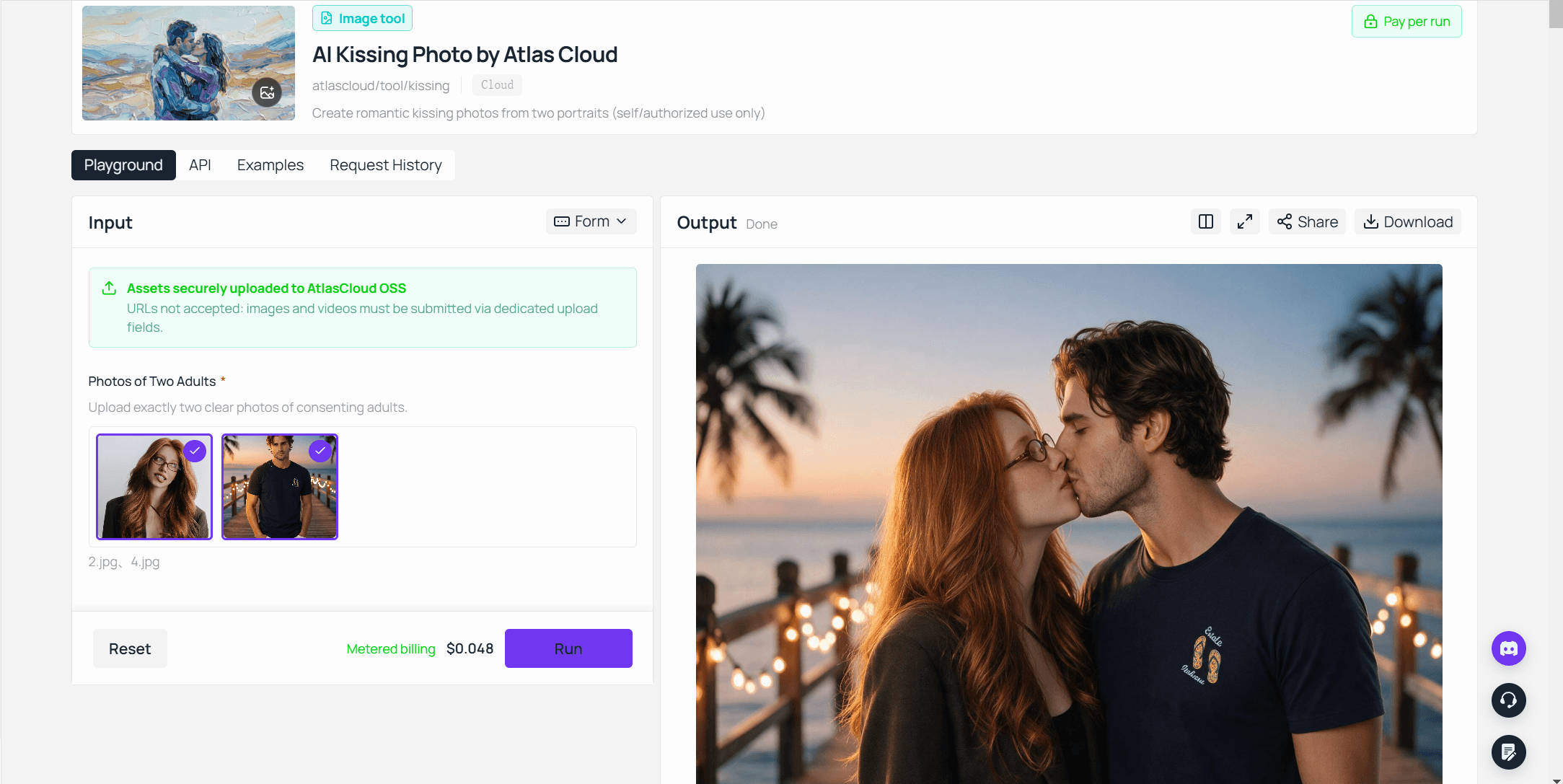
Il pannello di output conferma ciò che descrive il flusso in tre passaggi dello strumento stesso: una foto di bacio finita, pronta da scaricare. Se l'obiettivo è una clip in movimento, quel download diventa l'input per il passaggio due.
È uno dei numerosi strumenti gratuiti all'interno della collezione AI Tools di Atlas Cloud, insieme a un upscaler di immagini, un rimuovi sfondo e una gomma per oggetti.
Passaggio 2: trasformare la foto in un video di bacio AI
Trasformare una foto di bacio statica in movimento richiede un modello di image-to-video. Atlas Cloud ospita i modelli image-to-video di PixVerse tra centinaia di altri.
Quello già collaudato esattamente su questo caso d'uso è PixVerse V6 image-to-video, lo stesso motore dietro il template KissKiss di PixVerse che ha diffuso clip di baci su TikTok in diverse lingue.
La nostra [guida al template KissKiss](pixverse-ai-kiss.md?utm_source=blog&utm_medium=article&utm_campaign=ai-kissing-video-generator) racconta da dove viene quella tendenza e dove PixVerse traccia la linea del consenso. Questa sezione copre la versione che gestisci tu stesso.
Demo generata con PixVerse V6 image-to-video su Atlas Cloud a partire dalla foto di bacio del Passaggio 1, 5 secondi, con audio.
Metodo 1: creare il video di bacio nel playground
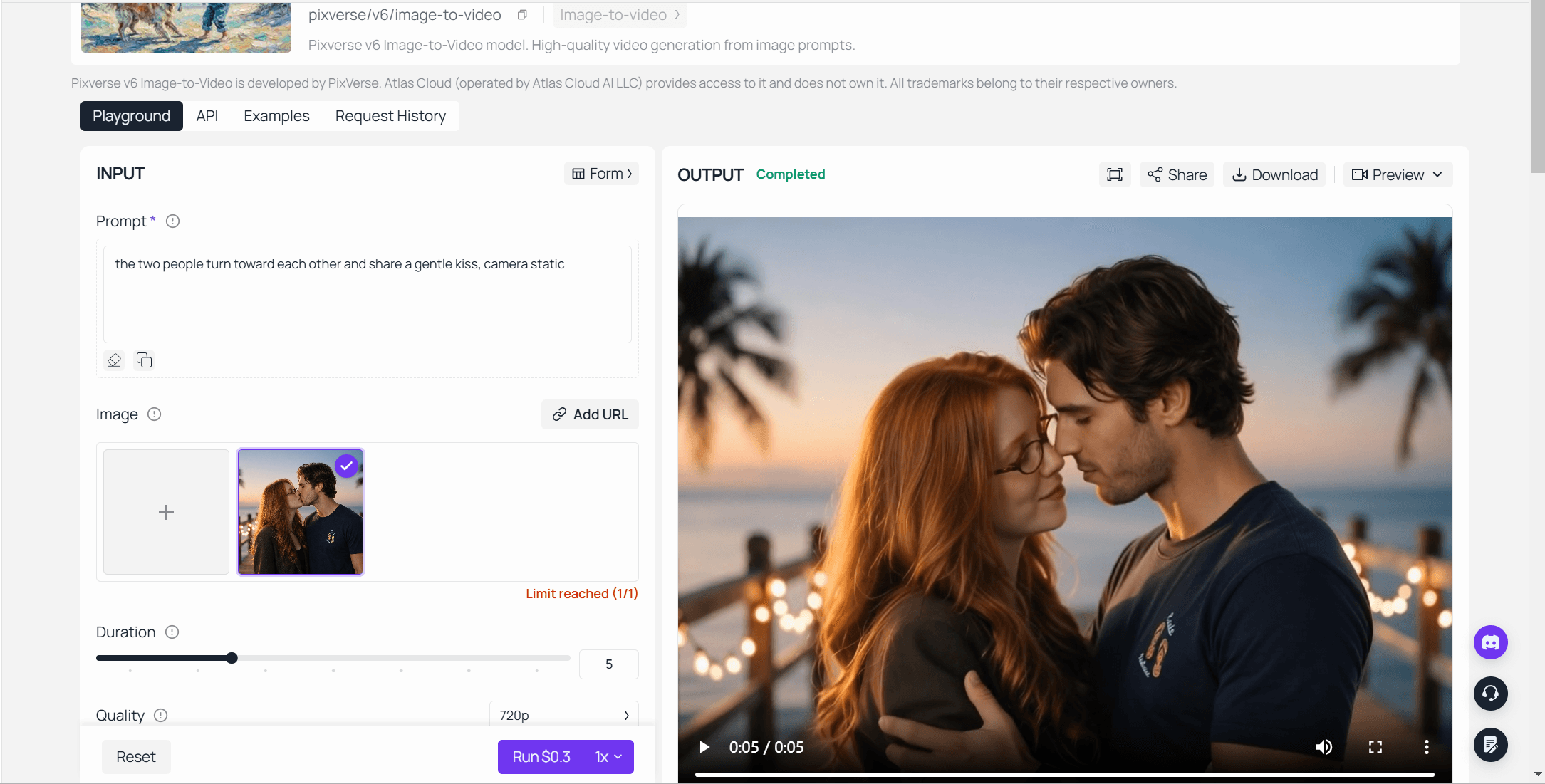
- Apri il playground di PixVerse V6 image-to-video e carica la foto di bacio del passaggio uno.
- Descrivi il movimento: "le due persone si girano l'una verso l'altra e si scambiano un bacio delicato, camera statica".
- Scegli una durata da 1 a 15 secondi e una risoluzione da 360p a 1080p.
- Attiva o disattiva l'audio ed esegui. Il pannello indica il prezzo esatto prima che tu confermi.
Metodo 2: chiamare l'API in tre passaggi
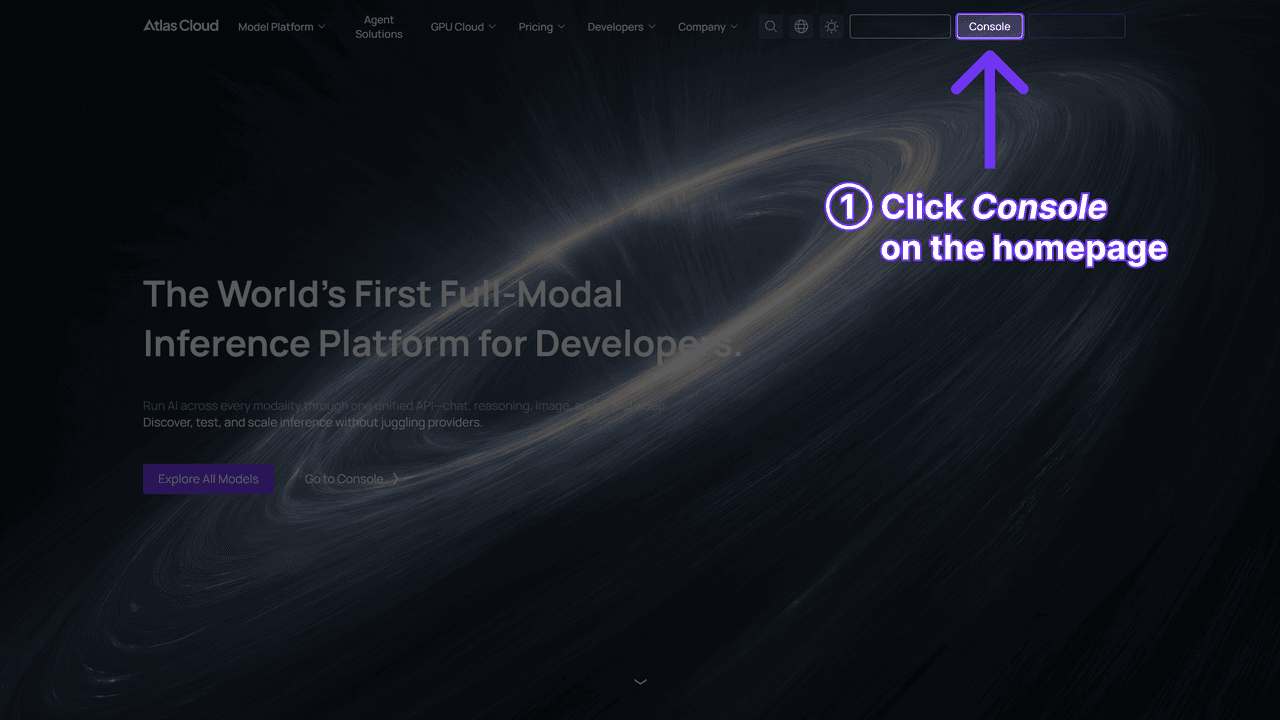
Passaggio 1: ottieni la tua chiave API. Creane una nella dashboard della console di Atlas Cloud e copiala.
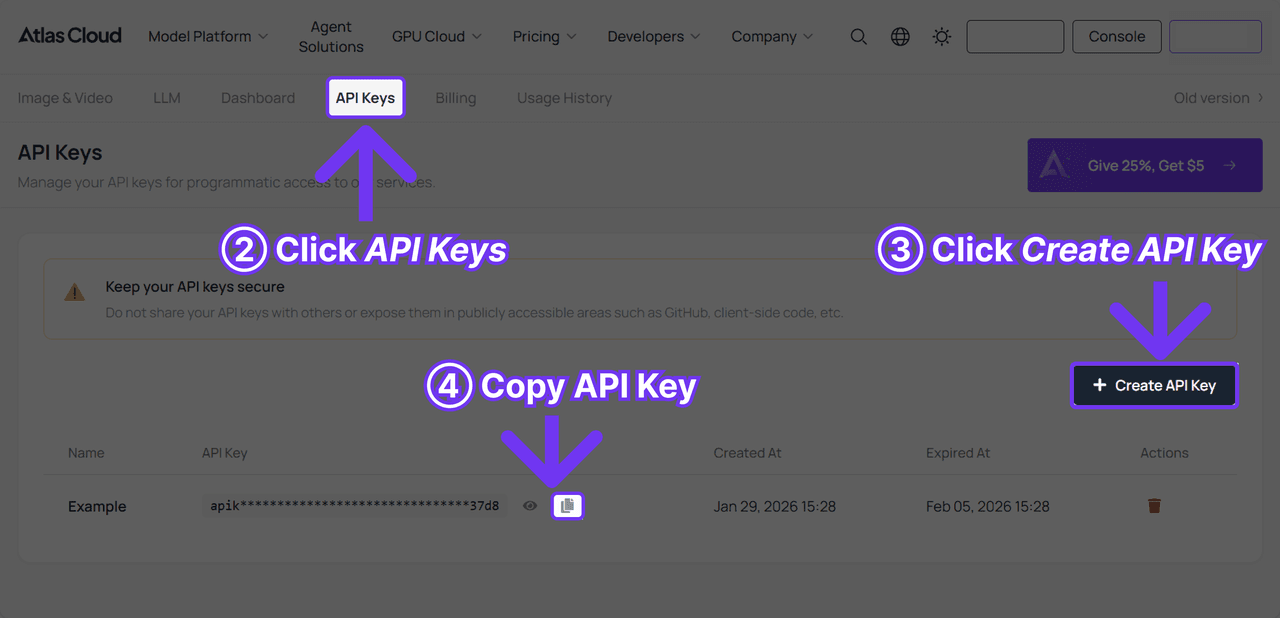
Passaggio 2: consulta la documentazione API. Endpoint, parametri e autenticazione si trovano nella documentazione API.
Passaggio 3: effettua la tua prima richiesta. Invia il job:
plaintext1curl -X POST https://api.atlascloud.ai/api/v1/model/generateVideo \ 2 -H "Content-Type: application/json" \ 3 -H "Authorization: Bearer $ATLASCLOUD_API_KEY" \ 4 -d '{ 5 "model": "pixverse/v6/image-to-video", 6 "image": "<your_kiss_photo_url>", 7 "prompt": "The two people turn toward each other and share a gentle kiss, soft window light, camera static", 8 "duration": 5, 9 "quality": "720p", 10 "sound": true 11 }'
Esegui il polling della previsione finché non è completata:
plaintext1curl https://api.atlascloud.ai/api/v1/model/prediction/<prediction_id> \ 2 -H "Authorization: Bearer $ATLASCLOUD_API_KEY"
Atlas Cloud usa un'unica API su tutta la piattaforma, quindi la stessa chiave e lo stesso ciclo di invio e polling funzionano per ogni modello che ospita. Cambia la stringa del modello in seguito e il resto dell'integrazione resta invariato.
Cosa rende una clip di bacio realistica invece che distorta
Ogni modello di image-to-video, PixVerse incluso, eredita ciò che gli offre la foto di partenza. Un ritaglio sfocato diventa una clip sfocata con strascichi di movimento sovrapposti.
| Foto di partenza | Come appare di solito il video | Input migliore |
|---|---|---|
| Due persone fianco a fianco, volti visibili, illuminazione simile | Movimento di avvicinamento pulito, volti stabili | Già utilizzabile |
| Due foto separate unite insieme | Volti distorti dove si trova la giunzione | Unisci e uniforma la luminosità prima del passaggio uno |
| Ritaglio stretto solo sui volti | Movimento rigido, spalle tagliate | Lascia spazio fino alle spalle |
| Luce mista o scarsa sui due volti | Incarnato tremolante o mutevole durante il movimento | Rifai lo scatto o schiarisci in modo uniforme prima di caricare |
Il prompt fa il resto del lavoro. "Si baciano" dà al modello troppo poco su cui agire. "Lei si avvicina per prima per un bacio lento di due secondi, luce calda del pomeriggio, la camera resta ferma" gli dà una sequenza, un ritmo e un'atmosfera che può davvero seguire.
Bacio alla francese, sulla guancia o cinematografico: scegliere uno stile di bacio
PixVerse V6 non ha un menu a tendina per lo stile di bacio. Lo stile vive interamente nella riga del prompt, quindi poche parole cambiano l'intera clip.
| Stile | Frase del prompt da usare | Ideale per |
|---|---|---|
| Classico | "un bacio dolce e breve, camera statica" | Post di anniversario, participation card |
| Bacio alla francese | "un bacio francese lento e romantico, la camera resta ferma" | Contenuti di coppia rivolti a un pubblico maturo |
| Bacio sulla guancia | "un bacio caldo sulla guancia, una persona sorride" | Contenuti per famiglia o amici, intensità minore |
| Cinematografico | "un bacio al rallentatore con una lieve spinta in avanti della camera, luce calda di contorno" | Video save-the-date, teaser di matrimonio |
Nessuno di questi richiede un nuovo modello o un'impostazione nascosta, solo una frase diversa nello stesso campo del prompt. Per prompt più lunghi, prompt negativi o formulazioni non in inglese, la nostra [guida ai prompt di PixVerse](pixverse-prompts-guide.md?utm_source=blog&utm_medium=article&utm_campaign=ai-kissing-video-generator) ha il formato che gli stessi test di PixVerse preferiscono.
Esiste un modo gratuito per creare un video di bacio AI?
Il passaggio uno è quasi gratuito. Il generatore di foto di baci di Atlas Cloud non costa nulla da provare, e la pagina non fissa un numero preciso: provarlo non costa nulla, e i crediti di Atlas Cloud subentrano quando ne vuoi di più.
Il passaggio due è dove il gratuito diventa più difficile. PixVerse V6 image-to-video di Atlas Cloud non ha un piano gratuito; fattura al secondo dalla prima richiesta.
La stessa app consumer di PixVerse è invece la via più vicina al gratuito: accedi, usa l'effetto KissKiss o qualunque template di bacio sia attualmente disponibile, e l'app detrae i propri crediti con una filigrana sulle esportazioni gratuite. La nostra guida al template KissKiss, linkata sopra, contiene i numeri attuali dei crediti e come appare quella filigrana.
| Passaggio | Meccanismo gratuito | Dove smette di essere gratuito |
|---|---|---|
| Foto di bacio (strumento Atlas) | Gratis da provare secondo la pagina dello strumento stesso | A consumo a $0,048 per generazione dopo, secondo il playground |
| Video di bacio (API Atlas) | Nessun piano gratuito | Fatturato al secondo dalla prima richiesta |
| Video di bacio (app PixVerse) | Crediti gratuiti limitati, filigrana all'esportazione | Una volta esauriti i crediti o quando non vuoi la filigrana |
Domande frequenti
Perché il mio generatore di baci AI mi ha dato una foto invece di un video?
Perché è un generatore di foto, non di video, anche se la parola "video" compare da qualche parte nella pagina. Controlla il pannello di output invece del titolo. Un'immagine fissa significa che hai completato il passaggio uno; falla passare attraverso un modello di image-to-video per ottenere il movimento.
Posso trasformare in video una foto di bacio che ho già creato?
Sì. Qualsiasi foto chiara funziona come input per un modello di image-to-video, inclusa una creata altrove. Caricala al posto dei tuoi ritratti e descrivi il movimento del bacio nel prompt.
Quanto costa creare un video di bacio AI?
Su Atlas Cloud, il generatore di foto di baci mostra una fatturazione a consumo di $0,048 per generazione nel playground, verificata a settembre 2026. Trasformare quella foto in video costa di più: PixVerse V6 image-to-video fattura da $0,025 a $0,115 al secondo a seconda della risoluzione e dell'audio, verificato sulla pagina del modello a settembre 2026 senza sconti attivi. Una clip di 5 secondi a 720p con audio costa $0,30; la stessa durata a 1080p costa $0,575.
È consentito creare un video di bacio AI di un'altra persona?
Solo con il suo consenso. I termini di servizio di PixVerse stesso vietano contenuti sessualmente suggestivi di persone reali creati senza il loro permesso, e la stessa aspettativa dovrebbe valere indipendentemente dalla piattaforma che usi. La nostra guida al template KissKiss, linkata sopra, copre il linguaggio esatto della policy e cosa succede quando una generazione viene segnalata.
Conclusione
Un generatore di video di baci AI funzionante è in realtà due lavori separati. Uno trasforma due foto in un bacio. L'altro trasforma quel bacio in movimento. Aspettati che un unico strumento faccia entrambe le cose e continuerai a chiederti perché il tuo generatore di video ti restituisce sempre un'immagine.
Entrambi i lavori girano oggi su Atlas Cloud: il passaggio foto gratuito da provare, il passaggio video fatturato al secondo senza filigrana e senza limite giornaliero di crediti. Inserisci l'uno nell'altro, regola il prompt per lo stile di bacio che vuoi davvero, e la clip nella tua cartella dei download è quella che stavi cercando un AI Kissing Video Generator per creare.





