Two days after Google shipped Nano Banana 2.1, the model has already been ranked, benchmarked, praised and shouted at. Google's own card says it beats both Nano Banana 2 and Nano Banana Pro on every published test. A thread on r/Bard calls it a model that ignores instructions. Both camps are looking at the same release, and the gap between them comes down to three settings most people have not touched yet: the thinking level, the resolution tier, and the input price.
This guide walks through what actually changed on October 6, 2026, what the new pricing covers and what it does not, what the loudest threads on Reddit and X are reacting to, and how to run the model yourself. Every number comes from Google's documentation or from runs we did on Atlas Cloud this week, so you can check the receipts.
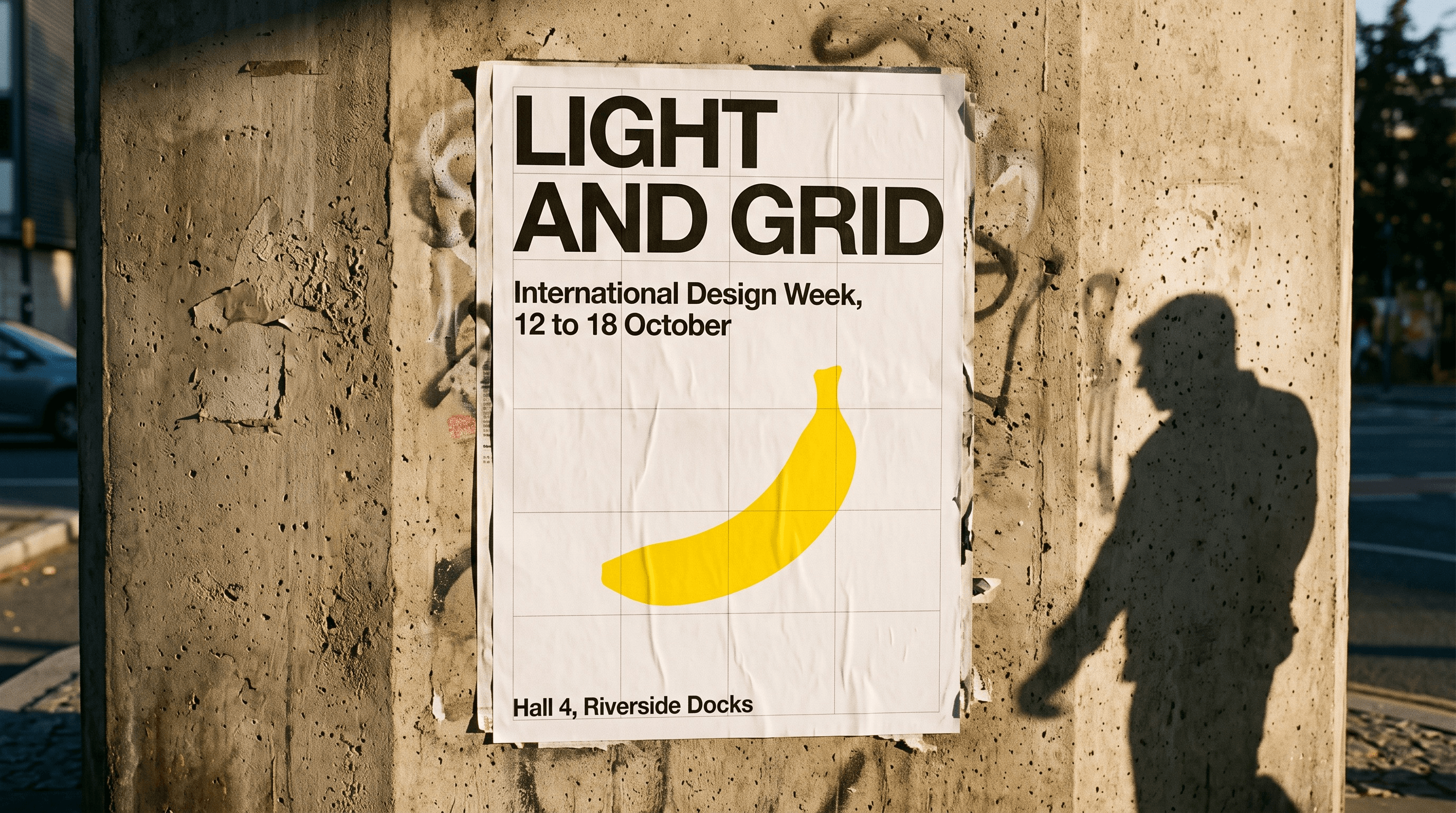
Generated with Nano Banana 2.1 on Atlas Cloud at 2K, default thinking, first attempt. Every word on the poster matches the prompt.
Key Takeaways
- Nano Banana 2.1wentgenerally available on October 6, 2026, runs on Gemini 3.6 Flash, and replaces Nano Banana 2 as Google's recommended Flash-class image model.
- 1K and 2K image prices in the Gemini API roughly halved, while input tokens cost three times more and the 0.5K output tier is gone.
- Thinking is on by default at medium. Drop to minimal for speed, raise to high for dense layouts.
- Free Gemini app users keep Nano Banana 2. Version 2.1 needs a paid Google AI plan there, and the API has no free tier.
- The Nano Banana 2.1 family on Atlas Cloudexposes text-to-image, edit and reference-to-image endpoints with a playground and one API key.
What Changed From Nano Banana 2 to Nano Banana 2.1
The short version: same product slot, new engine. Nano Banana 2 shipped in February 2026 as Gemini 3.1 Flash Image. Nano Banana 2.1 keeps the Flash positioning but, according to the DeepMind model card, is built on Gemini 3.6 Flash with a knowledge cutoff of March 2026. Google's API docs list it as the efficient counterpart to Gemini 3 Pro Image, which is still Nano Banana Pro.
The documented changes fall into six lines:
- Output at 1K, 2K and 4K, with 1K as the default. The 512-pixel tier that Nano Banana 2 offered is not supported.
- A fix for tiling artifacts on 1:4, 4:1, 1:8 and 8:1 aspect ratios at 2K and 4K.
- Better text rendering and infographic layout accuracy.
- Multi-image fusion with up to 14 reference images, holding up to 4 characters and 10 objects consistent.
- Grounding with Google Web Search and Google Image Search.
- Configurable thinking at minimal, medium or high, with medium as the default.
Google's own evaluation numbers are where the headline claims come from. On the model card's human preference tests, 2.1 with thinking scores 1050 on overall text-to-image preference against 990 for Nano Banana 2 and 935 for Pro. The widest gap is multi-character consistency, where 2.1 posts 1106 against 978 and 1011. Mask and ink-based editing moves from 965 to 1049. Infographic factuality, measured as a rate rather than an Elo score, goes from 0.179 to 0.521.
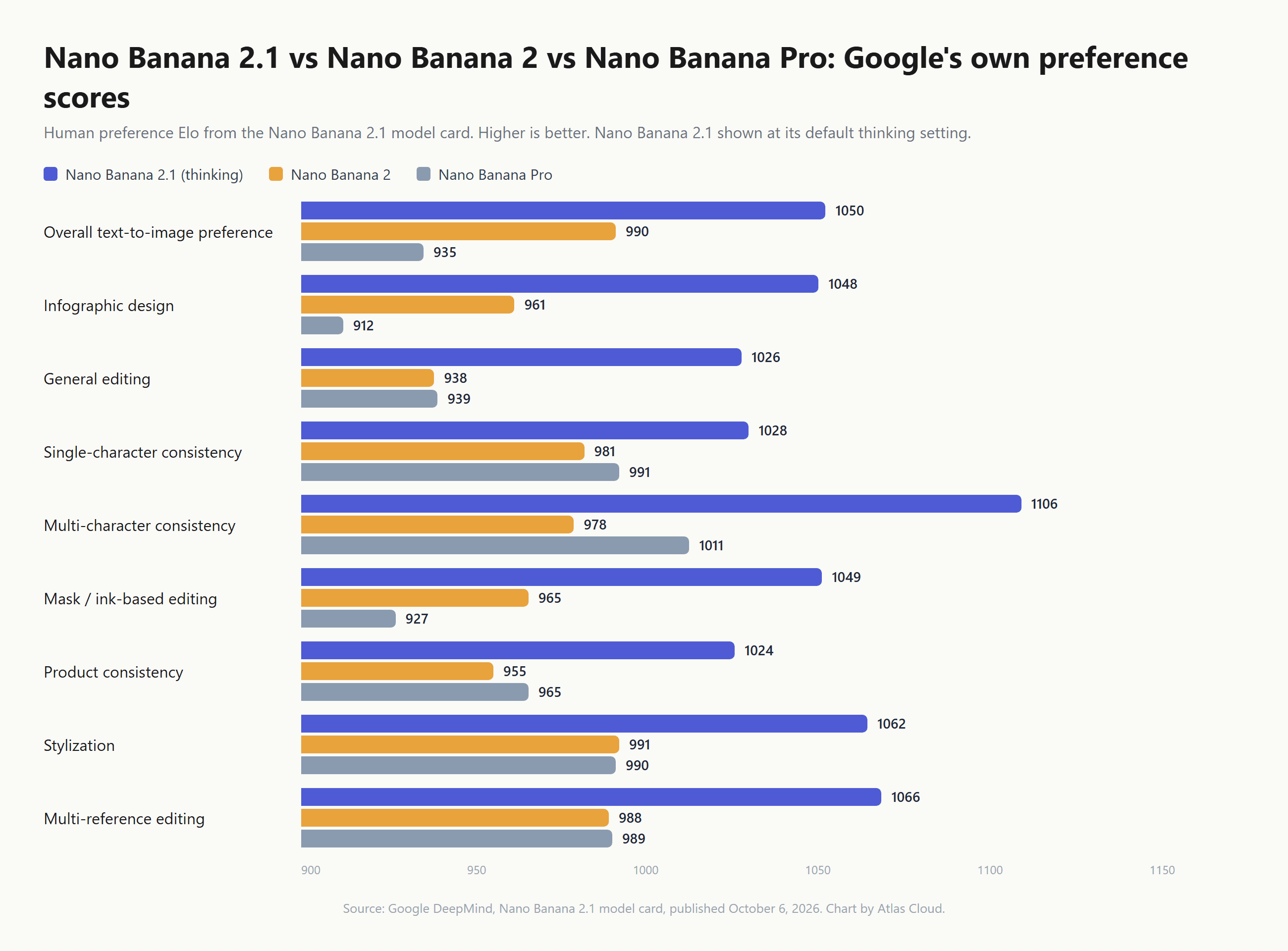
Two caveats belong next to that chart. These are Google's evaluations of Google's models on Google's prompt sets, and no independent lab had reproduced them at launch. And the same card lists what still goes wrong: small text that blurs at 1K, character consistency that is "not always perfect," partial instruction following in masked edits, and occasional slowness or timeouts. Keep those in mind when the Reddit section arrives.
How to Use Nano Banana 2.1 on Atlas Cloud
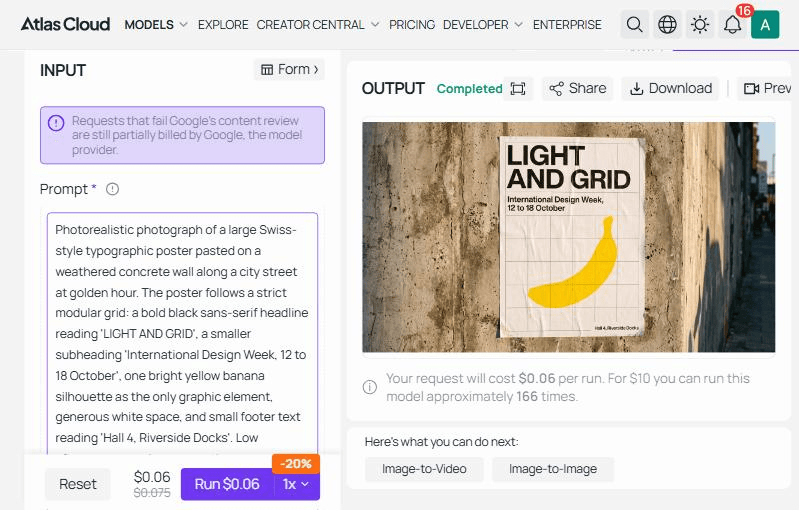
The poster at the top of this article came out of the Nano Banana 2.1 text-to-image playground on Atlas Cloud in one pass, at 2K, with no retries.
Method 1: Run It in the Playground
Open the Nano Banana 2.1 text-to-image playground and sign in. The form has a prompt box, an aspect ratio picker with fifteen options from auto to 8:1 and 1:8, a resolution toggle for 1k, 2k and 4k, a thinking level picker, and two grounding switches for Web Search and Image Search.
- Paste the prompt. Spell out any text you want rendered, in capitals if it should appear in capitals.
- Pick the resolution. The Run button updates its price estimate as you switch tiers, so you see the cost before you commit.
- Leave thinking on default for a first pass, then press Run. Our 1K runs this week landed between roughly 15 and 40 seconds from click to the Completed label, and the Request History tab keeps every result for 14 days.
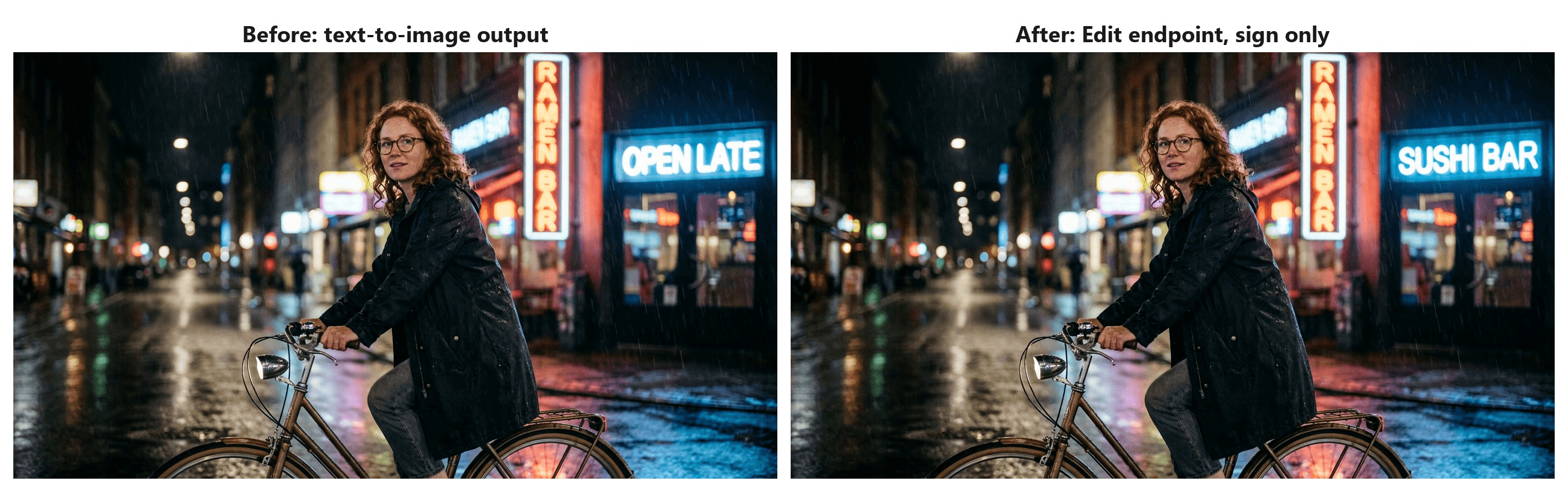
Region edits run through the Nano Banana 2.1 edit endpoint. Add the source image by URL or upload, then describe the one thing that should change and say that everything else stays. The endpoint page also documents the mask-style route Google's card scores: circle or doodle the region on the input image in a bold color before uploading, then describe the change.
We took the prompt-only route on a street scene the text-to-image endpoint had just produced, asked for the blue OPEN LATE sign to read SUSHI BAR, and got back the same woman, bicycle, rain and red RAMEN BAR sign with only that one sign rewritten.
Method 2: Call the API in Three Steps
Step 1: Get your API key. Create a key in the Atlas Cloud console and keep it in an environment variable rather than in client-side code.
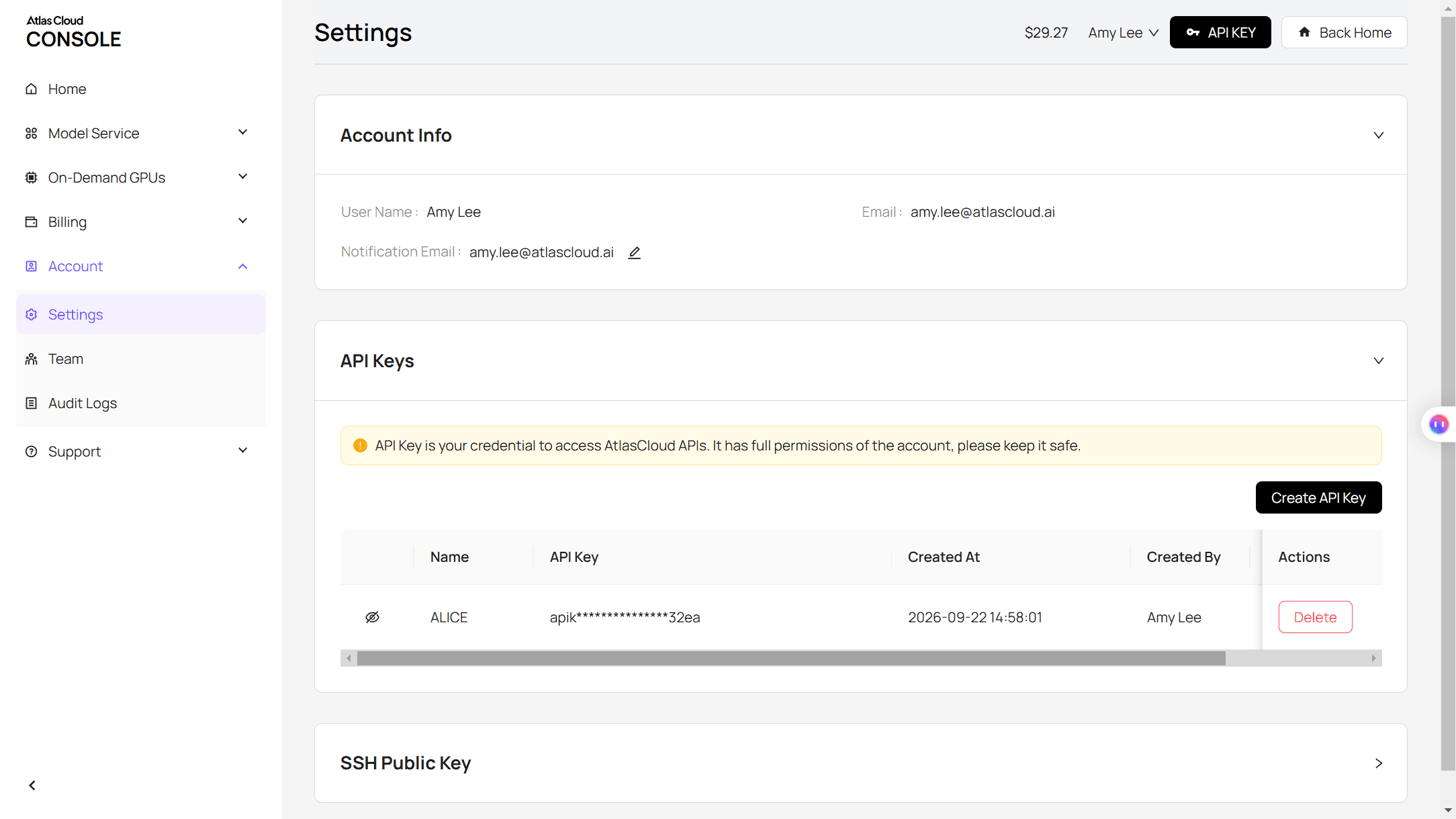
Step 2: Check the API docs. Endpoints, parameters and authentication live in the API documentation.
Step 3: Make your first request. Submit the job:
plaintext1curl -X POST https://api.atlascloud.ai/api/v1/model/generateImage \ 2 -H "Content-Type: application/json" \ 3 -H "Authorization: Bearer $ATLASCLOUD_API_KEY" \ 4 -d '{ 5 "model": "google/nano-banana-2.1/text-to-image", 6 "prompt": "Photorealistic photograph of a Swiss-style typographic poster on a concrete wall at golden hour, bold headline reading LIGHT AND GRID, subheading International Design Week, 12 to 18 October, one yellow banana silhouette, generous white space", 7 "aspect_ratio": "16:9", 8 "resolution": "2k", 9 "thinking_level": "medium" 10 }'
The response returns a prediction ID. Poll it until the status reads completed:
plaintext1curl https://api.atlascloud.ai/api/v1/model/prediction/<prediction_id> \ 2 -H "Authorization: Bearer $ATLASCLOUD_API_KEY"
If you are migrating from Nano Banana 2, three fields change. The model string moves to the 2.1 path. The resolution values are 1k, 2k and 4k with no 512-pixel option. And thinking_level is a new knob that defaults to medium, so pass minimal explicitly if your pipeline was tuned for Nano Banana 2 latency. The two grounding flags, enable_web_search and enable_image_search, are optional and off by default.
Everything else, including the header, the submit-and-poll loop and the key, is the same across Atlas Cloud, which is the point of one API: the edit endpoint and Nano Banana Pro answer the same calls with a different model string. For the pre-2.1 request shape, our Nano Banana 2 guide still applies.
Nano Banana 2.1 Pricing: Where the Half-Price Claim Holds
"Half price" is true for the line people read first and misleading for two others. The Gemini API pricing page bills 2.1 image output at $30 per million tokens, and a 1K image consumes 1,120 tokens. That works out to $0.0336 per 1K image against $0.067 for Nano Banana 2. A 2K image drops from $0.101 to $0.0504. So far, half.
4K is where it stops. Google's footnote puts a 4K image at 3,780 tokens, or $0.113, down from $0.151. That is a 25 percent cut, not 50. Several launch-day articles printed $0.0756 for 4K, which would require 2,520 tokens, a count that appears only in the Nano Banana 2 footnote. Trust the token math on Google's page, not the rounded headline.
The input side moved the other way. Text, image and video input went from $0.50 to $1.50 per million tokens, three times the Nano Banana 2 rate. Text and thinking output went from $3 to $7.50. Since thinking tokens bill at that output rate and Google does not publish how many a given image uses, a 1K image at the default medium level costs somewhat more than $0.0336. One developer's same-prompt test published on DEV Community on October 7 logged 550 to 1,383 thinking tokens per image at medium, which adds under a cent, but reference-heavy edits with fourteen input images will feel the input increase more than the output cut.
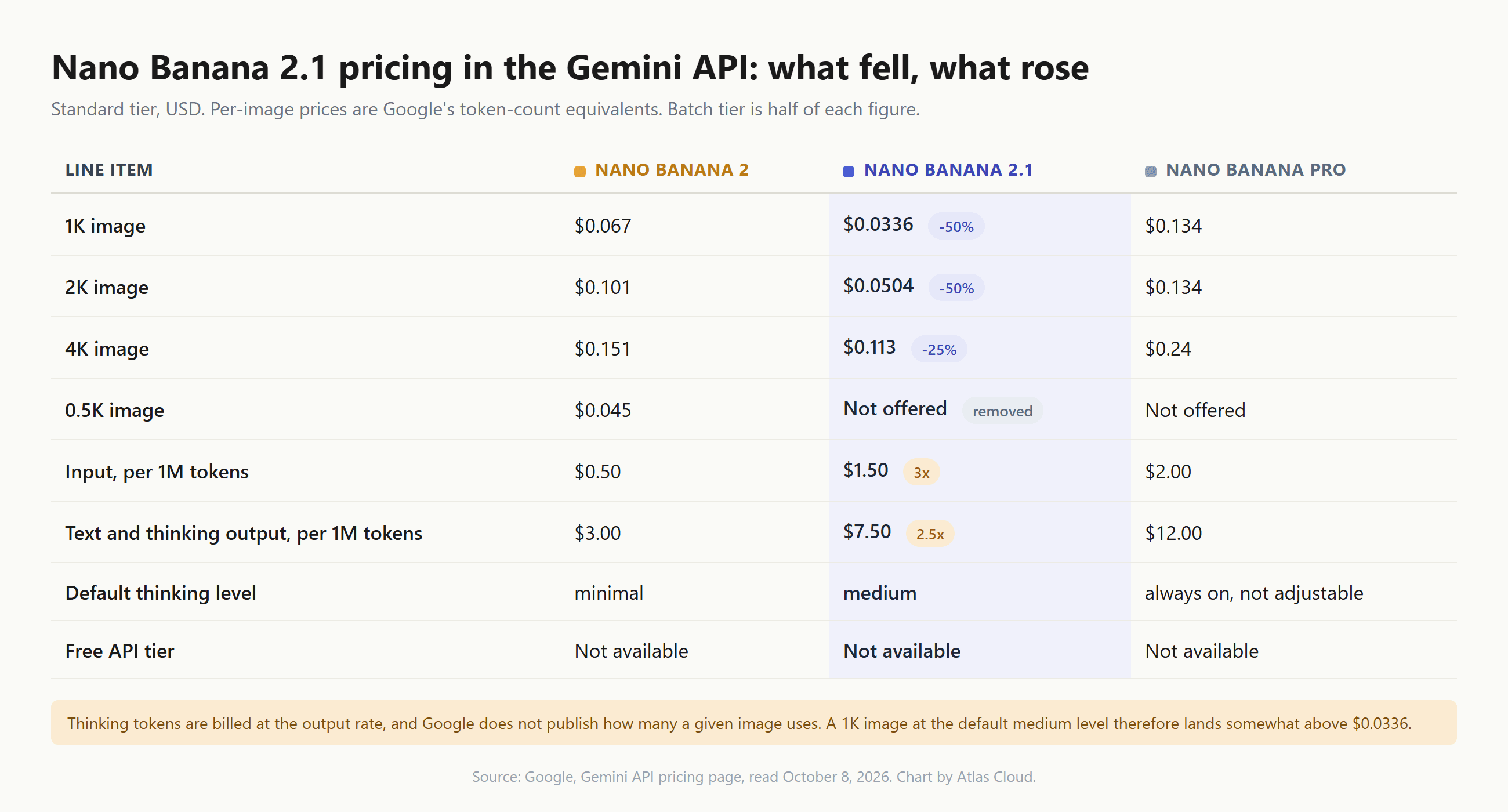
There is no free tier for 2.1 in the Gemini API. In the Gemini app, Google's image generation page lists Nano Banana 2 under the Free plan and reserves 2.1 for Google AI Pro, Plus and Ultra subscribers, with daily limits that Google has not published as numbers. Nano Banana 2 Lite, the 1K-only sibling, still bills input at $0.25 per million tokens with the same $0.0336 per 1K image, so it stays the cheaper option for high-volume 1K jobs with long prompts.
What Reddit Says About Nano Banana 2.1 So Far
Google introduced the model on X with a line about "notable leaps in visual design, mask-based editing, and subject consistency," in a post that had passed five thousand likes within a day. The replies and the subreddits split along a predictable fault line: people posting results versus people posting prompts that failed.
The showcase side is real. The largest 2.1 thread on r/GeminiAI by October 8 was a gallery post with the title "Nano Banana 2.1 goes crazy," which had drawn over 130 comments in half a day. On X, a creator ran what they called a "tiny people in a massive world" test and shared four frames with miniature explorers caught in a toothbrush wave, under a shopping cart, inside a clockwork mechanism and among carpet fibers.
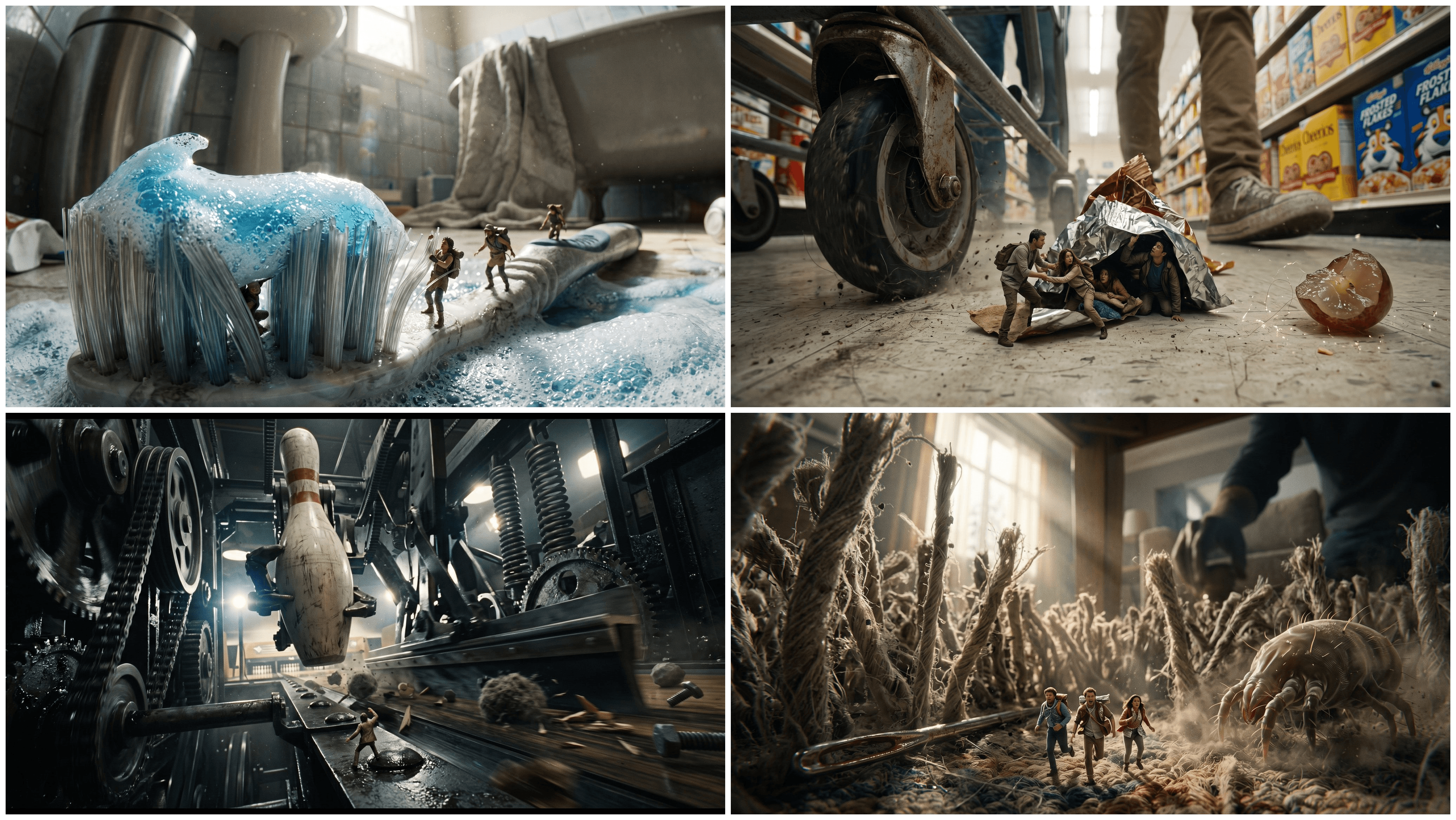
Images by Christopher Fryant, shared on X on October 6, 2026 as a first test of Nano Banana 2.1.
The complaint side has a single theme: instruction following. A thread on r/Bard titled "Nano Banana 2.1 - Ignores instructions" argued the model had been "massively downgraded" into a generalist that overrides specific direction. A second on r/GeminiAI called the model "completely deaf" and worried the update would be pushed onto Pro. A third described it as "very unhappy with blank spaces," filling empty areas with furniture and backgrounds the prompt never asked for. Smaller threads questioned why a model billed as cheaper consumed more of a Gemini app quota per image, and r/FluxAI posted a repeated-edit comparison that favored FLUX 3.
Independent leaderboards landed somewhere between the two camps. Arena's crowd-voted boards placed 2.1 fourth in multi-image edit, fifth in text-to-image and sixth in image edit on launch day, behind the GPT Image 2.5 pair, which Arena described as a substantial jump from Nano Banana 2.
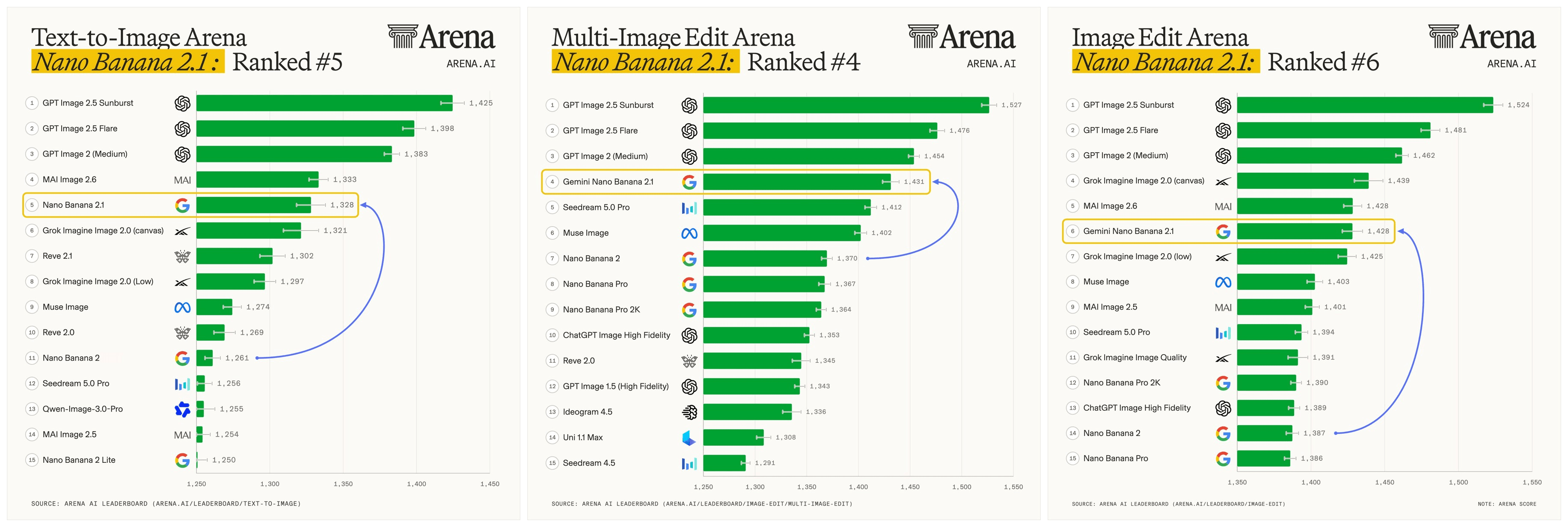
Leaderboard graphics published by Arena on X on October 6, 2026 .
Thinking Levels Explain Most of the Complaints
Here is the thing about "ignores instructions": Nano Banana 2 defaulted to minimal thinking, and Nano Banana 2.1 defaults to medium. A model that reasons about a prompt before drawing will reinterpret loose wording more aggressively than one that renders it literally, and it takes longer doing so. The DEV Community test mentioned above found 2.1 slower on every one of four prompts, 25 seconds against 15 on a menu board and 34 against 22 on an infographic, because of the extra thinking pass.
We ran one prompt built from the complaint threads at all three levels on Atlas Cloud: a chalkboard menu with a heading, exactly three priced lines, a blank lower third, and an explicit ban on decorations and extra words.
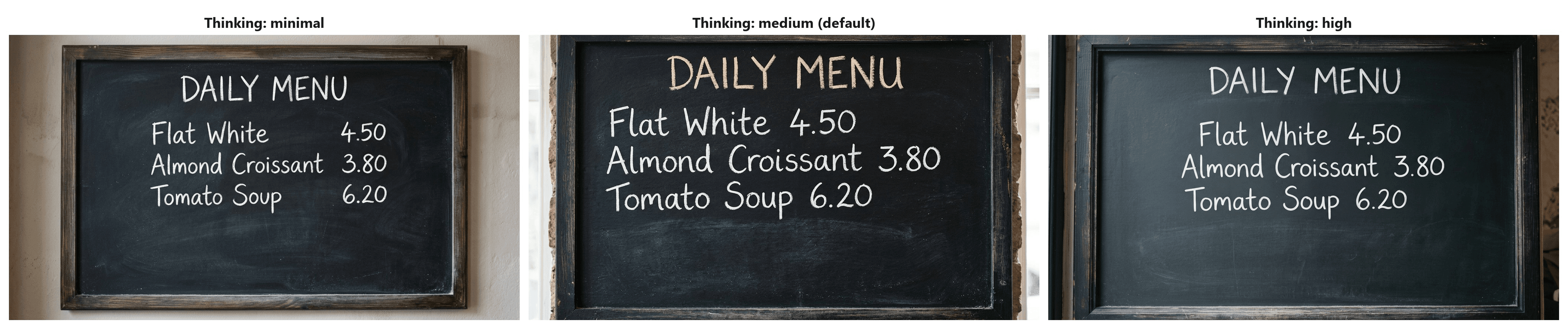
All three honored the text, the count and the empty space. The differences were layout choices, not obedience: minimal tabulated the prices in a right-hand column, medium and high ran them inline and framed the board tighter. Generation time in our runs overlapped across levels at roughly 15 to 40 seconds, close enough that the level is a quality dial, not a speed guarantee.
What this suggests for the threads: the explicit "nothing else" and "stays blank" clauses did more work than the thinking setting. If a prompt relied on Nano Banana 2's literal rendering, it will need those clauses now. If you want the old latency back, set thinking_level to minimal. If you are producing infographics or dense posters, the model card's biggest gains sit at high, where infographic factuality nearly triples, and that is where the extra seconds pay off.
Nano Banana 2.1 vs Nano Banana Pro: Which to Keep
Google's chart says 2.1 beats Pro everywhere. Reviewers who ran both have been less sure. The Decoder's launch review found Pro still produced the more convincing image in a horse-and-astronaut test, with 2.1 misjudging the horse's scale, and a five-prompt comparison published October 6 gave Pro the win on face likeness and in-scene signage while 2.1 took the product shot and the photoreal scene.
We ran the signage case ourselves: a red-haired cyclist in a rainy neon street with two signs that had to read RAMEN BAR and OPEN LATE, at 1K and 16:9 on both models.
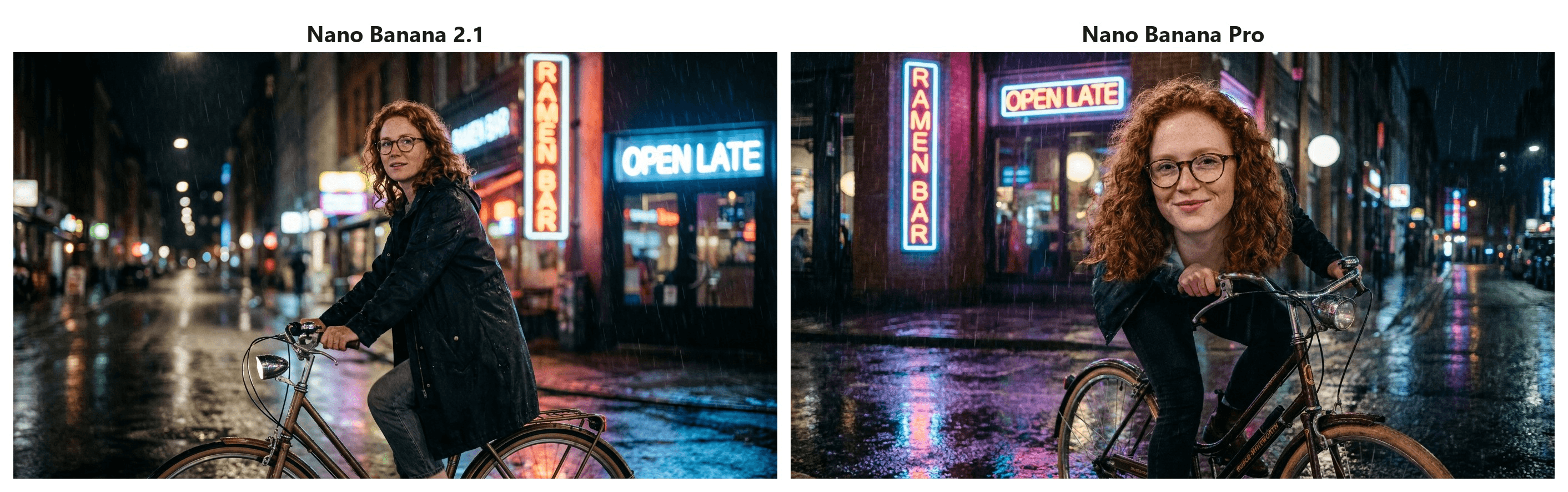
Both models spelled both signs correctly on the first try. Pro brought the subject closer and gave a more frontal, smiling face. 2.1 kept the wider, more cinematic frame and sharper reflections. On this prompt the difference was taste, not capability, and the Run button priced the Pro image at more than three times the 2.1 image.
The practical split: stay on Pro when a face has to match a reference or when the image is a one-off that will be scrutinized at full size. Move to 2.1 for everything that runs in volume, for multi-reference compositions, and for layout-heavy work where Google's own numbers put it furthest ahead. Google also still lists Pro's thinking as always on, so there is no minimal mode to reach for when Pro feels slow.
Migrating From Nano Banana 2 Before the Shutdown Date Lands
The deprecation is the part of this launch that moved under people's feet. On October 6, Google's changelog marked gemini-3.1-flash-image as deprecated and named gemini-nano-banana-2.1 as the migration target. The same day, several outlets reported October 29 as the earliest shutdown date from Google's schedule. By October 7, the deprecations page read "No shutdown date announced" for that model, which is also how the changelog entry is worded now.
| Date | Event | Source |
|---|---|---|
| February 26, 2026 | Nano Banana 2 preview ships as gemini-3.1-flash-image-preview | Gemini API deprecations page |
| May 28, 2026 | Stable gemini-3.1-flash-image released; preview models given a June 25 shutdown | Gemini API changelog |
| June 25, 2026 | Both preview image models shut down | Gemini API deprecations page |
| October 6, 2026 | gemini-nano-banana-2.1 generally available; gemini-3.1-flash-image deprecated | Gemini API changelog |
| October 7, 2026 | Deprecations page lists no shutdown date for gemini-3.1-flash-image | Gemini API deprecations page |
So there is no hard deadline today. Google's page says listed dates are the earliest a model might be retired and that the exact shutdown date will be communicated with advance notice. The reasons to move early are practical rather than calendar-driven. New capabilities ship on 2.1 only. The output price cut applies only to 2.1. And a migration is small: swap the model string, remove any 512-pixel size, and decide on a thinking level.
Test latency-sensitive paths at minimal, test anything with more than a few reference images for the higher input bill, and run your worst prompts from the Nano Banana 2 era with the explicit "keep everything else" wording this article has been leaning on. If you are also weighing OpenAI's side of the Arena board, our GPT Image 2.5 vs Nano Banana 2 test covers the previous generation of that matchup.
Frequently Asked Questions
Is Nano Banana 2.1 free in the Gemini app?
Not on the Free plan. Google's image generation page lists Nano Banana 2 as the free model and Nano Banana 2.1 as the model for Google AI Pro, Plus and Ultra subscribers. The practical effect is that a free Gemini user still gets a 2026 Google image model, but the thinking levels, the 14-reference fusion and the tiling fix at 2K and 4K stay behind the subscription. The API has no free tier for any Nano Banana model.
What model is Nano Banana 2.1 built on?
Gemini 3.6 Flash, according to Google's model card, with a knowledge cutoff of March 2026. That matters when you use search grounding: anything after the cutoff reaches the model only through the Web Search and Image Search flags, so turn them on for current products, places or events rather than relying on the base model.
Does Nano Banana 2.1 still offer 0.5K images?
No. The 512-pixel output that Nano Banana 2 supported is listed as not supported on 2.1, so 1K is the floor. Pipelines that generated thumbnails at 0.5K to save money will need to downscale a 1K result instead, and Nano Banana 2 Lite does not fill the gap either, since it outputs 1K only.
When will Nano Banana 2 shut down?
Google has not announced a date. The model was deprecated on October 6, 2026, and an October 29 date that appeared on launch day was replaced by "No shutdown date announced" the next day. Google says customers will be told the exact end date in advance, so treat the deprecation as a signal to plan the migration, not as a deadline.
What does Nano Banana 2.1 cost on Atlas Cloud?
At the time of writing, the text-to-image playground's Run estimate reads $0.04 per 1K image, $0.06 at 2K and $0.112 at 4K, with the page showing a launch discount of 20 percent against the list price of $0.05 at 1K. An edit with one reference image estimated at just over $0.041. Enabling search grounding adds $0.014 per request. Those prices are per run with no subscription, so a $10 balance covers roughly 250 1K images.
Conclusion
Nano Banana 2.1 is a cheaper, more deliberate Flash model wearing a familiar name. The output price cut is real at 1K and 2K, modest at 4K, and partly offset by a tripled input rate that reference-heavy work will notice. The benchmark gains are Google's own and still await outside confirmation, but the leaderboard climb, the correct signage in our runs and a clean one-sign edit say the model is at least a solid step past Nano Banana 2.
The Reddit argument is mostly an argument about defaults. A model that thinks before it draws rewards prompts that say what must stay, and punishes prompts that relied on literal rendering. Set the thinking level on purpose, state your constraints out loud, and Nano Banana 2.1 behaves like the upgrade Google's chart describes.





