編集を終えて保存を押す。その後の夜を決めるのは、たった一つの問いだ。今日もらえる保存は、これが最後だったのか? 私たちはその答えを求めてPixlrの料金ページ、ホームページのFAQ、ツールページを読んだが、答えは得られなかった。Pixlrの代替を探す旅は、たいていここから始まる——読む前にぶつかる天井から。
だからこの比較は、機能一覧ではなく課金の流れを追いかける。以下で引用するPixlrの記述はすべて、2026年9月にPixlr自身のページまたは同社の公開返信で読んだものであり、私たちが探していた数字は、どの製品ページも決して案内しない場所に現れた。
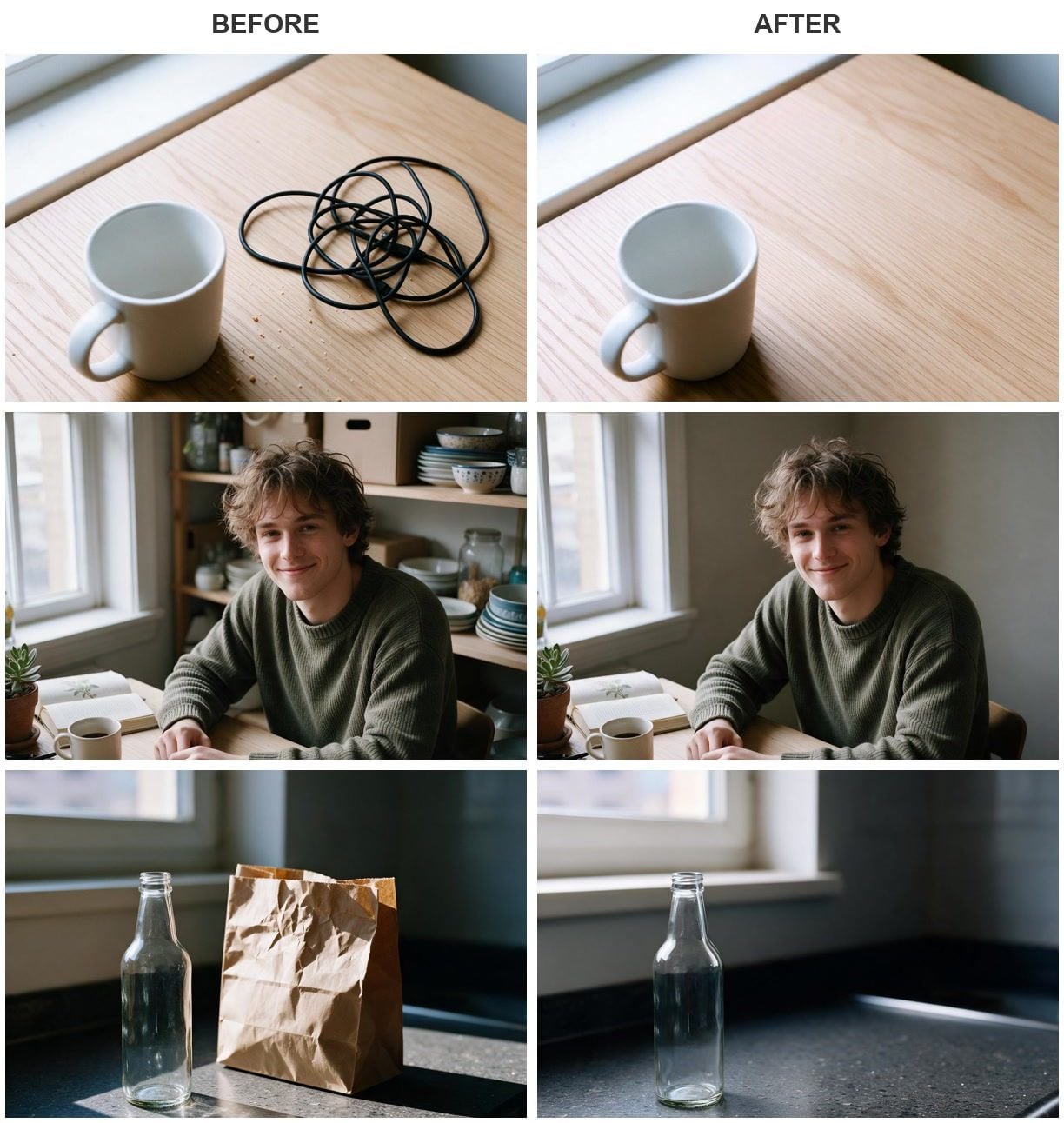
各ペアはSeedream v5.0 ProでのImage Edit 1回分の実行結果(2026年9月)。元フレームは同じワークスペースで生成した。
主なポイント
- Pixlrの料金ページは、4つの有料プランを1つのクレジットプールに販売しており、無料の列は一切ない。
- 無料プランの数値を見つけられた唯一の場所は、Pixlr自身があるレビューへの返信で、そこには1日3枚まで保存可能と書かれていた。
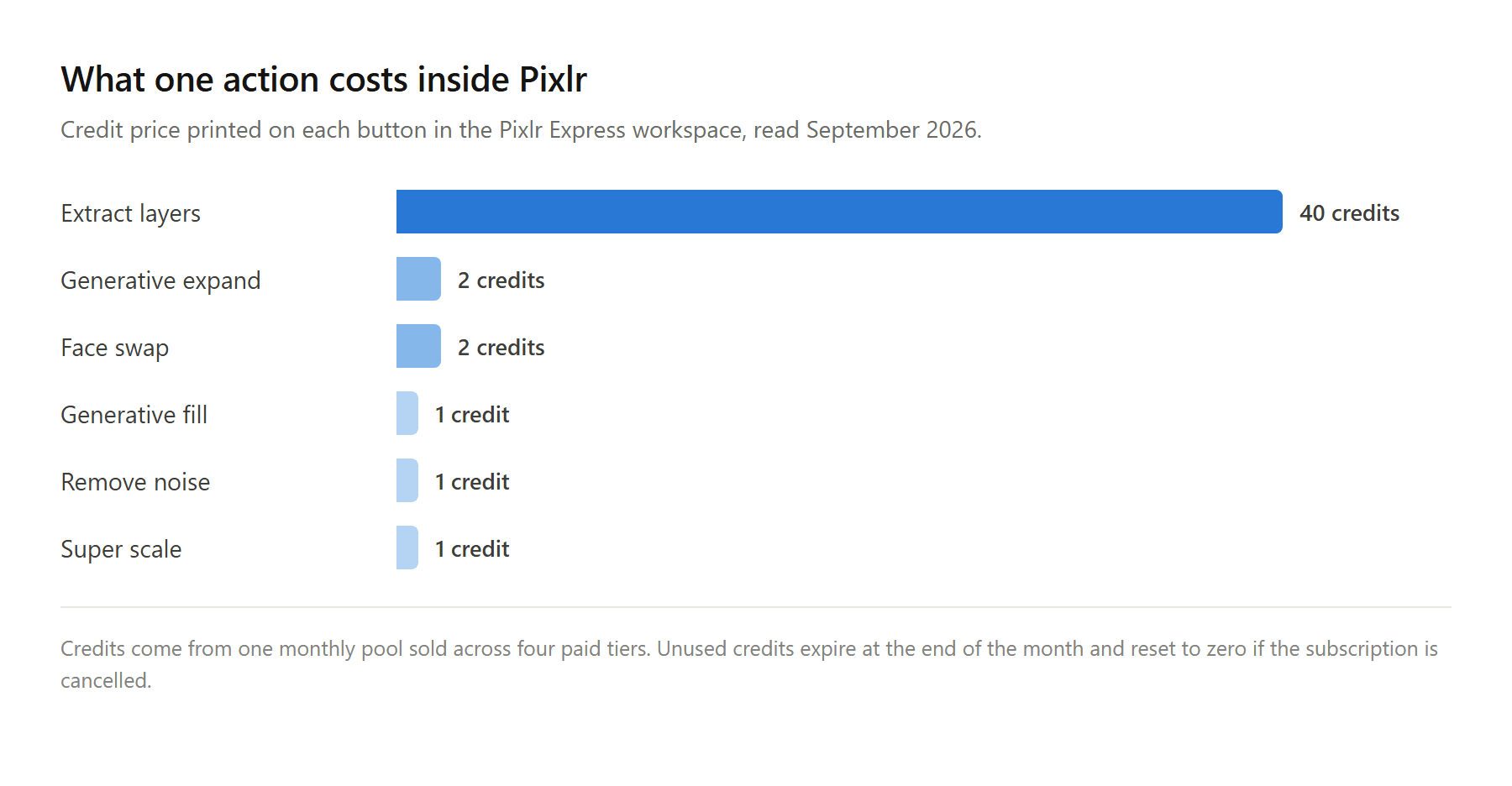
- PixlrのAIアクションはボタン上に価格が表示される。生成は1クレジット、拡張や顔の入れ替えは2、レイヤー抽出は40。
- プランのクレジットは毎月末に失効し、繰り越されず、解約するとゼロにリセットされる。
- AtlasはブラウザタブでImage Edit を実行し、画像ごとに課金し、実行前にボタン上へコストを表示する。
無料オンラインエディタとしてPixlrが優れている点
Pixlrは長い歴史を背負った本格的なエディタだ。実際には2つある。クラシックなワークスペースは今やeditor URLにあり、「the free advanced photo editor by Pixlr」と名乗っている。一方、より新しいexpress URLのものは「the free modern AI powered photo editor by Pixlr」と自称している。旧来のXとEのアドレスは、この2つへリダイレクトされる。
そのリーチは本物だ。Androidの掲載情報には、121万件のレビューに対して1億回以上のダウンロードが表示されており、これほど何度も開かれたブラウザエディタはほとんどない。
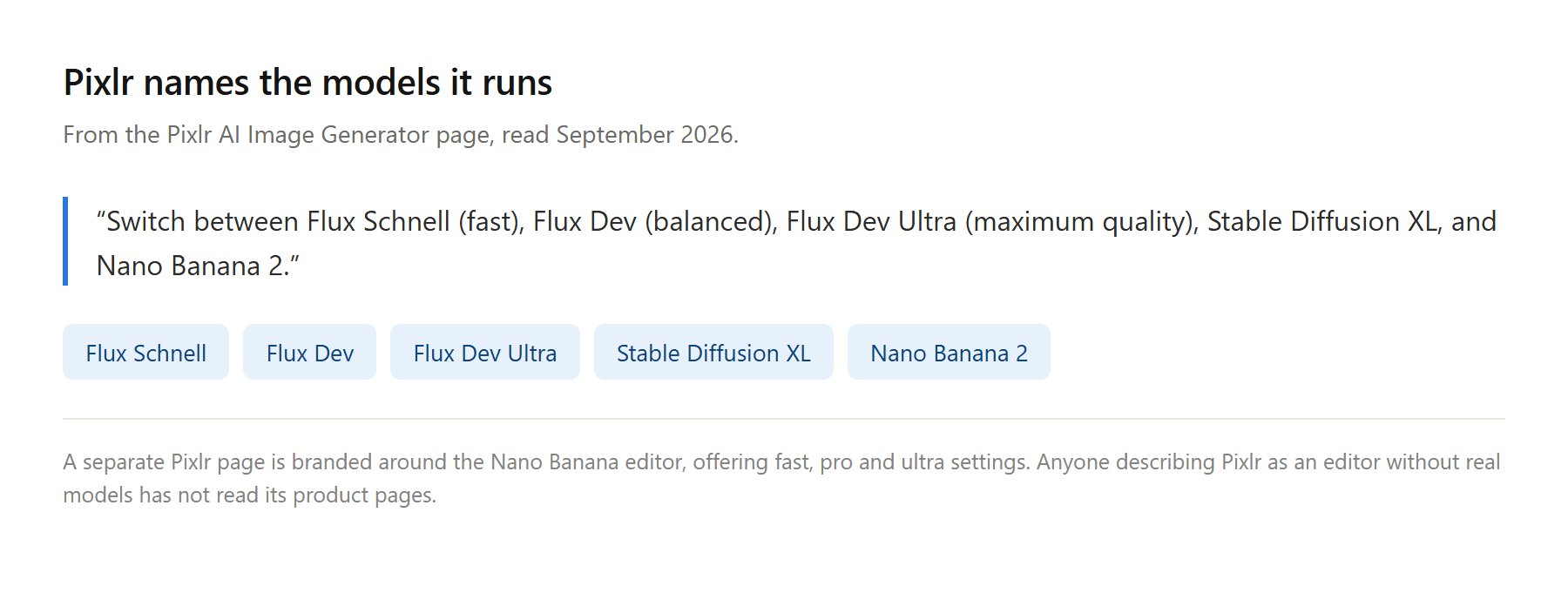
同社は、その下で動いているものも隠さなくなった。ホームページはツールを支えるモデルとしてFlux、Stable Diffusion、Seedream、Klingを挙げており、画像生成ページではドロップダウンにどれが並ぶかを教えてくれる。「Flux Schnell(高速)、Flux Dev(バランス)、Flux Dev Ultra(最高品質)、Stable Diffusion XL、Nano Banana 2を切り替えられます」。そのうちの1つ、Nano Banana editorのためのページまで丸ごと存在し、fast、pro、ultraの設定から選べる。
つまり以下の内容は、Pixlrが悪いモデルを選んだとか、弱いエディタを作ったという主張ではない。議論の的は、無料アカウントで何を仕上げられるか、そして支払った後にメーターがどう動くかだ。
なぜ人はPixlrの代替を探すのか
これを決めるのは2つの問いで、どちらも機能の話ではない。無料アカウントは1日に実際何を仕上げられるのか? そして月が変わるとき、支払ったクレジットはどうなるのか?
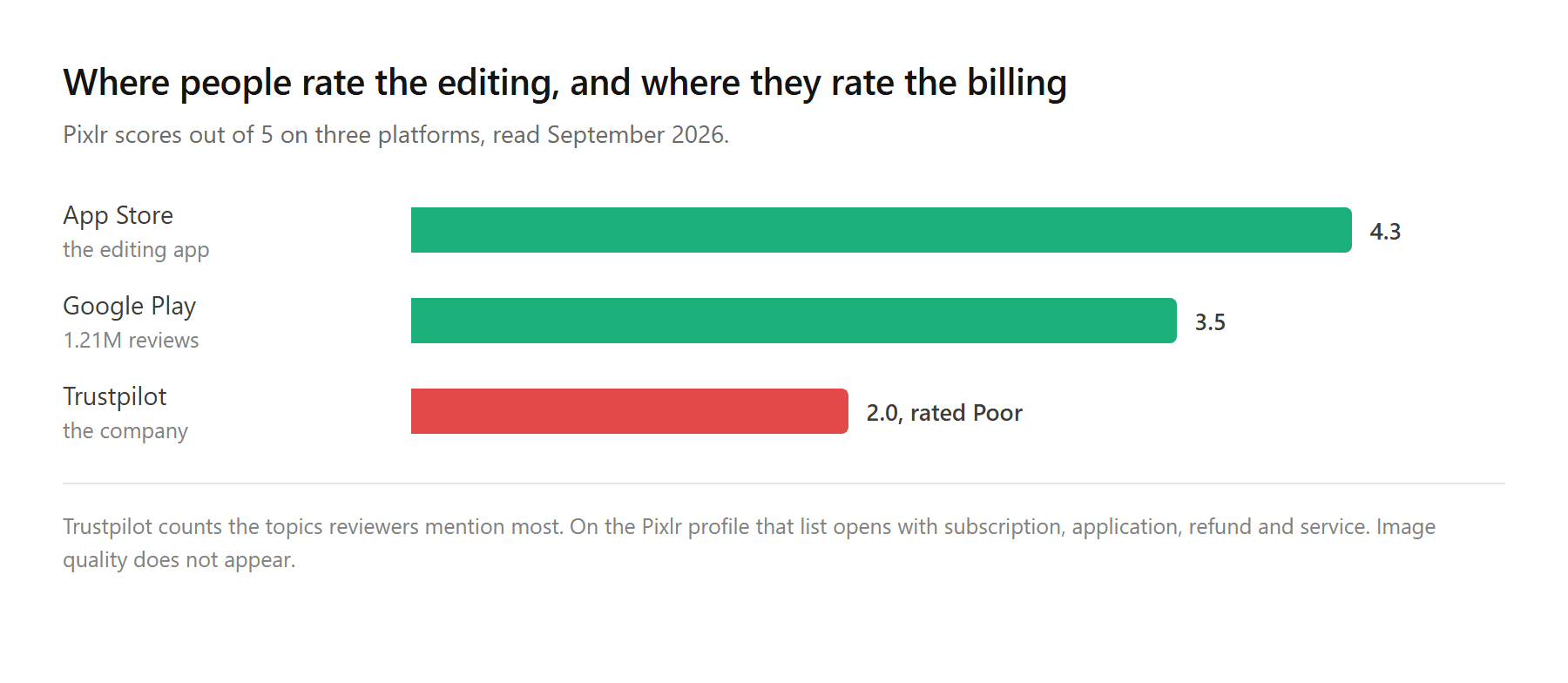
評価は摩擦がどこにあるかを示唆している。人々が編集機能を採点するストアでは、PixlrはiOSの約5,200件の評価で4.3、Google Playで3.5を維持している。人々が会社を採点するTrustpilotでは、5点満点で2だ。私たちが読んだ代替ツール一覧は、そのギャップを「無料枠は限定的」という一言で覆って先へ進む。
その背後にあるものはこうだ。
無料枠の数値はレビューへの返信の中にある
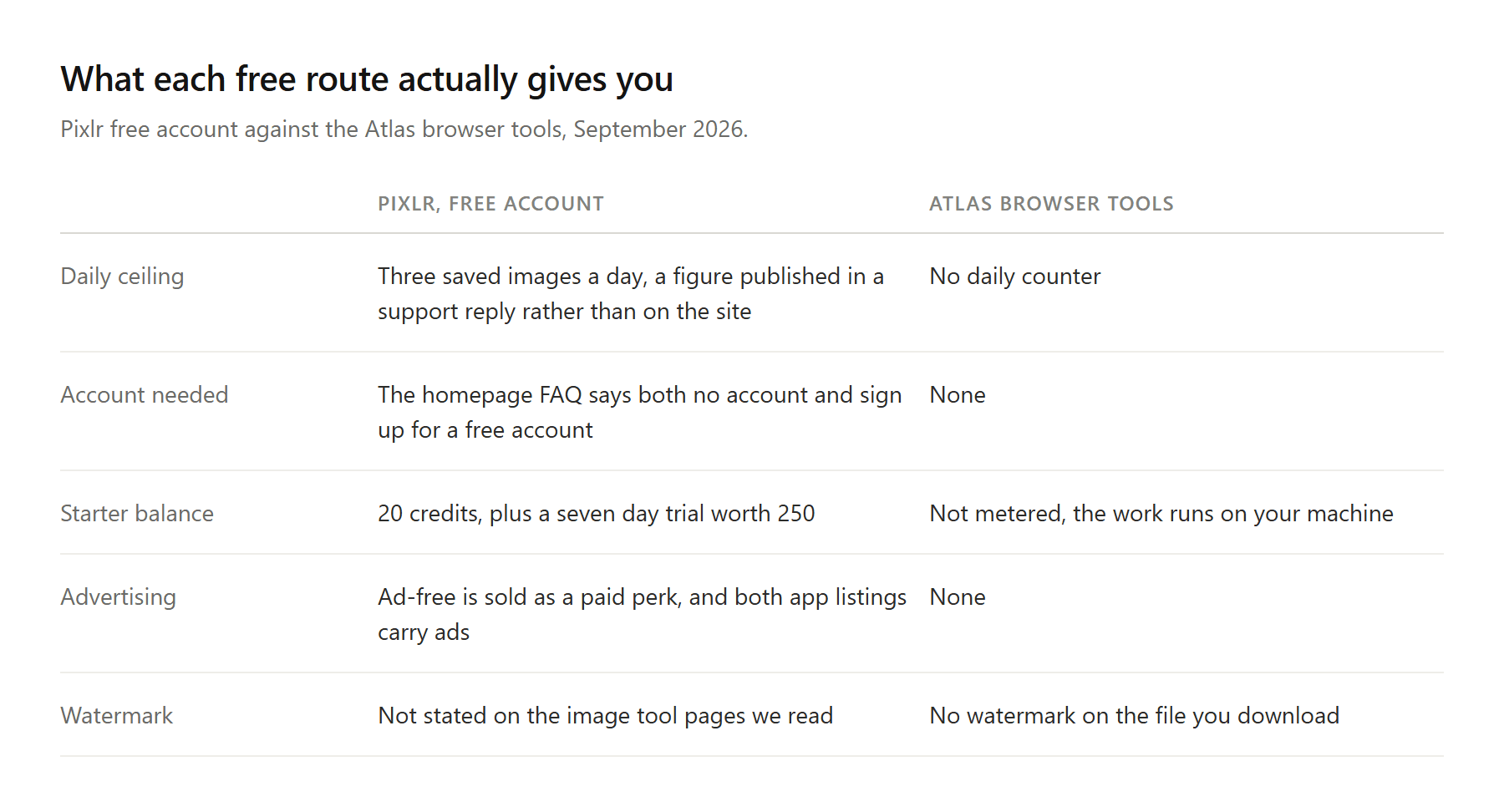
料金ページから始めよう。Plus、Premium、Ultra、Ultra MAXと名付けられた4つのカードがあり、いずれも月々のクレジット許容量を同じプールへ販売している。無料のカードはない。無料アカウントも数えられている証拠は、Plusの列にある「Unlimited saves(保存無制限)」という一行で、これは無料がそうでないことを教えてくれるが、数値は教えてくれない。
次にホームページのFAQは、アカウントの問いに対して2度、異なる答え方をしている。ある項目は、Pixlrの無料版を「アカウントも料金も必要なく」楽しめると言う。別の項目は、「無料アカウントに登録して、手の届く膨大な編集ツールを探し始めましょう」と言う。どちらも同じページにある。
その数値自体は意外な場所に現れる。2025年5月、星1つのレビューへの返信で、Pixlrのチームはこう書いた。「プランのないFreeアカウントのユーザーは、1日あたり最大3枚の画像/写真を編集・保存できます。有効なプランがない場合、Pixlrの機能/ツールへのアクセスは最小限/標準です」。
1日3枚。その返信は1年以上前のもので、許容量はそれ以降変わっているかもしれない——まさにそれが要点だ。カスタマーサービスの返信でしか読めないルールは、計画を立てるのに使えないルールだ。
カウンターも新しいものではなく、静かに登場したわけでもない。保存制限が現れてから2か月ほど後に書かれたPixlrのsubredditの投稿は、その後に訪れる離れを描写している。「保存制限ができてからというもの、Pixlrはせいぜい十数回しか使っていないし、まったく気に入らないおかしな描画ツールをいくつも抱えている」。人はエディタをやめると宣言したりしない。ただ、開く回数が減るだけだ。
![各Pixlr AIアクションが何クレジットかかるかを比較した棒グラフ。レイヤー抽出は40クレジットで他を大きく引き離している。回复...[图片]Amy Lee9 分钟前2026年7月と9月のPixlrの星1つレビュー3件をまとめた表。それぞれ自動更新または予期しない請求への不満を引用している。回复...[图片]Amy Lee8 分钟前Atlas Cloud Image Editのワークスペース。参照アップロードスロットとプロンプトボックスの上にモデルセレクターが開いており、次の実行の価格がRunボタンに表示されている。回复...[图片]Amy Lee7 分钟前2枚の別々の写真——スタジオ背景の女性と、ゴールデンアワーの誰もいない屋上テラス——と、その横に、Atlas Cloud Image Editが1つの指示から返した合成画像1枚。回复...[图片]Amy Lee6 分钟前同じ指示で2つの異なるAIモデルによって編集された、鋼製フラスコの製品写真1枚。入力と両方の結果が並び、各結果にはラベルが付いている。回复...[图片]Amy Lee6 分钟前無料のPixlrアカウントで得られるものと、アカウントなしでローカルに動作する4つのAtlasブラウザツールを比較した表。回复...[图片]Amy Lee5 分钟前4つの編集状況を適したツールに当てはめた意思決定表。手作業のレイヤー作業から、画像ごとに課金される反復的なAI編集まで。回复...推荐内容由 AI 生成本文暂未被其它文档引用本文暂未引用其它文档真诚点赞,手留余香取消发送0 字上传日志联系客服功能更新帮助中心快捷键 .wikiSSRBox{--wiki-ssr-tree-sidebar-width:0px;--wiki-ssr-header-expander-display:flex;visibility:hidden;display:block;background-color:var(--bg-body)}.wikiSSRBox{position:absolute;top:0;right:0;width:100%;height:100%;z-index:91}.wikiSSRBox #fakeTitle{display:none}.wikiSSRBox #innerdocbody{-webkit-user-select:none;-moz-user-select:none;-ms-user-select:none;user-select:none}.wikiSSRBox .app-main-container:not(.is-suite){background-color:var(--bg-body)!important}.wikiSSRBox #innerdocbody.blank-title>div:first-child:before,.wikiSSRBox .mention-chat-button{visibility:hidden!important}.wikiSSRBox #mainContainer{width:100%;height:100%}.wikiSSRBox .app-main-container{width:100%;height:100%}.wikiSSRBox .app-main{width:100%;height:100%}.wikiSSRBox .wiki-ssr-container{width:100%;height:100%;position:relative}.wikiSSRBox .wiki-ssr-right-box{height:100%;position:absolute;top:0;right:0;width:calc(100% - var(--wiki-ssr-tree-sidebar-width));display:flex;flex-direction:column;background-color:var(--bg-body)}.wikiSSRBox .wiki-ssr-header__wrapper{position:relative;width:100%;height:64px}.wikiSSRBox .wiki-ssr-header__bar{padding-left:10px;border-bottom:1px solid var(--line-border-card);display:flex;position:relative;line-height:64px;height:64px;background-color:var(--bg-body)}.wikiSSRBox .wiki-ssr-header__box{width:calc(100% - 100px);margin-right:16px;position:relative;white-space:nowrap;flex:1}.wikiSSRBox .wiki-ssr-header__note-title{user-select:none;position:relative;display:flex;flex-direction:row;height:64px;width:100%;line-height:1.5;align-items:center;justify-content:space-between;white-space:nowrap}.wikiSSRBox .wiki-ssr-header__left-content{flex-grow:1;overflow:hidden;display:flex;justify-content:flex-start;align-items:center}.wikiSSRBox .wiki-ssr-header__right-content{flex-grow:0;flex:1;display:flex;justify-content:flex-end;align-items:center}.wikiSSRBox .wiki-ssr-header__input-container{min-width:120px;flex:1 1 0%;font-variant-numeric:normal;font-feature-settings:normal}.wikiSSRBox .wiki-ssr-header__wiki-logo{display:flex;align-items:center;height:100%}.wikiSSRBox .wiki-ssr-header__expander,.wikiSSRBox .wiki-ssr-header__recent-menu-icon{width:24px;border-radius:4px;height:24px;margin:0 8px 0 6px;display:var(--wiki-ssr-header-expander-display);flex-shrink:0;flex-grow:0;justify-content:center;align-items:center}.wikiSSRBox .wiki-ssr-header__expander-next{width:30px;height:30px;border-radius:5px 0 0 5px;margin-right:0;margin-left:4px;box-sizing:border-box}.wikiSSRBox .wiki-ssr-header__recent-menu-icon{width:24px;height:24px;margin:0 2px 0 0;border-radius:0 5px 5px 0;border-left:none;box-sizing:border-box}.wikiSSRBox .wiki-ssr-header__wiki-logo-navbar{display:flex;flex-direction:column;width:100%;padding-left:4px;overflow:hidden}.wikiSSRBox .wiki-ssr-header__title{width:100%;display:flex;flex-direction:column;height:26px;justify-content:center}.wikiSSRBox .wiki-ssr-header__title-text{overflow:hidden;font-size:14px;margin-left:6px;color:var(--text-title)}.wikiSSRBox .wiki-ssr-header__title-info{margin-left:1px;display:flex;color:var(--text-caption);font-size:12px;line-height:18px;height:18px;white-space:nowrap;overflow:hidden;text-overflow:ellipsis;flex-shrink:0;margin-top:-1px}.wikiSSRBox .wiki-ssr-header__right-btn{margin-left:10px;display:flex;align-items:center;justify-content:center}.wikiSSRBox .wiki-ssr-header__line{width:1px;height:32px;background-color:var(--ccmtoken-mindnote-highlightcolor-neutral);margin:0 4px 0 16px}.wikiSSRBox .wiki-ssr-header__avatar-box{display:flex}.wikiSSRBox .setting-btn.hidden,.wikiSSRBox .wiki-ssr-header__avatar-box.hidden{display:none}.wikiSSRBox .wiki-ssr-header__avatar-box .wiki-ssr-header__line{margin:0 16px 0 14px}.wikiSSRBox .wiki-ssr-header__avatar{width:32px;height:32px;border-radius:50%}.wikiSSRBox .wiki-workspace-ssr-header__wrapper{position:relative;width:100%;height:64px}.wikiSSRBox .wiki-workspace-ssr-header__wrapper-card-mode{position:relative;width:100%;height:40px}.wikiSSRBox .wiki-workspace-ssr-header__wrapper-card-mode .wiki-workspace-ssr-header__box{margin-right:12px}.wikiSSRBox .wiki-workspace-ssr-header__wrapper-card-mode .wiki-workspace-ssr-header__note-title{padding-right:0}.wikiSSRBox .wiki-workspace-ssr-header__wrapper-card-mode .wiki-workspace-ssr-header__line{margin:0 0 0 12px}.wikiSSRBox .wiki-workspace-ssr-header__wrapper-card-mode .wiki-workspace-ssr-header__right-btn{margin-left:12px}.wikiSSRBox .wiki-workspace-ssr-header__bar{padding-left:10px;border-bottom:1px solid rgba(var(--N900-raw),.075);display:flex;position:relative;height:100%;background-color:var(--bg-body)}.wikiSSRBox .wiki-workspace-ssr-header__box{width:calc(100% - 100px);margin-right:16px;position:relative;white-space:nowrap;flex:1}.wikiSSRBox .wiki-workspace-ssr-header__note-title{user-select:none;position:relative;display:flex;flex-direction:row;padding-right:16px;height:100%;width:100%;line-height:1.5;align-items:center;justify-content:space-between;white-space:nowrap}.wikiSSRBox .wiki-workspace-ssr-header__left-content{flex-grow:1;overflow:hidden;display:flex;justify-content:flex-start;align-items:center}.wikiSSRBox .wiki-workspace-ssr-header__right-content{flex-grow:0;flex:1;display:flex;justify-content:flex-end;align-items:center}.wikiSSRBox .wiki-workspace-ssr-header__input-container{min-width:120px;flex:1 1 0%;font-variant-numeric:normal;font-feature-settings:normal}.wikiSSRBox .wiki-workspace-ssr-header__wiki-logo{display:flex;align-items:center;height:100%}.wikiSSRBox .wiki-workspace-ssr-header__wiki-logo-left{display:var(--wiki-ssr-header-expander-display);align-items:center;height:100%}.wikiSSRBox .wiki-workspace-ssr-header__expander{width:24px;border-radius:4px;height:24px;margin:0 8px 0 3px;display:flex;flex-shrink:0;flex-grow:0;justify-content:center;align-items:center}.wikiSSRBox .wiki-workspace-ssr-header__wiki-logo-navbar{display:flex;flex-direction:column;width:100%;padding-left:4px;overflow:hidden}.wikiSSRBox .wiki-workspace-ssr-header__title{width:100%;display:flex;flex-direction:column;height:26px;justify-content:center}.wikiSSRBox .wiki-workspace-ssr-header__title-text{overflow:hidden;font-size:14px;margin-left:6px;color:var(--text-title)}.wikiSSRBox .wiki-workspace-ssr-header__title-info{margin-left:1px;display:flex;color:var(--text-caption);font-size:12px;line-height:18px;height:18px;white-space:nowrap;overflow:hidden;text-overflow:ellipsis;flex-shrink:0;margin-top:-1px}.wikiSSRBox .wiki-workspace-ssr-header__right-btn{margin-left:10px;display:flex;align-items:center;justify-content:center}.wikiSSRBox .wiki-workspace-ssr-header__line{width:1px;height:20px;background-color:var(--ccmtoken-mindnote-highlightcolor-neutral);margin:0 4px 0 16px}.wikiSSRBox .wiki-workspace-ssr-header__avatar-box{display:flex;align-items:center}.wikiSSRBox .wiki-workspace-ssr-header__avatar-box .wiki-workspace-ssr-header__line{margin:0 16px 0 14px}.wikiSSRBox .wiki-workspace-ssr-header__avatar{width:32px;height:32px;border-radius:50%}.wikiSSRBox .wiki-ssr-sidebar__wrapper,.wikiSkeletonBox .wiki-ssr-sidebar__wrapper{height:100%;top:0;left:0;overflow:hidden;display:flex;flex-direction:column;background-color:var(--bg-body-overlay);border-right:1px solid var(--N300)}.wikiSSRBox .wiki-ssr-sidebar__wrapper{position:absolute;width:var(--wiki-ssr-tree-sidebar-width)}.wikiSkeletonBox .wiki-ssr-sidebar__wrapper{width:100%}.wikiSSRBox .wiki-ssr-sidebar__placeholder,.wikiSkeletonBox .wiki-ssr-sidebar__placeholder{border-radius:6px;background:var(--bg-filler)}.wikiSSRBox .wiki-ssr-sidebar__header,.wikiSkeletonBox .wiki-ssr-sidebar__header{padding:0 14px 0 8px;height:64px;width:100%;display:flex;align-items:center;flex-shrink:0;overflow:hidden;box-sizing:border-box}.wikiSSRBox #wiki-ssr-sidebar .wiki-ssr-sidebar__header,.wikiSkeletonBox #wiki-ssr-sidebar .wiki-ssr-sidebar__header{justify-content:space-between}.wikiSSRBox .wiki-ssr-sidebar__header-back-btn,.wikiSkeletonBox .wiki-ssr-sidebar__header-back-btn{width:24px;height:24px;border-radius:50%!important;margin-left:10px;margin-right:6px}.wikiSSRBox #wiki-ssr-sidebar .wiki-ssr-sidebar__header-title,.wikiSkeletonBox #wiki-ssr-sidebar .wiki-ssr-sidebar__header-title{width:128px;height:22px}.wikiSSRBox #workspace-next-ssr-sidebar .wiki-ssr-sidebar__header-title,.wikiSkeletonBox #workspace-next-ssr-sidebar .wiki-ssr-sidebar__header-title{width:137px;height:14px}.wikiSSRBox #wiki-ssr-sidebar .wiki-ssr-sidebar__header-icon,.wikiSkeletonBox #wiki-ssr-sidebar .wiki-ssr-sidebar__header-icon{width:24px;height:24px;display:flex;flex-shrink:0;flex-grow:0;justify-content:center;align-items:center;position:relative;right:-1px}.wikiSSRBox .wiki-ssr-sidebar__search-box,.wikiSkeletonBox .wiki-ssr-sidebar__search-box{flex-grow:0;flex-shrink:0;padding:0 8px 8px 8px}.wikiSSRBox .wiki-ssr-sidebar__search,.wikiSkeletonBox .wiki-ssr-sidebar__search{color:var(--text-caption);height:32px;padding-left:12px;display:flex;justify-content:space-between;align-items:center;border:1px solid transparent;background-color:var(--udtoken-component-outlined-bg)!important}.wikiSSRBox .wiki-ssr-sidebar__search-icon,.wikiSkeletonBox .wiki-ssr-sidebar__search-icon{color:var(--icon-n2);width:20px;height:20px;display:flex;align-items:center;justify-content:center;font-size:16px}.wikiSSRBox .wiki-ssr-sidebar__space-info,.wikiSkeletonBox .wiki-ssr-sidebar__space-info{height:56px;width:100%;padding:0 18px;margin-right:12px;display:flex;align-items:center}.wikiSSRBox .wiki-ssr-sidebar__space-icon,.wikiSkeletonBox .wiki-ssr-sidebar__space-icon{width:24px;height:24px;border-radius:50%!important;flex-shrink:0;margin-right:12px}.wikiSSRBox .wiki-ssr-sidebar__space-name,.wikiSkeletonBox .wiki-ssr-sidebar__space-name{height:14px;width:200px}.wikiSSRBox .wiki-ssr-sidebar__catalog-list,.wikiSkeletonBox .wiki-ssr-sidebar__catalog-list{flex-grow:1;overflow:hidden;display:flex;flex-direction:column;padding:0 8px}.wikiSSRBox #wiki-ssr-sidebar .wiki-ssr-sidebar__catalog-list,.wikiSkeletonBox #wiki-ssr-sidebar .wiki-ssr-sidebar__catalog-list{margin-top:14px}.wikiSSRBox .wiki-ssr-sidebar__catalog-title,.wikiSkeletonBox .wiki-ssr-sidebar__catalog-title{padding-left:2px;padding-right:8px;height:32px;display:flex;justify-content:space-between;align-items:center;font-size:13px;white-space:nowrap;border-radius:6px;overflow:hidden}.wikiSSRBox #wiki-ssr-sidebar .wiki-ssr-sidebar__catalog-tips,.wikiSkeletonBox #wiki-ssr-sidebar .wiki-ssr-sidebar__catalog-tips{width:94px;height:20px}.wikiSSRBox #workspace-next-ssr-sidebar .wiki-ssr-sidebar__catalog-tips,.wikiSkeletonBox #workspace-next-ssr-sidebar .wiki-ssr-sidebar__catalog-tips{width:54px;height:14px}.wikiSSRBox .wiki-ssr-sidebar__add-icon,.wikiSkeletonBox .wiki-ssr-sidebar__add-icon{font-size:16px;width:20px;height:20px;display:flex;align-items:center;justify-content:center;position:relative;right:-1px}.wikiSSRBox .wiki-ssr-sidebar__catalog-item,.wikiSkeletonBox .wiki-ssr-sidebar__catalog-item{height:35px;margin-top:1px;display:flex;align-items:center;padding:4px}.wikiSSRBox #wiki-ssr-sidebar .wiki-ssr-sidebar__catalog-item-left,.wikiSkeletonBox #wiki-ssr-sidebar .wiki-ssr-sidebar__catalog-item-left{width:16px;height:16px;margin-right:6px}.wikiSSRBox #workspace-next-ssr-sidebar .wiki-ssr-sidebar__catalog-item-left,.wikiSkeletonBox #workspace-next-ssr-sidebar .wiki-ssr-sidebar__catalog-item-left{width:18px;height:18px;margin-right:8px;margin-left:8px;flex-shrink:0;border-radius:50%!important}.wikiSSRBox #wiki-ssr-sidebar .wiki-ssr-sidebar__catalog-item-right,.wikiSkeletonBox #wiki-ssr-sidebar .wiki-ssr-sidebar__catalog-item-right{width:180px;height:18px}.wikiSSRBox #workspace-next-ssr-sidebar .wiki-ssr-sidebar__catalog-item-right,.wikiSkeletonBox #workspace-next-ssr-sidebar .wiki-ssr-sidebar__catalog-item-right{width:180px;height:14px}.wikiSSRBox .wiki-workspace-ssr-sidebar__wrapper,.wikiSkeletonBox .wiki-workspace-ssr-sidebar__wrapper{height:100%;top:0;left:0;overflow:hidden;display:flex;flex-direction:column}.wikiSSRBox .wiki-workspace-ssr-sidebar__wrapper{position:absolute;width:var(--wiki-ssr-tree-sidebar-width)}.wikiSkeletonBox .wiki-workspace-ssr-sidebar__wrapper{width:100%}.wikiSSRBox .wiki-workspace-ssr-sidebar__placeholder,.wikiSkeletonBox .wiki-workspace-ssr-sidebar__placeholder{border-radius:6px;background:var(--bg-filler)}.wikiSSRBox .wiki-workspace-ssr-sidebar__header,.wikiSkeletonBox .wiki-workspace-ssr-sidebar__header{padding:0 0 0 8px;height:64px;width:100%;display:flex;align-items:center;justify-content:space-between;flex-shrink:0;overflow:hidden;box-sizing:border-box;border-bottom:1px solid rgba(var(--N900-raw),.075)}.wikiSSRBox .wiki-workspace-ssr-sidebar__header-left-area,.wikiSkeletonBox .wiki-workspace-ssr-sidebar__header-left-area{display:flex;align-items:center;height:28px}.wikiSSRBox .wiki-workspace-ssr-sidebar__header-right-area,.wikiSkeletonBox .wiki-workspace-ssr-sidebar__header-right-area{display:flex;align-items:center}.wikiSSRBox .wiki-workspace-ssr-sidebar__header-entry,.wikiSkeletonBox .wiki-workspace-ssr-sidebar__header-entry{width:28px;height:28px;font-size:24px;padding:2px;margin:0 0 0 2px}.wikiSSRBox .wiki-workspace-ssr-sidebar__header-entry .universe-icon,.wikiSkeletonBox .wiki-workspace-ssr-sidebar__header-entry .universe-icon{display:flex}.wikiSSRBox .wiki-workspace-ssr-sidebar__header-divider,.wikiSkeletonBox .wiki-workspace-ssr-sidebar__header-divider{width:1px;height:20px;background:var(--line-divider-default);margin:0 8px}.wikiSSRBox .wiki-workspace-ssr-sidebar__header-divider-no-margin,.wikiSkeletonBox .wiki-workspace-ssr-sidebar__header-divider-no-margin{width:1px;height:20px;background:var(--line-divider-default)}.wikiSSRBox .wiki-workspace-ssr-sidebar__header-title,.wikiSkeletonBox .wiki-workspace-ssr-sidebar__header-title{width:128px;height:22px}.wikiSSRBox .wiki-workspace-ssr-sidebar__header-icon,.wikiSkeletonBox .wiki-workspace-ssr-sidebar__header-icon{width:24px;height:24px;display:flex;flex-shrink:0;flex-grow:0;justify-content:center;align-items:center;position:relative;right:-1px;margin:0 10px 0 0}.wikiSSRBox .wiki-workspace-ssr-sidebar__catalog-list,.wikiSkeletonBox .wiki-workspace-ssr-sidebar__catalog-list{flex-grow:1;overflow:hidden;display:flex;flex-direction:column;padding:12px 8px 0 8px;background-color:var(--bg-content-base)}.wikiSSRBox .wiki-workspace-ssr-sidebar__catalog-title,.wikiSkeletonBox .wiki-workspace-ssr-sidebar__catalog-title{padding-left:8px;padding-right:8px;height:32px;display:flex;justify-content:space-between;align-items:center;font-size:13px;white-space:nowrap;border-radius:6px;overflow:hidden}.wikiSSRBox .wiki-workspace-ssr-sidebar__catalog-tips,.wikiSkeletonBox .wiki-workspace-ssr-sidebar__catalog-tips{width:94px;height:20px}.wikiSSRBox .wiki-workspace-ssr-sidebar__add-icon,.wikiSkeletonBox .wiki-workspace-ssr-sidebar__add-icon{font-size:16px;width:20px;height:20px;display:flex;align-items:center;justify-content:center;position:relative;right:-1px}.wikiSSRBox .wiki-workspace-ssr-sidebar__catalog-item,.wikiSkeletonBox .wiki-workspace-ssr-sidebar__catalog-item{height:35px;margin-top:1px;display:flex;align-items:center;padding-left:6px}.wikiSSRBox .wiki-workspace-ssr-sidebar__catalog-item-left,.wikiSkeletonBox .wiki-workspace-ssr-sidebar__catalog-item-left{width:16px;height:16px;margin-right:6px}.wikiSSRBox .wiki-workspace-ssr-sidebar__catalog-item-right,.wikiSkeletonBox .wiki-workspace-ssr-sidebar__catalog-item-right{width:180px;height:18px}.wikiSSRBox .wiki-ssr-content-box{flex:1;overflow:hidden;height:100%;width:100%;position:relative}#ssrBox.wikiSSRBox .etherpad-container{width:auto;transition:none}.wikiSSRBox .wiki-selection-nav{position:absolute;height:100%;display:flex;align-items:center}.wikiSSRBox .entries-container{margin-top:30px;padding-bottom:0}#ssrBox.wikiSSRBox .etherpad-container.narrow{margin-left:100px}#ssrBox.wikiSSRBox .etherpad-container.medium{margin-left:max(calc(140px + (100% - 900px)/ 500 * 156),140px)}#ssrBox.wikiSSRBox .ssr-cover-loader-container{display:block;align-items:initial;justify-content:initial;text-align:center}#ssrBox.wikiSSRBox .ssr-cover-loader-container:after{content:'';display:inline-block;height:100%;vertical-align:middle}#ssrBox.wikiSSRBox .ssr-cover-loader-container .suite-loading-docx{vertical-align:middle}.wikiSSRBox .version-header__dropdown-btn-container{display:flex;align-items:center;margin-right:24px;font-size:14px;min-width:120px;padding-left:6px}.wikiSSRBox .version-header__title{overflow:hidden;white-space:nowrap;text-overflow:ellipsis}.wiki-ssr-sidebar__wrapper{display: none !important}.wiki-ssr-header__expander.wiki-ssr-header__expander-legacy, .wiki-ssr-sidebar__header-icon.wiki-ssr-sidebar__header-icon-legacy{display: none !important} !function(){!function(){var e=document.querySelector(".wikiSSRBox .wiki-ssr-header__avatar-box"),i=document.querySelector(".wikiSSRBox .wiki-ssr-header__right-btn.setting-btn"),t=window&&window.navigator.userAgent;if((/feishu/i.test(t)||/lark/i.test(t))&&/superapp/i.test(t))i&&i.classList.remove("hidden");else e&&e.classList.remove("hidden")}();var e=window.current_space_wiki,i=function(e){var i=document.querySelector(e);if(i&&i.parentNode)i.parentNode.removeChild(i)},t=function(){i(".wikiSSRBox"),i("#wikiSSRStyle")};if(e&&8===e.obj_type){const e=document.querySelector(".bitable-ssr-table-content"),i=document.querySelector(".bitable-ssr-workflow-content");if(!(e||i))return void t();if(window.matchLocal)return void t();if(window.bitableSSRValid&&!window.bitableWorkflowSSRValid)return void t()}if(document.querySelector(".wikiSSRBox").style.visibility="visible",window.performance&&window.performance.mark)window.performance.mark("wiki_suite_ssr_show")}(); window.fourthChunkStartTime=Date.now();window.catalogRecordInfo={"isEmptyCatalog":true,"headingRecords":{}} try { // 更新 catalogue if (window.__catalogueContentCallbacks) { window.__catalogueContentCallbacks.forEach(cb => cb()) window.__catalogueContentCallbacks = null } } catch(e) {} window.fourthChunkEndTime=Date.now();document.cookie="template-branch-list\u003d;expires\u003dMon, 21 Sep 2026 09:57:40 GMT;path\u003d/"window.__trailers = {"x-pageserver-objtype":"22","x-ssr-version":"1.0.18.78"} 采集#HUABAN_WIDGETS {font-family: "helvetica neue",arial,sans-serif; color: #444; font-size: 14px;} #HUABAN_WIDGETS * {box-sizing: content-box;} #HUABAN_WIDGETS .HUABAN-main {position: fixed; left: 0; top: 0; width: 100%; height: 100%; background: #e5e5e5; background: rgba(229,229,229,.95); max-height: 100%; overflow: hidden; z-index: 9999999999999;} #HUABAN_WIDGETS a img {border: 0;} #HUABAN_WIDGETS .HUABAN-header {height: 50px; background: white; box-shadow: 0 0 4px rgba(0,0,0,.2); width: 100%; left: 0; top: 0; position: absolute;} #HUABAN_WIDGETS .HUABAN-header .HUABAN-inner {margin: 0 auto; position: relative;} #HUABAN_WIDGETS .HUABAN-header .HUABAN-close {width: 60px; height: 50px; border-left: 1px solid #ddd; position: absolute; right: 0; top: 0; background: url(https://huaban.com/img/widgets/btn_close.png) 20px 14px no-repeat; cursor: pointer;} #HUABAN_WIDGETS .HUABAN-header .HUABAN-close:hover {background-position: 20px -26px;} #HUABAN_WIDGETS .HUABAN-header .HUABAN-close:active {background-position: 20px -66px;} #HUABAN_WIDGETS .HUABAN-header .HUABAN-logo {display: block; position: absolute; top: 12px;} #HUABAN_WIDGETS .HUABAN-waterfall-holder {position: relative; overflow-y: auto; height: 100%;} #HUABAN_WIDGETS .HUABAN-waterfall {position: relative; margin-top: 50px;} #HUABAN_WIDGETS .HUABAN-waterfall .HUABAN-empty {position: absolute; left: 50%; top: 30px; height: 36px; line-height: 36px; width: 216px; text-align: left; margin-left: -128px; color: #777; background: url(https://huaban.com/img/widgets/icon_notice.png) 12px 8px no-repeat white; padding-left: 40px; font-size: 15px;} #HUABAN_WIDGETS .HUABAN-btn {display: inline-block; border-radius: 2px; font-size: 14px; padding: 0 12px; height: 30px; line-height: 30px; cursor: pointer; text-decoration: none; white-space: nowrap; -moz-user-select: none; -webkit-user-select: none; user-select: none; text-align: center; background: #D53939; color: white;} #HUABAN_WIDGETS .HUABAN-btn:hover {background: #E54646;} #HUABAN_WIDGETS .HUABAN-btn:active {background: #C52424;} #HUABAN_WIDGETS .HUABAN-wbtn {background: #EDEDED; color: #444;} #HUABAN_WIDGETS .HUABAN-wbtn:hover {background: #F2F2F2;} #HUABAN_WIDGETS .HUABAN-wbtn:active {background: #DDD;} #HUABAN_WIDGETS .HUABAN-f-button {position: absolute; display: none; z-index: 9999999999998; box-shadow: 0 0 0 2px rgba(255,255,255,.2); background: #aaa; background: rgba(0,0,0,.3); color: white; cursor: pointer; padding: 0 12px; height: 30px; line-height: 30px; border-radius: 2px; font-size: 14px} #HUABAN_WIDGETS .HUABAN-f-button:hover {background-color: #999; background-color: rgba(0,0,0,.5);} #HUABAN_WIDGETS .HUABAN-f-button:active {background-color: rgba(0,0,0,.6);} #HUABAN_WIDGETS .HUABAN-red-normal-icon-button {width: 36px; height: 24px; border: 0px; line-height: 24px; padding-left: 24px; padding-right: 0px; text-align: left; background: url(https://huaban.com/img/widgets/widget_icons.png) 0 -200px no-repeat; box-shadow: none !important; font-size: 14px; background-color: transparent !important;} #HUABAN_WIDGETS .HUABAN-red-normal-icon-button:hover {background-position: -130px -200px;} #HUABAN_WIDGETS .HUABAN-red-normal-icon-button:active {background-position: -260px -200px;} #HUABAN_WIDGETS .HUABAN-red-large-icon-button {width: 80px; height: 24px; border: 0px; line-height: 24px; padding-left: 24px; padding-right: 0px; text-align: left; background: url(https://huaban.com/img/widgets/widget_icons.png) 0 -150px no-repeat; box-shadow: none !important; font-size: 14px; background-color: transparent !important;} #HUABAN_WIDGETS .HUABAN-red-large-icon-button:hover {background-position: -130px -150px;} #HUABAN_WIDGETS .HUABAN-red-large-icon-button:active {background-position: -260px -150px;} #HUABAN_WIDGETS .HUABAN-red-small-icon-button {width: 30px; height: 21px; border: 0px; line-height: 21px; padding-left: 20px; padding-right: 0px; text-align: left; background: url(https://huaban.com/img/widgets/widget_icons.png) 0 -250px no-repeat; box-shadow: none !important; font-size: 12px; background-color: transparent !important;} #HUABAN_WIDGETS .HUABAN-red-small-icon-button:hover {background-position: -130px -250px;} #HUABAN_WIDGETS .HUABAN-red-small-icon-button:active {background-position: -260px -250px;} #HUABAN_WIDGETS .HUABAN-white-normal-icon-button {width: 36px; height: 24px; border: 0px; line-height: 24px; padding-left: 24px; padding-right: 0px; text-align: left; background: url(https://huaban.com/img/widgets/widget_icons.png) 0 -500px no-repeat; box-shadow: none !important; color: #444; font-size: 14px; background-color: transparent !important;} #HUABAN_WIDGETS .HUABAN-white-normal-icon-button:hover {background-position: -130px -500px;} #HUABAN_WIDGETS .HUABAN-white-normal-icon-button:active {background-position: -260px -500px;} #HUABAN_WIDGETS .HUABAN-white-large-icon-button {width: 80px; height: 24px; border: 0px; line-height: 24px; padding-left: 24px; padding-right: 0px; text-align: left; background: url(https://huaban.com/img/widgets/widget_icons.png) 0 -450px no-repeat; box-shadow: none !important; color: #444; font-size: 14px; background-color: transparent !important;} #HUABAN_WIDGETS .HUABAN-white-large-icon-button:hover {background-position: -130px -450px;} #HUABAN_WIDGETS .HUABAN-white-large-icon-button:active {background-position: -260px -450px;} #HUABAN_WIDGETS .HUABAN-white-small-icon-button {width: 30px; height: 21px; border: 0px; line-height: 21px; padding-left: 20px; padding-right: 0px; text-align: left; background: url(https://huaban.com/img/widgets/widget_icons.png) 0 -550px no-repeat; box-shadow: none !important; color: #444; font-size: 12px; background-color: transparent !important;} #HUABAN_WIDGETS .HUABAN-white-small-icon-button:hover {background-position: -130px -550px;} #HUABAN_WIDGETS .HUABAN-white-small-icon-button:active {background-position: -260px -550px;} #HUABAN_WIDGETS .HUABAN-cell {width: 236px; position: absolute; background: white; box-shadow: 0 1px 3px rgba(0,0,0,.3); transition: left .3s ease-in-out, top .3s linear;} #HUABAN_WIDGETS .HUABAN-cell .HUABAN-img-holder {overflow: hidden; position: relative;} #HUABAN_WIDGETS .HUABAN-cell .HUABAN-img-holder:hover img.HUABAN-cell-img {opacity: .8} #HUABAN_WIDGETS .HUABAN-cell .HUABAN-video-icon {width: 72px; height: 62px; position: absolute; left: 50%; top: 50%; margin: -31px auto auto -36px; background: url(https://huaban.com/img/widgets/media_video.png) 0 0 no-repeat; display: none;} #HUABAN_WIDGETS .HUABAN-cell.HUABAN-video .HUABAN-video-icon {display: block;} #HUABAN_WIDGETS .HUABAN-cell .HUABAN-over {display: none;} #HUABAN_WIDGETS .HUABAN-cell:hover .HUABAN-over {display: block;} #HUABAN_WIDGETS .HUABAN-cell .HUABAN-over .HUABAN-btn {width: 60px; height: 34px; padding: 0; position: absolute; left: 50%; top: 50%; margin: -18px 0 0 -31px; line-height: 34px; box-shadow: 0 0 0 2px rgba(255,255,255,.2); font-size: 16px;} #HUABAN_WIDGETS .HUABAN-cell.HUABAN-long .HUABAN-img-holder {height: 600px;} #HUABAN_WIDGETS .HUABAN-cell.HUABAN-long .HUABAN-img-holder:after {content: ""; display: block; position: absolute; width: 236px; height: 12px; left: 0; bottom: 0; background: url(https://huaban.com/img/widgets/long_image_shadow_2.png) repeat-x 4px top;} #HUABAN_WIDGETS .HUABAN-cell img {width: 236px; display: block;} #HUABAN_WIDGETS .HUABAN-cell .HUABAN-size {margin: 8px 16px; font-size: 12px; color: #999} #HUABAN_WIDGETS .HUABAN-cell .HUABAN-description {display: block; width: 202px; margin: 0 6px 6px; padding: 6px 10px; border: 0; resize: none; outline: 0; border: 1px solid transparent; line-height: 18px; font-size: 13px; overflow: hidden; word-wrap: break-word; background: url(https://huaban.com/img/widgets/icon_edit.png) 500px center no-repeat;} #HUABAN_WIDGETS .HUABAN-cell:hover .HUABAN-description {background-color: #fff9e0; background-position: right top;} #HUABAN_WIDGETS .HUABAN-cell .HUABAN-description:focus {background-color: #F9F9F9; background-position: 500px center;} #HUABAN_WIDGETS .HUABAN-cell .HUABAN-select-btn {width: 34px; height:34px; background: url(https://huaban.com/img/widgets/checkbox.png) 0 0 no-repeat; position: absolute; right: 5px; top: 5px; cursor: pointer;} #HUABAN_WIDGETS .HUABAN-cell .HUABAN-pinned-label {position: absolute; left: 0; top: 10px; height: 24px; line-height: 24px; padding: 0 10px; background: #CE0000; background: rgba(200, 0, 0, 0.9); color: white; font-size: 12px; display: none;} #HUABAN_WIDGETS .HUABAN-cell.HUABAN-pinned .HUABAN-pinned-label {display: block;} #HUABAN_WIDGETS .HUABAN-selected .HUABAN-select-btn {background-position: 0 -40px;} #HUABAN_WIDGETS .HUABAN-multi .HUABAN-cell .HUABAN-img-holder {cursor: pointer;} #HUABAN_WIDGETS .HUABAN-multi .HUABAN-cell .HUABAN-cell-pin-btn {display: none;} #HUABAN_WIDGETS .HUABAN-multi .HUABAN-cell .HUABAN-over {display: block;} #HUABAN_WIDGETS .HUABAN-header .HUABAN-multi-buttons {position: absolute; top: 10px; left: 0; display: none;} #HUABAN_WIDGETS .HUABAN-header .HUABAN-multi-buttons .HUABAN-btn {margin-right: 10px;} #HUABAN_WIDGETS .HUABAN-header .HUABAN-multi-noti {display: none; height: 50px; line-height: 50px; text-align: center; font-size: 16px; color: #999; font-weight: bold;} #HUABAN_WIDGETS .HUABAN-header .HUABAN-multi-noti span {font-weight: normal;} #HUABAN_WIDGETS .HUABAN-header .HUABAN-multi-noti i {font-style: normal;} #HUABAN_WIDGETS .HUABAN-header .HUABAN-notice {padding: 0 10px; height:30px; line-height: 30px; position: absolute; left: 50%; top: 10px; margin-left: -83px; background: #fff9e2; text-align: center;} #HUABAN_WIDGETS .HUABAN-header .HUABAN-notice i {display: inline-block; width: 18px; height: 18px; background: url(https://huaban.com/img/widgets/icon_notice.png) 0 0 no-repeat; vertical-align: top; margin: 6px 6px 0 0;} #HUABAN_WIDGETS .HUABAN-switcher {height: 50px; width: 100px; position: relative;} #HUABAN_WIDGETS .HUABAN-switcher .HUABAN-title {position: absolute; right: 75px; top: 13px; color: #999; white-space: nowrap; line-height: 24px; opacity: 0; visibility: hidden;} #HUABAN_WIDGETS .HUABAN-switcher:hover .HUABAN-title {visibility: visible; opacity: 1; -webkit-transition: opacity .2s linear; -webkit-transition-delay: .2s; transition: opacity .2s linear; transition-delay: .2s;} #HUABAN_WIDGETS .HUABAN-switcher .HUABAN-bar {width: 40px; height: 24px; background: #EB595F; border-radius: 12px; color: white; position: absolute; right: 0; top: 13px; cursor: pointer; font-size: 14px; -webkit-transition: all .2s linear; transition: all .2s linear;} #HUABAN_WIDGETS .HUABAN-switcher:hover .HUABAN-bar {width: 64px;} #HUABAN_WIDGETS .HUABAN-switcher.HUABAN-on .HUABAN-bar {background: #7DD100;} #HUABAN_WIDGETS .HUABAN-switcher .HUABAN-bar .HUABAN-round {width: 20px; height: 20px; background: white; border-radius: 50%; position: absolute; left: 2px; top: 2px; -webkit-transition: left .2s linear; box-shadow: 0px 0px 3px rgba(0,0,0,0.15); transition: left .2s linear; box-shadow: 0px 0px 3px rgba(0,0,0,0.15);} #HUABAN_WIDGETS .HUABAN-switcher.HUABAN-on .HUABAN-bar .HUABAN-round {left: 17px;} #HUABAN_WIDGETS .HUABAN-switcher.HUABAN-on:hover .HUABAN-bar .HUABAN-round {left: 41px;} #HUABAN_WIDGETS .HUABAN-switcher .HUABAN-bar .HUABAN-text-1 {height: 24px; line-height: 24px; position: absolute; right:17px; top: 0; opacity: 0; visibility: hidden; -webkit-transition: all .2s linear; transition: all .2s linear;} #HUABAN_WIDGETS .HUABAN-switcher:hover .HUABAN-bar .HUABAN-text-1 {right: 9px; opacity: 1; visibility: visible;} #HUABAN_WIDGETS .HUABAN-switcher.HUABAN-on:hover .HUABAN-bar .HUABAN-text-1 {right: 17px; opacity: 0; visibility: hidden;} #HUABAN_WIDGETS .HUABAN-switcher .HUABAN-bar .HUABAN-text-2 {height: 24px; line-height: 24px; position: absolute; left:17px; top: 0; opacity: 0; visibility: hidden; -webkit-transition: all .2s linear; transition: all .2s linear;} #HUABAN_WIDGETS .HUABAN-switcher:hover .HUABAN-bar .HUABAN-text-2 {left: 17px; opacity: 0; visibility: hidden;} #HUABAN_WIDGETS .HUABAN-switcher.HUABAN-on:hover .HUABAN-bar .HUABAN-text-2 {left: 9px; opacity: 1; visibility: visible;} #HUABAN_WIDGETS .HUABAN-header .HUABAN-switcher {position: absolute; right: 0; top: 0;} <!--\[if IE 6\]>#HUABAN\_WIDGETS .HUABAN-red-normal-icon-button, .HUABAN-red-large-icon-button, .HUABAN-red-small-icon-button, .HUABAN-white-normal-icon-button, .HUABAN-white-large-icon-button, .HUABAN-white-small-icon-button { background-image: url({{imgBase}}/widget\_icons\_ie6.png) <!\[endif\]-->](https://static.atlascloud.ai/uploads/looking_for_a_pixlr_alternative_start_with_the_number_pixlr_does_not_print_4_eecc2f107a.png)
Pixlr公式料金ページのスクリーンショット(2026年9月)。
PixlrのAIボタンは何クレジットかかるか
Expressワークスペース内では、料金は爽快なほど率直だ。ボタンがそれを身にまとっている。Generative FillはGenerate(1c)、Generative ExpandはExpand(2c)、顔入れ替えはSwap(2c)、ノイズ除去とsuper scaleはそれぞれ1クレジット、フラットな画像からレイヤーを引き出すのは40を要求する。入れ替えにかかるコストについての私たちのウォークスルーは、その特定のボタンを詳しく扱っている。
新規アカウントには少額のスターター残高が与えられる。Pixlrの画像生成FAQは「20クレジットを使って20枚の画像を生成する」と説明し、同じ回答の中で250クレジット相当のトライアルに触れているが、両者がどう関係するかは説明していない。
人々を驚かせる部分は後からやってくる。Pixlrの規約は、未使用のクレジットは「該当月の終わりに自動的に失効し、繰り越し、累積、または翌月以降への持ち越しは行われない」と述べている。料金FAQは解約時に何が起きるかを付け加える。「サブスクリプションを解約すると、サブスクリプションのクレジットは0にリセットされます」。別途パックで購入したクレジットは、代わりに1年間有効だ。
この3つのルールをまとめて読むと、メーターがあなたの行動を形作り始める。使わなかったクレジットは毎月消え、やめる前に使わなかったクレジットは即座に消える。だから合理的な行動は、それを必要とする仕事があろうとなかろうと、残高を燃やし尽くすことだ。
Pixlrの星1つレビューは何についてか
それらのレビューが何を言っているかを私たちの言葉で信じる必要はない。なぜならTrustpilotがトピックを自ら集計しているからだ。2026年9月21日に読んだpixlr.comのプロフィールでは、その一覧はサブスクリプション、アプリケーション、返金、サービスで始まる。解約は数番目に現れる。画像品質は出てこない。
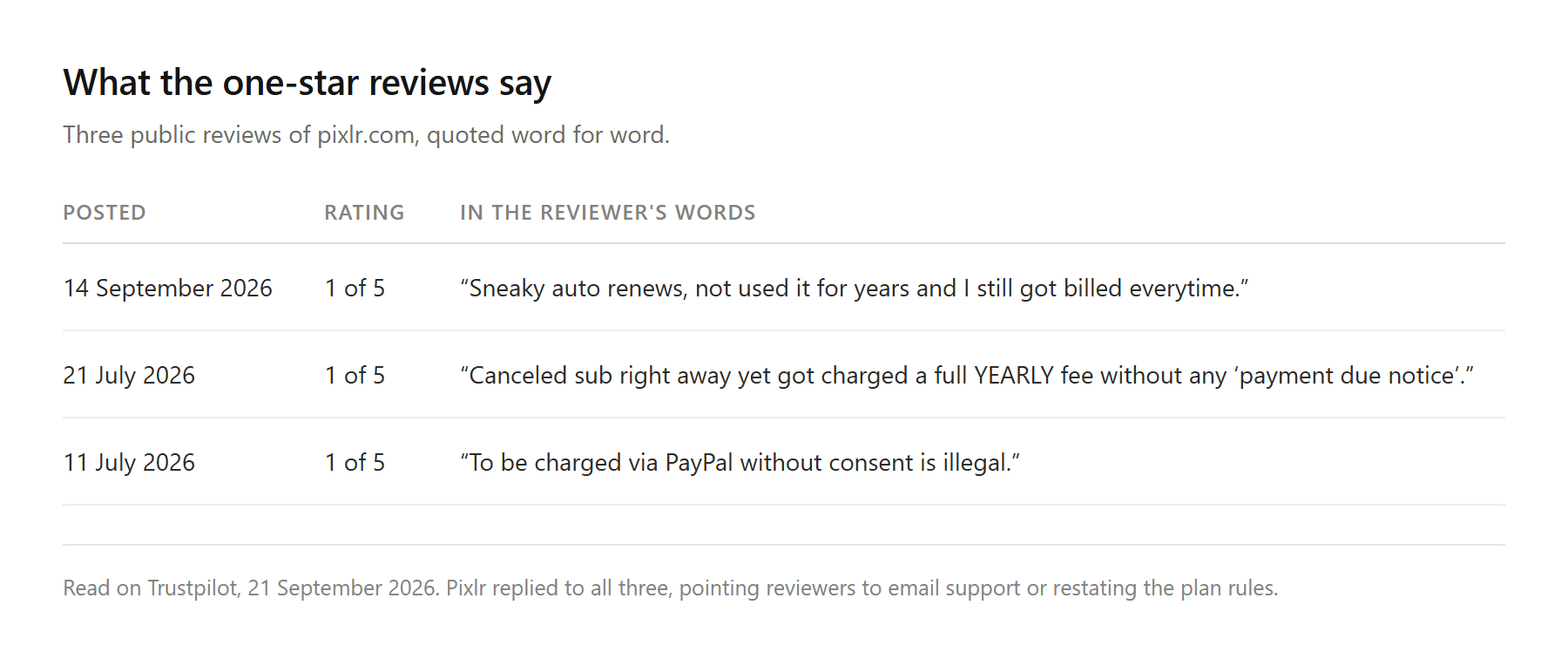
2026年9月14日に投稿されたレビューはこうだ。「こっそり自動更新される。何年も使っていないのに毎回請求された」。2026年7月21日のものはこう言う。「すぐにサブスクを解約したのに、『支払い期限の通知』もなく年間料金を満額請求された」。2026年7月11日の別のものはもっと短い。「同意なくPayPalで請求するのは違法だ」。
レビューは顧客の証言であり、監査済みの取引ではない。そしてPixlrはそのかなりの数に返信している。それらの返信が何をするかは注目に値する。人をメールサポートへ誘導するか、プランのルールを繰り返すだけであり、私たちが読んだものの中に返金を約束したものは一つもなかった。
書面のポリシーがその理由を説明している。Pixlrの規約は支払いは返金不可と述べており、料金FAQは、Pixlrは「支払いが処理された後は、サブスクリプションの返金を一切処理できない」と明言している。
subredditは同じ話を内側から、より詳細に語っている。2026年5月にクレジット消費の内訳を探しに行ったある購読者はこう報告した。「使用状況をクライアント側で確認する手段はない。だから毎月クレジットを全部使い切っていると言われても、根拠は『俺を信じろ』だ」。2か月後、別のスレッドはどこにも行かなかった返金リクエストを記録しており、返信は「一度請求が処理されたら、状況に関わらず返金は利用規約で禁止されている」というものだった。
怒りを生んでいるのはサブスクリプションそのものだ。開こうと開くまいと毎月請求され、その根拠となるメーターがどこにも明細として確認できないのであれば、静かな月でも請求は発生する。
Atlas Image Edit:画像ごとに課金するPixlrの代替
写真をアップロードし、変更点を平易な言葉で説明し、どのAIモデルで実行するかを選び、Runを押す。Atlas Image EditはAtlas Cloudの画像ワークスペースの編集側であり、参照スロットはImage to editと表示され必須なので、これは何もないところから画像を生み出すプロンプトボックスではなく、エディタだ。
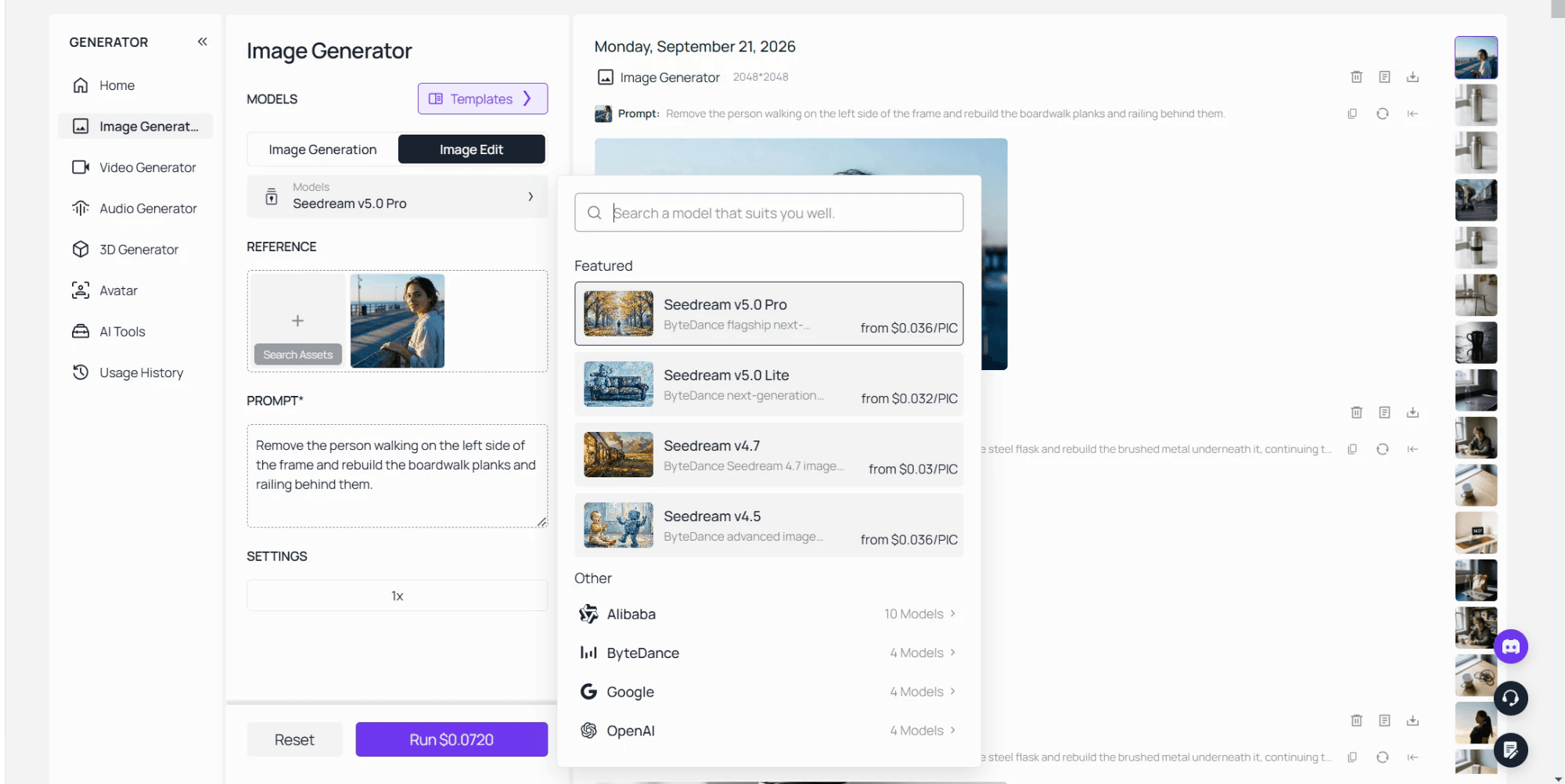
モデル一覧こそがこの比較を面白くする。これは、ある製品がより優れたエンジンを抱えているという話ではないからだ。PixlrはNano Banana editorを販売している。Nano Banana 2 EditはAtlasのピッカーにもあり、Seedream、Qwen、GPT Imageのビルドと並んで、編集側だけで22個ある。同じモデルファミリーに、2つのメーターがぶら下がっている。
Pixlrユーザーが絶えず行う作業を考えてみよう。2枚の写真を1枚にまとめることだ。参照エリアは1つのファイルだけでなく複数を保持でき、ピッカー内のモデルの一つであるSeedream v5.0 Pro Editは、指示とともに1〜10枚の参照画像を受け付ける。あるフレームの被写体と別のフレームの背景を組み合わせるのは、1つの文と1回の実行になる。その2枚目の参照を追加するとRunボタンの数字が上がり、それは確定した後ではなく、確定する前にそうなる。
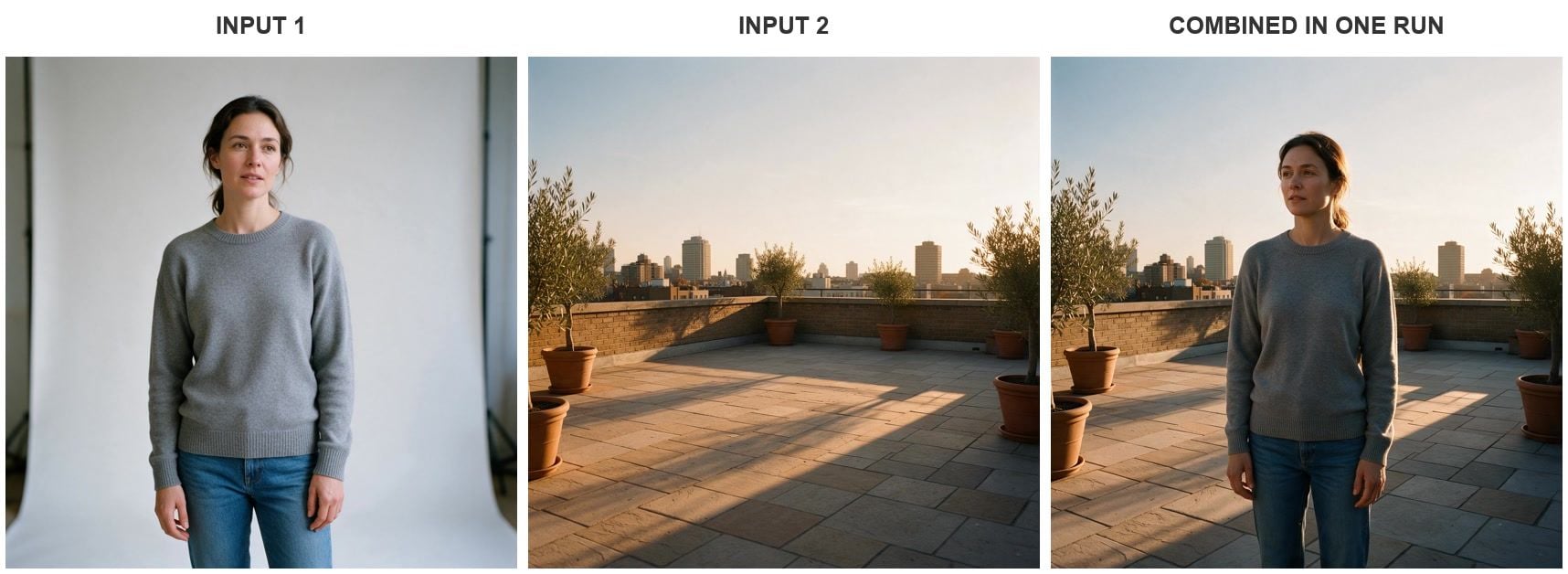
参照2枚、指示1つ、Seedream v5.0 Pro Editでの実行1回(2026年9月)。元フレームはどちらも同じワークスペースで生成した。
注目に値するのはライティングの再現だ。彼女はフラットなスタジオ照明の下で撮影されたが、戻ってきた画像ではテラスの低い日差しが彼女の右側に当たり、影が左へ石の上に落ちている。この一致は、手作業でやると人々が一晩を費やしてしまうステップだ。
アップロードし、変更を説明し、モデルを選ぶ
3つのステップがあり、3つ目が人々が飛ばしがちなものだ。ファイルをImage to editスロットにドロップする。変更すべき点を、レタッチャーに指示するように一文で書く。そして、デフォルトで読み込まれたものをそのまま受け入れるのではなく、モデルを選ぶ。
その3つ目のステップが、あなたのリカバリーパスだ。編集が間違って返ってくると、つい文を書き直したくなる。しかし舗装路を滲ませたモデルは、たいていまた滲ませる。エンジンを差し替えるのにかかるのは10秒ほどで、すでにアップロードしたものを再利用できる。
以下は、そのうち2つに送った1つの指示だ。どちらもフラスコから輪ゴムを外した。それ以外のすべてについては異なる判断を下した。それがピッカーを持つことの理由だ。
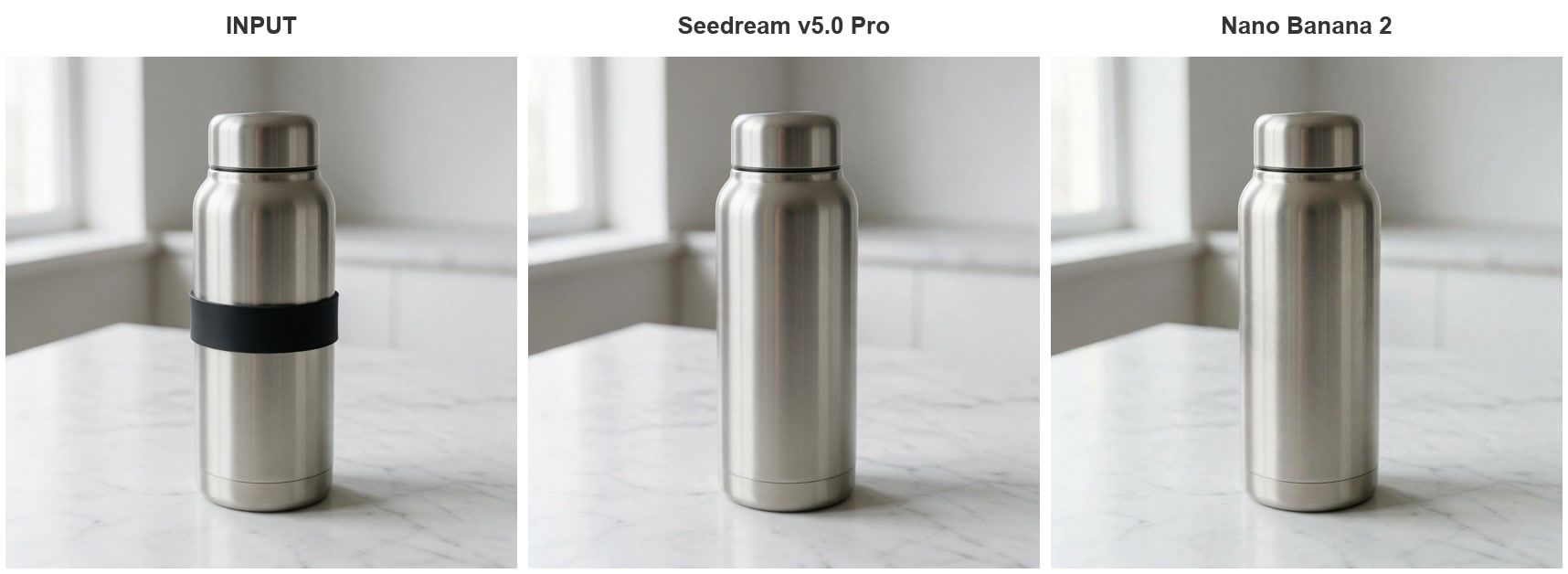
1つの指示、2つのモデル、Seedream v5.0 ProとNano Banana 2で各1回実行(2026年9月)。
PixlrとAtlas Image Editの比較
Pixlr列のすべては、Pixlrが自身について公表している内容(2026年9月に閲覧)か、同社のサポート返信が公に述べている内容だ。セルに「数値は非公開」とある場合、その不在こそが発見である。
| Pixlr | Atlas Image Edit | |
|---|---|---|
| 動作場所 | ブラウザ、iOSおよびAndroidアプリ | ブラウザタブ、インストール不要 |
| 料金ページの表示 | 有料プラン4つ、無料列なし | 画像ごとの課金、月額シートなし |
| 無料枠の上限 | 1日3枚の保存、サポート返信に記載 | アカウント不要の独立したブラウザツール4つ |
| 無料書き出しの透かし | 閲覧したツールページには記載なし | ダウンロードするファイルに透かしなし |
| モデルの選択 | 名前付きモデル、Nano Bananaの階層は1、3、5クレジット | Image Editピッカーに22モデル |
| 1アクションのコスト | 生成1c、拡張または入れ替え2c、レイヤー40c | その実行の価格をボタンに表示 |
| 未使用残高 | 毎月失効、解約でゼロにリセット | 事前購入なし、失効するものなし |
| 返金 | 支払い処理後は処理されない | 実行ごとの支払いなので、取り戻す残高がない |
1つの行には、勝利の周回ではなく注意書きがふさわしい。Pixlrのクレジットレートは、プランを保有し、毎月の許容量を本当に必要とした作業にすべて使い切るなら、1回あたりの価格を余裕で上回れる。痛手となるのは、静かな月と、やめた月の行だ。
単発の作業向けの無料Pixlr代替
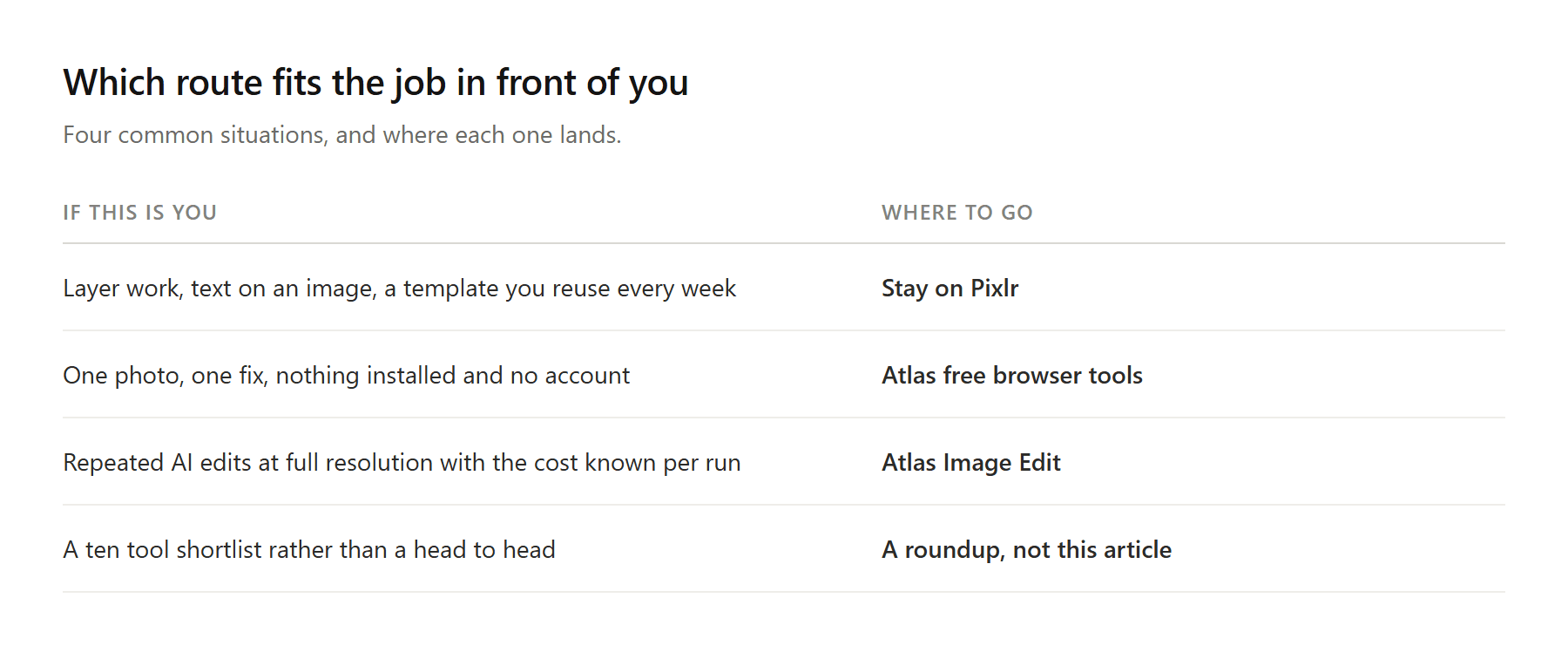
無料のPixlr代替を探すことへの正直な答えが、写真1枚と問題1つしかなく、ワークスペース全体は大げさすぎる、ということもある。Atlasはまさにそのために4つの無料ブラウザツールを用意している。画像アップスケーラー、背景リムーバー、オブジェクトイレイサー、顔入れ替えツールだ。
これらはサーバー上ではなく、あなたのマシン上で動く。アップスケーラーのページはファイルが「デバイスから決して出ない」と述べ、背景リムーバーは自らを「アップロードゼロのローカル推論」と説明している。アカウントなし、毎日のカウンターなし、出力時の透かしなし。背景除去が作業のすべてなら、私たちはそれを行う10のツールをbest AI background removersでランク付けした。
それがどこで止まるかを明確にしておこう。ローカル推論はあなたのラップトップが作業を行うことを意味するので、アップスケーラーは2倍が上限となり、サーバーはさらに先まで届く。そしてピクセルを増やすこととディテールを増やすことの間のギャップは、ひとりでに埋まるものではない。私たちはそれをphoto enhancer versus upscalerで分解した。
そのページの残りは別の仕組みだ。ヘッドショットジェネレーターや衣装チェンジャーのようなツールは、サインインしたユーザーにそれぞれ1回の無料トライアルを与えるので、それらはサンプルであり、無料枠ではない。
Pixlrのようなアプリが依然として正しい選択である場合
編集が手作業なら、そのままでいい。レイヤー作業、画像に配置するテキスト、毎週使い回すテンプレート、体が覚えているスマホのワークフロー。プロンプトボックスはそのどれも置き換えられないし、Pixlrの2つのエディタはそれをうまく扱う。
AI編集が作業そのもので、ファイルが成果物であるなら、乗り換えよう。フルサイズで戻さなければならないクライアント写真、今夜締め切りの出品画像、それぞれ同じ修正が必要な一連の製品写真。これらは、文書化されていない1日の上限にぶつかって死ぬ仕事だ。
スマホから検索しているなら、もう一つ考慮すべきことがある。両方のアプリの掲載情報は、無料側に広告を載せており、Google Playはアプリを「Contains ads(広告を含む)」と表示し、iOSの掲載情報は広告削除を別途購入として販売している。ブラウザタブは広告を表示せず、更新も求めない。
よくある質問
サインインせずに使える無料のPixlr代替はありますか?
はい、ただし範囲はより狭くなります。Atlasはアカウントも毎日のカウンターもなしに、ブラウザで4つの編集ツールを動作させ、ファイルはあなた自身のマシン上で処理します。各ツールは1つの仕事だけを行うので、オブジェクトを消すツールがシーンのライティングも直すことはありません。モデル一覧全体にわたるプロンプトベースの編集はImage Editで動作し、代わりに画像ごとに課金されます。
Pixlrの有料プランはいくらですか?
2026年9月のウェブ料金ページでは、Plusは月額US$2.49または年額請求でUS$1.99、PremiumはUS$9.99または年額US$7.99、UltraはUS$24.99から、または年額US$19.99、Ultra MAXは取り消し線の付いたUS$49.99に対してUS$39.99と表示されていました。モバイルのストアフロントは独自の名称と数字で展開しており、iOSの掲載情報では週額、月額、年額の購入に加えて500クレジットパックが表示されているので、誰かと情報を突き合わせる前に、どれを通じて購入しているかを確認してください。
Pixlrを使わなくなった後に請求された場合、返金を受けられますか?
書面のポリシーはノーと言っています。Pixlrの規約はサブスクリプションを自動更新と説明し、支払いは返金不可と述べ、料金FAQは、支払いが処理された後は返金を処理できないと繰り返しています。モバイルアプリ内で購読した場合、そのFAQは代わりにアプリストアへ案内します。課金の関係を握っているのはストアだからです。
Pixlrで2つの画像を結合するにはどうすればよく、もっと速い方法はありますか?
Pixlrの方法は手作業で、そのエディタページは道具一式を挙げています。「layers、masks、filters、effects、retouching」。最初の写真を開き、2枚目をレイヤーとして持ち込み、手作業でマスクして合成します。コラージュや、エッジを自分で制御したいあらゆる合成にとって、それは適切なツールであり、クレジットはかかりません。難しさが、2枚の写真を同じ部屋で撮影されたように見せることにあるなら、指示はマスクに勝ります。貼り付けた被写体のライティングを直すのが、一晩を食う部分だからです。構図が作業なら手作業で写真を結合し、ライティングの一致と格闘しているなら指示で結合しましょう。
インストールが不要な、Pixlrのようなアプリはありますか?
まさにそれが、この検索がスマホで存在する主な理由です。ブラウザエディタはダウンロード、更新、ストレージを省き、厳しく制限された仕事用ラップトップでも同じように動作します。引き換えに、ブラウザツールは接続を必要とするので、飛行機で編集するなら、そうした旅行用に何かインストールしておきましょう。
結論
Pixlrは編集が下手になったのではない。計画を立てるのが難しくなったのだ。料金ページは4つの階層を1つのクレジットプールへ販売し、無料アカウントの1日の上限はサイト上ではなくサポート返信に記され、未使用クレジットは毎月失効し、解約すると残っているものが何であれゼロになる。各ルールは単独では擁護できる。それらが合わさって、星1つレビューが画像品質ではなく課金についてなされる理由を説明している。
あなたの作業が手作業で、エディタのツールバーの中で完結するなら、そのどれも乗り換える価値はない。AI編集が作業そのもので、書き出しがあなたの手渡すものなら、実行前にコストを教え、後で失効するものを残さないものを選ぼう。変更できるモデル、フルサイズのファイル、そしてボタン上の価格。それは、これを含むあらゆるPixlr代替に課すべき妥当な基準だ。





