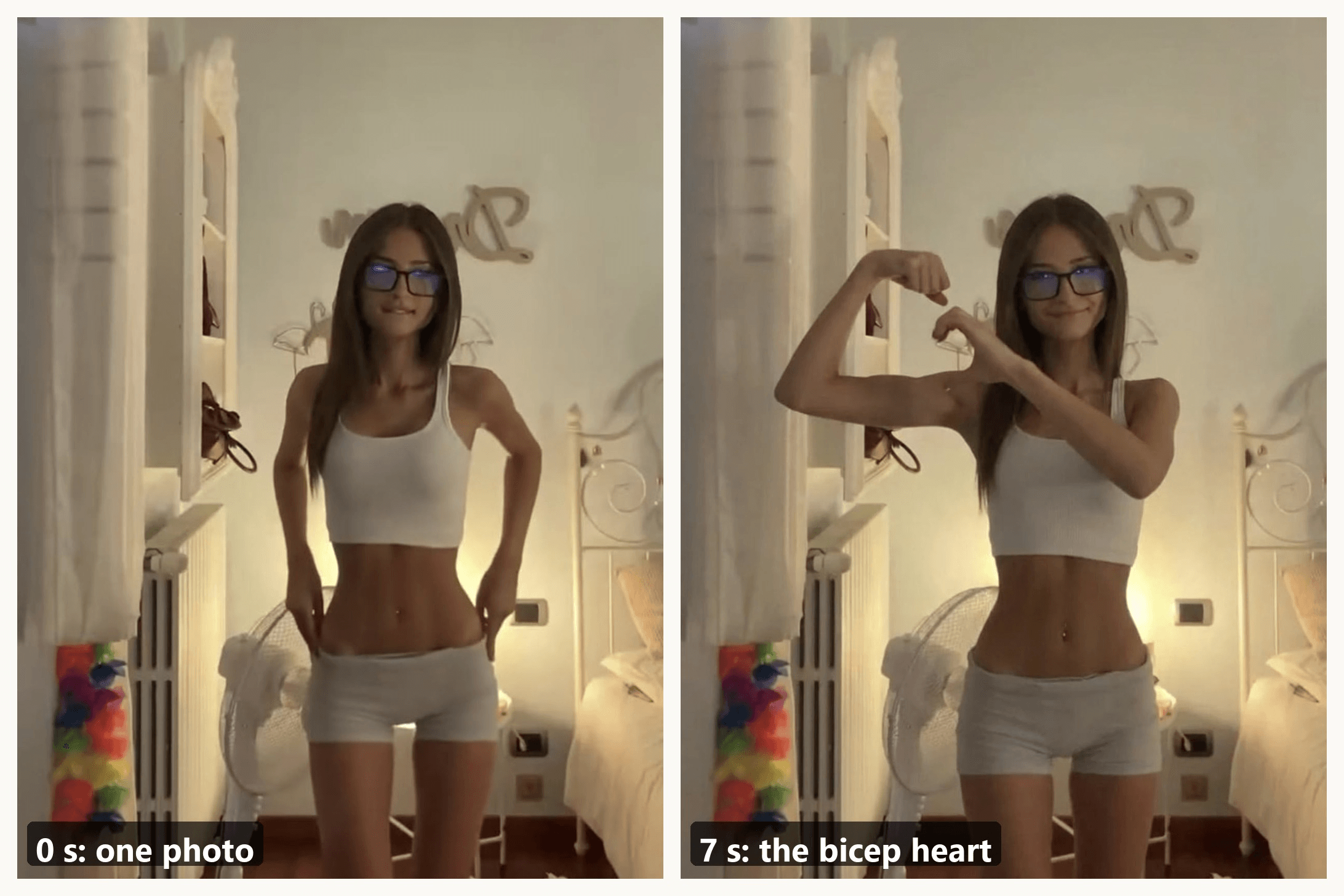
"Have you ever heard of a bicep heart..." That line, typed over a dim bedroom clip, has opened thousands of TikToks since the end of October. The person smiles, grabs one arm, flexes it, and curls the other hand against the bicep until the two make a heart. Seven seconds, one take.
This guide covers the bicep heart trend from both sides: the pose, broken into four moves, and the AI version. The clip above came from one photo and a prompt, and the workflow is below, including the part that makes the heart read as a heart.
Key Takeaways
- The bicep heart trend is one flexed arm and one curled hand that together close into a heart.
- The biggest TikTok posts share one sound and a seven-second beat: smile, grab, flex, hold the heart.
- You can do it by hand in four moves, or make it from one photo in the AI video generator.
- The CapCut templates behind the tutorial posts either swap in your own clip or turn a photo into a still picture.
- A readable heart comes down to hand placement, so build the end pose first and let the video model animate the move.
What Is the Bicep Heart Trend on TikTok?
It is a pose, filmed in one take, usually with a line of text on top. Flex one arm so the fist sits beside your head. Bring the other hand across, press it against the inside of the flexed arm, and curl the fingers over until they meet the fist. From the camera's side, the curve of the arm and the curve of the hand read as one heart.
The caption does half the work. The clip several one-photo AI tools use as their reference was posted on November 1 by @kavithageorge with "have you ever heard of a bicep heart..." on screen; it had 5.3 million plays by November 6.
A day earlier, @mckennacrisp posted a seated version captioned "im sad please send bicep hearts...", now past 4.3 million. The earliest clip we traced went up on October 27; the biggest had 7.9 million plays by November 6.
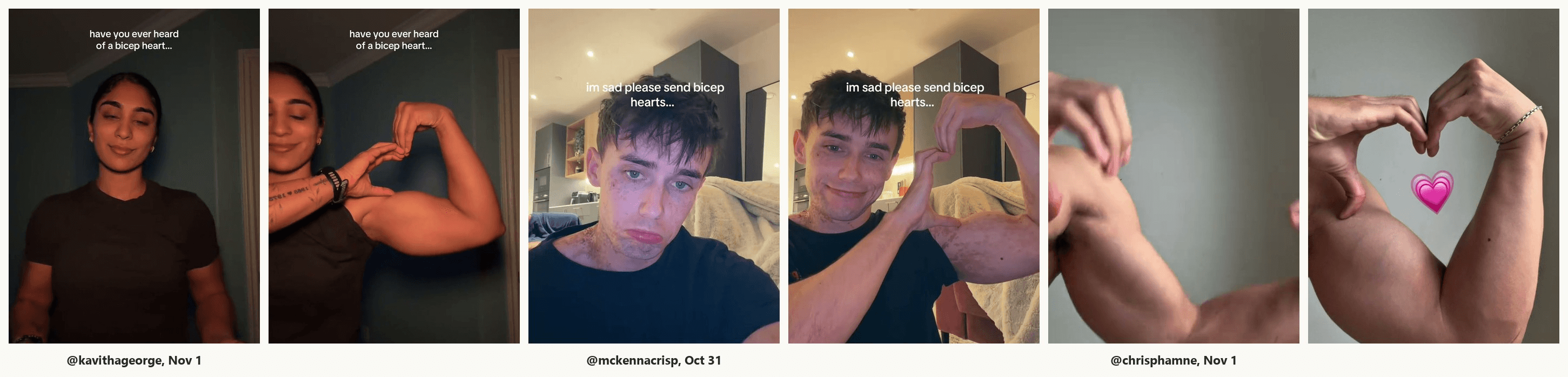
Arm size does not matter, which is why the trend spread past gym accounts within days. The heart comes from the hand, and a slim arm just makes a smaller, tidier one.
The Bicep Heart Sound and the 7-Second Beat
Most of the big posts we pulled sit on one original sound uploaded on October 5 and captioned as a slowed cut of Wyw My Sweetie, the jersey club track behind the Wyw My Sweetie dance. The sound page lists more than 100,000 videos, many of them other memes.
The timing is what makes the clips feel like one trend. Frame by frame, the November 1 post runs like this:
| Time | What happens |
|---|---|
| 0 to 2 s | Hands low in front, a small smile at the camera |
| 2 to 3.5 s | One arm crosses the chest and grabs the other upper arm |
| 3.5 to 4 s | The grabbed arm bends up into a flex, fist beside the head |
| 4 to 7 s | The free hand curls against the bicep, the heart closes, and it holds with a head tilt |
Three seconds of setup, three seconds of heart. Keep that ratio and your take will drop into a duet without anyone noticing the edit.
How to Do the Bicep Heart Pose by Hand
The pose is easy; getting the heart to read on camera takes a couple of tries. These four moves match the frames below.
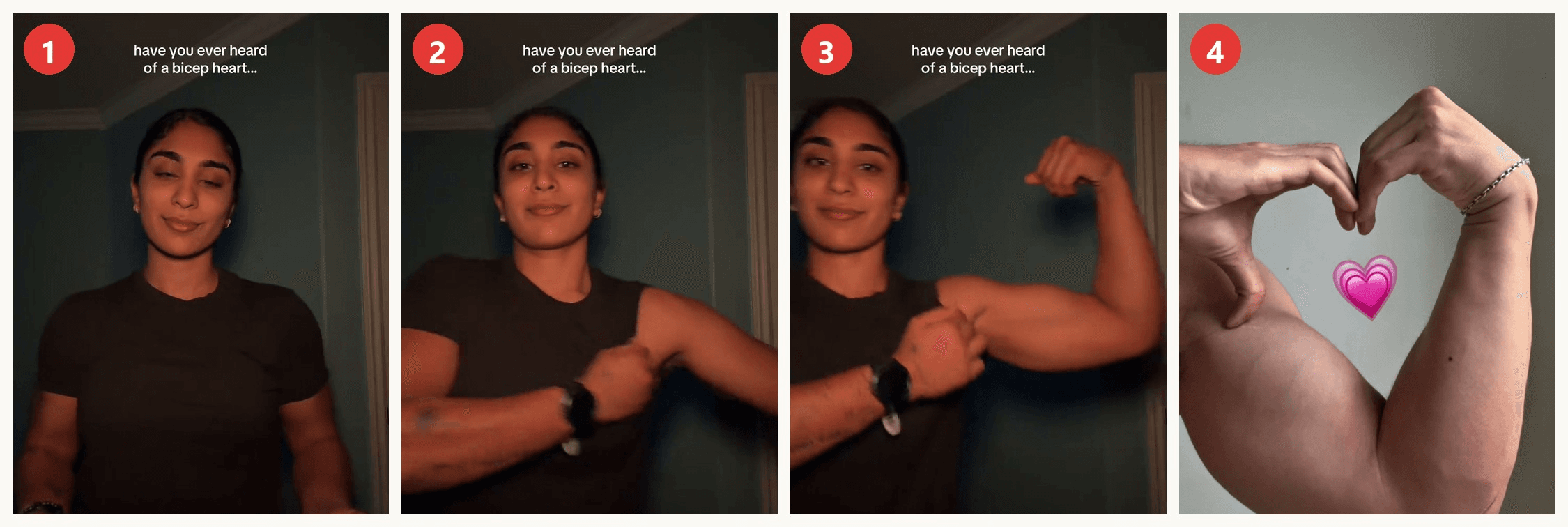
- Start low. Hands together in front of your waist, eyes on the lens. The smile here is the "before".
- Grab the arm. Reach across your chest and take hold of the opposite upper arm. This sets up where the hand will land.
- Flex. Bend the grabbed arm up until the fist is beside your head, knuckles turned in toward your face, forearm close to vertical.
- Close the heart. Slide the free hand up the bicep until it sits just below the fist. Thumb against the inside of the arm, index and middle fingers arched over the top so the fingertips touch the fist's knuckles. The gap between hand and fist is the heart.
Turn the flexed arm a few degrees toward the camera until the gap reads, then hold. The usual failed take has the hand too low, down by the elbow, which gives a loop instead of a heart.
How to Make a Bicep Heart AI Video From One Photo
No gym pump, no second take, and the hand lands in the right place. The 8-second clip below came from a single standing photo, run through Atlas Cloud with the prompt in the next section.
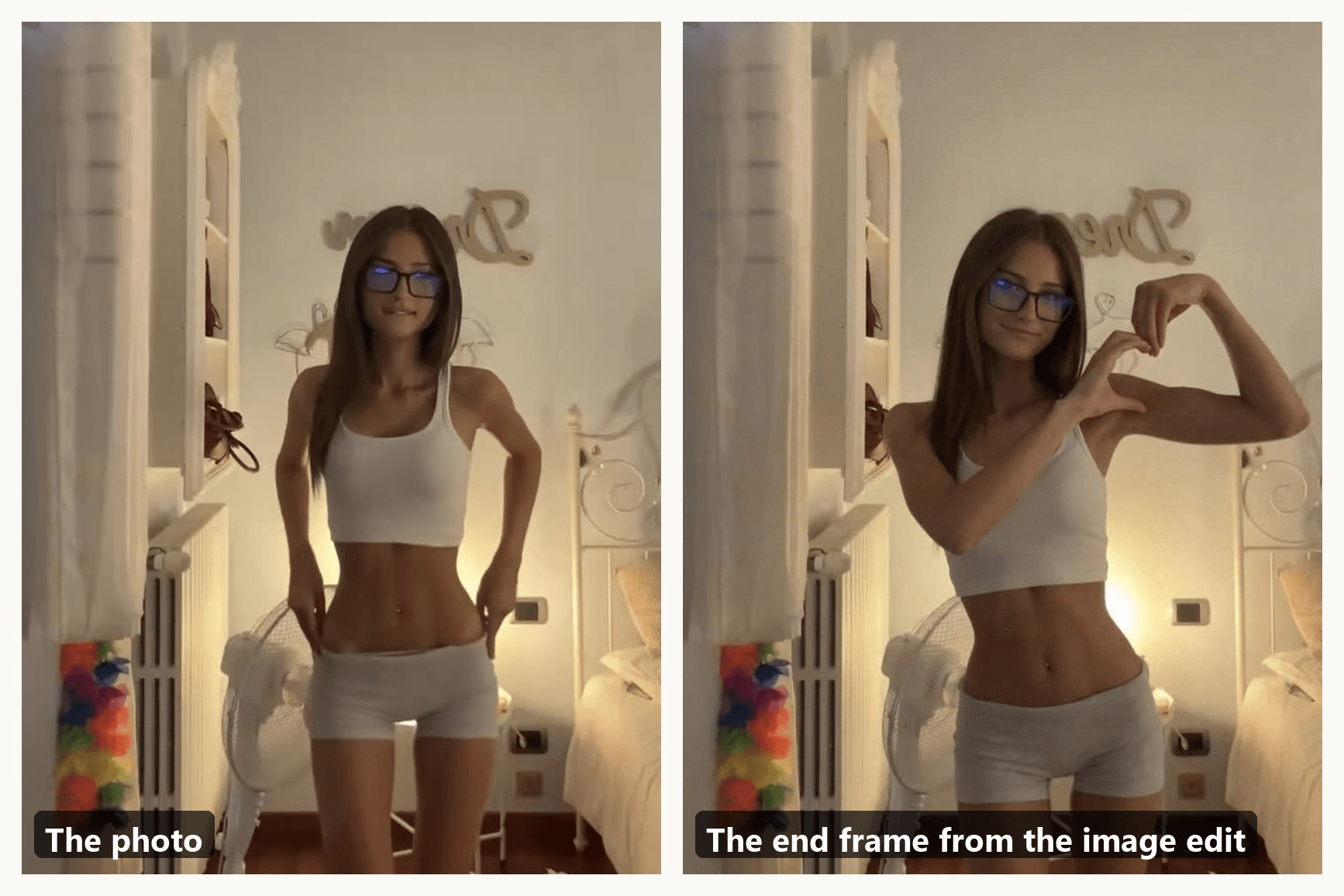
The model is Seedance 2.5, and the trick is to give it both ends of the clip. A first frame on its own gets you the beat. The finger arch is a tiny detail in a moving shot, so we build that still first and hand it over as the last frame; the video then only travels between two fixed poses.
Method 1: Build the Heart Pose First, Then Animate It in the Video Generator
Stage A, the end frame. An image model that accepts a reference photo can do this. We used Seedream 5.0 Pro Edit on the same site, feeding the photo plus two frames from the trend posts as pose references, with the end-frame prompt from the next section. Check the result before moving on: the hand should sit just under the fist with an open gap between them.
Stage B, the video. Open the video generator, pick the Video Generation tab and keep Seedance 2.5 as the model. Then, in the order on the screenshot:
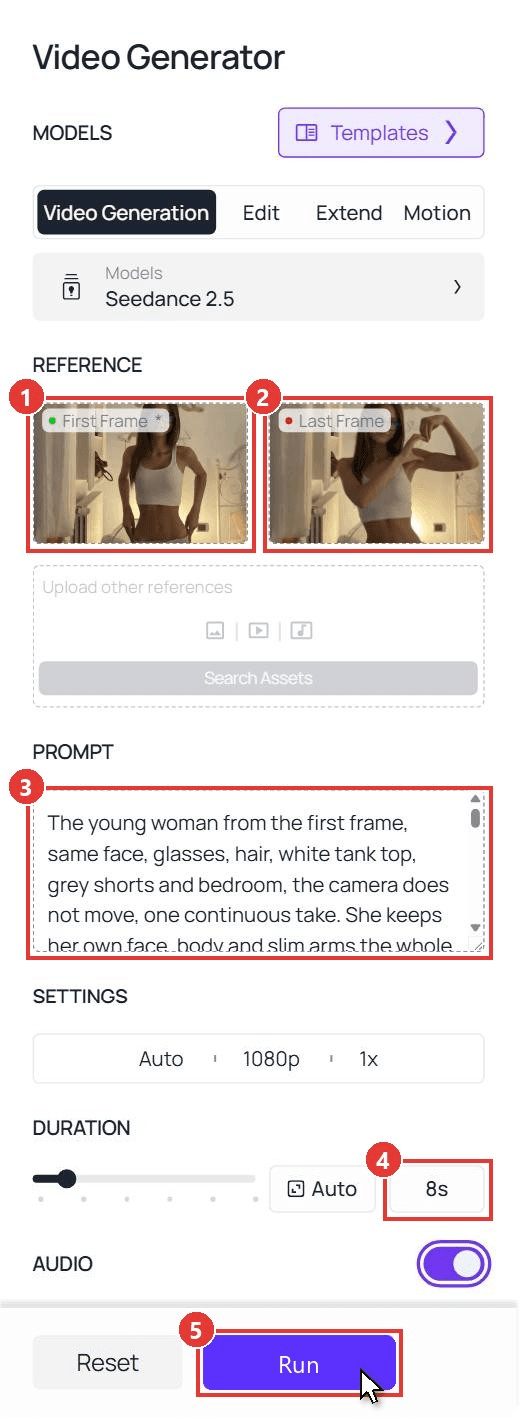
- First Frame: upload the photo. Face the camera with both arms free; a 3:4 or 4:5 crop from the knees up works best.
- Last Frame: upload the end frame from Stage A, at the same ratio as the photo.
- Prompt: paste the video prompt from the next section.
- Duration: type 8 into the box. Resolution can stay at 1080p and audio can stay on.
- Run. The clip lands in the panel on the right after a couple of minutes.
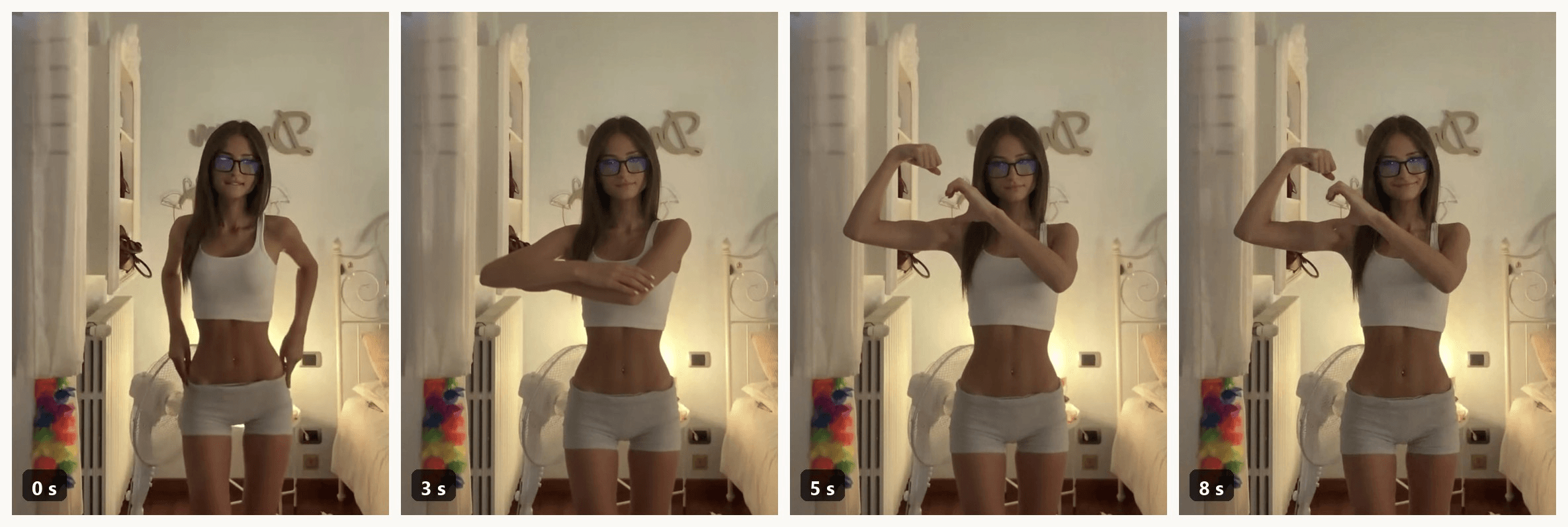
Check the 5-second mark: if the heart is closed there and holds to the end, the last frame did its job. Face, glasses and room match the photo because the model was never asked to invent them.
Method 2: Send the Same Two Frames Through the API
Making one for every friend who asked? The API takes the same photo, end frame and prompt.
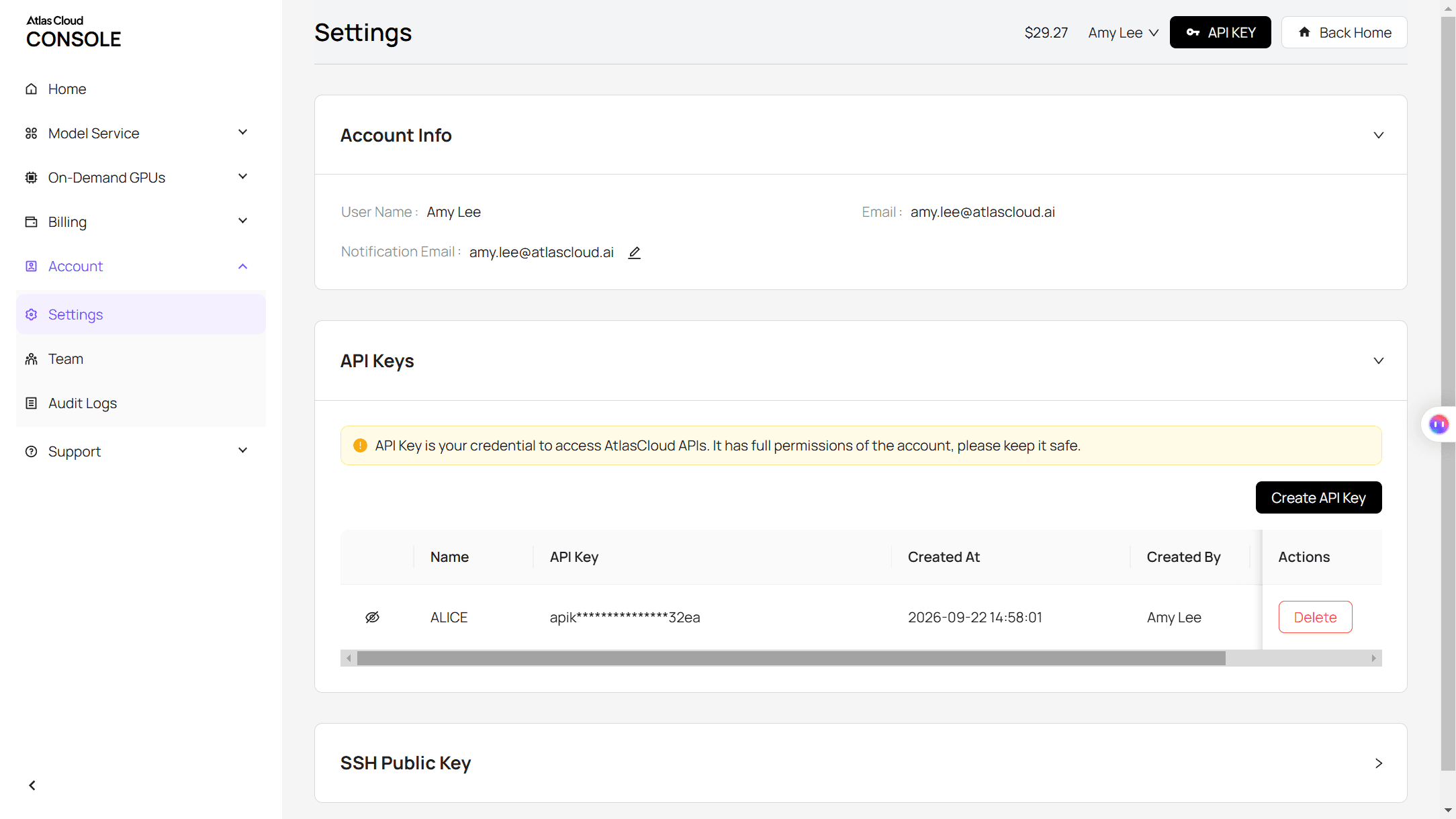
Step 1: Create an API key. In the console, open Settings and create a key under API Keys.
Step 2: Check the request format. The Atlas Cloud docs cover authentication and the video endpoint.
Step 3: Send the request and poll. The photo goes in the image field and the end frame in last_image:
plaintext1curl -X POST https://api.atlascloud.ai/api/v1/model/generateVideo \ 2 -H "Authorization: Bearer $ATLASCLOUD_API_KEY" \ 3 -H "Content-Type: application/json" \ 4 -d '{ 5 "model": "bytedance/seedance-2.5/image-to-video", 6 "prompt": "<paste the video prompt here>", 7 "image": "https://your-cdn.com/your-photo.jpg", 8 "last_image": "https://your-cdn.com/your-heart-end-frame.jpg", 9 "duration": 8, 10 "resolution": "1080p", 11 "generate_audio": true 12 }'
Poll the returned prediction ID until the status reads completed, then download the clip from the outputs array:
plaintext1curl https://api.atlascloud.ai/api/v1/model/prediction/<prediction_id> \ 2 -H "Authorization: Bearer $ATLASCLOUD_API_KEY"
The endpoint and the key stay the same across every video model on Atlas Cloud. To try another one, change the model string.
Bicep Heart AI Prompts That Keep the Heart Readable
Two prompts, one per stage, and the wording for the hand took a few rounds. Two phrases to avoid: "thumb pointing down", which image models tend to render as a thumbs-up, and "elbow crease", which pulls the hand down the arm. Say where the hand grips instead: on the upper arm, right under the fist, far from the elbow.
End-frame prompt (image edit; image 1 is your photo, images 2 and 3 are pose references such as frames from the posts above):
plaintext1Image 1 is the photo to edit. Images 2 and 3 are pose references only. Keep image 1 exactly: the same person, face, hair, glasses, clothes, the same room, camera position, framing and light. Change only the arms and hands so the person holds exactly the bicep heart pose shown in image 2, with the hand placed as in the close-up in image 3: one arm bent up in a tight flex, fist beside the head, knuckles turned in toward the face; the other hand reaching across the chest and gripping the top of that flexed upper arm right below the fist, high up on the bicep and far away from the elbow, fingers curled over the top so the fingertips touch the knuckles of the fist and the palm rests against the bicep, leaving a clear empty heart-shaped window between the curled hand, the fist and the forearm. Neither hand rests on the elbow, the knee or the leg, and there is no thumbs-up gesture. Do not copy the face, hair, clothes, room, lighting or arm size from images 2 or 3. Two arms, two hands, five fingers each, the person's own arms, no added muscle. Shy, proud smile, small head tilt. No text, no heart graphics.
Video prompt (first frame = your photo, last frame = the end frame, 8 seconds):
plaintext1The young woman from the first frame, same face, glasses, hair, white tank top, grey shorts and bedroom, the camera does not move, one continuous take. She keeps her own face, body and slim arms the whole time: two arms and two hands with five fingers each, no added muscle. 0-2s: she drops her hands from her hips, lets them hang together low in front of her, looks into the camera with a small shy smile and a tiny head tilt. 2-3.5s: her right arm crosses her chest and her right hand takes hold of her left upper arm. 3.5-4.5s: her left arm bends up into a tight bicep flex, fist beside her head, knuckles turned in toward her face. 4.5-5s: her right thumb presses down into the inside of the flexed arm and her index and middle fingers curl over to touch the knuckles of the fist, closing a clear empty heart-shaped window between the two hands and the forearm, exactly the pose of the last frame. 5-8s: she holds that heart completely still, facing the camera, only blinking and letting the shy smile grow a little, and the video ends on the last frame. No text, no captions, no heart graphics, nobody else. Sound: quiet bedroom tone, a soft amused exhale when the heart forms, no music.
Swap the first sentence for your own person and clothes, and keep the timestamps. The "exactly the pose of the last frame" line ties the two stages together; the timing logic follows the same rules as any Seedance 2.5 prompt.
Is There a Bicep Heart CapCut Template or TikTok Filter?
We found no template or effect that animates the pose for you, as of November 6. Of the 59 posts we pulled from the #bicepheart hashtag page, the only effects attached were skin filters; people film the move themselves. Two CapCut templates show up in tutorial posts, and they do different things:
| Template | Created | Uses (Nov 6) | What it does |
|---|---|---|---|
| I love you❤️ by Mr Editor🔥 | Nov 2 | 146,152 | A two-clip edit. You film your own bicep heart, drop it in, and it adds an "I ❤️ U" sticker at the end |
| Ai photo by Coco11758 | Nov 3 | 3,858 | An AI photo effect. One photo in, one still picture of you in a gym holding the bicep heart out |
So the first needs you to do the pose on camera, and the second gives you a picture rather than a clip. A handful of one-page web tools launched in the first days of November that transfer the motion of the original reel onto your photo. The method above keeps your own prompt, both frames and your own room under your control.
Bicep Heart Variations From the Biggest Posts
The standing version is the default and the one to copy first. Three other takes keep showing up.
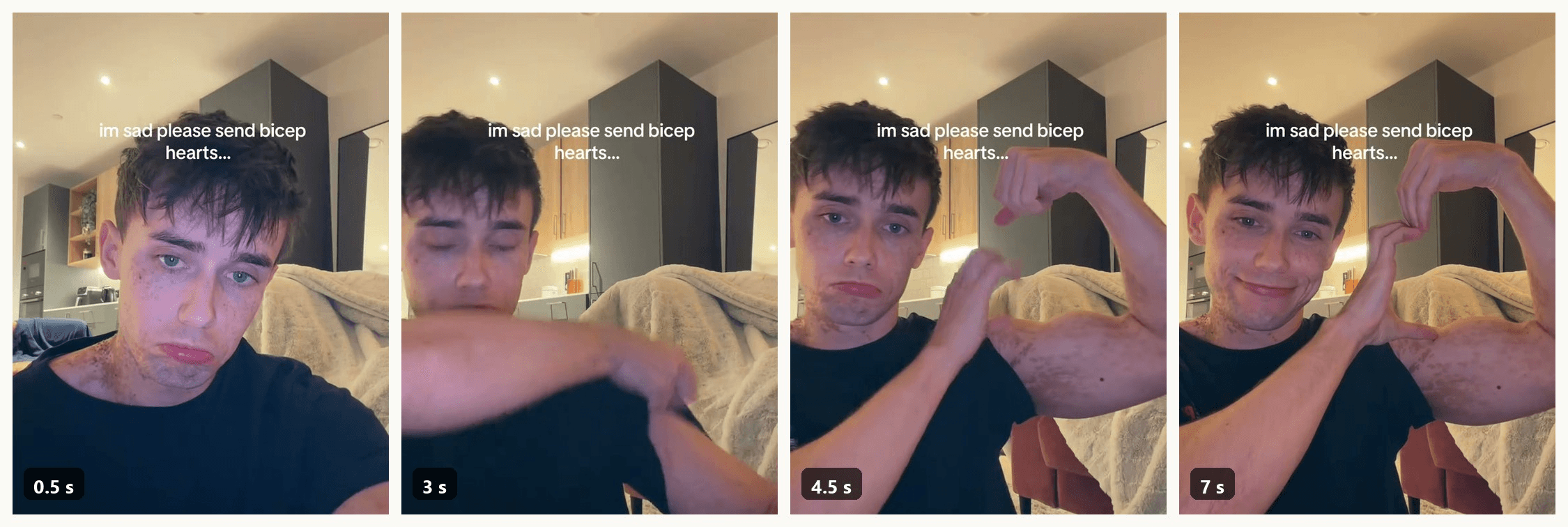
The sad version. Pout at the camera with "im sad, pls send a bicep heart" on screen, do the pose, and let the face flip to a grin. The contrast is the joke, the way the skull cap trend flips from goofy to serious. It works seated, hence all the sofas.
The arm close-up. Crop to the arm, no face, and let a heart emoji float in the gap. This reads best with a bigger arm, since the bicep becomes half the heart.
The couple version. Two people side by side, each flexing the inside arm, with the two curled hands meeting in the middle. For an AI take, start from the two-photo reference workflow in the Wyw My Sweetie guide.
Frequently Asked Questions
Who started the bicep heart trend?
No single first post is clear. The earliest clip we could trace went up on October 27, 2026, and the trend took off between October 31 and November 2, when four posts that have since passed 4 million plays each went up within 48 hours of one another. Several AI tool pages name an exact start date and a first creator without citing a source, so we leave that out.
What is the bicep heart song?
An original sound uploaded on October 5, captioned as a slowed jersey club cut of Wyw My Sweetie by nissi and 25Hzz. Tap the sound under any of the big posts to reuse it. The AI clip from this guide comes with room tone only, so add the sound in the TikTok editor.
Do you need big arms to do a bicep heart?
No. The heart is drawn by the hand and the forearm; the bicep only forms one curve of it. A slim arm makes a smaller heart that still reads, as the clip above shows. Big arms help the close-up version, where the muscle is half the shape.
How much does a bicep heart AI video cost on Atlas Cloud?
An 8-second clip at 1080p with a first and last frame costs $4.79, which is 20% off the $5.98 list price, as of November 6, 2026. The same clip at 720p is $2.43, and the end-frame image edit adds a few cents. The Run button shows the exact price before you generate.
Can two people make one bicep heart?
Yes, and it is a popular variation. Stand side by side, flex the arms that face each other, and curl the outer hands so the fingertips meet above the two fists. An AI version needs two photos and a reference clip, since the model has to place two people in one shot.
Conclusion
The bicep heart is a four-move pose with a seven-second rhythm, and the only hard part is where the hand lands. Keep it high on the arm, right under the fist, and the heart closes on its own.
For the AI route, build the end frame first, hand the video model both ends of the clip, and keep the timestamps in the prompt. That is the whole bicep heart trend in one photo and eight seconds.


