


A pink-haired anime girl stares at the camera, cheeks red, mouth open. Then she spins on the spot, crosses her arms and turns her nose up at you. Hmph.
That's the tsundere dance trend, and in November 2026 it jumped from anime fan edits to real people filming themselves at home.
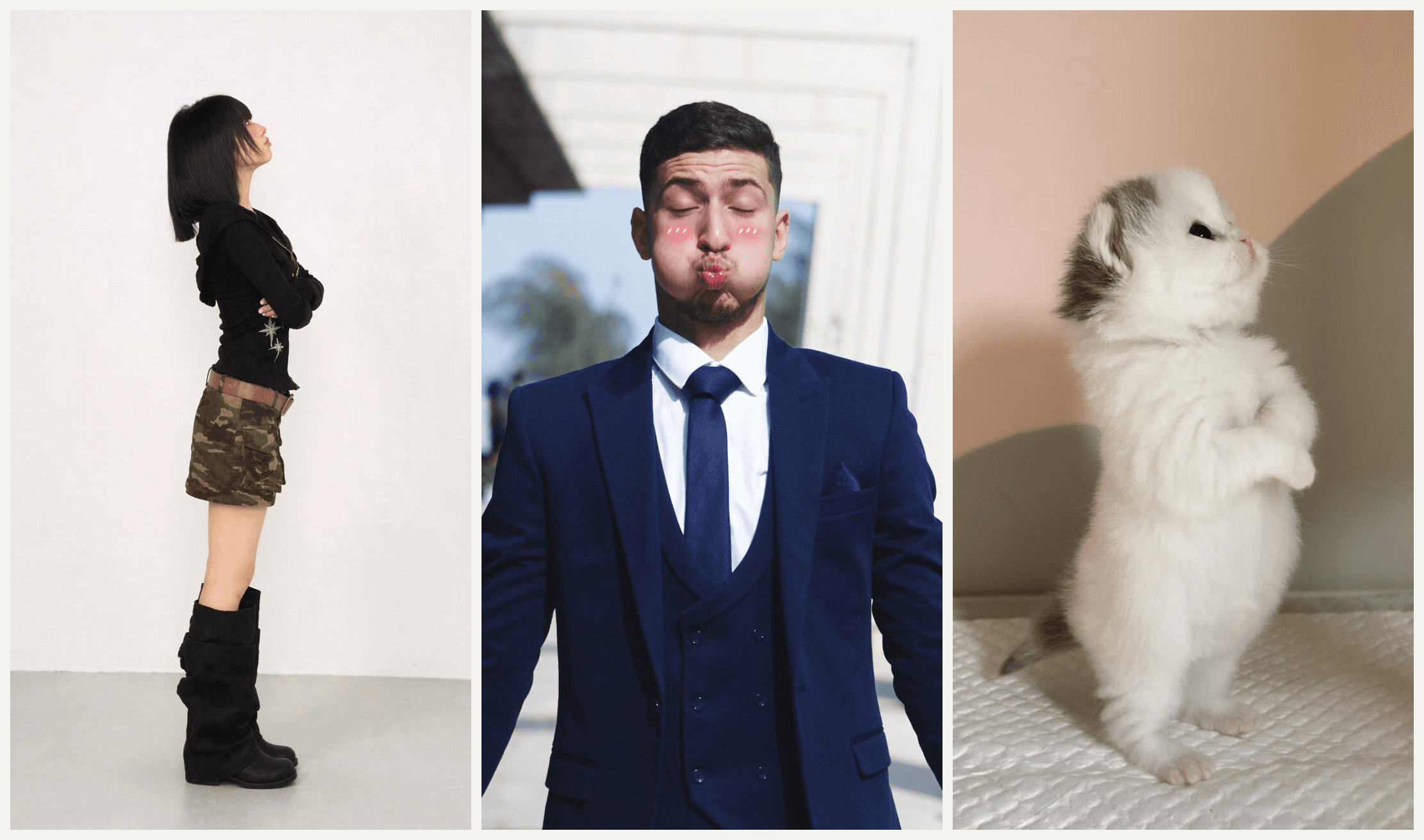
We rebuilt it three times with Seedance 2.5: a woman in streetwear, a man in a three-piece suit and a kitten, each from a single photo. Below you'll find where the clip came from, the five beats that make it work, which AI templates exist, and the prompt we used.
Key Takeaways
- The tsundere dance trend copies a 3D Natsuki fan animation: a flustered face, a spin to full profile, crossed arms, hmph.
- E-Bros Animations posted the 5-second clip in February 2025, and a November 5, 2026 edit passed 2.4 million TikTok plays.
- Many real-person takes dance to a different sound, the audio of a Genshin Impact fan clip now on about 59,000 videos.
- We found no live CapCut template for the dance, so the AI versions come from a template site or your own prompt.
- In the Atlas Cloud AI video generator, Seedance 2.5 recasts the clip with one photo of you, a friend or a pet.
What Is the Tsundere Dance Trend on TikTok?
It's an eight-second act of sulking. You face the camera looking caught out, spin away with your arms crossed, snap back, spin away again, and finish with your back half turned and your chin in the air.
Tsundere is the anime label for a character who acts cold to hide that they care. Natsuki, the pink-haired member of the 2017 visual novel Doki Doki Literature Club, is the textbook case, which is why English-speaking TikTok also calls this the Natsuki trend, the Natsuki stomp or the hmph trend.
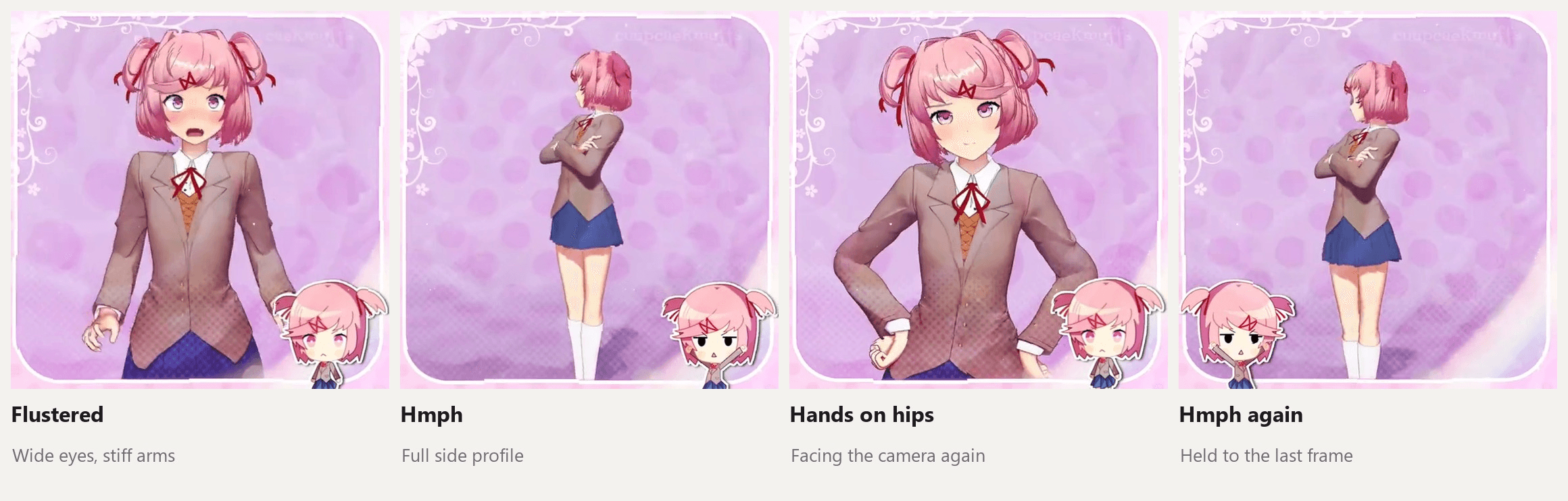
Frames from the November 5, 2026 TikTok edit (a video), built on an animation by E-Bros Animations.
What makes it funny is how the body moves. Natsuki doesn't sway or bounce. She snaps from pose to pose and freezes, and every turn rotates her whole body at once, like a game character on a turntable. Copy that stiffness and the joke lands even on someone who has never watched anime.
Where the Natsuki Trend Started
The animation is older than the trend. E-Bros Animations posted it on TikTok on February 3, 2025 as "Natsuki V2": five seconds of a 3D Natsuki going from crossed arms to a smug, hands-on-hips pose. The YouTube channel behind it says it's two brothers making animations together.
It sat quietly for 21 months. Then on November 5, 2026, an edit of that animation cut it into the full-body, turn-away version you see today, credited to the E-Bros YouTube channel in the caption.
| Date | What happened | Numbers on November 17, 2026 |
|---|---|---|
| February 3, 2025 | E-Bros Animations posts the 5-second 3D "Natsuki V2" clip | 367,000 plays |
| October 16, 2026 | A Genshin Impact fan clip goes up with the sound many real-person takes later use | 1.4 million plays; the sound sits on 59,100 videos |
| November 5, 2026 | The Natsuki edit cuts the animation into the turn-away routine | 2.4 million plays, 592,500 likes, 121,500 saves |
| November 8, 2026 | A man in a plain gray room copies the hmph on the Genshin sound | 1.1 million plays |
| November 9 to 11, 2026 | Reposts of the Natsuki edit and a hand-drawn After Effects version, both crediting E-Bros | 577,000 and 447,000 plays |
So the trend runs on two sounds. Anime fans reuse the Natsuki edit's own audio. Many real-person takes, often captioned in Russian with #цундере, use the Genshin clip's sound instead. Neither changes the moves.
How to Make the Natsuki Stomp From One Photo on Atlas Cloud
Here's our run: one studio photo of a woman in a black zip-up top, the Natsuki edit as the reference, eight seconds out.
Atlas Cloud runs Seedance 2.5, ByteDance's video model that reads a reference photo and a reference video in one request.
The photo decides who dances, what they wear and where they stand. The clip decides the timing, the turns and the camera cuts, so a cartoon's motion lands on a real face.
Method 1: Recast the Natsuki Clip in the Video Generator
Sign in, open the Video Generator, and follow the numbers.
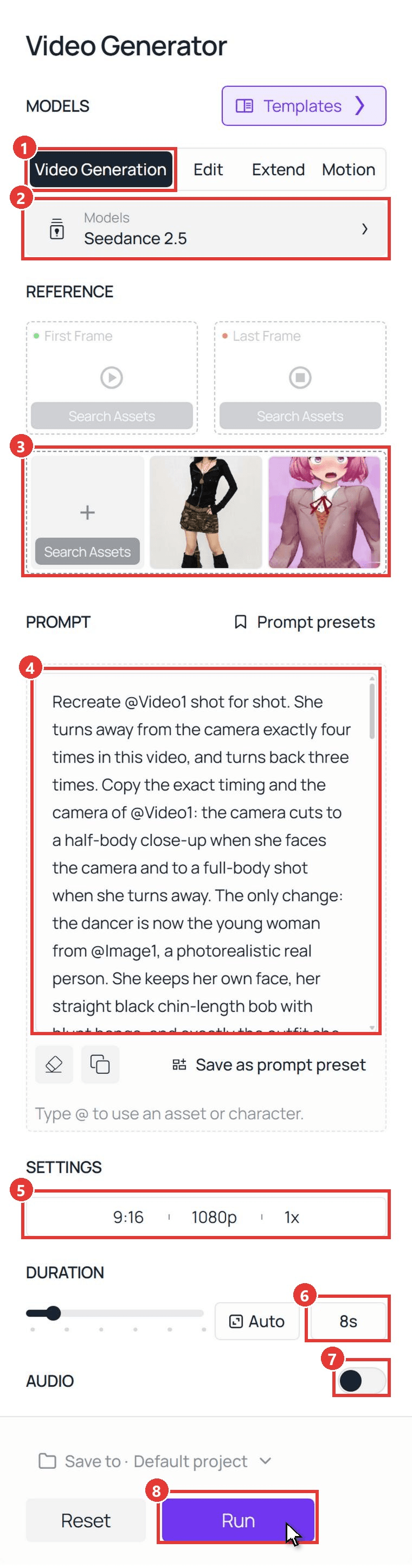
- Click the Video Generation tab.
- Keep the model on Seedance 2.5.
- In the box under First Frame and Last Frame, upload your photo first and the dance clip second, with its sound removed. Upload order sets the tags: the photo becomes @Image1 and the clip becomes @Video1. Leave both frame slots empty.
- Paste the prompt. Ours:
plaintext1Recreate @Video1 shot for shot. She turns away from the camera exactly four times in this video, and turns back three times. Copy the exact timing and the camera of @Video1: the camera cuts to a half-body close-up when she faces the camera and to a full-body shot when she turns away. The only change: the dancer is now the young woman from @Image1, a photorealistic real person. She keeps her own face, her straight black chin-length bob with blunt bangs, and exactly the outfit she wears in @Image1: 2- a fitted black ribbed long-sleeve zip-up top with a wide collar, two chest flap pockets with metal eyelets and silver star embroidery on the left side; 3- layered gold and bronze chain necklaces with a heart pendant; 4- a camouflage cargo mini skirt with lace-up pockets and a wide brown leather belt; 5- black slouchy knee-high boots. 6She does not wear a suit, a tie, a blazer, a school uniform or anything from @Video1. She stands in the plain white photo studio from @Image1, white wall and light gray floor, with no bag. 7 8Beat by beat, matching @Video1: 90-0.7s: half-body close-up, facing the camera, arms held stiff and straight away from her sides, flustered wide eyes and an open mouth. 100.7-1.8s: TURN AWAY 1. She spins on the spot as one stiff piece to a full side profile, arms crossed tight over her chest, chin up. Full-body shot. She holds this pose perfectly still. 111.8-2.6s: she snaps back to face the camera. Half-body close-up, hands on her hips, eyes squeezed shut, then flustered. 122.6-3.6s: TURN AWAY 2. She spins to full side profile again, arms crossed, chin up, full-body shot, frozen still. Do not skip this turn. 133.6-4.4s: snaps back to the camera, half-body close-up, blushing and flustered, arms stiff at her sides. 144.4-5.2s: TURN AWAY 3. Full side profile, arms crossed, full-body shot, frozen still. 155.2-5.6s: snaps back to the camera, half-body close-up, a pout with puffed cheeks. 165.6-8s: TURN AWAY 4. Final spin to full side profile, arms crossed tight, chin up, nose in the air. Full-body shot. She holds this pose without moving until the end. 17 18She moves exactly like a rigged 3D video game character, not like a real person: each pose snaps into place and freezes, every turn rotates her whole body together like a figure on a turntable, no bouncing, no knee bend, no weight shift, smooth and evenly timed like keyframed game animation. 19 20Her skirt stays in place and never flips up. Exactly one person in every frame. Nothing from @Video1's pink background, stickers or school uniform appears. Natural anatomy, two arms, two legs, five fingers on each hand. No text, no captions, no logos.
- Open the settings bar and pick 9:16 and 1080p.
- Type 8 in the duration box. The Natsuki edit runs about seven seconds once trimmed.
- Leave Audio off. You'll add the trend sound when you post.
- Click Run.
In our runs, the clip shaped the motion more than any prompt line did. Our first test used a real person's take as the reference, and the result moved like a real person too: small bounces, a weight shift on every turn. The game-character snap only showed up once we switched to the animated Natsuki edit, trimmed and muted, and wrote the stiffness into its own paragraph.
Two other lines did a lot of work. Listing every piece of the outfit kept the clothes from the photo, and the line "Nothing from @Video1's pink background, stickers or school uniform appears" kept the anime set out of the studio. For more on timed lines, see our Seedance 2.5 prompt guide.
Method 2: Send the Tsundere Dance Through the API
Running a "make your tsundere video" button in an app? The same request goes through one endpoint.
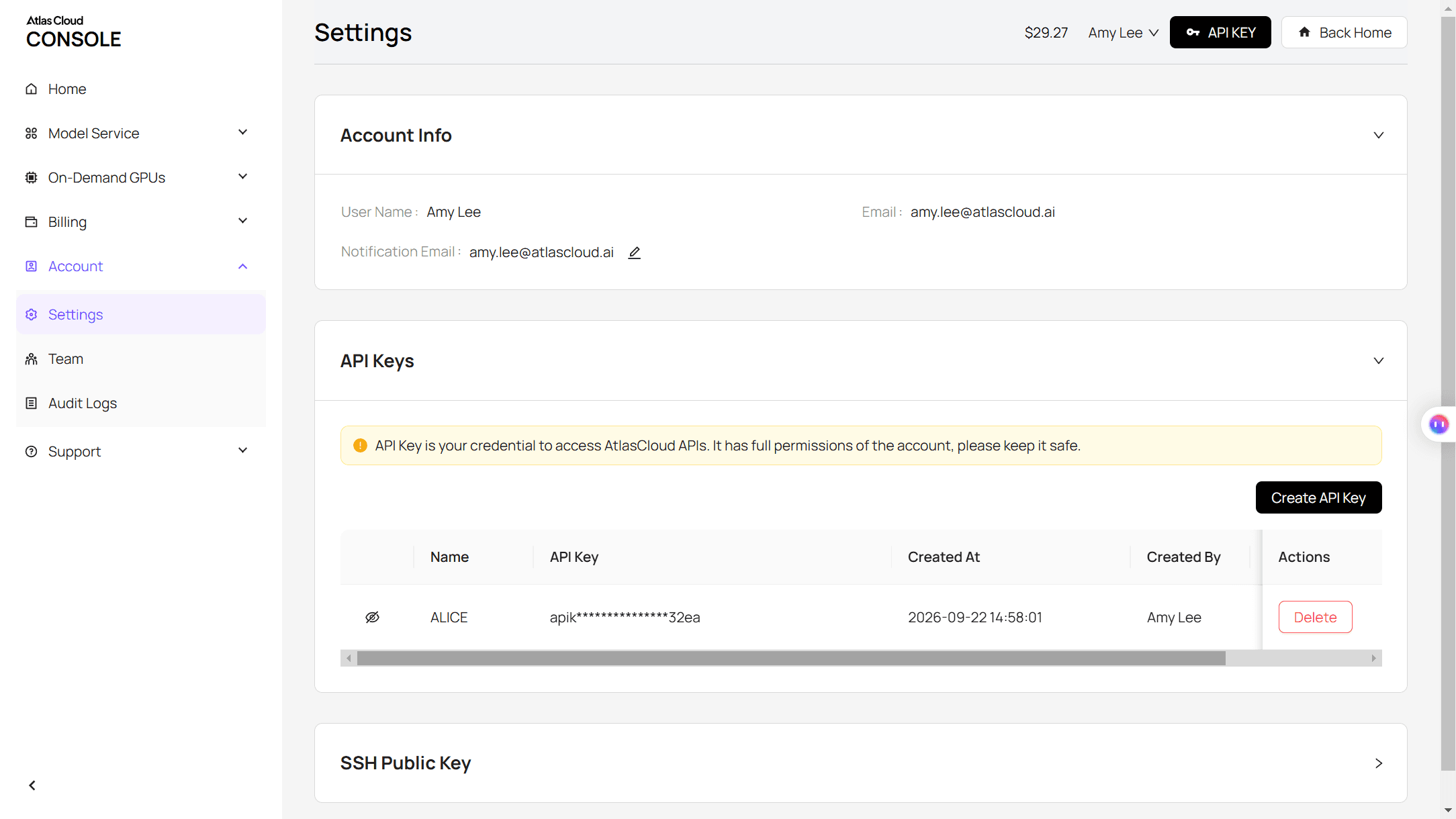
Step 1: Create and copy an API key. Open Settings in your Atlas Cloud console, click Create API Key, and copy the key straight away, since the list masks it afterwards.
Step 2: Check the request format. The Atlas Cloud API docs list every field for Seedance 2.5 Reference-to-Video, the model the Video Generation tab calls when you add reference files.
Step 3: Submit the job and poll for the result. The photo goes in reference_images and the muted clip in reference_videos, in the order the prompt tags them:
plaintext1curl -X POST https://api.atlascloud.ai/api/v1/model/generateVideo \ 2 -H "Authorization: Bearer $ATLASCLOUD_API_KEY" \ 3 -H "Content-Type: application/json" \ 4 -d '{ 5 "model": "bytedance/seedance-2.5/reference-to-video", 6 "reference_images": [ 7 "https://your-cdn.com/full-body-photo.jpg" 8 ], 9 "reference_videos": [ 10 "https://your-cdn.com/natsuki-clip-muted.mp4" 11 ], 12 "prompt": "Recreate @Video1 shot for shot... (paste the full Method 1 prompt)", 13 "duration": 8, 14 "resolution": "1080p", 15 "ratio": "9:16", 16 "generate_audio": false 17 }'
You get a prediction ID back. Poll it until the status reads completed, then take the clip URL from the outputs array:
plaintext1curl https://api.atlascloud.ai/api/v1/model/prediction/<prediction_id> \ 2 -H "Authorization: Bearer $ATLASCLOUD_API_KEY"
Atlas Cloud's video models run on this same endpoint, key and polling loop. Change the model string and its fields, and the same code calls a different model.
The Tsundere Stomp, Beat by Beat
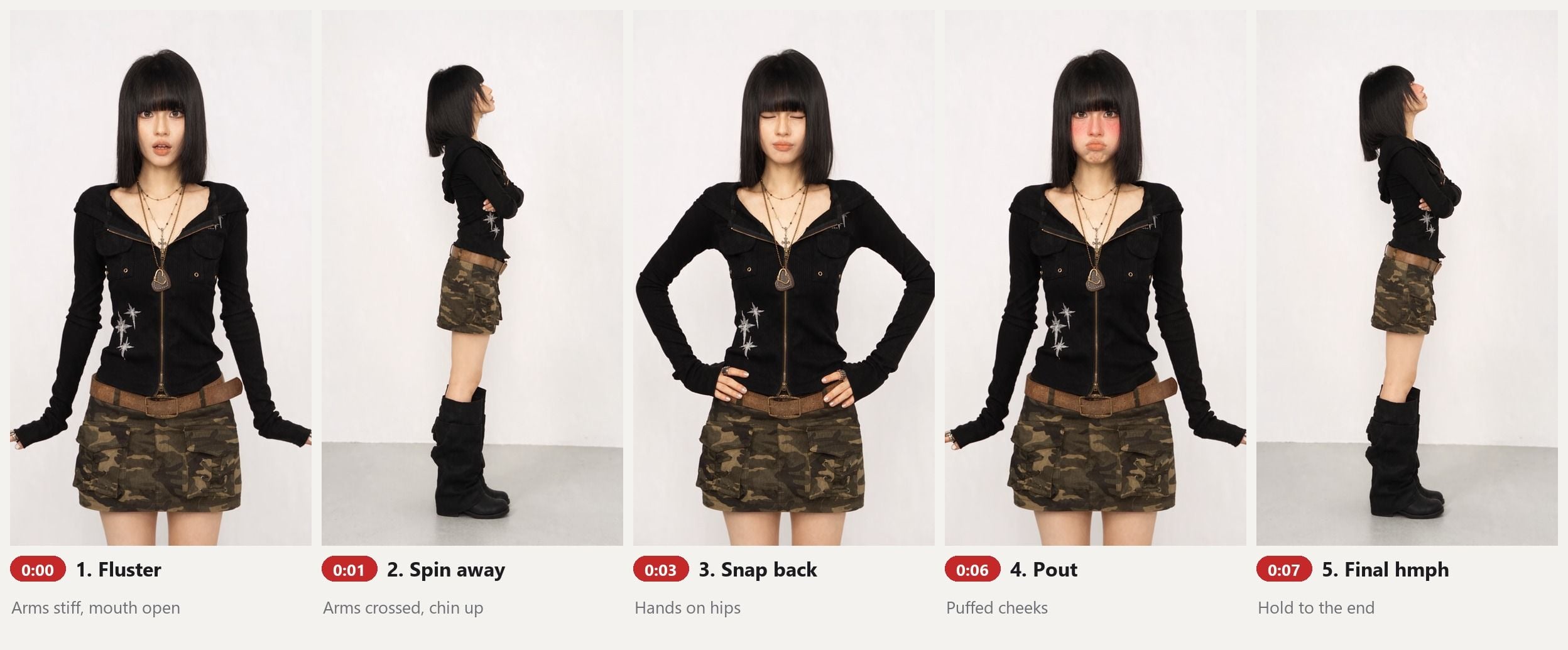
Doing it yourself on camera? The routine is five beats, and you can see each one in our AI run.
- Fluster. Face the lens with your arms locked straight and slightly out, eyes wide, mouth open, as if someone just caught you caring.
- Spin away. Turn a full 90 degrees in one piece, cross your arms tight and lift your chin. Freeze.
- Snap back. Whip back to the camera with your hands on your hips, then drop them stiff at your sides.
- Pout. Puff your cheeks. The blush is optional, but it reads well on camera.
- Final hmph. One last spin to profile, nose up, and hold it until the clip ends.
Repeat beats two and three once more in the middle and you have the full eight seconds. Keep your knees straight and your hips still. Every bounce makes it look like dancing, and the joke is that it isn't dancing.
The contrast does half the work. Here's the same routine on a man in a three-piece suit, built with the same steps and a new first paragraph describing his face, suit and the corridor from his photo:
If you want a second anime-flavored routine for a group, the Last Dance trend works from two photos.
Which Tsundere Trend AI Templates Exist Right Now?
Search CapCut for this dance and you'll mostly find something else. CapCut's tsundere template page listed 20 templates on November 17. Titles such as "i'm not a tsundere" belong to the older "I'm not a dere, a tsun-tsundere" song meme, and none of the 20 named this dance, Natsuki's stomp or the hmph trend. CapCut had no page at all for "tsundere dance" or "natsuki trend", and none of the six trend posts we opened carried a CapCut template link.
| Route | What you upload | What you get | Who it suits |
|---|---|---|---|
| CapCut | Nothing usable for this dance yet | Templates for the older tsundere song meme | Fans of the song edits |
| One-tap template site | 1 photo of you or a pet | A copy of a real person's take in their room or yours, about 10 seconds, with sound | Posting fast with no writing |
| Your own Seedance 2.5 prompt | 1 photo plus the Natsuki clip | The anime timing and camera cuts on your face, outfit and room | Wanting the game-character look |
The template site we looked at copies a real person's take, so the result moves like that person. If you want Natsuki's stiff, spin-and-freeze motion, the animated clip has to be your reference.
Photo Rules for a Clean Hmph Trend Video
One photo carries the whole cast, so it pays to pick it carefully. The photo our run started from was cropped at the shins. We extended it to head-to-boots with an image edit pass in the Atlas Cloud Image Generator before running the video.
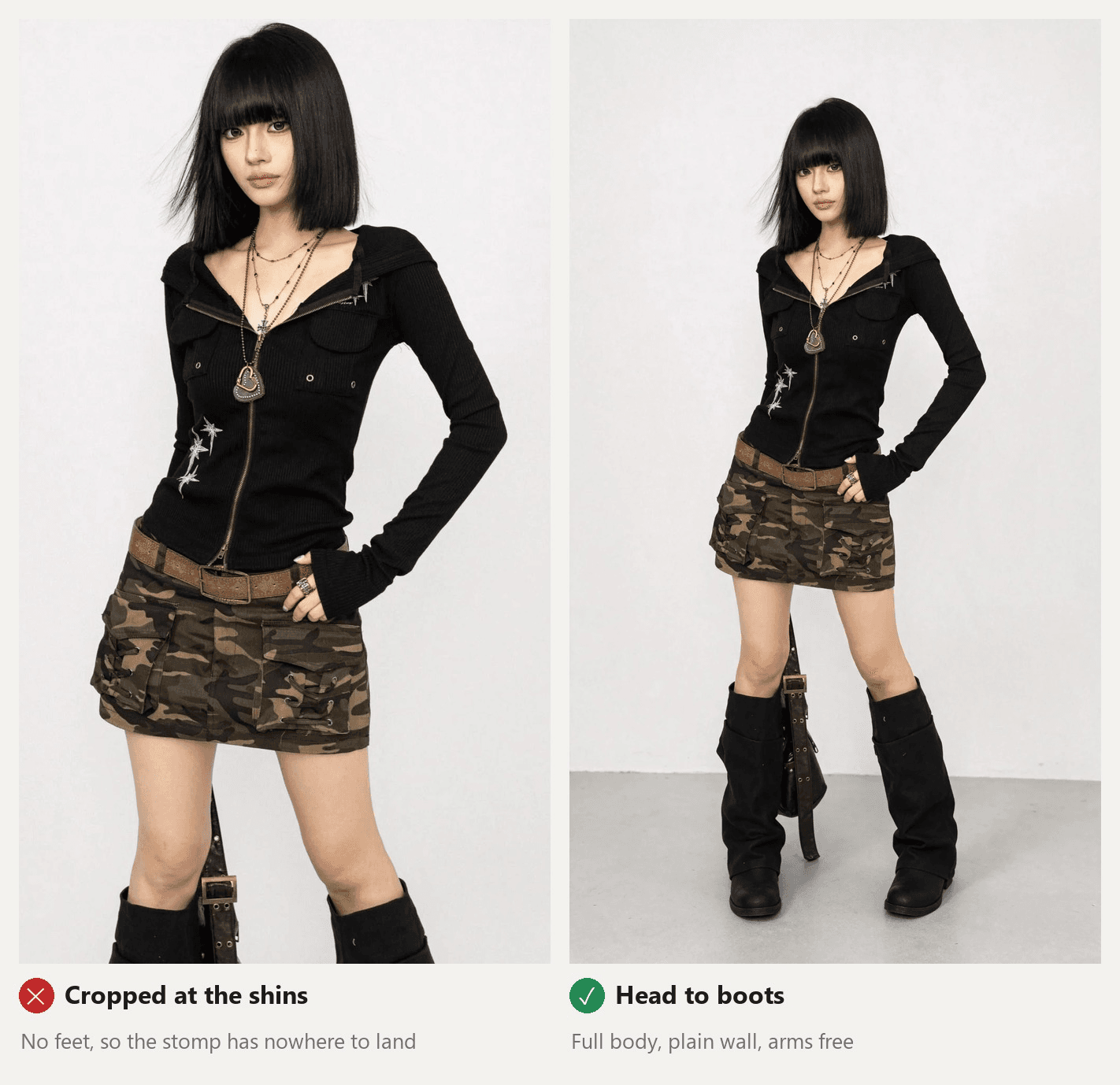
- Show the whole body. The turns cut to full-body shots, so the model needs your legs and shoes to draw them.
- Keep your arms off your body. Hands in pockets or clutching a bag leave the model guessing when the arms cross.
- Use a plain background. It becomes the set. Our studio wall, the suit photo's corridor and the kitten's blanket all carried straight into the videos.
- One subject only. A passer-by behind you can end up in the video, so say "exactly one person" in the prompt anyway.
Pets work too. Our kitten photo showed it lying down, and the prompt asked it to stand on its hind legs for the whole clip:
For a pet, swap the first paragraph of the Method 1 prompt for one like this, and change "arms" to "front legs" in the beat lines:
plaintext1The only change: the dancer is now the white kitten from @Image1: the same round face, big dark eyes, pink nose, small ears, gray patch on top of the head and fluffy white fur. It stands upright on its hind legs like a person the whole time, at a natural kitten size with a kitten's real body proportions, on the white quilted blanket from @Image1 with the soft pink and gray wall behind it. It keeps real animal anatomy: round fluffy paws with pink toe pads, never human hands, no clothes.
Our AI cat dance guide has more pet routines built the same way.
Frequently Asked Questions
Who is Natsuki in the tsundere trend?
Natsuki is a character from Doki Doki Literature Club, a 2017 visual novel. She's the pink-haired club member who snaps at people while clearly caring about them, the classic tsundere. The trend uses a 3D fan animation of her made by E-Bros Animations, not footage from the game itself.
What song is used for the tsundere dance trend?
There isn't a named song. Anime edits reuse the original audio of the November 5 Natsuki edit, which had 3,084 videos on November 17, 2026. Many real-person takes use the original sound from an October 16 Genshin Impact fan clip, which had 59,100 videos the same day. Pick either from TikTok's sound library when you post.
Is the tsundere dance trend the same as the "I'm not a tsundere" song?
No. The "I'm not a dere, a tsun-tsundere" lyric meme is older and has its own CapCut templates. The November 2026 trend has no lyrics: it's the flustered face, the spin to profile and the hmph from the Natsuki animation.
Can I make a tsundere dance video of my cat or dog?
Yes. Upload a sharp photo with the whole animal in view, use the pet paragraph above, and ask for real paws and no human hands. Our kitten stood on its hind legs for all eight seconds and kept its paws as paws.
How much does a tsundere dance AI video cost on Atlas Cloud?
As of November 17, 2026, an 8-second 9:16 Seedance 2.5 video from one photo and our 7.1-second reference clip costs about $5.36 at 1080p and about $2.72 at 720p. Both include the 20% discount shown on the page, against list prices of $6.70 and $3.40. The reference clip's length counts toward the price, and the Run button shows the exact figure before you generate, so a 720p test run is a cheap way to check your prompt.
Conclusion
The tsundere dance works because it barely moves. A flustered face, a stiff spin, a freeze and a hmph, borrowed from a five-second fan animation, read as funny on anyone from a schoolgirl cartoon to a man in a suit. Feed the model that animated clip, describe your outfit piece by piece, and the game-character motion carries over.
Choose a full-body photo, paste the prompt above, and add the Natsuki sound when you post. Your tsundere dance trend video will be ready before anyone admits they wanted to see it.




