


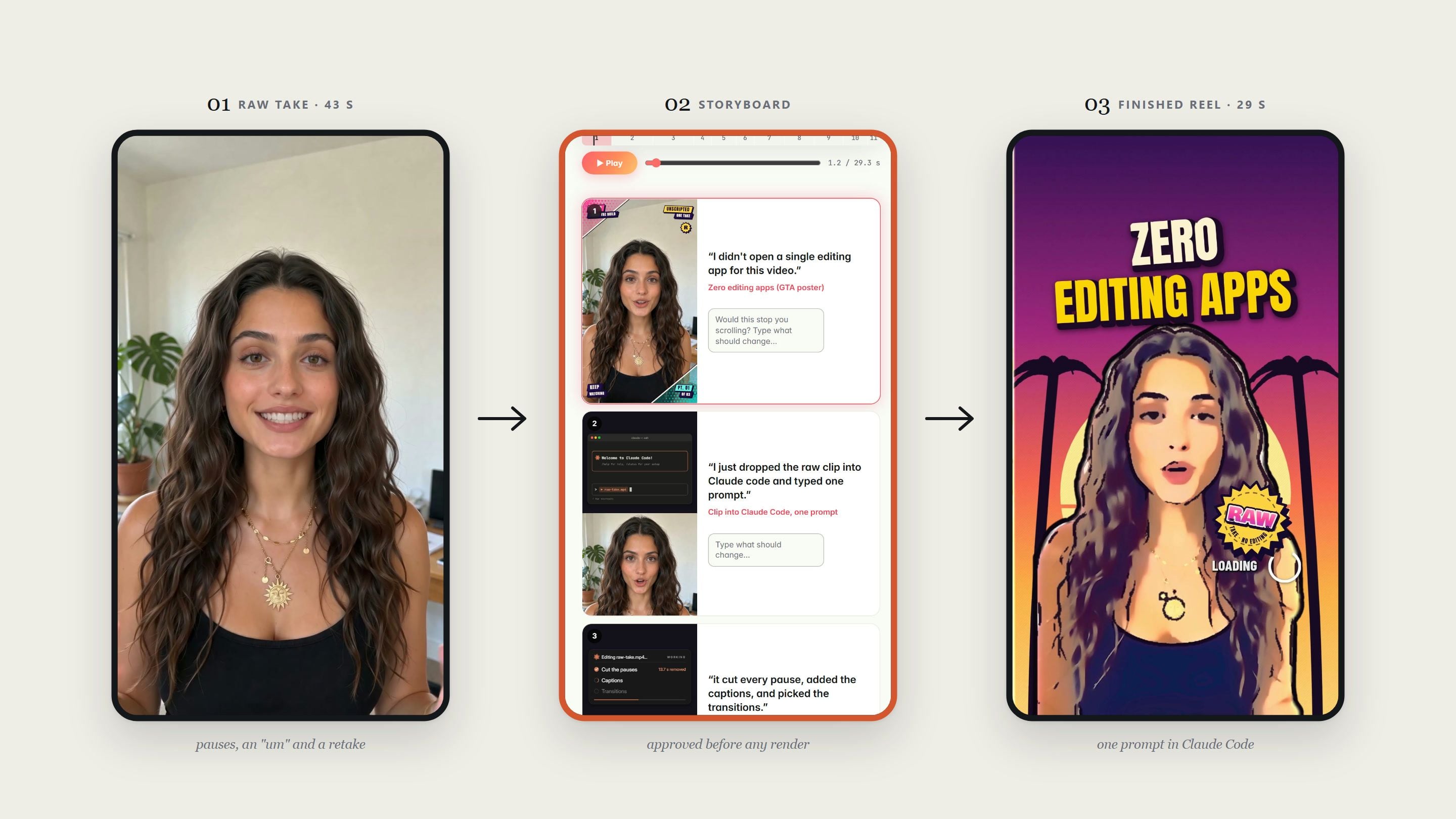
Forty-three seconds of footage. Ten dead pauses, one "um" and a sentence started twice. That was the raw take we handed to Claude Code on November 26. About nine minutes of rendering later it came back as a 29-second vertical reel with captions, a GTA-style poster hook, three transitions and a drone shot nobody filmed.
So, can Claude edit videos? Yes, through Claude Code and a free video editing skill. Below is the setup, the prompt, the storyboard you approve before anything renders, how we generated the missing B-roll, and the four Windows errors we had to fix along the way.
Key Takeaways
- Claude can edit videos through Claude Code, where a free video editing skill cuts, captions and renders locally.
- In our test, one prompt turned a 43-second raw take into a 29-second reel with captions and transitions.
- ContentSkills shows a storyboard page before it renders anything, so you approve or change each scene first.
- Missing a shot? Claude Code can generate B-roll with Seedance 2.5 on Atlas Cloud through MCP mid-edit.
- On Windows the skill needed four fixes, from a uv Python error to a font path ffmpeg rejected.
Can Claude Edit Videos? Yes, Through Claude Code Skills
The editing happens in Claude Code, Anthropic's agent that can run programs on your computer. That is the whole trick.
Claude does not scrub a timeline. It runs ffmpeg to cut, a local Whisper model to transcribe, and a headless browser to draw captions and graphics frame by frame. A skill is the folder of instructions and scripts that tells Claude Code which tool to run, in which order, and how to check the result. Put the two together and you get a Claude video editor you steer with sentences instead of a timeline.
The "one prompt" clips going around this week come from ContentSkills, an open-source skill pack Blotato published on GitHub on November 21, 2026 (AGPL-3.0, 159 stars as of November 26). Blotato's founder, Sabrina Ramonov, posted four Shorts between November 23 and 25, including one where Claude edits her raw clip and posts it to nine platforms.
One detail in those clips is easy to misread. "It learned my style" does not create a new skill. Say "make this my style" and ContentSkills writes your colors, fonts and caption choices to a style profile file that every later video reads.
Here is what our run produced. The presenter is an AI-generated host we made for this test, so the take behaves like a real phone recording with real flubs, and the edit itself is untouched output.
How to Edit Videos With Claude Code and ContentSkills
Open the Claude desktop app's Code tab in an empty folder and type "setup https://github.com/blotato/contentskills". Claude clones the repository, checks three tools, installs what is missing and runs the setup script, which pulls 1.5 to 2 GB of models into a local tools folder. When it finishes, it opens a dashboard on localhost and says it is ready for a video.
| What setup brings in | What it does in the edit |
|---|---|
| Node.js 22 or newer | Runs every pipeline command (cut, footage, make, quality check) |
| FFmpeg | Cuts, encodes and mixes the clip |
| uv | Builds three Python environments for voice, effects and transcription |
| Whisper small.en (about 470 MB) | Word-level transcripts on your own machine, downloaded the first time you transcribe |
| Kokoro voice model (about 380 MB) | Free narration for faceless videos |
| Headless Chrome | Draws captions, overlays and 3D scenes frame by frame |
Write One Prompt, Then Flag the Retakes Yourself
Drag your clip into the folder and send one request. Ours was a variation of this:
plaintext1Make a video from raw-take.mp4 in the gta6 theme. Cut the pauses, the ums and any false starts. Add captions, transitions and a few effects on my key words. Show me the storyboard before you render anything.
Claude Code runs the cut first. It transcribes the take, numbers every word and lists what it plans to remove. Ten pauses longer than 0.15 seconds went, along with the "um".
The false start did not. Whisper heard "It even... wait, let me say that again" as ordinary speech, so the detector kept it. The skill's own playbook tells the agent to read the numbered list for restarted sentences, and that is where we caught it: we added words 56 to 63 to the drop list and ran the cut for real.
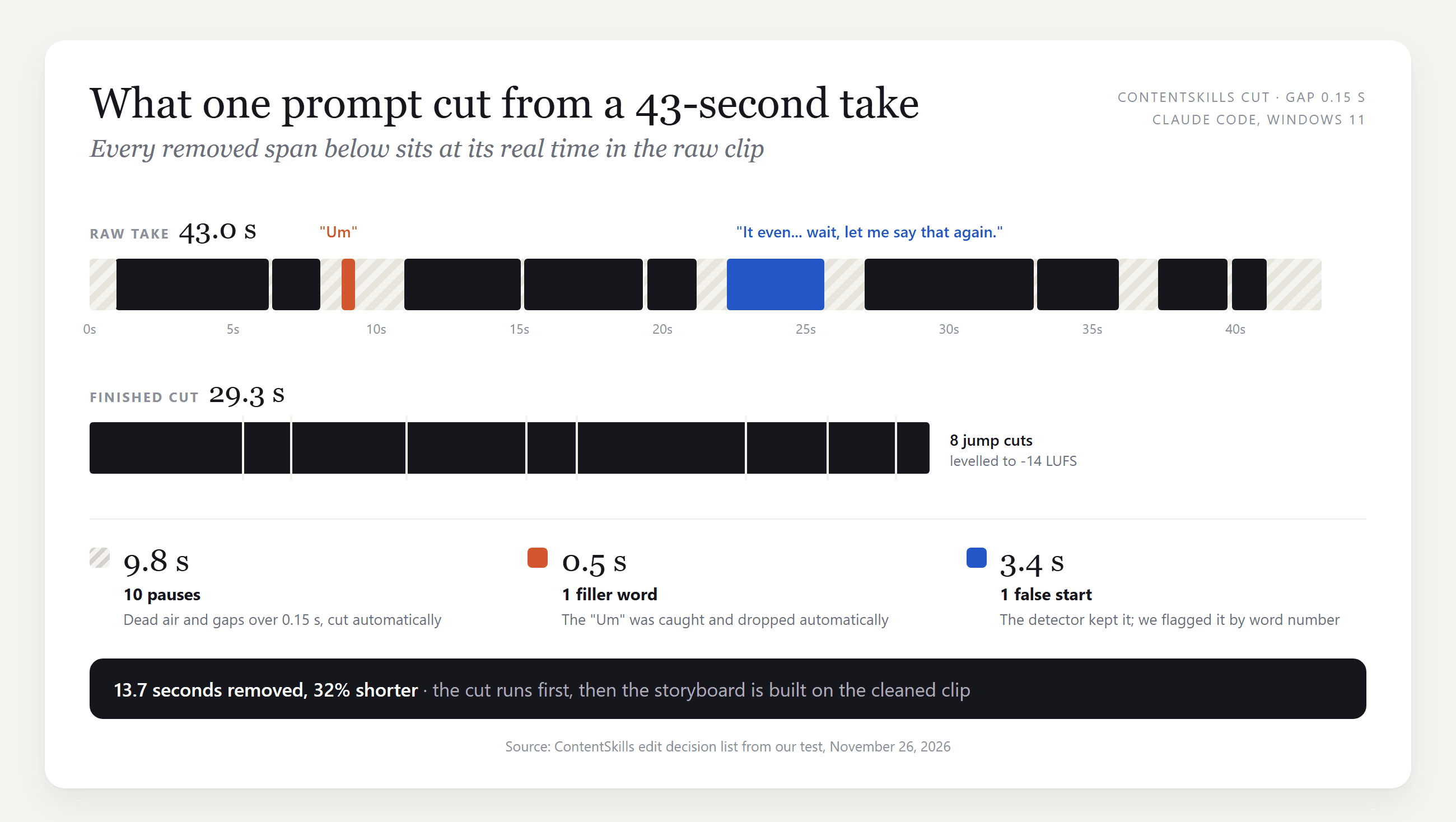
The cut also levels each phrase to the same loudness and normalizes the voice to -14 LUFS, so a sentence said further from the mic does not drop in volume.
Approve the Claude Storyboard Before Anything Renders
Next, Claude writes the plan scene by scene and sends a link to a storyboard page on your computer. Nothing is rendered yet. You watch a phone-size animatic, leave notes on the scenes you want changed, and press one button when it looks right.
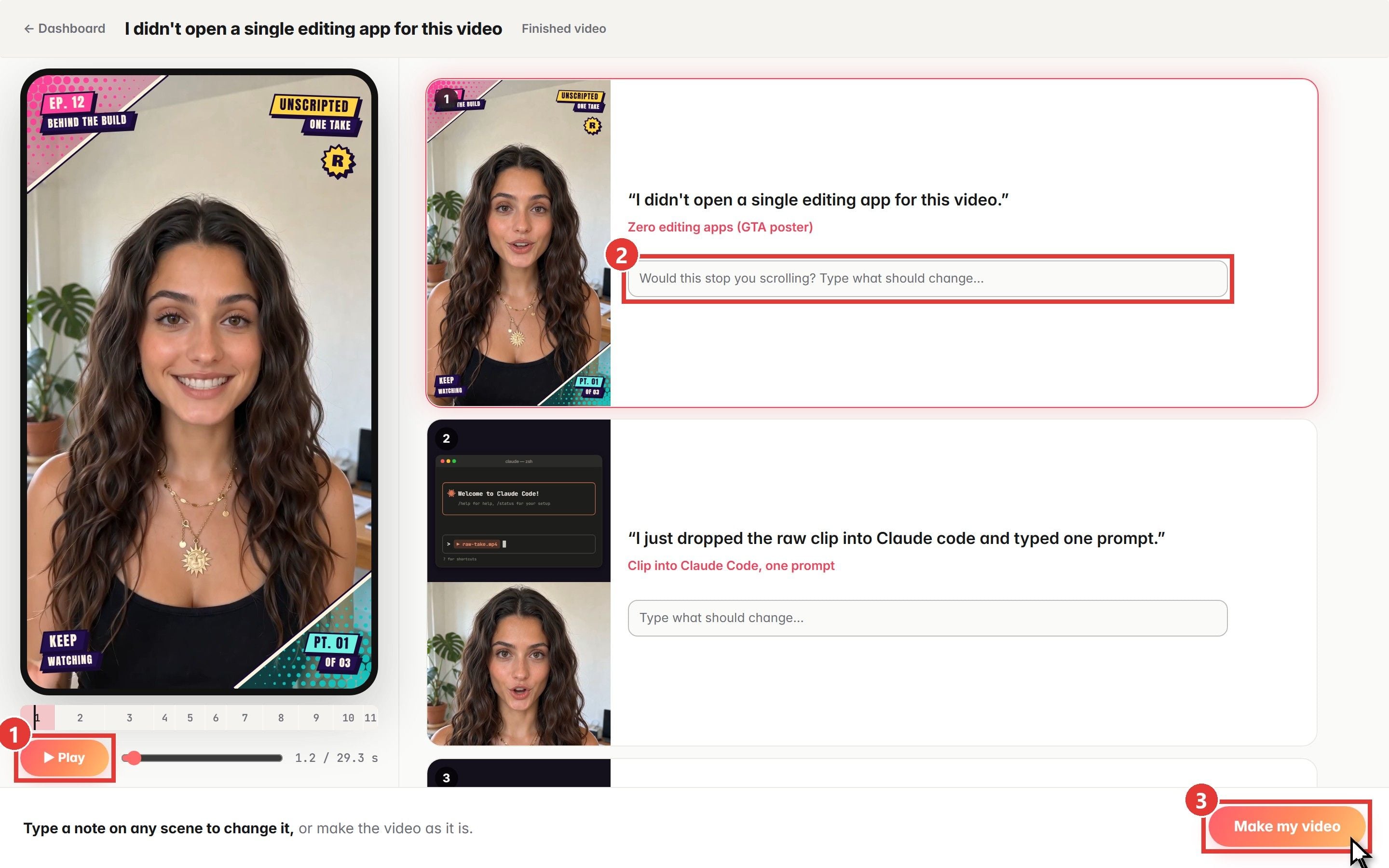
- Press Play to watch the animatic with captions and sound effects.
- Type a note on any scene card ("captions smaller", "this card covers my face") and Claude revises only that scene.
- Press Make my video to approve and render.
One thing the page cannot show live: picture effects such as the GTA poster, cel shading and color grades only appear after the render.
Our 11-scene storyboard rendered 879 frames at 1080 x 1920 in 548 seconds. The built-in quality check then failed two corner labels that sat under the app's top bar and bottom buttons. Claude replaced them with a sticker inside the safe area, re-rendered in 372 seconds, and the final check passed at -14.2 LUFS.
Add B-Roll You Never Filmed With Seedance 2.5 on Atlas Cloud
The line "like a drone shot over a city at sunset" had no footage behind it. So mid-edit, Claude Code generated one with Seedance 2.5 on Atlas Cloud, laid the last 2.4 seconds over that line and kept the voice running underneath. This is the raw 5-second shot.
Seedance 2.5 takes a text prompt and returns 4 to 30 seconds of video in ratios from 21:9 down to 9:16, so the shot drops into a vertical reel without cropping. You can switch its native audio off, which keeps your own voice track clean.
Method 1: Generate the Shot in the Seedance 2.5 Playground
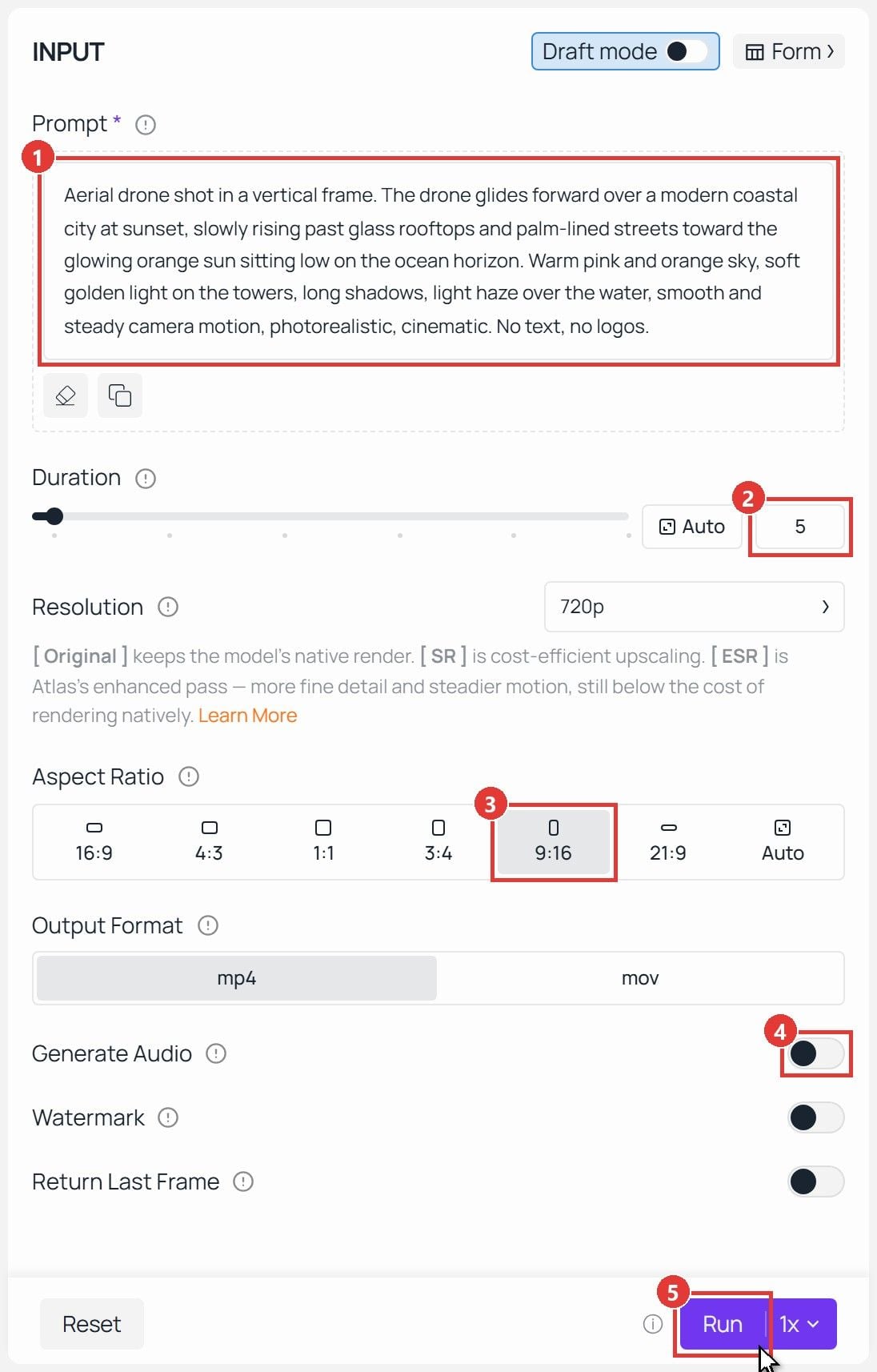
Log in and open the Seedance 2.5 text-to-video playground. Then:
- Paste the prompt below into Prompt.
- Set Duration to 5.
- Pick 9:16 under Aspect Ratio.
- Turn Generate Audio off.
- Press Run, download the MP4 and drop it into your project folder. Our clip came back in a little over two minutes.
plaintext1Aerial drone shot in a vertical frame. The drone glides forward over a modern coastal city at sunset, slowly rising past glass rooftops and palm-lined streets toward the glowing orange sun sitting low on the ocean horizon. Warm pink and orange sky, soft golden light on the towers, long shadows, light haze over the water, smooth and steady camera motion, photorealistic, cinematic. No text, no logos.
Method 2: Call Seedance 2.5 From Claude Code Through the Atlas Cloud API
If you want the skill to fetch B-roll on its own, give Claude Code API access.
Step 1: Create an API key. In the Atlas Cloud console, open Settings, find API Keys and click Create API Key. Keep it server-side: one key covers every model on the platform.
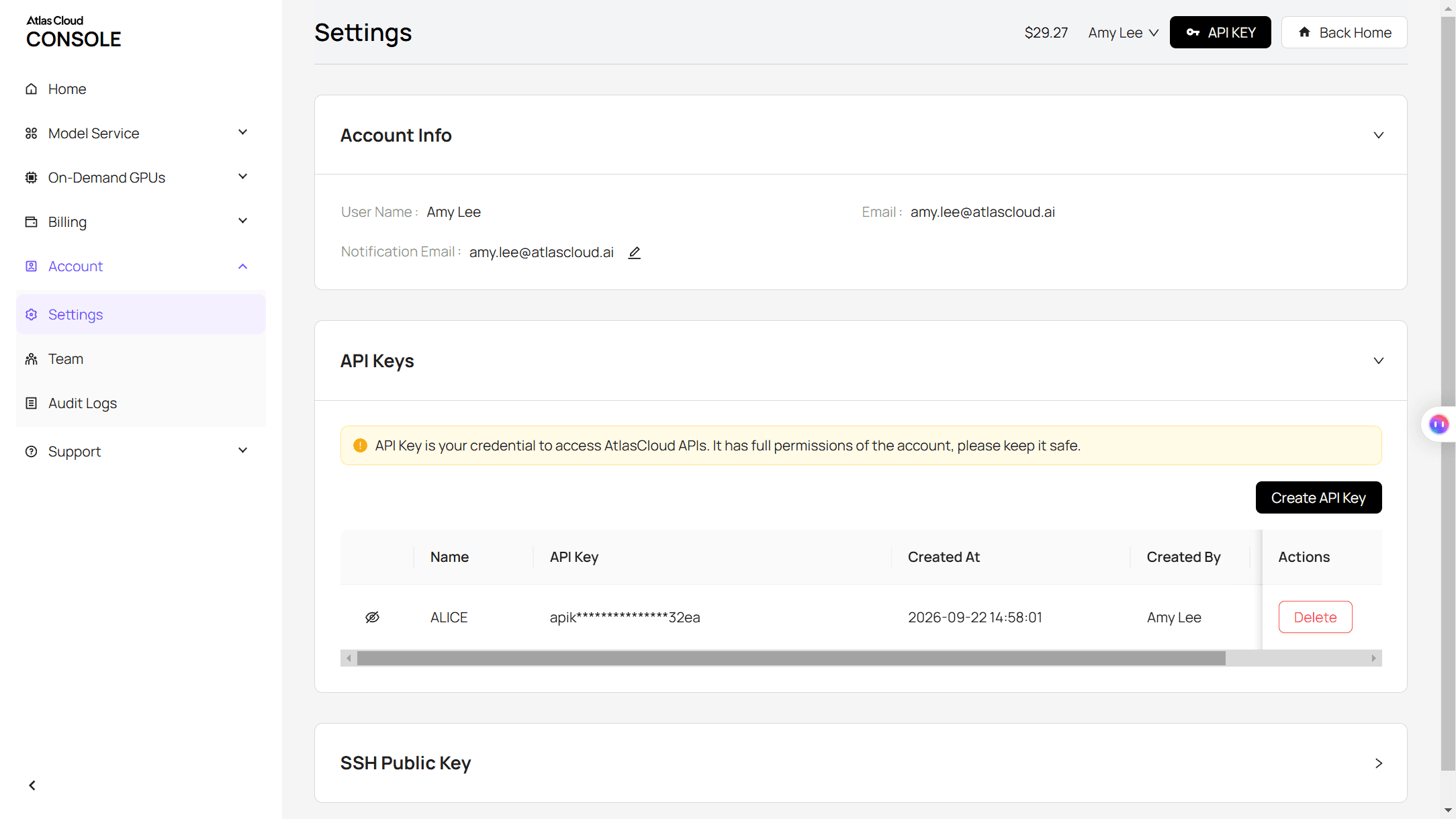
Step 2: Check the request shape. The Atlas Cloud API docs cover authentication and polling, and the API tab on the model page lists every parameter.
Step 3: Send the request and poll. Submit the job:
plaintext1curl -X POST https://api.atlascloud.ai/api/v1/model/generateVideo \ 2 -H "Content-Type: application/json" \ 3 -H "Authorization: Bearer $ATLASCLOUD_API_KEY" \ 4 -d '{ 5 "model": "bytedance/seedance-2.5/text-to-video", 6 "prompt": "Aerial drone shot in a vertical frame over a modern coastal city at sunset, rising past glass rooftops toward the sun on the ocean horizon, photorealistic, no text", 7 "duration": 5, 8 "resolution": "720p", 9 "ratio": "9:16", 10 "generate_audio": false 11 }'
The response returns a prediction ID. Poll it until the status reads completed:
plaintext1curl https://api.atlascloud.ai/api/v1/model/prediction/<prediction_id> \ 2 -H "Authorization: Bearer $ATLASCLOUD_API_KEY"
The completed response carries the video URL. Atlas Cloud runs one API across the platform, so the same key, header and submit-and-poll loop work for every model, and moving to a newer Seedance release means changing the model string.
Inside Claude Code you rarely type that curl yourself: the Atlas Cloud MCP server wraps the same calls, and our Claude Code MCP setup guide covers the one-time install. After that, asking for "a 5-second 9:16 drone shot over a city at sunset" in the ContentSkills session is enough.
Running a Claude Video Editing Skill on Windows: 4 Fixes
ContentSkills' guide says Claude Code video editing works on Windows through the Claude desktop app's Code tab, with winget installing Node, FFmpeg and uv when they are missing. That part held up. Four other steps broke on our Windows 11 machine, all from path or encoding handling.
| Where it failed | What we saw | The fix |
|---|---|---|
| Setup, Python step | uv stopped with "Missing expected target directory for Python minor version link" | Set UV_PYTHON_INSTALL_DIR to another folder (we used one on drive D) and run setup again |
| The cut command | It exited instantly and wrote nothing | Its "run directly" check compares a Unix-style path that never matches on Windows; launching the script through a two-line wrapper that passes that path works |
| Sketch and render | FFmpeg rejected the font path for the GTA poster text | Inside FFmpeg filters, Windows paths need forward slashes and an escaped drive colon (D\:); we patched the two font helpers |
| Quality check | Python crashed with a "gbk" codec error | Run it with PYTHONUTF8=1 so Python reads the project's JSON as UTF-8 on a Chinese-locale system |
None of these needed admin rights. The repository was five days old when we tested, so check its latest commits before patching anything yourself.
Which Video Editing Skills for Claude Fit Your Footage?
ContentSkills is one of several ways to do video editing with Claude. The biggest practical difference between them is where you get to say "not like that" before the final render. Each entry below comes from the tool's own README or docs, read on November 26, 2026.
| Tool | What you give it | How you review before the final render | What renders the video | Extra costs |
|---|---|---|---|---|
| ContentSkills (Blotato) | One talking-head take, or just a topic | A storyboard page with one panel per scene and a Make my video button | Your computer: FFmpeg, headless Chrome, Python effects | Free (AGPL-3.0); ElevenLabs voices and posting are optional |
| video-use (Browser Use) | A folder of raw takes | A written edit strategy it waits for you to approve, then a 720p preview | Your computer: FFmpeg and PIL, plus HyperFrames, Remotion or Manim for animation | MIT license; needs an ElevenLabs API key for transcription |
| ChatCut desktop MCP | Footage inside a ChatCut project | The edit lands on ChatCut's own timeline, which you adjust by hand | The ChatCut desktop app on macOS or Windows | ChatCut account; free plan plus paid credit plans |
| edit-video skill (Cole Medin) | One recording or a folder of numbered clips | One round of questions up front, then the agent checks its own output and lists what needs your eyes | Your computer: faster-whisper, FFmpeg, HyperFrames | MIT license; optional cloud review mode through OpenRouter |
| Kapwing shorts-editor | A project folder plus 3 to 10 reference videos in your style | Claude pulls frames from the rendered MP4, fixes layout problems and re-renders | Your computer: FFmpeg, Whisper, HyperFrames | Free download |
| Remotion skills | A prompt inside a Remotion project | A live preview in Remotion Studio | Remotion, locally or on AWS Lambda | Free for individuals and teams up to 3 people |
If you film yourself talking and want to approve each scene, ContentSkills and its storyboard page fit. If you have a pile of takes and prefer to sign off on a written plan, video-use does that.
If you want hands on a real timeline afterward, ChatCut puts the edit there, and Remotion keeps everything as code you can preview in Studio. If you would rather skip agents and use an app, our AI video editor comparison tests ten of them on one clip.
FAQ
Can Claude edit videos for free?
The skill costs nothing. ContentSkills is open source, and its cut, transcription and rendering all run on your computer.
Claude Code itself is part of the paid Claude plans: Claude's pricing page says it "is included in all paid plans," and Pro costs $20 a month billed monthly ($17 a month on an annual plan) as of November 26, 2026. Generated B-roll is billed per second of video, and the Run button in the playground shows the exact price before you generate.
Is Claude a good video editor?
For talking-head cuts it is fast and thorough. It removed every pause over 0.15 seconds in our take and placed graphics on the exact words that triggered them. It still needs your judgment. It missed our restarted sentence until we flagged it, and ContentSkills' own playbook reminds the agent that it cannot watch video or hear sound, only check stills and numbers. Pacing, motion and audio are yours to review.
Can Claude edit videos in Premiere Pro or DaVinci Resolve?
Not with ContentSkills, which renders the finished MP4 itself. If you need a project file to keep editing, Remotion's agent skills can export an OpenTimelineIO timeline that DaVinci Resolve and Premiere open, and ChatCut leaves the edit on its own editable timeline.
Can Claude edit an AI avatar video?
Yes. Our host is AI-generated: we lip-synced a portrait to a generated voice track with an avatar model, then gave the 43-second result to Claude Code like any phone recording. The skill treated it as normal footage. Its face tracker found her face in 405 of 440 sampled frames, and the 35 misses roughly match the length of the faceless drone shot.
Conclusion
The edit itself was the easy part. One request produced a cut, captions, transitions and a storyboard we could change scene by scene, and our one manual call in the edit was flagging a restarted sentence. Windows users should expect the four fixes above. The generated drone shot filled the one line we had no footage for.
So can Claude edit videos? With Claude Code and a skill like ContentSkills, yes, and well enough to ship a short-form reel from a raw take. Approve the storyboard before you render, check the cut list for false starts, and generate the shots you never filmed instead of skipping the line.







