

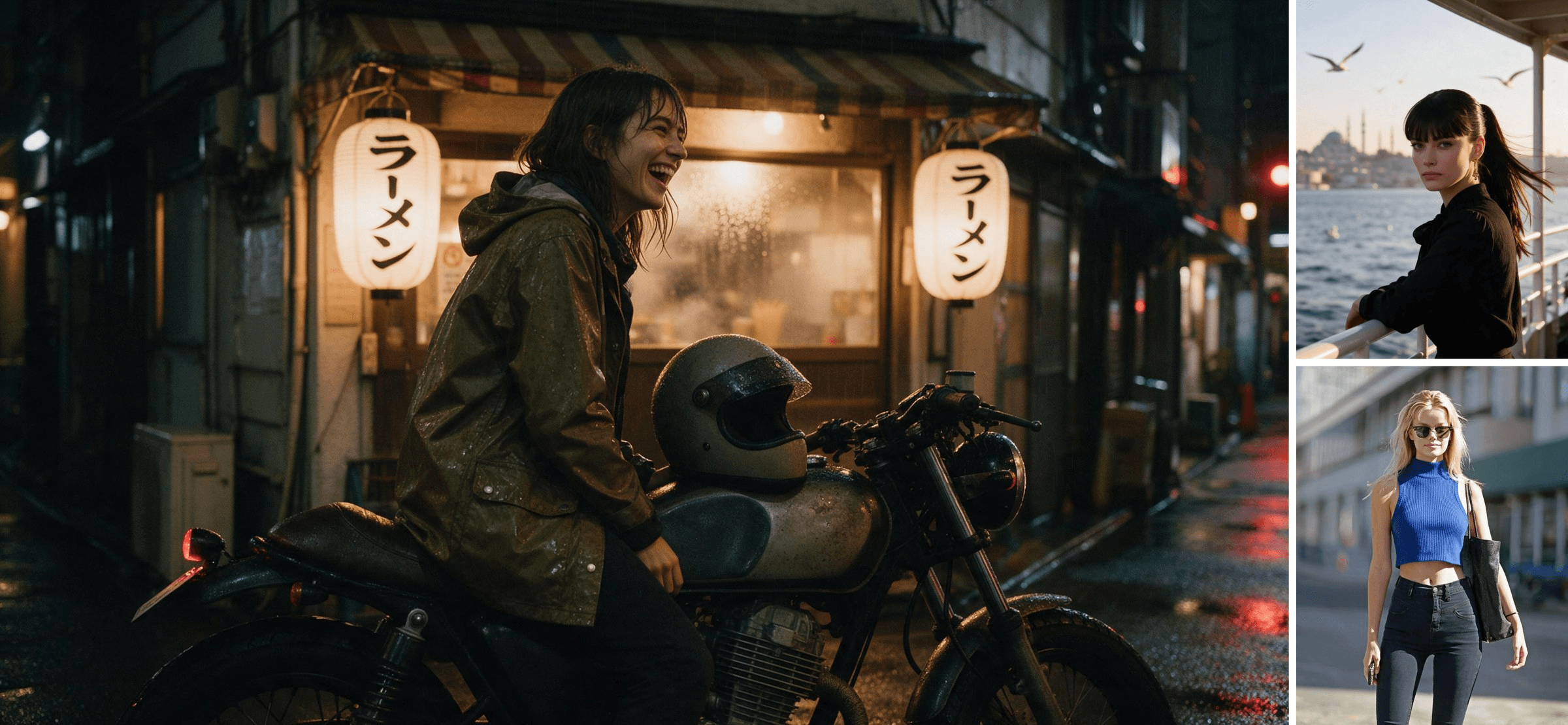
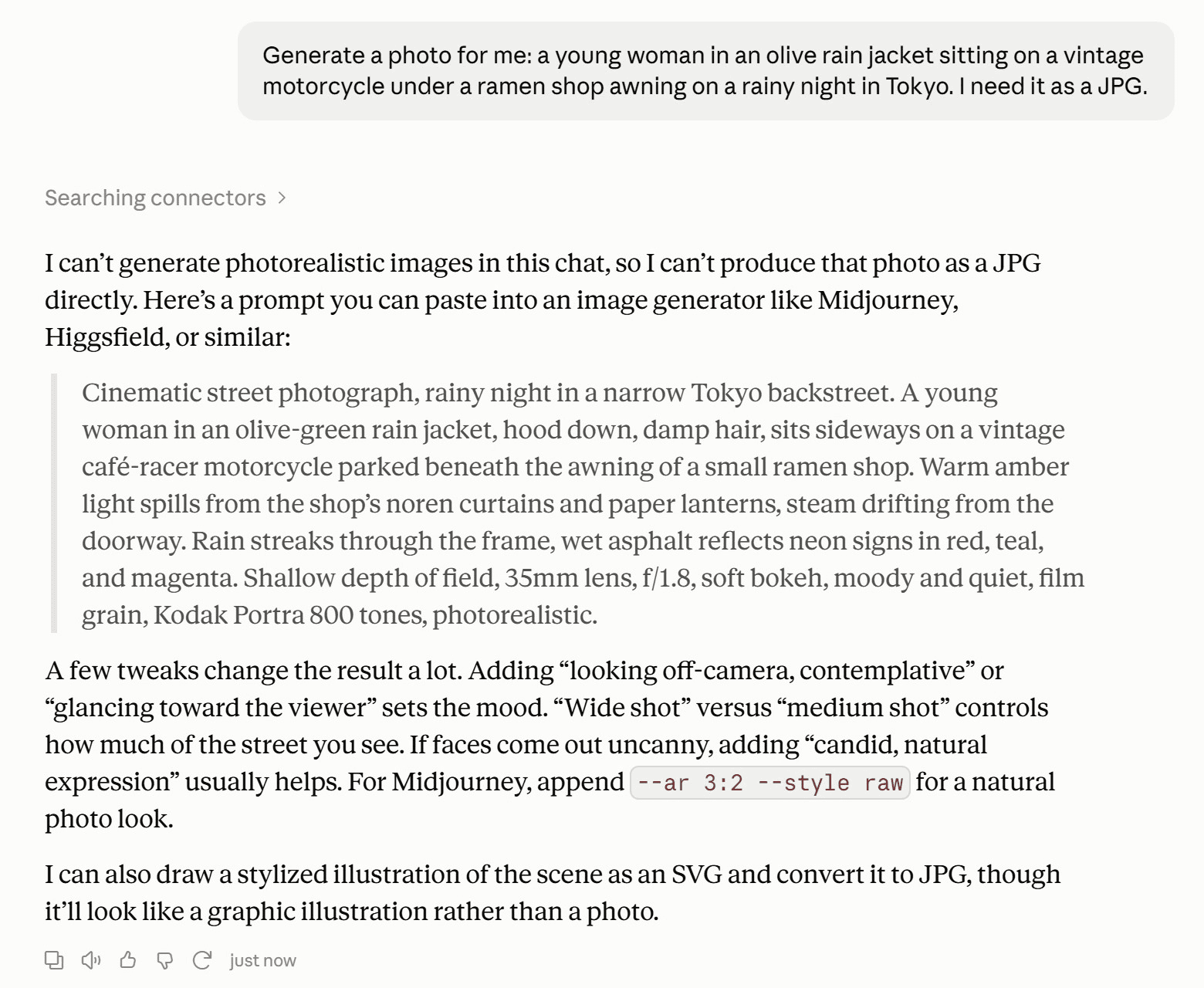
We asked Claude for a JPG of a woman on a vintage motorcycle outside a Tokyo ramen shop in the rain. It checked its connectors, found nothing that could do the job, and wrote a prompt for some other tool instead. So can Claude generate images? Not photos and not illustrations. It can draw charts and SVG graphics, and Claude Design builds layouts.
Give it an image model through an MCP server, though, and the same request comes back as a real picture. We installed one and ran three tests: a scene from a sentence, a portrait moved to a new city, and a single clothing swap.
Key Takeaways
- Claude does not generate photos or illustrations;itdraws charts, diagrams andgraphicsas SVG and HTML.
- Claude Design builds slides, layouts and prototypes, and the designer behind it says it has no image model.
- One MCP server for Claude lets Claude Desktop and Claude Code call Seedream 5.0 Pro and return real images.
- Attach your own photo and Claude uploads it, edits it, and keeps the face consistent across follow-up changes.
- Generation took 50 to 92 seconds per image in our tests, and Claude returned a link or saved the file.
Does Claude Generate Images Natively?
No. Anthropic's help article Can Claude produce images? puts it plainly: Claude "doesn't generate photos or illustrations the way image-generation tools do." What it can do is look at images. Upload a screenshot or a photo and Claude will read it, describe it and answer questions about it.
Our motorcycle request played out exactly that way. Before replying, Claude ran a quick search of its connector directory, came back empty, and answered that it can't generate photorealistic images in the chat. It then wrote a detailed prompt we could paste into another generator and offered a fallback: a stylized SVG of the scene.
That fallback is worth a closer look, because it shows what Claude actually makes when you ask for a picture.
What Claude Can Draw Without an Image Model: Charts, SVG and Claude Design
Claude draws with code. According to Anthropic's release notes, since March 12, 2026 it can "create custom charts, diagrams and other visualizations in-line," and the help article above says those visuals are built with HTML and SVG, so you can ask Claude to change them after the fact. We took Claude up on its SVG offer. It wrote a few dozen lines of SVG shapes and colors, and the drawing rendered right in the chat.
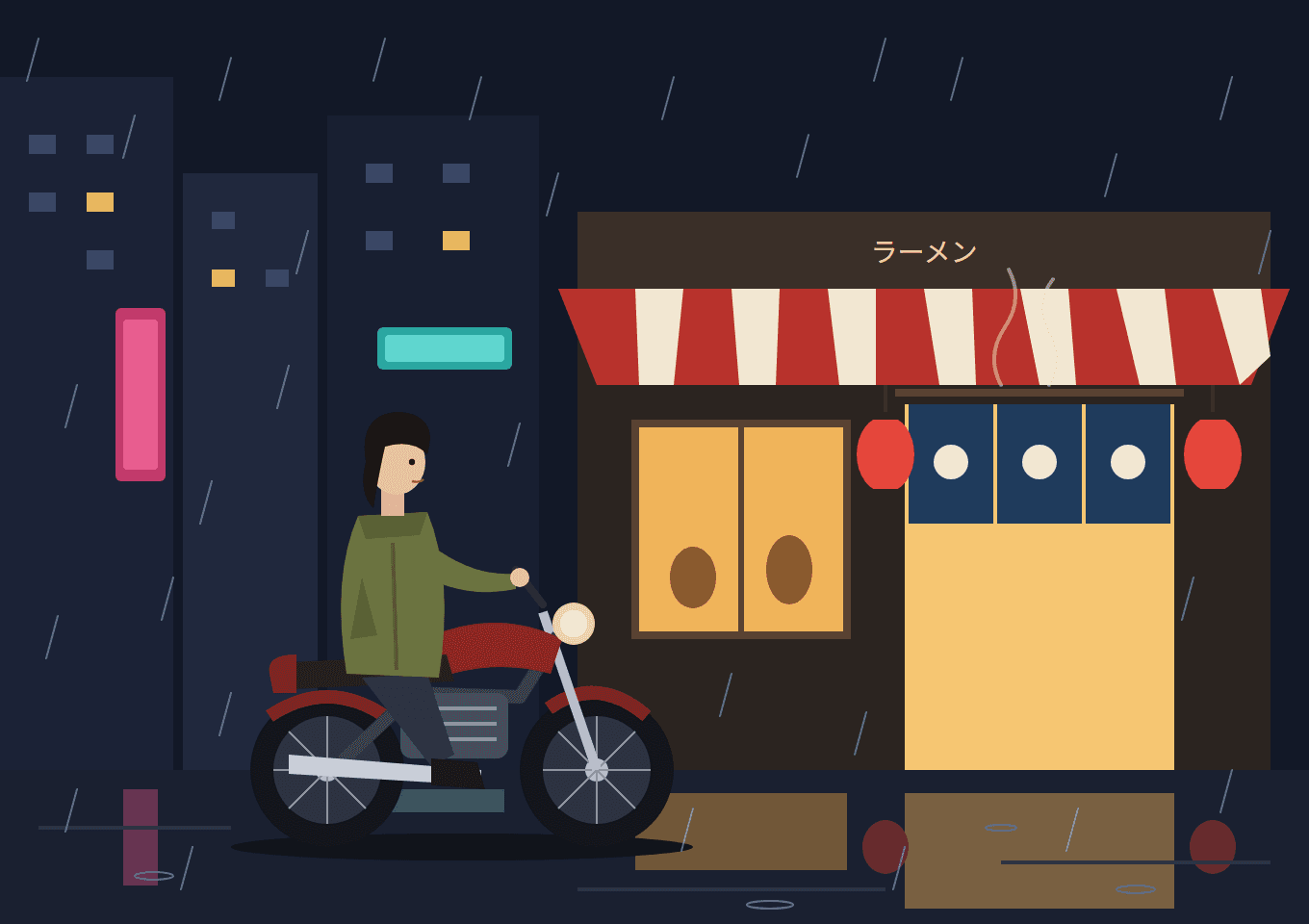
It is a tidy flat illustration, and every element is editable. It is also clearly not a photograph. Claude got the awning, the lanterns and even the ラーメン sign right, but every person and object is built from basic geometric shapes.
Claude Design is the other source of confusion. Anthropic launched it on April 17, 2026 for "designs, prototypes, slides, one-pagers, and more," and according to Anthropic's release notes it has worked in any Claude conversation, on every plan including Free, since September 16. Nate Parrott, the product designer who built it, is direct about the limit in a July 2026 post: "Claude Design doesn't have an image model and isn't built for image generation." You bring the photos, it arranges them.
| Claude chat | Claude Design | Claude with an image model | |
|---|---|---|---|
| What you get | Charts, diagrams, SVG graphics | Slides, landing pages, one-pagers | Photos and illustrations |
| Photoreal people and scenes | No | No | Yes |
| How it is made | HTML and SVG code | HTML layouts | An image model renders pixels |
| Where it runs | claude.ai, Claude Desktop | Any Claude conversation | Claude Desktop, Claude Code via MCP |
How to Generate Images With Claude Using the Atlas Cloud MCP Server
Claude image generation starts working the moment Claude has a tool it can call. The tool we used is atlascloud-mcp, an MIT-licensed npm package from Atlas Cloud that gives Claude 13 tools. The ones that matter here are atlas_generate_image, which sends a request to an image model, atlas_upload_media, which turns a file on your computer into a URL a model can read, and atlas_get_prediction, which collects the result. Our first prompt went to Seedream 5.0 Pro, ByteDance's flagship image model, and this came back.
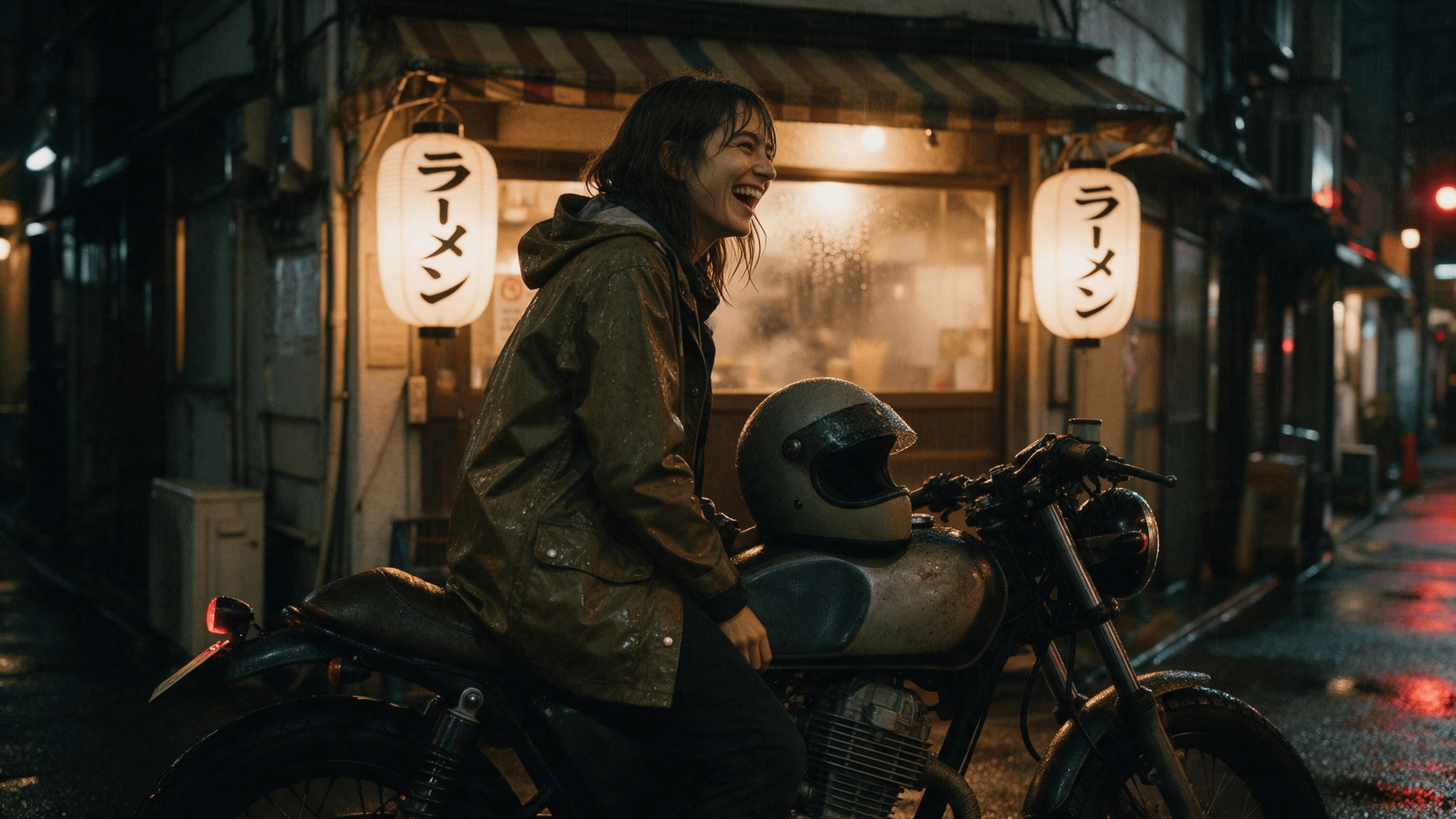
Same scene as the SVG above, this time with rain beading on the jacket and both lanterns spelling ラーメン correctly. Here is how to set it up.
Install Once: One Command or One JSON Block
You need Node.js 18 or newer and an Atlas Cloud API key from your account settings. The full notes live on the Atlas Cloud MCP server page. Atlas is not in Claude's built-in connector directory, so the empty search in the first test is expected. You add it yourself.
In Claude Code it takes three steps, with ATLASCLOUD_API_KEY set in your shell:
- Add the server from your project folder:
plaintext1claude mcp add atlascloud -- npx -y atlascloud-mcp
- Run claude mcp list. The atlascloud line should end in Connected.
- Start claude in the same folder and describe the image you want.
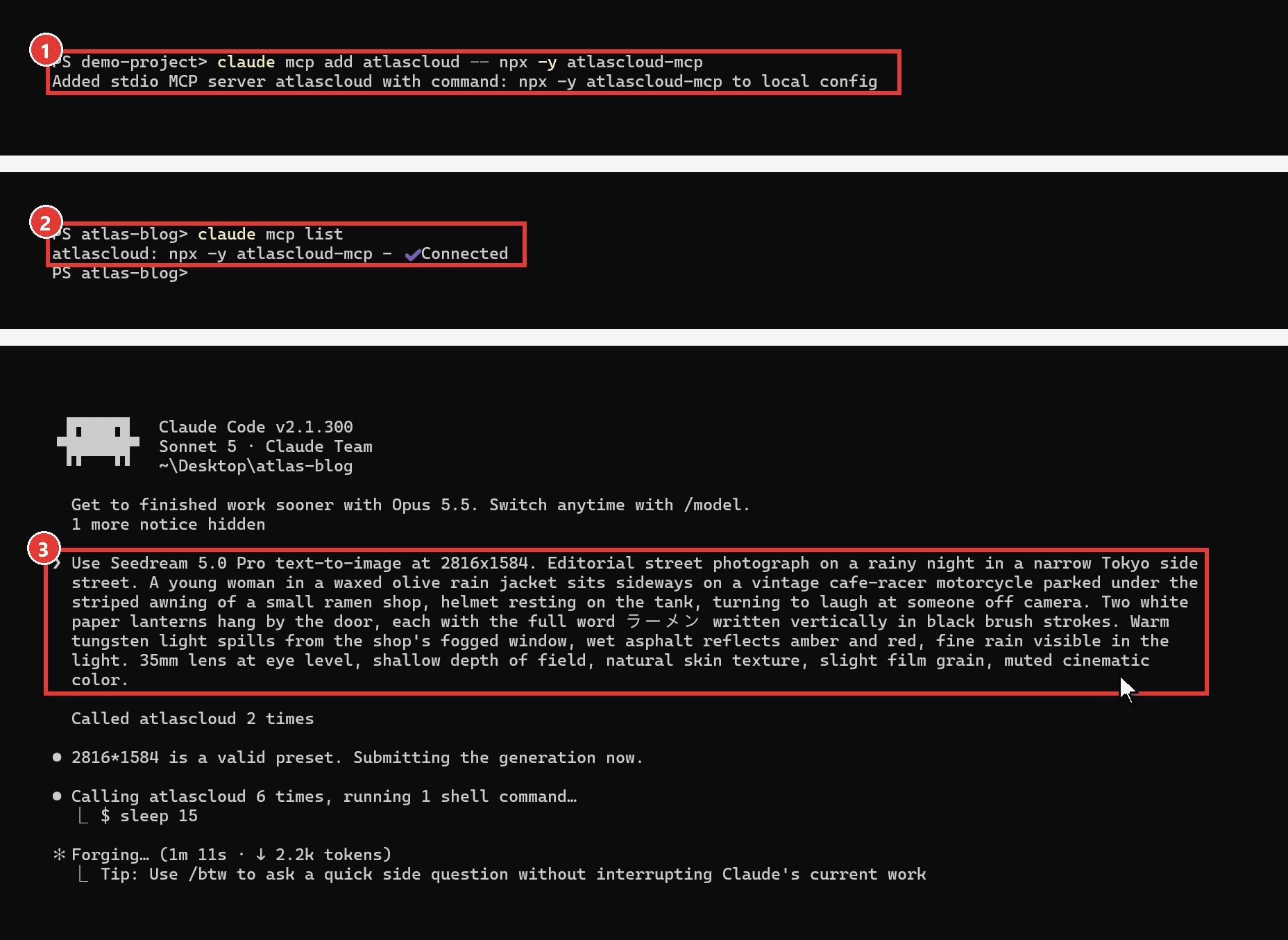
The add command registers the server for the current folder only, which is why the output says "local config". Add --scope user to use it in every project.
Claude Desktop reads the same server from a config file. Open Settings, choose Developer, click Edit Config, and paste this block into claude_desktop_config.json with your key in place of the placeholder:
plaintext1{ 2 "mcpServers": { 3 "atlascloud": { 4 "command": "npx", 5 "args": ["-y", "atlascloud-mcp"], 6 "env": { 7 "ATLASCLOUD_API_KEY": "your-api-key-here" 8 } 9 } 10 } 11}
Save, then quit and reopen the app. New chats can use the atlascloud tools after the restart.
First Prompt: Claude Image Generation With Seedream 5.0 Pro
Name the model and the shape you want, then describe the picture the way you would brief a photographer. This is the exact prompt behind the motorcycle image:
plaintext1Use Seedream 5.0 Pro text-to-image at 2816x1584. Editorial street photograph on a rainy night in a narrow Tokyo side street. A young woman in a waxed olive rain jacket sits sideways on a vintage cafe-racer motorcycle parked under the striped awning of a small ramen shop, helmet resting on the tank, turning to laugh at someone off camera. Two white paper lanterns hang by the door, each with the full word "ラーメン" written vertically in black brush strokes. Warm tungsten light spills from the shop's fogged window, wet asphalt reflects amber and red, fine rain visible in the light. 35mm lens at eye level, shallow depth of field, natural skin texture, slight film grain, muted cinematic color.
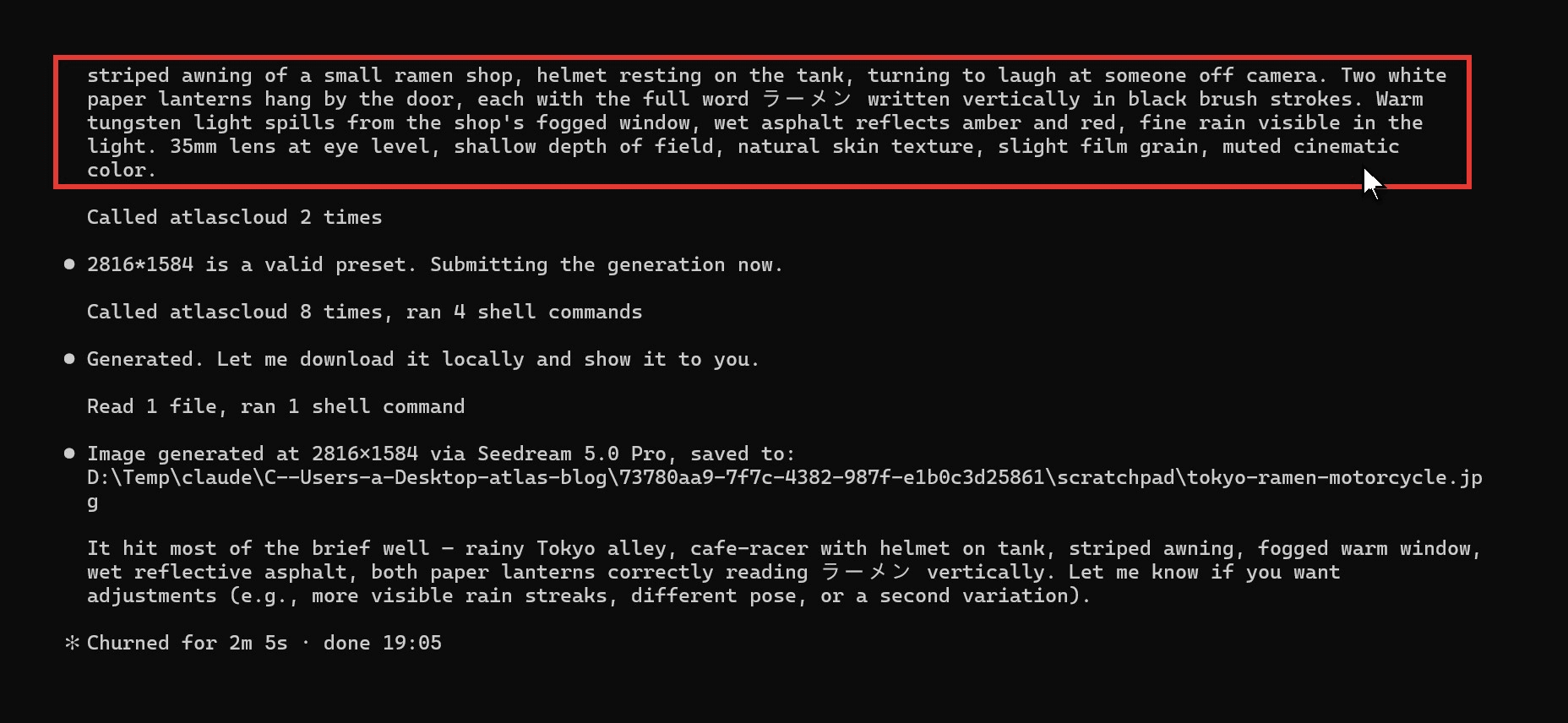
In Claude Code, Claude confirmed that 2816×1584 is a valid size, submitted the job, checked on it until it finished, and saved the file, about two minutes from pressing Enter to done. Spelling out sign text word for word, as the lantern line does, is what puts readable characters into the scene. A prompt that works on the Seedream 5.0 Pro playground works here too, since Claude sends your description to the same model along with the model ID and size.
Can Claude Make Images From Your Own Photo?
Yes, and this is where the MCP route beats a prompt-copying workaround. We gave Claude a close-up portrait of a woman with a sleek black ponytail, blunt bangs and long gold earrings, and asked it to keep her exactly as she is but put her on a ferry crossing the Bosphorus at golden hour. Claude uploaded the photo with atlas_upload_media and sent it to Seedream 5.0 Pro Edit with the instruction.
Then we asked for one more change in the same chat: swap the gold earrings for pearl drops and leave everything else alone. Claude fed the ferry image back into the edit model as the new input. Both edits finished in under two minutes each.
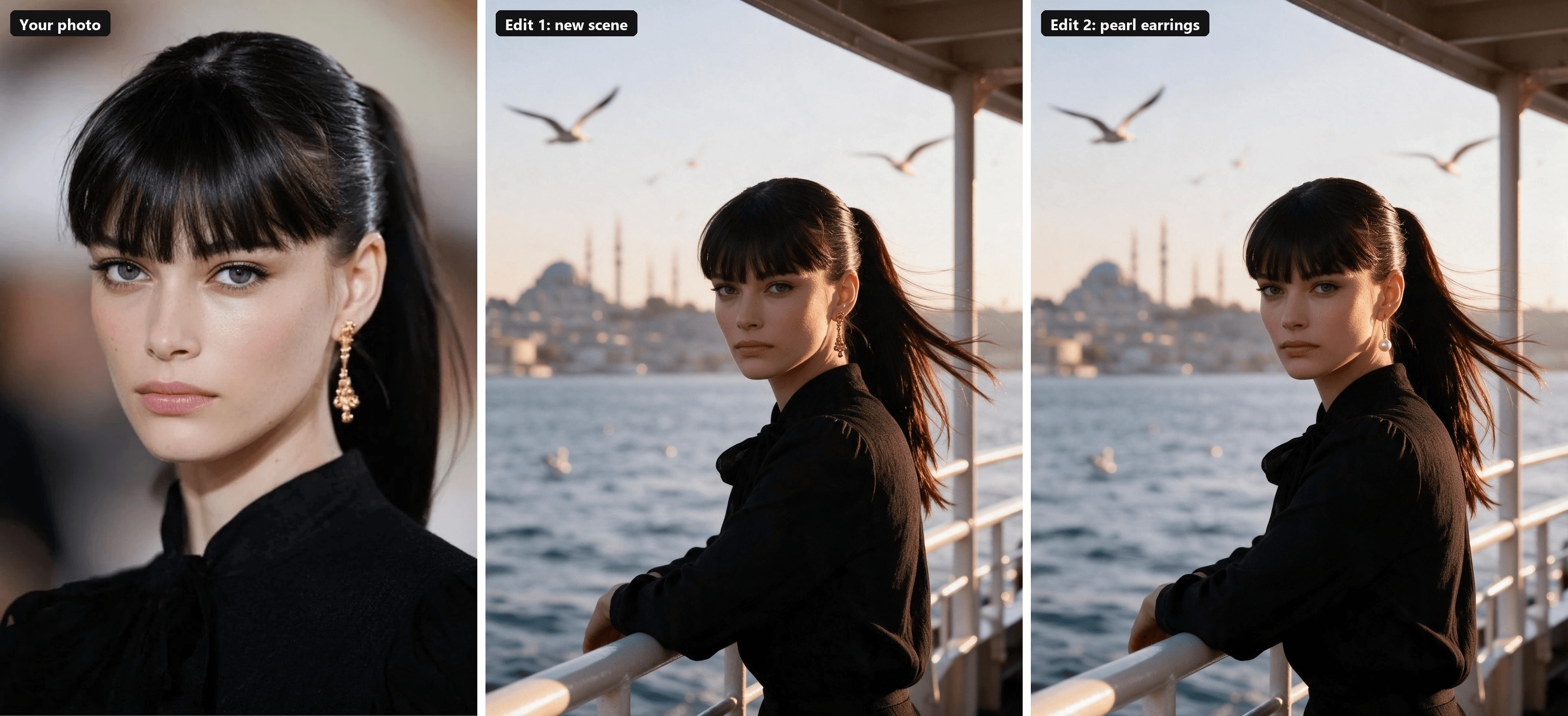
Look at the second and third frames side by side. The skyline, the gulls, the wind in her ponytail and the angle of the railing all match. The earrings are the one visible change. That is what makes it practical for product or wardrobe iterations, where you want one variable at a time.
Two habits keep results this tight. Say what must stay ("keep her face, bangs and blouse exactly the same") before saying what should change. And ask for the edit on the latest image, not the original, so each round builds on the last one.
Claude Code Image Generation: Same Server, Files in Your Project
Claude Code uses the same server, and the difference is where the output goes. In a terminal session Claude can download the result straight into your repository, which suits anyone building a site, an app or a product catalog. We pointed it at a street-style photo of a blonde woman in a black sleeveless top and asked for one change: make the top a cobalt blue ribbed knit with the same high neck and cropped length.
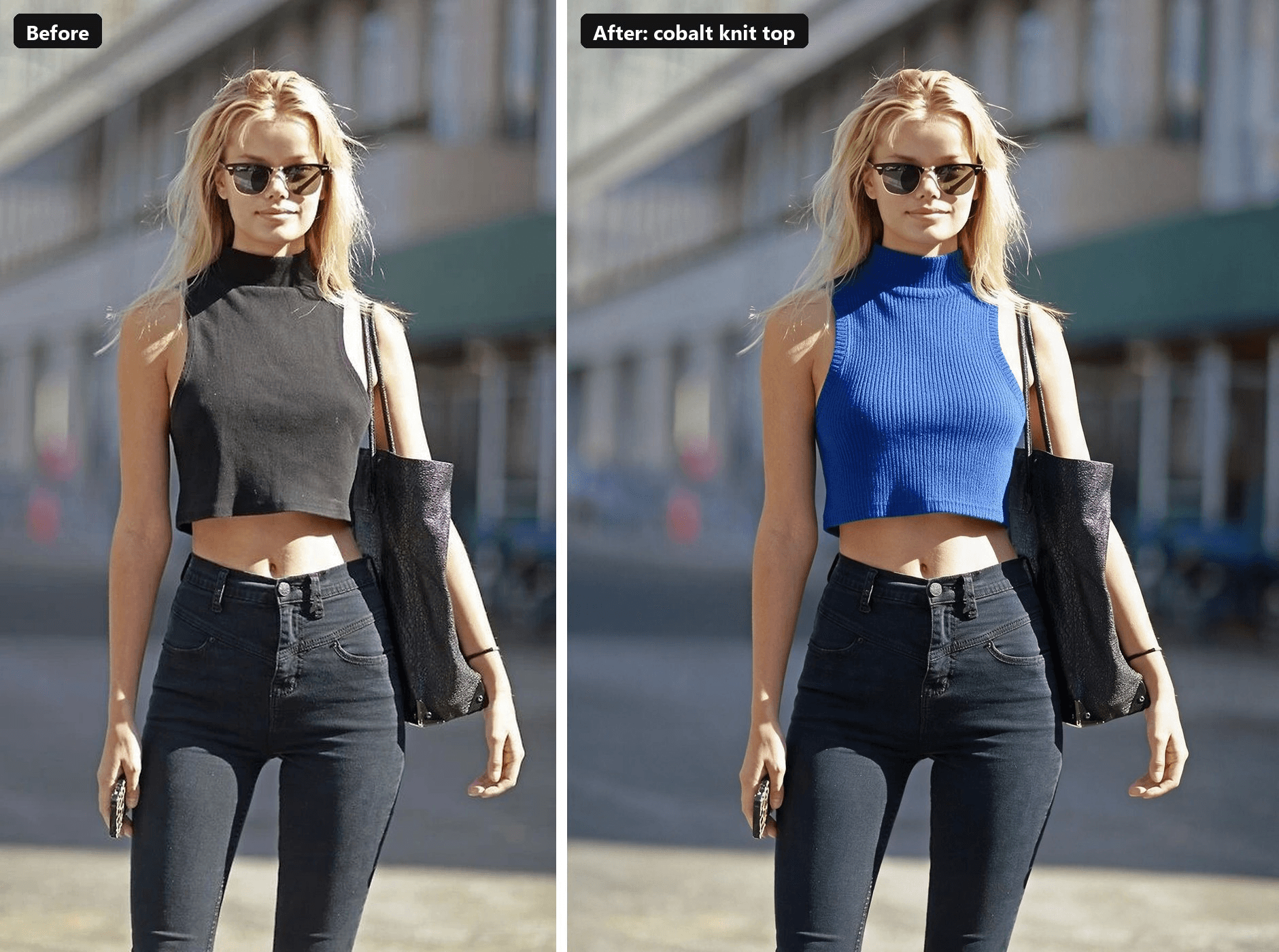
Claude uploaded the local file, ran the edit at 1328×1776, downloaded the result into the project's images folder, then opened it to check the change before reporting back. The whole exchange took under two minutes. The sunglasses, the bag strap and even the thin bracelet on her wrist survived. The texture of the knit is new.
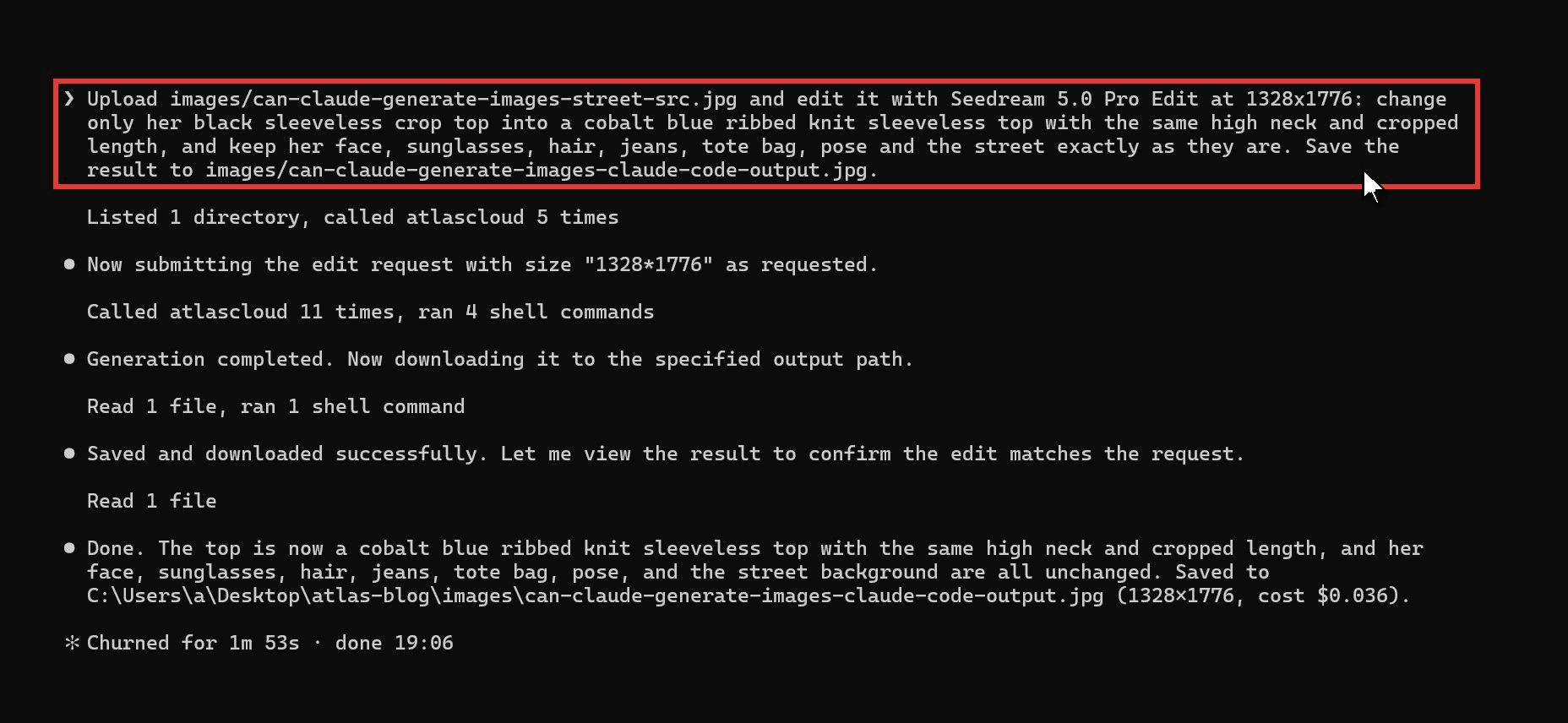
Some tutorials show Claude Code "generating" images by writing code that draws a PNG. That is the SVG route again with a different file type. Useful for icons and placeholders, not for a photo of a person.
Claude Chart, Claude Design or an Image Model: Which Route Fits Your Request
Most "can Claude make images" questions sort themselves once you name what the picture is for.
| What you need | Best route | Why |
|---|---|---|
| A bar chart, flowchart or timeline | Claude chat | Drawn as code, editable by asking |
| A slide, poster layout or landing page | Claude Design | Arranges text and your own images |
| An icon or simple flat graphic | Claude chat (SVG) | Clean vectors, no extra tools |
| A photo of a person, product or place | Claude with an image model | Needs a model that renders pixels |
| An edit to a photo you already have | Claude with an image model | Upload plus an edit model keeps the subject |
The routes also combine. Claude Design accepts your own images as assets, so a photo generated through the MCP server can go straight into a one-pager or a slide.
FAQ
Why can't Claude generate images?
We could not find a reason published by Anthropic. Its help center simply lists photos and illustrations as things Claude does not produce, and steers people to charts and diagrams instead. Claude takes images in and sends text and code out, so a picture has to come from a separate image model that Claude calls as a tool.
Is Claude better than ChatGPT for image generation?
On its own, no. ChatGPT has image generation built in, with daily limits that OpenAI does not publish (we measured ours in our ChatGPT image limit test). Claude needs an MCP server first. Once connected, though, Claude can call whichever model you name, and switching models means changing the model name in your prompt.
Can Claude generate images for free?
Claude's built-in charts and SVG drawings cost nothing beyond your Claude plan. Generated photos are billed by whichever service runs the model. As of October 2026, Seedream 5.0 Pro on Atlas Cloud is listed at $0.036 per image, 20% off its $0.045 list price with no end date shown. That rate covers sizes up to 2.61 million pixels. Larger 2K sizes bill at the next tier, which was $0.072 per image in our tests, while our 1328×1776 edit cost $0.036.
Which AI bot can generate images?
ChatGPT, Gemini and Grok generate images natively in their own apps. Claude can join that list through an MCP server, with the advantage that one setup reaches several model families: the Atlas Cloud server lists Seedream, Nano Banana, GPT Image and FLUX models side by side.
Conclusion
Claude on its own draws with code. A photo request ends in a prompt written for some other tool, or in an SVG that looks like a flat cartoon. Claude Design is built for layouts and openly lacks an image model. Neither will hand you a photograph.
An MCP server changes that after a few minutes of setup. After that, the motorcycle scene, the ferry portrait and the knit top above all came from ordinary messages in Claude, with the edits keeping the same face from start to finish. So can Claude generate images? On its own it draws charts and vectors. With Seedream 5.0 Pro one tool call away, it hands back real photos.





