


一個零食罐頭拉長到兩倍高、彈回原狀、旋轉,接著在一排複製體中飛出,全都踩在同一個大鼓拍點上。
這就是 tweenslop:補間(tweening)加上 slop(粗製濫造內容),是一種誇張到極致的動畫風格,讓一張圖片跟著巴西放克音樂的每個節拍被甩來甩去。它最初是動畫師用來嘲諷的詞,今年秋天卻變成爆紅的 TikTok 剪輯格式。
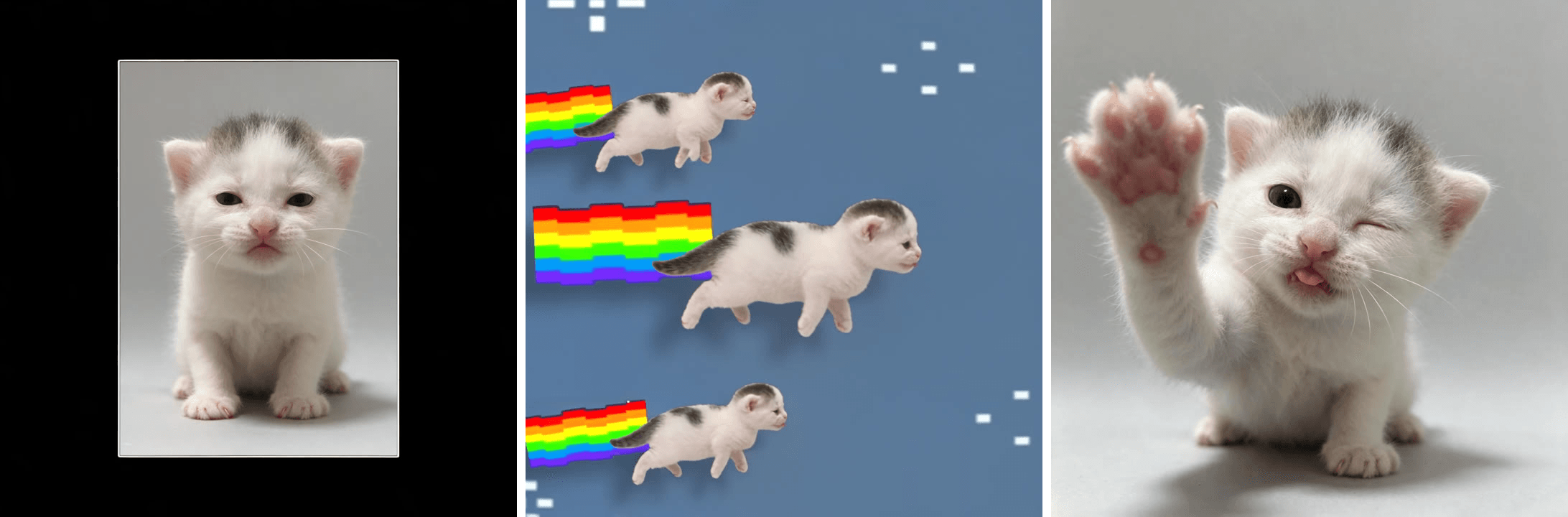
我們追查了奠定這種視覺風格的貼文、查了 CapCut 範本,並用 AI 把一張小貓照片變成 15 秒的 tweenslop 短片。
重點摘要
- Tweenslop 結合了補間與 slop:一張圖片跟著巴西放克音樂的每個節拍彈跳、拉伸、旋轉。
- 這種視覺風格可追溯至 2026 年 8 月 CheezeDibbles 的零食罐頭剪輯,觀看數突破 2,000 萬。
- 三種風格共用這個名稱:CheezeDibbles 風格的產品剪輯、成排飛舞的剪影照片,以及在姿勢之間抽搐切換的手繪角色。
- 沒有任何高使用率的 CapCut 範本掛著 tweenslop 之名,所以我們查到的熱門貼文全是手動設定關鍵影格,許多是在 Alight Motion 中製作。
- 一張照片加上一段參考剪輯,在 Atlas Cloud 影片生成器 中就能做出 15 秒的 tweenslop 短片。
什麼是 Tweenslop?TikTok 的 Tween Slop 趨勢背後的意思
補間是動畫的偷吃步,由軟體在兩個關鍵姿勢之間補上影格。Slop 是網路俚語,指廉價、大量製造的內容。兩者湊在一起就成了這個笑話:完全靠軟體、中間什麼都沒畫的動畫。
動畫師最初用這個詞來嘲諷偷懶的動態,後來開始刻意這樣做,把補間誇張到極點,結果反而變得搞笑。讓這件事變得明顯的格式是「我的補間風格 vs tweenslop」:創作者先展示一段溫和的動畫,接著同一張圖片在放克音樂落下時徹底失控。
| 一般補間 | Tweenslop | |
|---|---|---|
| 動態 | 小幅擺動、眨眼、重心轉移 | 整張圖片傾斜、拉伸到兩倍高再彈回 |
| 時間點 | 流暢、姿勢之間有緩動 | 每個大鼓拍點都硬切和拉近 |
| 額外元素 | 通常沒有 | 色彩閃爍、成排飛舞的複製體、彩虹拖尾 |
| 聲音 | 任何音樂 | 巴西放克,通常是說明欄中註明的原創曲目 |
| 製作工具 | 任何動畫 App | 通常是 Alight Motion 或 CapCut 關鍵影格 |
我們查到的貼文各自搭配自己的原創放克曲目,所以沒有兩段剪輯聽起來完全一樣。
如何用一張照片加上 AI 製作 Tweenslop 動畫
手動設定關鍵影格做一段 tweenslop 剪輯,可能得耗掉一整晚。我們的版本只用了一張照片、一段參考剪輯,跑一次就完成。
Atlas Cloud 運行 Seedance 2.5,這是位元組跳動的影片模型,可在同一次請求中接受參考照片和參考影片,並讓你在提示詞中為每一個加上標籤。把你的照片設為 @Image1、一段 tweenslop 剪輯設為 @Video1,它就會逐鏡重建整段剪輯,讓你的主角出現在每一格畫面和每一個飛舞的複製體中。上圖的小貓也會在節拍之間眨眼、打哈欠和打噴嚏,這是靜態照片永遠做不到的。
方法 1:在 Atlas Cloud 影片生成器中製作 Tweenslop 影片
先從照片開始。乾淨的背景能讓剪影在旋轉時保持清晰可辨,帶點個性的姿勢則能為剪輯添上笑點。我們清掉了小貓的背景,接著在圖片生成器的「圖片編輯」分頁中,用 Seedream 5.5 讓牠舉起一隻貓掌、吐著舌頭。
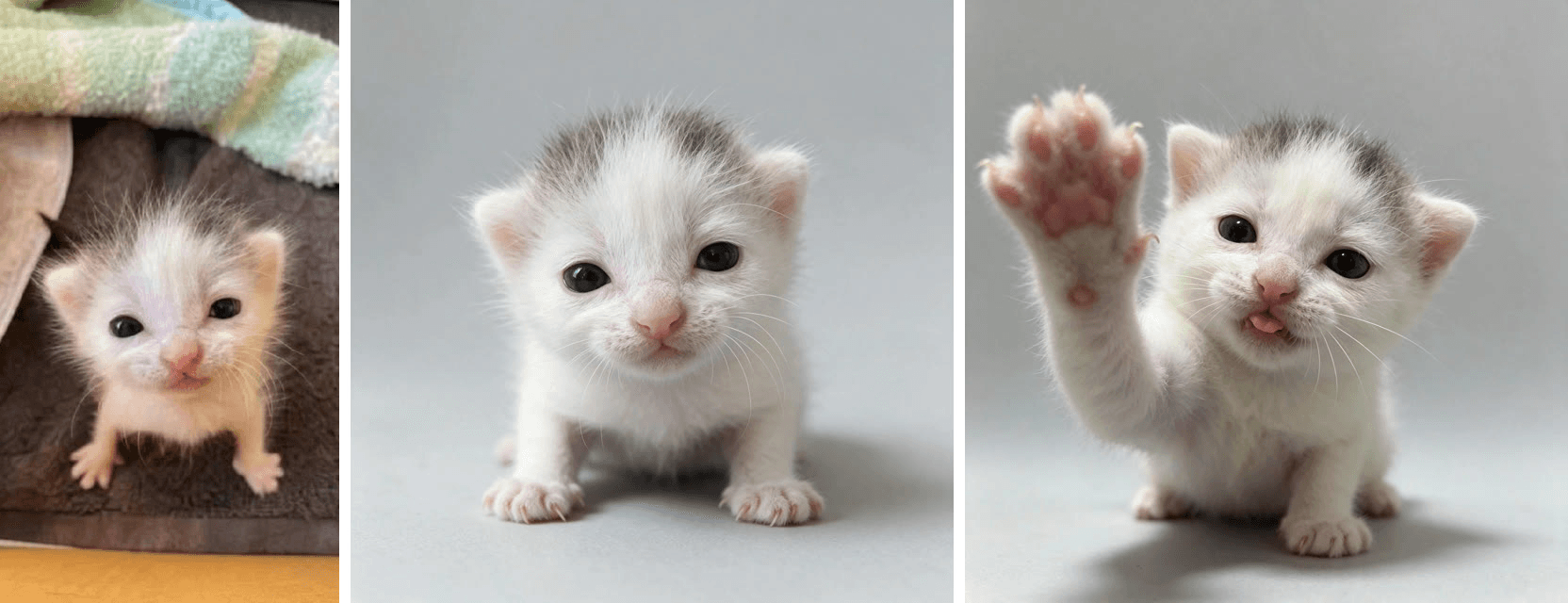
接著登入、開啟影片生成器,然後照著數字操作。
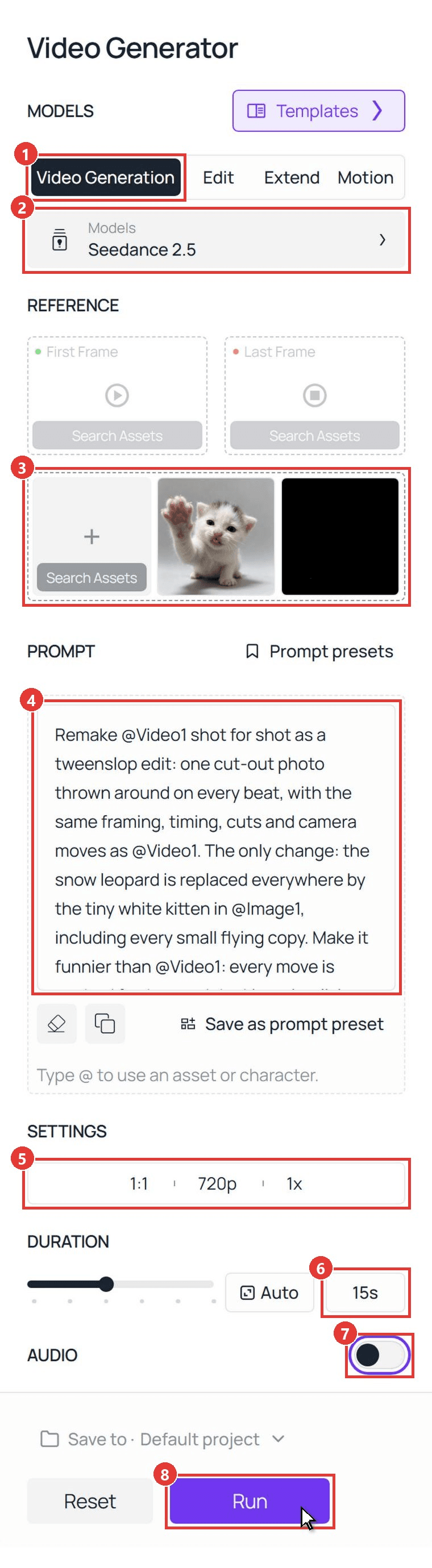
- 點選 影片生成 分頁。
- 模型保持在 Seedance 2.5。
- 在 上傳其他參考 下,先加入你的照片,讓它成為 @Image1,再加入一段約 15 秒的 tweenslop 剪輯作為 @Video1。我們用的是 11 月 1 日發布的雪豹剪輯。上傳前先把影片靜音,並挑選畫面乾淨的版本:Seedance 2.5 會緊跟參考內容,所以乾淨的剪輯會帶來乾淨的成品。
- 貼上提示詞。我們這版是為寵物寫的:
plaintext1Remake @Video1 shot for shot as a tweenslop edit: one cut-out photo thrown around on every beat, with the same framing, timing, cuts and camera moves as @Video1. The only change: the snow leopard is replaced everywhere by the tiny white kitten in @Image1, including every small flying copy. Make it funnier than @Video1: every move is pushed further, and the kitten is a living photo sticker, so its face, eyes, ears, tongue and paws keep moving with a new little action on almost every beat instead of holding one expression. 2 3The cut-out: a sticker-like photo cut-out of the kitten in @Image1 with a thin clean white edge, keeping its exact face, dark eyes, small pink tongue, grey patch on top of its head, pink nose, pale pink ears and fluffy white fur in every frame. It stays a tiny kitten, never a grown cat. In the side-on rainbow shots it is the same kitten seen from the side, flying horizontally like a sticker. It never turns back into the leopard: no spotted grey coat, no thick tail, no large round ears. 4 5Follow @Video1 second by second: 60-1.5s: a small framed photo of the kitten sits in the middle of a black screen and jumps bigger on each beat. Inside the frame the kitten comes alive: it slowly blinks both eyes, licks its nose with its tiny pink tongue, then tilts its whole head far over to one side like a confused puppy and holds the tilt with the tip of its tongue sticking out, staring at the camera. 71.5-3.5s: a white flash, then the big cut-out on a plain grey background stretches up to twice its height, snaps back, squashes flat like a pancake and springs up again. On each beat it does one new thing: its ears flick, its head tilts to one side, it gives one quick wink, then it opens its mouth in a big wide yawn. 83.5-5s: a white flash; the cut-out in front of a green hill and a blue sky lifts its left front paw high and waves twice, then spins flat like a flipped coin and flies off as a flat picture. 95-8.5s: a white flash, then a dark blue background with tiny white pixel stars: a sideways cut-out of the kitten slides across with a pixel rainbow trail behind it, its little legs paddling as if it is swimming through the sky. More and more copies of the kitten pop in above and below until the screen is crowded, each with its own rainbow trail, and the copies do different things: one yawns, one licks its paw, one blinks. 108.5-12s: extreme close-ups of the kitten's face filling the frame while the colors flash on each beat: grey-green, lilac, white, peach and pink. Each flash shows a new face, and in between them the kitten keeps tilting its head far to one side and grinning with squinted happy eyes and the tip of its tongue out: eyes wide in shock, then a head-tilted squinty grin, a scrunched-up sneeze, then tilted the other way with the same grin, a slow sleepy blink, the tongue licking its nose. Then it tilts and flies off over a purple sky and a green hill. 1112-15s: a white flash, then rows of the kitten with rainbow trails slide across while the background color changes on every beat: teal, green, olive, brown, purple, every copy waving a paw. On the very last beat one single kitten bonks into the camera with its paw up, stops dead and gives one slow blink. 12 13Keep the cheap 2D tween-animation look of @Video1: hard zooms, bounces, squash and stretch, white flashes, flat color backgrounds, pixel stars and rainbow trails, all on the beat. The kitten's small face and paw actions are quick and cute, like a real kitten, while the cut-out is thrown around. One head per cut-out, four paws only, kitten paws only, no human hands, no person anywhere, no text, no captions, no logos, no watermark letters in the corner. No music, no singing, no lyrics.
- 打開設定列,選擇 1:1 和 720p,與參考相同的正方形畫面。
- 在時長欄輸入 15。
- 將 音訊 切換為關閉。放克音樂等你發布時再加回去。
- 點選 執行。
逐秒的時間區段能讓成品踩在節拍上。把主詞那幾行換成你自己的照片即可。我們的 Seedance 2.5 提示詞指南涵蓋更多時間節奏範例。
方法 2:透過 Seedance 2.5 API 生成 Tweenslop 短片
想在 App 裡做一個「讓你的寵物變成 tweenslop」按鈕?同一個請求也能透過 API 運行。
步驟 1:建立並複製 API 金鑰。 在你的 Atlas Cloud 主控台開啟「設定」,點選「建立 API 金鑰」後立刻複製;之後清單會將它遮蔽。
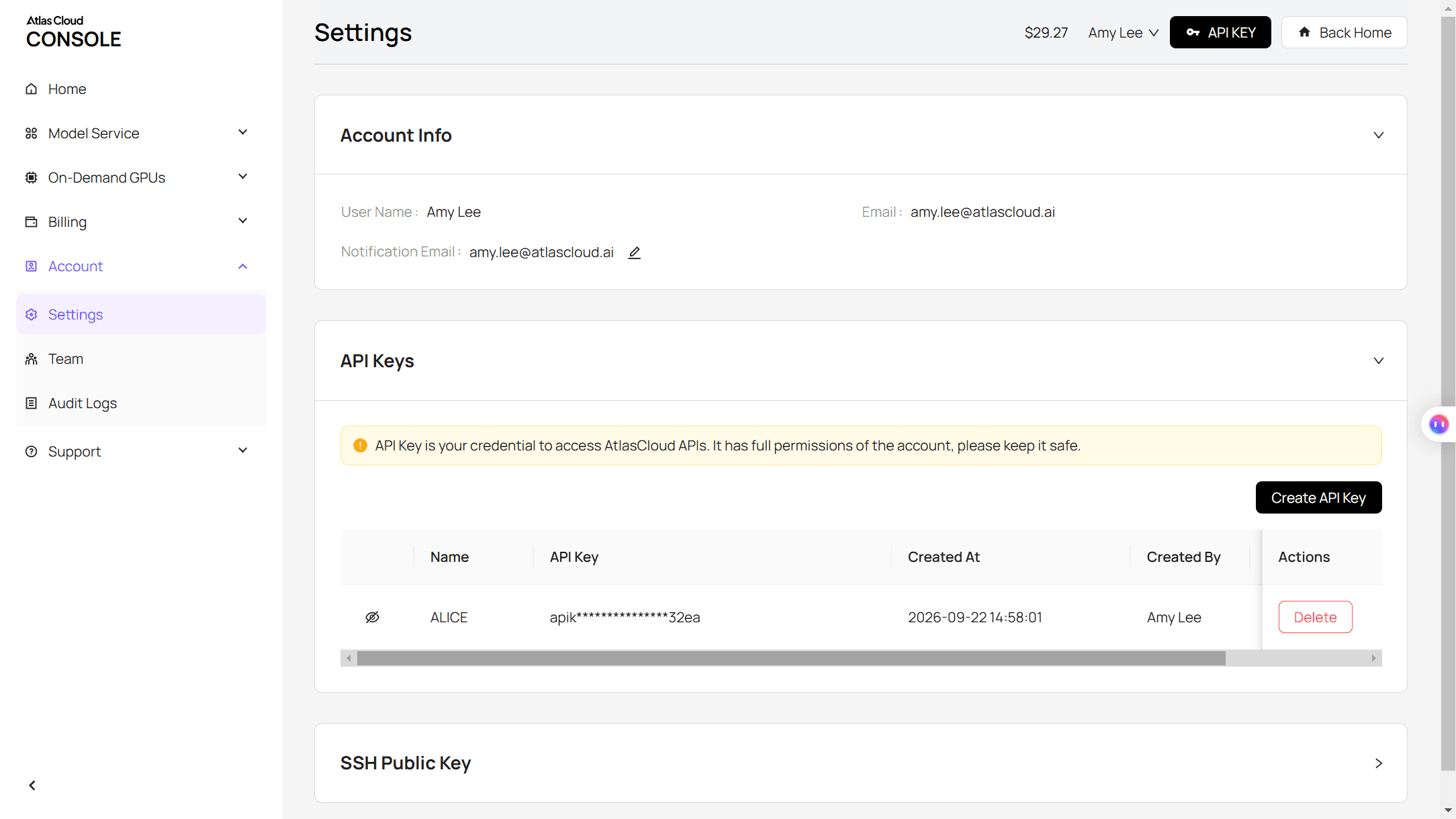
步驟 2:查看請求格式。 Atlas Cloud API 文件列出了 Seedance 2.5 參考生影片模型的每個欄位,也就是「影片生成」分頁在你加入參考時所呼叫的模型。
步驟 3:提交任務並輪詢結果。 把照片放進 reference_images、剪輯放進 reference_videos,讓標籤與提示詞相符:
plaintext1curl -X POST https://api.atlascloud.ai/api/v1/model/generateVideo \ 2 -H "Authorization: Bearer $ATLASCLOUD_API_KEY" \ 3 -H "Content-Type: application/json" \ 4 -d '{ 5 "model": "bytedance/seedance-2.5/reference-to-video", 6 "reference_images": ["https://your-cdn.com/kitten.jpg"], 7 "reference_videos": ["https://your-cdn.com/tweenslop-reference-muted.mp4"], 8 "prompt": "Remake @Video1 shot for shot as a tweenslop edit... (paste the full Method 1 prompt)", 9 "duration": 15, 10 "resolution": "720p", 11 "ratio": "1:1", 12 "generate_audio": false 13 }'
回應會帶有一組預測 ID。輪詢它,直到狀態顯示 completed,且影片 URL 出現在 outputs 陣列中:
plaintext1curl https://api.atlascloud.ai/api/v1/model/prediction/<prediction_id> \ 2 -H "Authorization: Bearer $ATLASCLOUD_API_KEY"
Atlas Cloud 上的影片模型共用這個端點、金鑰和輪詢迴圈。只要更改模型字串及其欄位,同一段程式碼就能運行不同的模型。
Tweenslop 風格:CheezeDibbles、剪影照片剪輯與 OC 舞蹈
滑一遍這個標籤,你會看到一個名稱下的三種風格,全都共用放克音樂和過度誇張的動態。
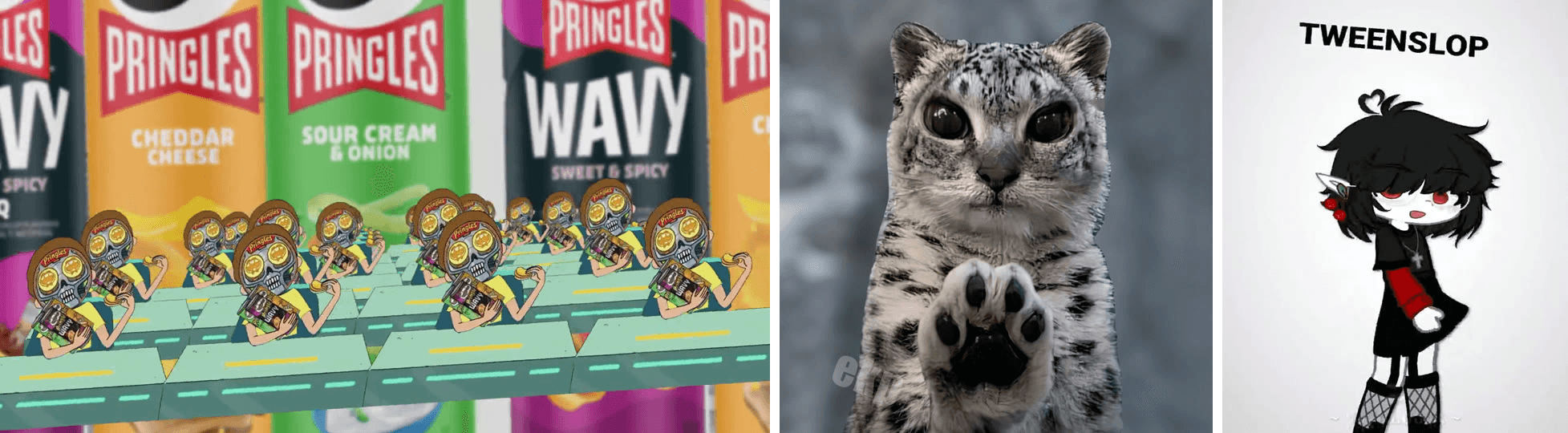
從左到右:8 月 11 日的CheezeDibbles 剪輯、11 月 1 日的雪豹剪影剪輯,以及 10 月 24 日的「我的補間風格 vs tweenslop」貼文。
- CheezeDibbles 風格。 產品照和卡通角色被剪下來,成排地猛烈甩動。重製版本會標註原作者的名字,其他動畫師如今也把它視為一種值得模仿的具名風格。
- 剪影照片剪輯。 一張真照片,通常是寵物,被做成貼紙般拉近、壓扁,並帶著彩虹拖尾成排飛舞。這是能從單張照片做出來的版本,也是我們的小貓所模仿的。
- OC 舞蹈。 手繪角色,從火柴人到 Gacha OC、Roblox 虛擬形象,在幾個關鍵姿勢之間抽搐著傾頭、擺臀。「我的風格 vs tweenslop」的比較貼文大多屬於這一類。
Tweenslop 趨勢從何而來
這個詞比趨勢本身更早出現。TikTok 的 #tweenslop 標籤 ID 可追溯至 2025 年 7 月,當時它還是指偷懶的動畫。今年秋天爆紅的視覺風格則是後來才出現的。以下觀看數皆為 2026 年 11 月 16 日的數字。
| 日期 | 發生什麼事 | 觸及 |
|---|---|---|
| 2025 年 7 月 | #tweenslop 標籤在 TikTok 出現,當時這個詞仍指偷懶的補間 | 未追蹤 |
| 2026 年 8 月 11 日 | CheezeDibbles 發布一段品客剪影剪輯 | 2,080 萬觀看 |
| 2026 年 9 月下旬 | 創作者在 Alight Motion 中用自己照片重製這種風格 | 最高 230 萬觀看 |
| 2026 年 10 月 24 日 | 「我的補間風格 vs tweenslop」比較格式擴散 | 480 萬觀看 |
| 2026 年 11 月 1 日 | 帶有彩虹拖尾複製體的雪豹剪影剪輯 | 140 萬觀看 |
| 2026 年 11 月 8 日至 14 日 | 至少有五則新貼文各自突破一萬次收藏 | 每則 14,000 至 51,000 次收藏 |
到了 11 月中,這個標籤已累積近 3 萬則貼文,我們查到的熱門貼文全都出自手工製作。
有 Tweenslop 的 CapCut 範本嗎?
沒有專為它打造的範本。我們在 11 月 16 日查看時,CapCut 的 tweenslop 範本頁面什麼都沒有。有一個範本帳號標註 #tweenslop,連結到的是一個點頭範本、使用次數 57,237 次,那是另一個迷因;它其他 tweenslop 貼文則指向一個已刪除的範本。
| 方式 | 你需要什麼 | 你會得到 |
|---|---|---|
| Alight Motion 或 CapCut 關鍵影格 | 一張剪影圖片、一段放克曲目和設定關鍵影格的時間 | 完全掌控每一次彈跳和閃爍 |
| CapCut tween 範本 | 一張照片放進固定欄位 | 別人的動態,通常來自相關迷因 |
| AI 影片模型 | 一張照片和一段參考剪輯 | 你的主角被重建進剪輯中,並在節拍之間有小巧的即時動作 |
如果你偏好固定節拍模式的一張照片剪輯,我們的 wassup in a minute 指南展示了類似的剪影格式。
常見問題
Tweenslop 用什麼歌?
沒有單一的 tweenslop 歌曲。配樂是巴西放克,一種接近 phonk 的重低音風格,而我們查到的貼文各自使用原創曲目,製作人則在說明欄中標註。我們的 AI 短片是無聲生成的;我們之後才加上參考剪輯的放克配樂,從 0:00 開始,讓白色閃爍打在節拍上。
我可以做我的寵物或 OC 的 tweenslop 嗎?
可以。寵物最貼近剪影照片風格,而乾淨背景上的正面照片效果最好。若是 OC,將角色圖上傳為 @Image1,在提示詞中描述牠的顏色和服裝,並以一段 OC 舞蹈剪輯作為參考。更多寵物短片請見我們的 AI 貓咪影片指南。
Atlas Cloud 上的 tweenslop AI 影片要多少錢?
我們這次運行,一張照片加上一段 15 秒的 720p、1:1 參考剪輯,在 2026 年 11 月 17 日於「執行」按鈕上顯示 $5.45,是定價的八折。參考影片依長度計費,所以較短的剪輯成本較低;「執行」按鈕會在你開始前顯示確切總額。
結論
Tweenslop 就是把補間影格變成笑點。剝掉放克音樂和閃爍,剩下來的是一條簡單規則:一張圖片,被推到不該去的地方,踩在每個節拍上。
挑一張輪廓清晰的照片,選一段你喜歡的剪輯作為參考,貼上提示詞。發布時把放克音樂加回去,你自己的 tweenslop 只差一次運行。







