


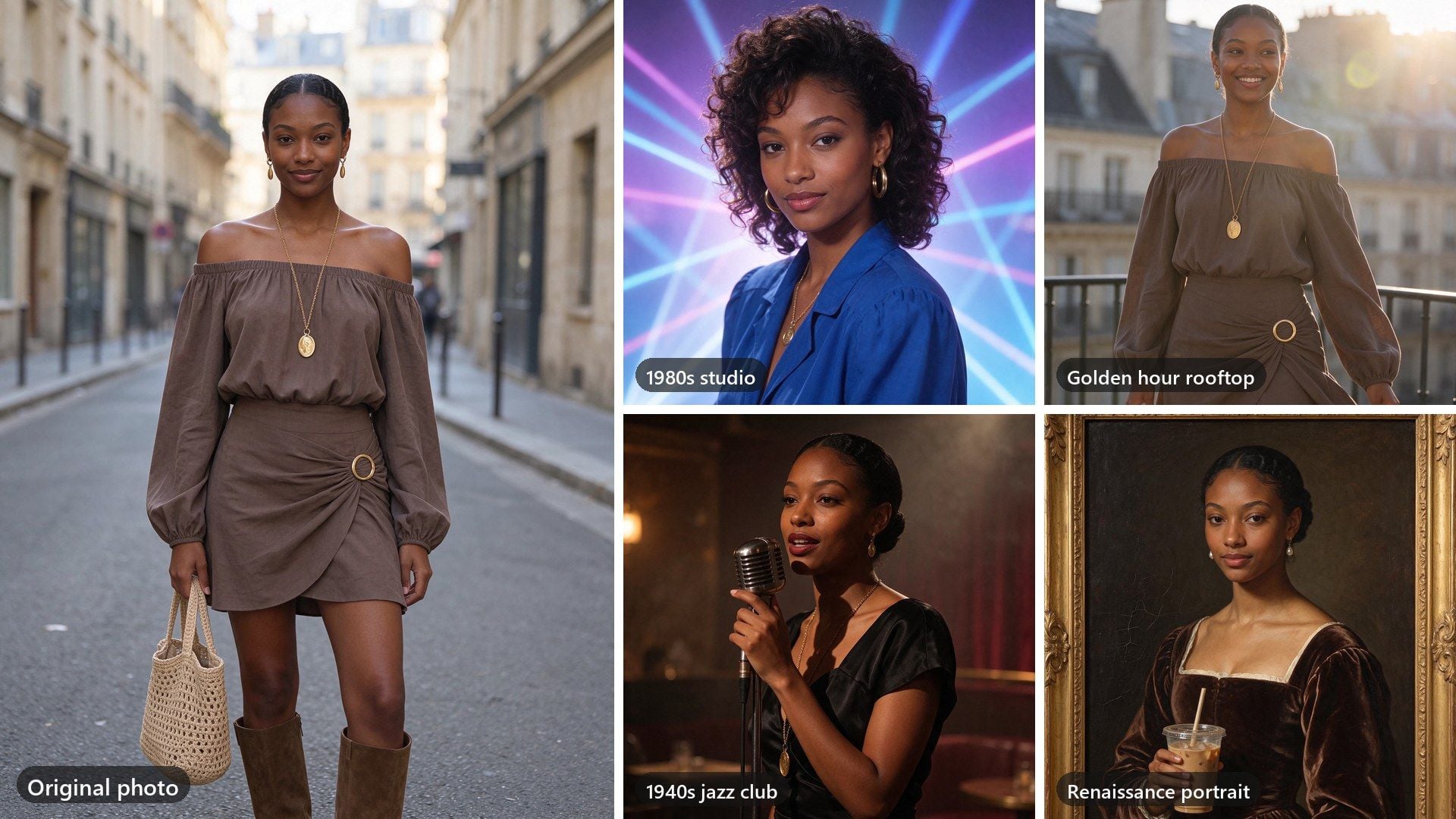
A reliable ChatGPT prompt for photo edits names what must stay the same first (your face, skin tone and hairstyle), then the one thing to change. Below are 30 copy-paste prompts built that way for selfies, the 1980s trend, couples, holiday cards, old-photo repair and image expansion, each shown with a real result.
Every prompt was run on a real photo, almost all of them on the same two portraits, so you can see what it does before you paste it. A prompt that only describes the new scene leaves the model free to redraw your face, which is why the keep list comes first.
Key Takeaways
- A good ChatGPT prompt for photo edits says what must stay the same before it names the one thing to change.
- Paste a face-lock line first and ask for one change per message, so the model has less room to redraw you.
- The 1980s trend, couple shots, holiday cards, old-photo repair and image expansion each get copy-paste prompts with real results.
- Every prompt here also runs on Seedream 5.5 in Atlas Cloud's Image Edit tab, where you pick the exact output size.
- Stuck on wording? A Photo Prompt Perfector meta-prompt has ChatGPT turn a rough idea into a finished prompt.
How to Edit a Photo in ChatGPT Without Changing Your Face
Yes, ChatGPT can edit your own photos. OpenAI's help page on images says you upload a picture and describe the changes, and a selection tool lets you mark one area first. The same page admits that "Highlights are not always precise."
ChatGPT redraws the picture from your words, so anything you leave unsaid is fair game. Faces are where it shows, because small shifts in the eyes or jaw are easy to miss in a prompt and hard to miss in the result.
OpenAI's release note for ChatGPT Images 2.6, shipped November 4, 2026, lists better detail preservation across edits as a headline change.
Three habits do most of the work:
- Use a clear, front-lit photo where your whole face is visible.
- Put the keep list first, then one change. Every extra change in the same message is one more thing the model can reinterpret.
- Start each new look from your original photo, not from the last edit.
Each item in a keep list protects something specific:
| Keep-list item | What naming it protects | Words to paste |
|---|---|---|
| Face shape and features | Identity: small shifts in eyes, nose or jaw read as a different person | same face shape, eyes, nose and lips |
| Skin tone and texture | Natural skin, not a lighter or plastic-smooth version | same skin tone and skin texture, no retouching |
| Hairstyle | Your hair, not a restyle that suits the new scene | same hairstyle |
| Accessories | Small items such as earrings, glasses and piercings | same earrings and glasses |
| Outfit | Your clothes when only the background or light should change | keep my outfit |
| Pose and framing | The original crop and body position | keep my pose and framing |
Paste this line at the top of any edit prompt and fill in the bracket:
Plain1Keep my face exactly as it is in this photo: same face shape, eyes, nose, lips, skin tone and skin texture, same hairstyle. Do not retouch, slim or beautify my face. Change only: [the one thing you want changed].
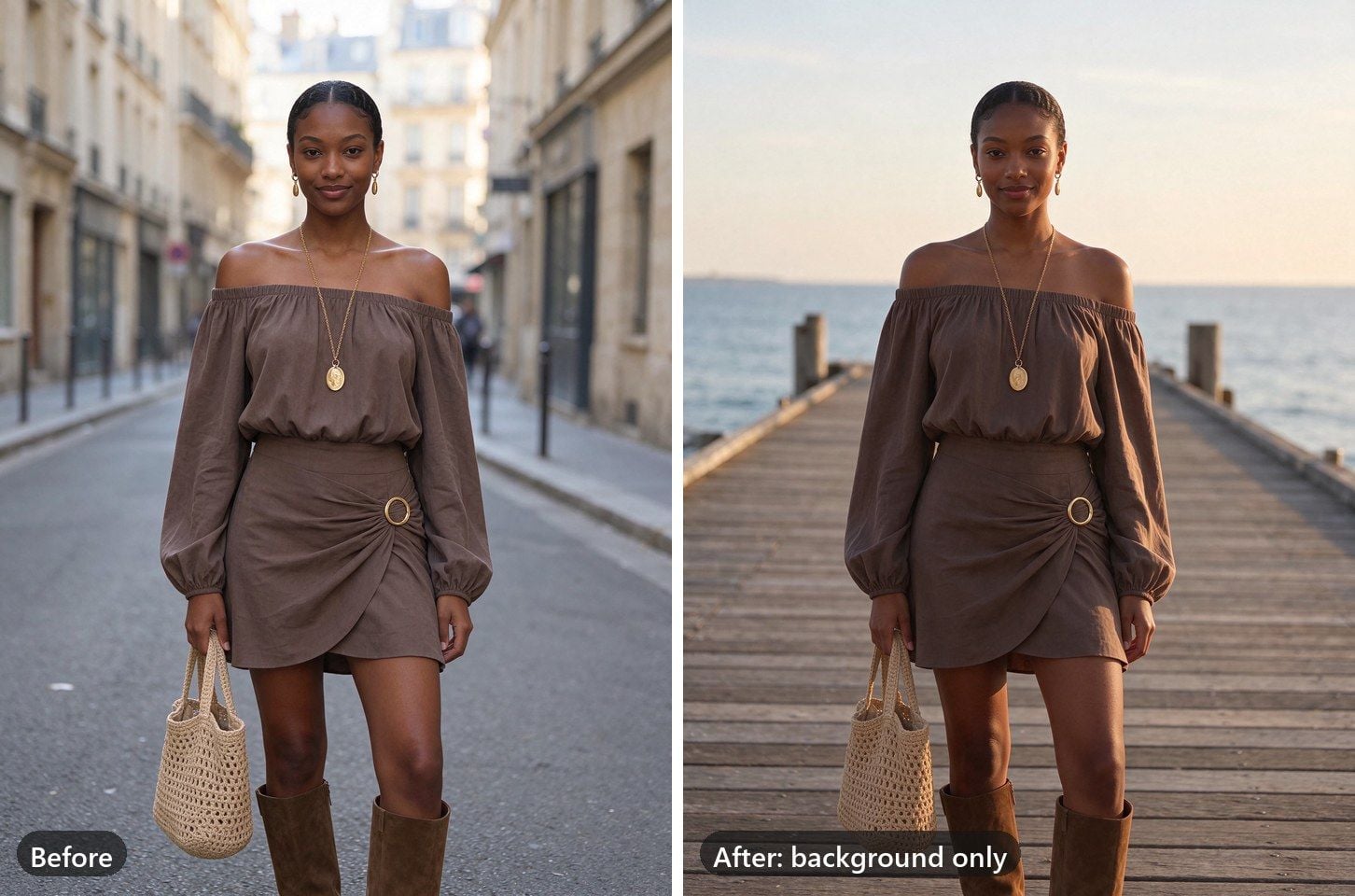
Here it is doing a background swap, a common first edit:
Plain1Keep my face exactly as it is in this photo: same face shape, eyes, nose, lips, skin tone and skin texture, same hairstyle and earrings. Do not retouch, slim or beautify my face. Change only the background: put me on a wooden pier by the sea at sunset, with warm side light that matches the new scene. Keep my pose, outfit and framing the same.
Run These ChatGPT Photo Prompts on Seedream 5.5 in Atlas Cloud
ChatGPT photo prompts are plain English, so you can run them outside ChatGPT too, and every result in this guide was made that way. Atlas Cloud runs ByteDance's Seedream 5.5 editing model in its AI photo editor, and Atlas describes the model as keeping unedited areas stable over 100+ editing rounds. Here is the 1985 snapshot prompt, run on our male portrait.
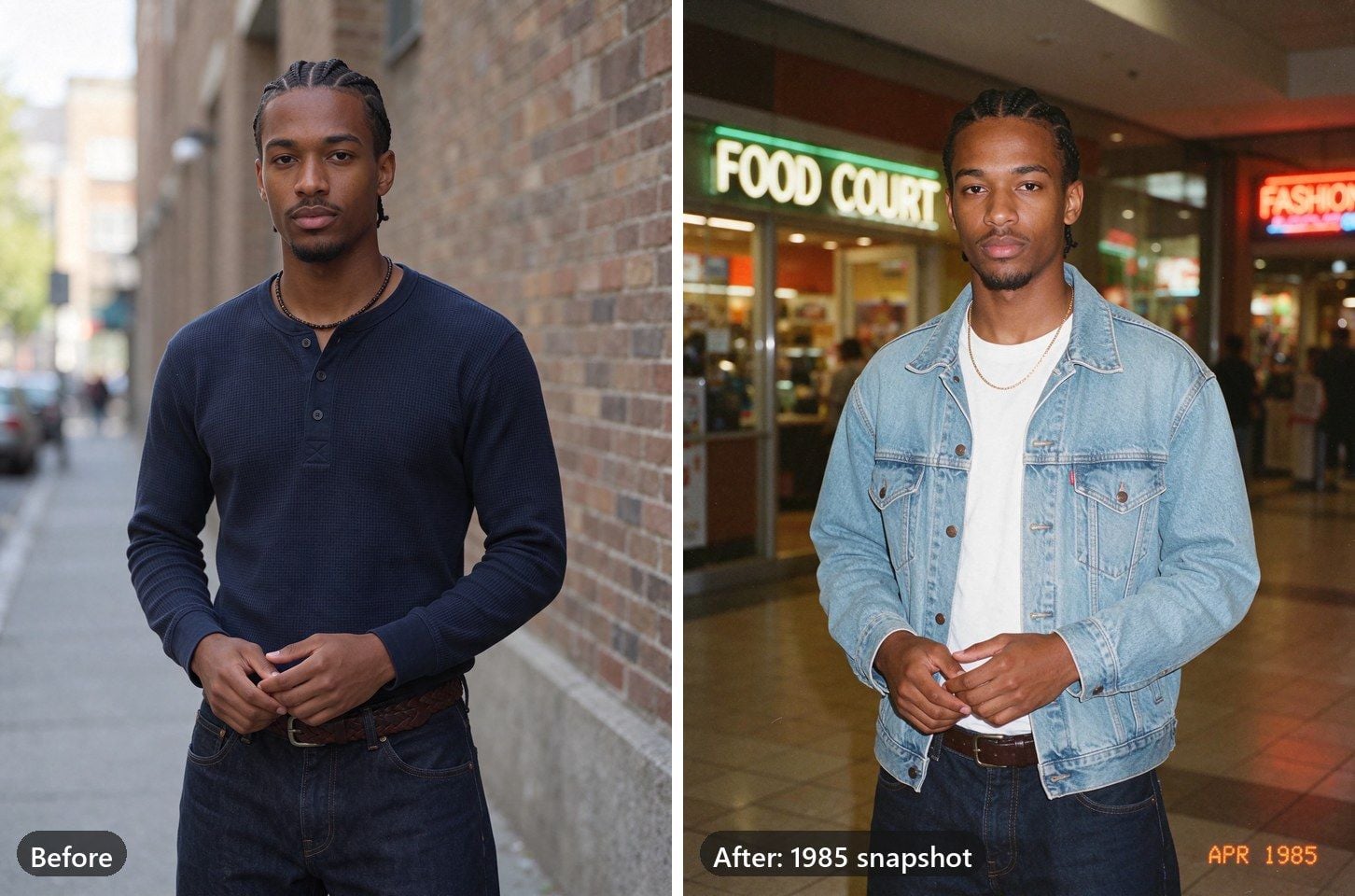
Plain1Turn this photo into an authentic 1985 snapshot. Keep my face, features, skin tone and braids exactly as they are. Dress me in a period outfit: a light-wash denim jacket over a white tee and a thin gold chain. Shoot it like a 35mm point-and-shoot with a direct on-camera flash, slightly faded warm colors, soft film grain and a small orange date stamp in the bottom right corner. Background: a 1980s shopping mall with neon shop signs, slightly blurred.
Six steps take you from photo to result:
- Open the Image Edit tab.
- Choose Seedream v5.5 under Models.
- Upload your photo under Reference. Couple prompts take two photos, in the order the prompt names them.
- Paste the prompt.
- Set the size and number of outputs under Settings.
- Click Run.
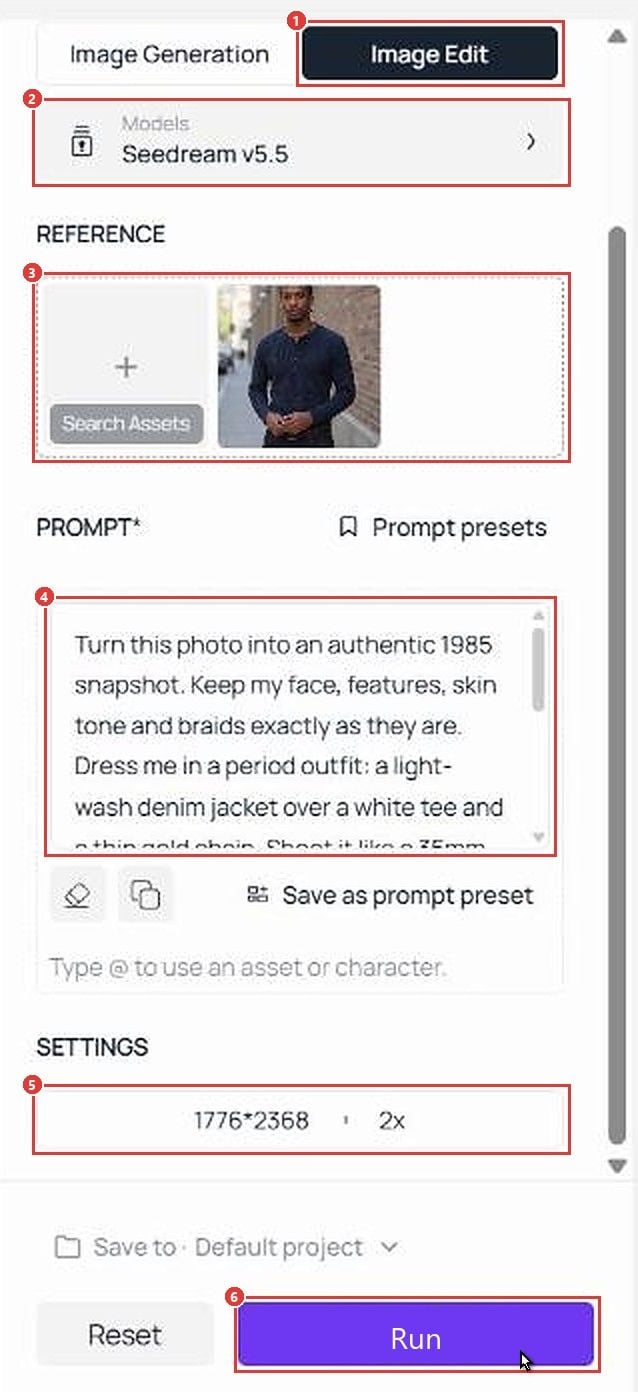
Settings offers 1K, 1.5K and 2K presets in ratios such as 1:1, 3:4, 16:9 and 9:16. Every result on this page is 2K at 3:4 unless the caption says otherwise, and each run returned two versions in about a minute or two.
ChatGPT Prompts for Pictures of Yourself
ChatGPT prompts for pictures of yourself start from one selfie and keep you as the subject while the scene, light and camera change around you. Each prompt here ends with the keep list, so paste it as is and swap "dress" or "braids" for your own details.
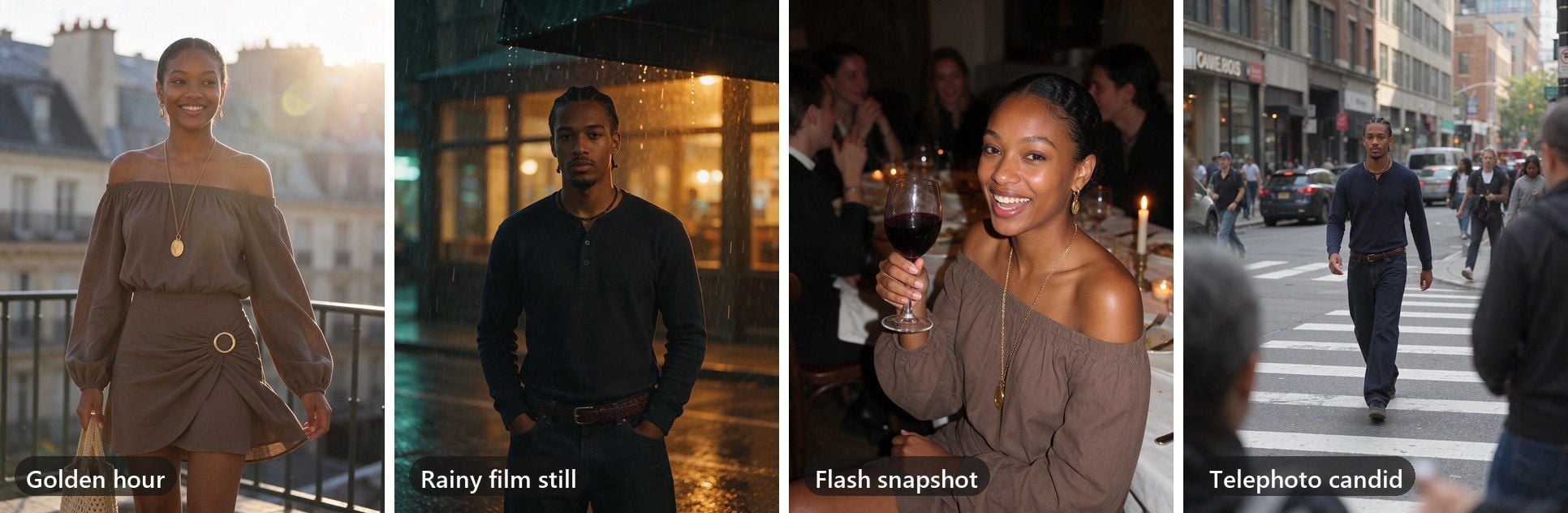
Golden hour rooftop (shown on a woman)
Plain1Use my photo to create a candid shot of me on a city rooftop at golden hour, laughing and glancing just past the camera while the breeze moves my dress. Warm backlight, soft lens flare, shallow depth of field, shot on a 50mm lens. Keep my face, features, skin tone, hairstyle and jewelry exactly as in my photo. Photorealistic, natural skin texture.
Rainy night film still (shown on a man)
Plain1Make me the lead in a film still: I'm standing under a cafe awning on a rainy night street, hands in my pockets, rain streaks catching the warm light from the cafe window. Teal and amber color grade, light film grain, shallow depth of field. Keep my face, features, skin tone, braids and outfit exactly as in my photo.
Dinner party flash snapshot (shown on a woman)
Plain1Turn my photo into a direct-flash snapshot at a candlelit dinner party: I'm holding a glass of red wine, mid-laugh, with friends blurred at the table behind me. Hard on-camera flash, dark background falloff, slightly hot skin highlights like a point-and-shoot camera. Keep my face, features, skin tone, hairstyle and earrings exactly as in my photo.
Street-style telephoto candid (shown on a man)
Plain1Create a candid street-style photo of me crossing a busy downtown crosswalk, caught mid-stride, shot from across the street with an 85mm telephoto lens, people and traffic blurred in the foreground. Overcast daylight, muted colors. Keep my face, features, skin tone, braids and outfit exactly as in my photo.
Trending ChatGPT Image Prompts, From the 1980s Photo to Your Younger Self
The 1980s photo trend took off in September 2026. Pixelbin published 15 prompts for it on September 10, and ChatGPT's own Images page now carries an 80s preset next to a Y2K digital camera look. The six trending ChatGPT image prompts here cover the looks people keep asking for, plus two that are just fun.
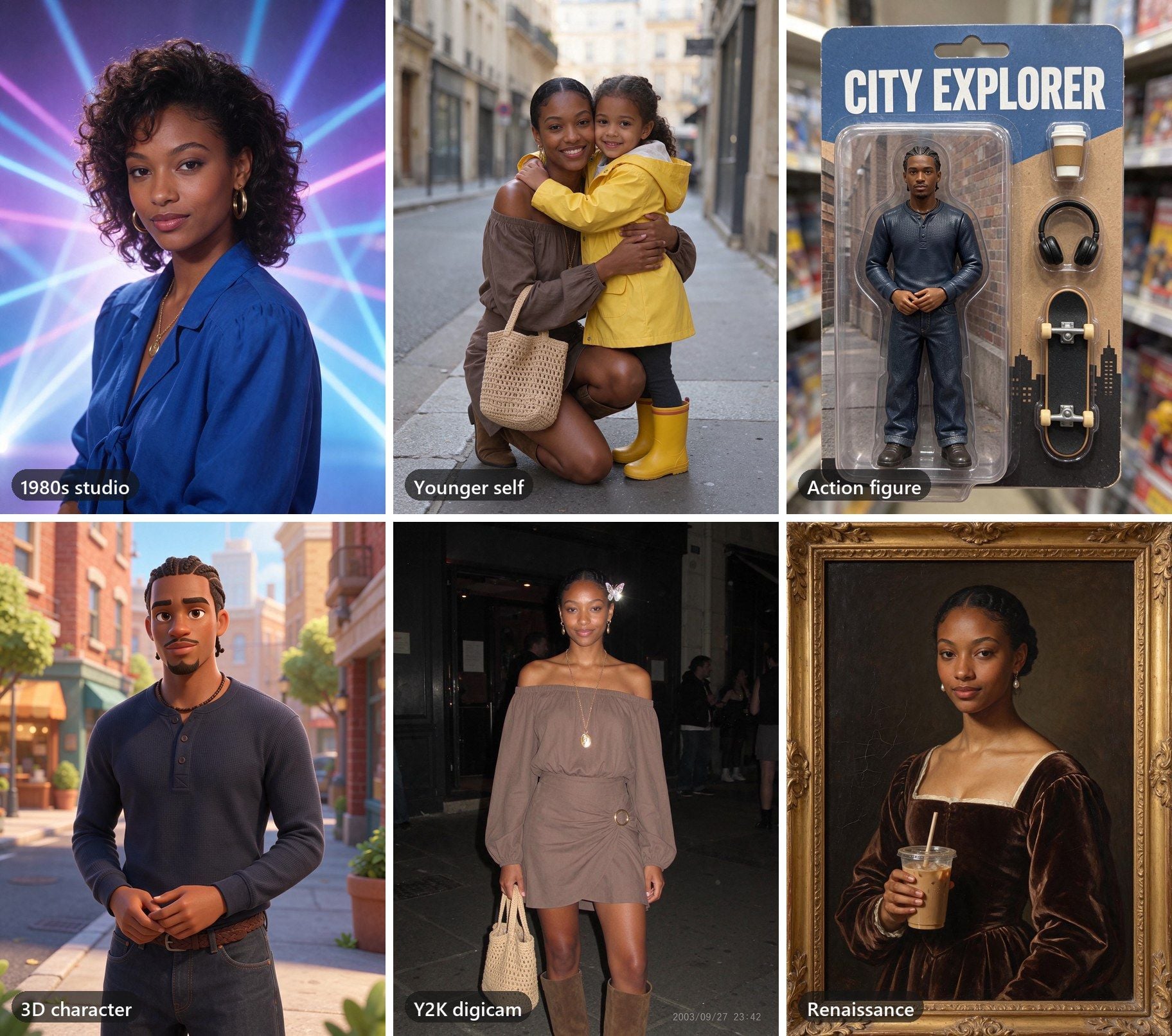
1980s mall studio portrait
Plain1Recreate my photo as a 1980s mall studio portrait. Keep my face, features and skin tone exactly as they are. Give me voluminous 80s curls, a shoulder-padded electric-blue blouse and big gold earrings. Classic laser-beam backdrop in purple and blue, soft-focus filter, glossy studio lighting, slight film grain, posed over-the-shoulder look at the camera.
Hug your younger self
Plain1Add a six-year-old girl who is clearly my younger self, with the same face shape, eyes and skin tone, wearing a yellow raincoat. I'm kneeling on the sidewalk hugging her and we're both smiling at the camera. Keep my face, features, skin tone, hairstyle and outfit exactly as in my photo. Natural daylight, candid family-photo feel.
Action figure in a blister pack
Plain1Turn me into a 12-inch action figure sealed in a clear plastic blister pack on a toy store shelf. Keep my face, braids and outfit recognizable, scaled down in glossy plastic. The cardboard backing says "CITY EXPLORER" in bold letters and holds tiny accessories: a coffee cup, headphones and a skateboard. Bright retail lighting, photorealistic product shot.
3D animated movie character
Plain1Turn me into a stylized 3D animated movie character with slightly larger eyes and soft rounded features, while keeping my face shape, skin tone, braids, beard and outfit clearly recognizable. Place me on a sunny cartoon city street. Soft global illumination, rich colors, high-detail render.
Y2K digital camera night shot
Plain1Turn my photo into a 2003-style digital camera shot taken at night outside a club: harsh built-in flash, low dynamic range, blown-out highlights and a small timestamp in the bottom corner. Add a sparkly butterfly hair clip. Keep my face, features, skin tone and outfit exactly as in my photo.
Renaissance portrait with an iced coffee
Plain1Paint me as a Renaissance oil portrait in a gilded frame: dark background, soft window light, a deep brown velvet gown and pearl earrings, and in my hand an iced coffee in a clear plastic cup with a straw. Keep my face, features and skin tone exactly as in my photo. Visible canvas texture and fine craquelure.
Couple Photos That Keep Both Faces
For a ChatGPT couple photo, upload both photos in one message and say who is in which. "The woman in the first photo and the man in the second" gives the model a clear map and helps keep the two faces apart. Change the wording to match your own pair.
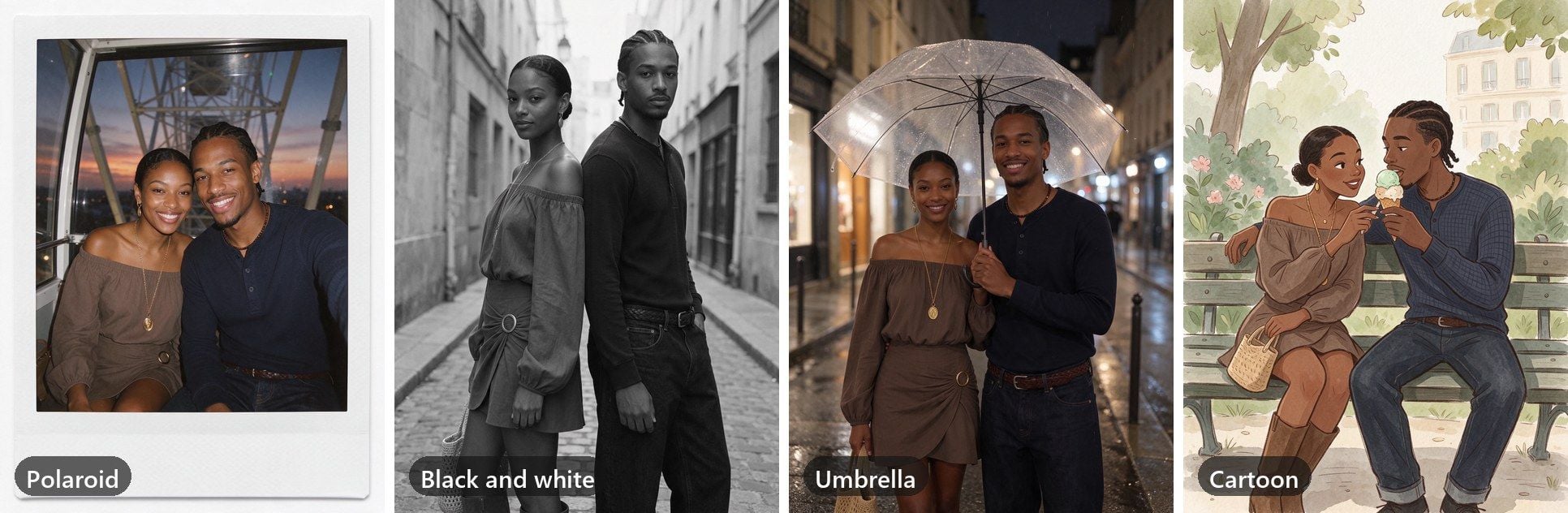
Ferris wheel Polaroid
Plain1Using the woman in the first photo and the man in the second photo, create an instant Polaroid of the two of them squeezed together for a selfie on a Ferris wheel at dusk, both laughing. Built-in flash, warm faded colors, white Polaroid border. Keep both faces, skin tones, hairstyles and outfits exactly as in their photos.
Black-and-white editorial
Plain1Combine the woman from the first photo and the man from the second into one black-and-white editorial portrait: standing back to back on a cobblestone street, both looking at the camera with calm expressions. High-contrast monochrome, soft natural light, fine grain. Keep both faces and hairstyles exactly as in their photos.
Rainy night umbrella
Plain1Put the woman from the first photo and the man from the second under one clear umbrella on a rainy city street at night, her arm through his, both smiling with their faces turned toward the camera. Wet pavement reflections, warm shop lights, shallow depth of field. Keep both faces, skin tones, hairstyles and outfits exactly as in their photos.
Hand-drawn cartoon couple
Plain1Turn the woman from the first photo and the man from the second into a hand-drawn cartoon couple portrait: sitting together on a park bench sharing an ice cream, clean line art, soft pastel colors, light paper texture. Keep their face shapes, skin tones, hairstyles and outfits recognizable.
Studio-Style Portraits Without a Photographer
A professional photo shoot prompt mostly comes down to the backdrop and the light. Name both, and ChatGPT has far less to guess. For LinkedIn-style headshots in more depth, our guide to the AI prompt for professional headshots breaks the prompt into slots.
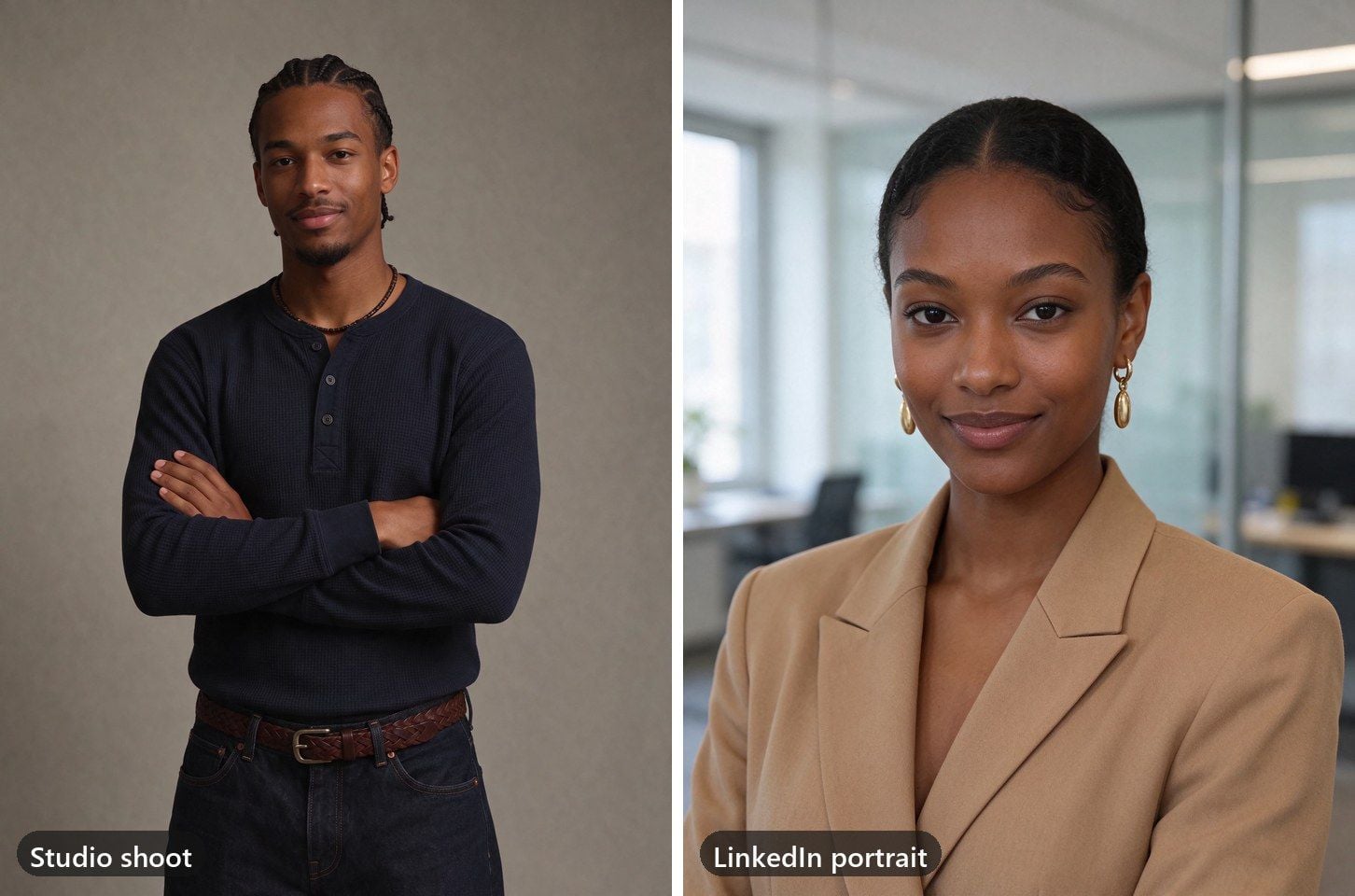
Studio photo shoot (shown on a man)
Plain1Turn my photo into a professional studio portrait: I'm standing against a seamless warm-gray backdrop, three-quarter body, arms crossed, slight confident smile. Large softbox key light from the left, subtle rim light, crisp focus, color-accurate skin. Keep my face, features, skin tone, braids and outfit exactly as in my photo.
Office portrait for LinkedIn (shown on a woman)
Plain1Make a polished head-and-shoulders portrait of me for LinkedIn: I'm wearing a camel tailored blazer, a bright modern office is softly blurred behind me, gentle window light falls on my face, friendly closed-mouth smile, eye-level camera. Keep my face, features, skin tone, hairstyle and earrings exactly as in my photo. No heavy retouching.
ChatGPT Holiday Photo Prompt for Cards and Parties
ChatGPT holiday photo prompts work best when the props carry the season and the keep list carries you. The three here cover New Year's Eve, a cozy card and a winter market. For candy canes and Christmas sets, see how to do the AI Christmas photo trend.
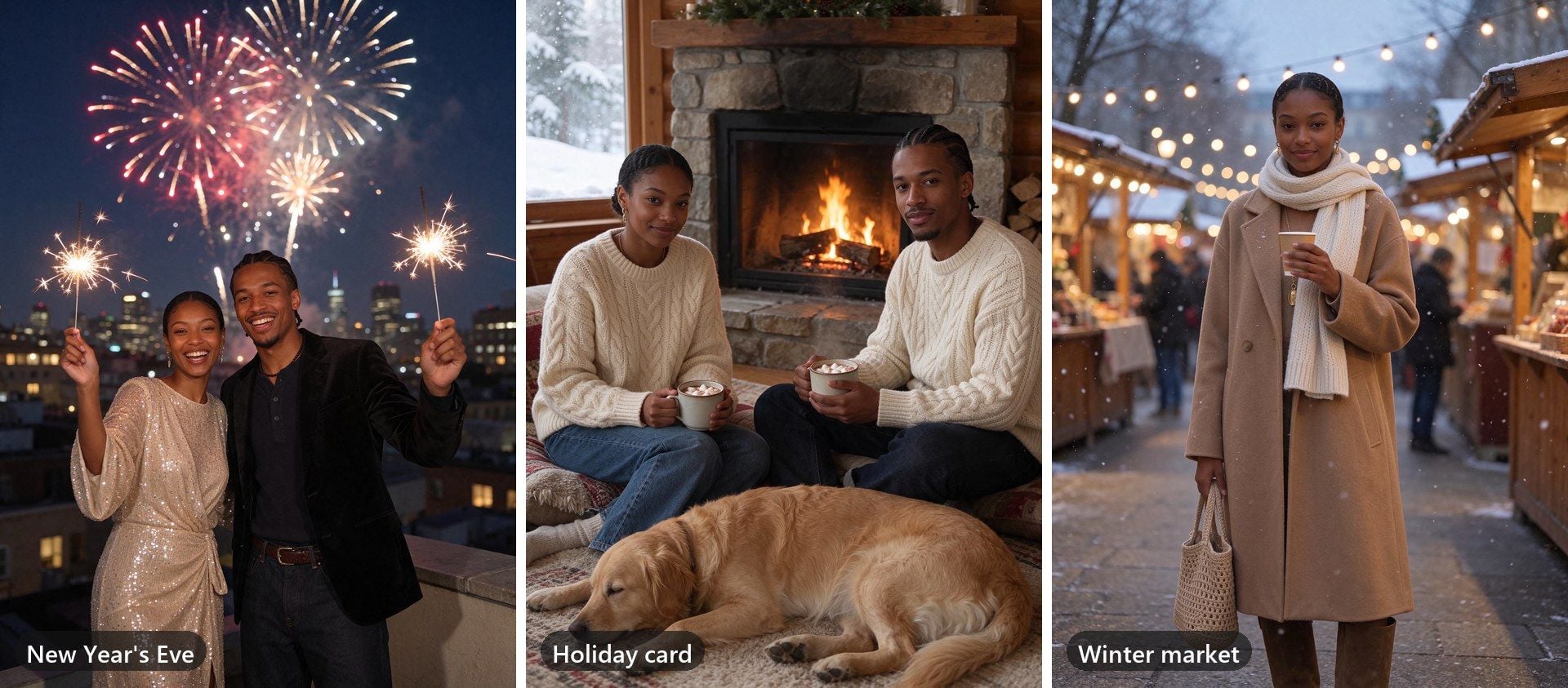
New Year's Eve rooftop (two photos)
Plain1Put the woman from the first photo and the man from the second on a city rooftop at midnight on New Year's Eve, holding sparklers, fireworks bursting over the skyline behind them, both laughing toward the camera. She wears a sequined champagne dress and he wears a black velvet blazer. Keep both faces, skin tones and hairstyles exactly as in their photos.
Cozy holiday card (two photos)
Plain1Make a cozy holiday card photo of the woman from the first photo and the man from the second sitting by a stone fireplace in a snowy cabin, wearing matching cream cable-knit sweaters and holding mugs of hot cocoa, with a sleepy golden retriever at their feet. Warm firelight, soft snowy window light. Keep both faces, skin tones and hairstyles exactly as in their photos.
Winter market stroll (one photo)
Plain1Put me at an outdoor winter market at dusk, wearing a long camel wool coat and a knit scarf, holding a paper cup of mulled cider, with string lights and wooden stalls softly blurred behind me and light snow falling. Keep my face, features, skin tone, hairstyle and earrings exactly as in my photo.
ChatGPT Photo Editing Prompts for Fixing Real Photos
ChatGPT photo editing prompts for repairs work the opposite way from style prompts: they fix one flaw in a real photo and leave everything else alone. The trick is to list what stays even more strictly, down to the background and framing. We degraded copies of our portraits on purpose so the fix is easy to see.
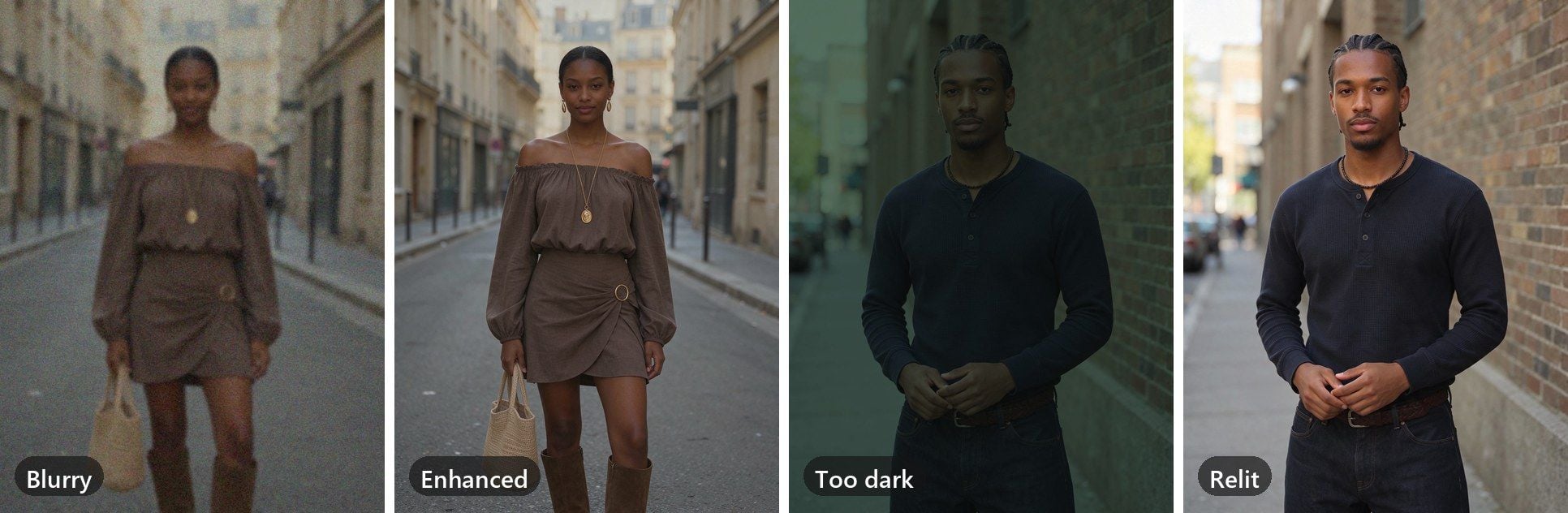
Improve photo quality
Plain1Enhance this photo: remove the blur and noise, recover sharp detail in my face, hair and clothes, and correct the exposure. Keep my face, features, skin tone, expression, pose, outfit and background exactly the same. Do not change the composition or add anything new. Natural skin texture, no plastic smoothing.
Fix dark lighting
Plain1This photo is underexposed with a green cast. Relight it like soft late-afternoon daylight: brighten my face evenly, restore natural skin tones and recover shadow detail in my clothes. Keep my face, features, pose, outfit, framing and background exactly the same.
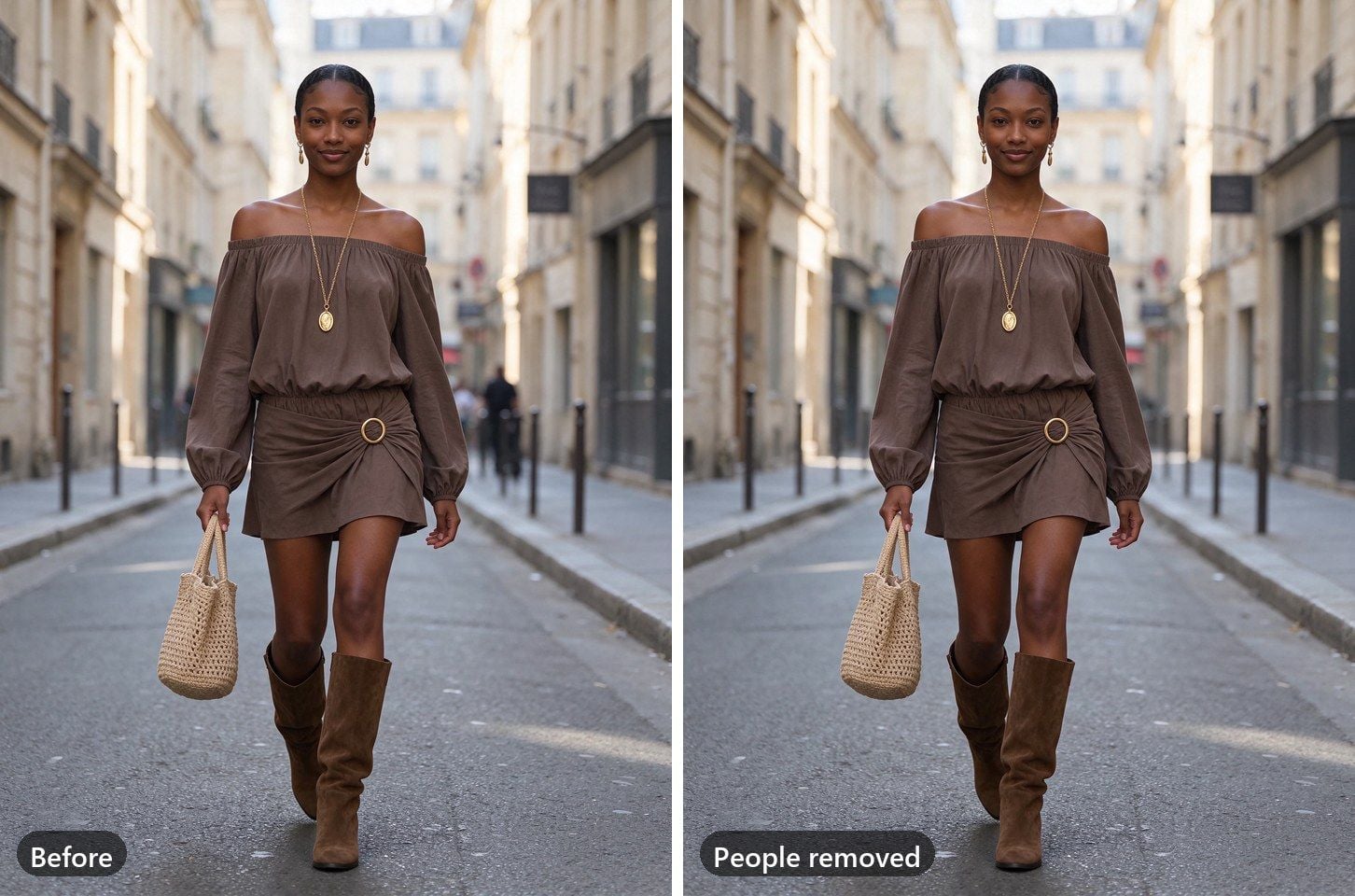
Remove people from the background
Plain1Remove every person and car in the background behind me and fill the street naturally with matching pavement and stone buildings. Keep me, my pose, my outfit and the lighting exactly the same.
Old prints are where a restore prompt earns its keep. We used a scanned family portrait more than a century old, with flaking emulsion across the faces, then colorized the restored version in a second pass.
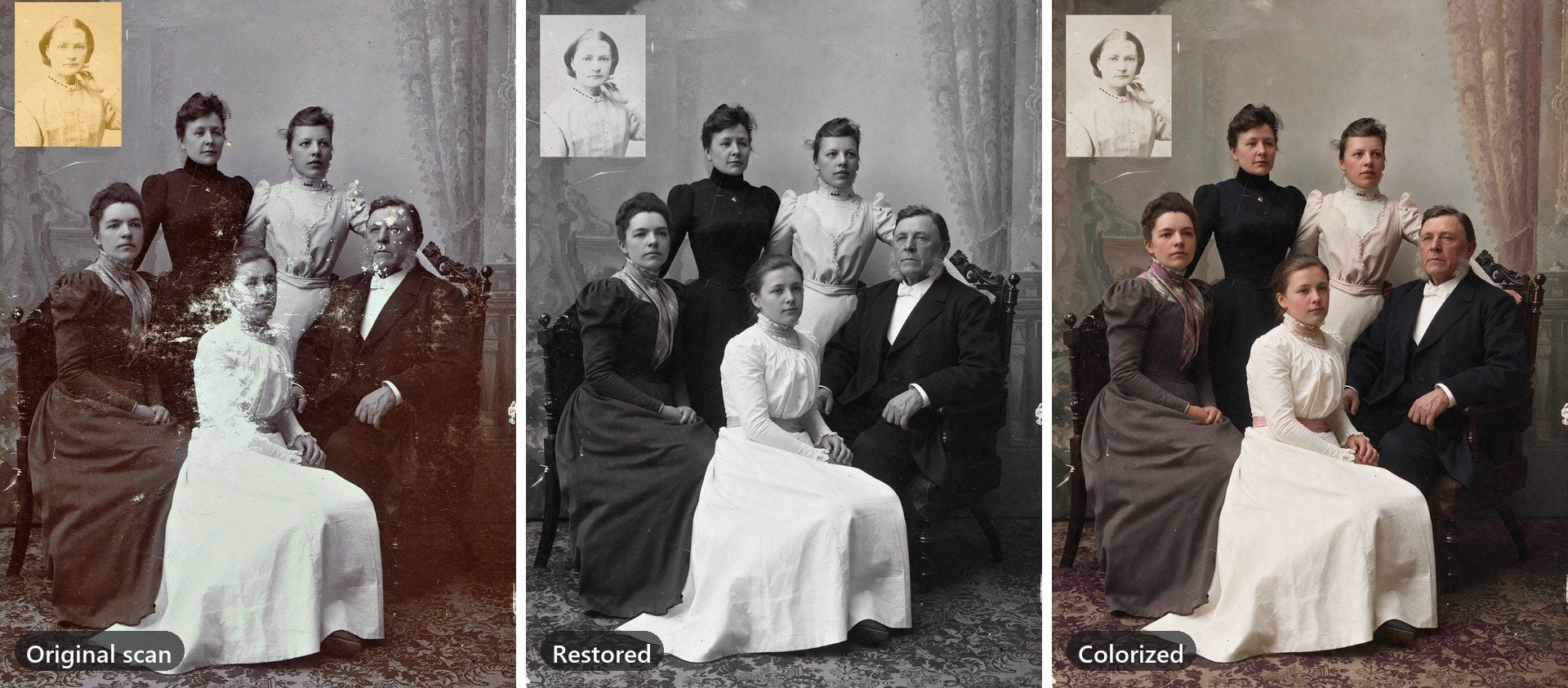
Original photo: Sofia Jansdotter Wallin family, Wikimedia Commons, public domain.
Restore an old photo
Plain1Restore this old photo: repair the scratches, creases, stains and torn edges, rebuild missing detail and sharpen the faces gently. Keep every person's face, expression, hairstyle, clothing and the original composition exactly the same. Keep it black and white with a natural film grain.
Colorize a black-and-white photo
Plain1Colorize this black-and-white photo with realistic, period-accurate colors: natural skin tones, muted fabric colors and soft daylight. Keep every face, expression and detail exactly the same.
ChatGPT Prompt to Expand an Image
Expanding an image in ChatGPT means adding canvas around a photo that already exists: a tight crop becomes a wide shot, a square becomes a Story. Tell the model the target ratio, which edges to grow and what the new area should contain, and repeat that the original part stays untouched.
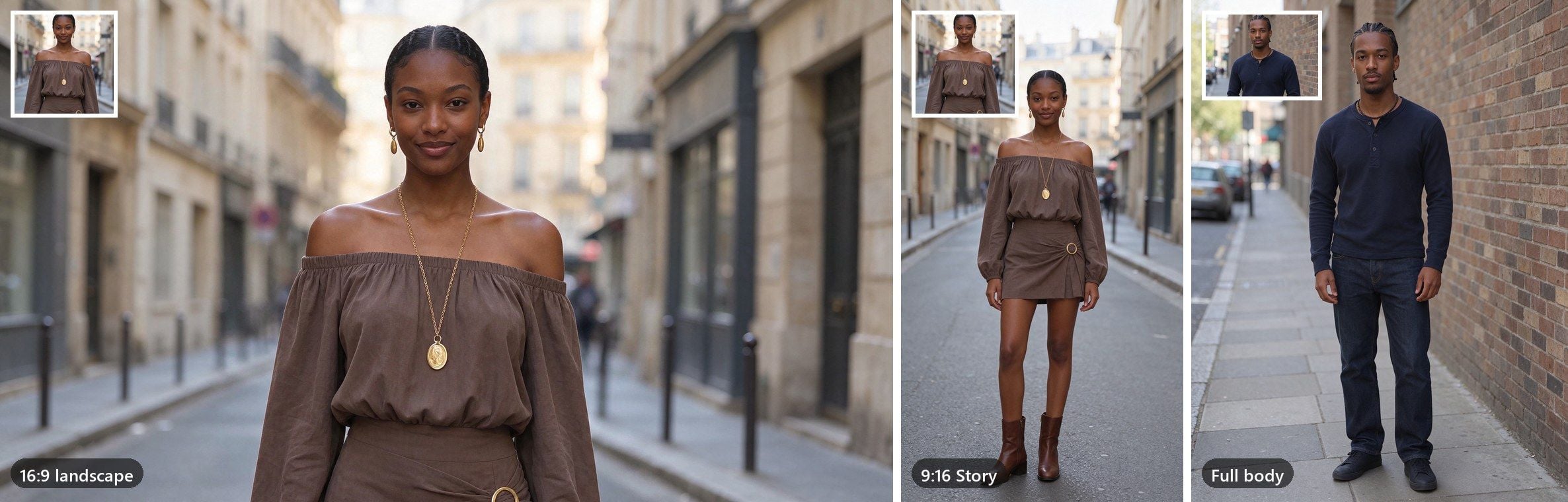
Widen to 16:9
Plain1Expand this image to a 16:9 landscape without cropping or changing me. Continue the stone street, buildings and soft afternoon light naturally on both sides, matching the camera angle, lens and colors. Keep my face, pose, outfit and the original part of the photo exactly the same.
Stretch to a 9:16 Story
Plain1Expand this photo into a 9:16 vertical frame for Instagram Stories. Extend the scene above and below me, showing more sky and street, and continue my outfit naturally down to my boots. Keep my face, pose and outfit exactly the same.
Half body to full body
Plain1Extend this half-body photo into a full-body shot: continue my body, jeans and shoes downward and widen the street around me, matching the light and perspective. Keep my face, pose, outfit and everything in the original area exactly the same.
ChatGPT Photo Prompt Perfector: Let ChatGPT Write the Prompt
A ChatGPT photo prompt perfector is a short instruction that turns a rough idea into a finished photo prompt with the keep list already in place. Use it when you know the look you want but not the words. Paste this into a new chat, then add your idea on the last line:
Plain1You are a photo prompt editor for ChatGPT Images. I'll give you a rough idea, and sometimes a photo of me. Rewrite my idea as one image prompt of 60 to 90 words. Start with what must stay the same: my face, features, skin tone, hairstyle and anything else I name. Then describe the new scene: setting, outfit, pose, camera and lens, lighting, color and texture. Use plain, concrete words and skip hype like "stunning" or "8K masterpiece". If my idea is unclear, ask me one question first. Return only the final prompt. 2 3My idea: [describe it in a few words]
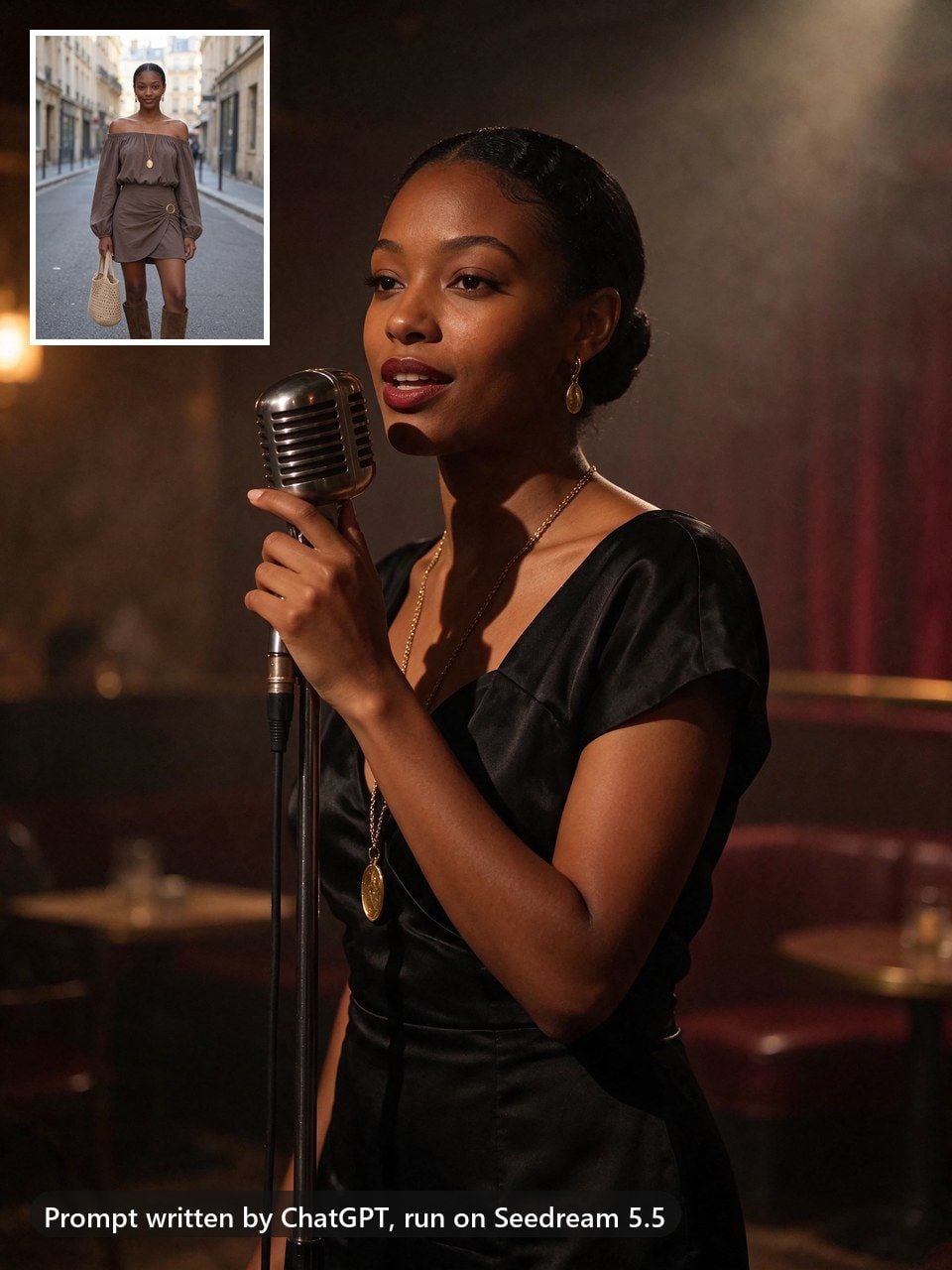
We tried it in a free ChatGPT account with "me as a jazz singer in an old club, I'm a woman." This is what came back, word for word:
Plain1Keep my face, facial features, skin tone, and hairstyle exactly as shown in my reference photo. Show me as a woman jazz singer performing in a dim, intimate 1940s jazz club, wearing a black satin evening dress and holding a vintage microphone. Pose me mid-song, one hand on the microphone stand, with a relaxed, expressive gaze. Use a medium close-up, 50mm lens, warm amber stage lighting, deep burgundy shadows, a smoky atmosphere, and subtle film grain.
Frequently Asked Questions
Can ChatGPT edit photos of people?
Yes. ChatGPT lets you upload a portrait and ask for a new background, outfit, lighting or style, and every edit prompt in this guide is written for exactly that. Results hold up best when your face is clear and well lit and the prompt says what must stay the same.
How long does it take ChatGPT to edit a photo?
OpenAI's help page says image generation can take a few minutes, depending on how complex the request is. A single background swap is a simpler request than a scene with several people, props and text, so expect busier prompts to take longer.
Do these ChatGPT photo prompts work on the free plan?
Image generation is available on every ChatGPT tier, Free included, according to OpenAI's help page. The catch is how many images a free account gets per day, which OpenAI does not publish. We counted our own free-plan runs in this ChatGPT image limit test.
Can ChatGPT restore old photos?
ChatGPT can repair scratches, stains and fading on a scanned print and add color in a second pass. Scan at the highest resolution you have, restore first while keeping the photo black and white, then colorize the restored version.
How much does a Seedream 5.5 photo edit cost on Atlas Cloud?
As of November 26, 2026, a Seedream 5.5 edit with one reference photo costs $0.0344 per image at 2K, after a 20% discount on the $0.043 list price. The 1.5K tier costs $0.0224, and the two-photo couple prompts cost $0.0408 per image at 2K.
Conclusion
A ChatGPT photo edit that changes your face usually comes from a prompt that only described the new scene. Name what stays first, keep to one change per message and start each new look from your original photo, and both ChatGPT and Seedream 5.5 have far less room to wander.
Pick a prompt above, swap in your own details and run it. If you want an exact output size or two versions per run, open the Image Edit tab on Atlas Cloud and paste the same text there. A ChatGPT prompt for photo edits works best when it reads like a short brief to a photographer: what to keep, what to change, and how the light should fall.







