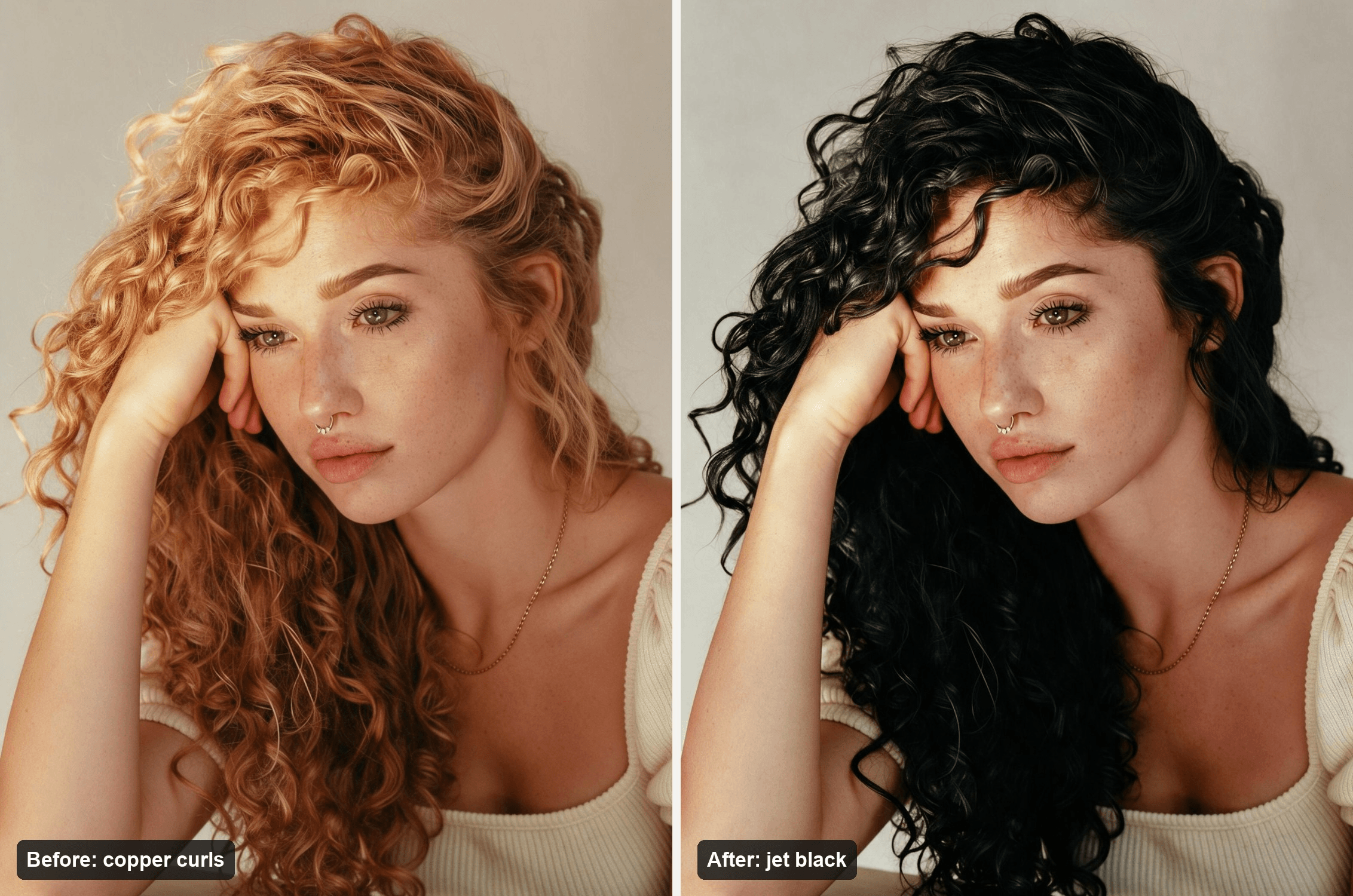
You have copper curls, a box of jet black dye in your cart, and one question the comments can't answer for you: will it suit you? That is the moment the black hair filter was made for. People have been holding a phone up to their face since 2022, watching their hair go dark, and deciding from the result.
On TikTok the trend has gone through three versions: a live camera effect, CapCut AI templates, and this fall, two-shot clips of what looks like real dye. This guide sorts out which is which. Then it shows how to turn one selfie into a jet black still and a 10-second dye reveal on Atlas Cloud, so you see the color on your own face before it touches your hair.
Key Takeaways
- The black hair filter took off as TikTok's BLVCK effect in January 2022 and now runs on CapCut AI templates.
- The biggest CapCut version, AI BLACK HAIR FILTER, showed 55,171 uses on November 9, 2026.
- The 908K-play "black hair effect" clip from October 29 cuts between two separate shots andlinksno template.
- Seedance 2.5 in the Atlas Cloud video generator turnsajet black still into a 10-second dye reveal.
- Black dye is hard to lift later, so preview jet black, soft black and dark brown on your own face first.
What Is the Black Hair Filter on TikTok?
It depends on the year. The name took off in January 2022 with a TikTok effect called BLVCK, which darkens your hair live on camera, along with the rest of the frame. @pinterestboy's clip from January 25, captioned "Seeing what I look like with black hair", now shows 8.7 million plays. Two more clips posted with a BLVCK effect and the same sound within the next week now show 6.4 million and 7.2 million.
The AI version came through CapCut. Templates from early 2025 take one photo, generate the same face with black hair, and reveal it with a wipe. The biggest one, AI BLACK HAIR FILTER, went live on March 30, 2025, and a MooMoji clip posted with it the same day has 3.3 million plays. A May 2026 template puts the real motive on screen: "What would you look like with black hair?"
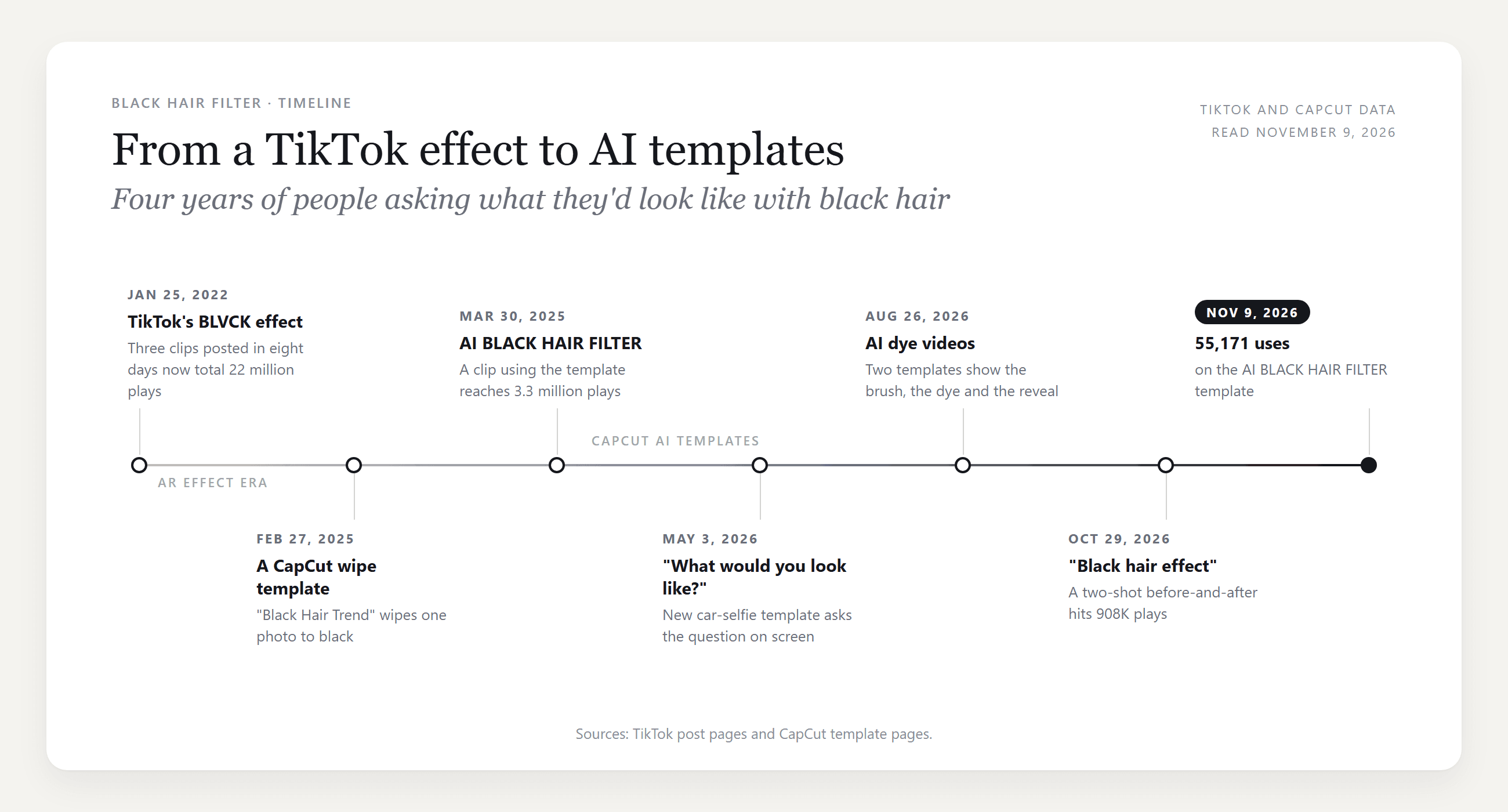
The newest wave may not be a filter at all. The first clip on TikTok's Black Hair Filters discover page right now, posted on October 29 with the on-screen text "black hair effect:", links no CapCut template. It cuts from long brown hair in one shot to straight jet black in another, with a different top and a different room, which points to a real dye job. It had 908K plays when we checked.
So if your feed is full of black hair this month, some of it is probably dye, and some of it is AI.
How to Make a Black Hair Filter Video From One Selfie
The early templates stop at a still and a wipe. Two newer CapCut templates from August animate the whole job instead: the brush, the black dye, then the reveal. That moving version is the one we rebuilt.
On Atlas Cloud the work splits in two. The free AI Hairstyle Changer turns your selfie into a jet black still. Seedance 2.5 then takes the selfie as the first frame and the black still as the last frame, and it generates the dye job in between with its own sound. Here is the clip from one portrait:
She smiles at the camera and brings up a bowl of black dye at about 2 seconds. Three brush strokes turn one front section black while the rest stays copper.
At 5 seconds she sweeps her curls over her face, and when she flips them back at 7 seconds the whole head is glossy jet black with the same curl pattern. She ends with her elbow on the table, in the exact pose of the black still.
Step 1: Get the Jet Black Still From the Free AI Hairstyle Changer
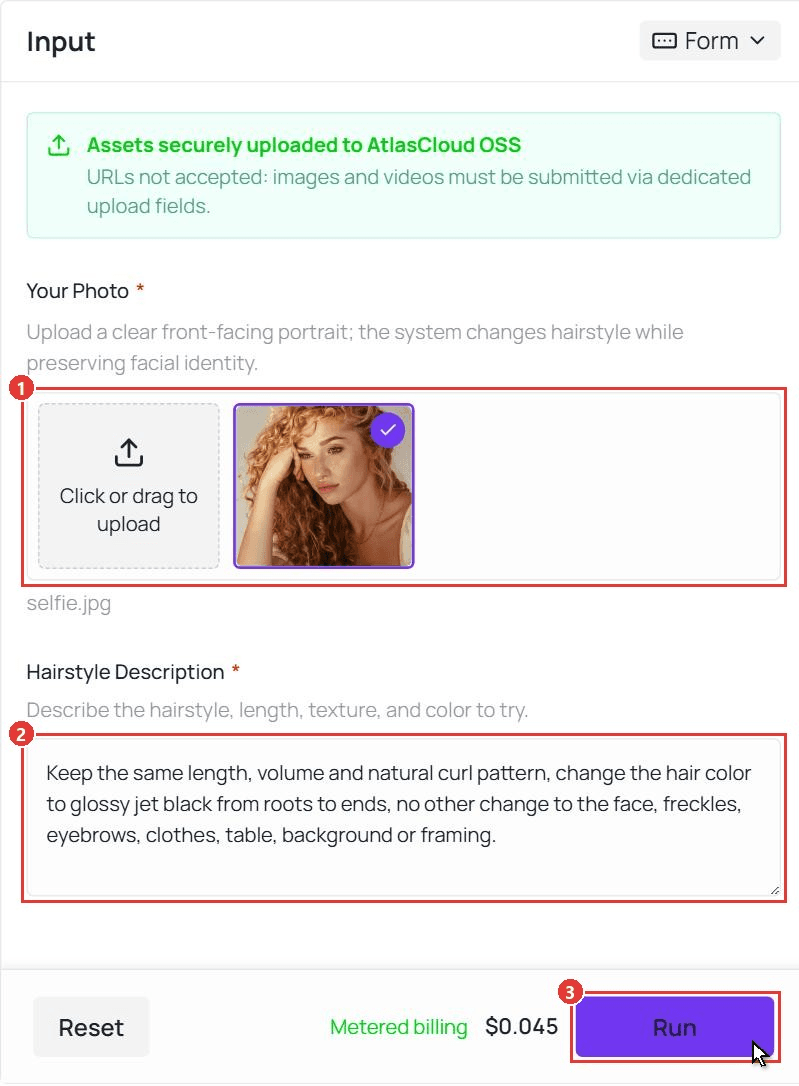
Open the free AI hairstyle changer and sign in with a free Atlas Cloud account. Then follow the three numbered controls:
- Upload a clear, front-facing photo under Your Photo. The tool returns a vertical 9:16 image, so crop your photo to 9:16 before you upload it.
- Type the color you want into Hairstyle Description.
- Click Run, then open the result full size and save it.
The request behind the still in the hero image:
plaintext1Keep the same length, volume and natural curl pattern, change the hair color to glossy jet black from roots to ends, no other change to the face, freckles, eyebrows, clothes, table, background or framing.
Name the texture along with the color, so curls stay curls. Listing the eyebrows under "no other change" keeps them copper. That matters for the video, which has to end on exactly this frame.
Method 1: Build the Reveal in the Atlas Cloud Video Generator
Open the AI video generator and follow the numbers on the screenshot:
- Open the Video Generation tab.
- Keep Seedance 2.5 under Models.
- Upload your original selfie as the First Frame.
- Upload the jet black still as the Last Frame.
- Paste the prompt below into Prompt, with your own hair color, top and room.
- Under Settings, leave the ratio on Auto and pick 720p for a test or 1080p for the final.
- Type 10 in the Duration box.
- Leave Audio on.
- Click Run.
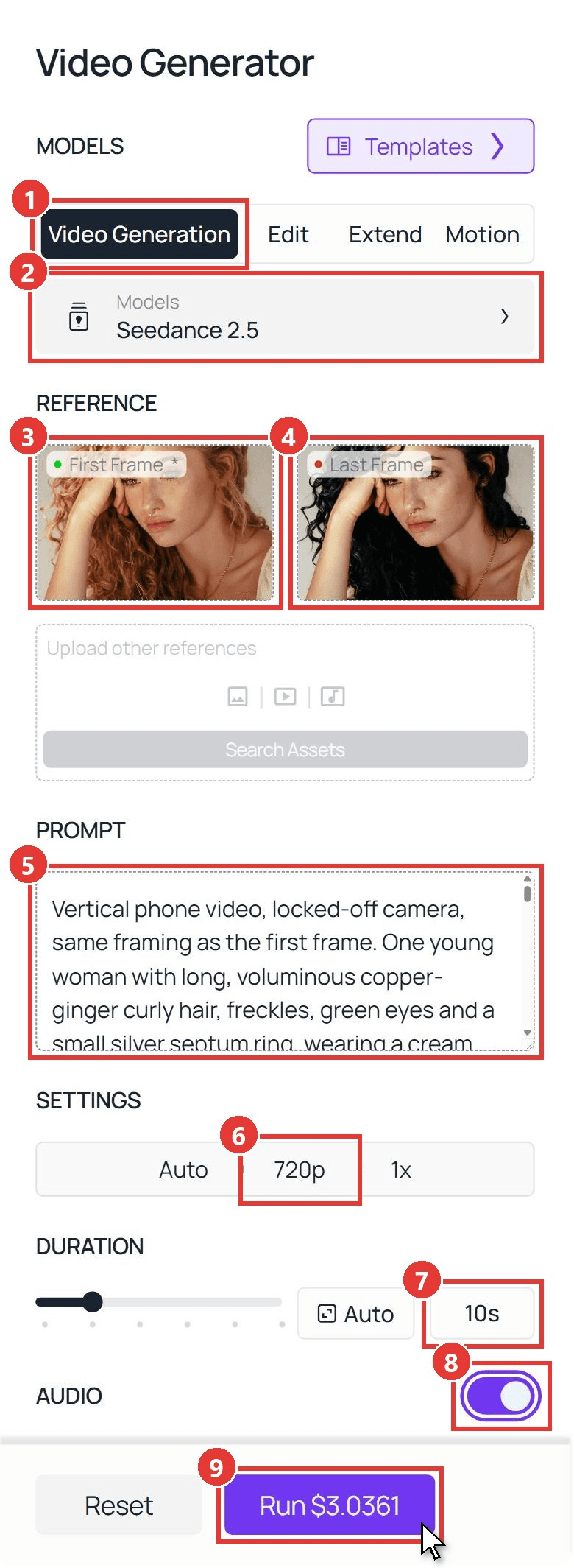
plaintext1Vertical phone video, locked-off camera, same framing as the first frame. One young woman with long, voluminous copper-ginger curly hair, freckles, green eyes and a small silver septum ring, wearing a cream square-neck ribbed knit top with short puff sleeves and a thin gold chain necklace, seated at a light oak table in front of a plain warm beige wall in warm side light. Only one person in every frame. 20-2s: she lifts her head from her hand, takes her elbow off the table, turns to face the camera and gives a small smile, pushing one copper curl off her cheek. 32-5s: she brings up a small black bowl of thick, glossy, tar-black hair dye and a flat black tint brush from the table just below the frame. With three slow strokes she paints the dye onto one front section of her curls; the black dye is clearly visible on the brush and the strands, and only the painted curls turn wet and jet black while the rest of her hair stays copper-ginger. 45-7s: she puts the bowl and brush back down below the frame, leans forward a little and sweeps all of her curls forward over her face with both hands; the cream knit top stays in place. 57-10s: she flips her head back up and all of her hair is now glossy jet black curls from roots to ends, the same length, volume and curl pattern as before. She runs one hand through the curls, turns her head slightly left and right to show the shine, then puts her left elbow back on the table and rests her head against her hand, settling into exactly the pose of the last frame. 6Her face, freckles, green eyes, copper-brown eyebrows, septum ring, skin tone and the cream knit top never change. Each hand has five fingers. No text, no logos, no extra people. 7Sound: quiet room tone, soft brush strokes at 2-5s, a hair-flip whoosh at 7s, no music.
Two lines carry most of the weight. The 5 to 7 second line hides the switch under her own hair, so the color never changes on a visible face. The eyebrow line keeps the brows copper all the way through, which is how they look in the last frame. The clip above is a 1080p run of exactly this prompt.
Method 2: Send the Two Frames Through the API
Running previews for a whole salon client list, or adding a black hair button to an app? The same two steps run through the API.
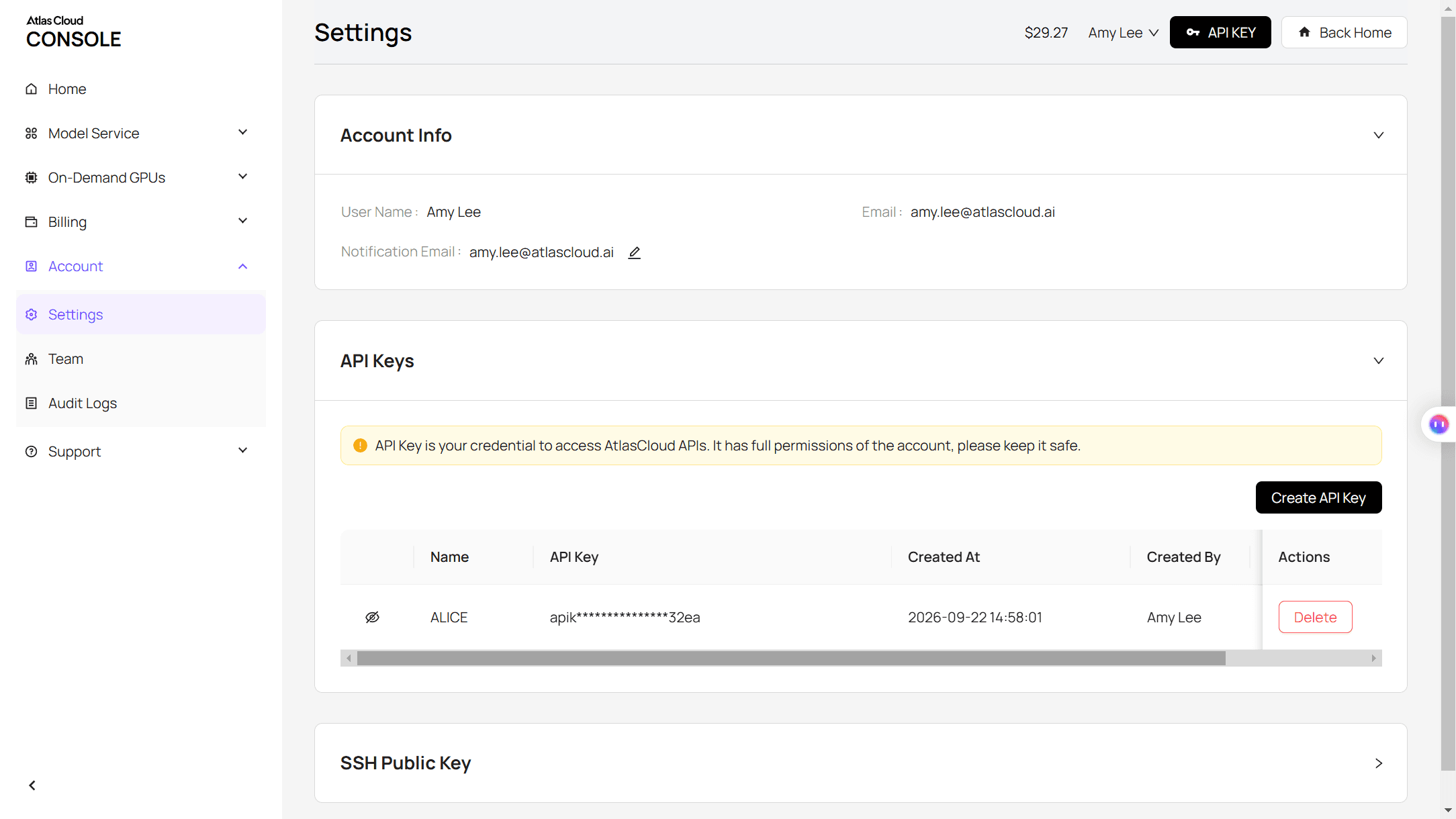
Step 1: Create and copy an API key on the Settings page of the Atlas Cloud console.
Step 2: Check the request format in the Atlas Cloud API docs.
Step 3: Make the still, then the clip, and poll for each file. The hairstyle call takes the photo URL and the color request:
plaintext1curl -X POST https://api.atlascloud.ai/api/v1/model/generateImage \ 2 -H "Authorization: Bearer $ATLASCLOUD_API_KEY" \ 3 -H "Content-Type: application/json" \ 4 -d '{ 5 "model": "atlascloud/tool/hairstyle-changer", 6 "image": "https://your-cdn.com/selfie.jpg", 7 "prompt": "Keep the same length, volume and natural curl pattern, change the hair color to glossy jet black from roots to ends, no other change to the face, eyebrows, clothes, background or framing." 8 }'
The video call takes the selfie as image and the returned still as last_image:
plaintext1curl -X POST https://api.atlascloud.ai/api/v1/model/generateVideo \ 2 -H "Authorization: Bearer $ATLASCLOUD_API_KEY" \ 3 -H "Content-Type: application/json" \ 4 -d '{ 5 "model": "bytedance/seedance-2.5/image-to-video", 6 "prompt": "<paste the Method 1 video prompt here>", 7 "image": "https://your-cdn.com/selfie.jpg", 8 "last_image": "https://your-cdn.com/selfie-jet-black.jpg", 9 "duration": 10, 10 "resolution": "720p", 11 "generate_audio": true 12 }'
Poll the returned prediction ID until the status reads completed, then download the file from the outputs array:
plaintext1curl https://api.atlascloud.ai/api/v1/model/prediction/<prediction_id> \ 2 -H "Authorization: Bearer $ATLASCLOUD_API_KEY"
The same two endpoints and the same key run every image and video model on Atlas Cloud. To try another model, change the model string and keep the rest.
Which Black Hair Filter CapCut Template Is Behind the Trend?
We opened the CapCut templates linked from black hair filter posts on TikTok and from CapCut's own black hair filter pages. Here is what each one makes, with uses as of November 9, 2026:
| Template | Uses | What it makes |
|---|---|---|
| AI BLACK HAIR FILTER | 55,171 | A blonde portrait turns black block by block from the crown down, under the caption "Why NOBODY tell me about the BLACK hair effect?" |
| Black Hair Trend | 6,780 | A vertical wipe from long blonde waves to long black waves |
| JET BLACK | 2,093 | A "Jet Black" color swatch, a hair flip, then black curls |
| Black hair filter (May 2026) | 1,952 | A diagonal wipe on a car selfie that asks "What would you look like with black hair?" |
| Black hair filter (August 2026) | 179 | An AI video: dye brushed onto blonde hair, a rinse, then black hair combed out |
| Black Hair Goth AI | 118 | An AI video: dye, a blow-dry, and a goth makeup reveal |
One surprise on CapCut's black hair filter page: the most-used template listed there, Aestetic aihaircolor, had about 258,000 uses and goes the other way, from black hair to ash blonde. If a template preview starts dark, check where it ends before you spend a photo on it.
You don't need a template inside the CapCut app. A CapCut guide dated July 14, 2025 walks through Retouch, then Hair, which offers eight preset colors and a Customize box where you type a shade. Snapchat also lists a black hair Lens.
Should I Dye My Hair Black? What the Filter Can Tell You First
This is the question people type right after the filter. Reddit threads that ask it word for word run to hundreds of comments, and the worries repeat: black looks flat, it reads goth, and it is hard to undo. Clairol's dye guide lists the last one first: "Black hair color is difficult to lighten afterwards."
A filter can't tell you how your hair will take dye. It can answer the other worries in seconds, because each one is a question about your face.
| The worry | What to preview | What to look at |
|---|---|---|
| Black will look flat | Jet black and soft black side by side | Whether your curls or layers still show shine and separation |
| It will look too goth | Soft black and dark brown | Whether your face looks washed out next to the darkest shade |
| I might regret it | Dark brown first | Whether a near-black brown already gives you the look you want |
| My brows won't match | Black hair with darker brows | Covered in the pale skin section below |
Jet Black, Soft Black or Dark Brown: Which One to Preview
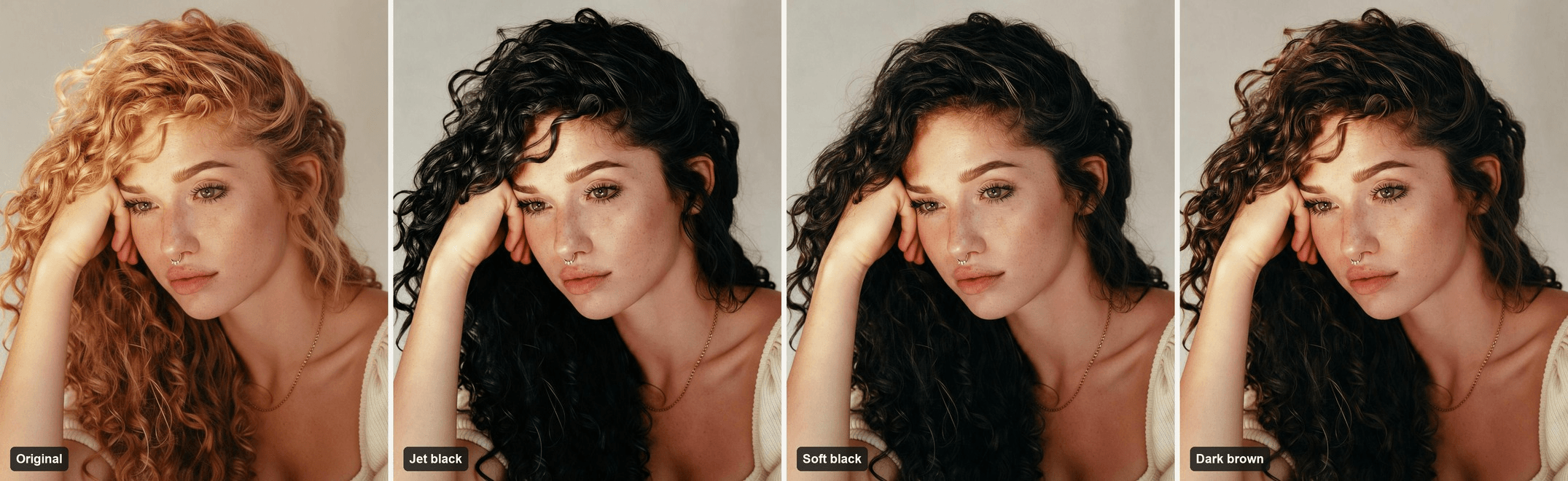
Change only the color phrase in the Step 1 request. These three phrases made the panels above:
| Shade | Color phrase |
|---|---|
| Jet black | glossy jet black from roots to ends |
| Soft black | a soft natural black that shows a hint of warm brown in the light |
| Dark brown | a rich darkest espresso brown that looks almost black indoors |
On this face, jet black picks up a cool blue sheen in the highlights, soft black keeps warm brown in the light, and the dark brown lands on a rich chocolate. Seen together, the three tell you more than any single preview. For shades going the other direction, the same tool handles silver too, as our gray hair preview shows.
What Would I Look Like With Black Hair if I'm Pale?
Our model is a fair test case: pale skin, freckles, green eyes and copper brows. Jet black raises the contrast around her face, and the freckles read stronger. Her copper eyebrows stay light under black curls, and that gap is probably why "black hair and eyebrows filter" shows up as its own TikTok search.
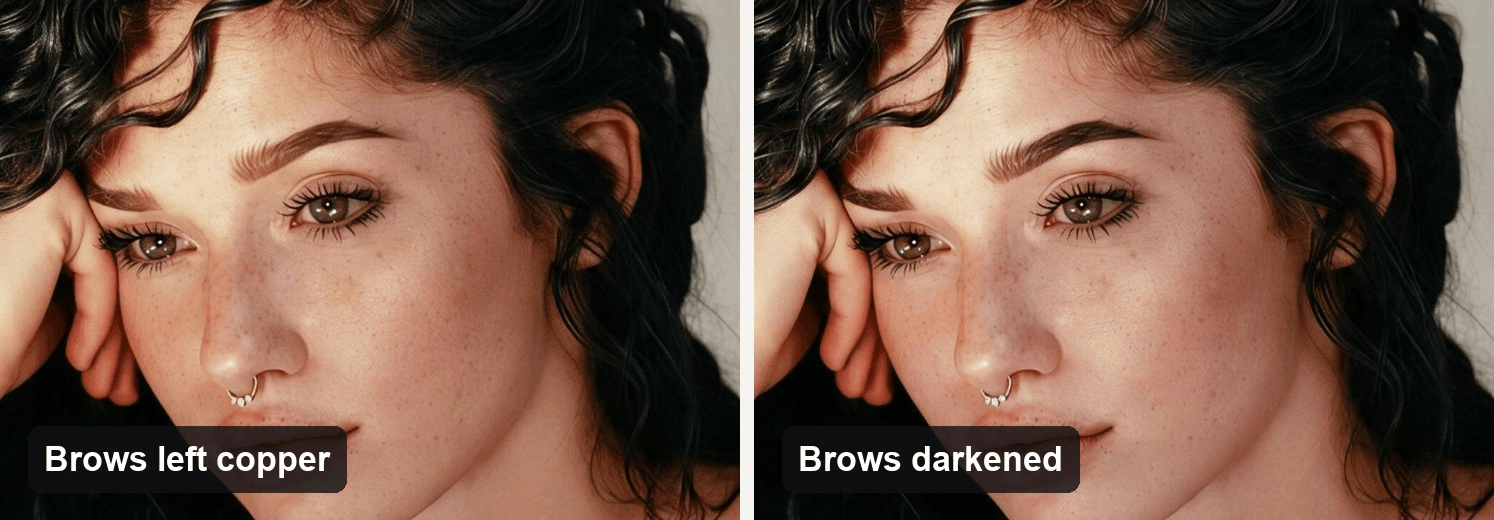
We darkened the brows one shade in a second pass with Seedream v5.0 Pro in the Image Edit tab, asking it to change only the eyebrows. Put the two versions next to each other and decide whether you'd tint your brows too. If you're thinking about lighter eyes with dark hair, the blue eye filter trend uses the same still-then-video setup.
Black Hair Filter for Men: How Would I Look With Black Hair?
The 8.7-million-play clip that opened the 2022 wave is a young man with light brown hair checking the look on himself, and TikTok's "Black Hair Men Filter" page is still full of clips from that January. The question is the same one, just on shorter hair. We tried it on a short, textured blond cut with a messy fringe, about as far from black as hair gets.
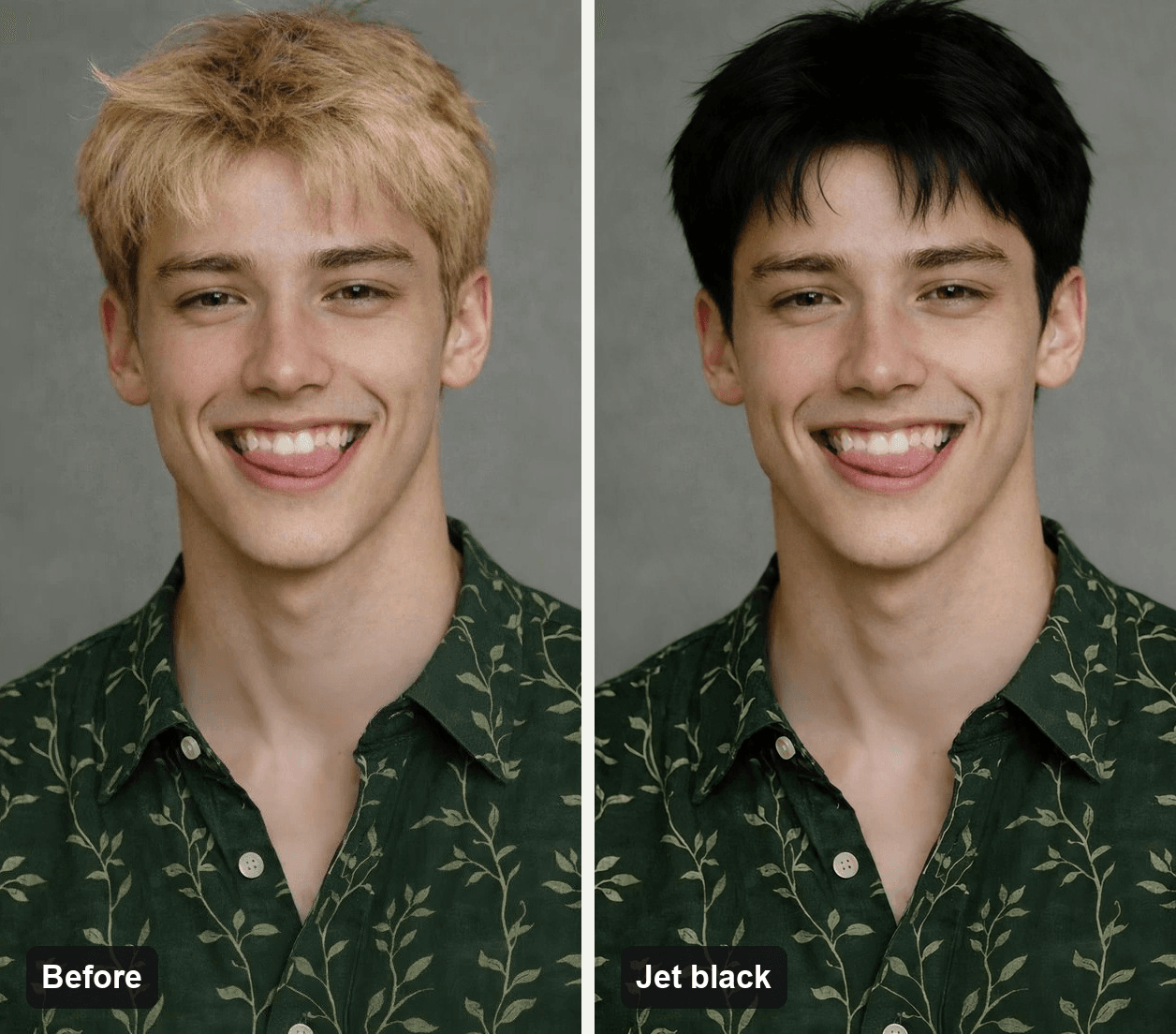
plaintext1Keep the same short textured haircut, fringe, length and texture, change the hair color to natural jet black from roots to ends, keep the eyebrows their natural color, nno other change to the face, smile, skin, green leaf-print shirt, background or framing.
The request names his smile too, and the grin came through unchanged. His brows are a medium brown, dark enough to sit under black hair without a tint; on lighter brows, run the brow pass from the section above.
Frequently Asked Questions
Is there a black hair filter on TikTok?
Yes, in two forms. The 2022 clips used a built-in effect called BLVCK, which darkens your hair live on camera. Many black hair filter posts since 2025 link a CapCut AI template instead, which turns one photo into a reveal clip you then post on TikTok.
How do I get the black hair filter on CapCut?
Open a black hair filter template from a TikTok post, or search the template names in the table above, and add one photo. Inside the CapCut app you can also open Retouch, then Hair, and pick one of the eight preset colors or type a shade into Customize.
Can the filter make my eyebrows black too?
Ask for it in its own pass. Edit the black hair still a second time and request only darker eyebrows, as we did in the pale skin section. Keeping it separate lets you compare both versions before you commit to tinting.
Can I go back to blonde after dyeing my hair black?
It is possible, but slow. Clairol's guide calls lightening black hair difficult and damaging for the hair, especially if you like to change your color often. That is a good reason to spend a few minutes on previews before the dye goes on.
Does the AI video come with the TikTok sound?
No. With Audio on, Seedance 2.5 writes its own sound from the last line of the prompt; ours asked for brush strokes and a whoosh on the hair flip. Mute that track when you post, and add a trending sound in the TikTok app.
How much does a black hair filter video cost on Atlas Cloud?
A 10-second Seedance 2.5 clip with a first frame, a last frame and audio costs $3.04 at 720p and $5.98 at 1080p, as shown on November 9, 2026. Both are currently 20% off the $3.80 and $7.47 list prices. The jet black still comes from the AI Hairstyle Changer, which runs on a free Atlas Cloud account and is metered at $0.045 per preview.
Conclusion
The black hair in your feed comes from three places: a 2022 camera effect, CapCut AI templates, and this fall's before-and-after clips of what looks like real dye. The AI version works because it keeps your face and changes only the hair. Hide the switch under a hair flip and keep the brows fixed, and the reveal looks like a real afternoon with a box of dye.
Start with one front-facing selfie cropped to 9:16. Make the jet black still, then soft black and dark brown, and look at all three before you buy anything. If one of them makes you want to post it, give Seedance 2.5 both frames and the timed prompt, and your black hair filter becomes a 10-second reveal.


