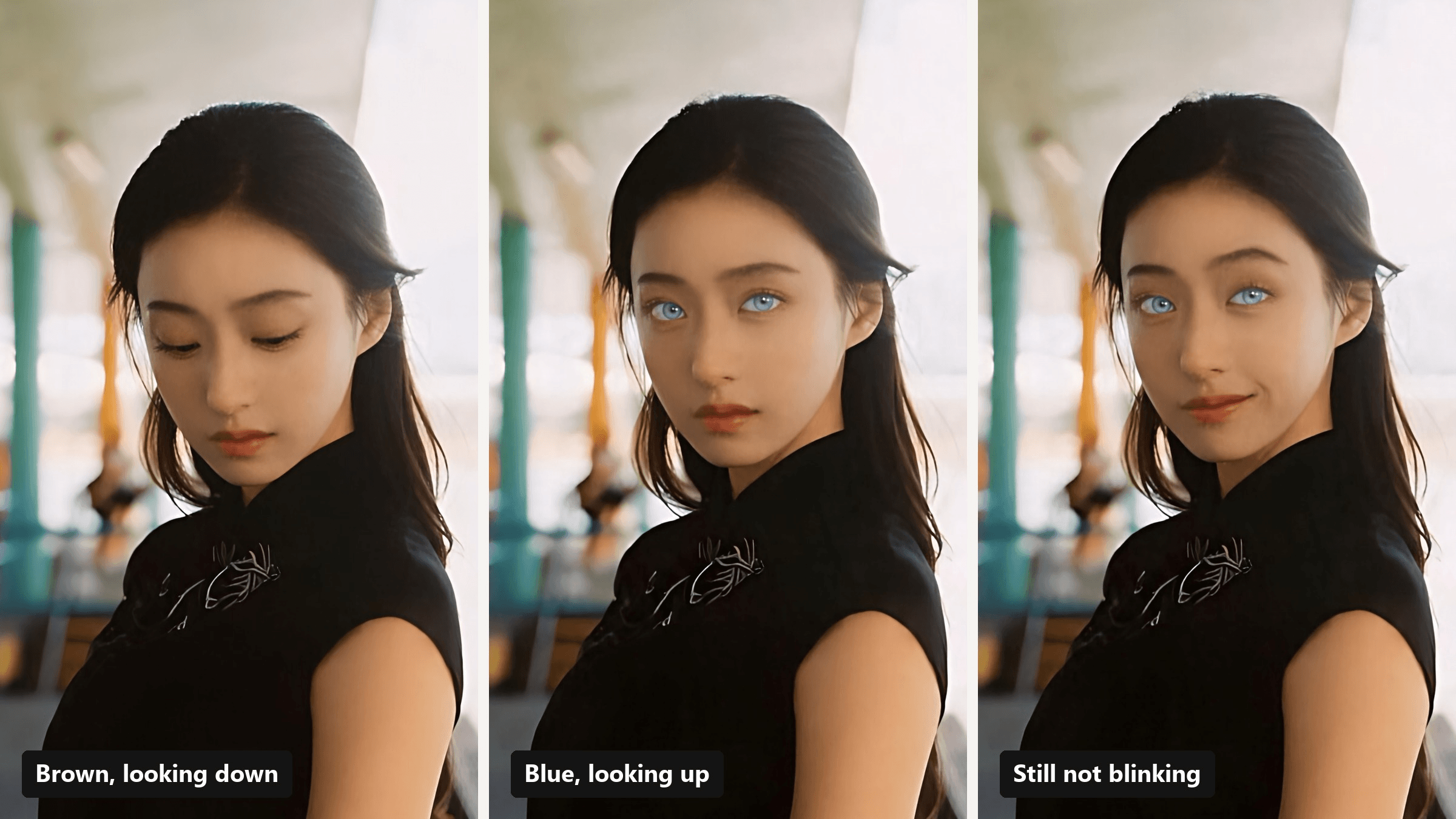
Somebody on your feed lowers their eyes, lifts them slowly, and suddenly they have the eyes of a husky that knows your browser history. That is the blue eye filter TikTok trend in one sentence. It looks like a filter, but the versions we traced are CapCut templates, and the smoothest ones are AI edits that repaint the eyes after you upload a photo.
We tracked down the four templates people actually use, then rebuilt the funniest version from one portrait with brown eyes. The whole thing takes two steps and no colored contacts. Here's what the trend is, how to make it, and three ways to make it funnier than the original.
Key Takeaways
- The blue eye filter TikTok trend mostly runs on CapCut templates linked under the tutorial posts.
- Four templates carry it: an eye-open reveal, a phone over the eyes, a sticker, and a color switcher.
- Change eye color in a photo first, then use that photo as the last frame of the video.
- The Atlas Cloud video generator turns one portrait into a 10-second blue eye reveal with sound.
- Funny versions win when the blue eyes misbehave: too intense, out of sync, or staring far too long.
What Is the Blue Eye Filter TikTok Trend?
It's a short clip where a normal face gets a sudden pair of very blue eyes, usually set to a moody sound. Search the trend and you land on tutorial posts, and nearly every one carries a "CapCut · Try this template" button. We opened those buttons on the posts ranking for the blue eye filter in Google and traced them to four templates.
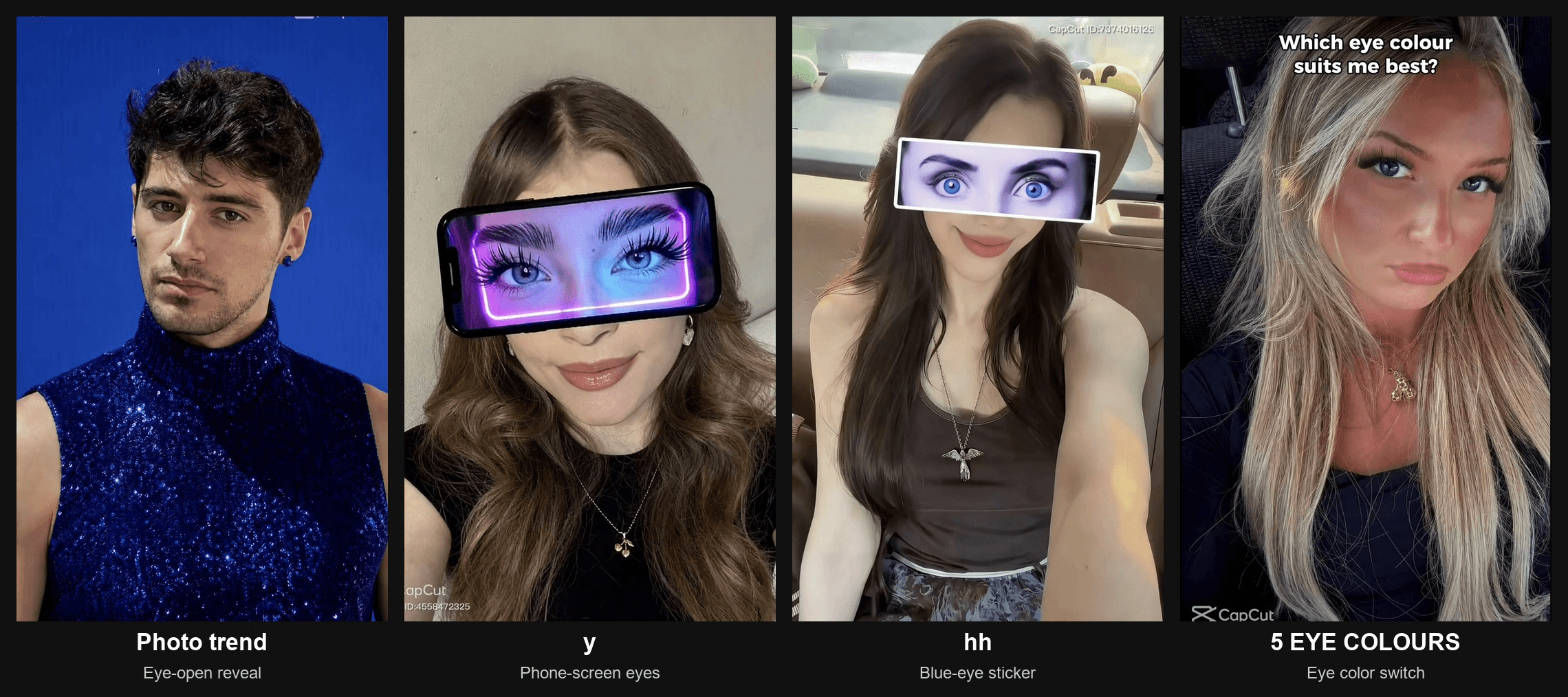
| Template | Creator | First published | Uses (Oct 29, 2026) | What happens on screen |
|---|---|---|---|---|
| Photo trend | Future301 | Sep 7, 2026 | 23,441 | AI clip: eyes closed, then a slow look up into the camera |
| y | Future301 | Mar 18, 2026 | 2,169 | A phone held across the face shows a pair of blue eyes |
| hh | Esme70275 | Aug 15, 2026 | 1,345 | A blue eye sticker covers the real eyes for the whole clip |
| 5 EYE COLOURS | KP.Capcut | Aug 2, 2026 | 366 | AI clip asking "Which eye colour suits me best?" while the eyes cycle colors |
The eye-open reveal is the big one. A tutorial by aurora27808 on TikTok links straight to Photo trend, and three more tutorials captioned "Eyes Blue Like The Atlantic" point to the same template.
Blue Eyes Phone Trend vs the Eye-Open Reveal
The phone version is a sight gag. The blue eyes live on a screen, so they never quite line up with your face, and that mismatch is the joke. The eye-open reveal plays it straight: same face, real-looking eyes, a dramatic beat. One is a meme, the other is a glow-up. You can make both from the same photo.
How to Do the Blue Eye Filter With AI
A template paints the eyes for you, but it also decides the background, the pace, and sometimes your outfit. Photo trend repaints the whole shot as a blue studio portrait. If you want your own photo, your own setting, and a punchline you choose, build it yourself on Atlas Cloud. This is the clip we made from one portrait with dark brown eyes:
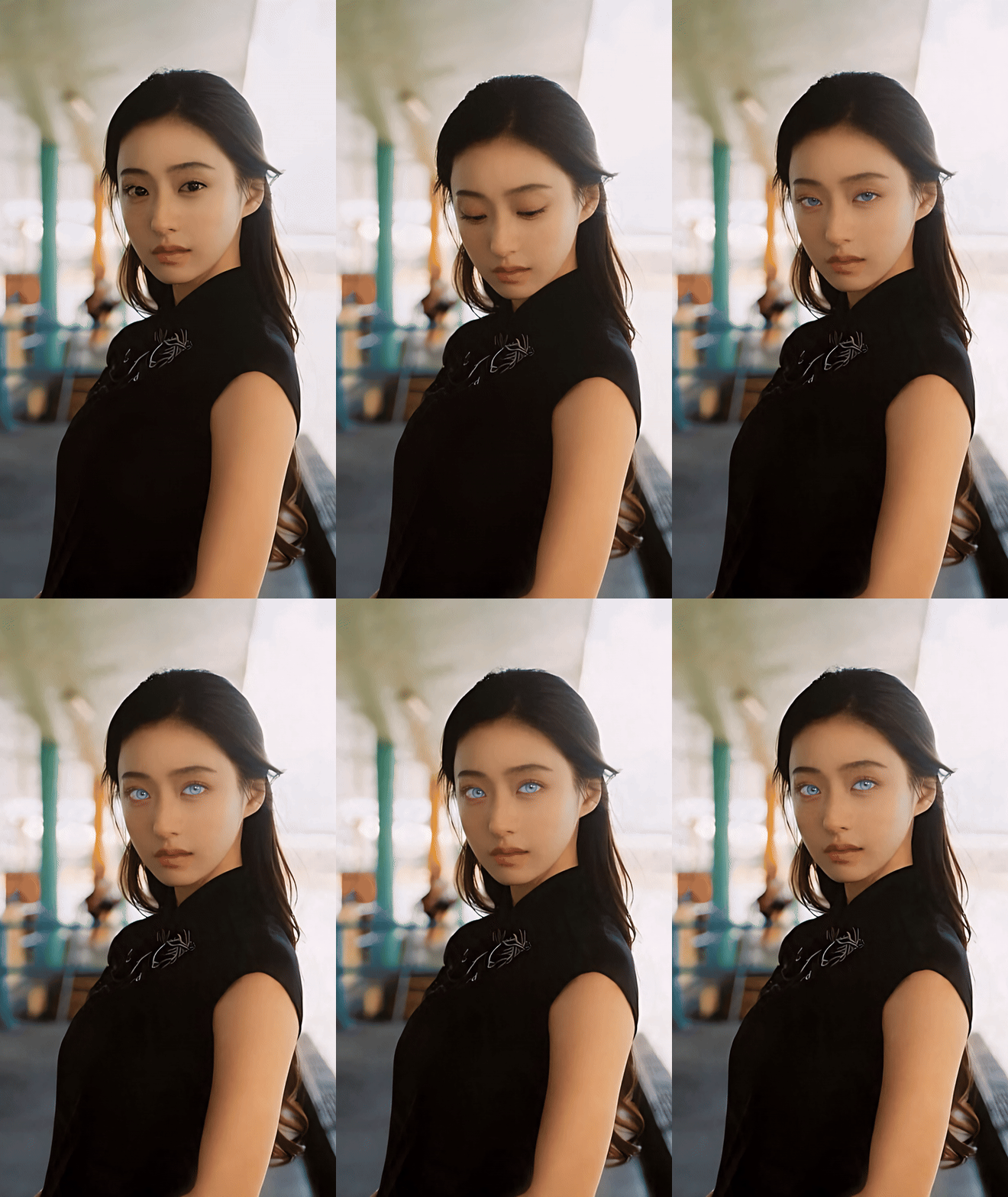
The trick is two steps. Change the eye color in a still first, then let Seedance 2.5 animate from the brown-eyed photo to the blue-eyed one. Because the blue still is the last frame, the clip has to land on it.
Method 1: Change Eye Color in Photo, Then Make the Eyes Open
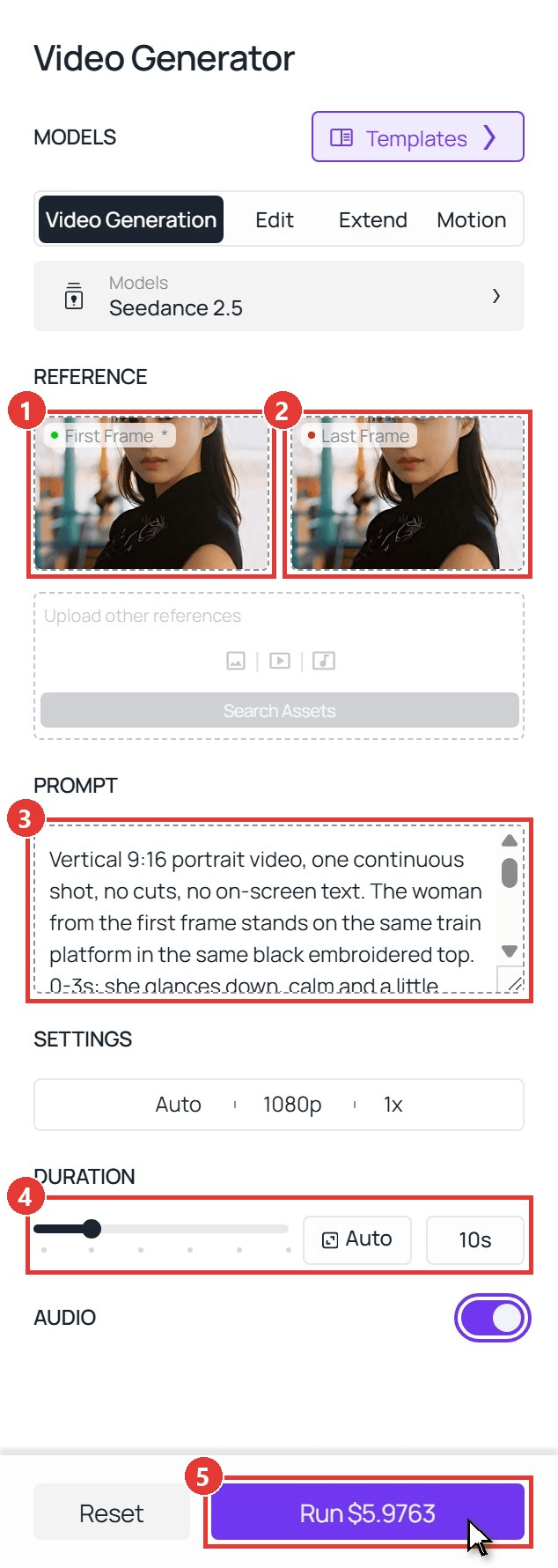
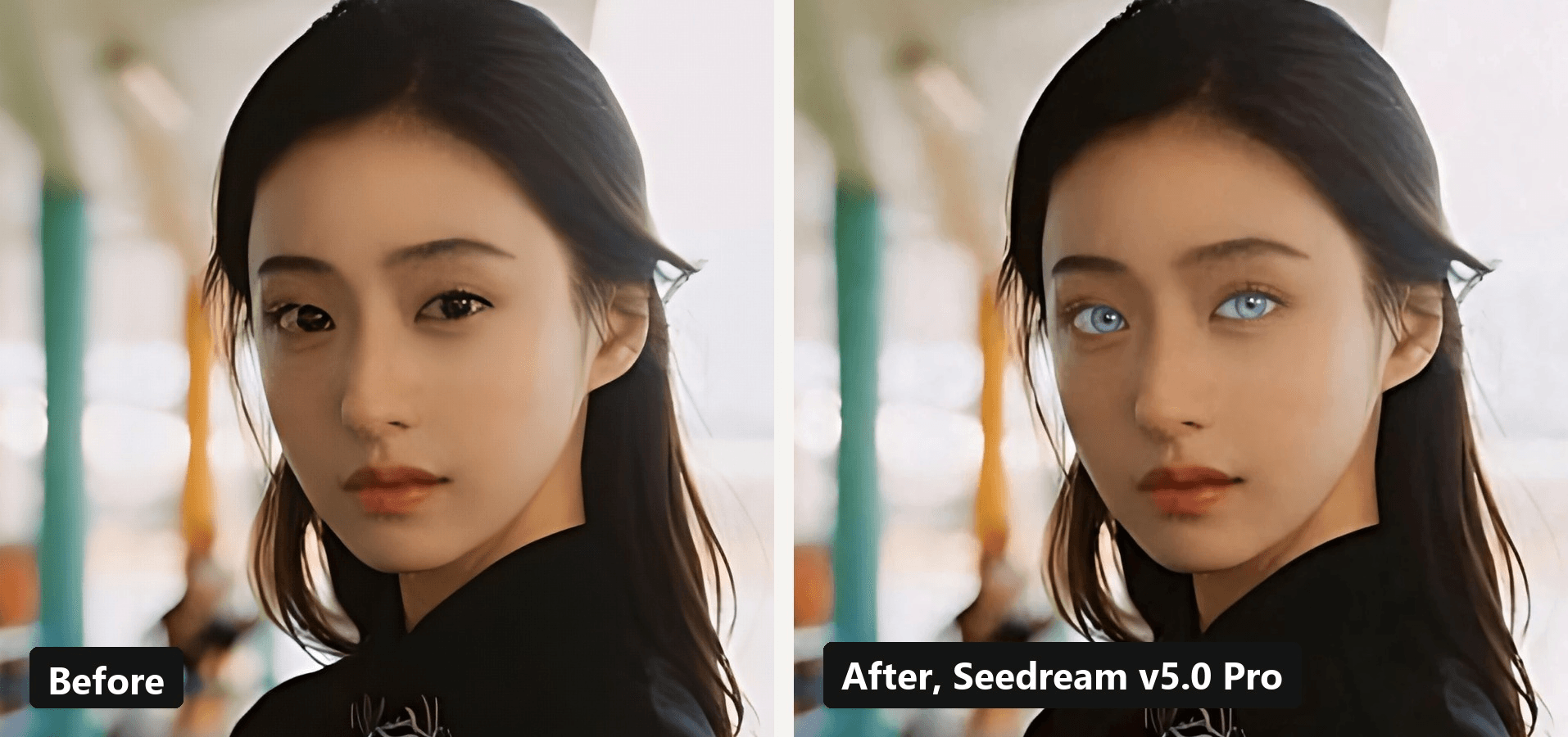
Sign in, then start in Image Generator, one row above the AI video generator in the sidebar. Switch to Image Edit, pick Seedream v5.0 Pro, upload your portrait, choose a 9:16 size and paste the eye color prompt below. Save the blue-eyed result, open Video Generator, keep Video Generation with Seedance 2.5, and work down the panel:
- First Frame. Upload the original portrait with brown eyes.
- Last Frame. Upload the blue-eyed version you just saved.
- Prompt. Paste the video prompt below.
- Duration. Type 10 seconds. Resolution stays at 1080p and Audio stays on.
- Run. One click, then wait for the clip to appear on the right.
The eye color changer prompt for Image Edit:
plaintext1Change only her eye color. Make both irises a pale icy blue with a slightly darker blue ring at the edge and natural iris texture, like real eyes with no contact lenses. Keep her face, skin texture, eyelashes, hair, black embroidered top, pose, the train platform background and the soft film-like light exactly the same. Keep the small catchlights in her eyes.
And the video prompt for step 3:
plaintext1Vertical 9:16 portrait video, one continuous shot, no cuts, no on-screen text. The woman from the first frame stands on the same train platform in the same black embroidered top. 0-3s: she glances down, calm and a little bored. 3-6s: she lifts her eyes very slowly toward the camera while a low bass note swells, and her irises are now pale icy blue. 6-10s: she holds the stare far too long without blinking, then one eyebrow rises slightly and the corner of her mouth twitches into a smug half smile. Her face, hair and outfit stay the same the whole time. Ends exactly on the last frame.
Method 2: Run Both Steps Through the API
Doing this for a whole friend group, or adding a blue eye button to your own app? The same two steps run as two API calls.
Step 1: Create an API key. In the console, open Settings and create a key under API Keys.
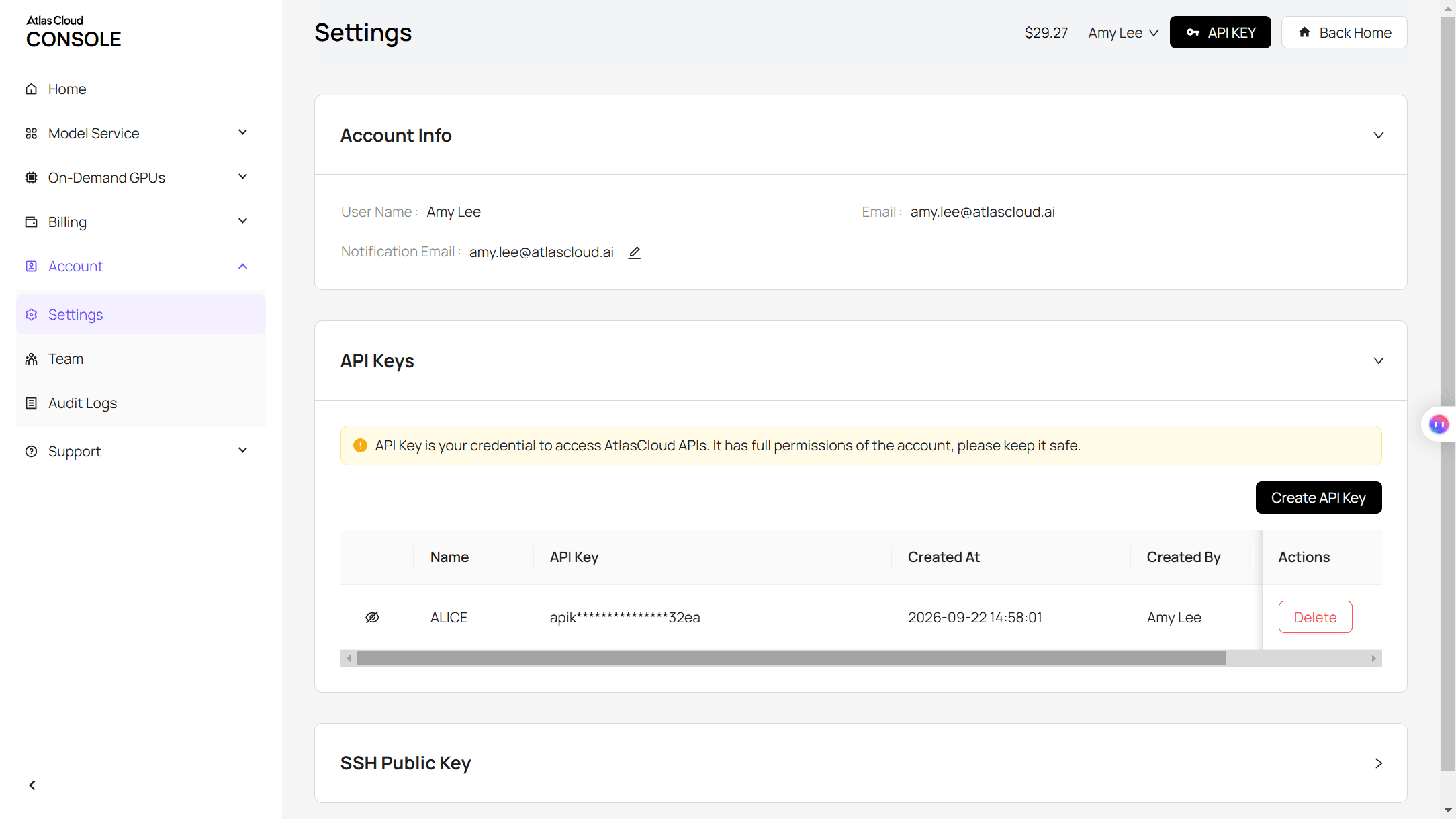
Step 2: Check the request format. The Atlas Cloud API docs cover authentication, both endpoints and polling.
Step 3: Send both requests. First the eye color edit:
plaintext1curl -X POST https://api.atlascloud.ai/api/v1/model/generateImage \ 2 -H "Authorization: Bearer $ATLASCLOUD_API_KEY" \ 3 -H "Content-Type: application/json" \ 4 -d '{ 5 "model": "bytedance/seedream-v5.0-pro/edit", 6 "prompt": "<paste the eye color prompt here>", 7 "images": ["https://your-cdn.com/portrait-9x16.jpg"], 8 "size": "1152*2048" 9 }'
Then the video, with the edited image as the last frame:
plaintext1curl -X POST https://api.atlascloud.ai/api/v1/model/generateVideo \ 2 -H "Authorization: Bearer $ATLASCLOUD_API_KEY" \ 3 -H "Content-Type: application/json" \ 4 -d '{ 5 "model": "bytedance/seedance-2.5/image-to-video", 6 "prompt": "<paste the video prompt here>", 7 "image": "https://your-cdn.com/portrait-9x16.jpg", 8 "last_image": "https://your-cdn.com/portrait-blue-eyes.jpg", 9 "duration": 10, 10 "resolution": "1080p", 11 "generate_audio": true 12 }'
Each call returns a prediction ID. Poll it until the status reads completed, then grab the file from the outputs array:
plaintext1curl https://api.atlascloud.ai/api/v1/model/prediction/<prediction_id> \ 2 -H "Authorization: Bearer $ATLASCLOUD_API_KEY"
Same key and same polling for both calls. Switching either step to another model means changing one model string.
Funny Blue Eye Filter Prompts to Copy
The straight reveal is fun once. The second time, your followers want the eyes to misbehave. Here's the blue eyes prank that got the biggest laugh out of us: a phone held over the face, with eyes on the screen that refuse to cooperate.
plaintext1Vertical 9:16 video, one continuous shot, no on-screen text. The woman from the first frame stands on the same train platform in the same black embroidered top. 0-2s: she lifts her phone horizontally in front of her eyes, screen facing the camera. 2-7s: the screen shows a close-up of a pair of huge, glossy icy blue eyes that blink slowly, look left, then look right, while her real mouth below stays in a serious pout. 7-10s: she lowers the phone, revealing her own dark brown eyes, and gives the camera a flat, unimpressed look. Light whoosh sound when the phone comes down.
Seedance took "huge, glossy" seriously. The eyes it put on the screen are enormous, pale and faintly alien, and the drop to her own brown eyes and a small frown lands harder because of it.
A few things made our runs funnier:
- Give the eyes a job. "Blink slowly, look left, look right" reads as a personality. "Blue eyes on a phone" reads as a screenshot.
- Keep the face deadpan. The calmer she looks, the sillier the eyes get.
- Endonthe real eyes. The reveal of plain brown eyes is the punchline, so give it the last three seconds.
Two other gags from the same series work the same way: the bangs filter prank fakes a fringe cut, and the bald filter prank shaves a head in 10 seconds.
The Blue Eye Theory, Tested on One Very Serious Face
Before the template wave, TikTok had a running joke called the blue eye theory. Dexerto's explainer puts it plainly: "The blue eye theory states that blue eyes make a person look more intimidating." People with darker eyes would film a stare, swap in blue eyes, and ask the comments which one was scarier. The same Dexerto article adds that it is "not a real theory with any scientific backing."
So we ran our own completely unscientific test. We pulled the stare frame from our clip, ran it back through the eye color changer in dark brown, and put the two side by side:
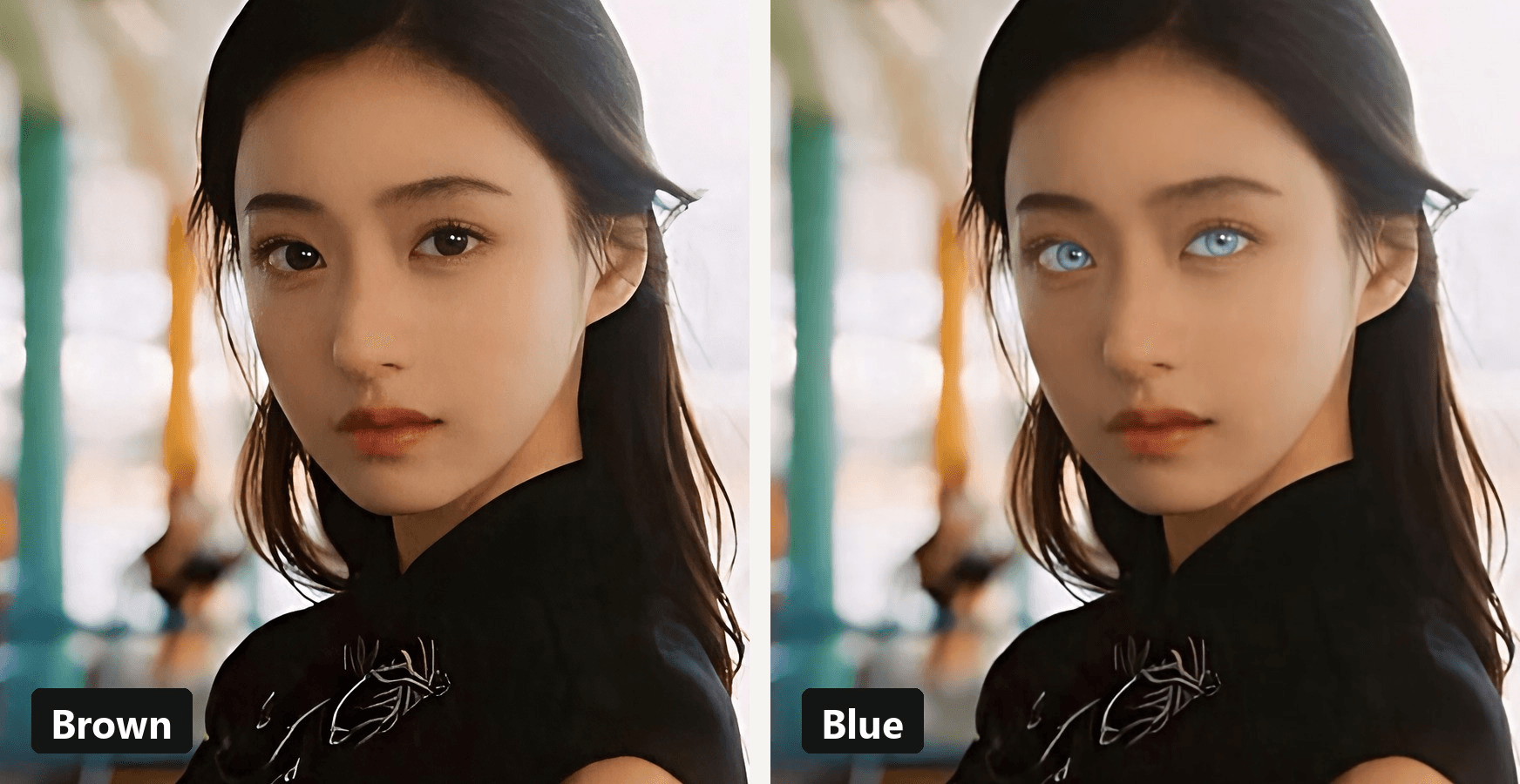
Our verdict: the brown-eyed glare says "you're late." The blue-eyed one says "I already know why." You can be the judge in your own comments. If you're curious why eye color is so hard to predict in real life, our piece on what your baby might look like covers the genetics in two paragraphs.
Eye Color Changer, Blue Eye Filter App, or AI Video?
Three kinds of tools show up when you search for a blue eye filter, and they solve different problems.
| You want | Best fit | What you get | Good to know |
|---|---|---|---|
| A still photo with blue eyes | AI eye color changer (image edit) | One edited photo, your background and pose kept | No motion, no reveal |
| A live look while filming | Blue eye filter app or lens (Snapchat, TikTok effects) | Real-time eye tint on the front camera | You get the lens maker's shade, not one you describe |
| The trend clip itself | CapCut template | A ready-made edit from your upload | The template's scene replaces yours |
| Your photo, your scene, your punchline | Image edit plus AI video | A 10-second reveal from your own portrait | Start from a portrait with open, front-lit eyes, since the edit works from the iris it can see |
For a quick profile picture, an eye color filter on a single photo is enough. For a post that people watch twice, the video route is where the joke lives.
Frequently Asked Questions
Where do I find the blue eye filter on TikTok?
The clips we traced all came from CapCut templates rather than a TikTok effect. Tap the template button under a trend video to open it in CapCut, or skip the template and build your own version from a photo.
Can a phone flash really turn brown eyes blue?
No. A 2022 trend claimed bright light plus TikTok's S5 filter changed eye color. In the Belfast News Letter, Specsavers ophthalmic director Sinead Donnelly warned that exposing your retinas to bright light risks "permanently damaging the light sensitive cells on your retina." Edit the photo instead.
What would I look like with blue eyes?
Run the eye color prompt from Method 1 on a clear, front-lit selfie. You get a still with blue eyes in about the time it takes to find your best angle, and you can keep that photo as a profile picture or use it as the last frame of a video.
Can I pick the shade, like icy blue or sapphire?
Yes. Name the shade in the prompt and describe it: "pale icy blue with a darker ring" looks very different from "deep sapphire blue." Change one word, run it again, and line the results up to choose.
Does the blue eye filter work on very dark brown eyes?
It does, and dark eyes make the best before and after because the contrast is bigger. Our demo started from very dark brown eyes. Use a photo where the eyes are open, in focus and lit from the front so the edit has a clear iris to work on.
Conclusion
The trend looks like magic, but it comes down to three moves: a photo, a new iris color, and a well-timed stare. The templates hand you the stare. Building it yourself lets you choose the setting, the shade, and the joke.
So pick your most serious photo, give it eyes it didn't ask for, and post it. If your comments start a fresh round of the blue eye theory, the blue eye filter TikTok trend has done its job.





