Kling posted its 4.0 spec sheet on September 28, and the same three numbers led the coverage: 30 seconds, 10 keyframes, 15 references. Further down the same page sits a second table for Kling 4.0 Flash, the build you can use today, and it lists a 20-second, 720p model. This guide walks through that page row by row, marks which specs you can use now and which are still labeled "coming soon," and shows where the upgrade over Kling 3.0 actually lands.
Key Takeaways
- Kling 4.0 launches in October; Kling 4.0 Flash opened to a limited group of users on September 28.
- The full model generates 3 to 30 second clips at up to 4K, guided by 10 keyframes and 15 mixed references.
- Flash tops out at 20 seconds, 720p and 8-bit SDR, and its official spec table lists no multi-keyframe input.
- 10-bit HDR and 2-minute video extension are officially marked "coming soon."
- 4K is not new in 4.0: Kling added native 4K output on April 23, 2026, five months before this announcement.
When Is the Kling 4.0 Release Date?
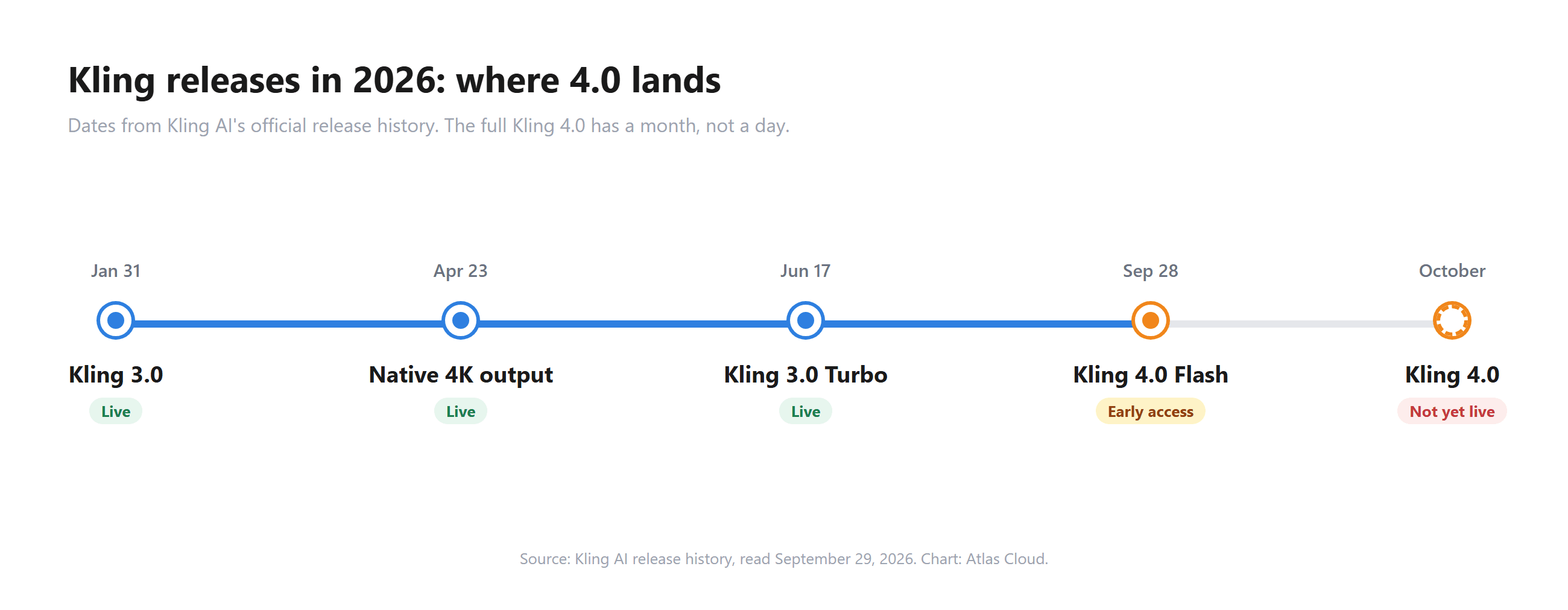
Kling's official release note gives one date and one month. The full model "will officially launch in October." No day has been announced. Kling 4.0 Flash, the lighter model in the same lineup, went live for early access on September 28.
Kling's launch trailer, posted the same day, runs through the headline features in under two minutes: dynamic motion, multiple keyframes, text generation, Flash, and multilingual dialogue.
Who gets Flash depends on which announcement you read. The release note says "a limited group of users." Kling's post on X names "Ultra Yearly subscribers." Chinese coverage of the launch calls the same group black-gold annual members. Read together: early access is gated to yearly subscribers on the Ultra plan.
Kling 4.0 Specs, Marked by Launch Status
Kling published one 20-row master table for the full model. The table below keeps the rows that decide a project (the language, dialect and text-generation rows are covered in the text underneath) and adds the column the official page doesn't have: whether you can use the feature right now. The "coming soon" labels come from Kling's own text further down the same release note.
| Capability | Kling 4.0 (official) | Status |
|---|---|---|
| Text-to-video, image-to-video | Supported | October launch |
| First and last frames | Supported | October launch |
| Multi-keyframes | Up to 10 keyframe images | October launch |
| Omni Reference | Up to 15 items total | October launch |
| Video duration | 3 to 30 seconds | October launch |
| Resolution | 720p, 1080p, 4K | October launch |
| Dynamic range | 10-bit HDR at 1080p and 4K | Coming soon |
| Aspect ratio | 21:9, 16:9, 1:1, 9:16, Auto | October launch |
| Audio output | Two-channel stereo | October launch |
| Prompt length | Up to 8,000 tokens | October launch |
| Video editing | Up to 5 clips, 3 to 30 seconds each, 30 seconds combined | October launch |
| Video extension | Up to 2 minutes | Coming soon |
Two rows need a closer look. The spec table lists 10-bit HDR as a feature, but the highlights section says "10-bit HDR output at 4K and 1080p is coming soon." Plan October projects around SDR until Kling confirms the switch.

The language list also disagrees with itself. The spec table names Indonesian after French, while the highlights section names Hindi in the same spot. Both lists open with Chinese, English, Japanese, Korean, Spanish, Portuguese and German. The same languages, plus emoji, are listed for on-screen text generation, and Kling names Beijing, Taiwanese, Northeastern, Sichuan and Cantonese accents for Chinese and American, British and Indian accents for English.
How Kling 4.0 Splits Its 15 References
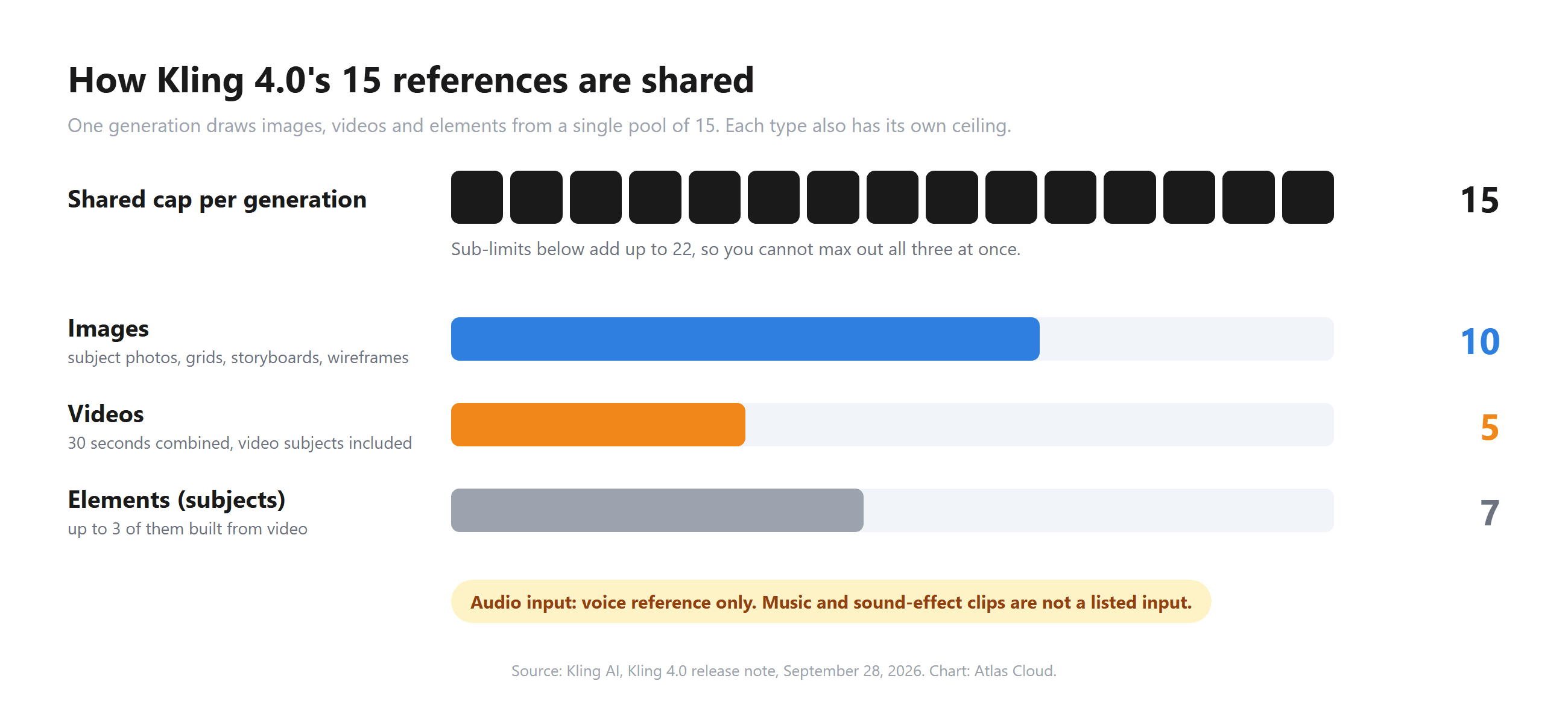
"15 references" is a shared budget with sub-limits. One generation can combine up to 10 images, up to 5 videos with a combined length of 30 seconds, and up to 7 elements (subjects), of which up to 3 can be built from video. All of it counts toward the single cap of 15.
Audio works differently. Kling's table says "Voice reference only," so you can attach a speaking voice to a subject, but music or sound-effect clips aren't a listed input. If a shot needs a specific soundtrack, add it in the edit.
30-Second Generation With Up to 10 Keyframes
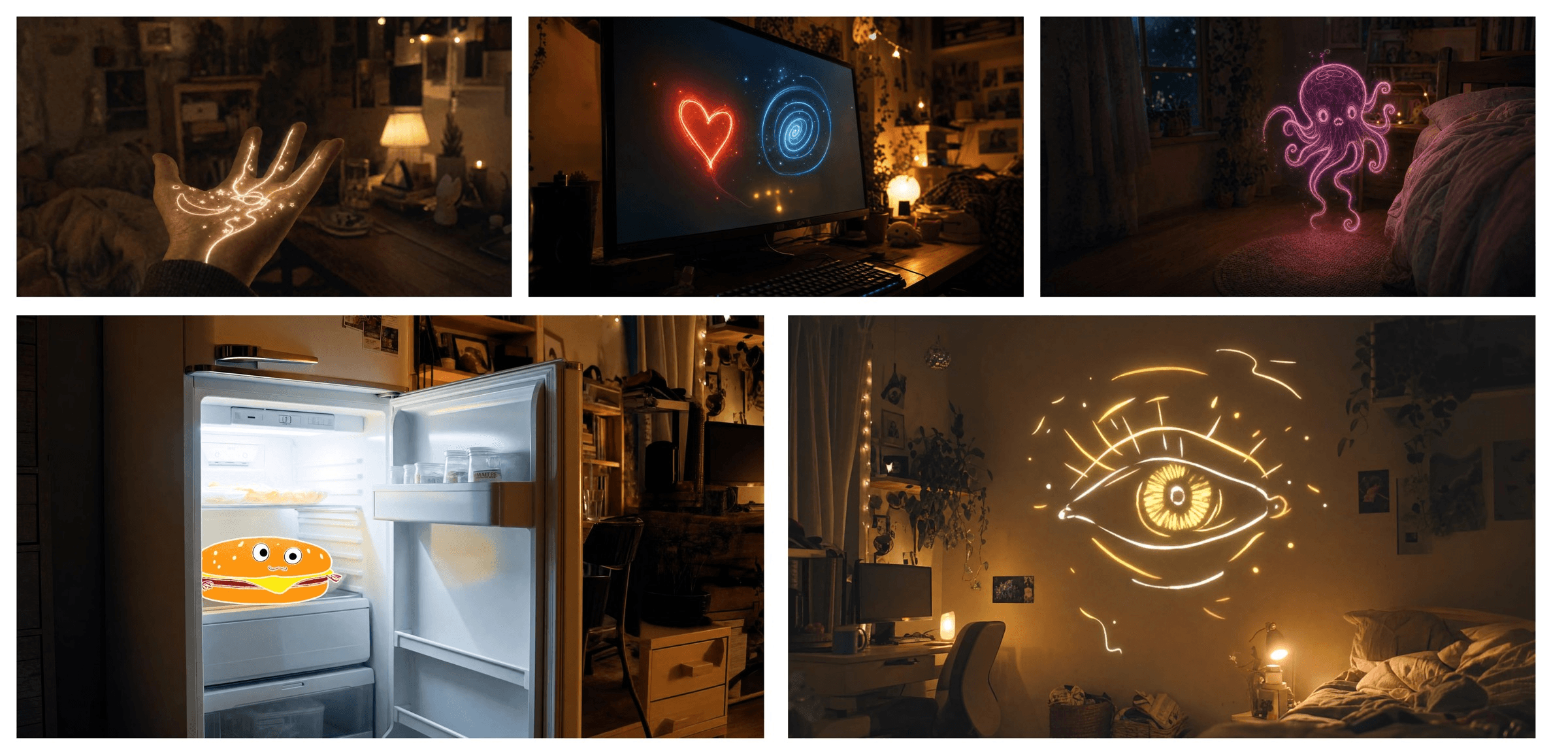
Thirty seconds is double what Kling 3.0 could produce in one pass. The bigger change for storytellers is how you steer those 30 seconds. Instead of one start frame and one end frame, you can pin up to 10 keyframe images and let the model animate the path between them.

Kling's release note shows it with a five-frame story set in a dark bedroom: a glowing doodle drawn on a hand, a heart and a spiral on a monitor, a neon octopus, a cartoon burger in the fridge, and a giant eye on the wall. Each frame is a beat the video has to hit.
The 8,000-token prompt ceiling pairs with this. Ten keyframes plus a long written brief means you can describe camera moves, dialogue and timing for each segment in one request.
Run Kling Video Models on Atlas Cloud Today
October is coming soon, and Flash access sits behind a yearly plan. If you have a project due now, Atlas Cloud serves the current Kling model family through a browser playground and an API.
The closest workflow to 4.0's Omni Reference is Kling Video O3 Pro Reference-to-Video. Upload reference images of your subject, describe the scene, and get a clip that keeps the character or product consistent. If the same character has to survive several shots, build a four-view reference pack before you run.
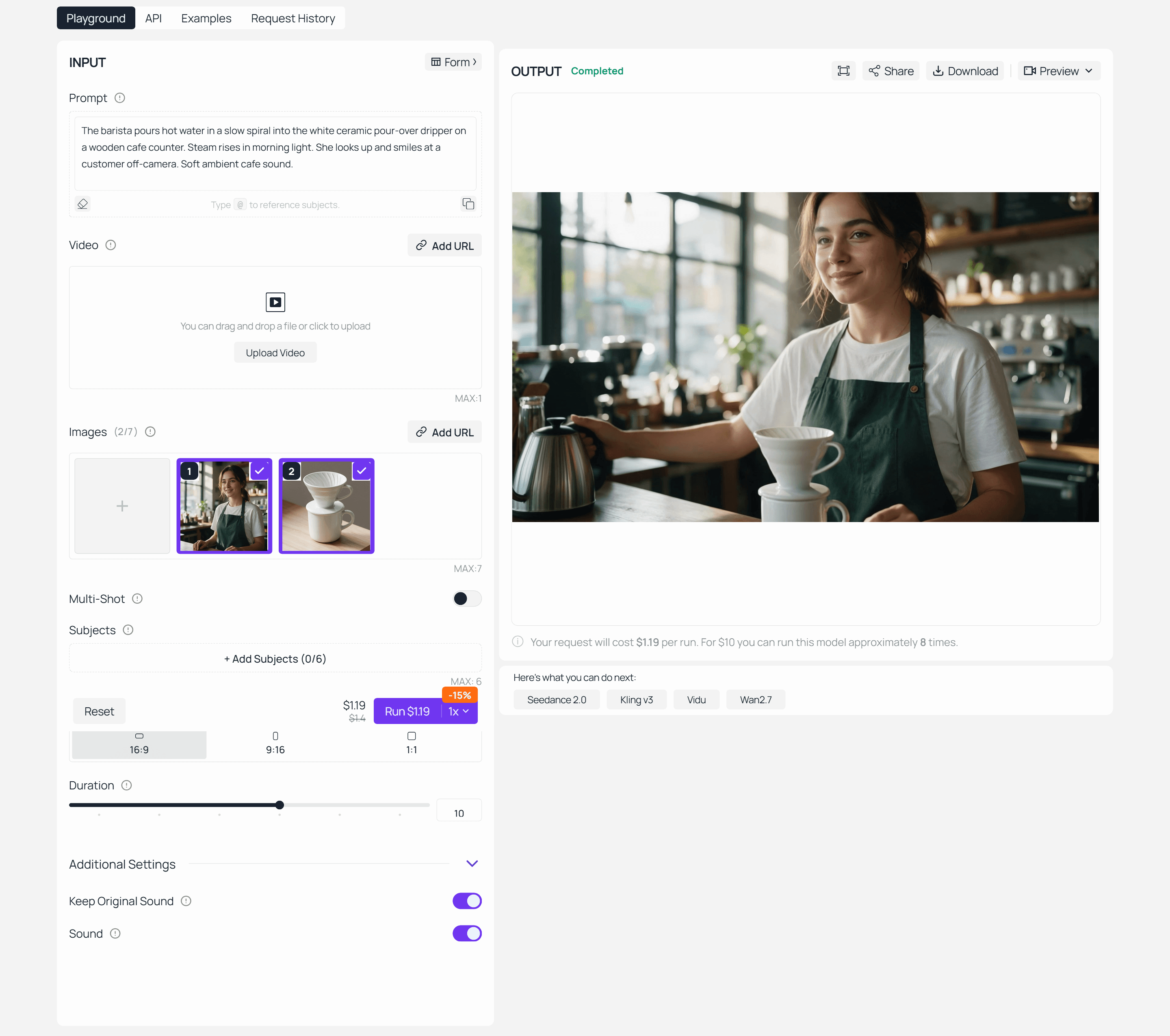
Two reference images went in: a barista in a green apron and a white ceramic pour-over dripper, both made with an image model. The 10-second result keeps her face, the apron and the dripper's shape while she pours, looks up and smiles.
O3 Pro takes up to 7 reference images, or up to 4 when you also add a reference video for motion. Clips run anywhere from 3 to 15 seconds, and a multi-shot mode can split one prompt into as many as 6 shots with their own descriptions. That covers ad spots and short scenes up to 15 seconds while you wait on 4.0.
You can also start from the Atlas Cloud AI video generator, which lists Kling 3.0, 3.0 Turbo and Kling Video O3 next to other video models in one interface.
Method 1: Generate in the Browser
- Open the O3 Pro Reference-to-Video playground and sign in.
- Upload your reference images. Photos of one subject from different angles hold identity better than a single shot.
- Write the scene: who is in it, what they do, where the camera sits.
- Set duration and aspect ratio, turn on sound if you want generated audio, then run.
Keep test runs at 3 to 5 seconds. Once the look is right, push to 10 or 15 seconds for the final cut.
Method 2: Call Kling Through the Atlas Cloud API
When the playground result is right, moving it into code takes three steps.
Step 1: Create an API key. Generate a key in the Atlas Cloud console and store it as an environment variable, never in client-side code.
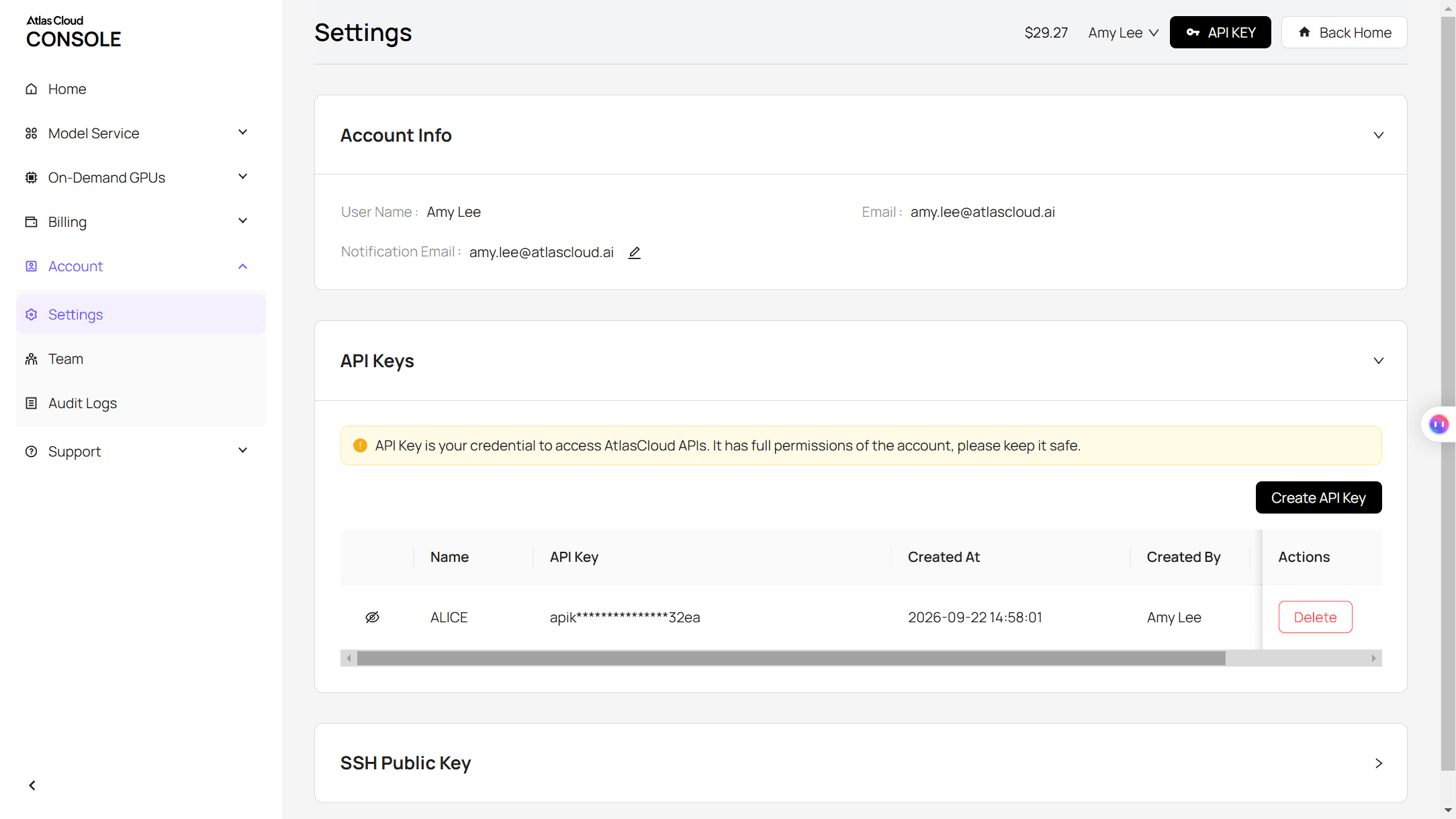
Step 2: Check the API docs. Endpoints, parameters and authentication are in the Atlas Cloud API documentation.
Step 3: Send your first request. Submit the job:
plaintext1curl -X POST https://api.atlascloud.ai/api/v1/model/generateVideo \ 2 -H "Content-Type: application/json" \ 3 -H "Authorization: Bearer $ATLASCLOUD_API_KEY" \ 4 -d '{ 5 "model": "kwaivgi/kling-video-o3-pro/reference-to-video", 6 "prompt": "The barista pours hot water in a slow spiral into the white ceramic pour-over dripper on a wooden cafe counter. Steam rises in morning light. She looks up and smiles at a customer off-camera.", 7 "images": [ 8 "https://your-cdn.com/barista.jpg", 9 "https://your-cdn.com/pour-over-dripper.jpg" 10 ], 11 "duration": 10, 12 "aspect_ratio": "16:9", 13 "sound": true 14 }'
The response returns a prediction ID. Poll it until the status reads completed:
plaintext1curl https://api.atlascloud.ai/api/v1/model/prediction/<prediction_id> \ 2 -H "Authorization: Bearer $ATLASCLOUD_API_KEY"
The completed response carries the hosted video URL. One key and one auth header cover the whole Atlas Cloud catalog, so trying Kling 3.0 Turbo means swapping the model string and trimming the body to the parameters that model accepts. The submit-and-poll loop stays the same.
Kling 4.0 Flash vs Kling 4.0: What the Early Build Leaves Out
Kling describes Flash as "built for frequent creation," with fast generation and "excellent value." Its official spec table is also much shorter than the full model's. Here is every row Kling published for Flash, next to the matching full-model row.
| Capability | Kling 4.0 Flash | Kling 4.0 |
|---|---|---|
| Availability | Early access since September 28 | October |
| Text-to-video | Supported | Supported |
| Image-to-video | Supported | Supported |
| Omni Reference | Supported | Up to 15 items |
| Video duration | 3 to 20 seconds | 3 to 30 seconds |
| Resolution | 720p | 720p, 1080p, 4K |
| Dynamic range | 8-bit SDR | 10-bit HDR (coming soon) |
| First and last frames | Not listed in the Flash table | Supported |
| Multi-keyframes | Not listed in the Flash table | Up to 10 |
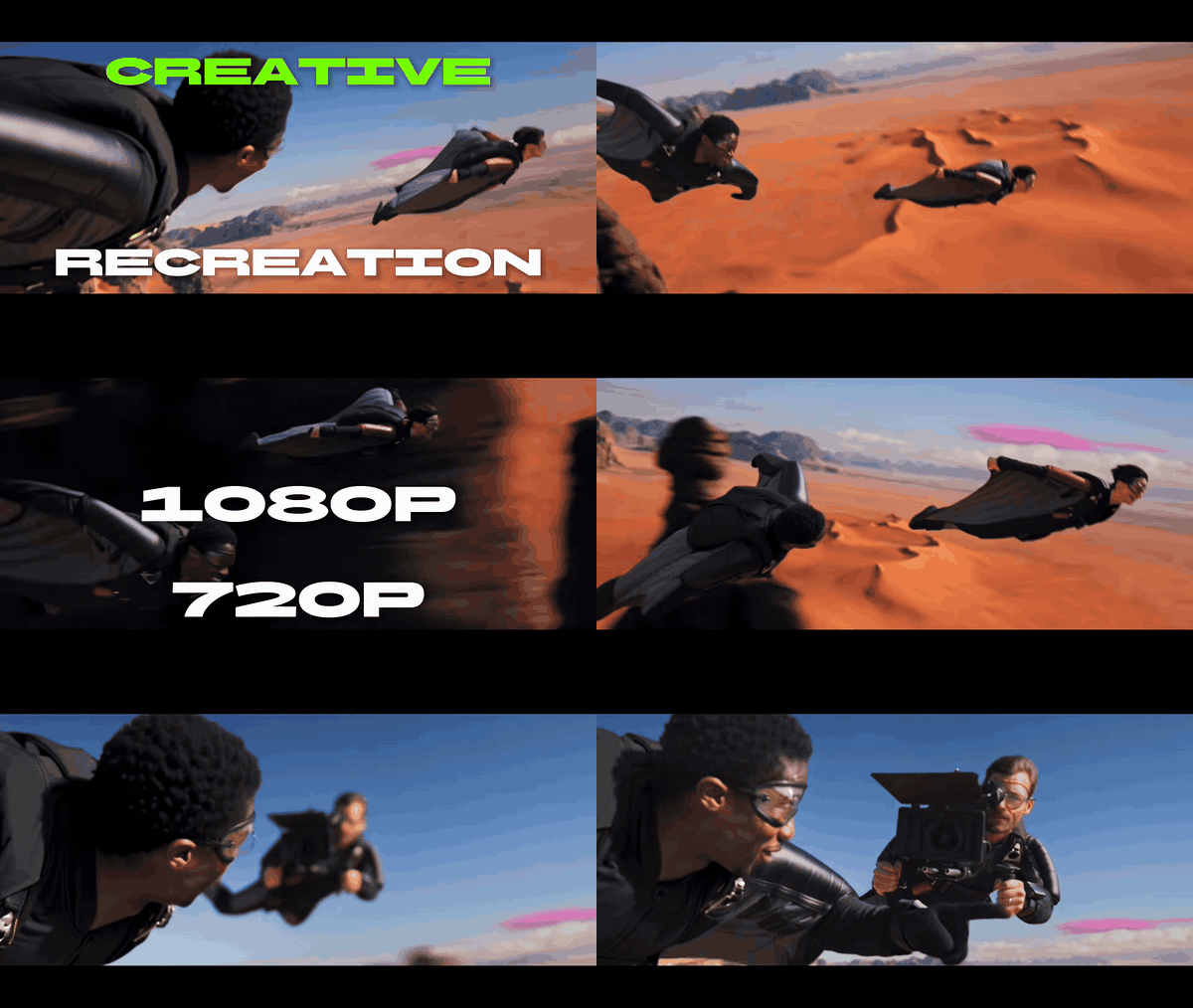
The last two rows matter most. The Flash table names three input modes: text, image and Omni Reference. Keyframe control, one of the four features printed on Kling's launch banner, isn't among them. Kling hasn't said Flash lacks it outright, but nothing on the official page says Flash has it.
So an early-access session tests Kling 4.0's motion, realism and reference consistency at 720p. It doesn't test the 30-second, 10-keyframe workflow. Anyone judging 4.0 from Flash clips alone is judging a different spec.
What Changed From Kling 3.0
Kling 3.0 went live on January 31, 2026. Its launch note introduced native audio, multi-shot generation and a 15-second ceiling, which is the baseline 4.0 is measured against.
| Capability | Kling 3.0 | Kling 4.0 |
|---|---|---|
| Max length per generation | 15 seconds | 30 seconds |
| Frame control | Start and end frames | Up to 10 keyframes |
| References | Multi-image and video elements, element voice | Up to 15 items (10 images, 5 videos, 7 elements) |
| Spoken languages | 5 named (Chinese, English, Japanese, Korean, Spanish) | 9 named, plus "and more" |
| Audio | Native audio | Two-channel stereo |
| Prompt length | Not in the 3.0 launch note | Up to 8,000 tokens |
| 4K output | Added April 23, 2026 | Supported |
| Extension | Not in the 3.0 launch note | Up to 2 minutes (coming soon) |
The 4K row is easy to misread. Kling's release history shows native 4K output announced on April 23, 2026, five months before 4.0, and Kling 3.0 is sold in a 4K tier today (this 4K render guide covers when that tier earns its cost). The resolution ceiling didn't move in 4.0. What's new at the top end is 10-bit HDR.
The real jumps are length and control: twice the duration, five times the anchor frames, and one shared reference pool instead of separate element slots.
Kling published a short film alongside the announcement to show what those longer takes look like. "The Beat," made with Kling 4.0, follows a drummer whose kit is being repossessed and turns into a rainbow-paint fantasy across New York before landing back on the stage.
Should You Use Kling 4.0 Flash Now or Wait for October?
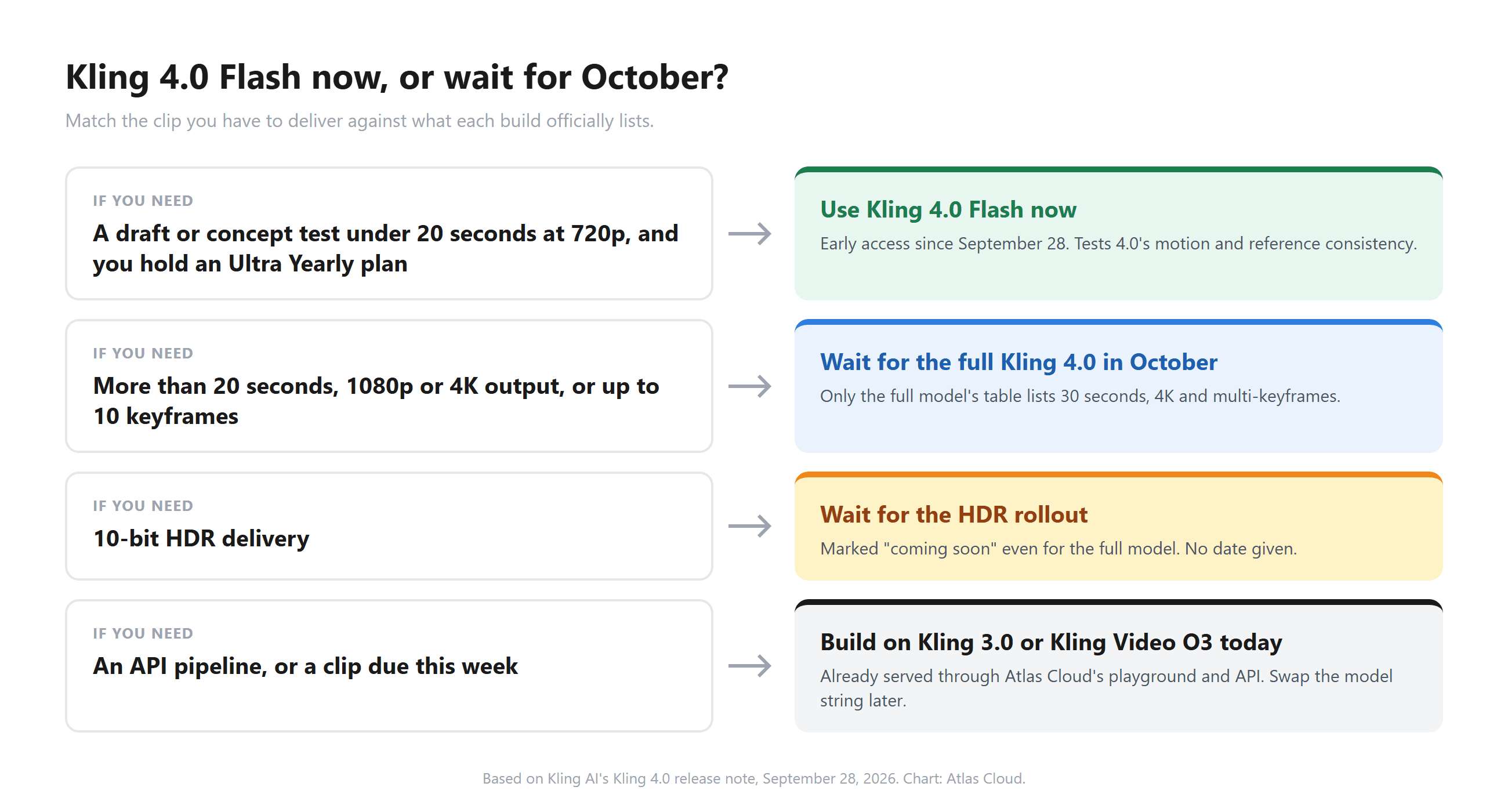
It depends on what the finished clip has to be. Flash is a strong preview of how 4.0 moves and renders. The October model is the one with the delivery specs.
- Social drafts and concepttestsunder 20 seconds. Flash at 720p is enough, if you already hold the yearly plan that unlocks it.
- Clientwork that ships at 1080p or 4K. Wait for the October release.
- Storyboarded pieces with several fixed beats. Wait. The 10-keyframe control is only listed for the full model.
- HDR grading. Wait for the HDR rollout, which has no date yet.
- A deadline this week, or an API pipeline. Build on Kling 3.0 or Kling Video O3 now through a platform that already serves them, and switch the model name later.
FAQ
Is Kling 4.0 free?
Kling hasn't published pricing for Kling 4.0 or Kling 4.0 Flash. The one access detail so far is that Flash early access went to Ultra Yearly subscribers. Expect credit costs to appear with the October launch, and budget the longer 30-second and 4K jobs as the expensive end of the range.
Is there a Kling 3.5?
No. Kling's release history goes from Kling 3.0 in January 2026 to Kling 3.0 Turbo in June and then to the Kling 4.0 announcement in September. If you see a "Kling 3.5" model on a third-party site, check which official Kling release it maps to before paying for it.
Is Kling 4.0 better than Seedance 2.5?
They aim at the same 30-second single-generation ceiling but spend their inputs differently. Seedance 2.5 accepts up to 50 references, including audio clips, while Kling 4.0 caps references at 15 and adds 10-keyframe control on top. Seedance 2.5 has been out since July 31, after two delays, so it's the one you can test at full spec today.
Will Kling 4.0 have an API?
Kling's 4.0 release note covers the web app and doesn't mention API timing. Kling has offered API access to earlier generations, including 3.0 and Kling Video O3, which is how platforms like Atlas Cloud serve them. Watch the release notes around the October launch for an API date.
Conclusion
Kling's own page tells two stories. The October model brings 30-second generation, 10 keyframes and a 15-item reference pool, which is a real step past Kling 3.0. The early Flash build is a 20-second, 720p model whose spec table doesn't list the keyframe control, and HDR plus 2-minute extension are still promises.
Test Flash for motion and realism if you have access. Hold client and storyboard work for October, and keep today's deadlines on the Kling models that already run in production. When the full Kling 4.0 goes live, re-check the "coming soon" rows before you plan around them.





