
Scaling programmatic AI video generation across production pipelines often leads to unexpected cloud infrastructure bills when engineers estimate costs based on consumer web interface plans rather than direct API metrics. Before committing infrastructure budget to developer endpoints, many teams compare features against consumer tiers by examining Veo 3.1 free and paid access tier restrictions to evaluate daily limits.
Google structures programmatic Veo 3.1 API pricing around per-second video generation rates on both Google AI Studio / Gemini API and Vertex AI, with unit rates determined by model tier, resolution, and audio parameters.
Veo 3.1 API Pricing at a Glance:
| Model Tier | Max Resolution | Video Only | Video + Audio | Use Case |
| Veo 3.1 Lite | 1080p | $0.03 – $0.05 / sec | $0.05 – $0.08 / sec | Previews & Rapid Storyboards |
| Veo 3.1 Fast | 4K | $0.08 – $0.25 / sec | $0.10 – $0.30 / sec | Social Automation & App Workflows |
| Veo 3.1 Quality | 4K | $0.20 – $0.40 / sec | $0.40 – $0.60 / sec | Broadcast Master Renders |
Unit generation costs range from $0.03/sec up to $0.60/sec once 4K output and audio synthesis are enabled. At 10,000 requests per month, raw per-second billing makes architectural choices like draft-to-master processing pipelines critical to protecting app margins.
A frequently overlooked factor in API budget calculations is the pipeline failure and user retry rate. While Google Cloud only bills for successfully rendered video seconds (failed renders triggered by safety filters do not incur video generation fees), pre-generation prompt processing fees, quota throttling, and user re-rolls still impact backend compute cycles. Engineering teams should build a 15%–20% buffer directly into their unit economics formulas to account for prompt iterations and unexpected workflow retries.
Veo 3.1 API Pricing Architecture: Models, Resolutions, and Tiers
Developers staring at an unexpected Google Cloud invoice after running a batch of high-resolution video tests quickly realize that programmatic video generation behaves entirely differently from standard LLM text token billing. When querying the Veo 3.1 API endpoint across Vertex AI or Google AI Studio, every parameter adjustment directly compounds your compute spend.
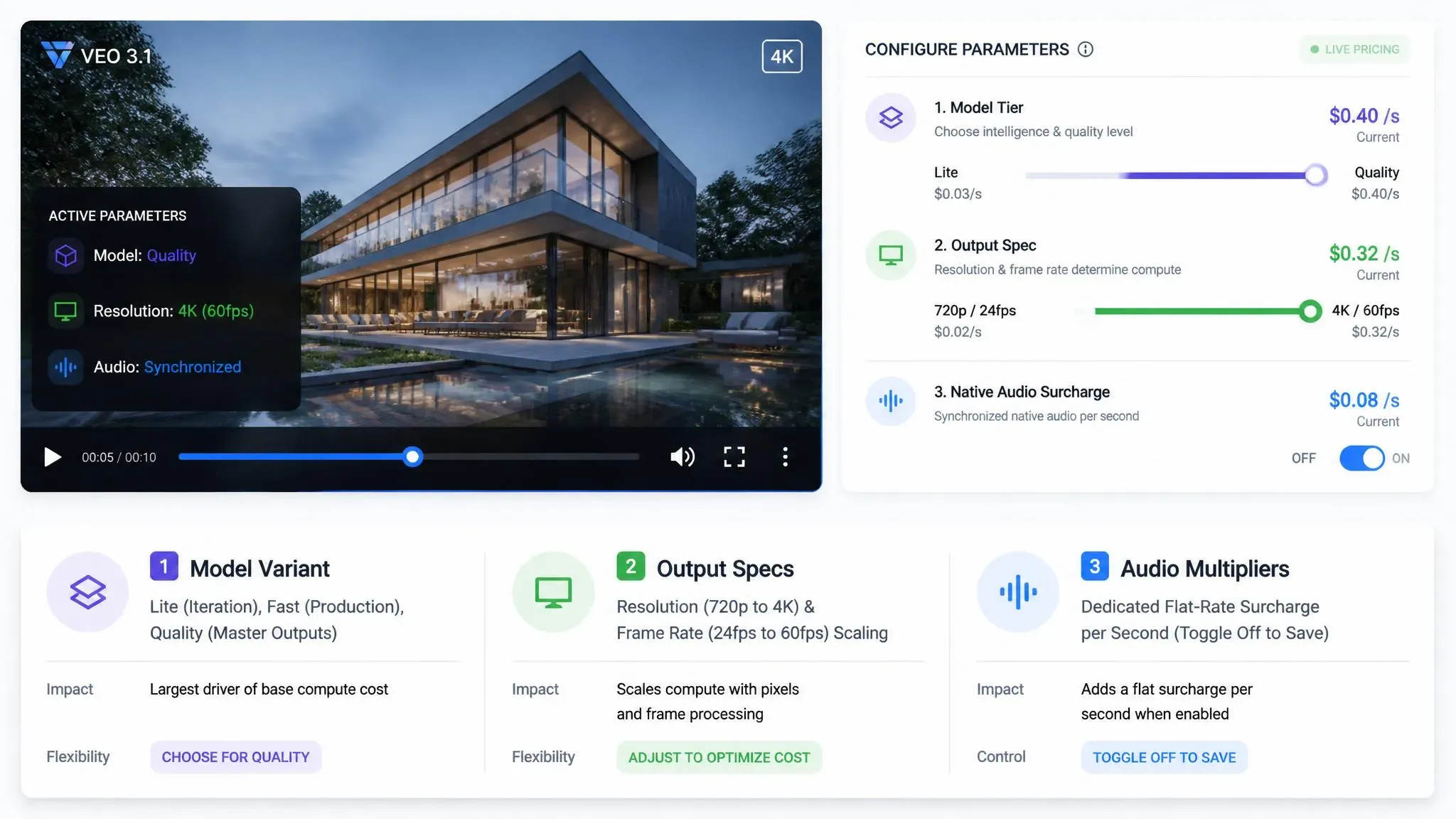
Core Cost Drivers
Billing accumulates based on three distinct technical mechanics that dictate underlying resource consumption:
- Model Variant: Selecting Lite provides cost optimized rendering for rapid iteration. Fast delivers balanced production throughput, while Quality triggers intensive clusters for high fidelity master outputs.
- Output Specifications: Resolution scaling from 720p to 4K combined with frame rate jumps from 24fps to 60fps exponentially increases VRAM requirements and per second rates. Furthermore, because single-pass outputs are structurally capped, understanding Veo 3.1 single-pass duration constraints is essential when calculating how multi-pass extension workflows impact overall token generation and compute billing.
- Audio Multipliers: Generating synchronized audio adds a dedicated flat rate surcharge per second. Disabling this parameter when audio is unnecessary prevents wasted overhead.
The Veo 3.1 Pricing Matrix
| Model Variant | Output Resolution | Price / Sec (Video Only) | Price / Sec (Video + Audio) | Audio Surcharge | VRAM & Cost Impact |
| Veo 3.1 Lite | 720p | $0.03 – $0.04 | $0.05 | +$0.01 – $0.02 | Lowest latency; ideal for draft preview loops |
| Veo 3.1 Lite | 1080p | $0.05 – $0.06 | $0.08 | +$0.02 | Cost-optimized full-HD preview tier |
| Veo 3.1 Fast | 720p | $0.08 | $0.10 | +$0.02 | High-throughput social feed baseline |
| Veo 3.1 Fast | 1080p | $0.10 | $0.12 | +$0.02 | Standard production throughput & balance |
| Veo 3.1 Fast | 4K | $0.25 | $0.30 | +$0.05 | High-volume 4K rendering tier |
| Veo 3.1 Standard / Quality | 720p / 1080p | $0.20 | $0.40 | +$0.20 | High-fidelity master output with spatial audio |
| Veo 3.1 Standard / Quality | 4K | $0.40 | $0.60 | +$0.20 | Compute-intensive broadcast-grade master render |
Navigating Gemini API Rate Limits & Quotas
Beyond base per-second costs, production applications must architect for Gemini API and Vertex AI Veo 3.1 rate limits. Video generation is computationally intensive, meaning Google enforces strict concurrency caps and request throttles across both Google AI Studio and Vertex AI platforms.
Key Quota Metrics & Throttle Behaviors
When making high-volume or programmatic API calls, pipelines can encounter three distinct restriction dimensions:
- RPM Rate Throttling: Generation calls are strictly throttled at the API key or project level. Breaching these minute-by-minute thresholds results in hard HTTP 429 or RESOURCE_EXHAUSTED rejections, halting your pipeline.
- Concurrent Generation Caps: Unlike standard text models, video endpoints enforce strict limits on active pending jobs. Submitting a new rendering payload before a previous video finishes processing can lead to request rejections or pipeline stalls.
- Tier & Regional Quota Variations: Video endpoints are locked behind paid accounts—Google AI Studio limits free tiers to text and image modalities. For production workflows, throughput is governed by your GCP quota allocation and deployment region. If you hit concurrency ceilings in overloaded regions like
us-central1, routing traffic across alternate multi-region endpoints (such aseurope-west4) is necessary to maintain stable pipeline capacity.
Engineering Tactics for Rate-Limit Resiliency
To avoid rate-limit errors that increase retry costs and disrupt video pipelines, engineering teams should use these strategies:
- Exponential Backoff with Jitter: In order to avoid secondary request spikes, space out retries for 429 errors using incremental, randomized delays.
- Task Queue Throttling: Route render calls through Celery, Redis Streams, or Cloud Tasks. This throttles outgoing API requests so concurrent runs never breach your GCP concurrency limits.
- Manual GCP Quota Scaling: Default quotas won't support high-volume batch renders. Before launching to production, submit a Quota Increase Request for Veo 3.1 inside the Vertex AI Quota Management console.
For precise, tier-specific metrics and endpoint status, consult the official Gemini API Rate Limits Documentation and Vertex AI Veo 3.1 Deployment Guide.
Calculating Unit Economics: What Does Video Generation Cost at Scale?
Engineering teams frequently launch a programmatic video feature expecting a $500 cloud bill, only to receive a $3,000 invoice 30 days later. Standard API documentation assumes flawless execution, but production environments require anticipating prompt iterations, strict safety filter blocks, and user re-rolls.
To forecast an accurate monthly Google Cloud AI bill, developers must look beyond static per-second rates and model dynamic video generation unit economics. Scaling AI video API costs demands applying a Retry and Failure Factor, typically ranging from 1.2 to 1.5, to cover wasted compute cycles. A blocked payload or a hallucinated visual output still consumes backend resources.
The fundamental Veo 3.1 API cost calculation is:

Real-World API Scaling Scenarios
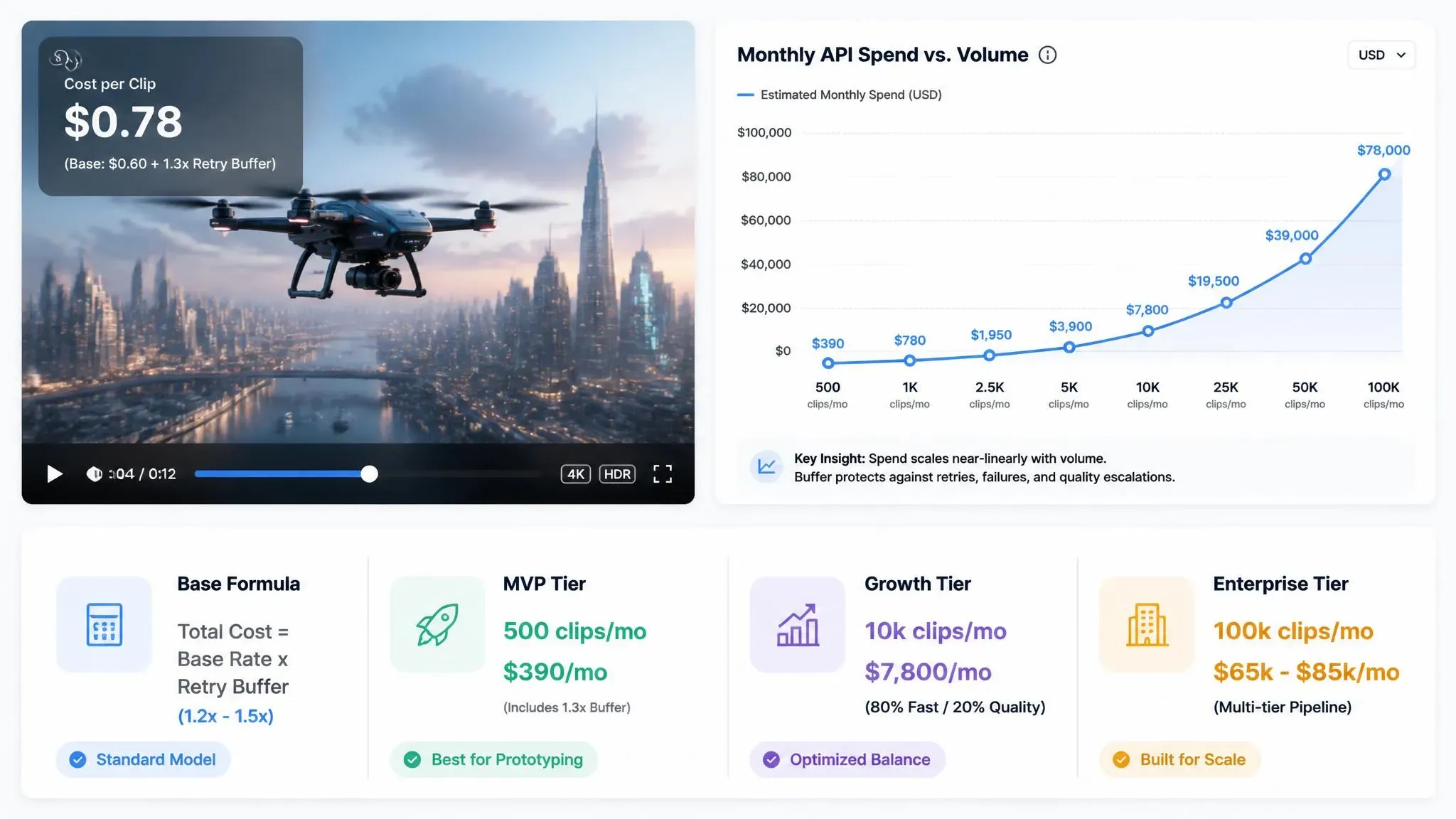
Applying this formula demonstrates how expenses multiply rapidly as a product matures.
- SaaS MVP Phase: 500 clips/month at 5 seconds each on the Fast tier ($0.12/s) equals $300 in base API charges. Applying a standard 1.3x retry buffer puts realistic monthly spend at roughly $390.
- Growth Application Volume: At 10,000 clips per month, splitting requests (80% Fast and 20% Quality endpoints), the blended API rate adjustments push expenses to approximately $7,800 monthly.
- Enterprise Video Engine: High volume workloads outputting 100,000 clips (10 seconds each) via a mixed multi-tier pipeline will require an optimized production pipeline cost ranging from $65,000 to $85,000 per month.
Failing to account for user behavior fundamentally breaks product viability. To maintain profitable margins, technical leads must track failure rates relentlessly and restrict full-resolution outputs until the user approves a low-cost draft.
Architectural Cost Optimization: The Draft-to-Master Pipeline
Developers often burn thousands of dollars rendering high-fidelity 4K video for minor prompt tweaks. Re-running an entire Veo 3.1 Quality API payload just to change a camera angle or lighting parameter is financially unsustainable. To understand how compute overhead shifts between these modes and why initial drafts save budget, developers often analyze Veo 3.1 Fast and Quality rendering performance differences to structure better workflows. Team architects must abandon single-shot generation in favor of a staged pipeline that treats low-cost drafts as the primary feedback loop.
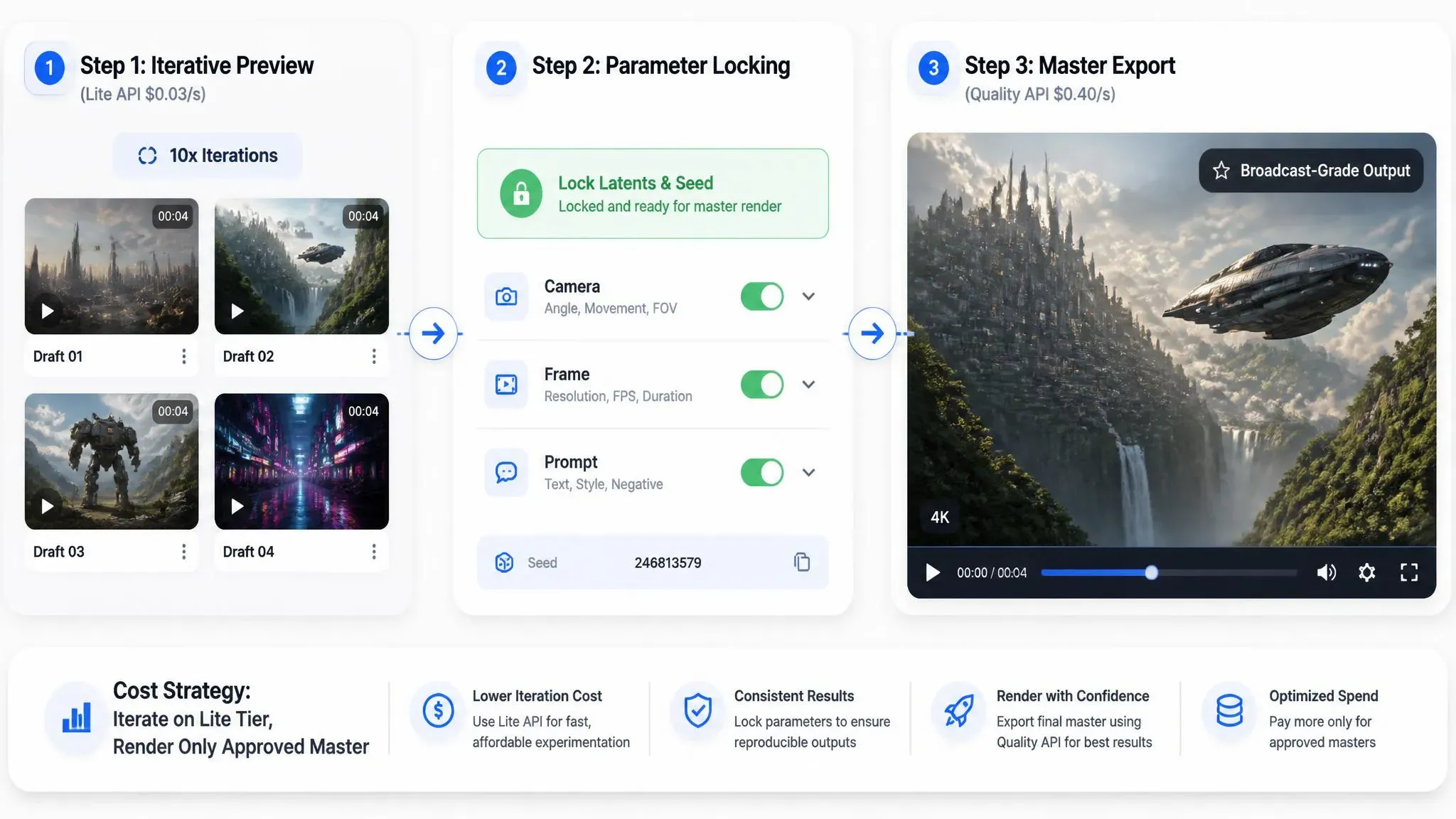
The Draft-to-Master Architecture
The most effective way to control Vertex AI video rendering costs is a staged Draft-to-Master workflow. This isolates compute-intensive tasks until the creative direction is locked down:
- Iterative Preview: Route initial storyboard generation and prompt tuning through the Veo 3.1 Lite API ($0.03–$0.05/sec). At roughly 10% of Quality tier costs, users can iterate on 10 prompt variations for the price of a single high-res render.
- Parameter Locking: Hold off on calling the Veo 3.1 Quality API until the user explicitly approves the low-res preview, locking in key latents and frame parameters.
- Master Export: Trigger the final Quality endpoint ($0.40–$0.60/sec) only during final asset delivery to generate broadcast-grade, high-bitrate outputs.
Secondary Backend Optimization Tactics
Beyond model tiering, integrating these engineering patterns prevents redundant API billing and cloud storage bloat:
- Prompt Caching & Deduplication: Store prompt embeddings, parameters, and seed latents in Redis. Before invoking the API, query your cache layer to intercept identical requests and prevent double-billing.
- 48-Hour Asset Retention: Input video payloads carry a 48-hour TTL. Each successful extension request resets this timer back to 48 hours. Referencing expired assets past this window returns a 404 Not Found or invalid payload error.
- Queue-Based Throttling: Use background worker queues to route requests for non-realtime batch tasks, such as bulk ad production. While GCP does not offer off-peak discounts, queueing smoothes out request spikes to keep active generation runs strictly within your project's regional concurrency limits.
Shifting from a single-shot request model to this tiered approach allows development teams to slash monthly generation spend by 60% or more without compromising final output quality.
Measuring ROI: Traditional Video Production vs. Veo 3.1 API Integration
A corporate marketing team spends $15,000 and waits three weeks for a 30-second localized ad, only to realize the main message needs a sudden rewrite.
Executing programmatic video generation via the Veo 3.1 API changes this balance sheet completely. By breaking down a 30-second campaign into four 8-second parameterized clips or using native video extension workflows, the Total Cost of Ownership shifts from unpredictable variable expenses to fixed, scalable cloud compute rates.
TCO Breakdown: Legacy vs. Veo 3.1 API Workflows
| Cost Component | Traditional Video Production | Internal Motion Teams | Veo 3.1 API Workflows |
| Direct Production Unit Cost | $1,200 – $5,000 per asset | $300 – $800 (In-house labor) | $0.24 – $4.80 (Per 8s clip) |
| Asset Acquisition & Licensing | $50 – $500 per stock license | $200+ design subscriptions | Included in generation output |
| Turnaround Time | 5 – 15 business days | 2 – 4 business days | 15 – 90 seconds per asset (tier & queue dependent) |
| Scalability Limit | Linear cost scaling per output | Capacity constrained by headcount | Elastic API concurrency |
While traditional motion design relies on labor-intensive video creation pipelines, integrated AI video APIs process dynamic prompt parameters directly from structured database inputs. Deploying programmatic video workflows cuts direct unit production costs by 70%–90% at enterprise scale while compressing delivery cycles from days down to seconds.
Cost per Rendered Video Asset Breakdown:
- Legacy Studio Shoot: ~$2,500.00 per clip
- Internal Motion Team: ~$450.00 per clip
- Veo 3.1 API Pipeline: ~$0.24 – $3.20 per 8s clip (depending on Lite/Fast vs. Quality tier)
Mitigating Production Overhead and Hidden Costs
Beyond direct generation fees, enterprise buyers capture significant long-term business value by eliminating key operational bottlenecks:
- Zero Location or Talent Logistics: Replaces field crews, site permits, and physical asset staging with parameterized API calls.
- Instant Dynamic Personalization: Generates thousand-variant localized campaigns without requiring manual re-renders from video editors.
- Streamlined Multi-Format Delivery: Native audio generation eliminates secondary voiceover licensing and audio syncing costs.
Analyzing AI video generation ROI across high-volume production highlights how automated pipelines decouple video yield from linear headcount growth. Adopting an automated video production cost comparison model shows that integrating the Veo 3.1 API business impact delivers sustainable margin expansion and faster campaign iteration. Conducting a complete AI video TCO analysis confirms that legacy production workflows are quickly becoming economically unsustainable for scaled enterprise operations.
Veo 3.1 API vs. Competitors: Seedance 2.0, Gemini Omni Flash, and Kling API Pricing
Scaling a programmatic video engine from a single-threaded prototype to production volume introduces harsh unit-economic realities. Teams running automated ad generators or synthetic media pipelines often face unexpected cloud invoices as daily outputs scale into thousands of rendered frames.
Before committing to a vendor SDK, engineering leads must evaluate total-cost-of-ownership (TCO), latency tradeoffs, and concurrency scaling across competing endpoints.
| Model | Unit Cost (per sec) | Concurrency Limits | Standard Latency | Commercial Licensing |
| Google Veo 3.1 | $0.05 - $0.2 / sec | Custom (Scalable via GCP Vertex AI Quotas) | Low to Medium (TPU v5p accelerated) | Full enterprise commercial clearance |
| Seedance 2.0 | $0.072–$0.112 / sec | Tiered developer rate caps | Medium | Commercial usage allowed via API tiers |
| Gemini Omni Flash | $0.112–$0.14 / sec | Standard Gemini API RPM & TPM limits | Low (Optimized for real-time video edits) | Paid tier standard commercial rights |
| Kling AI API | $0.048–$0.357 / sec | Shared API pool queues | Variable (Queue depth dependent) | Commercial license included in API tiers |
Note: The model pricing listed above is based on Atlas Cloud API rates as of August 19.
Key Architectural Takeaways
- Native GCP Integration vs. Aggregator Routers: Veo 3.1 and Gemini Omni Flash benefit from direct Google Cloud SLA guarantees and regional quota extensions. Models like Seedance 2.0 or Kling AI routed through third-party API gateways (e.g., Atlas Cloud) offer competitive base rates but can introduce unpredictable queue latency during peak global traffic.
- Flash vs. Quality Workloads: Gemini Omni Flash ($0.10/sec) fits high-frequency, low-latency 720p tasks. Veo 3.1 Quality ($0.40–$0.60/sec) should be saved exclusively for 4K broadcast masters and complex spatial audio renders.
For teams building production systems, higher baseline reliability and native security frameworks often outweigh minor per-second cost savings offered by standalone video tools.
FAQs
Are failed or safety-blocked API requests billed by Google Cloud?
No. Google Cloud Vertex AI and Gemini API only bill for successfully generated video seconds. Requests triggered by Vertex AI safety filter billing checks that block an output before rendering completes do not incur video generation fees. However, pre-generation prompt token processing fees may still apply.
How does Veo 3.1 API billing differ from Google Flow or Google AI Plus subscriptions?
API usage operates on a developer pay-as-you-go model, whereas workspace subscriptions operate on capped user pools.
| Feature | Veo 3.1 API (Vertex AI / Gemini) | Google Flow & Google AI Subscriptions |
| Billing Basis | Per second generated ($0.05–$0.40/sec) | Monthly subscription fee ($4.99–$99/mo) |
| Usage Limits | Scalable via GCP quotas | Fixed daily resets / monthly credit caps |
| Asset Output | Unwatermarked, API-driven workflows | Web UI exports, potential watermarking |
| Target Audience | Enterprise SaaS, app developers, pipelines | Individual creators, visual editors |
Does Google offer enterprise volume discounts or committed use discounts (CUDs) for Veo 3.1 on Vertex AI?
Standard Google Cloud committed use discounts Veo options apply to underlying compute infrastructure rather than raw generation list prices. Enterprise customers consuming high monthly volumes can negotiate custom pricing contracts and minimum spend commitments with Google Cloud sales to lower unit rates.
Can I use Veo 3.1 API outputs for commercial SaaS products without copyright liabilities?
Commercial users of the Veo API via Google Cloud Vertex AI are granted rights to commercially utilize generated outputs within the scope permitted by applicable laws and platform terms. Google provides Enterprise Vertex AI customers with Generative AI Indemnification, covering third-party copyright infringement claims arising from training data or output content.
Note: This protection is contingent upon strict adherence to Google's Acceptable Use Policy. Users must not intentionally prompt the model to produce infringing content, e.g., known third-party copyrighted IP or protected likenesses, and must retain the default SynthID digital watermarks and safety metadata.





