You have held your hair up at your jaw in the bathroom mirror at least once. Maybe you took a photo. Then you let it fall, because a photo of hair folded under a hand tells you nothing.
TikTok found a better answer this autumn. The question what would I look like with short hair now gets a 10-second video: your own face, a pair of scissors, the hair dropping away, and your reaction at the end. We traced the templates behind the trend, then rebuilt the clip from one studio headshot with a prompt you can copy, once for a bob and once for a pixie.
Key Takeaways
- The short hair filter on TikTok is a 10-second CapCut AI template that cuts a bob, not a live camera effect.
- You can make the same clip from one photo with Seedance 2.5 in the Atlas Cloud video generator.
- Bob Haircut Filter by VCap is the template behind the biggest posts, listed at over 466,000uses.
- A front-facing photo with hair down and the ends in frame gives the most believable cut.
- Run a bob and a pixieonthe same photo to settle "would I look good with short hair" before you book.
What Is the Short Hair Filter Everyone Is Posting on TikTok?
Search the phrase on TikTok and the clips follow one script. A woman talks to her front camera with long hair. Scissors come up to her jaw. Hair falls past her shoulders. Cut to a sleek bob and a face that has just realised what happened.
The whole thing runs about 10 seconds and usually carries a small AI label in the corner, because it is a CapCut template rendered from a single photo. Nothing is cut on camera. Nothing is live.
The biggest post we found is a husband prank from August 18, 2026, which had passed 2.4 million plays by the time we checked on October 30. A boyfriend version posted on September 1 sat at 191,000. Both link to a CapCut template under the video.
The beat sheet rarely changes: a setup caption, often some version of "I'm just gonna do it", then the cut, then the reaction. New posts in the same format were still going up in late October. Older short hair filter clips from 2020, which still rank in search, were made with a live camera effect. The 2026 wave is a rendered video, which is why the hair actually falls.
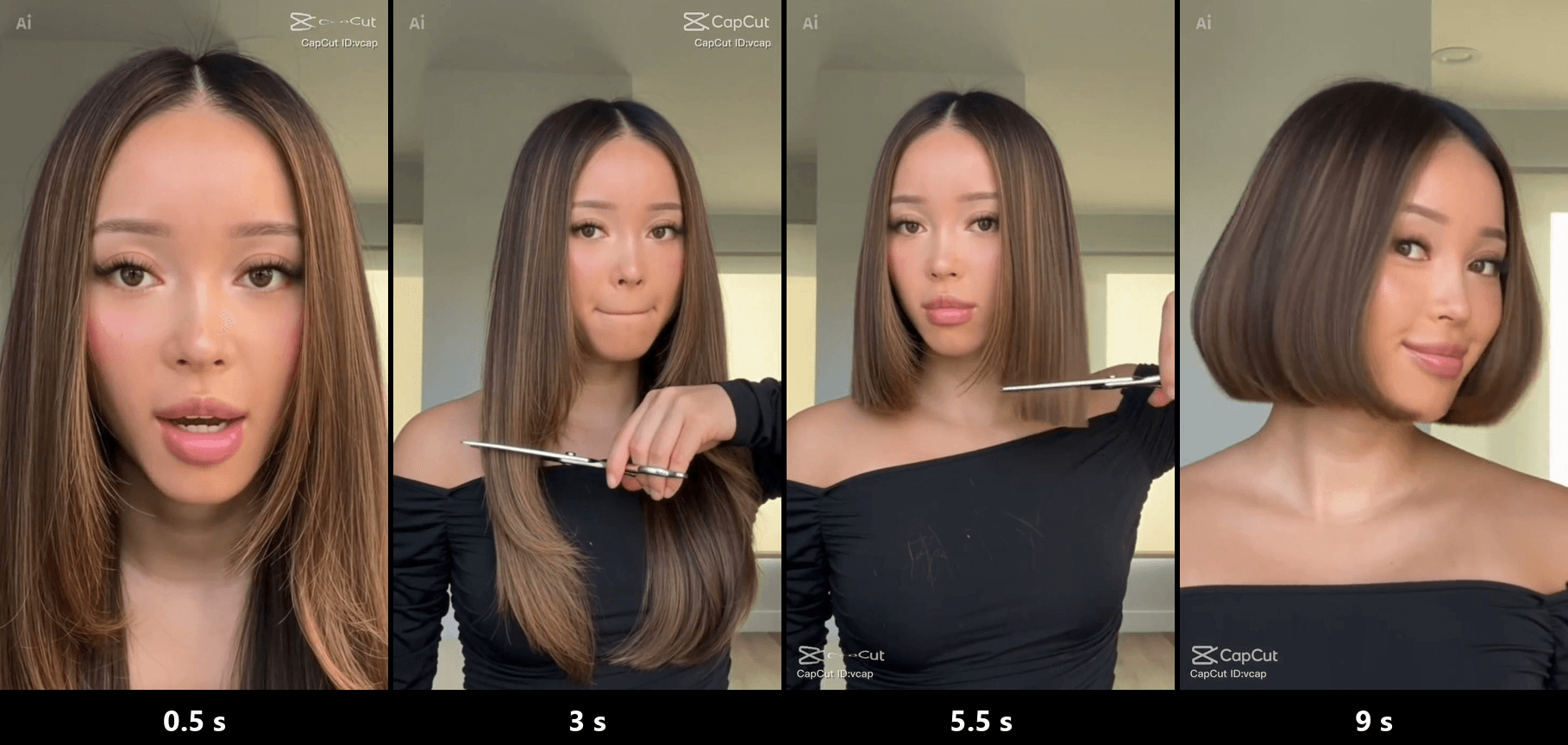
Frames from the preview video of the CapCut template Bob Haircut Filter by VCap.
How to See What You'd Look Like With Short Hair in 10 Seconds
A template gives you its haircut. If you want a bob at the chin instead of the jaw, or a pixie instead of a bob, you need a prompt. Atlas Cloud runs Seedance 2.5, which takes one photo as the first frame and animates everything after it. We gave it a studio headshot of a woman with shoulder-length layered hair and asked for the template look:
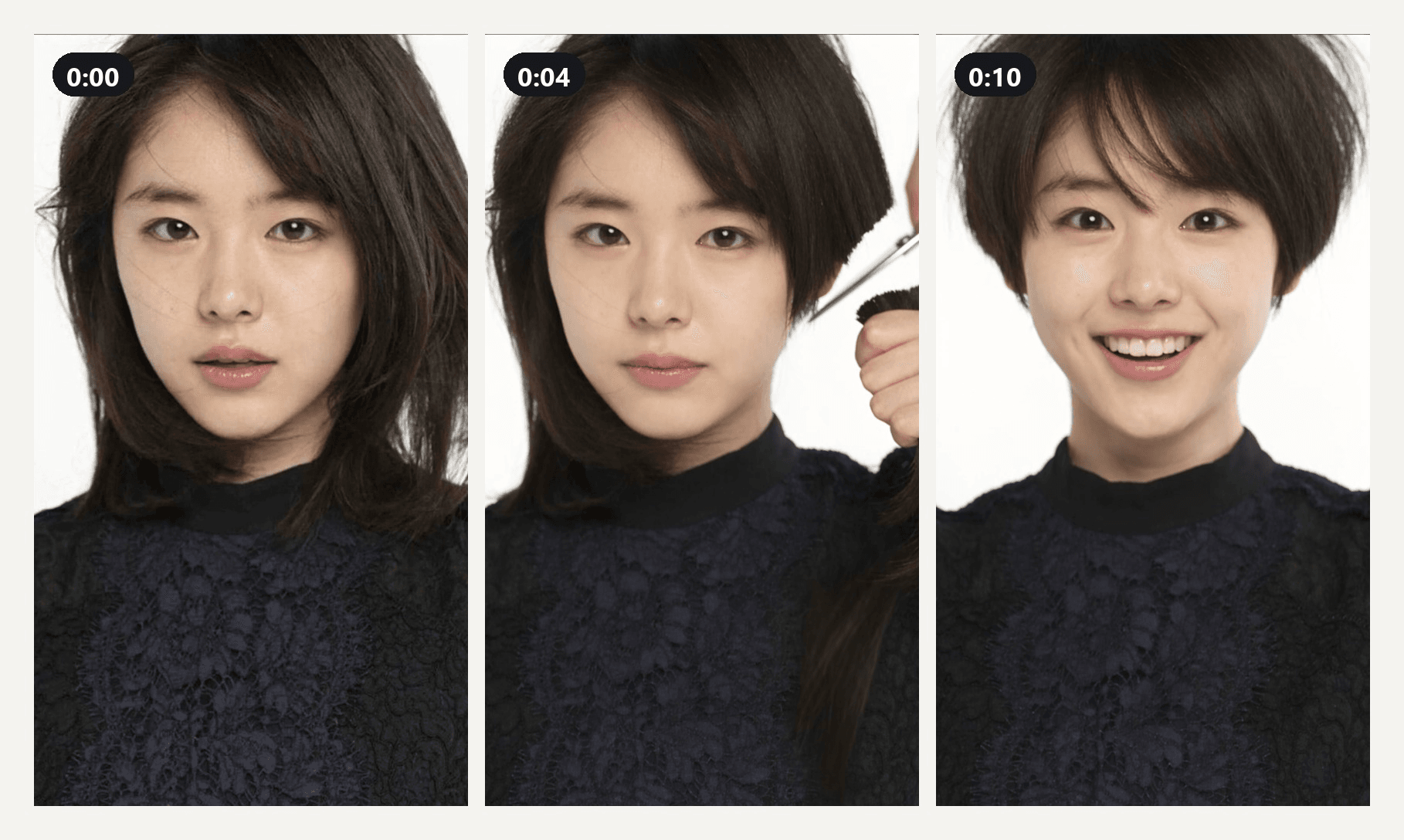
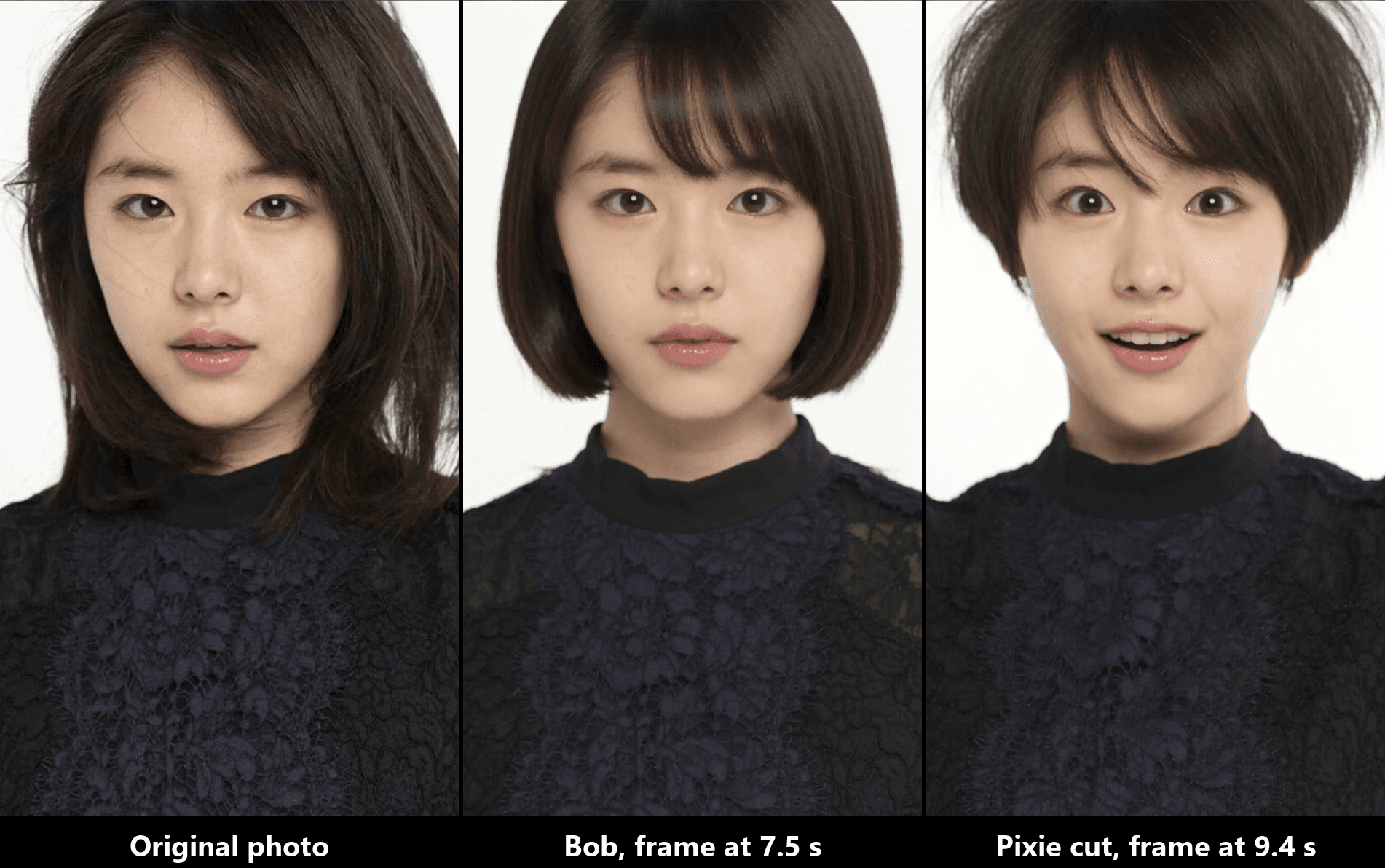
The scissors are at her jaw by 2 seconds. The last strands drop at 5. By 6.5 seconds she has a chin-length bob with a soft fringe, her eyes widen at 8, and the hand lands on her mouth at 9 and stays there to the final frame. The lace top, the white wall and her face do not change, which is the part that sells it.
Method 1: Cut a Bob in the Atlas Cloud Video Generator
Sign in, open the video generator page and follow the numbers on the screenshot:
- Open the Video Generation tab.
- Keep Seedance 2.5 under Models.
- Upload your photo to First Frame. Crop it to 9:16 first so the clip comes out in portrait. Leave Last Frame empty.
- Paste the prompt below into the Prompt box.
- Under Settings, pick 1080p.
- Set Duration to 10 and keep Audio on for the scissor snips.
- Click Run.
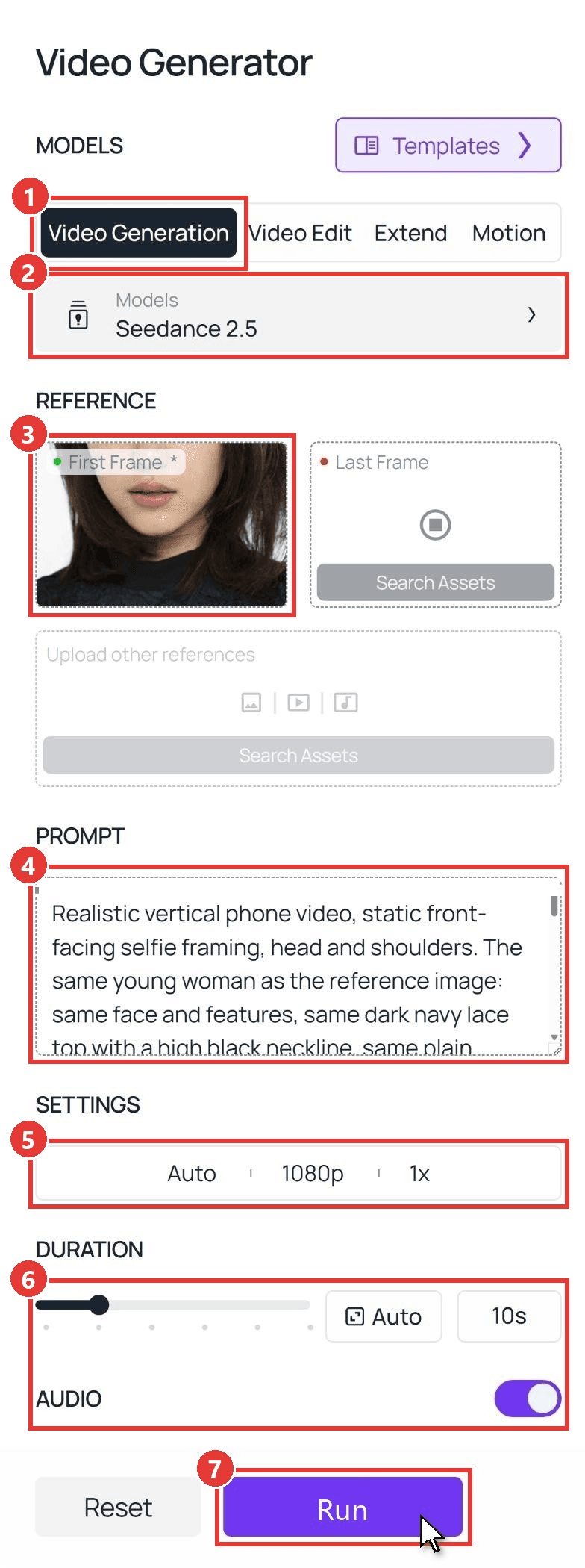
This is the prompt behind the bob clip above:
plaintext1Realistic vertical phone video, static front-facing selfie framing, head and shoulders. The same young woman as the reference image: same face and features, same dark navy lace top with a high black neckline, same plain white studio background, same soft even front lighting. 20-2s: she looks straight into the camera, lifts a section of hair on the left side of her face with one hand and raises a pair of silver hair scissors in the other, blades open just below her jawline. 32-6s: she cuts straight across at chin level, first the left side, then the right side, the cut strands dropping down out of frame, small bits of hair falling past her shoulders. 46-8s: the new haircut is fully visible: a sleek chin-length blunt bob with a soft side part, ends sitting just at the jaw, neck fully visible. This new short haircut stays exactly like this until the final frame and never grows back. 58-10s: her eyes go wide, her mouth drops open, and she slaps one hand over her mouth in shock while still staring at the camera. 6Natural skin texture, no beauty smoothing, no text, no captions, no watermark. Sound: crisp scissor snips, quiet room tone, no music, no speech.
Swap the top, the background and the lighting for whatever is in your photo. Keep the time codes until you have one clip you like.
Method 2: Run the Same Cut Through the Seedance 2.5 API
Making a clip for everyone in the group chat, or adding a short hair button to your own app? The API takes the same photo and the same prompt in one request.
Step 1: Create an API key. In the console, open Settings and create a key under API Keys. One key covers every model on the platform.
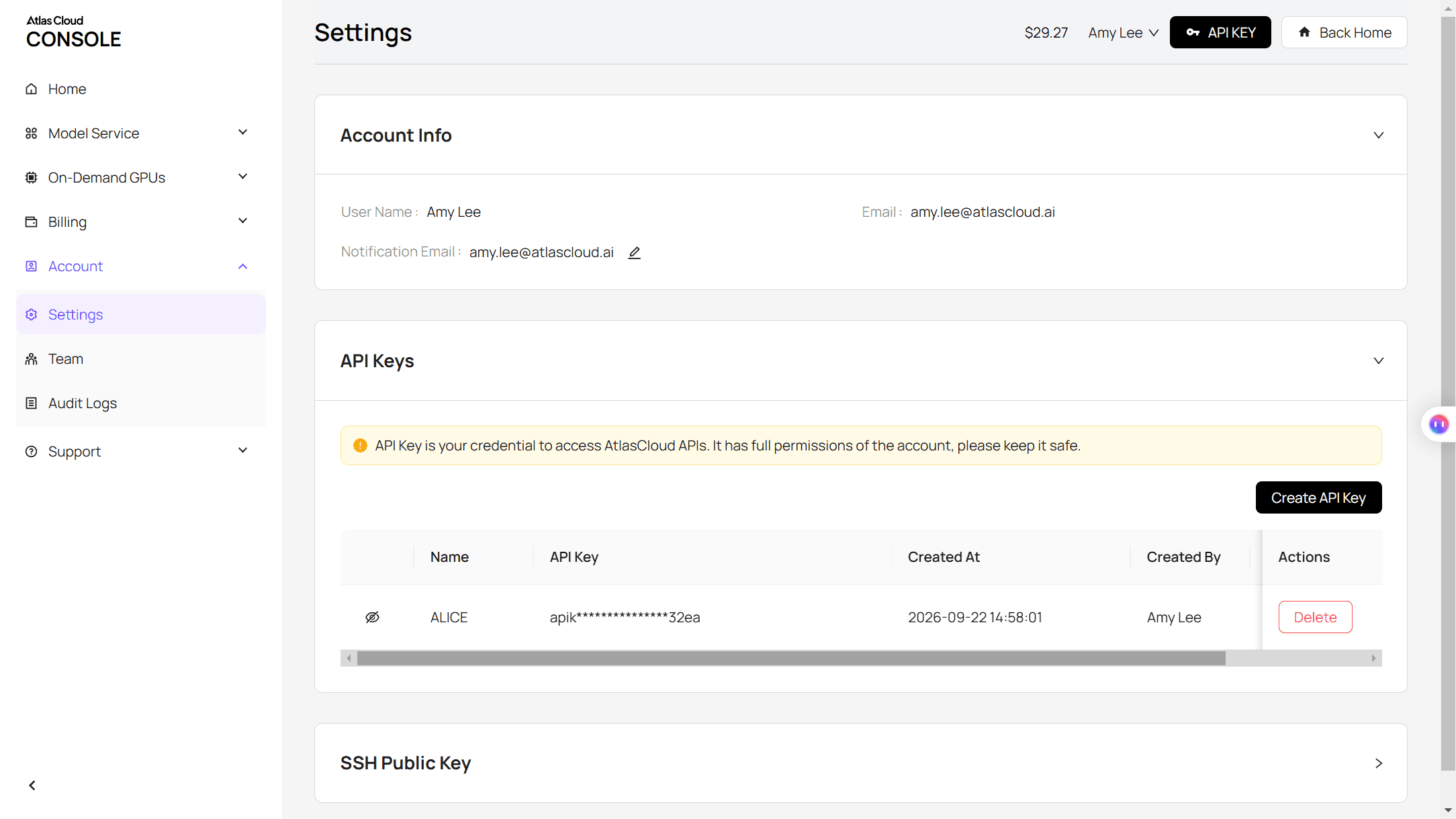
Step 2: Check the request format. The Atlas Cloud API docs cover authentication and the video endpoint.
Step 3: Send the request and poll. Put a public URL of your 9:16 photo in the image field:
plaintext1curl -X POST https://api.atlascloud.ai/api/v1/model/generateVideo \ 2 -H "Authorization: Bearer $ATLASCLOUD_API_KEY" \ 3 -H "Content-Type: application/json" \ 4 -d '{ 5 "model": "bytedance/seedance-2.5/image-to-video", 6 "prompt": "<paste the Method 1 prompt here>", 7 "image": "https://your-cdn.com/your-photo-9x16.jpg", 8 "duration": 10, 9 "resolution": "1080p", 10 "generate_audio": true 11 }'
The response returns a prediction ID. Poll it until the status reads completed, then download the MP4 from the outputs array:
plaintext1curl https://api.atlascloud.ai/api/v1/model/prediction/<prediction_id> \ 2 -H "Authorization: Bearer $ATLASCLOUD_API_KEY"
Same endpoint and same key for every video model, so trying the cut on another model is a one-line change to the model string.
Short Hair Filter Prompts: A Bob Filter Pass, Then a Pixie Cut Filter Pass
One photo can answer the question twice. Keep the first half of the prompt identical, change only the 6 to 8 second line that describes the finished cut, and you get two clips you can put side by side. Two habits make the difference between a cut that holds and one that drifts:
- Describe the face, the clothes and the background as "same", and leave the starting hairstyle out of that list. If the opening hairstyle is pinned as "same", the model has a reason to bring it back.
- Write the finished cut as a state that "stays exactly like this until the final frame". A time code alone is a suggestion. The sentence about the last frame is the instruction.
Bob Filter Prompt (the Template Look)
The Method 1 prompt is the bob filter prompt. Three swaps for the 6 to 8 second line give you three lengths from the same photo:
| Length you want | Replace the finished-cut sentence with |
|---|---|
| Lob at the collarbone | a straight lob that ends at the collarbone, center part, ends slightly tucked under |
| Classic bob at the chin | a sleek chin-length blunt bob with a soft side part, ends sitting just at the jaw |
| French bob at the jaw | a jaw-length French bob with a full fringe that ends at the eyebrows, slightly tousled ends |
Name the fringe either way. If you want the forehead bare, add "no fringe, forehead fully visible" to the same line.
Pixie Cut Filter Prompt (One Length Shorter)
The pixie is the clip that makes people gasp, because almost everything goes. We ran it on the same headshot with the same opening lines and this ending:
plaintext1Realistic vertical phone video, static front-facing selfie framing, head and shoulders. The same young woman as the reference image: same face and features, same dark navy lace top with a high black neckline, same plain white studio background, same soft even front lighting. 20-2s: she looks into the camera, gathers the hair on one side of her head in her fist and raises a pair of silver hair scissors in the other hand. 32-6s: she cuts the hair very short, section after section on both sides and across the back, long dark strands falling past her shoulders and out of frame. 46-8s: the finished cut is fully visible: a short pixie cut, cropped close at the sides and back with both ears showing, a longer textured top swept to one side across the forehead, neck and jawline fully visible. This short pixie cut stays exactly like this until the final frame and never grows back. 58-10s: she tilts her head, runs her fingers up through the short top, and breaks into a surprised, delighted smile at the camera. 6Natural skin texture, no beauty smoothing, no text, no captions, no watermark. Sound: crisp scissor snips, quiet room tone, no music, no speech.
The strands drop between 2 and 4 seconds, the pixie is set by 5, and the smile builds from 8 to the last frame. Put the two endings next to the original photo and the question answers itself:
If a still image is enough for your decision, the pixie cut preview in our bangs guide walks through the same cut with the free hairstyle tool.
Which Short Hair Filter CapCut Template Is Behind the Trend?
We opened the template linked under each post we found and watched the previews frame by frame. Six are the scissor-cut video kind, one is a still-photo wipe, and most carry CapCut's AI label in the corner.
| Template (creator) | Published | Uses on October 30 | What the preview shows |
|---|---|---|---|
| Bob Haircut Filter (VCap) | August 8, 2026 | 466,270 | Scissors at the jaw, chin-length blunt bob, closed-eye smile |
| Filtre carré (ʟᴜᴢᴅʟᴜɴᴀ) | July 31, 2026 | 106,849 | Black hair cut in a car, shocked face, then a smile |
| Ai Hairstyling (Andreea Maria Margin) | August 18, 2026 | 88,063 | Cut to the shoulder, hairspray, a curly bob with a fringe |
| Coupe Carré (j4ms) | July 31, 2026 | 53,546 | Blonde bob cut in a car, hand over the mouth |
| Side Parting Bob Cut (Disco Octopus) | August 22, 2026 | 33,595 | Comb and scissors at a bathroom mirror, side-parted bob |
| Untitled template (Nghĩa Phan) | August 19, 2026 | Listed at over 11 million | Bob cut in a red car seat, hairspray, tousled finish |
| Short hair change (Thuý Kiều) | January 21, 2026 | 261,266 | A wipe that swaps long hair for a bob on a still photo |
Bob Haircut Filter is the one under the husband prank and under three of the tutorial posts we traced, which is why it leads the table.
Two search results will send you somewhere else: a 3-million-play "hair filter" demo from September links to a head-shave template, the one we covered in the bald filter prank, and a 1.6-million-play "6 short hairstyle filter" post from April points to a template page that is now empty.
Would I Look Good With Short Hair? What the Clip Can and Can't Tell You
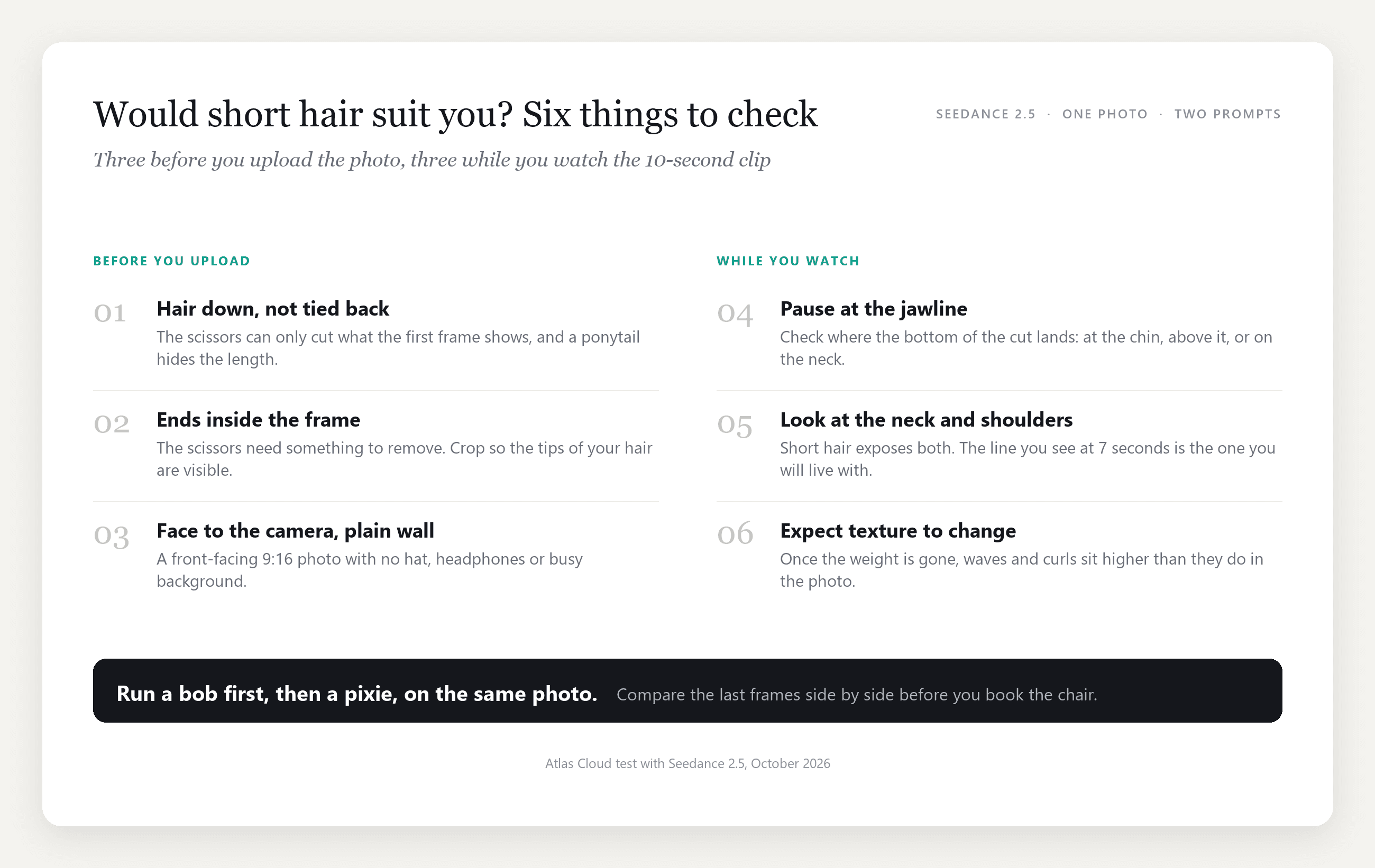
The clip is good at proportion. For the first time you see your jawline, your neck and your shoulders without hair around them, in motion, with your own expressions. Pause at 7 seconds and look at where the bottom of the cut lands relative to your chin. That line is the decision.
Texture is a separate question. The model works from the one photo you give it, so hair that is straightened in the picture is straightened in the clip, and how your curls sit once the weight comes off is something your stylist can tell you and a photo cannot. Treat the clip as a length test.
What goes into the photo matters more than any setting:
How to Turn the Clip Into a Short Haircut Prank
The AI haircut prank posts share a structure, and the prompt already covers two of its three beats.
| Beat | What the viewer sees | Where it comes from |
|---|---|---|
| The setup | A caption like "I'm just gonna do it" over the first seconds | Add text in your editor, keep the prompt free of on-screen text |
| The cut | Scissors, falling hair, the new length by 6 seconds | The 0 to 6 second lines of the prompt |
| The reaction | Wide eyes, a hand over the mouth, or a grin | The 8 to 10 second line of the prompt |
Send it to one person first. The reply is the second half of the content, and a private "what did you do" is easier to screenshot than a public comment. Keep the bob prompt for the shocked version, use the pixie ending for the "I love it" version that starts arguments in the replies, and if the face belongs to a friend, ask before you post it.
Frequently Asked Questions
Where do I find the short hair filter on TikTok?
It is not in TikTok's effects tray. Open one of the trend videos and tap the "CapCut · Try this template" bar under the caption, which opens the template that made the clip. The 2020 clips used a live camera effect, which is a different thing: nothing is cut and nothing falls.
Is there a short hair simulator that works on video, not just a photo?
A video generator with a first-frame input does that job. Seedance 2.5 takes your photo, animates the cut and keeps the face, clothes and background from the first frame through the last. For a still preview, the free hairstyle changer in our AI hairstyle changer guide is the quicker route.
Does the short hair generator keep my face the same?
In both of our clips the face, the lace top and the white wall held for the full 10 seconds, because the prompt lists them as "same" and the first frame anchors them. Keep the hairstyle out of that list, or you are asking the model to preserve the thing you want changed.
Can I use the AI short hair filter on a man's photo?
Yes, with the finished-cut line rewritten for the style you want, a crop, a buzz cut or a textured crop with a fade. The scissors beats stay the same. Our men's hairstyle try-on guide has still-image versions of the common cuts.
What if my hair is tied back in the photo?
Retake it if you can. A ponytail or bun gives the scissors nothing visible to remove, so the clip has to invent the length it cuts and the before-and-after loses its point. Hair down, ends visible, shoulders in frame.
Conclusion
The mirror trick never worked because folded hair is still long hair. The short hair filter works because the hair leaves: scissors at the jaw, strands past the shoulders, and a face you recognise under a cut you have only imagined. The CapCut templates fix that moment at a chin-length bob; a prompt with time codes moves the line to the collarbone, the jaw, or up to a pixie.
Pick a front-facing photo with your hair down, run the bob prompt first, then the pixie, and put the two last frames next to the original. If one of them makes you stop scrolling, you have your answer to what would I look like with short hair, and a clip to send before anyone can talk you out of it.





