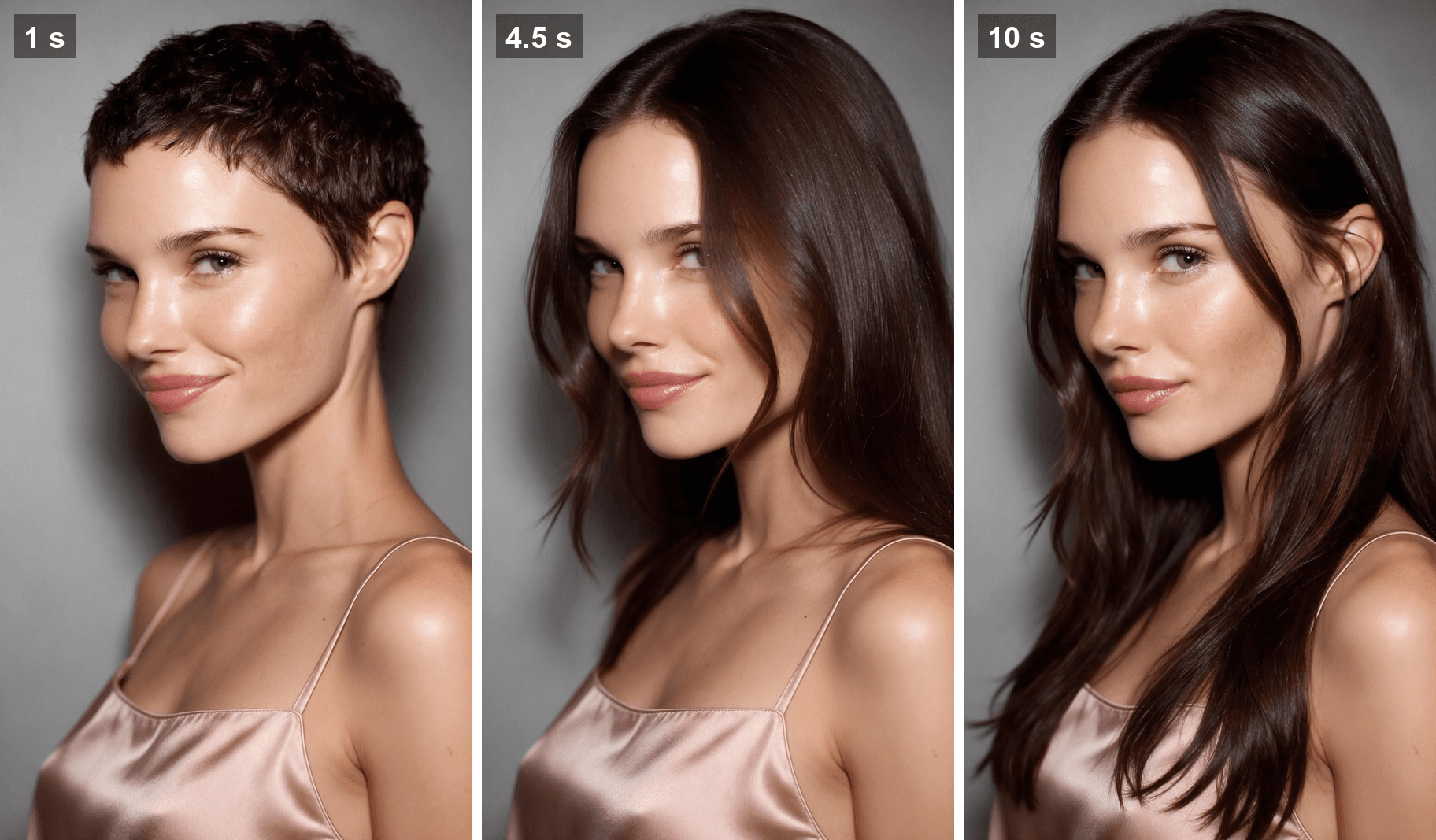
Growing out a pixie takes months of awkward in-between lengths, and you only find out at the end whether long hair was worth it. The long hair filter skips the wait. One photo goes in, and a few seconds later you are looking at yourself with hair past your shoulders.
On TikTok the name covers two different things: a 2023 FaceApp and CapCut combo that went viral with men, and a face-measuring effect that never shows you any hair at all. This guide sorts them out, then shows how to turn one photo into a 10-second clip where your hair actually grows, on your own face.
Key Takeaways
- The long hair filter went viral in April 2023 as a FaceApp photo wiped over a selfie in CapCut.
- The CapCut template LONG HAIR FILTER showed 6,453,876 uses on November 10, 2026.
- The 2.25 hair length filter measures your face;itnever shows you with long hair.
- The Atlas Cloud video generator turns one photo and one long hair still into a 10-second grow-out clip.
- Name the final length in the prompt and tell the model to hold it until the last frame.
What Is the Long Hair Filter on TikTok?
It started with men in April 2023. @denniscelik's clip from April 7 shows him in a car with a buzz cut and stubble, then a wipe reveals shoulder-length waves and a full beard. It now has 11.3 million plays. Three more clips in the same format, posted between April 10 and 14, show 7.5 million to 10.7 million plays.
None of those clips was filmed with a live effect. The long hair came from FaceApp, and Dexerto's guide walks through it: pick the "Long 2" hairstyle in FaceApp, save the photo, then drop both photos into a CapCut template that wipes from one to the other.
Two kinds of tools actually put long hair on your face:
| Version | Since | What you get |
|---|---|---|
| FaceApp photo + CapCut wipe | April 2023 | A 5-second wipe from your selfie to an AI long hair photo |
| AI hairstyle tools and templates | 2025 to 2026 | One photo in, one or more long hair styles out |
Ten of the top 16 clips on TikTok's Long Hair Men Filter page were posted in April or May 2023, when we checked on November 10, 2026.
What Would I Look Like With Long Hair? One Photo, One 10-Second Clip
Both versions are built from stills. A still answers how long hair looks on you. It does not show the change happening, which is the part people replay.
On Atlas Cloud the job takes two steps. The free AI Hairstyle Changer gives you the long hair still. Seedance 2.5 then uses your photo as the first frame and that still as the last frame, and grows the hair in between with its own sound:
For the first 2 seconds she keeps her pixie and smiles. The hair then grows back over her ear and keeps going, past her shoulder and onto the satin top, until it reaches mid-chest at about 6.5 seconds. She turns toward the camera so the length swings, then settles into the exact pose of the last frame.
Step 1: Get the Long Hair Still From the Free AI Hairstyle Changer
Open the free AI hairstyle changer and sign in with a free Atlas Cloud account.
- Upload a clear photo under Your Photo. Crop it to 9:16 first if you plan to make the vertical video.
- Describe the length, texture and color you want under Hairstyle Description.
- Click Run and save the result.
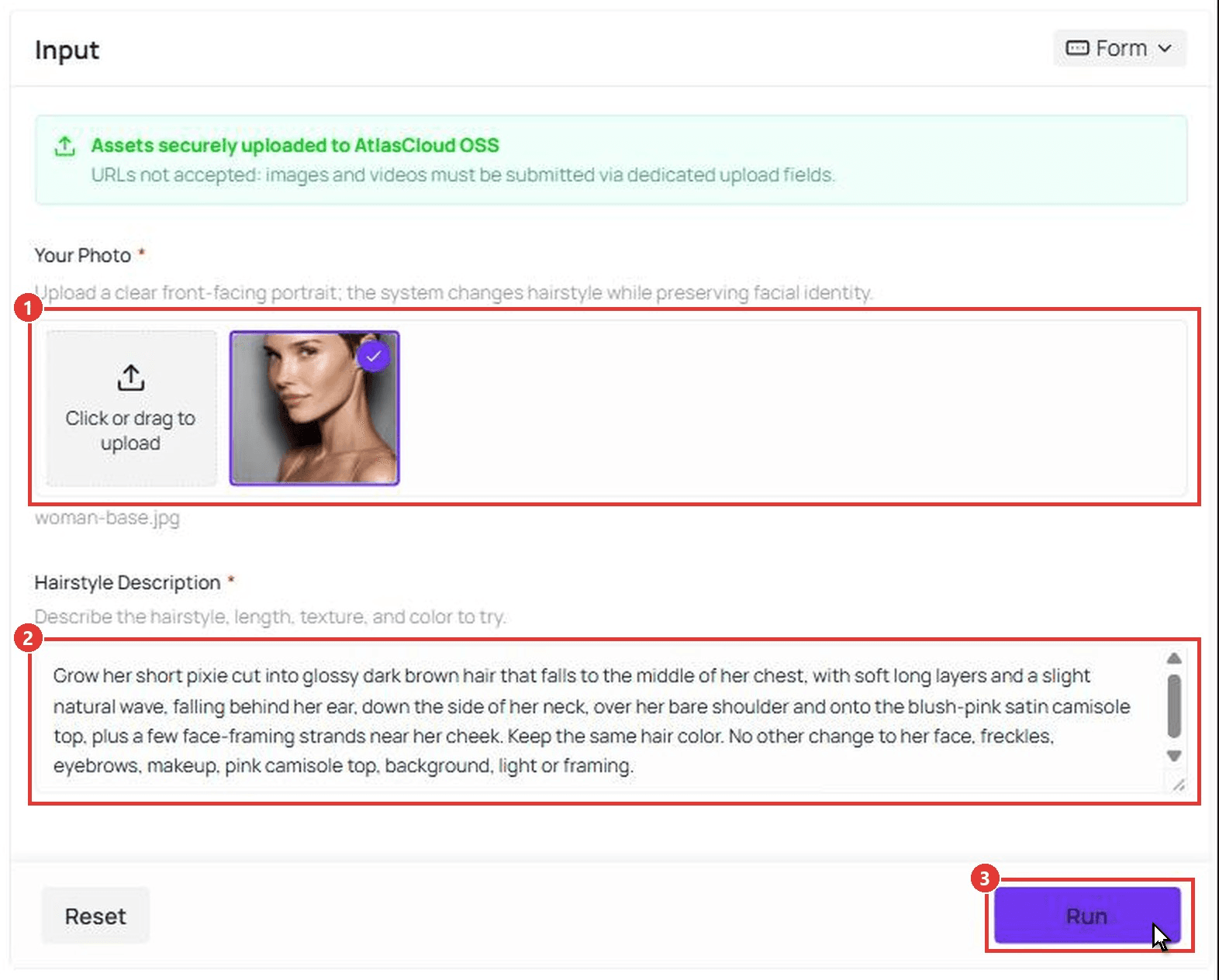
This is the request behind the last frame of the clip:
plaintext1Grow her short pixie cut into glossy dark brown hair that falls to the middle of her chest, with soft long layers and a slight natural wave, falling behind her ear, down the side of her neck, over her bare shoulder and onto the blush-pink satin camisole top, plus a few face-framing strands near her cheek. Keep the same hair color. No other change to her face, freckles, eyebrows, makeup, pink camisole top, background, light or framing.
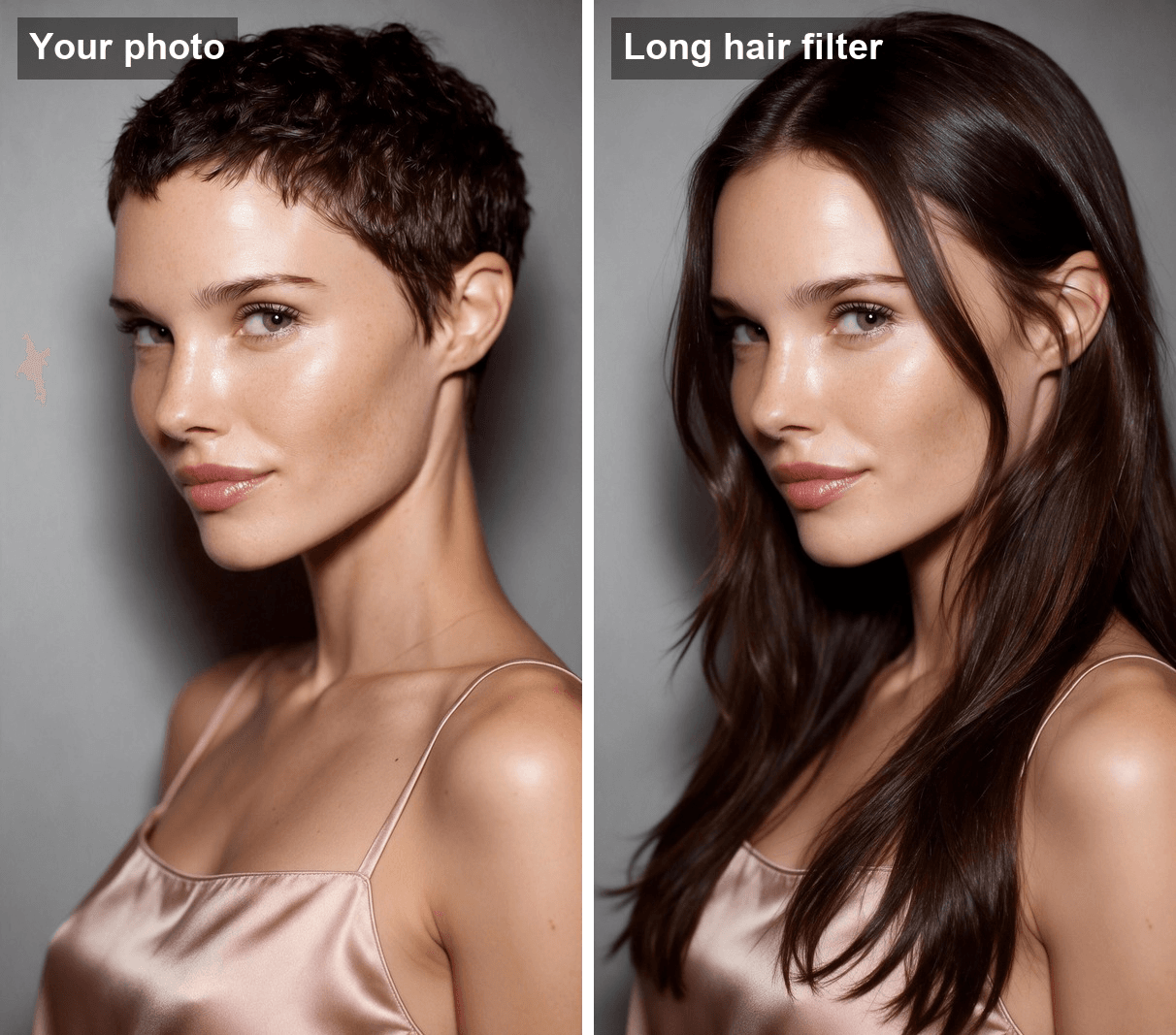
"Keep the same hair color" earns its place. The video only has to change length if the last frame matches your real color.
Method 1: Grow It Out in the Atlas Cloud Video Generator
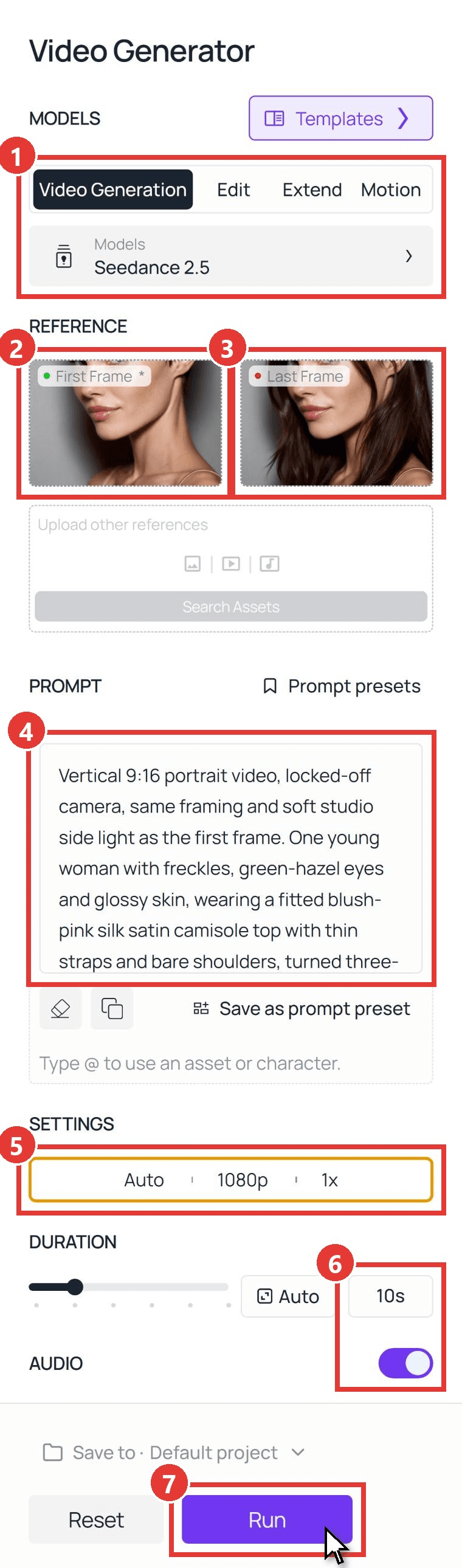
Open the AI video generator and follow the numbers on the screenshot:
- Open the Video Generation tab and keep Seedance 2.5 under Models.
- Upload your original photo as the First Frame.
- Upload the long hair still as the Last Frame.
- Paste the prompt below into Prompt.
- Under Settings, leave the ratio on Auto and pick 720p for a test or 1080p for the final.
- Type 10 in Duration and leave Audio on.
- Click Run.
plaintext1Vertical 9:16 portrait video, locked-off camera, same framing and soft studio side light as the first frame. One young woman with freckles, green-hazel eyes and glossy skin, wearing a fitted blush-pink silk satin camisole top with thin straps and bare shoulders, turned three-quarters toward the left of the frame, against a plain soft grey wall. Only one person in every frame. 20-1.5s: she holds the pose from the first frame with her short dark brown pixie cut, blinks once and gives a small closed-lip smile. 31.5-7s: her hair grows out in one smooth, continuous motion, like a time-lapse: the pixie lengthens over her ear, the ends slide down the side of her neck, over her bare shoulder and onto the pink satin top, and soft face-framing strands fall beside her cheek, until it is glossy dark brown hair falling to the middle of her chest with a slight natural wave. The hair never disappears or cuts; it only gets longer, frame by frame. 47-9s: she turns her head slightly toward the camera so the long hair swings over her shoulder, then turns back to the original angle. 59-10s: she holds exactly the pose of the last frame; her long hair stays exactly this length until the final frame. 6Her face, freckles, eyes, eyebrows, makeup, skin tone and pink camisole top never change. No hands in frame, no text, no logos, no extra people. 7Sound: quiet studio room tone and a soft rustle of hair as it grows, no music.
The sentence "the hair never disappears or cuts" is the one to keep when you rewrite this for your own photo. It tells the model to grow the hair frame by frame instead of swapping one hairstyle for another halfway through. The clip above is a 1080p run of this exact prompt.
Method 2: Send the Two Frames Through the Seedance 2.5 API
Building a "see yourself with long hair" button for a salon booking app or an extensions store? The same two steps run through the API.
Step 1: Create and copy an API key on the Settings page of the Atlas Cloud console.
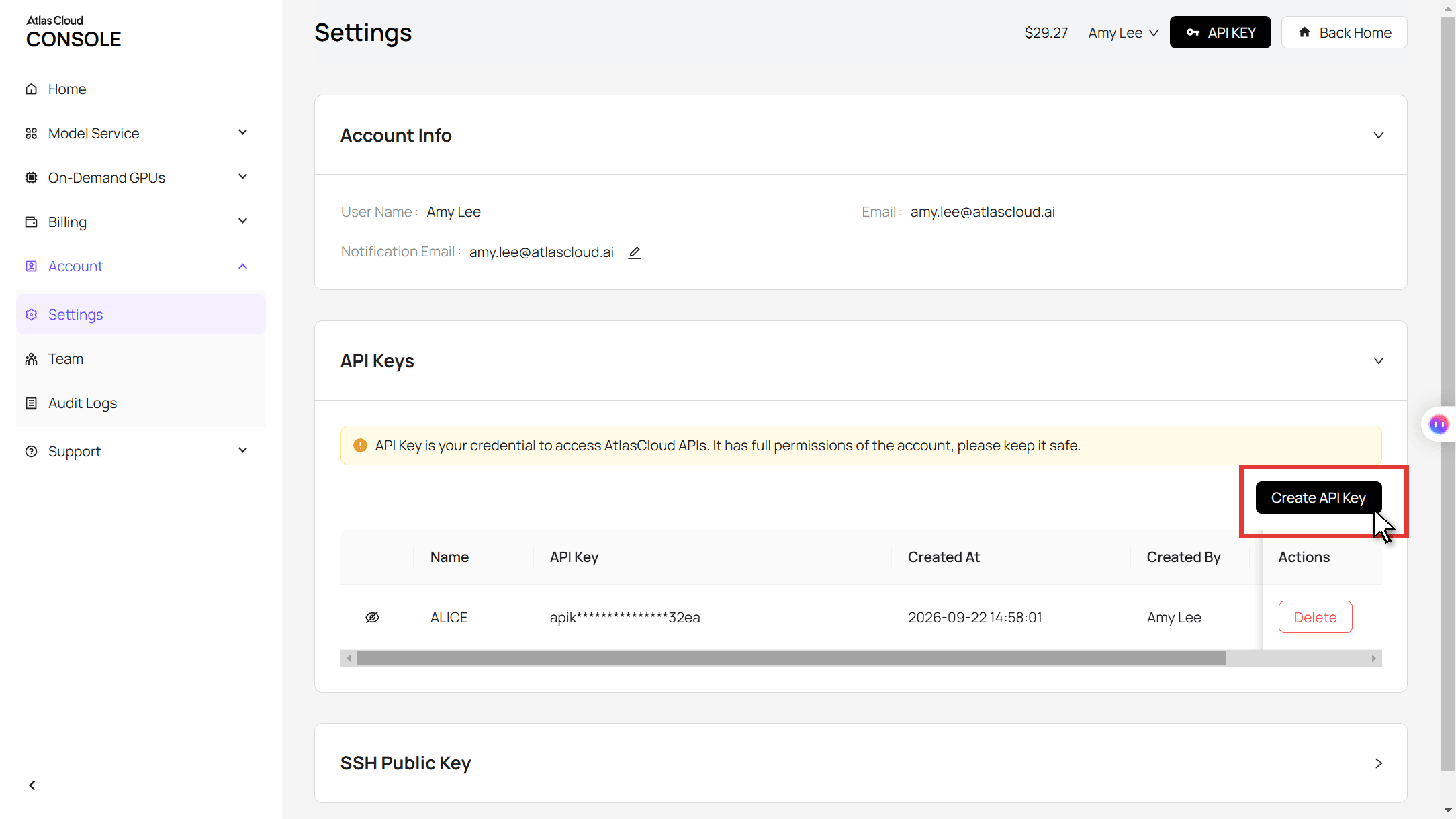
Step 2: Check the request format in the Atlas Cloud API docs.
Step 3: Make the still, then the clip, and poll for each file. The hairstyle call takes the photo URL and the length request:
plaintext1curl -X POST https://api.atlascloud.ai/api/v1/model/generateImage \ 2 -H "Authorization: Bearer $ATLASCLOUD_API_KEY" \ 3 -H "Content-Type: application/json" \ 4 -d '{ 5 "model": "atlascloud/tool/hairstyle-changer", 6 "image": "https://your-cdn.com/photo.jpg", 7 "prompt": "Grow the short hair into glossy hair that falls to the middle of the chest, with soft long layers. Keep the same hair color. No other change to the face, clothes, background or framing." 8 }'
The video call takes the original photo as image and the returned still as last_image:
plaintext1curl -X POST https://api.atlascloud.ai/api/v1/model/generateVideo \ 2 -H "Authorization: Bearer $ATLASCLOUD_API_KEY" \ 3 -H "Content-Type: application/json" \ 4 -d '{ 5 "model": "bytedance/seedance-2.5/image-to-video", 6 "prompt": "<paste the Method 1 video prompt here>", 7 "image": "https://your-cdn.com/photo.jpg", 8 "last_image": "https://your-cdn.com/photo-long-hair.jpg", 9 "duration": 10, 10 "resolution": "720p", 11 "generate_audio": true 12 }'
Poll the returned prediction ID until the status reads completed, then download the file from the outputs array:
plaintext1curl https://api.atlascloud.ai/api/v1/model/prediction/<prediction_id> \ 2 -H "Authorization: Bearer $ATLASCLOUD_API_KEY"
The same endpoints and the same key run every image and video model on Atlas Cloud. To try another model, change the model string and keep the rest.
AI Long Hair Filter Prompts: Lob, Past the Shoulders and Mid-Chest
"Long hair" is not one length. A lob that grazes the shoulders and hair that reaches mid-chest suit faces differently, so preview more than one. We ran the same photo three times and changed only the length phrase:
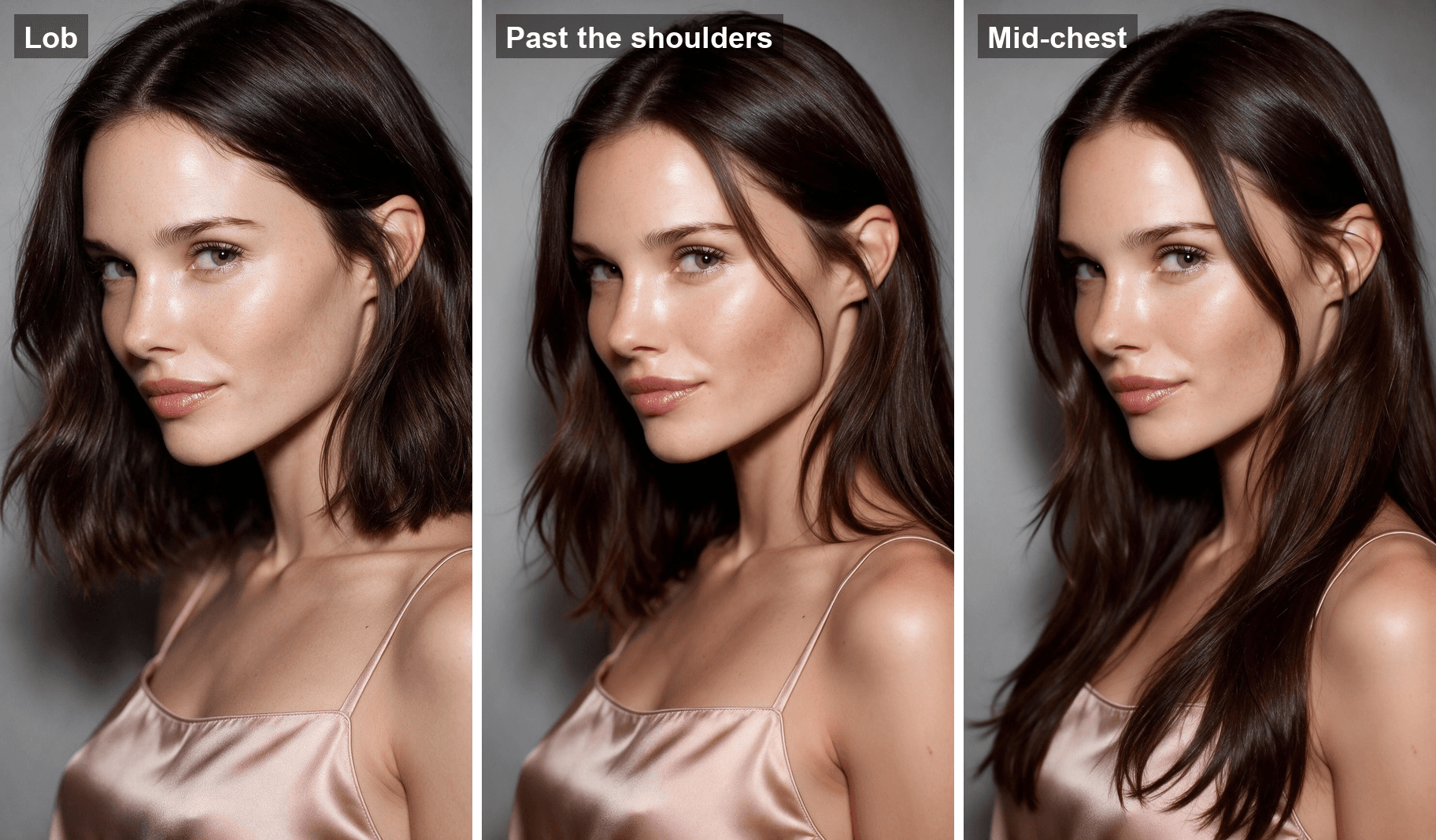
Start from this template and swap the bracketed part:
plaintext1Grow her short pixie cut into glossy dark brown hair that [LENGTH], with soft layers and a slight natural wave, tucked behind her ear with a few face-framing strands near her cheek. Keep the same hair color. No other change to her face, freckles, eyebrows, makeup, clothes, background, light or framing.
| Look | Text for [LENGTH] |
|---|---|
| Lob | becomes a sleek long bob that just grazes the tops of her shoulders |
| Past the shoulders | falls just past her shoulders and rests on them |
| Mid-chest | falls to the middle of her chest, over her shoulder and onto her top |
Two habits make the results easier to compare. Name a body landmark for the length, since "long" alone leaves the model guessing. And wear a top that contrasts with your hair color: dark hair over a black shirt hides exactly where the ends stop.
Which Long Hair Filter CapCut Template Is Behind the Trend?
The template that carried the 2023 wave is called LONG HAIR FILTER. It went live on April 15, 2023, eight days after the April 7 clip above, and showed 6,453,876 uses on November 10, 2026. It takes two clips and runs about 5 seconds.
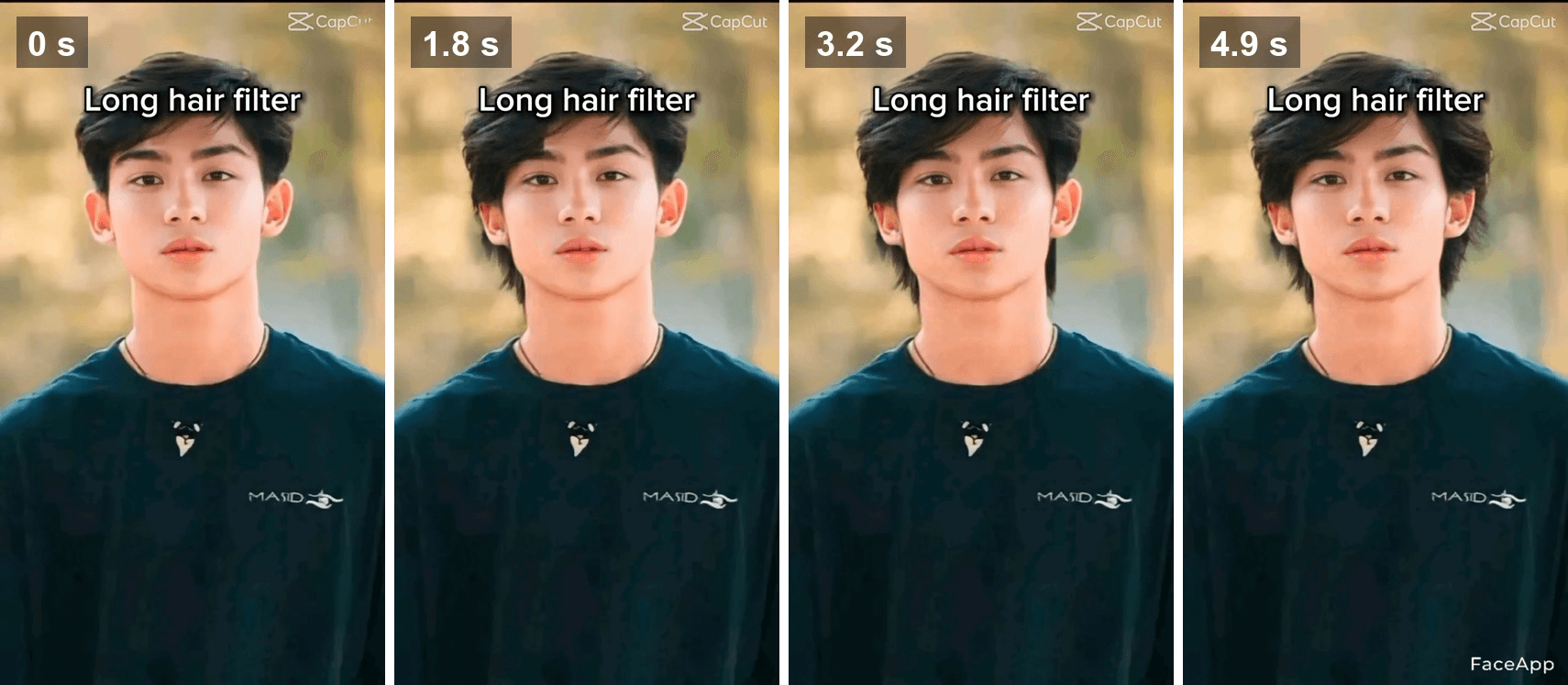
Frames from the preview of the CapCut template LONG HAIR FILTER, captured November 10, 2026.
The preview shows how the format works. A plain photo fades into a second photo with longer hair, and the FaceApp watermark appears in the corner at the end. The template moves nothing itself; the long hair comes from whatever photo you load second.
| Template | Went live | Uses on November 10, 2026 | What it makes |
|---|---|---|---|
| LONG HAIR FILTER | April 15, 2023 | 6,453,876 | A 5-second fade from your photo to a long hair photo you supply |
| 6hair style | October 26, 2025 | 760,457 | One photo cycled through six AI long hairstyles |
| AI Long Hair Trend | June 24, 2026 | 5,643 | The template page no longer shows a title or preview |
CapCut's own Long Hair Filter page lists general hairstyle templates rather than a long hair one. The newer templates change style and color, and few are about length.
Should I Grow My Hair Out? What the 2.25 Hair Length Filter Can't Show You
Plenty of people meet the long hair filter while asking a bigger question: should I grow my hair out at all? On TikTok that question usually lands on the 2.25 Hair Length Filter.
It draws two red lines on the lower half of your face and gives a number. Bustle's write-up from October 5, 2023 sums up the rule: under 2.25 suggests short hair, over 2.25 suggests long hair. A men's lifestyle clip from October 22, 2023 using the effect has 10.2 million plays.
| 2.25 Hair Length Filter | AI long hair filter | |
|---|---|---|
| What goes in | Your live camera | One photo |
| What comes out | A number between about 2 and 4 | Your face with long hair |
| Shows texture, part and color | No | Yes, as you describe them |
| Compares several lengths | No | Yes, one run per length |
The number is a rule of thumb about proportions. It cannot tell you whether your hair will fall straight or flip out, or whether a center part works on you. A preview can. If the score says long and the preview looks wrong, trust what you see.
Long Hair Filter for Men: How Would I Look With Long Hair and a Beard?
The four 2023 clips above are all men, and two of them grew a beard along with the hair. The same two-step method handles both, with one extra pass for the beard:
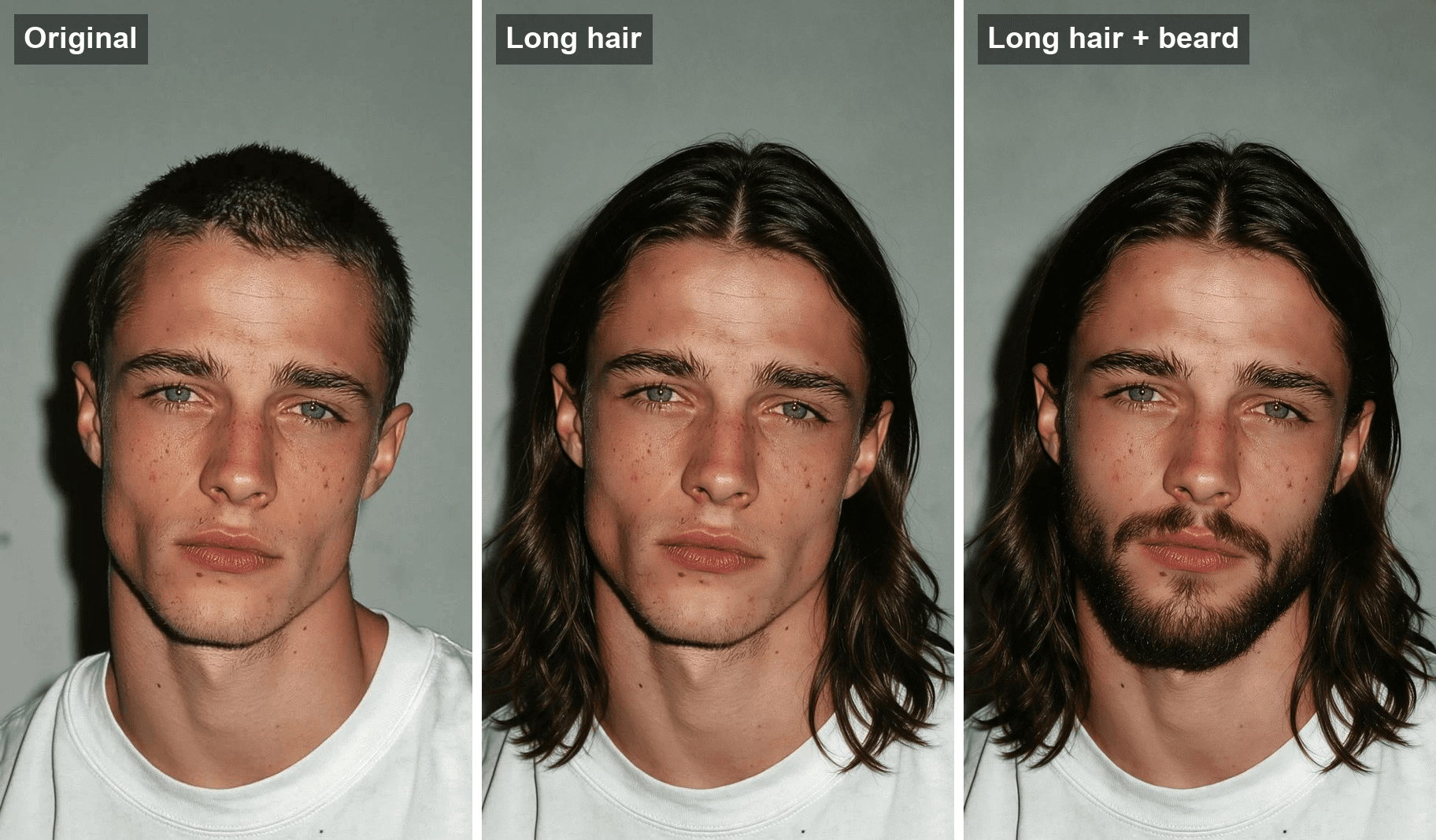
The hairstyle changer gave him the hair. The beard came from one more edit in the Image Edit tab of the Atlas Cloud image generator, with Seedream v5.0 Pro and a prompt that changed only the facial hair. That second still became the last frame:
For men, describe the part and where the ends land. "Center part, tucked behind the ears, falling to the shoulders" gets you the 2023 look. Hair that stops at the jaw reads as a different cut.
On r/malegrooming, a man who tried long hair with AI and asked whether it suited him drew more than 380 comments, and the top answer picked a middle length. If you are weighing facial hair on its own, our beard filter guide covers that clip.
Frequently Asked Questions
Is there a long hair filter on TikTok?
The viral 2023 clips did not use a TikTok effect. They used FaceApp for the long hair photo and a CapCut template for the wipe. The effect people find under "hair length filter" is the 2.25 Hair Length Filter, which only measures your face. Snapchat also has lenses called Long Hair Filter and Short to Long Hair Style Filter.
How do I get the long hair filter on CapCut?
Find a long hair filter clip on TikTok and tap the CapCut link above the creator's name to open the template. LONG HAIR FILTER needs two photos: your selfie and a long hair version of it. Make the second photo first with any AI hairstyle tool, then load both.
Is there a free long hair filter online?
Yes. The Atlas Cloud AI Hairstyle Changer takes one photo and a written description of the style, and returns the long hair still. Each eligible account gets one free try after signing in, and further runs are billed per run. Turning that still into a grow-out video is a separate step.
Does the long hair filter work on curly hair?
Yes, as long as you say so. Write "keep my natural curl pattern" or name the curl type, such as loose waves or tight coils, along with the length. Leave it out and the tool picks the texture for you.
Can I use the grow-out video on Instagram or Snapchat?
Yes. The clip is a plain vertical MP4, so it uploads to Reels, Stories or TikTok like any other video. Label it as AI-generated when you post, since it shows a hairstyle you do not have yet.
How much does a 10-second long hair video cost on Atlas Cloud?
As of November 10, 2026, Seedance 2.5 costs $3.04 for a 10-second image-to-video clip at 720p and $5.98 at 1080p, both at a 20% discount from list prices of $3.80 and $7.47. The long hair still from the hairstyle changer costs $0.045 per run. Run 720p until the motion looks right, then render the final at 1080p.
Conclusion
The 2023 version of this trend was a magic trick: two photos and a wipe. It answered the question, but it skipped the part people actually wonder about, which is the hair getting longer on a face they recognize. A still from the hairstyle changer plus a Seedance 2.5 clip shows that part, and naming the length and the "never cuts" rule in the prompt keeps it believable.
Start with one photo and three lengths, pick the one that looks like you, and grow that one out. If you want to see the opposite move first, our short hair guide cuts a bob the same way. Either way, a long hair filter clip takes a few minutes, and the real thing takes months of growing.


