The sparkle sits in the bottom-right corner of the picture you just made. Small enough to miss on a phone, impossible to ignore once the file lands in a slide deck. A Gemini watermark remover will lift it off in about two seconds, and roughly a dozen single-purpose pages now compete to be the one that does it.
Here is the part that gets skipped: the badge is the thinnest of three marks Google puts on that file. This guide covers where the badge comes from, how to get it off an image already sitting in your downloads folder, and why Google can still recognise the picture afterwards. Every claim traces to Google's own help pages, DeepMind's documentation, or the text of the law.
One boundary before anything else. This is about images you generated yourself in Gemini. Someone else's artwork, a stock photo carrying an agency mark, a frame grabbed from a streaming service: none of that is in scope, and nothing below is a workaround for it.

Key Takeaways
- The visible mark is a sparkle in the bottom-right corner of images from free and Google AI Pro accounts. Google AI Ultra and AI Studio output ships without it.
- Since 14 August 2026 you can switch the badge off yourself under Settings and Media watermark, though only for images you make after flipping it.
- For a file you already downloaded, a free AI image eraser paints the corner out without the image leaving your machine.
- Google says every image Gemini generates carries SynthID, and DeepMind describes it as built to survive cropping, filters and lossy compression.
- Google's line is not drawn at removing the badge. It is drawn at passing the result off as human work in order to deceive.
What the Gemini Watermark Is, and Where It Sits
Google spelled out the rule when it shipped Nano Banana Pro in November 2025. The announcement was explicit about who gets marked: a visible sparkle appears on images from free and Google AI Pro accounts, and Google said it would remove that watermark for Google AI Ultra subscribers and inside AI Studio, on the reasoning that professional work needs a clean canvas.
Your account tier decides it, then, and not the model. A picture made in the consumer app comes out stamped while the same request inside AI Studio comes out clean. So when people look for a way to take the watermark off a Nano Banana 2 image, this corner sparkle is the thing they mean.

Keep three layers straight, because the rest of this article depends on the distinction. There is the badge you can see. There is a Content Credentials record written into the file. And there is SynthID, sitting in the pixel values themselves.
Does Gemini Leave Watermarks in Text?
Nothing visible. Google's own help page scopes the visible watermark to visual media, naming images, videos and music, and text is not on that list. Google DeepMind does describe a text version of SynthID on its SynthID page, explaining that for text generated through Gemini it "adjusts these probability scores to generate a watermark", which is not noticeable to a reader and does not affect quality.
Whether you can check a given paragraph yourself is a separate question. The same page lists image, video and audio as the formats the SynthID Detector accepts, so a public text check is not part of what Google currently offers.
| Gemini output | Visible mark | SynthID |
|---|---|---|
| Images | Corner sparkle, on by default | Embedded |
| Video | Persistent overlay on the clip | Embedded |
| Music | Mark on the visual player | Embedded |
| Text | None | Described by DeepMind, no public checker |
Turn the Gemini Watermark Off Before You Generate
On 14 August 2026 Google shipped a setting that the removal tools have been slow to notice. One of the pages ranking for this search still tells readers the badge cannot be turned off, which stopped being true that morning.
Google announced the switch on X and rolled it out across Gemini and Flow over the following days: Media watermark, with plain On and Off options, covering Nano Banana images, Omni video and Lyria music. On is still the default.
Three steps on the web:
- Open gemini.google.com and click Settings.
- Choose Media watermark.
- Set it to Off.
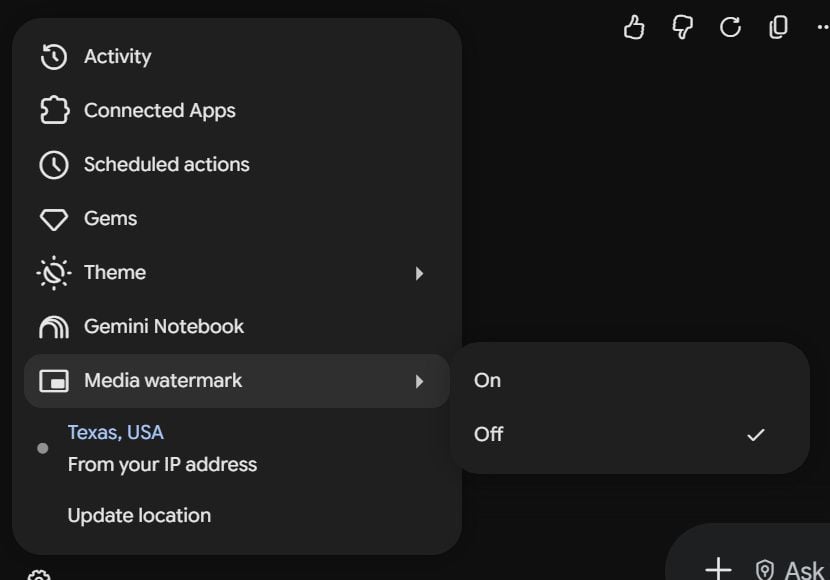
Two limits worth knowing. Google's help page says visible watermarks will appear on any newly generated images, which is a polite way of saying the switch has no reach backwards into pictures you already made.
The same page names India, South Korea and Vietnam as places where the setting only shows up with an AI Ultra subscription. Google's announcement put the carve-out down to countries where the law requires the mark to stay.
The help page is also blunt about what the switch does not touch: it "only controls the visible watermark" and "doesn't affect SynthID watermarks or Content Credentials for media you create with Gemini Apps".
How to Remove a Gemini Watermark From an Image You Already Made
Which leaves the folder of images you generated last month. The badge is painted into those pixels, so getting rid of it means repainting that corner.
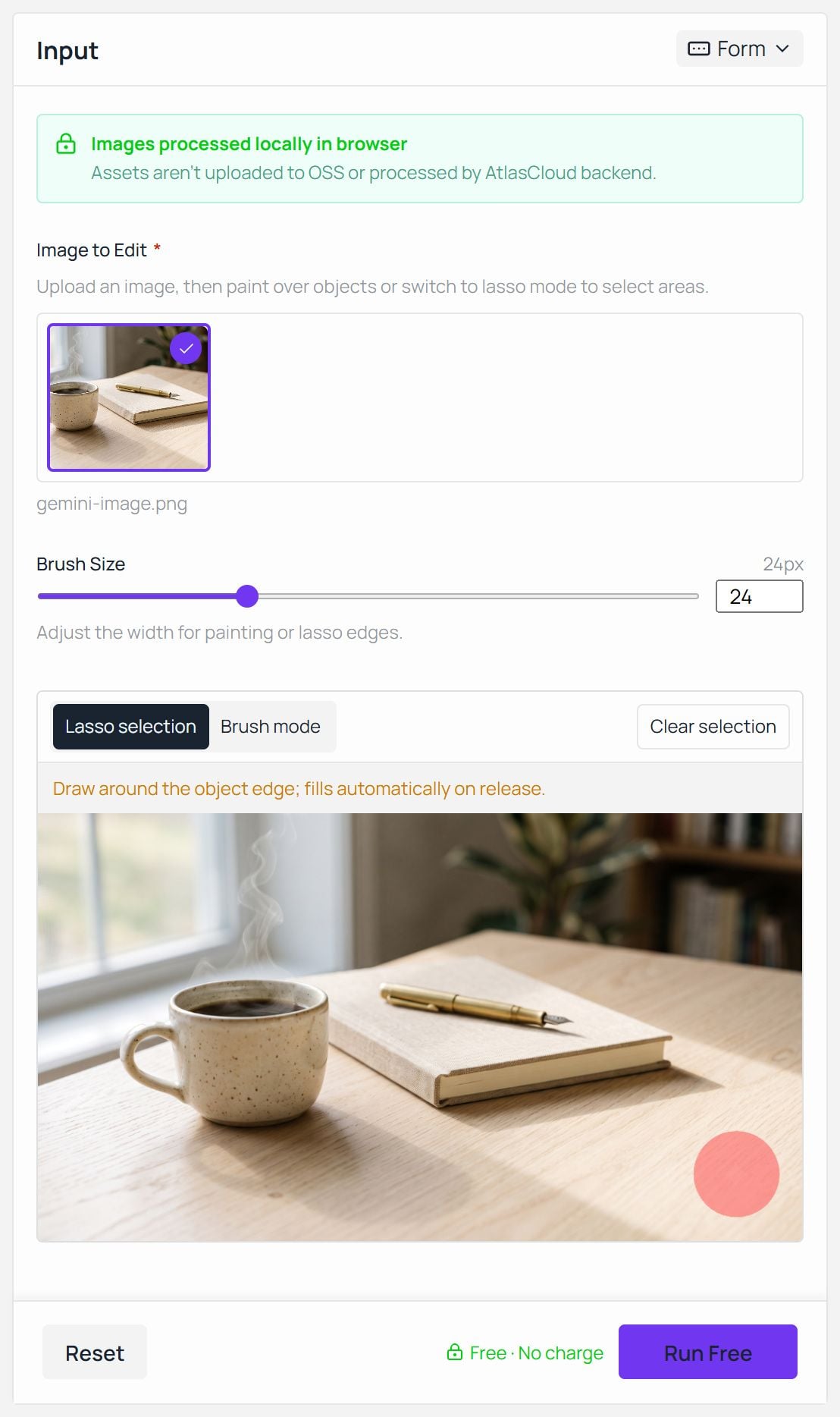
Atlas Cloud's Object Eraser does that job in the browser tab, and the tool page is direct about where the file goes: images are processed locally in the browser, and assets are not uploaded to storage or sent to a backend. No account is needed at any point, with no credits and no daily limits.
Run a Free Gemini Watermark Cleaner in Your Browser
Drop the file into the upload area, draw a loop around the sparkle with the lasso (it fills in when you release), and press Run Free. The output panel gives you a Download button, and the PNG comes back at the same dimensions you put in.
The first run pulls the model into your browser cache, so later images start straight away. It runs wherever WebGPU is available, which covers current desktop Chrome, Edge and Safari builds.
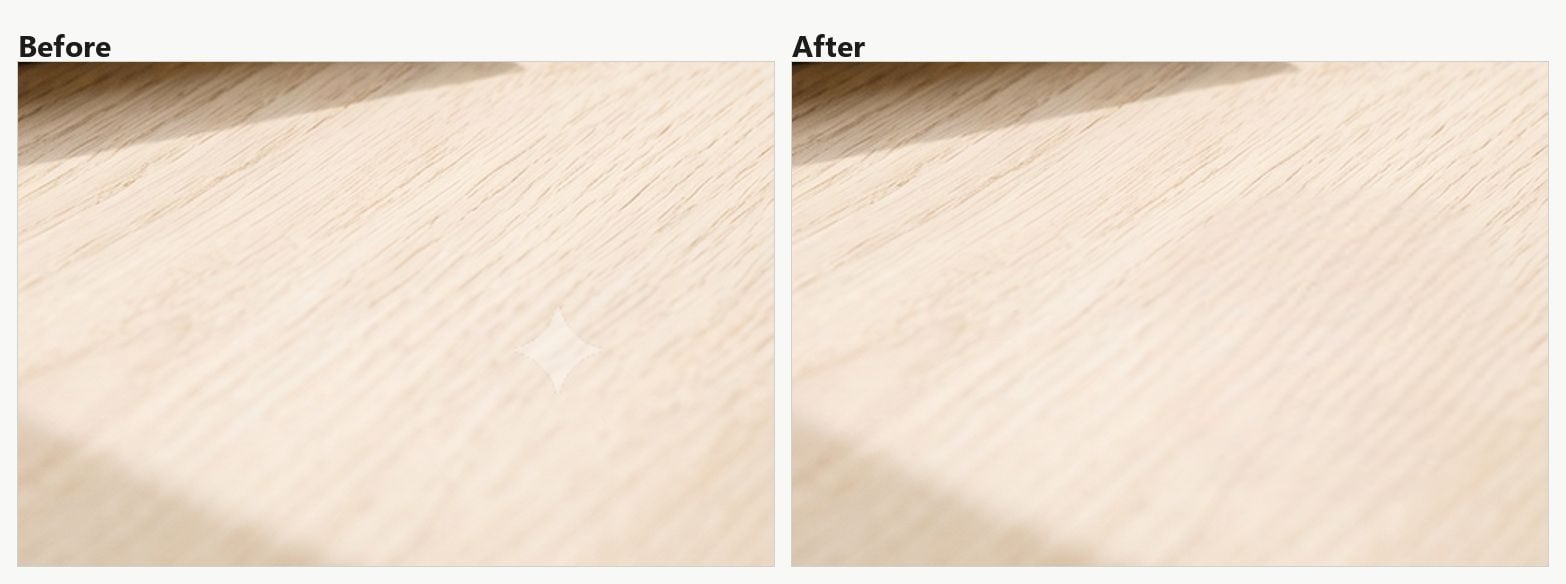
Two practical notes. The tool has to invent what was underneath the badge, so a corner with flat sky or plain desk repaints cleanly while a corner full of small detail takes a second pass. That is the same behaviour described in our walkthrough on removing objects from photos, just on a much smaller selection.
Several of the single-purpose Gemini pages take a different route, and say so on the tin: they know the exact shape and opacity of the badge, so they reverse the alpha blend arithmetically and recover the original pixels instead of guessing at them.
That is a cleaner result on the corner itself. The arithmetic also depends on knowing the overlay in advance, so the same page has nothing to offer a date stamp or a logo somewhere else in the frame.
Gemini Watermark Remover vs SynthID: What Stays in the Image
Now for what sits under the badge. Google's developer documentation states the rule for image output in one line: all generated images include a SynthID watermark. DeepMind describes it as imperceptible to humans but detectable by SynthID's technology, and says the image version is designed to stand up to modifications like cropping, adding filters, changing frame rates, or lossy compression.
Read that list again next to what a badge eraser does. Repainting a few thousand pixels in one corner is a smaller change than a crop. Google's published list stops at those four edit types, which leaves the corner repaint outside anything the vendor has claimed in writing, and a durability claim by a vendor is still a claim. Hence the check below.
The scale gives some sense of how seriously Google treats the layer. In a May 2026 post the company put the running total at over 100 billion images and videos watermarked, plus 60,000 years of audio, and said the verification feature had been used 50 million times worldwide.
| What you do to the file | Corner badge | Content Credentials | SynthID |
|---|---|---|---|
| Switch Media watermark off first | Not applied | Still written | Still embedded |
| Erase the badge in a browser tool | Gone | Dropped when the file is re-encoded | Outside Google's published list, so see the check below |
| Crop the corner away | Gone | Depends on the editor | On Google's list |
| Re-save as a compressed JPEG | Untouched | Often stripped | On Google's list |
| Screenshot the picture | Untouched | Gone | Not addressed in Google's published list |
We Erased the Badge, Then Asked Gemini to Check the Image
The Gemini app has been able to answer this question since November 2025: upload a picture, ask whether Google AI made it, and SynthID decides the answer. So the test writes itself. Take a stamped image, erase the sparkle with the browser eraser described above, then hand the cleaned file back to Gemini and ask.

The answer came back as a single line: "Most or all of this image was edited or generated with Google AI."
Worth noting what that file had been through before Gemini saw it. The picture was resized to half its width, run through the eraser, exported as a fresh PNG with no Content Credentials left inside it, and compressed again on upload. The mark held through all four steps.
C2PA Content Credentials Ride Along in the File
The third layer behaves differently from both of the others. Google uses C2PA Content Credentials across a growing number of its generative media tools, and in May 2026 it added Content Credentials verification to the Gemini app, with Search and Chrome following. Pixel 10 writes the same kind of record for photos taken with its own camera.
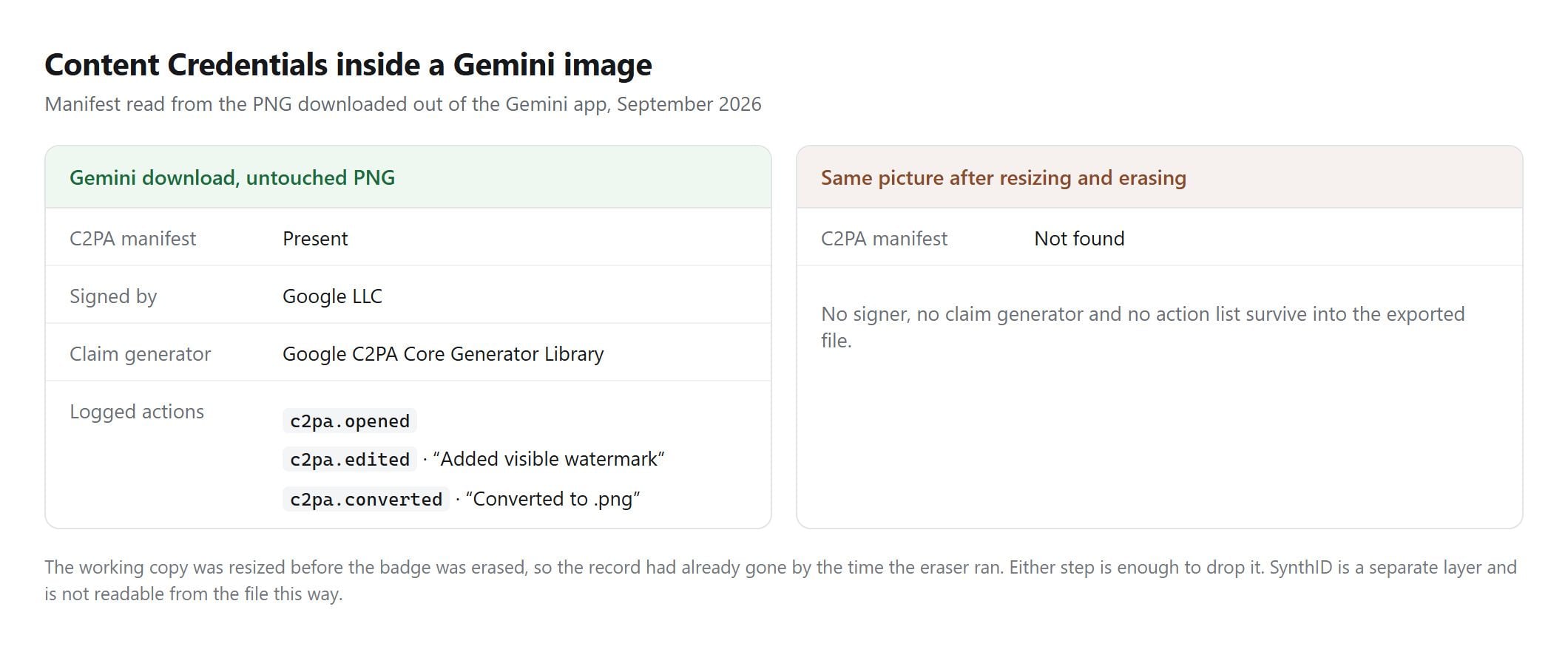
We opened the manifest on the file used for this article. Google LLC signs it, the claim generator names itself Google C2PA Core Generator Library, and the action list spells out what happened: c2pa.edited with the description "Added visible watermark", alongside a second entry recording the conversion to PNG.
The badge therefore leaves two traces. One sits in the pixels and comes off with an eraser. The other sits in the manifest as a logged edit, and it goes on saying a watermark was added.
Credentials live in the file's metadata rather than in the picture, which makes them the fragile layer. Re-encode the image, screenshot it, or run it through a tool that rewrites the file, and the record can simply not be there on the other side.
Is It Okay to Remove the Gemini Watermark From Your Own Image?
Google draws its line in a narrower place than the question suggests. The prohibited use policy bars "misrepresenting the provenance of generated content by claiming it was created solely by a human, in order to deceive". The badge is not mentioned. The lie is.
Ownership gets misreported too. One of the removal pages ranking for this search frames the badge as Google keeping a claim on your picture, and Google's terms of service say the opposite: some services let you generate original content, and Google will not claim ownership over it.
Publishing into the EU adds a layer that has nothing to do with Google. Article 50 of the AI Act has applied since 2 August 2026. It puts a machine-readable marking duty on providers of systems that generate synthetic content, and a disclosure duty on deployers who publish a deepfake. SynthID is Google discharging the first duty. The second one is yours, and a clean corner does not discharge it.
| Rule | What it says | What it means for your file |
|---|---|---|
| Google prohibited use policy | Bars misrepresenting provenance by claiming human authorship in order to deceive | Erasing the badge is not the trigger. The false claim is. |
| Google terms of service | Google will not claim ownership over content you generate | The picture is yours to use, badge or no badge |
| EU AI Act Article 50 | Machine-readable marking for providers, deepfake disclosure for deployers | Applies since August 2026 to what you publish in the EU |
None of this is legal advice, and the disclosure duty turns on what you publish and where, so check your own situation before betting a campaign on it.
Which Route Fits the Image in Front of You
Chances are one row of the table below is yours and the rest are not. The answer depends less on which tool you pick than on whether the picture already exists.
| Your situation | What to do |
|---|---|
| Image not generated yet | Switch Media watermark off in Gemini settings, then prompt |
| File already downloaded | Erase the corner in a browser-side eraser |
| On Google AI Ultra, or generating in AI Studio | Nothing to remove |
| In India, South Korea or Vietnam | The setting needs AI Ultra, so erase after the fact instead |
| Publishing where disclosure rules apply | Keep a label on the work even once the badge is gone |
If the corner repaint is one step in a longer edit, the rest of the browser-side set lives on Atlas Cloud's free tools page.
FAQ
How do I remove the watermark from a Nano Banana image?
Same badge, same two routes. Nano Banana is the model behind Gemini's image output, so a picture from it carries the identical corner sparkle: turn the Media watermark setting off before you generate, or erase the corner afterwards in a browser eraser. Knowing they are one problem saves you hunting for a Nano Banana specific tool that does not need to exist.
Why do I still see a watermark after paying for Google AI Pro?
Because the exemption Google announced covered Google AI Ultra and AI Studio, and Pro was not on that list. Since August 2026 the tier question matters much less anyway: the Media watermark switch sits in settings, and Google's help page names only India, South Korea and Vietnam as places where seeing it requires AI Ultra. Check the setting before you assume the subscription is broken.
Can I use the image commercially once the badge is gone?
Google's terms say it does not claim ownership of content you generate, so the commercial question turns on your own use rather than on the sparkle. What changes nothing is the removal itself: a de-badged image carries exactly the same rights, and the same SynthID, as the stamped version you started with.
Is there a free Gemini watermark cleaner that works on video?
Browser erasers of the kind described here work frame by frame on still images, so a clip needs a video editor rather than an image tool. For video the setting route is the practical one, because Gemini applies its video mark as a persistent overlay across the whole clip and removing that after the fact is a far bigger job than cleaning one corner.
Conclusion
The corner sparkle turns out to be the least interesting thing about a Gemini image. Google now hands you a switch for it, so a whole category of one-click pages is solving a problem you can prevent in three clicks, and for the pictures already on your disk a browser eraser repaints the corner without the file going anywhere. That part is genuinely easy.
What does not move is the layer underneath. Google puts SynthID in every image Gemini generates and built it to survive the edits people actually perform, and the Gemini app will read it back for anyone who thinks to ask. Treat a Gemini watermark remover as a cosmetic tool for your own work, keep saying where the picture came from when it matters, and the corner of the frame stops being something you have to think about.





