A small business owner with one product photo and a launch date does not have a design budget. That is the exact situation the best free AI ad generators are supposed to solve, and it is also where most of them quietly fall short. Some cap you at a handful of credits a day. Some stamp a watermark across the download. One popular pick, as of this week, does not have a free plan at all anymore.
We spent the first week of September 2026 reading the live pricing, terms and help-center pages of ten AI ad generator tools, because free-tier rules in this category change without much notice. Three questions decided the ranking: how much is genuinely free, does the output carry a watermark or a licence catch, and can you use it in a real ad campaign without a second look at the terms. The tool that starts from your own product photo instead of a blank prompt sits at the top for that reason.
Key Takeaways
- Ten tools, tested against the same three questions: how much is actually free, does the output carry a watermark, and can you use it in a real campaign.
- Atlas Cloud's free AI ad generatorturns one product photo and one sentence into a finished ad, with the first generation free after sign-in.
- Canva and Adobe Express both fold a real AI allowance into an existing free plan instead of a separate trial.
- Two long-repeated "free" listings turned out to be stale: Predis.ai's own pricing page no longer shows a free plan, and Venngage's free ads cannot be downloaded at all.
- Free does not always mean clearto publish. Microsoft Designer's own terms describe its output as personal, non-commercial use.
Free AI Ad Generator Comparison Table
Five of these ten hand over a free tier worth using, needing little more than an account to start. Three ask for that same account and still add a watermark or a usage cap tight enough to notice. Two do not have a standing free plan anymore, whatever an older blog post might say. The table below comes from each vendor's own pricing, help-center and terms pages, read on 2026-09-04.
| Tool | Best for | Free tier | Card required | Watermark on free output |
|---|---|---|---|---|
| Atlas Cloud AI Ad Generator | Turning one product photo into a posed ad | One free generation per account, then metered | No | No |
| Canva | Ad templates for Instagram, Facebook, YouTube and Google Ads | Up to 200 Standard AI uses a month, resets monthly | No | No on AI images |
| Adobe Express | Commercially safe Firefly ad visuals | Free daily generations, count not published | No | Disputed, see below |
| Sivi | Display banners in IAB sizes | 12 AI banners a month | No | No |
| Creatify | Multi-platform video ads from a product link | 10 monthly credits (one help page says 5) | Not stated | Yes |
| Microsoft Designer | Personal design projects, not ad campaigns | Monthly AI credits, count not published | No | No |
| Venngage | Static ad visuals you can preview and share | 5 AI ad designs (pages disagree on the number) | No | Cannot download free designs at all |
| Predis.ai | Social and ad creative at volume | 7-day trial only, no standing free plan | Not confirmed | Not stated |
| AdCreative.ai | High-volume creative testing for paid media | 7-day trial only, no standing free plan | Yes | Not stated |
| Quickads.ai | AI image and video ad generation with a $0 tier | $0 tier exists, credit count not published | Not stated | No, across plans |
How We Tested Every Free AI Ad Generator on This List
Every entry here got the same treatment: read the vendor's live pricing page, its help-center articles on credits and watermarks, and, where one exists, its terms of service, all in the first week of September 2026. Marketing copy says one thing on a landing page and something else in the FAQ often enough that a single page is not proof of anything.
Four things decided where a tool landed:
- Free-tier honesty: does the number the pricing page prints match what the help center and the terms of service say, and does it survive being read on the day of publication rather than trusted from an older roundup.
- Output ownership: can the free download be used in an actual paid campaign, or does the licence quietly restrict it to personal use, a public gallery, or a trial that expires.
- Ad fit specifically: ad-size presets, ad copy generation, and whether the tool starts from a product photo rather than only a text prompt.
- What the free tier costs you before it costs money: a watermark, a locked download, a card on file, or a countdown.
Ad fit specifically got a hands-on check, not just a features page. We ran the same pencil sketch of a mug through every tool in the top five that would take an image, plus the same one-sentence brief for the ones that would not, and compared what came back rather than trusting a demo screenshot from the vendor.
Free-tier honesty carried the most weight, because it is the one thing the free AI ad generator roundups we read for comparison tend to skip. Predis.ai, ranked further down this list, turned out to be the clearest example. A close second, Simplified, gets the same treatment across the web and did not make the ten at all once we checked: its public pricing page has moved behind a login wall, and the last cached version showed a trial rather than a free plan.
Disclosure: Atlas Cloud publishes this article and operates the tool ranked first. No other tool paid for placement, and every other entry is described from its own published pages, read on the dates noted above.
| Criterion | What it checks | Why it matters for an ad |
|---|---|---|
| Free-tier honesty | Pricing page vs. help center vs. terms, read this week | Older roundups quote numbers vendors have since removed |
| Output ownership | Personal use, public gallery, or cleared for a campaign | A free ad you cannot publish is not a free ad |
| Ad fit | Product photo input, ad sizes, copy generation | Separates ad-specific tools from general design apps |
| Free-tier friction | Watermark, locked download, card, or countdown | The real cost of "free" before any money changes hands |
1. Atlas Cloud: Best Free AI Ad Generator for Product Photo Ads
Most tools on this list start from a text prompt and hope the image they invent looks like your product. Atlas Cloud's free AI ad generator starts from the product itself. Upload one photo up to 10MB, write a single sentence covering who the ad is for, the mood, and any exact headline in quotation marks, and the tool returns a finished 1152 by 2048 poster with that headline rendered as typed.
Why it stands out: the headline lands on the poster exactly as written, in quotation marks, rather than as a suggestion the model might rephrase. The tool page's own words are "Type an exact headline in quotation marks and it lands on the poster as written," which matters for anyone who has watched a text-to-image model invent its own slogan.
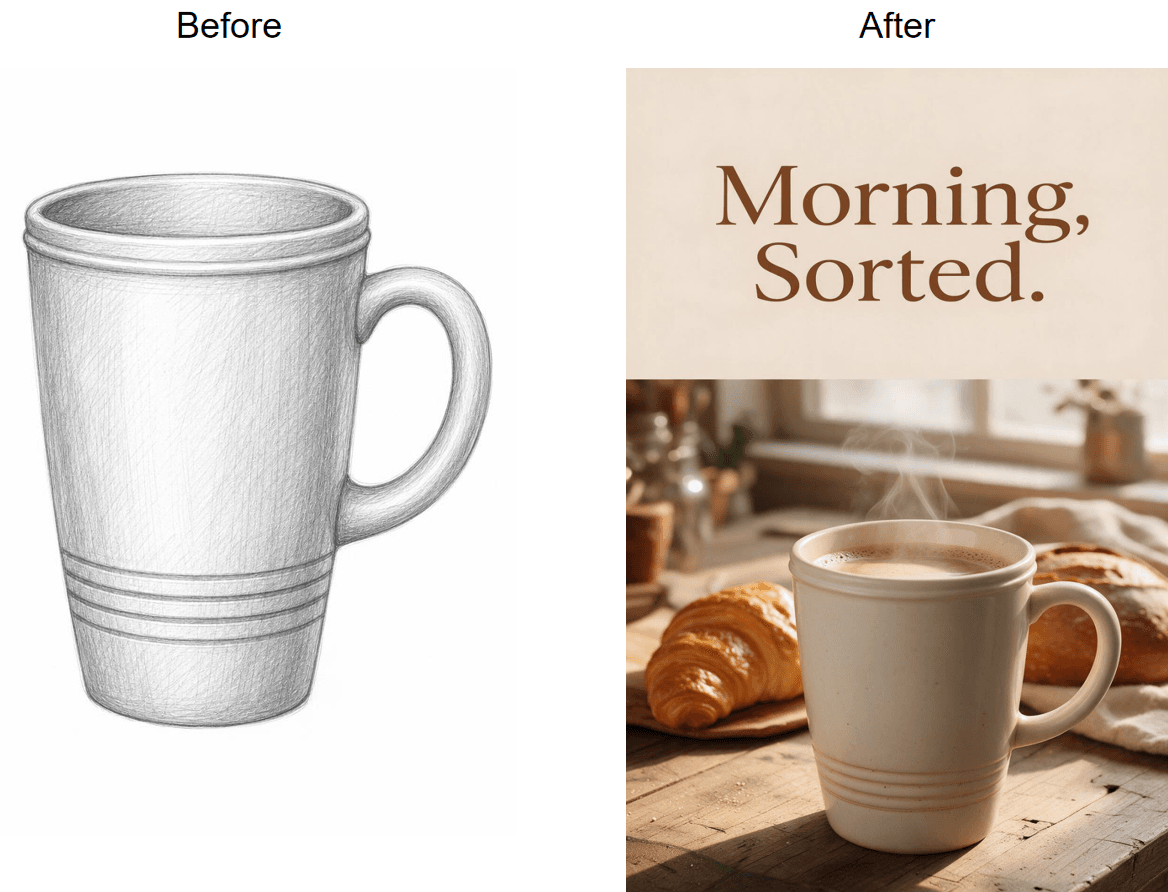
We ran the same pencil sketch of a mug through Creatify and Adobe Express further down this list, and both handed it back still drawn, wrapped in a template rather than turned into a product. Atlas Cloud is the one that read the sketch as a real mug and rendered it as one: same tapered body, same handle, same three grooves near the base, now ceramic and sitting on a wood counter with a croissant and a loaf of bread beside it.
Best for: sellers who already have a clean product shot and need a launch, listing or story ad today without opening a design editor.
Pricing: every account gets one free generation after signing in. Later runs switch to metered billing from a prepaid balance rather than a subscription, so there is no bundle to buy up front.
Method 1: Run It in the Free Tool
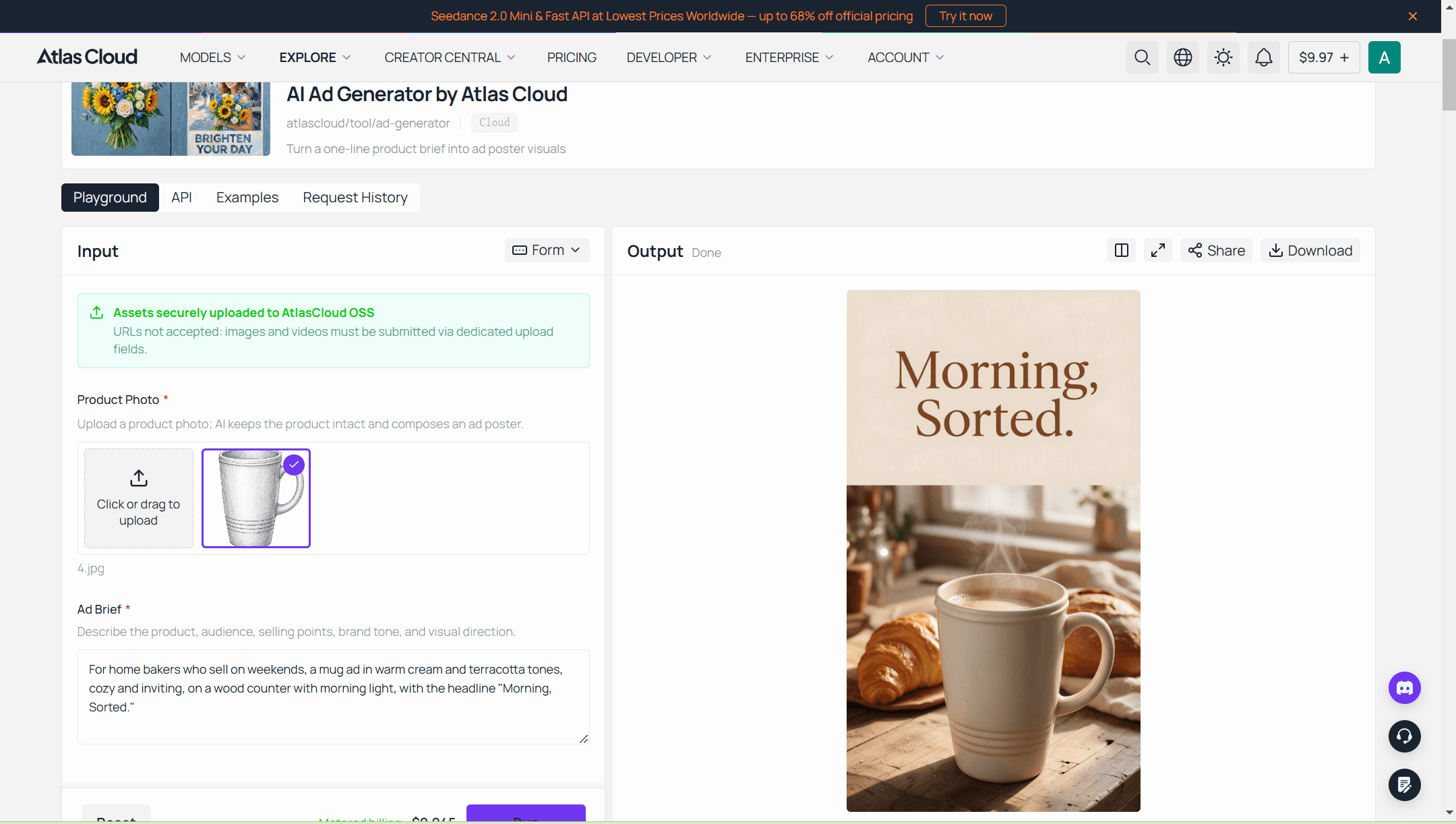
Sign in to Atlas Cloud and open the free AI ad generator. The page walks through three steps in this order.
- Add photo and brief. One sentence covers the audience, the mood, and the exact headline in quotes. Example: For home bakers who sell on weekends, a mug ad in warm cream and terracotta tones, cozy and inviting, on a wood counter with morning light, with the headline "Morning, Sorted."
- Run the generator. The first poster on a new account is free. Every run after that shows the metered price before you commit.
- Download the poster. It arrives as a standard 9:16 image ready to post or resize.
The same hub of free AI tools sits next to a background remover for messy packshots and a UGC product ad tool that turns the same photo into a short presenter video, which is the route to take once a still ad needs to move. Readers who need a wider view of poster-style tools specifically, banners and print sizes included, will find that in our AI poster generator ranking.
Method 2: Batch Ad Photos Through the API
The browser tool is built for one ad at a time. A catalogue of fifty products needs the API instead, and it runs on the same model under a public name: atlascloud/tool/ad-generator.
One thing to know before writing code: the API version accepts a text brief only, with no image field, so the product is described rather than uploaded for this specific route. For batch jobs that must keep a real packshot intact, an image-edit model with reference images is the better fit, and our e-commerce ad creative playbooks cover that route.
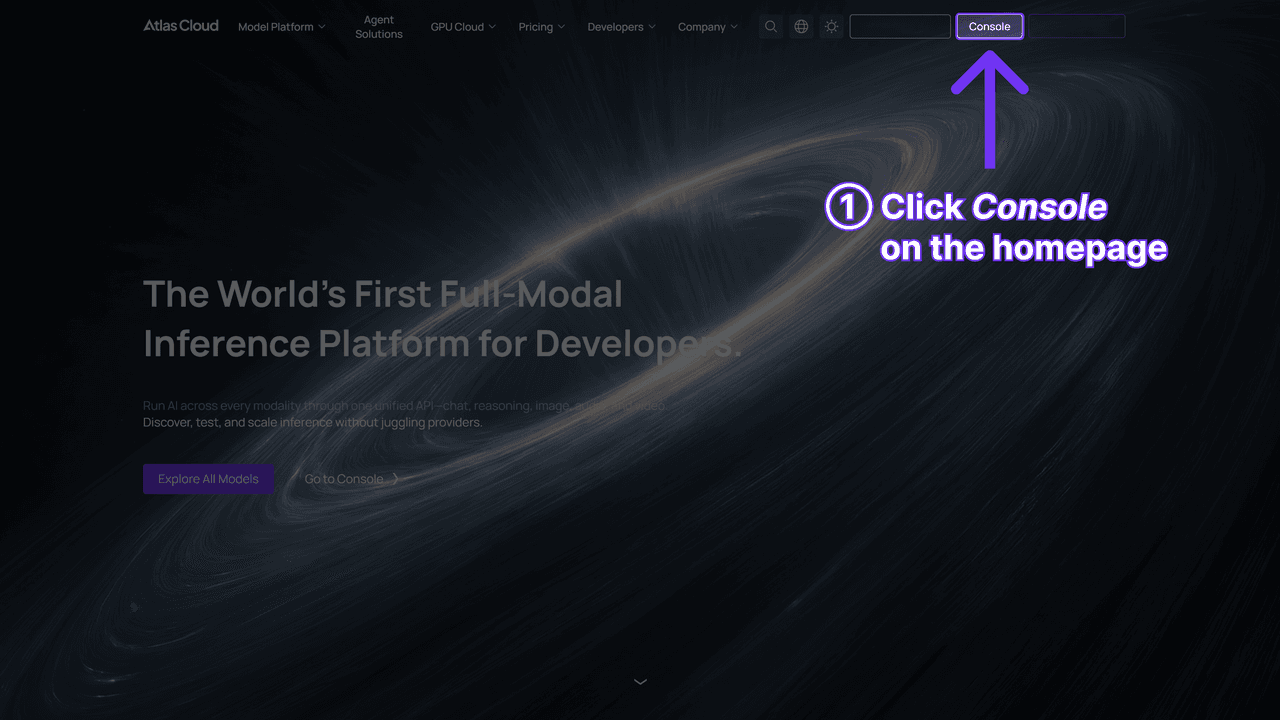
Step 1: Create an API key. Open the Atlas Cloud console, go to API Keys, click Create API Key, and copy the value before it is masked.
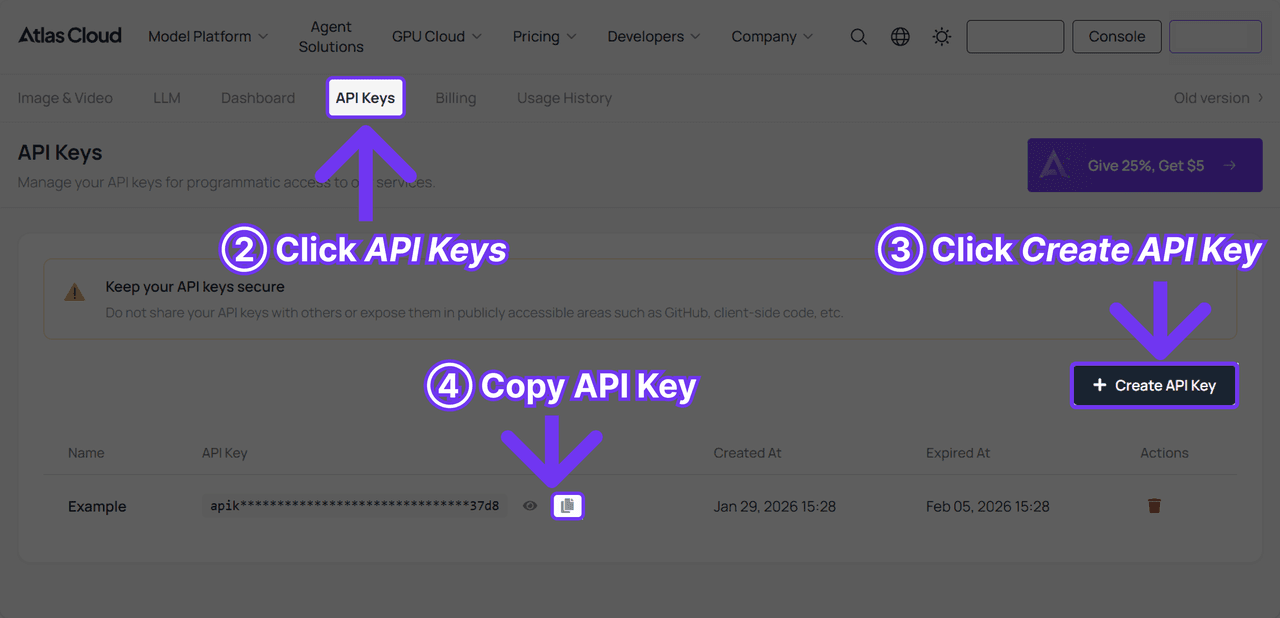
Step 2: Check the request format. Authentication, the submit endpoint and the polling contract are in the API documentation. For this model the body is just the model name and the brief.
Step 3: Send the first request, then poll. Submission returns a prediction ID right away, and the finished image URL arrives once the status turns to completed.
plaintext1curl -X POST https://api.atlascloud.ai/api/v1/model/generateImage \ 2 -H "Authorization: Bearer $ATLASCLOUD_API_KEY" \ 3 -H "Content-Type: application/json" \ 4 -d '{ 5 "model": "atlascloud/tool/ad-generator", 6 "prompt": "For home bakers who sell on weekends, a mug ad in warm cream and terracotta tones, cozy and inviting, on a wood counter with morning light, with the headline "Morning, Sorted."" 7 }'
plaintext1curl https://api.atlascloud.ai/api/v1/model/prediction/{prediction_id} \ 2 -H "Authorization: Bearer $ATLASCLOUD_API_KEY"
Every other image model on Atlas Cloud answers the same endpoint with the same key and the same polling loop. Swap the model string and a general text-to-image or an image-edit model with a real reference photo takes the same three calls, which is the whole point of one API.
2. Canva: Best Free AI Ad Generator for Multi-Platform Ad Templates
Canva's ad tools are not a separate product bolted onto a design app. Its free plan itself lists "Ad insights and AI ad creation" as a standard feature, and the free ad maker builds for Instagram, YouTube, Google Ads, Facebook and X from the same template library everyone already knows.
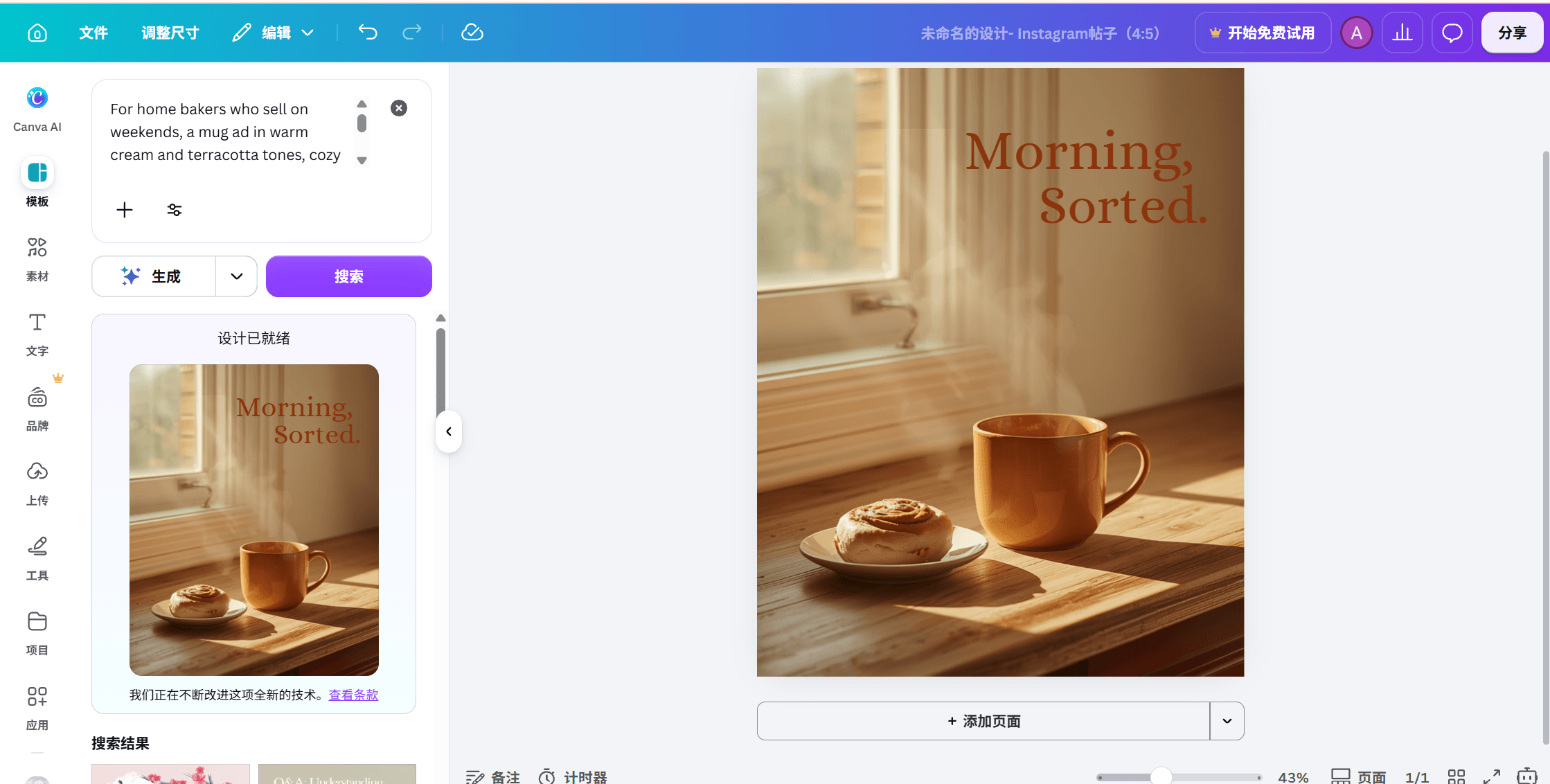
Where the free tier stops you: Canva's own AI-access help page states the allowance plainly, "Canva Free: Up to 200 uses of Standard AI tools, or up to 20 uses of Premium AI tools. No access to Ultra AI tools," and the allowance resets at the start of each month rather than running out for good.
What one usable ad actually costs: nothing while the monthly allowance holds, since the editor, the templates and the download are all free. Canva's Content License Agreement lists "advertising and promotional projects" among the uses a free-plan design is cleared for, so a finished ad is not stuck in personal-use limbo.
Where it falls short: Canva's AI image tools draw from a prompt, not an uploaded product photo placed into a scene, so getting your exact product into the frame means generating a background and layering your own cutout over it by hand.
Fits: anyone who already works in Canva and wants templated, on-brand ads across several platforms from one account. Not for you if: the ad has to show your product exactly as photographed, generated rather than layered in.
3. Adobe Express: Best Free AI Ad Generator for Commercially Safe Ad Visuals
Adobe Express pairs a free advertisement maker with Firefly's generative tools, and its own page for the ad maker opens with two lines that answer the two questions everyone asks first: "Free to use" and "No credit card required."
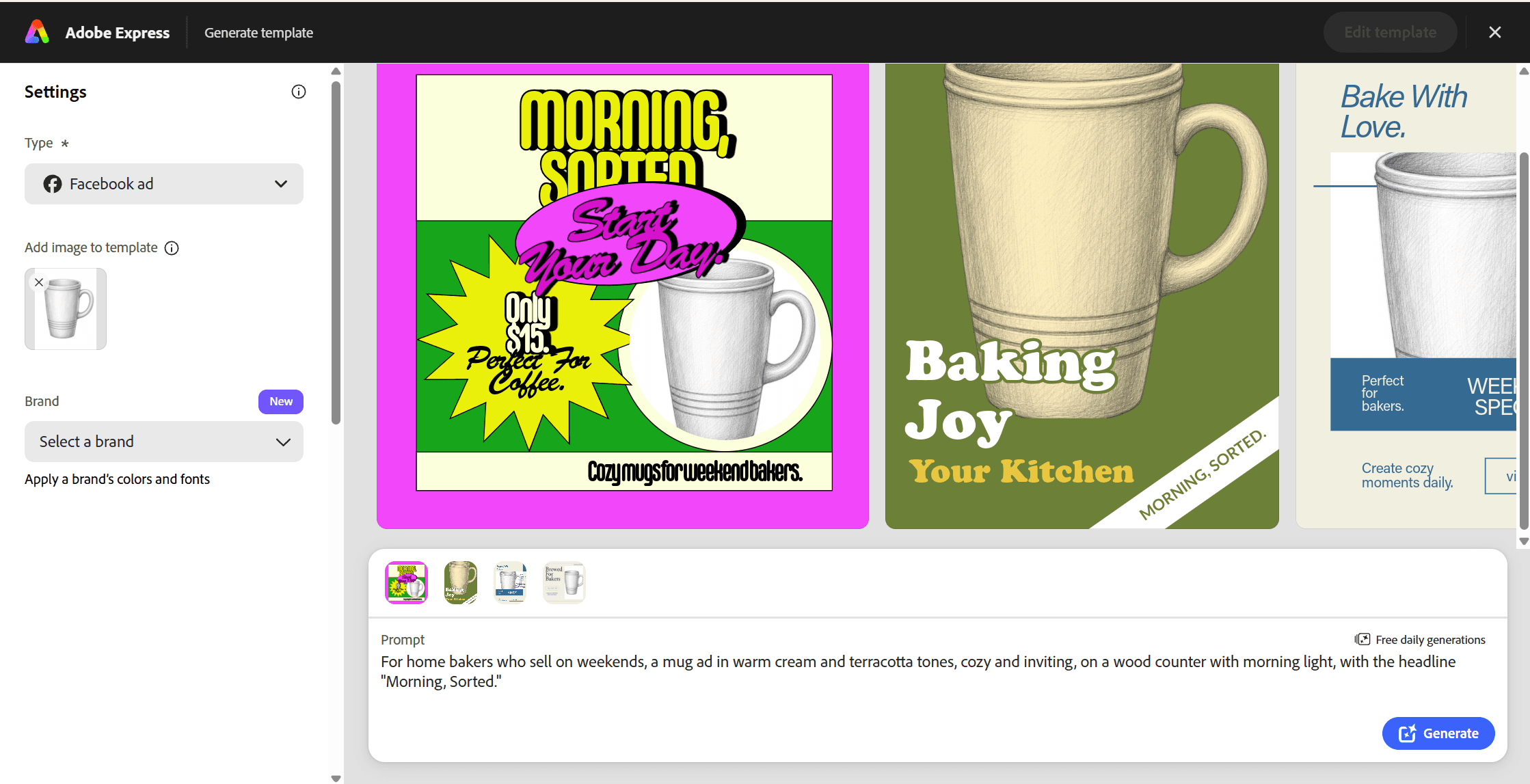
Where the free tier stops you: Adobe's own pricing table lists the free plan's allowance simply as "Free daily generations," without a fixed monthly number, while Premium names its allowance precisely at 250 generative credits a month. Support-forum threads describe a watermark on free-plan Firefly downloads that Premium removes, though Adobe's own generative AI terms only require that Content Credentials metadata stay attached rather than spelling out a visible watermark rule, so treat the exact behavior as unsettled until you check your own export.
What one usable ad actually costs: nothing for the templates and text tools, which stay free regardless of AI usage. Adobe's own pricing table describes the generative features as ones "designed to be commercially safe," though full IP indemnification for Firefly output is a benefit reserved for paid business plans, not the free tier.
Where it falls short: like Canva, the ad maker leans on a template rather than a single photoreal generation, and it shows. Feeding it the same mug sketch we ran through the free AI ad generator got a loud, pre-built comic layout back, price callout included, with the mug still drawn as a sketch rather than rendered as a product photo.
Fits: anyone who wants an ad maker with Adobe's stock library and font selection behind it, published straight to TikTok, Google, LinkedIn, Amazon, Facebook or Instagram from the same page. Not for you if: you need to confirm a specific dollar figure for Premium before switching, since Adobe's own page returned two different currencies on two reads today.
4. Sivi: Best Free AI Ad Generator for IAB Banner Sizes
Ads live in more shapes than a single 9:16 poster. Sivi is built around that fact: its own generate-ads page states, "For small and medium ad sizes, it costs one credit per ad," across a size list that includes IAB standards like 728 by 90, 300 by 250 and 160 by 600, plus Facebook, Instagram and LinkedIn formats.
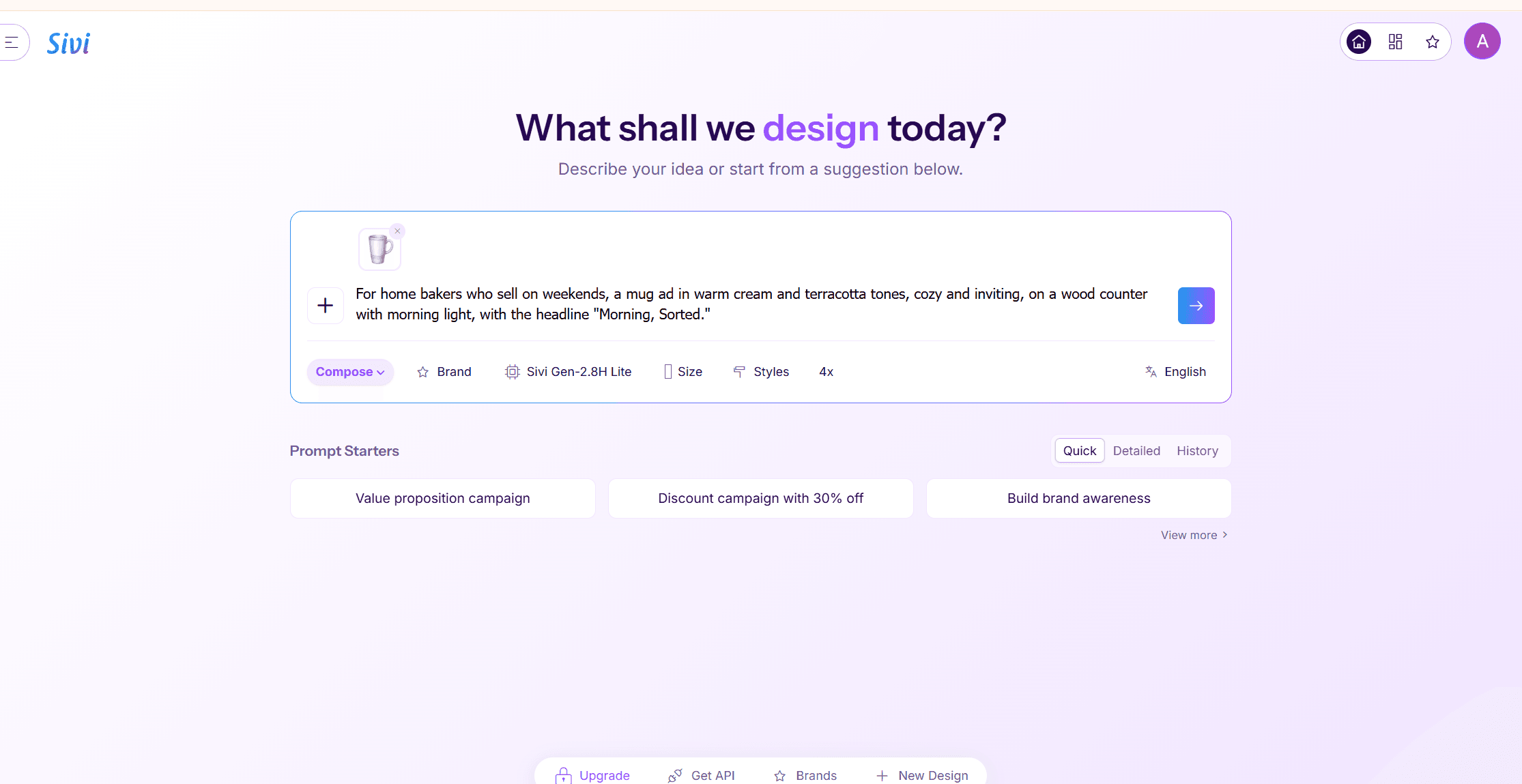
Where the free tier stops you: the pricing FAQ is direct about the number, "Sivi offers a freemium plan with 12 credits per month and 100 MB storage, no credit card required," which works out to roughly a dozen small ad sizes or two to three multi-variant briefs a month.
What one usable ad actually costs: nothing for the first twelve. Sivi's own FAQ adds that "commercial use is allowed on the free plan" and that generated ads can run "on platforms such as Meta, Google, LinkedIn, and TikTok" without a separate licence purchase.
Where it falls short: Sivi starts from a text brief or a pasted product URL rather than an uploaded photo, so the product in the banner is generated from a description, not your actual packshot.
Fits: anyone who needs one brief turned into a full set of banner sizes for a display campaign. Not for you if: the deliverable is a single vertical hero ad rather than a banner set.
5. Creatify: Best Free AI Ad Generator for Video Ads
Video is what sets Creatify apart from the four tools ranked above it, but it is not the only output. Sign-up hands over 10 credits, and the same account can spend them on "a product URL, image, or short brief" turned into a video ad rendered in 9:16, 16:9 and 1:1 at once, or on a static poster instead.
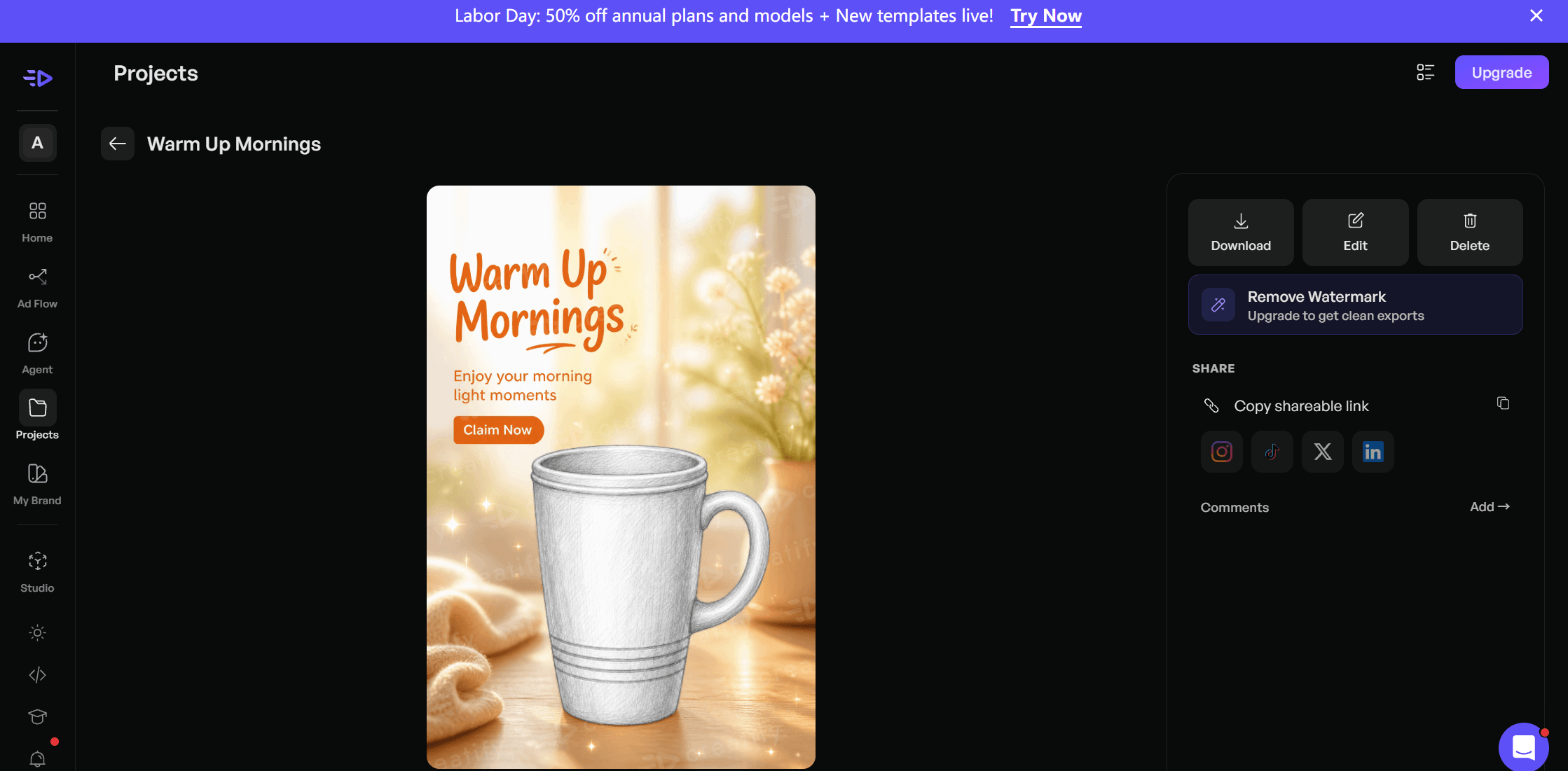
Where the free tier stops you: Creatify's own pages disagree with each other on the exact number. Its pricing FAQ says "the Free Plan includes 10 monthly credits," enough to "create up to 2 video ads or 20 image ads," while a separate FAQ page updated more recently says free users "receive 5 free credits every month." Our own test poster cost 2 credits, four times the roughly 0.5 credits per image ad that "20 image ads" from 10 credits implies. Either way, "all exports on the free plan will include a watermark," which Creatify's own help pages confirm plainly.
What one usable ad actually costs: the watermark stays until you upgrade, since removal is a paid-plan feature. Ownership is otherwise generous. Creatify's FAQ states, "You own all of your creatives, even after your plan ends. You can use them in any channel without limitations."
Where it falls short: ten credits a month covers a handful of posters or a couple of short video ads, and a watermarked ad is not something most brands will run as is. Unlike the product-photo route at the top of this list, our poster kept the sketch looking like a sketch. Creatify wrapped a background and copy around the drawing rather than rendering the mug as a photograph.
Fits: anyone testing whether AI-generated video ads are worth adopting before paying for a seat. Not for you if: the free output has to be publishable without a watermark on day one, or the product itself needs to look photographed rather than illustrated. For a fuller field of video-first options at every price point, see our video ad generator ranking.
The Other Five Free AI Ad Generators Worth Knowing
Each of these publishes its limits plainly, and each one has a catch specific enough to name.
6. Microsoft Designer
Free with a Microsoft account, with a monthly AI credit allowance Microsoft has not published an exact number for on any page we could find. The real catch sits in the licence, not the credit count.
Microsoft's own support FAQ states, "Designer is licensed for personal, non-commercial use with your Microsoft account," and its web terms of use for Designer separately say the product is "for personal use only and not for use in the course of trade or commerce." A different clause in the same document permits using Creations for "any legal purpose," so Microsoft's own documents do not fully agree with each other. For a tool people search for by name as an ad generator, that is worth reading before you build a campaign around it.
7. Venngage
Venngage runs a dedicated AI ad generator page promising free AI ad designs, and its own free-plan help articles state the trade-off in the same breath: "If you're using a free Venngage plan, downloading your designs isn't available." Free-plan work can be shared through a public link that anyone can open, but not downloaded as a file. A free ad you can only preview is not the same as a free ad you can post.
8. Predis.ai
Multiple older roundups describe Predis.ai as offering a free plan with a set number of posts a month. Its live pricing page, read this week, shows no free plan at all, only three paid tiers starting at Core, alongside a 7-day free trial. If a "best free" list you find elsewhere quotes a specific free allowance for Predis.ai, check the date on that article before trusting the number.
9. AdCreative.ai
The name behind the "AI ad creative generator" search itself is not a free tool by any current measure. Its own help center confirms a credit card is required at signup, stating plainly, "We require a credit card at sign-up to ensure seamless access to all premium features," and the trial converts into a paid Starter subscription automatically once the 7 days run out. Our full AdCreative.ai alternative comparison breaks down what that subscription costs per ad.
10. Quickads.ai
The closest thing to a genuinely free entry point among the pricier tools on this list. Quickads.ai's pricing page lists a $0 tier called DIY Creatives with AI image and video ad generation built in, and a separate line on the same page promises "No Watermark on Downloads" across its plans. Elsewhere the site describes one-click deployment to "YouTube, TikTok, Meta, or Google," though it is not clear from the page whether that publishing step is part of the $0 tier or a managed add-on.
Its terms of service grant a licence to use downloaded content "solely for legitimate commercial uses (e.g., marketing, promotions)." The number of free credits that $0 tier includes is not published anywhere on the site, which keeps it out of the top five until that changes.
Does a Free AI-Generated Ad Need a Disclosure Label?
None of these ten tools ask you to label your ad as AI-made before you post it. Whether the platform you post it to already knows is a different question, and the answer has changed twice in the last year.
TikTok has required a label on realistic AI-generated content since September 2023. Its own newsroom post is specific about scope: "the policy requires people to label AI-generated content that contains realistic images, audio or video," using either the platform's built-in label "or other types of disclosures, like a sticker or caption," and it applies regardless of which tool made the content.
Meta's system works differently and has moved further recently. Its ads transparency post, most recently updated on June 1, 2026, describes an automatic detection layer that now looks for third-party AI editing, not just Meta's own tools: "we will also begin automatically detecting ads created or edited using third-party AI tools through industry-standard signals," surfacing an "AI info" label inside a new "About this ad" panel behind the three-dot menu on every ad. That detection is separate from mandatory self-disclosure, which Meta still limits to ads about social issues, elections and politics.
| Platform | What triggers a label | Who has to add it | Source year |
|---|---|---|---|
| TikTok | Realistic AI-generated image, audio or video | The creator, via a built-in label or caption | 2023 |
| Meta | Automatic detection of AI editing, any advertiser | Meta's system; self-disclosure required only for social-issue, election and political ads | 2025, updated 2026 |
Consumers are more used to seeing this than advertisers expect. Industry group IAB surveyed 505 US consumers and 104 advertising executives for its "The AI Ad Gap Widens" report and found a real perception gap: 82% of executives assumed consumers feel positive about AI-made ads, while only 45% of consumers actually said so, a 37-point gap that grew from 32 points the year before. On the more encouraging side, 71% of consumers say they have already seen an AI-made ad, and 73% say a disclosure label either helps or does not hurt their purchase intent.
What to do instead: run the ad through the same eye you would apply to any creative before it goes live, since a detection layer is now watching for edits either way. If the audience skews younger, weigh a voluntary label. IAB's data shows Gen Z reacts negatively to AI-made ads at roughly double the rate millennials do, so the label that costs you nothing to add may be the one that avoids a worse reaction to finding out later.
What Do Verified Reviewers Say About Free AI Ad Generators?
Star ratings on a review platform will not tell you whether a specific free tier is generous. They will tell you whether the people who paid to find out stuck around, and a few numbers here are worth reading twice.
| Tool | Platform | Score | Reviews | Read on |
|---|---|---|---|---|
| Canva | Trustpilot | 4.0 / 5 | 6,934 | 2026-09-04 |
| Sivi | Trustpilot | 4.1 / 5 | 11 | 2026-09-04 |
| Venngage | Trustpilot | 4.7 / 5 | 201 | 2026-09-04 |
| Creatify | Trustpilot | 3.9 / 5 | 825 | 2026-09-04 |
| AdCreative.ai | Trustpilot | 3.4 / 5 | 4,496 | 2026-09-04 |
| Adobe Express | Trustpilot | 2.6 / 5 | 7 | 2026-09-04 |
A couple of these need context the number alone will not give you. Adobe Express's dedicated Trustpilot page has only seven reviews, too small a sample to mean much either way, and it should not be confused with the parent adobe.com page, which carries thousands of reviews dominated by billing complaints about Creative Cloud subscriptions generally rather than the free Express ad maker specifically.
Creatify's 825 reviews include a notable one-star share, close to a sixth of the total, which lines up with the watermark and credit-count confusion its own help pages already show. Venngage's own Trustpilot page, despite the highest score of the group, includes at least one review pointing out that its rolling credit system undercuts the "Unlimited Designs" language on its pricing page, the same tension between marketing copy and fine print that shows up across most of this list.
AdCreative.ai's own reply to a September 2026 review acknowledges the mechanic behind its most common complaint directly: cancelling "schedules the account to close at the end of that billing term rather than immediately, and automated payment retries may still occur for the open invoice."
Frequently Asked Questions
What is the best free AI ad generator in 2026?
There is no single tool that wins every case. Atlas Cloud's free AI ad generator is the strongest pick if you already have a product photo and want a finished ad in one run. Canva and Adobe Express are the better fit for anyone who wants ad templates and a real monthly AI allowance inside a free plan they will use for other design work too.
Can I create ads for free without a credit card?
Most of the tools on this list, including Atlas Cloud, Canva, Adobe Express, Sivi and Quickads.ai, ask for nothing more than an account to start. AdCreative.ai is the clear exception: its 7-day trial explicitly requires a card at signup and converts to a paid subscription automatically once the trial ends.
Do free AI ad generators add a watermark?
It depends on the tool. Atlas Cloud, Canva, Sivi, Microsoft Designer and Quickads.ai all confirm no watermark on free output. Creatify's own help pages confirm the opposite, watermarking every free-plan export. Adobe Express sits in between, with support-forum reports of a watermark that Adobe's own contract language does not spell out clearly either way.
Is there a free AI ad creative generator without any sign-up?
Not among the ten covered here. Every tool, including the ones with the most generous free tier, requires at least an email account before you can generate anything.
Can a free AI ad generator use my own product photo?
Atlas Cloud requires a photo upload as its core input. Sivi accepts a product page URL instead of an image file. Canva and Adobe Express can restyle or place an uploaded photo through a separate step, though their core ad-template flow starts from a text prompt rather than the photo itself.
Is a free AI-generated ad actually cleared to run in a paid campaign?
Usually, but check the specific tool. Canva's licence explicitly lists advertising and promotional projects among permitted uses of AI-generated content, and Sivi and Quickads.ai both state commercial use is allowed on their free plans. Microsoft Designer is the exception worth flagging: its own terms describe Designer's output as personal, non-commercial use, which makes it a poor fit for an actual ad campaign regardless of how generous its credits are.
Conclusion
Ten tools, and the split that matters most is not price. It is whether the free tier hands you something you can actually publish. Atlas Cloud, Canva, Adobe Express, Sivi and Quickads.ai all clear that bar in different ways: a real allowance, no watermark, and terms that name advertising as a permitted use. Creatify and Venngage clear it partway, a watermark on one and a locked download on the other. Microsoft Designer's own paperwork argues against using it for a campaign at all, whatever its credit count looks like.
Start with the shortest path for the job in front of you. If a product photo and a headline are all you have, run one through the free AI ad generator and see the finished poster before you open anything else. If the job needs a full set of platform sizes or a moving ad instead, Canva, Sivi and Creatify each cover a different piece of that from here. Either way, read the free tier's fine print before you build a campaign around a tool that quietly stopped offering one.





