GPT Image 2は、画像1枚あたりUSD0.008という低コストで実用的な素材を生成します。このモデルはプロンプトを構造化することで最大限の力を発揮します。入力が曖昧だとストックフォトのような出力になりますが、具体的かつ詳細に入力すれば、そのまま製品に使用できるクオリティの画像が生成されます。
本ガイドでは、コピー&ペーストして使える50以上のプロンプトを紹介します。これらはモデルの強みである「プロダクト撮影」「UIデザインモックアップ」「マーケティング用ビジュアル」の3つのカテゴリに整理されています。各プロンプトは、Atlas Cloud上のGPT Image 2 APIでテスト済みです。
ワンクリックで試せるコミュニティ投稿型のプロンプト集については、Atlas Cloud GPT Image 2 プロンプトハブをご覧ください。
*最終更新日:2026年5月4日*
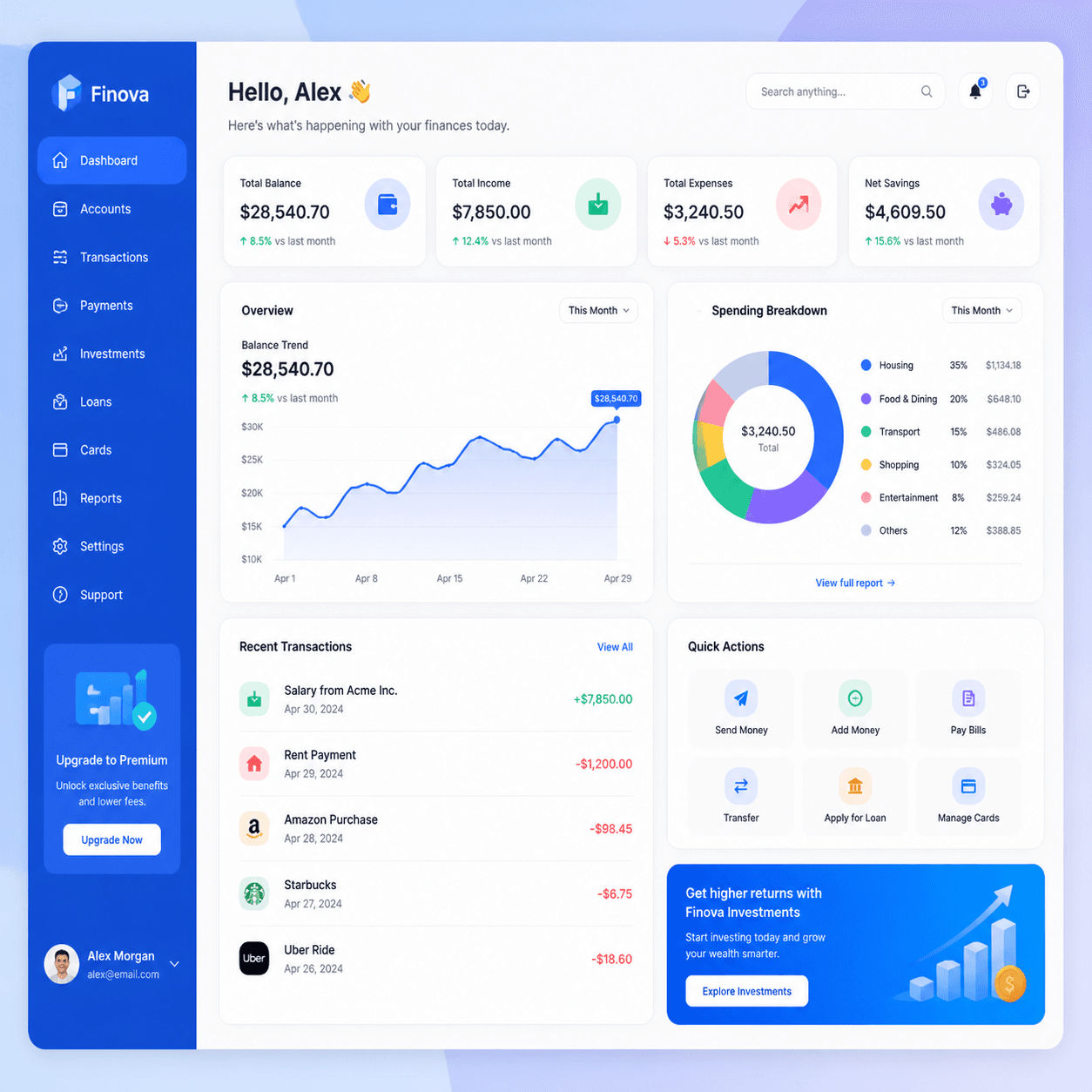
本ガイドのプロンプトで生成された実際の出力:


GPT Image 2 プロンプトの公式
優れたGPT Image 2のプロンプトは、すべて以下の5つの要素で構成されています。
plaintext1``` 2[被写体] + [構図] + [ライティング] + [色や雰囲気] + [スタイルアンカー] 3```
5つの短い句。1文で十分です。シーンに要素が多い場合は、短い段落にするとより効果的です。
数百のプロンプトを実行して得られた重要な原則:
- 被写体を先頭に置く。 「マットブラックのセラミック製コーヒーマグ」とするのが正解で、「コーヒーマグの美しい画像」は避けます。モデルは名詞を最初に解析します。
- 構図を指定する。 「クローズアップ」「ワイドショット」「真上からの視点(フラットレイ)」「斜め4分の3の視点」など。一言でフレーミング全体が変わります。
- ライティングを指定する。 「柔らかい窓からの光」「スタジオソフトボックス」「ゴールデンアワー」「ネオンのリムライト」など。被写体以上にライティングが印象を左右します。
- 最後にスタイルアンカーを追加する。 「プロフェッショナルな商品撮影」「Figma UIモックアップ」「雑誌のエディトリアル写真」など。これでレンダリングスタイルを固定します。
- プロンプトを60ワード以内に収める。 長いプロンプトも機能しますが、繰り返しの試行が遅くなります。価格はどちらも同じです。
GPT Image 2はGPT-5ベースであるため、長いプロンプトも理解します。複雑なレイアウト(UIダッシュボードやマルチパネルのシーン)には長いプロンプトを、それ以外には短いプロンプトを使用してください。
品質とサイズの選択
段階に応じて `quality` を選択してください:
- `low`:プロンプトの調整用。高速でUSD0.008。構図を判断するには十分です。
- `medium`:レビューや大半のプロダクション出力用。より鮮明なディテールが得られ、価格は同じです。
- `high`:最終的なヒーロー素材やテキストを含むもの用。低速(約30秒)ですが、価格は同じです。
用途に応じて `size` を選択してください:
- `1024x1024`:商品撮影、SNS、アプリ内画像、迷った場合。
- `1024x1536`:ポートレート、モバイルモックアップ、全身の被写体。
- `1536x1024`:デスクトップバナー、ブログのヘッダー、ワイドなUIモックアップ。
価格はサイズや品質に関係なく一定です。予算ではなく、用途に合わせて選んでください。
カテゴリ1:プロダクト撮影(17個のプロンプト)
プロダクト撮影は、GPT Image 2が最も安定してこなせるカテゴリです。素材感、ライティング、クリーンな背景の扱いに優れています。ECサイトのモックアップ、ブランドデッキ、SNS投稿、ピッチ資料などに活用してください。
1. ミニマルなテーブルトップの商品写真
plaintext1``` 2Modern minimalist product photo of a matte black ceramic coffee mug on a 3warm wooden tabletop, soft window light from the left, neutral cream 4background, shallow depth of field, professional product photography 5```
万能なプロンプトです。被写体を入れ替えて使ってください。
2. スタジオの白背景商品写真
plaintext1``` 2Studio product photography of a wireless over-ear headphone in matte 3graphite finish, centered on a clean pure-white background, soft even 4lighting from above, subtle drop shadow, ecommerce listing photo 5```
Amazon風の出品写真やカタログ向けです。「subtle drop shadow(繊細なドロップシャドウ)」が、ただ切り抜いたような画像とプロっぽい写真の差を生みます。
3. 真上からのフラットレイ
plaintext1``` 2Overhead flat lay of skincare bottles, eucalyptus leaves, and a folded 3linen towel on a pale concrete surface, soft diffused daylight, muted 4sage green and warm beige palette, editorial product styling 5```
GPT Image 2のフラットレイ出力は非常に強力です。食品、文房具、テックアクセサリーなど、あらゆる製品セットに応用できます。
4. ライフスタイル商品写真
plaintext1``` 2Lifestyle product shot of a person in a cream knit sweater holding a 3ceramic mug of coffee in both hands, sitting by a window in a sunlit 4modern kitchen, warm morning light, shallow depth of field, lifestyle 5brand photography 6```
顔に焦点を当てないことで、ポートレート撮影時の弱点が出ないようにしています。
5. プレミアム飲料ボトル
plaintext1``` 2Photorealistic product photography of a tall amber glass beverage bottle 3with minimal craft branding, condensation droplets on the surface, deep 4shadow on a dark slate background, single dramatic side light, premium 5beverage marketing photography 6```
暗くてムーディーな飲料のショットは得意分野です。クラフトビール、コーヒー、コンブチャ、健康飲料などに最適です。
6. 大理石上のコスメ商品
plaintext1``` 2Macro product shot of a frosted glass perfume bottle on a polished white 3marble slab, soft pink rose petals scattered around, golden afternoon 4window light, luxury cosmetic photography, shallow depth of field 5```
コスメや美容関連に。「大理石+花びら」の組み合わせは、苦労せずとも高級感を演出できます。
7. グラデーション上のフローティング商品
plaintext1``` 2Floating product photo of a sleek matte white wireless earbuds case 3suspended above a pale lavender to peach gradient background, clean 4soft shadow below, modern minimalist tech product photography 5```
アプリストアのアイコン、ヒーローバナー、ブランドサイト向け。「浮遊+グラデーション」は現代的なAppleスタイルの美学です。
8. パッケージのモックアップ
plaintext1``` 2Product packaging mockup of a small kraft paper coffee bag standing 3upright on a wooden surface, custom label with bold serif brand name 4"NORTH ROAST" centered, mountain illustration in deep amber, soft 5window light, branding mockup style 6```
デザイナーに依頼する前のブランド検討用。プロンプト内でブランドテキストを指定してください。
9. 箱入りギフトのヒーローショット
plaintext1``` 2Hero product photo of a premium gift box opened to reveal a leather 3journal and a fountain pen inside, cream silk lining, single warm 4overhead spotlight, dark walnut wood background, luxury retail 5photography 6```
ホリデーシーズンやギフト関連のマーケティング用。横幅に余裕を持たせているので、後からテキストを重ねやすくなっています。
10. アウトドアライフスタイル
plaintext1``` 2Outdoor lifestyle product shot of a navy blue insulated water bottle 3sitting on a moss-covered rock beside a forest stream, dappled sunlight 4through trees, natural color grading, adventure brand photography 5```
アウトドアやフィットネスブランド向け。スタジオ撮影よりも自然環境のほうが適しています。
11. 食品のヒーローショット
plaintext1``` 2Top-down hero shot of a ceramic bowl of ramen with soft-boiled egg, 3green onions, and nori on a dark linen tablecloth, soft moody window 4light from one side, steam rising visible, editorial food photography 5```
食品カテゴリは強力です。温かい料理の場合は必ず「steam rising visible(立ち昇る蒸気)」を指定してください。
12. アパレルのフラットレイ
plaintext1``` 2Overhead flat lay of a folded white linen shirt, brown leather belt, 3worn denim jeans, and a pair of canvas sneakers on a pale oak floor, 4soft natural daylight, editorial menswear styling, neutral color palette 5```
ファッションやアパレルカテゴリ用。床や素材を指定するとより現実味が増します。
13. テック商品のスケッチモックアップ
plaintext1``` 2Premium tech product photography of a thin matte black laptop floating 3above a clean marble desk, soft pastel gradient background of cream and 4pale lavender, editorial product launch layout, wide cinematic framing 5```
SaaSやテック製品のローンチバナー用。 `1536x1024` を使用してください。
14. ジュエリーのマクロ撮影
plaintext1``` 2Macro close-up product shot of a gold ring with a small emerald stone 3on black velvet, single dramatic top light creating sharp catchlights, 4soft falloff into shadow, luxury jewelry photography, ultra-shallow 5depth of field 6```
ジュエリーにはマクロフレーミングと暗い表面が必要です。「キャッチライト(輝き)」の指示が重要です。
15. 家具のヒーローショット
plaintext1``` 2Wide product photo of a mid-century modern walnut armchair with cream 3linen upholstery, positioned on a soft beige rug in a sunlit minimalist 4living room, large window casting long shadows, editorial interior 5photography 6```
家具や雑貨用。部屋の文脈が製品の魅力を伝えます。
16. 文房具のヒーローショット
plaintext1``` 2Overhead flat lay of a leather-bound notebook open to a blank page, a 3brass fountain pen, a small stack of postcards, and a steaming espresso 4cup on a worn wooden desk, warm afternoon light, editorial stationery 5photography 6```
ソフトグッズ、文房具、クラフトブランド向け。
17. ECサイトのバリエーション表示
plaintext1``` 2Product photography of a single matte ceramic vase in three colorways: 3sage green on the left, terracotta in the center, deep navy on the 4right, identical lighting and shadow, clean white background, ecommerce 5catalog grid layout 6```
ストアフロントやピッチデッキでのバリエーション表示用。
カテゴリ2:UIとデザインのモックアップ(17個のプロンプト)
GPT Image 2は、他のモデルよりも確実に画像内にテキストをレンダリングできます。実際の動作するUIを作るのではなく、UIの画像が必要なデザイン検討の際に役立ちます。ランディングページ、ピッチデッキ、提案用モックアップ、コンセプトアートに活用してください。
18. SaaSダッシュボード
plaintext1``` 2Flat design illustration of a fintech dashboard mockup with line charts, 3KPI cards, and a sidebar navigation, soft gradient background, modern 4SaaS branding, vibrant blue and white color scheme, isometric perspective 5```
ランディングページや提案用資料向け。「アイソメトリック視点」にすることで、現代的なSaaS風の斜めスクリーン表示になります。
19. モバイルアプリのコンセプト画面
plaintext1``` 2Mobile app concept screen showing a clean meditation app interface, 3soft pastel gradient background, minimal sans-serif typography, floating 4cards with rounded corners, single iPhone mockup, soft shadow below 5```
Figmaで作り込む前のアプリコンセプト検討用。
20. ダークモードの料金ページ
plaintext1``` 2Dark-mode SaaS pricing page mockup in a browser frame, three pricing 3cards labeled "Starter $0", "Pro $29", "Team $99", subtle blue and 4purple accent colors, clean sans-serif typography, modern landing page 5design, isometric desktop view 6```
Atlas Cloud プロンプトハブの「ダークモードAI API料金ページモックアップ」に触発されたものです。
21. ライトモードのマーケティングサイト・ヒーロー
plaintext1``` 2Light-mode SaaS marketing site hero section in a browser frame, large 3serif headline "Build calmer software" centered at top, subhead in 4sans-serif below, two CTA buttons, soft cream background with subtle 5gradient mesh, modern landing page mockup 6```
ピッチデッキやブランド検討用。
22. CRMダッシュボード
plaintext1``` 2Modern CRM dashboard mockup, dark sidebar with navigation icons, main 3content showing a kanban board with three columns labeled "Lead", 4"Qualified", "Closed", colorful card tags, subtle drop shadows, clean 5flat design UI mockup 6```
営業ツールやCRMのコンセプト用。
23. モバイルウォレットアプリ
plaintext1``` 2Mobile fintech wallet app screen mockup, dark gradient background, 3large "$24,880" balance text, line chart of weekly spending, four 4quick-action icons in a row, recent transactions list with colored 5category tags, iPhone mockup with subtle shadow 6```
Atlas Cloud プロンプトハブのコミュニティ例に触発されたものです。
24. メールニュースレターのモックアップ
plaintext1``` 2AI newsletter page mockup in a desktop email client, header with 3publication name "PIXEL DIGEST" in bold serif, three story sections 4each with a thumbnail image and headline, soft cream background, clean 5editorial typography, subtle dividers between sections 6```
メディアブランドやニュースレターのコンセプト用。
25. 設定パネルUI
plaintext1``` 2Modern app settings panel UI mockup, light mode, sidebar with grouped 3settings categories, main panel showing toggle switches, dropdowns, and 4a profile section, soft drop shadows, clean Material Design influence, 5desktop browser frame 6```
あらゆるカテゴリで使える汎用的な設定画面のコンセプト。
26. 検索結果ページ
plaintext1``` 2Modern search results page mockup, top search bar with query "best 3indoor plants", results list with title, URL, and snippet, sidebar 4showing related searches, clean typography, light background, desktop 5browser layout 6```
SEOやコンテンツマーケティングの資料に役立ちます。
27. オンボーディングフロー
plaintext1``` 2Three-screen onboarding flow mockup for a habit-tracking mobile app, 3arranged side by side, each screen showing an illustration, headline, 4and CTA button, soft pastel color palette, rounded card aesthetic, 5iPhone mockups with light shadows 6```
ピッチデッキによく使われます。横に並べることでフローとして認識されます。
28. ブランドスタイルタイル
plaintext1``` 2Brand style tile composition with three logo variations, color palette 3swatches in muted earth tones, sample typography pairings, and texture 4swatches, arranged on a clean white background, art-direction reference 5sheet 6```
ピッチやブランドデッキ用。
29. デザインシステムページ
plaintext1``` 2Design system page mockup showing color tokens, typography scale, button 3variants, and form components, organized in clean grid sections, soft 4white background with subtle borders, modern Figma-style documentation 5layout 6```
デザインシステムや事例紹介のビジュアル用。
30. アナリティクスチャートUI
plaintext1``` 2Analytics dashboard widget mockup featuring a large line chart showing 3weekly active users, three KPI cards above, dropdown filters at top, 4clean white card on a soft gray background, modern data visualization 5UI 6```
ダッシュボード全体よりも、特定のチャートだけの方が役立つことも多いです。
31. iOSウィジェットセット
plaintext1``` 2iOS home screen widget set mockup showing four widgets in a 2x2 grid: 3weather, calendar, music player, and step counter, blurred lavender 4gradient background, clean Apple-style design language, subtle drop 5shadows 6```
iOSアプリの機能紹介ページ用。
32. 管理者テーブルビュー
plaintext1``` 2Admin panel table view mockup, dark mode, columns labeled "Name", 3"Email", "Status", "Last Active", colored status pills, search bar at 4top, pagination controls at bottom, clean SaaS interface design 5```
社内ツールのコンセプト検討用。
33. カレンダーアプリUI
plaintext1``` 2Calendar app interface mockup showing a week view with colored event 3blocks across seven days, sidebar with mini month picker and event list, 4soft pastel category colors, clean white background, modern productivity 5app design 6```
生産性向上アプリやスケジュール管理アプリのコンセプト用。
34. チャットUIモックアップ
plaintext1``` 2Modern messaging app interface mockup, three-pane layout with 3conversation list on left, active chat in center showing message 4bubbles, profile panel on right, light mode with soft accent colors, 5desktop browser frame 6```
チームチャットやカスタマーサポートツールのコンセプト用。
カテゴリ3:マーケティング用ビジュアル(16個のプロンプト)
マーケティング用ビジュアルは、ヒーローバナー、SNS投稿、ポスター、インフォグラフィック、広告、エディトリアルイラストまで多岐にわたります。GPT Image 2の強力なテキストレンダリングと幅広いスタイルは、あらゆるマーケティング面に適しています。
35. エディトリアルイラスト
plaintext1``` 2Editorial vector illustration of a person working at a laptop with 3floating UI elements around them, muted pastel color palette, simple 4geometric shapes, modern flat design with subtle gradient shading, 5The New Yorker editorial style 6```
ブログヘッダーや記事のメイン画像用。出版物名を指定するとスタイルが固定されます。
36. ヒーローバナー
plaintext1``` 2Wide cinematic shot of a sleek electric vehicle parked on a coastal 3cliff road at sunset, ocean horizon in the background, warm golden 4hour light, dramatic sky with low clouds, clean automotive marketing 5photography 6```
ヒーローバナーには `1536x1024` を使用してください。
37. SNS引用カード
plaintext1``` 2Social media quote card with the text "Build something small that 3actually ships" in clean sans-serif, centered on a soft cream 4background, subtle paper texture, minimal pastel sketch of a paper 5airplane in the corner, modern Instagram post layout 6```
LinkedIn、Instagram、Twitterの引用投稿用。
38. イベントポスター
plaintext1``` 2Minimal event poster design for a jazz festival, large serif title 3"AUTUMN JAZZ" centered at the top, smaller subtitle "OCTOBER 18-20" 4below, abstract trumpet illustration in deep burgundy and cream, 5clean editorial layout, vintage poster aesthetic 6```
タイトルや日付はほとんどの場合、明確にレンダリングされます。誤字があれば再生成してください。
39. 両面チラシのモックアップ
plaintext1``` 2Two-sided event flyer mockup arranged side by side on a wooden surface, 3front side shows a watercolor coffee cup illustration with event title 4"COFFEE PICNIC" in handwritten script, back side shows event details 5in clean sans-serif, soft natural light, casual stationery aesthetic 6```
Atlas Cloud プロンプトハブの「両面水彩イベントチラシ」に触発されたものです。
40. 製品ローンチのお知らせ
plaintext1``` 2Product launch announcement graphic, large bold sans-serif headline 3"NOW SHIPPING" centered, smaller tagline below, hero shot of the 4product in three-quarter view on a soft gradient background, modern 5tech brand aesthetic, square 1:1 social post layout 6```
TwitterやLinkedInのプレスリリース用。
41. パフォーマンスマーケティング広告
plaintext1``` 2Static ad creative for a meditation app, bold headline "8 minutes a 3day, less anxious in two weeks" on the left, calming illustration of 4a person in a mountain landscape on the right, soft pastel palette, 5clean sans-serif typography, modern Facebook ad layout 6```
ダイレクトレスポンス型の広告用。
42. 雑誌表紙モックアップ
plaintext1``` 2Magazine cover mockup for a tech publication, masthead "PIXEL 3QUARTERLY" at the top, large hero portrait of a person at a desk, 4cover headlines in a column on the left, clean editorial typography, 5glossy magazine aesthetic 6```
ブランドデッキなどの参考画像用。
43. インフォグラフィックポスター
plaintext1``` 2Vertical infographic poster summarizing five key statistics about 3remote work, large bold numbers paired with one-line captions, clean 4icon for each stat, soft gradient background, editorial data 5visualization style, modern Bloomberg-influenced layout 6```
LinkedInのカルーセル投稿やコンテンツマーケティング用。
44. エディトリアルデータチャート
plaintext1``` 2Editorial dual-axis line chart comparing two contrasting trends over 3ten years, clean newspaper-style layout with chart annotations and a 4short caption underneath, serif headline above, muted blue and orange 5data colors, white background, journalism-grade data visualization 6```
Atlas Cloud プロンプトハブのプロンプトを参考にしています。
45. ブランドパターン
plaintext1``` 2Repeating brand pattern of small geometric icons (circles, triangles, 3plus signs) in a balanced grid, soft pastel color palette of cream, 4sage, and dusty rose, clean modern brand asset, ready for use as a 5website background or packaging texture 6```
ブランドシステムや製品の表面素材用。
46. カンファレンス登壇スライド
plaintext1``` 2Conference keynote slide mockup, large bold title "THE NEW INTERFACE" 3centered, smaller subtitle below, three-column body content with icons 4and short captions, soft dark gradient background, modern tech keynote 5aesthetic, 16:9 widescreen layout 6```
`1536x1024` を使用。ピッチデッキでよく使われます。
47. YouTube動画サムネイル
plaintext1``` 2YouTube thumbnail composition with a surprised expression face on the 3left, bold yellow text "I tried it for 30 days" on the right, dark 4gradient background, vibrant high-contrast color palette, click-worthy 5thumbnail design, 16:9 layout 6```
クリエイターのマーケティング用。表情と太字テキストがこのジャンルの基本です。
48. ピッチデッキのセクション区切り
plaintext1``` 2Pitch deck section divider slide, large serif chapter number "03" on 3the left, section title "MARKET" in bold sans-serif on the right, 4clean white background with a single thin accent line, minimal 5editorial layout, 16:9 widescreen 6```
デッキの主要セクションの区切りに使用してください。
49. App Storeスクリーンショット枠
plaintext1``` 2App Store promotional screenshot, iPhone mockup centered on a soft 3gradient background, large bold headline "Track every habit" above 4the phone, supporting tagline below, vibrant marketing aesthetic, 59:16 portrait layout 6```
`1024x1536` を使用。App StoreやGoogle Playのプレビュー画像用。
50. メールヘッダーバナー
plaintext1``` 2Email newsletter header banner, brand logo on the left, simple line 3illustration of a coffee cup and notebook on the right, soft cream 4background, minimal sans-serif tagline below, clean modern email 5header design, wide horizontal layout 6```
SubstackやMailchimpのテンプレート用。
51. ブランドストーリーテリング
plaintext1``` 2Lifestyle brand storytelling hero shot, two friends laughing at a 3sunny outdoor cafe, warm golden hour light, shallow depth of field, 4muted earth tone color grading, editorial brand photography, wide 5cinematic framing 6```
「2人の人物+アクティビティ+暖かい光」という構成はDTCブランドの定番です。 `1536x1024` を使用してください。
ボーナス:編集プロンプト
編集モデルは、元画像とプロンプトを使用して画像を編集します。出力1枚につきUSD0.008と低コストです。
編集プロンプト:色の変更
plaintext1``` 2Change the mug color to deep forest green and add a small spoon resting 3beside it 4```
短く具体的に、1〜2箇所変更するのがコツです。
元画像:

編集後:

編集プロンプト:背景の変更
plaintext1``` 2Replace the background with a soft out-of-focus garden scene with warm 3afternoon light, keep the subject and lighting on the subject unchanged 4```
「keep ... unchanged(...は変更しない)」という指定が重要です。これがないと、被写体まで再生成されてしまいます。
編集プロンプト:詳細の追加
plaintext1``` 2Add a small black wireless headset around the person's neck, match the 3existing lighting and color grading, do not change anything else 4```
単一要素の追加は最も安定した編集結果が得られます。
編集プロンプト:スタイル転換
plaintext1``` 2Reinterpret this photo as a clean flat-design illustration with soft 3pastel colors and minimal geometric shapes, keep the composition and 4subject layout the same 5```
写真をイラストに変換する場合。何を残すべきかを詳しく指定してください。
編集プロンプト:テキストの変更
plaintext1``` 2Replace the text on the bag from "ATLAS ROAST" to "MORNING BLEND", 3keep the same font style, color, and placement 4```
古いテキストと新しいテキストの両方を引用してください。曖昧に指示するより確実です。
編集プロンプト:避けるべきこと
- 「もっと良くして」:アンカーがないため効果がありません。
- 1つのプロンプトで5つの変更:1回につき1〜2箇所に絞ってください。
- 曖昧な位置指定:「カップを動かして」ではなく「カップを右下に移動させて」と指定してください。
- 否定形のみの指示:何をすべきでないかではなく、何があるべきかを指示してください。
プロンプトの実行方法
atlascloud.aiにサインアップし、APIキーを作成します。
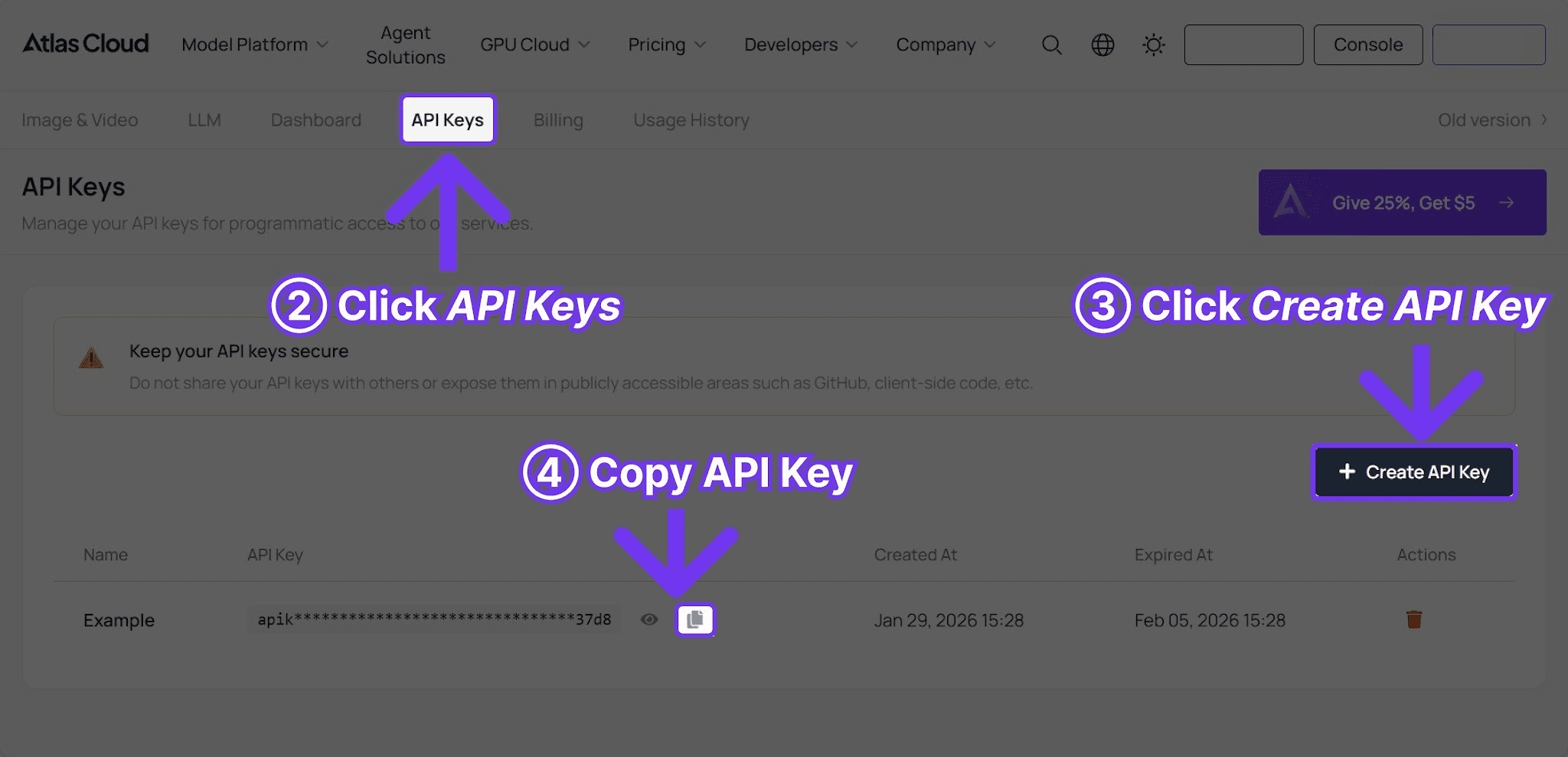
次に、以下のPythonスクリプトを使用します。本ガイドのプロンプトを貼り付けてください。
plaintext1```python 2import requests, time 3 4API_KEY = "your-atlas-cloud-api-key" 5BASE_URL = "https://api.atlascloud.ai/api/v1" 6 7resp = requests.post( 8 f"{BASE_URL}/model/generateImage", 9 headers={"Authorization": f"Bearer {API_KEY}", "Content-Type": "application/json"}, 10 json={ 11 "model": "openai/gpt-image-2/text-to-image", 12 "prompt": "PASTE PROMPT FROM THIS GUIDE", 13 "size": "1024x1024", 14 "quality": "low", 15 }, 16) 17poll_url = resp.json()["data"]["urls"]["get"] 18 19while True: 20 time.sleep(3) 21 s = requests.get(poll_url, headers={"Authorization": f"Bearer {API_KEY}"}).json()["data"] 22 if s["status"] == "completed": 23 print(s["outputs"][0]) 24 break 25```
編集プロンプトの場合は、モデルを `openai/gpt-image-2/edit` に変更し、元画像のURLを `images` フィールドに追加してください。詳細なコードはGPT Image 2 APIガイドをご覧ください。
イテレーション(反復)パターン
最も信頼性の高いワークフロー:
- `low` 品質で生成する。コスト:USD0.008。
- プロンプトを調整し、再度 `low` で実行する。コスト:USD0.008。
- 構図とライティングが適切になったら、最終生成のために `high` に切り替える。コスト:USD0.008。
1セットの試行にかかる費用は5セント未満です。編集の場合も、まずは `low` でモデルが変更を理解したか確認し、最後に `high` で再実行してください。
クイックリファレンス:効果的なプロンプトパーツ
ライティング:
- `soft window light from the left`(左からの柔らかな窓の光)
- `golden hour light, low sun angle`(ゴールデンアワーの光、低い太陽角)
- `studio softbox lighting on a clean white background`(白背景でのスタジオソフトボックス照明)
- `dramatic rim light against a dark backdrop`(暗い背景に対するドラマチックなリムライト)
- `soft diffused daylight, no harsh shadows`(柔らかな拡散された日光、強い影なし)
構図:
- `overhead flat lay`(真上からのフラットレイ)
- `wide cinematic shot`(ワイドな映画のようなショット)
- `close-up macro detail`(クローズアップのマクロ詳細)
- `three-quarter body portrait`(斜め4分の3の全身ポートレート)
- `isometric perspective`(アイソメトリック視点)
スタイルアンカー:
- `professional product photography`(プロの商品撮影)
- `editorial magazine photography`(雑誌のようなエディトリアル写真)
- `flat design illustration`(フラットデザインのイラスト)
- `modern SaaS UI mockup`(現代的なSaaS UIモックアップ)
- `lifestyle brand photography`(ライフスタイルブランド写真)
- `clean Scandinavian design aesthetic`(クリーンな北欧デザインの美学)
これらを組み合わせてみてください。本ガイドの商品撮影プロンプトのほとんどは(被写体+構図+ライティング+カラーパレット+スタイルアンカー)で構成されています。この基本形だけで数十の素材を作成可能です。
Atlas Cloud プロンプトハブでもっと見る
Atlas Cloudでは、数百ものプロンプトを掲載したコミュニティ主導のGPT Image 2 プロンプトハブを運営しています。各プロンプトにはサンプル画像とワンクリックで試せるボタンが付いています。UIモックアップ、インフォグラフィック、ポスター、アニメスタイルなどのカテゴリがあります。
基本の50個は本ガイドから使い、コミュニティのバリエーションや特定の美学の出発点を探したいときはハブを活用してください。
よくある質問
GPT Image 2のプロンプトはDALL-E 3と同じですか?
ほとんどの場合、はい。GPT-5ベースであるため、同じ英語の構造を理解します。主な違いは、GPT Image 2の方が長いプロンプトを維持しやすく、短いテキストのレンダリングが安定している点です。
プロンプトはどれくらいの長さが良いですか?
20〜60ワードが最適です。これより長くても問題ありませんが、効果は限定的です。これより短いとライティングやスタイルが欠落しがちです。
ブランド名を理解しますか?
汎用的なスタイル(`Funko Pop style`、`New Yorker illustration style`)や一般的な参照は理解しますが、商標登録されたロゴや特定のキャラクターの複製は避けるようになっています。
ネガティブプロンプトは使えますか?
`negative_prompt` フィールドはありません。代わりにメインプロンプト内で `clean background, no text, no watermark` のように自然言語で記述してください。
生成画像が正しくない場合は?
まずは同じプロンプトを再実行してください。シード値が異なるため、2〜3回目には著しく良い結果が出ることがよくあります。費用はUSD0.008のままです。
編集モデルを使うべきか、再生成すべきか?
元画像に保持すべきもの(構図、人物、ブランド要素)がある場合は編集モデルを使用します。プロンプト自体が間違っていた場合は再生成してください。
コミュニティのプロンプトはどこで見られますか?
Atlas Cloud GPT Image 2 プロンプトハブに数百のプロンプトがあり、ワンクリックでアカウントを使用して試すことができます。
総評
GPT Image 2は、最もプロンプトフレンドリーな画像モデルの1つです。短く構造化されたプロンプトで実用的な出力が得られます。長いプロンプトも機能し、編集プロンプトも具体的で範囲が限定されていれば非常に安定しています。
低価格であるため、試行錯誤の考え方も変わります。10種類のバリエーションを作ることにコストの痛みはありません。`low` で素早くイテレーションし、最終版を `high` でコミットしてください。
────────────────────────────────────────────────────────────





