


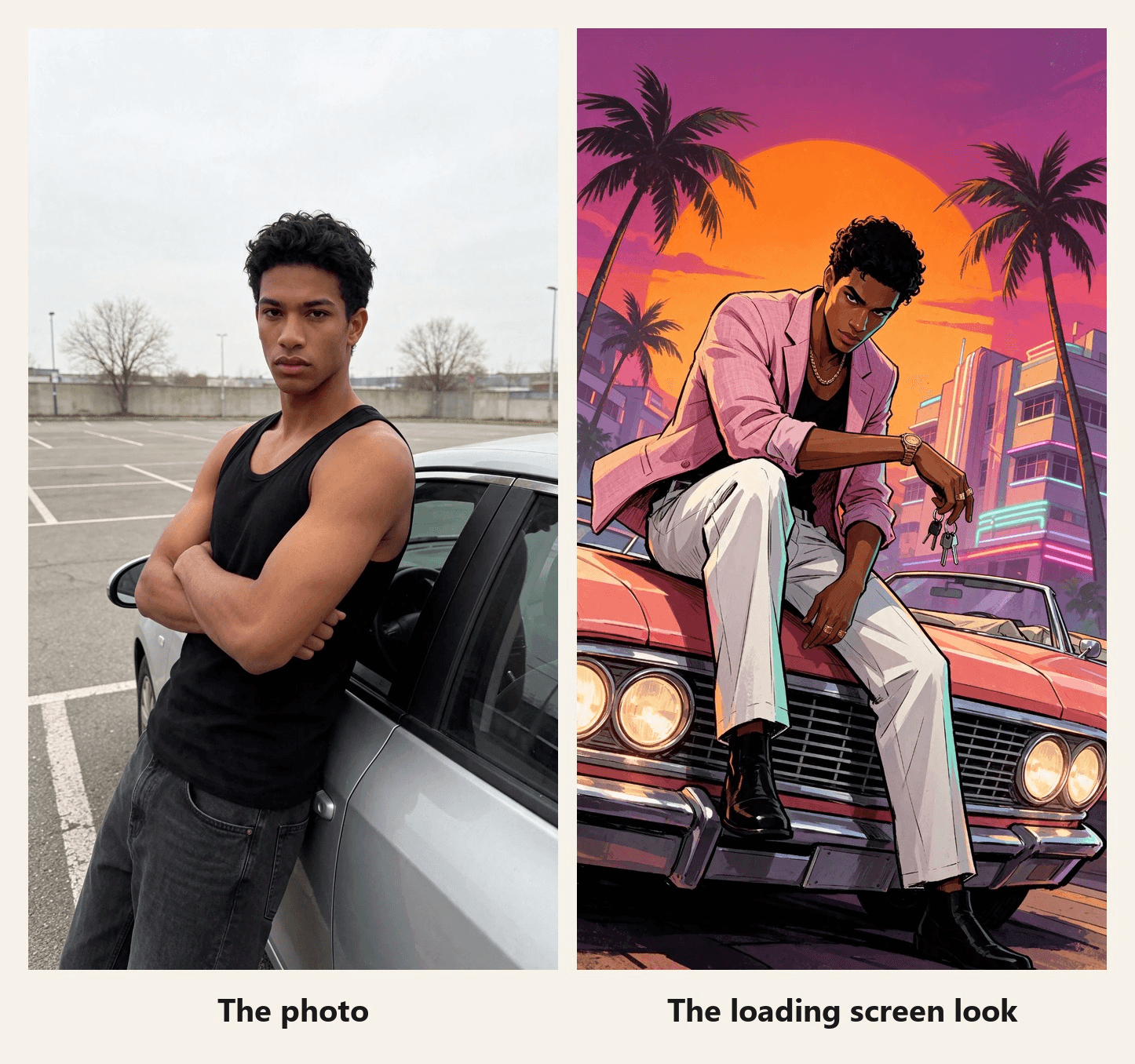
黒いタンクトップの男性が、灰色の駐車場でシルバーのセダンにもたれかかっている。ローディングバーのように光る線がフレームを上っていき、その下のすべてが夕暮れに変わる。ピンクのブレザー、珊瑚色のコンバーチブル、ヤシの木。この入れ替わりが、今週人々が投稿しているGTAフィルターだ。2026年11月19日にGTA 6のローンチを数日後に控えたタイミングのことだ。
それらの投稿の元になっているのはCapCutのテンプレートで、静止したポスターで終わる。このガイドではそのテンプレートの名前と数値を示す。そして、Atlas Cloud上で1枚の写真から、キャラクターが動き続けるバージョンを作る。
主なポイント
- 今週TikTokに投稿されたGTAフィルターは、GTA 6 Screen AIというCapCutテンプレートで、Rockstar製ではなくクリエイター製だ。
- そのCapCutページには、2026年11月16日、GTA 6のローンチ3日前の時点で155,763回の使用が表示されていた。
- このテンプレートは静止ポスターで終わるが、 Atlas Cloudの動画生成ツールは、公開後もキャラクターを動かし続ける。
- GTA風のAIプロンプトで指定するのは4つ。自分の特徴、ローカメラアングル、態度のあるポーズ、そしてインク調のフラットカラー。
- 自分のバージョンにはゲームのロゴとキャラクターを入れず、ファンメイドと明記しよう。
TikTokのGTAフィルタートレンドとは?
まずひとつ整理しておこう。GTA 6フィルターを検索すると、返ってくるものの一部は、ゲームのローンチトレーラーの霞んだ見た目についてファンが議論しているものだ。このガイドで扱うのはもうひとつの意味、つまりあなたの写真をローディング画面のアートに変えるエフェクトだ。
そのエフェクトはCapCutのテンプレートだ。#gtafilterのローディング画面の投稿を開いて、CapCutテンプレートのリンクをタップすると、JDCapcutによるGTA 6 Screen AIにたどり着く。プレビューでは「Your GTA 6 loading screen」というキャプション付きのミラー自撮りが流れ、フレームが下から上へワイプされ、最後に同じ人物が夕日の中で車にもたれかかるイラスト版が残る。
| GTA 6 Screen AI | 2026年11月16日の時点で確認できた内容 |
|---|---|
| クリエイター | JDCapcut |
| 作成日 | 2026年8月27日 |
| 使用回数 | 155,763 |
| 長さと形状 | 約8秒、9:16 |
| クリップ枠 | 2 |
| 終わり方 | ゲームのロゴが重ねられた静止イラスト |
テンプレート自体は数か月前からあるが、この波は新しい。#gtafilter、#gta6filter、#gta6aifilterで開いた投稿のほぼすべてが、ローンチ前週にあたる11月10日から16日の日付だった。
「グッバイ GTA V」動画:もうひとつのGTA 6フィルタートレンド
同じハッシュタグに乗る第二のフォーマットは、フィルターというより短編映画だ。11月14日に投稿されたクリップでは、少年が2013年に桟橋でGTA Vの3人の主人公に出会い、2026年に大人になって戻ってきて彼らを抱きしめて別れを告げる。長さは30秒で、11月16日までに36万回再生を超えた。
CapCutには同じアイデアで作られたテンプレート、ArtemisCCのGTA5 to GTA6 2がある。プレビューでは、若者がビーチでGTA Vの3人の主人公を抱きしめ、次にネオンの街でGTA VIの2人の主人公の隣に現れる。
| GTA5 to GTA6 2 | 2026年11月16日の時点で確認できた内容 |
|---|---|
| クリエイター | ArtemisCC |
| 作成日 | 2026年11月14日 |
| 使用回数 | 1,776 |
| 長さ | 13秒 |
| 画面に映るもの | あなたと、ゲーム本編のキャラクターたち |
最後の行が重要だ。グッバイフォーマットはRockstarのキャラクターに依存しており、どちらのテンプレートも結果にゲームのロゴを刻み込む。以下のバージョンはどちらも使わない。
1枚の写真からGTAローディング画面のAI動画を作る方法
テンプレートのポスターは静止したままだ。Atlas Cloudならそれを動かせる。画像モデルがあなたの写真をローディング画面として描き直し、Seedance 2.5が写真からアートへと移行するクリップを、独自のサウンド付きで生成する。
両方のステップはひとつのワークスペースで完結し、クリップはAI動画生成ツールで仕上がる。
最初の2秒間は普通のスマホ動画だ。線が上昇し、その下では彼はすでにピンクのブレザーを着ている。そして描画は続く。彼はドアから体を離し、コンバーチブルのところまで歩き、ヘッドライトが点き、頭の後ろに太陽を背負ってボンネットに腰を下ろす。サウンドも生成される。プロンプトでは、線とともに盛り上がるシンセ、ブーツの足音、ヘッドライトのカチッという音を指定している。
このカットでは、そのサウンドの上に楽曲を重ね、3つの瞬間をビートに合わせた。ワイプの終わり、ヘッドライト、そして最後のポーズだ。2か所はタイミングを合わせるために数パーセント遅くし、各ヒットでフレームをわずかにプッシュインしている。
方法1:動画生成ツールでリビールを作る
まず静止画から始める。動画はそれをラストフレームとして必要とするからだ。画像生成ツールを開き、Image Editタブに切り替え、ModelsでSeedream v5.5を選ぶ。写真をアップロードし、2K(1584*2816)の9:16サイズを選び、以下のプロンプトを貼り付けてRunを押す。どんな何気ない写真でも機能する。私たちのものはスタジオのヘッドショットから始まったので、まず追加の編集1回で彼を駐車場に配置した。
plaintext1Redraw this photo as a hand-painted GTA loading screen illustration, not a photo filter. Keep only his identity from the photo: the same young man, same face shape, same eyes, thick eyebrows, nose and full lips, same warm brown skin, same short curly black hair. Change everything else. Camera: a dramatic low-angle shot from near the ground with a wide lens and a slight tilt, looking up at him. Pose: he sits on the hood of the car with one boot planted on the chrome front bumper, leaning forward with one forearm resting on his raised knee, the other hand hanging loose with a set of car keys dangling from one finger; his head is tilted down a little, eyes locked on the viewer from under his brows, jaw set, a faint smirk. He is tall and lean with long legs. Outfit: a pastel pink linen blazer with the sleeves pushed up, worn over the black tank top, white pleated trousers, black leather boots, a gold chain, a chunky gold watch and two gold rings. Car: a 1980s coral pink convertible with a wide chrome grille and glowing round headlights, filling the lower part of the frame. Background: the huge orange sun sits directly behind his head and shoulders like a halo, a magenta and violet sky, tall palm trees bending in the wind, pastel art deco hotels with glowing neon tubes far behind. His blazer and the palm fronds blow in the wind. Lighting: a strong orange rim light around his whole silhouette, deep violet shadows, teal fill light on one side of his face. Style: thick black ink outlines with varied weight, flat cel-shaded color with sharp graphic shadow shapes, high contrast, saturated palette, bold poster composition. Natural adult proportions. Vertical 9:16, full figure with the car. Only one person, no other people, no other cars. No weapons. No text, no letters, no neon words, no signs with writing, no game logo, no title, no license plate characters, no watermark.
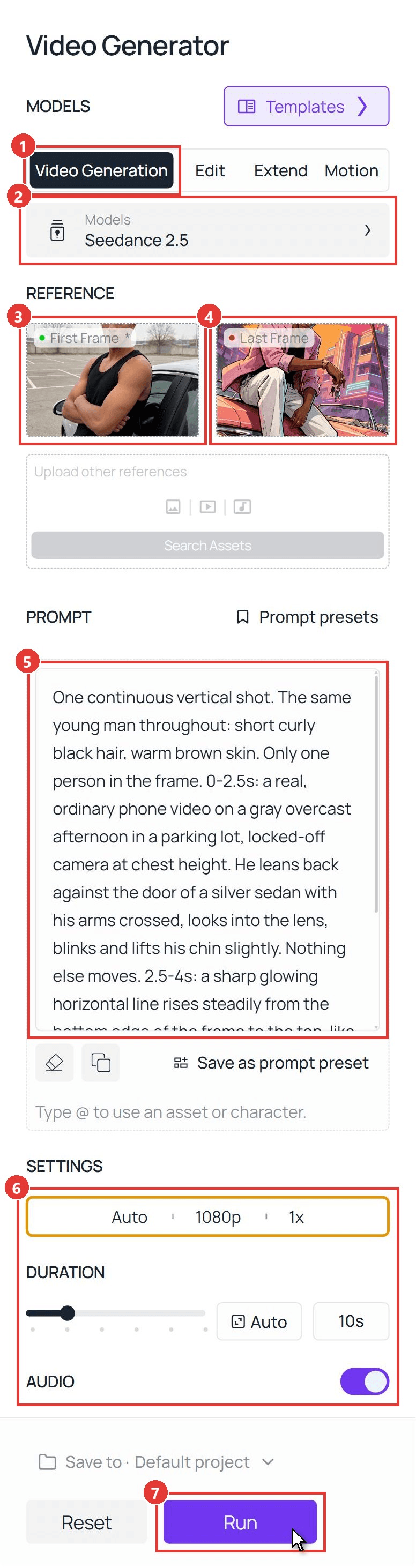
次にクリップだ。スクリーンショットの番号付きコントロールに従う。
- Video Generationタブに切り替える。
- Modelsを開き、Seedance 2.5を選ぶ。
- 9:16にクロップした写真をFirst Frameとしてアップロードする。
- ローディング画面の静止画をLast Frameとしてアップロードする。
- 以下のリビールプロンプトをPromptに貼り付ける。
- Settingsで1080pを選び、Durationを10秒に設定し、Audioをオンのままにする。アスペクト比はAutoのままで、ファーストフレームに従う。
- Runを押す。
plaintext1One continuous vertical shot. The same young man throughout: short curly black hair, warm brown skin. Only one person in the frame. 0-2.5s: a real, ordinary phone video on a gray overcast afternoon in a parking lot, locked-off camera at chest height. He leans back against the door of a silver sedan with his arms crossed, looks into the lens, blinks and lifts his chin slightly. Nothing else moves. 2.5-4s: a sharp glowing horizontal line rises steadily from the bottom edge of the frame to the top, like a loading bar wiping upward. Everything the line has passed becomes a hand-painted game loading-screen illustration with thick black outlines and flat cel-shaded color: the silver sedan is now a coral pink 1980s convertible, the gray lot is a sunset boulevard with palm trees and neon-lit pastel hotels, and he now wears a pastel pink linen blazer with pushed-up sleeves over a black tank top, white trousers, black boots, a gold chain and a gold watch. Above the line the real gray parking lot remains until the line passes it. 4-8.5s: the whole frame is now the illustration. He pushes off the car door and spins a set of car keys once around his finger. He turns his body to face the direction he is going and walks four clear steps along the side of the car to its front, his legs and boots visibly stepping one after the other, his arms swinging naturally. The car stays parked in the same spot the whole time: it never rotates, slides or changes shape, and the camera is what moves, gliding forward with him and sinking down to a low angle in front of the chrome grille, looking up at him. He walks the whole way; he never glides, floats or morphs from one place to another. At the front of the car he turns to face the lens, the round headlights switch on with a warm glow, and he hops up to sit on the hood, plants one boot on the chrome front bumper and leans forward with his forearm on his raised knee, the keys dangling from his finger. Palm fronds and his blazer blow in the wind, and the huge orange sun slides into place directly behind his head. 8.5-10s: he tilts his head down a little, locks eyes with the lens with a faint smirk and holds the exact pose of the last frame. He stays an illustration until the end and never turns back into a photo. No other people, no other cars, no weapons. No text, no letters, no logos, no title card, no user interface. Sound: quiet parking-lot ambience for the first 2.5 seconds, a rising synth whoosh as the line travels up, keys jingling, four boot steps on asphalt, the clunk of headlights switching on, then warm evening ambience with distant surf and a soft 1980s synth bass pulse, no voice.
このプロンプトのうち2つの部分がクリップを成立させている。時間指定の行は、実写映像に独自の2秒間を与え、ビフォーが読み取れる状態を保つ。歩行の行は、足取り、脚、そして駐車した車の周りを動くカメラを明示しており、これによって彼はドアからボンネットまで徒歩で移動する。これは私たちのコミックブックフィルターのリビールと同じファースト&ラストフレーム構成で、あちらがフラッシュを使ったところをワイプにしたものだ。
方法2:API経由でGTA AIフィルターを実行する
ローンチ週のフォトブースや、自分のアプリ内のGTA AIフィルターボタンには、2つのタブではなく2つのAPI呼び出しが必要だ。
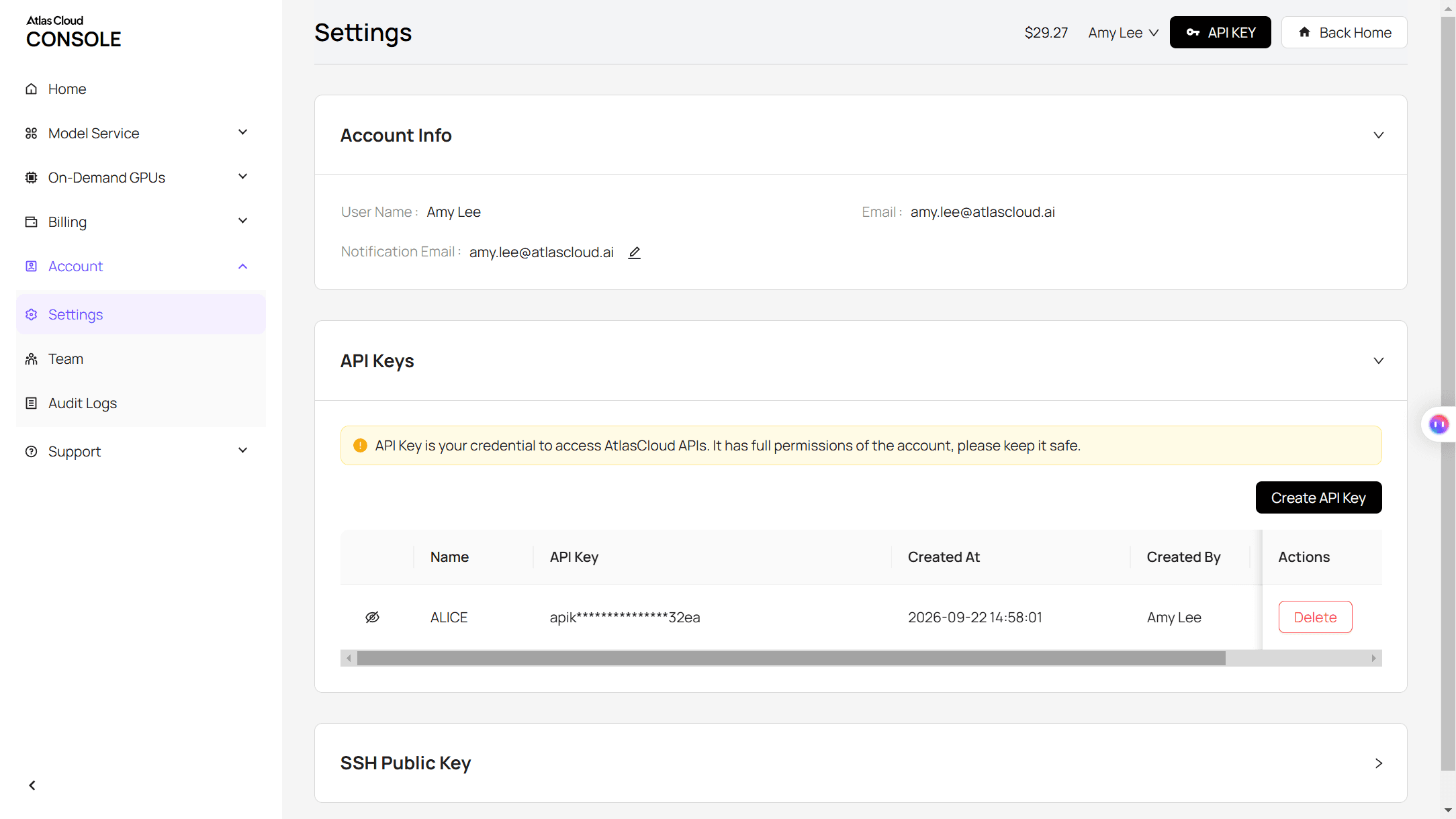
ステップ1:APIキーを作成してコピーする。Atlas CloudコンソールのSettingsページで行う。
ステップ2:リクエスト形式を確認する。Atlas Cloud APIドキュメントを参照。
ステップ3:静止画を作り、次にクリップを作り、それぞれのファイルをポーリングする。 画像呼び出しには写真のURLとローディング画面プロンプトを渡す。
plaintext1curl -X POST https://api.atlascloud.ai/api/v1/model/generateImage \ 2 -H "Authorization: Bearer $ATLASCLOUD_API_KEY" \ 3 -H "Content-Type: application/json" \ 4 -d '{ 5 "model": "bytedance/seedream-v5.5/edit", 6 "prompt": "Redraw this photo as a hand-painted GTA loading screen illustration. Keep only his identity: same face, skin tone and short curly black hair. Low-angle wide shot looking up at him as he sits on the hood of a coral pink 1980s convertible, one boot on the chrome bumper, forearm on his knee. Pastel pink linen blazer, white trousers, gold chain. A huge orange sun behind his head, palm trees, neon-lit art deco hotels. Thick black ink outlines, flat cel-shaded color, strong orange rim light. Only one person. No text, no game logo, no weapons.", 7 "reference_images": ["https://your-cdn.com/photo.jpg"], 8 "size": "1584*2816", 9 "output_format": "jpeg" 10 }'
動画呼び出しでは、元の写真をimageとして、返された静止画をlast_imageとして渡す。
plaintext1curl -X POST https://api.atlascloud.ai/api/v1/model/generateVideo \ 2 -H "Authorization: Bearer $ATLASCLOUD_API_KEY" \ 3 -H "Content-Type: application/json" \ 4 -d '{ 5 "model": "bytedance/seedance-2.5/image-to-video", 6 "prompt": "One continuous vertical shot. The same young man throughout. 0-2.5s: a real phone video in a gray parking lot, he leans on a silver sedan with his arms crossed. 2.5-4s: a glowing horizontal line wipes up the frame and everything it passes becomes a hand-painted game loading-screen illustration at sunset. 4-8.5s: he walks four clear steps to the front of the pink convertible while the camera sinks to a low angle, the headlights switch on and he sits on the hood. 8.5-10s: he holds the exact pose of the last frame. No text, no logos. Sound: a rising synth whoosh, boot steps, the clunk of headlights, evening ambience, no voice.", 7 "image": "https://your-cdn.com/photo.jpg", 8 "last_image": "https://your-cdn.com/photo-loading-screen.jpg", 9 "duration": 10, 10 "resolution": "1080p", 11 "generate_audio": true 12 }'
plaintext1curl https://api.atlascloud.ai/api/v1/model/prediction/<prediction_id> \ 2 -H "Authorization: Bearer $ATLASCLOUD_API_KEY"
同じ2つのエンドポイントと同じキーで、Atlas Cloud上の他の画像・動画モデルも実行できる。別のモデルでこのルックを試すには、モデル文字列を変更し、残りはそのままにする。
GTA風AIプロンプト:ローディング画面のルックのために書くべきこと
最初の静止画はお行儀が良すぎた。写真のポーズを維持するようモデルに指示していたのだが、腕を組んで目線の高さで立つ男性は、ヤシの木付きのパスポート写真でしかない。ローディング画面のアートはアングルと態度に頼るので、うまくいったプロンプトは写真からひとつだけを残し、残りを変えている。
| プロンプトの部分 | 私たちの記述 | 効果 |
|---|---|---|
| アイデンティティ | 彼のアイデンティティだけを残す:顔の形、目、眉、肌、髪。それ以外はすべて変える。 | 顔は本人のまま、ポーズとシーンを自由にする |
| カメラ | 地面近くからのローアングルショット、広角レンズ、わずかな傾き | カバーアートのようにフレーム内で彼を大きく見せる |
| ポーズと衣装 | ボンネットに座り、片方のブーツをバンパーに乗せ、指に鍵;ピンクのリネンブレザー、金時計 | 何かが動き出す前にキャラクターに物語を与える |
| 光とインク | 頭の後ろの太陽が後光のように、オレンジのリムライト;太いインクの輪郭、フラットなセルシェーディングカラー | ポスターのルックを決め、彼を空から際立たせる |
最後に、除外するもののリストを添える。テキスト、ゲームのロゴ、タイトルを禁止する行がフレームをクリーンに保ち、武器なしの行がトーンを軽く保つ。
3つのルック:サンセット大通り、ナイトネオン、ビーチの日光
シーンブロックを入れ替えれば、同じ顔がマップの別の場所に現れる。3つのパネルはすべて、同じ駐車場の写真と同じアイデンティティの一文から作られている。
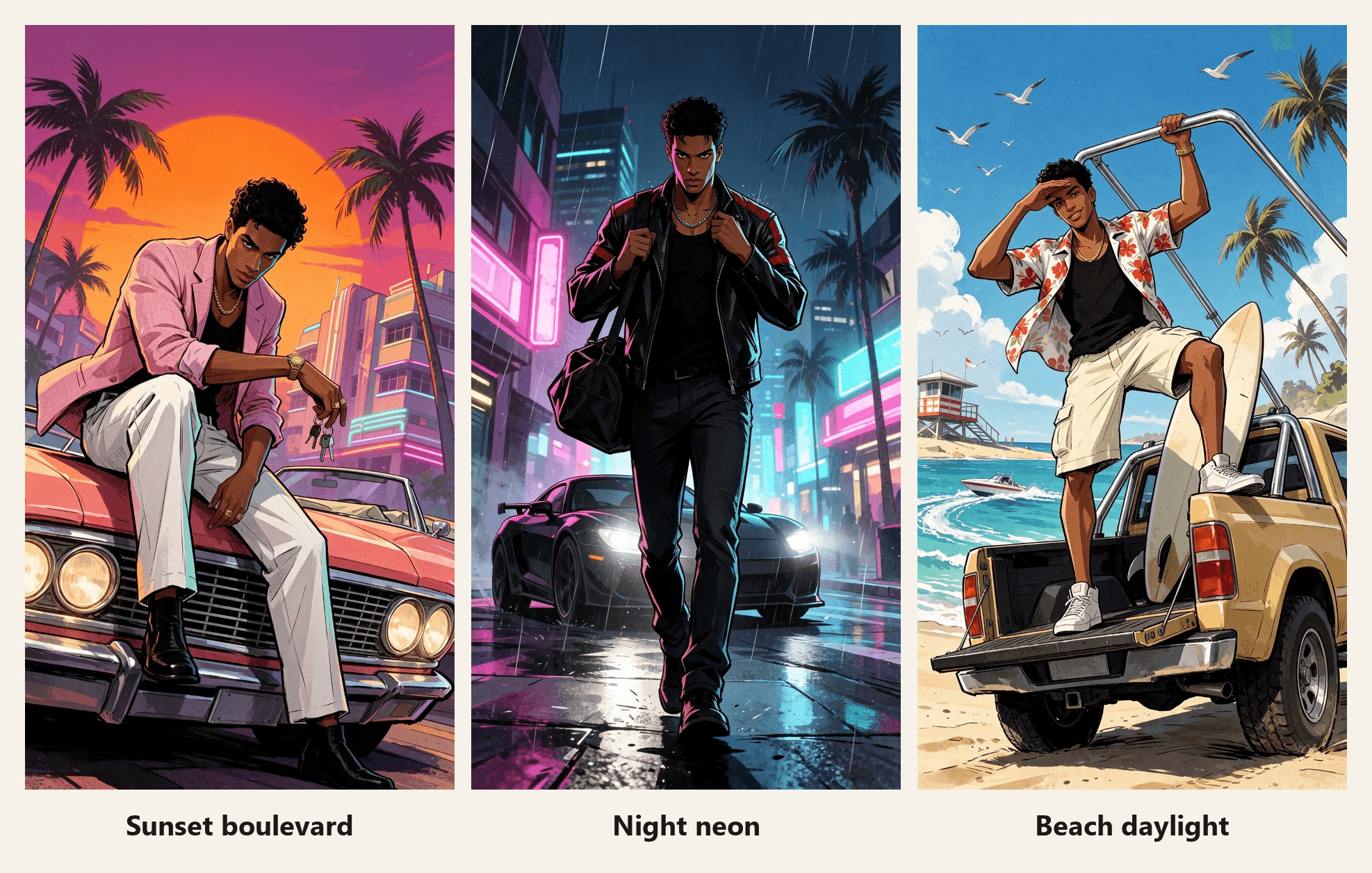
| ルック | ポーズ | 衣装と乗り物 | 光 |
|---|---|---|---|
| サンセット大通り | ボンネットに座り、前かがみ | ピンクのリネンブレザー、珊瑚色の1980年代コンバーチブル | 頭の後ろにオレンジの太陽、紫の影 |
| ナイトネオン | 歩調の途中でカメラに向かって歩く | 黒いレザーレーシングジャケット、マットブラックのクーペ | 背後にヘッドライト、顔にマゼンタとシアン |
| ビーチの日光 | トラックのテールゲートに立ち、目をかざす | ハイビスカス柄のシャツ、リフトアップしたビーチトラック | 真昼の強い日差し、くっきりした影 |
ネオンの街のシーンは文字を招き寄せる。ナイトのプロンプトには、文字のない無地の光るチューブと空白のパネルを求める行を1つ追加すると、看板はきれいに返ってくる。
GTAフィルターアプリかCapCutテンプレートか:どちらが合う?
このルックを得る方法は3つあり、それぞれ異なる目的に合う。
| CapCutテンプレート | ブラウザの写真フィルター | Atlas Cloudのプロンプトルート | |
|---|---|---|---|
| 得られるもの | 静止画で終わる8秒のワイプ | 通常は静止画像 | 任意のシーンの静止画、そしてサウンド付きの10秒クリップ |
| シーンとポーズ | テンプレートで固定 | プリセットスタイルから選択 | 自分で書く |
| ゲームのロゴ | 結果に重ねられる | ツールによる | プロンプトで除外 |
| 向いている用途 | 手早くトレンドに乗る | 新しいプロフィール写真 | キャラクターが動き続けるリビール |
今夜トレンドに乗って投稿したいだけなら、テンプレートが近道だ。自分の車、自分の衣装、歩くキャラクターが欲しいなら、プロンプトを書こう。同じリビールのアイデアで別のアートスタイルを試すなら、ピクサー風AI動画ガイドで3Dルックを扱っている。
よくある質問
TikTokでGTAフィルターはどこにある?
#gtafilterまたは#gta6filterを検索し、ローディング画面のリビールが表示される投稿を開き、そのCapCutテンプレートリンクをタップする。CapCutでGTA 6 Screen AIが開く。CapCutのテンプレートは地域によって制限されることがある。私たちが2026年11月16日に確認したとき、これは私たちの地域からは利用不可と表示された。
GTAフィルターはRockstar製?
いいえ。GTA 6 Screen AIはJDCapcutによるクリエイターテンプレートで、そのCapCutページにはRockstarと結びつけるものは何もない。これや上記のプロンプトで作ったものは、ファンアートとして扱おう。
自分の動画にGTA 6のロゴを入れられる?
ロゴとキャラクターはゲームのパブリッシャーに帰属するので、私たちはそれらを外し、あなたにも同じことを勧める。夕日、コンバーチブル、インクの輪郭だけでもすでにGTA風に見える。投稿が公式素材と誤解される可能性があるなら、ファンメイドと明記するキャプションを付けよう。
ChatGPTのGTAプロンプトでも同じ結果になる?
構造はそのまま使える。まずアイデンティティ、次にカメラ、ポーズ、衣装、光、そして除外するもののリストだ。私たちはSeedream v5.5で実行しており、このガイドのためにChatGPTは試していないので、別の画像モデルでは文言を調整することを想定しておこう。
GTA 6はいつ発売?
Rockstar Gamesによると2026年11月19日。発表はこのガイドの冒頭にリンクされている。
Atlas CloudでGTAローディング画面動画はいくらかかる?
2026年11月16日時点、確認時に適用された20%割引後で、1584*2816のSeedream v5.5 Editの静止画は$0.0344。オーディオ付きの10秒のSeedance 2.5ファースト&ラストフレームクリップは、720pで$3.04、1080pで$5.98と見積もられる。ベース写真1枚、ローディング画面の静止画1枚、1080pのテイク1本で約$6.05になるので、まず720pでプロンプトを固めよう。
まとめ
ローンチ週のGTAフィルターは、6桁の使用回数を持つ1つのCapCutテンプレートだ。写真、ワイプ、ポスター。その隣では、ゲーム本編のキャラクターで作られたグッバイ動画が走っている。どちらも投稿は手早く、どちらも絵が動き始められる地点で止まってしまう。
さらに進めるなら、顔を保ちつつアングル、ポーズ、光を変えるローディング画面プロンプトを書こう。写真をファーストフレームとして、その静止画をラストフレームとしてSeedance 2.5に渡せば、あなたのGTAフィルターはワイプの後も、車のボンネットまで動き続ける。




