MiniMax wdrożył H3 w piątek. W ciągu dwudziestu czterech godzin Seedance 2.5 trafił w ręce użytkowników, a oś czasu skurczyła się do jednej rozmowy: trzydzieści sekund, natywne 4K, pięćdziesiąt wejść referencyjnych. Post H3 z premierą leżał pod spodem, cicho, a prawie nikt nie przeprowadził na nim prawdziwego testu.
Rozumiem, dlaczego. Trzydzieści sekund to świetna liczba. Pasuje do nagłówka.
Ale jeśli naprawdę tworzysz pionowe krótkie dramy, wiesz, że tym, co rujnuje ci noc, nie jest trzydziesta sekunda. To ujęcie 4. Żuchwa głównego bohatera przesuwa się o pół centymetra, jego krawat traci fałdę, a widz przesuwa palcem, zanim hak zdąży trafić. Nikt nie rezygnuje, bo klip był piętnastosekundowy zamiast trzydziestu. Rezygnują, bo facet na zbliżeniu to nie ten facet z planu ogólnego.
Więc pominąłem pojedynek na specyfikacje. Stworzyłem jeden arkusz transformacji postaci, jedną tablicę lokalizacji z sześcioma panelami, napisałem jeden 15-sekundowy prompt do gotyckiej krótkiej dramy i wysłałem identyczny pakiet do obu stron. Potem wpatrywałem się w twarz.
Kluczowe wnioski
- Tylko H3 jest dostępny do wywołania dziś — API Seedance 2.5 jest u ByteDance, ale wciąż jako strona Dnia 0 na tej platformie.
- Specyfikacje dzielą się wyraźnie: Seedance 2.5 = 30 s w jednym ujęciu, natywne 4K, do 50 referencji; H3 = 5–15 s, 2K, stereo audio w każdym klipie.
- Stabilność postaci to problem opakowania — jeden dobry pakiet referencyjny, a nie większy model, utrzymuje twarz.
- Oba generują natywne audio; H3 dodatkowo przypisuje głos z maksymalnie trzech referencji audio.
- Oceniaj piksele na klatkę, nie sekundy — w tym samym przebiegu H3 zwrócił 1440p wobec 720p od Seedance.
Wynik Seedance 2.5 vs MiniMax H3, zanim przejdziemy do teorii
Zanim przejdziemy do teorii, oto, co produkuje przepływ pracy. To cztery ujęcia wyciągnięte z gotowego 15-sekundowego pionowego klipu i ułożone w kafelki. To własna referencyjna seria H3 od MiniMax, zbudowana dokładnie z arkusza postaci i tablicy lokalizacji, które zobaczysz w krokach 1 i 2, w natywnym 1440x2560. Moje własne serie tego samego pakietu pojawią się później, w samouczku, z widocznym stanem playgroundu.
Ona dociera do rzeźbionych drzwi, czyli panelu 4 tablicy lokalizacji, potem konfrontacja na korytarzu, potem ciasne zbliżenie na niego, a potem dwuosobowe ujęcie. Jego przedziałek włosów jest taki sam na profilu i na zbliżeniu. Jej półupięty pleciony kok przetrwa pełne zbliżenie twarzy, co jest dokładnie momentem, w którym większość modeli po cichu odbudowuje twarz. Kremowa koronkowa gorsetowa sukienka zachowuje ten sam dekolt i mankiet rękawa od pierwszej do ostatniej klatki.
To jest cały test. Nie trzydzieści sekund. Cztery ujęcia i linia żuchwy.
Dlaczego Seedance 2.5 vs MiniMax H3 trafiły w ten sam tydzień i dlaczego większość testów postaci jest bezużyteczna
MiniMax wypuścił H3 30 lipca, ogólnego przeznaczenia multimodalny model wideo, który czyta tekst, obrazy, wideo i audio jako jeden kontekst i zwraca 5-15-sekundowe klipy w rozdzielczości do 2K z natywnym dźwiękiem stereo. Może także edytować istniejący materiał i przenosić ruch z jednego klipu na inny, a MiniMax powiedział, że wagi pojawią się w ciągu kilku dni (Reuters, lipiec 2026).
Seedance 2.5 pojawił się w tym samym oknie z głośniejszą liczbą: 30 sekund w jednej generacji, natywne 4K i do 50 multimodalnych wejść referencyjnych w jednym zadaniu (The Next Web, lipiec 2026). Jego API jest już w rękach programistów, z lokalizowaną edycją, która przerysowuje część klatki, pozostawiając wydajność, oświetlenie i zachowanie kamery bez zmian, referencja-do-wideo akceptująca green-screeny lub blokowe modele 3D, jedenaście języków oraz eksperymentalny tryb długiego wideo sięgający 180 sekund (CineD, lipiec 2026).
Luka w uwadze jest interesująca. Prawie każdy post, jaki znalazłem, był klipem 2.5. Tymczasem liczby z publicznej areny mówią coś innego: na tablicy liderów obraz-do-wideo Artificial Analysis, Seedance 2.0 w 720p prowadzi z 1196 Elo, Gemini Omni Flash podąża z 1195, a MiniMax H3 jest już trzeci z 1185, cztery dni po starcie. Seedance 2.5 nie ma tam jeszcze oceny (Artificial Analysis, lipiec 2026). Model z najmniejszym szumem ma najwyższy stosunek wyniku do uwagi.
Teraz część, która faktycznie decyduje o twoim wyniku, bo ma prawie nic wspólnego z tym, które logo wybierzesz.
Większość testów spójności postaci zawodzi, zanim model w ogóle zostanie zaangażowany. Cztery tryby awarii, a wszystkie cztery są twoje do naprawienia:
| Tryb awarii | Co widzisz w wynikach | Poprawka |
|---|---|---|
| Wielowidokowe referencje wysłane jako osobne pliki | Twarz w każdym ujęciu jest „prawie dobrze” i żadne dwie się nie zgadzają | Połącz widoki w jeden obraz, a następnie przypisz role w prompcie („mężczyzna po LEWEJ”, „kobieta po PRAWEJ”) |
| Przepisywanie opisu postaci dla każdego ujęcia | Garderoba i dodatki dryfują od ujęcia do ujęcia | Napisz blok tożsamości raz i używaj go dosłownie; tylko kamera i akcja zmieniają się w ujęciu |
| Pozwalanie, by oświetlenie wędrowało ze sceną | Twarz zostaje strukturalnie odbudowana w nowym świetle | Zbuduj oddzielną tablicę lokalizacji, która blokuje kierunek światła, mgłę i odbicie podłogi, i podaj ją jako referencję |
| Traktowanie maksymalnego czasu trwania jako metryki jakości | Jeden dryf w ciągu 30 sekund zabija wszystkie 30 | Przytnij do ziarnistości, którą możesz ponownie wygenerować, a potem rozmawiaj o długości |
Chcesz samodzielnie umieścić Seedance 2.5 i MiniMax H3 przed tym samym promptem? Porównanie modeli Atlas Cloud uruchamia je obok siebie w jednym przebiegu — identyczny prompt i ustawienia, z kosztem szacowanym przed wygenerowaniem — abyś mógł ocenić twarze, ruch i tekst na ekranie bez rezerwowania dwóch osobnych testów.
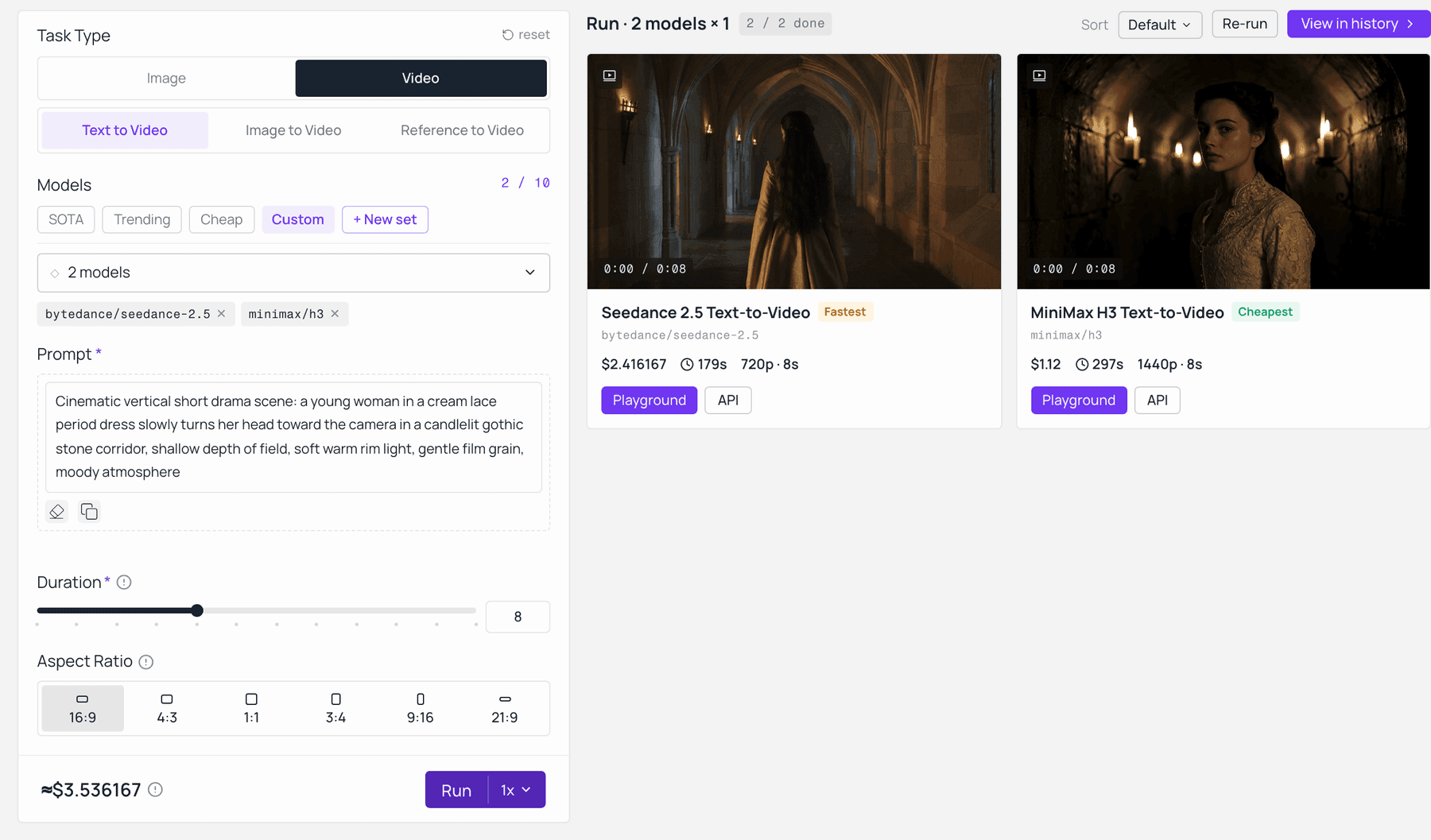
Seedance 2.5 i MiniMax H3 na identycznym prompcie w porównaniu modeli Atlas Cloud. Seedance 2.5 zwrócił 720p za 2,42 $; MiniMax H3 zwrócił 1440p za 1,12 $, a obie ceny były szacowane przed uruchomieniem. Zarejestrowane na żywo na model-explorer.
Wiersz pierwszy to ten, który ludzie najczęściej psują. Wyślij sześć pojedynczych zdjęć, a model potraktuje je jako sześciu kandydatów i uśredni. Wyślij jeden czysty kompozyt, a potraktuje je jako jedną osobę widzianą z trzech stron. Te same piksele, zupełnie inny wynik.
Arkusz specyfikacji Seedance 2.5 vs MiniMax H3 i co możesz faktycznie wywołać dzisiaj
Oddziel możliwości od dostępności, a napięcie staje się jasne. Pod względem surowych możliwości Seedance 2.5 prowadzi pod względem czasu trwania, pułapu rozdzielczości, liczby referencji i szczegółowości edycji. Pod względem dostępności H3 jest tym, który ma trzy działające endpointy na ogólnego przeznaczenia platformie modelowej w tym tygodniu. Jeśli robisz porównanie modeli AI wideo do planowania na 2026, ta druga kolumna ma znaczenie tak samo jak pierwsza.
| MiniMax H3 | Seedance 2.5 | Seedance 2.0 Ref-to-Video (co uruchomiłem) | |
|---|---|---|---|
| Maksymalny czas trwania, jedna generacja | 5 do 15 s | do 30 s, bez łączenia (tryb beta do 180 s, eksperymentalny) | menu krótkich klipów, patrz strona modelu |
| Rozdzielczość | natywne 2K, 1440p krótszy bok przy 16:9 do 9:16; poziom 768p jest wymieniony jako nadchodzący | natywne 4K, 10-bitowy kolor | do 720p na tym endpointzie |
| Liczba klatek na sekundę | 24 fps | nie podano osobno | nie podano osobno |
| Wejścia referencyjne | 9 obrazów + 3 filmy + 3 audio, łącznie 12 plików | do 50 multimodalnych referencji | 9 obrazów + 3 filmy + 3 audio |
| Natywne audio | tak, każde wyjście, stereo | tak, plus 11 języków napisów i głosu | tak |
| Szczegółowość edycji | edycje instrukcji całego klipu (zamień postać, tło, oświetlenie, dialog) | edycje na poziomie regionu, które przerysowują część klatki | edycje instrukcji całego klipu |
| Limit promptu | 7 000 znaków | nie podano | nie podano |
| Otwarte wagi | ogłoszone na dni po premierze | nie ogłoszone | nie ogłoszone |
| Artificial Analysis I2V Elo, 31 lipca 2026 | 1 185 (3. miejsce) | jeszcze nie ocenione | 1 196 (1. miejsce, Dreamina 720p) |
| Możliwe do wywołania na platformie, którą testowałem | tak, 3 endpointy | jeszcze nie, strona Dnia 0 | tak |
Pełne ujawnienie dotyczące konfiguracji testu. Seedance 2.5 nie był otwarty na mojej platformie, gdy to uruchamiałem, więc strona Seedance to Seedance 2.0 Reference-to-Video, obecnie dostępny członek tej samej rodziny z tym samym czteromodalnym systemem referencyjnym. Jeśli 2.5 zmieniłby odpowiedź, mówię o tym. Strona Seedance 2.5 jest na razie powiadomieniem Dnia 0.
Wszystko poniżej działa w jednej karcie przeglądarki, na jednym kluczu, łącznie trzy modele:
| Krok | Model | Co produkuje | Kluczowe ustawienia | Co decyduje o koszcie |
|---|---|---|---|---|
| 1 | OpenAI GPT Image 2 Text-to-Image | arkusz transformacji postaci | jakość wysoka, 16:9 | za obraz, płatność na bieżąco, aktualna stawka na stronie modelu |
| 2 | ten sam model, drugie uruchomienie | tablica lokalizacji i oświetlenia z sześcioma panelami | jakość wysoka, 16:9 | za obraz, płatność na bieżąco |
| 3 | MiniMax H3 Reference-to-Video | pionowy klip 9:16 z natywnym audio | 9:16, 2K, czas trwania 5 dla testu i 15 dla właściwego cięcia | sekundy x rozdzielczość, rozliczane za sekundę |
| 4 | Seedance 2.0 Reference-to-Video | przebieg kontrolny, identyczne wejścia | 9:16, najwyższa dostępna rozdzielczość, ten sam czas trwania | sekundy x rozdzielczość, rozliczane za sekundę |
| 5 | H3 Reference-to-Video, klip jako wejście | jedno naprawione ujęcie bez ponownego generowania wszystkiego | ta sama rozdzielczość, krótki czas trwania | sekundy x rozdzielczość, rozliczane za sekundę |
H3 ma również wpisy text-to-video i image-to-video, jeśli chcesz czystej linii bazowej tekstowej lub kontroli pierwszej i ostatniej klatki zamiast tego.
Jeszcze jedna rzecz warta wiedzieć przed zaplanowaniem partii: tekst na ekranie. Ta 15-sekundowa sekwencja tytułowa H3 utrzymuje angielskie napisy przez osiem ostrych cięć bez ani jednej literówki, co jest jedną z najtrudniejszych rzeczy do utrzymania stabilnie w wygenerowanym wideo.
Przepływ pracy Seedance 2.5 vs MiniMax H3 dla krótkiej dramy, krok po kroku
Pięć kroków. Kopiuj prompty dokładnie tak, jak są napisane, łącznie z brzydkimi częściami. Nie wyczyściłem ich na potrzeby artykułu i ty też nie powinieneś ich czyścić dla modelu.
Krok 1: Zbuduj arkusz postaci za pomocą GPT Image 2
Zrób pakiet referencyjny, zanim zrobisz jakiekolwiek wideo. Jeden obraz, dwie postacie, trzy widoki każdej, czyste białe seamless tło, równomierne studyjne oświetlenie. To usuwa każdą niejednoznaczność poza tą, która cię interesuje: jak wygląda ta osoba.
plaintext1Pełna sylwetka referencyjnego arkusza transformacji postaci na czystym białym seamless tle, dwie postacie obok siebie, sześć figur łącznie, równomierne neutralne studyjne oświetlenie, bez cieni na podłodze, bez tekstu, bez etykiet, bez znaku wodnego. 2 3LEWA POŁOWA, główny bohater, trzy widoki w rzędzie: przód, prawy profil, tył. Późne 20., blada cera, ciemne falowane włosy średniej długości, ostra linia żuchwy. Ubrany w długi do podłogi czarny aksamitny surdut z subtelnym haftem ton w ton na klapach i mankietach, czarną brokatową kamizelkę, czarną jedwabną krawatkę, proste czarne spodnie, wypolerowane czarne skórzane buty derby. Ręce rozluźnione wzdłuż boków, neutralny wyraz twarzy. 4 5PRAWA POŁOWA, główna bohaterka, trzy widoki w rzędzie: przód, prawy profil, tył. Wczesne 20., jasna cera, długie falujące kasztanowe włosy z półupiętym plecionym kokiem. Ubrana w kremową wiktoriańską bawełnianą koronkową suknię, długie rękawy z koronkowymi mankietami, dopasowany gorset z małymi guzikami, pełną spódnicę do kostek, kremowe buty na niskim obcasie z paskiem w kostce. Ręce rozluźnione wzdłuż boków, neutralny wyraz twarzy. 6 7Fotorealizm, spójna skala pomiędzy wszystkimi sześcioma figurami, stopy wyrównane na tej samej linii podstawy, ostry fokus od krawędzi do krawędzi.
Ustawienia: model OpenAI GPT Image 2 Text-to-Image, jakość wysoka, proporcje 16:9, wszystko inne domyślne.
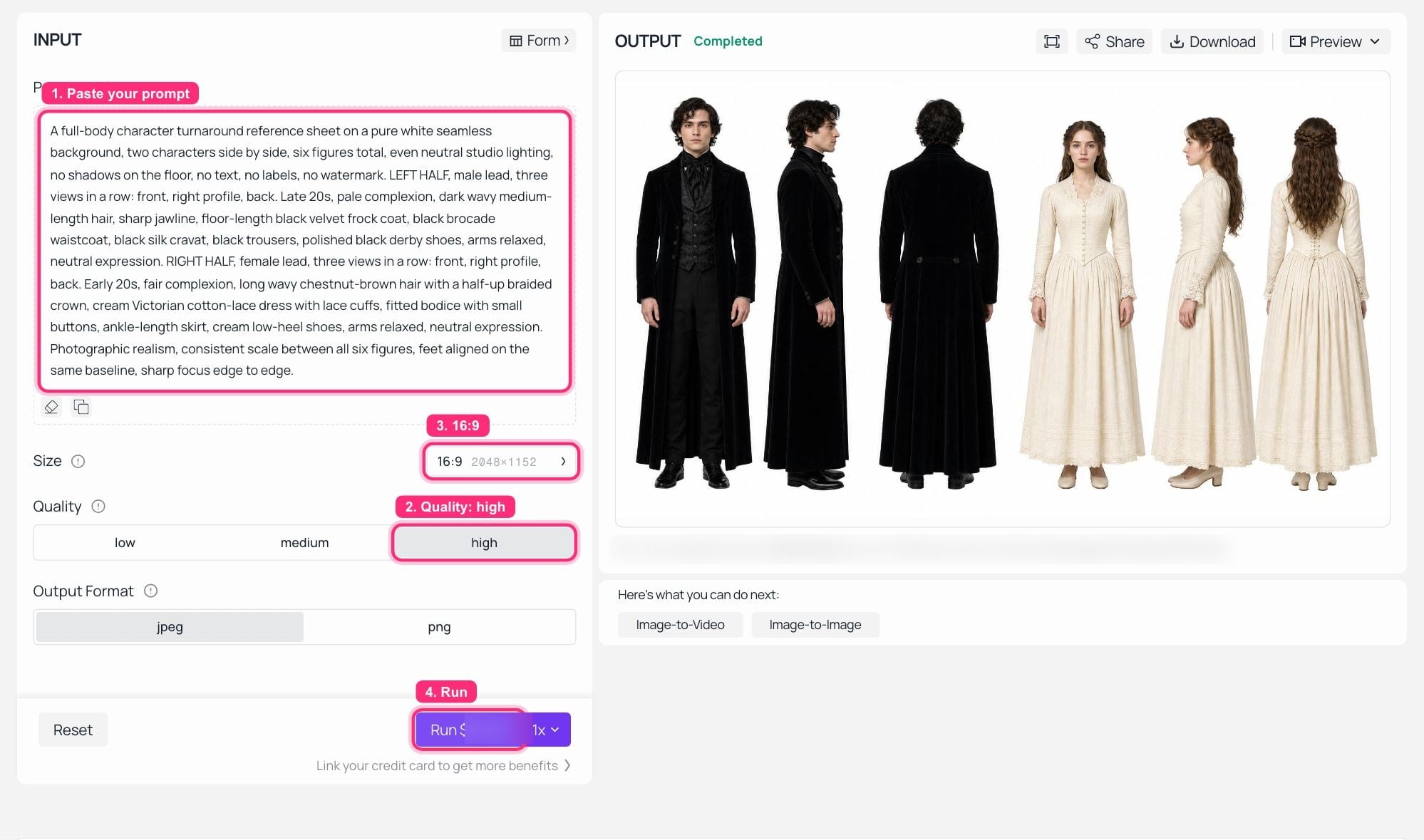 GPT Image 2 Text-to-Image na Atlas Cloud, uruchomienie zakończone: prompt transformacji po lewej, sześć figur na jednym białym arkuszu w panelu OUTPUT.
To jest docelowy kształt. Sześć figur, jedna linia podstawy, nic w tle do dyskusji:
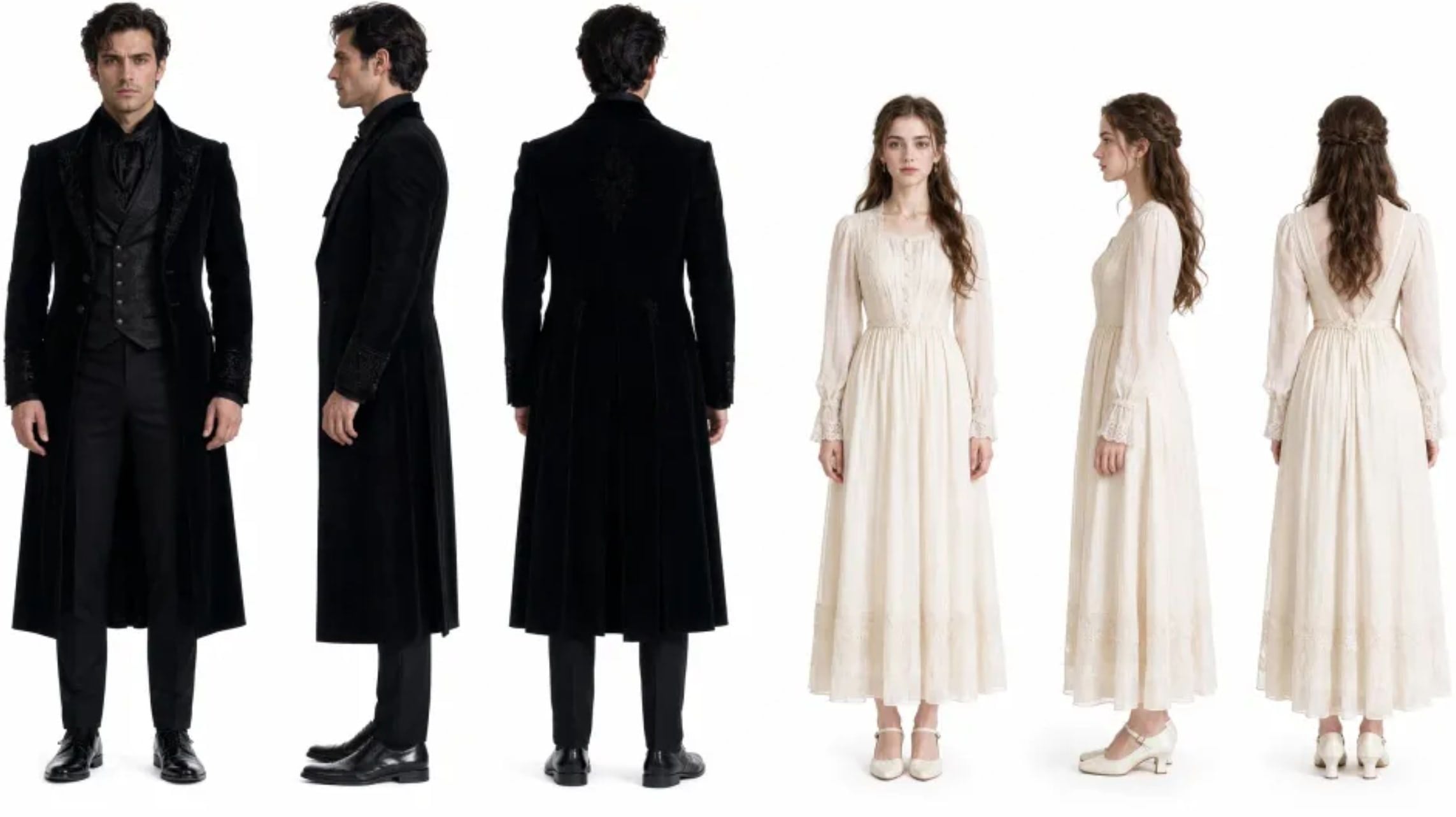 Pakiet referencyjny, który napędzał demo: główny bohater w czarnym aksamicie, główna bohaterka w kremowej wiktoriańskiej koronce, trzy widoki każdej, jeden plik.
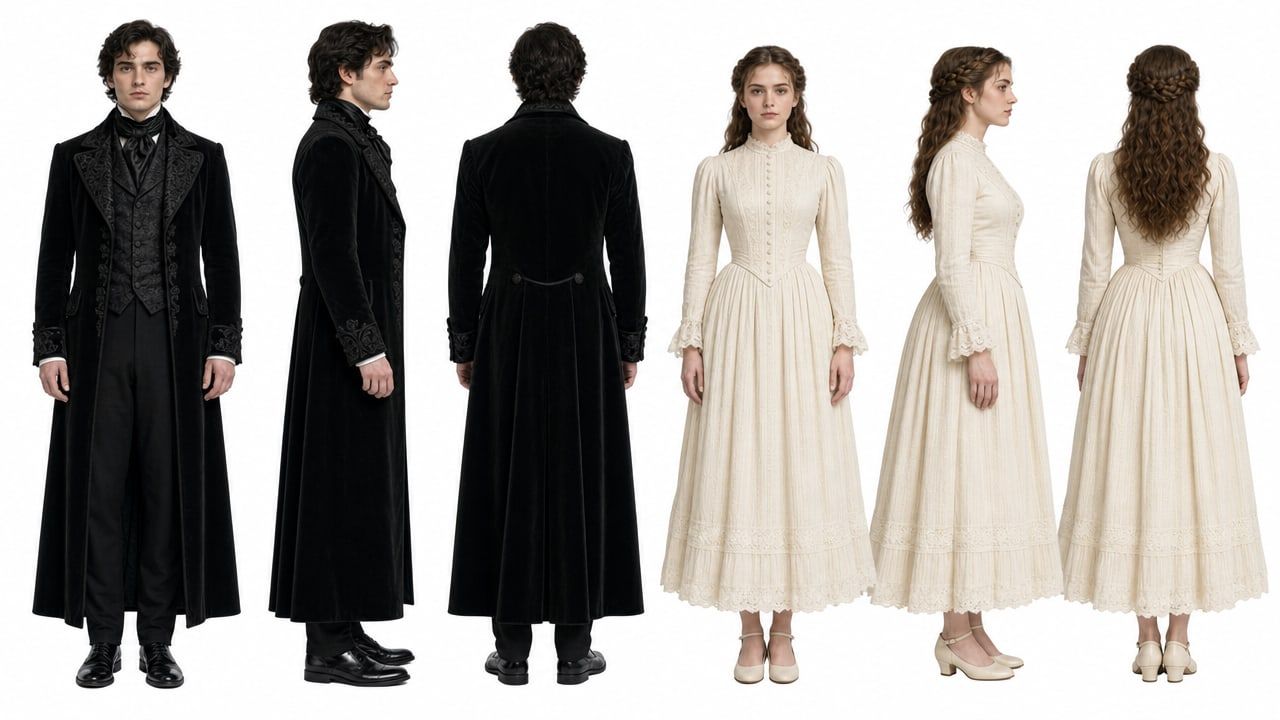 Moje własne uruchomienie GPT Image 2 promptu z kroku 1, dla porównania z powyższą referencją.
Krok 2: Zablokuj lokalizację za pomocą tablicy sceny z sześcioma panelami
Utrzymałeś twarz. Światło wciąż cię zdradzi. Drugi obraz referencyjny precyzuje sześć pozycji kamery, kierunek światła księżycowego, ile mgły jest w powietrzu i jak mokra jest podłoga. Mówisz modelowi, że ten film ma dokładnie jedną konfigurację oświetlenia.
plaintext1Sześciopanelowa kinowa tablica lokalizacji, 2 rzędy po 3 kolumny, cienkie czarne odstępy między panelami, każdy panel podpisany małą elegancką białą czcionką wersalikową z odstępami u dołu panelu. Temat: wnętrze opuszczonego gotyckiego zamku nocą. Zimne niebieskie światło księżycowe, unosząca się niska mgła, mokra odbijająca światło kamienna podłoga, wysokie witraże, żelazne świeczniki ścienne z małymi ciepłymi płomieniami, głębokie odbarwione czernie, ciężkie aksamitne zasłony. Żadnych ludzi w żadnym panelu. 2 3Panel 1, podpis "SZEROKI UJĘCIE USTALAJĄCE - KORYTARZ": długi kolumnowy korytarz opadający ku oświetlonemu witrażowi. 4Panel 2, podpis "NISKI KĄT - ŚWIATŁO KSIĘŻYCOWE NA PODŁODZE": niska kamera, snop światła księżycowego przecinający mokre kamienne płyty. 5Panel 3, podpis "KOMPOZYCJA DRZWI I SCHODÓW": łukowe drzwi oprawiające kręcone kamienne schody. 6Panel 4, podpis "SZCZEGÓŁ BLISKI - RZEŹBIONE DRZWI": ciasne ujęcie ciężkich rzeźbionych drewnianych drzwi z żelazną klamką. 7Panel 5, podpis "WIDOK PRZY OKNIE - MGŁA I ZASŁONY": wysokie okno, mgła wdzierająca się, brzeg zasłony na pierwszym planie. 8Panel 6, podpis "OSTATNIA KLATKA PLAKATU - PUSTA SALA": symetryczna pusta sala, wzorzysty biegacz dywanowy prowadzący do okna. 9 10Fotograficzny, kinowy, ziarno filmowe, spójna kolorystyka we wszystkich sześciu panelach.
Ustawienia: ten sam model, jakość wysoka, proporcje 16:9.
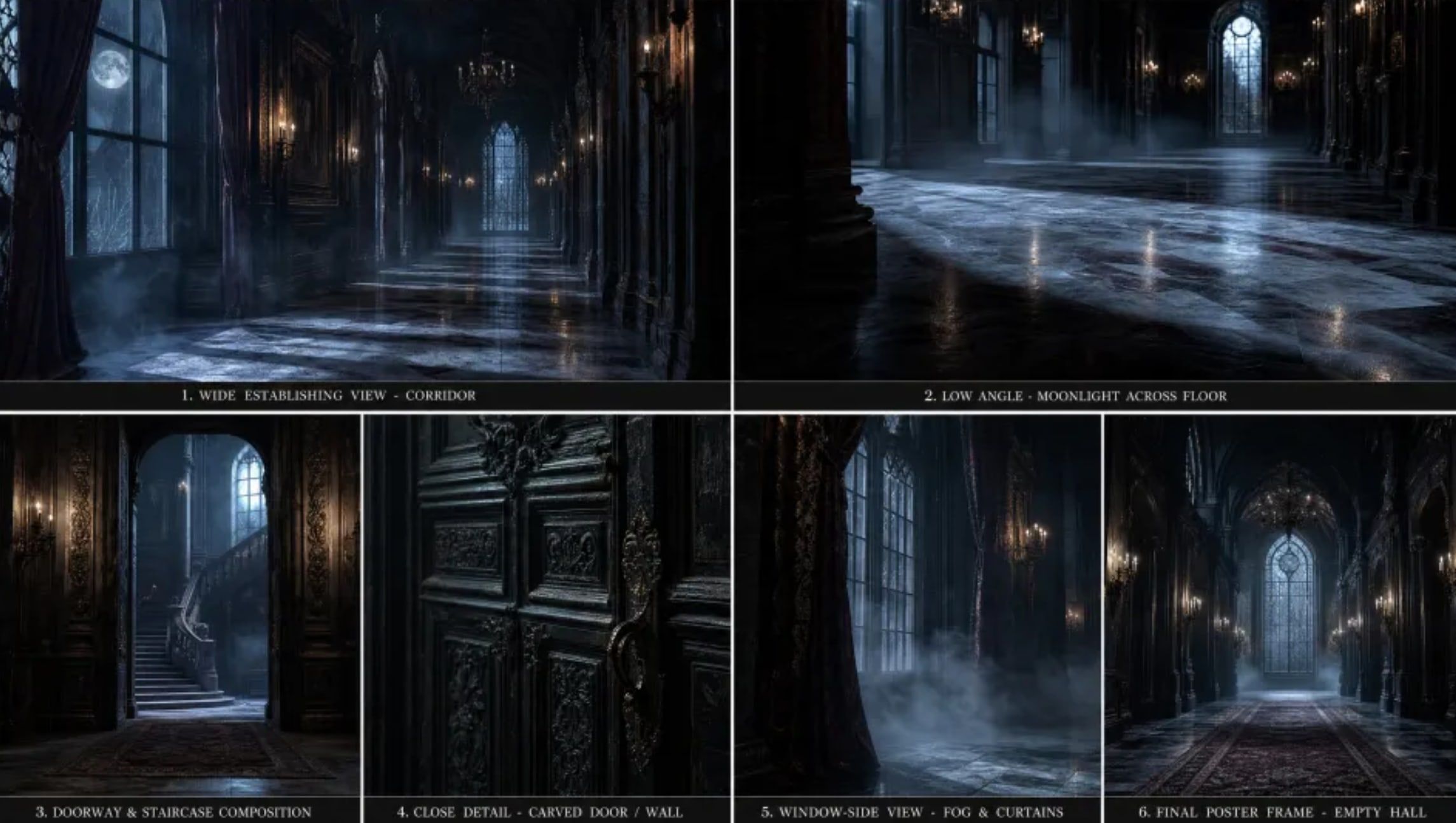 Tablica lokalizacji, która napędzała demo: sześć gotyckich wnętrz zamkowych, jedna kolorystyka, czytelne podpisy.
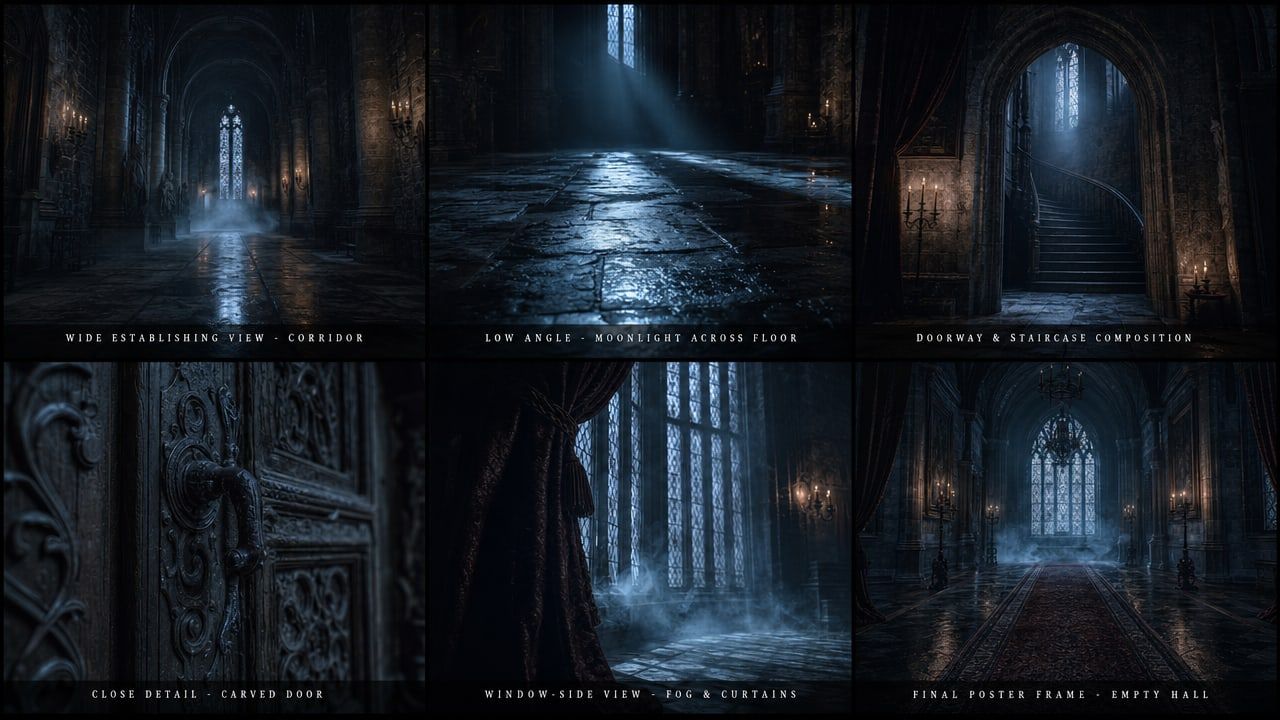 Moje własne uruchomienie GPT Image 2 promptu tablicy z kroku 2.
Krok 3: Wygeneruj ujęcie za pomocą MiniMax H3 reference-to-video
Dwa obrazy referencyjne plus jeden prompt niosący pozycje kamery i kierunek audio. Dźwięk jest produkowany w tym samym przebiegu, więc nie ma osobnego etapu głosu lub muzyki. Trzymaj krótki czas trwania podczas strojenia, a następnie zwiększ do 15 dla właściwego cięcia.
plaintext1Obraz referencyjny 1 to arkusz postaci: mężczyzna po LEWEJ to główny bohater, kobieta po PRAWEJ to główna bohaterka. Zachowaj obie tożsamości dokładnie tak, jak pokazano: jego żuchwa, ciemne falowane włosy, czarny aksamitny surdut, czarna brokatowa kamizelka i czarna jedwabna krawatka; jej kasztanowe półupięte plecione włosy i kremowa wiktoriańska koronkowa suknia. Obraz referencyjny 2 to tablica lokalizacji i oświetlenia: dopasuj jej zimne niebieskie światło księżycowe, unoszącą się mgłę, mokrą odbijającą światło kamienną podłogę i odbarwione czarne tony. 2 39:16 pion, premium live-action krótka drama look, płytka głębia ostrości, kinowy kontrast, bez napisów, bez tekstu na ekranie, bez znaku wodnego. 4 5Ujęcie 1: Średnie zbliżenie, kamera powoli wjeżdża. Główna bohaterka stoi w oświetlonym księżycem korytarzu, płytko oddycha, oczy utkwione w czymś poza kadrem po prawej. Mgła przesuwa się obok niej na wysokości kolan. 6Ujęcie 2: Ostre cięcie. Zza ramienia zza niej, główny bohater wychodzi z ciemnego łuku w światło księżyca, płaszcz łapie światło, wyraz twarzy zimny i ciekawy. 7Ujęcie 3: Ciasne zbliżenie na jego twarz, pół oświetloną przez okno, a następnie pasujące zbliżenie na jej twarz, gdy odmawia odwrócenia wzroku. 8 9Audio: niski ciągły basowy dron, odległy kamienny pogłos, jej nierówny oddech, jeden ciężki krok, gdy wchodzi w światło, pojedyncze miękkie wzmocnienie smyczkowe przy ostatnim cięciu.
Ustawienia: model MiniMax H3 Reference-to-Video, rozdzielczość 2K, czas trwania 8 (domyślny suwak; zwiększ do 15 dla właściwego cięcia), proporcje adaptacyjne, i oba pliki w Materiałach Referencyjnych. Panel liczy je jako 2 z 9, więc masz mnóstwo miejsca na dodanie później płytek garderoby lub rekwizytów.
Warto odnotować, co się stało z proporcjami. Zostawiłem Proporcje na adaptacyjne i napisałem tylko „9:16 pion” wewnątrz promptu. H3 i tak zwrócił pion, więc odczytał kadrowanie z tekstu, a nie potrzebował pola formularza.
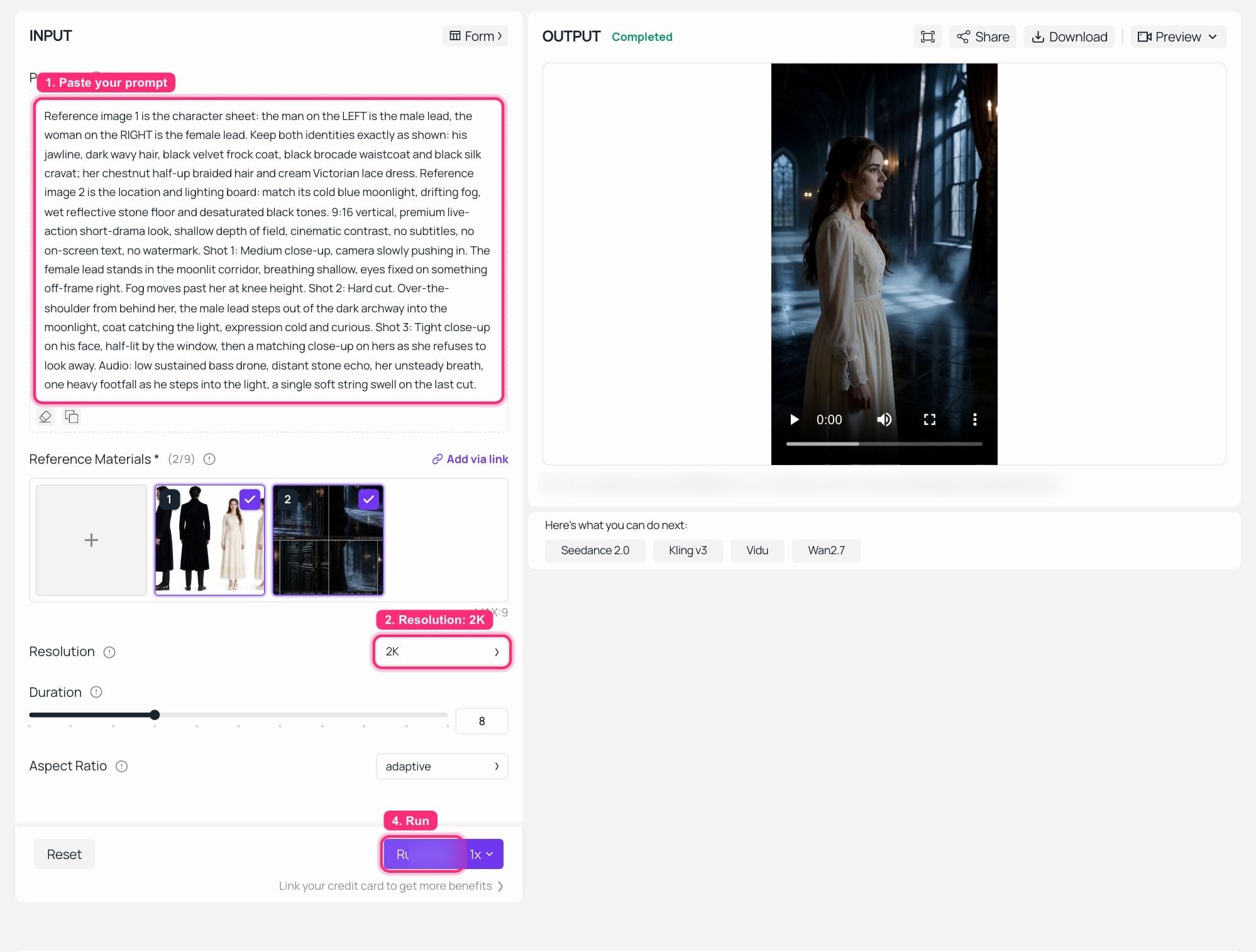 MiniMax H3 Reference-to-Video na Atlas Cloud, uruchomienie zakończone: oba pliki referencyjne załadowane jako 2 z 9, rozdzielczość 2K, a wygenerowany pionowy klip odtwarzany w panelu OUTPUT.
Pierwsza klatka to główna bohaterka w kremowej koronkowej gorsetowej sukience, stojąca w korytarzu z panelu 1 tablicy, z mgłą na wysokości kolan i światłem księżycowym padającym na mokrą podłogę dokładnie tam, gdzie umieściła je tablica. Oba obrazy referencyjne trafiły.
Krok 4: Uruchom kontrolę Seedance 2.5 vs MiniMax H3 z identycznym pakietem
Nie zmieniaj ani słowa. Te same dwa obrazy referencyjne, ten sam prompt, inny model. Zostawiłem domyślny czas trwania każdej strony bez zmian, zamiast wymuszać dopasowanie, i mówię, co każdy zwrócił poniżej. Przeformułowanie promptu „dla” drugiego modelu to dokładnie sposób, w jaki porównania zaczynają kłamać.
plaintext1Ten sam prompt co w kroku 3, dosłownie. Nie przeformułowuj go dla drugiego modelu.
Ustawienia: model Seedance 2.0 Reference-to-Video, rozdzielczość 720p, te same dwa obrazy referencyjne w Obrazach Referencyjnych (znów 2 z 9, z oddzielnymi slotami na do 3 referencyjnych filmów i 3 referencyjnych plików audio). Czas trwania pozostawiony na domyślny na stronie, który zwrócił 10-sekundowy klip.
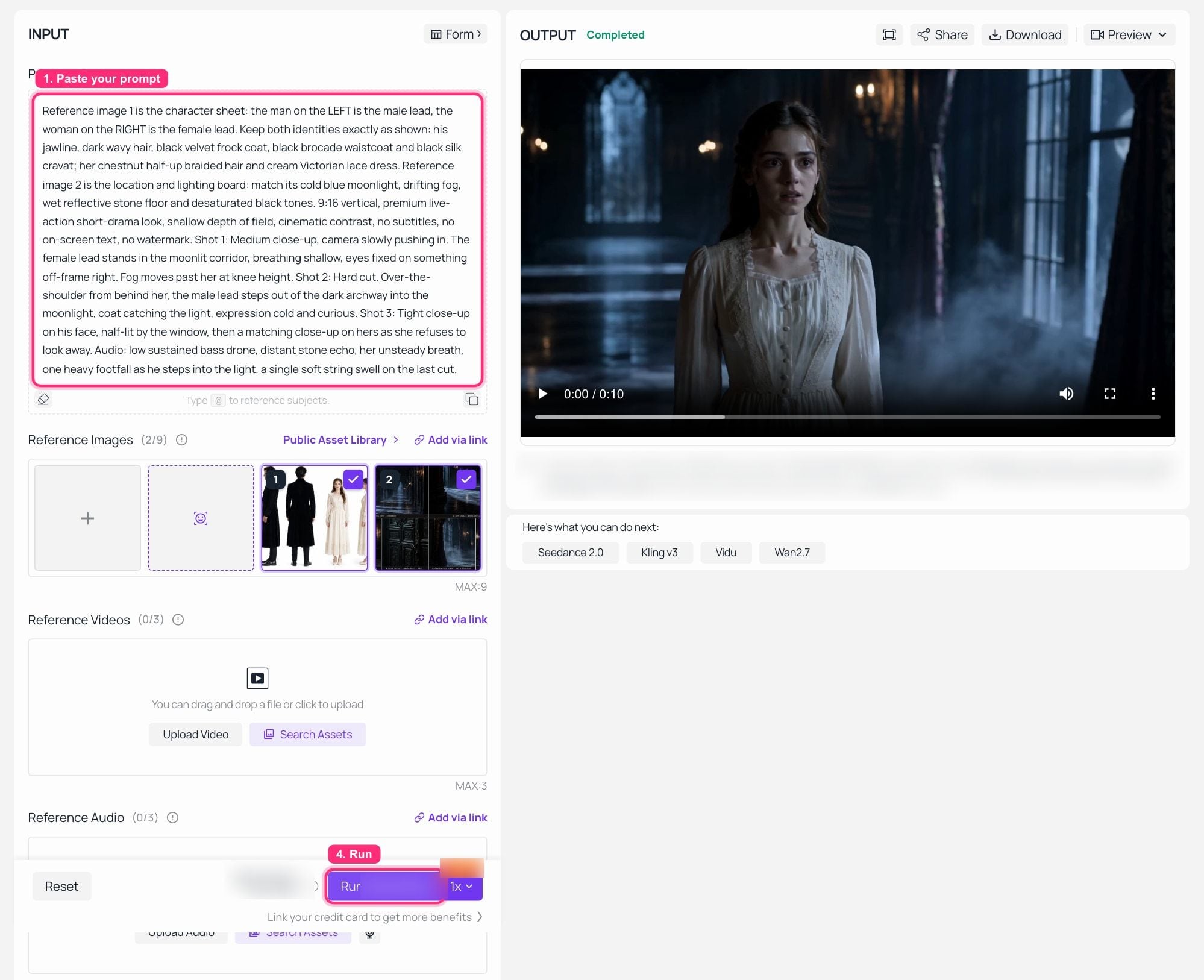 Seedance 2.0 Reference-to-Video na Atlas Cloud, uruchomienie zakończone z identycznym pakietem referencyjnym i promptem z kroku 3, a 10-sekundowy wynik w panelu OUTPUT.
Oto, co faktycznie pokazały dwa panele OUTPUT, i raportuję to płasko, zamiast wybierać zwycięzcę.
Oba przebiegi utrzymały postać. Ta sama kremowa koronkowa sukienka z tym samym dekoltem i mankietami rękawów, te same kasztanowe włosy, ten sam korytarz z mgłą i światłem księżycowym wyjęty z tablicy. Żaden nie wymyślił innej kobiety. Pakiet referencyjny wykonał tę pracę po obu stronach, co jest odkryciem, które najbardziej mnie interesuje.
Różnice dotyczyły formy, a nie twarzy. Ten endpoint Seedance dostarczył 720p; H3 dostarczył 2K z identycznych wejść. I podział kadrowania: H3 odczytał „9:16 pion” bezpośrednio z tekstu promptu i zwrócił pion, podczas gdy przebieg Seedance zwrócił 16:9, ponieważ ta strona ma własną kontrolę proporcji, a sam tekst promptu jej nie nadpisał. Jeśli tniesz dla TikToka, ta różnica będzie cię kosztować jedno uruchomienie za pierwszym razem, gdy zapomnisz o polu formularza. Seedance 2.5 prawdopodobnie zmieniłby połowę rozdzielczości tej sytuacji i dodał ponowne generowania na poziomie regionu, i nie będę udawał, że to zmierzyłem.
Krok 5: Napraw jedno ujęcie bez ponownego generowania całego klipu
Prawdziwy koszt krótkiej dramy to nie pierwsza generacja. To rewizja siódma. H3 akceptuje istniejący klip jako wejście i edytuje zgodnie z instrukcjami, trzymając to, czego nie wymieniłeś. Ofertą Seedance 2.5 jest tutaj drobniejsza: przerysuj region klatki, pozostawiając wydajność, oświetlenie i kamerę bez zmian.
plaintext1Korzystając z dostarczonego klipu: zachowaj obie postacie, ich garderobę, ruchy kamery i rytm cięcia dokładnie tak, jak są. Zmień tylko otoczenie, zastąp oświetlony księżycem kamienny korytarz tą samą salą balową zamku, wysokimi łukowymi oknami, oświetlonym żyrandolem i ciepłym światłem świec, i doświetl obie postacie tak, aby ich kluczowe światło pochodziło z żyrandola po lewej stronie kadru zamiast z okna. Przepisz jej jedyną wypowiadaną kwestię na „Nigdy nie spałeś, prawda?”. Zachowaj jej timing wykonania na tych samych beatach.
Ustawienia: MiniMax H3 Reference-to-Video z klipem z kroku 3 jako wejściem referencyjnym, czas trwania 5, rozdzielczość 2K.
Poza testem Seedance 2.5 vs MiniMax H3: Cztery sposoby na pchnięcie pakietu referencyjnego
Ta sama postać, następny odcinek. Zapisz arkusz z kroku 1 jako zasób i zmień tylko listę ujęć i blok fabularny w prompcie. Tożsamość pochodzi z pliku, a nie z twojej pamięci, jak to sformułowałeś w zeszły wtorek.
Przypnij też głos. H3 przyjmuje do trzech referencji audio, 2 do 15 sekund każda, i muszą one towarzyszyć wejściu obrazu lub wideo. Daj mu próbkę głosu, a postać będzie mówić w tej barwie, więc nie musisz ponownie obsadzać aktora głosowego między odcinkami.
Zablokuj kamerę, zanim zapłacisz za render. Seedance 2.5 reference-to-video akceptuje blokowe modele 3D i green-screeny, więc możesz zablokować kadrowanie na szarej geometrii i dopiero wtedy przejść do gotowego wyglądu. Ten przykład działał na Seedance 2.1, wcześniejszym członku rodziny, ale kształt przepływu pracy jest taki sam.
Zlokalizuj jedno cięcie mistrzowskie zamiast kręcić je ponownie. Zamiana na poziomie regionu wymienia twarz, produkt lub język mówiony, podczas gdy kamera, timing i czas trwania warg pozostają na miejscu. Tutaj jedno cięcie mistrzowskie urody jest ponownie obsadzone i nagłośnione dla hiszpańskiego, koreańskiego i hindi, z pokojem, kadrowaniem i czasem trwania warg utrzymanymi na miejscu.
A ponieważ ktoś zapyta, jak wygląda transfer ruchu, gdy przestaniesz być rozsądny: trzech mężczyzn w garniturach, zastąpionych przez trzech fotorealistycznych kapibar, podążających ścieżką ruchu oryginalnego klipu uderzenie za uderzeniem, aż ułożą się w piramidę.
Jest też prosta wersja tego wszystkiego, której nikt nie publikuje: statyczny plakat staje się ruchomym plakatem, a układ przetrwa.
 Statyczny plakat źródłowy. Podaj go do reference-to-video z „zachowaj kadr, paletę i układ, animuj napis”, a otrzymasz ruchomą wersję tego samego projektu.
Ile faktycznie kosztuje cię krótki film Seedance 2.5 vs MiniMax H3?
Żadnych liczb tutaj, bo liczby się zmieniają, a struktura nie. Obie rodziny rozliczają za sekundę, płatność na bieżąco, bez miejsca i bez subskrypcji. To pozostawia trzy zmienne: sekundy, poziom rozdzielczości i ponowne generowania.
Trzecia to cały rachunek. 15-sekundowy klip, który trafia za pierwszym razem, to jedna opłata. Ten sam klip za siódmym razem to siedem. Więc oszczędzanie pieniędzy polega nie na wybraniu tańszego modelu na sekundę, ale na zrobieniu pakietu referencyjnego dobrze, zanim cokolwiek wygenerujesz. Te dwa wywołania obrazu w kroku 1 i 2 to najtańsza pozycja w całym pipeline i ta, która decyduje o tym, ile wywołań wideo wykonasz. Najwyższy zwrot z wydatku w całym łańcuchu, o dużą przewagę.
Następnie popraw instynkt na sekundę. Ten sam pakiet referencyjny, ten sam czas pracy: H3 reference-to-video oddaje 1440p, ten endpoint Seedance reference-to-video oddaje 720p. Sekunda to zła jednostka. Piksele na klatkę i czy musisz potem zapłacić za osobny pass upscalingu, to właściwa.
Audio też należy do arytmetyki. Obie strony produkują natywnie zsynchronizowany dźwięk w tym samym przebiegu. Jeśli twój obecny pipeline to model wideo plus TTS plus edytor dopasowujący ścieżki, to, co oszczędzasz, to dwa wywołania API i popołudnie osoby, a ta oszczędność nie pojawia się na żadnej liście cenowej.
Który model do którego zadania:
| Zadanie | Wybierz | Dlaczego | Zastrzeżenie |
|---|---|---|---|
| Pionowa krótka drama, 9:16, TikTok lub ReelShort | MiniMax H3 | 1440p pion z natywnym stereo, dostępny teraz, 15 s to pełny hak | tnie się przy 15 s, więc planuj uderzenia odpowiednio |
| Jeden ciągły 30-sekundowy film markowy | Seedance 2.5 | pojedyncza generacja, bez łączenia, natywne 4K | najpierw sprawdź dostępność na swojej platformie |
| Naprawianie jednego ujęcia w zatwierdzonym cięciu | Seedance 2.5 | przerysowanie na poziomie regionu pozostawia resztę bez zmian | H3 edycja całego klipu załatwia większość dziś |
| Skróty produktowe i e-commerce | dowolny | oba dobrze utrzymują tekst na ekranie i znaki marki | zweryfikuj tekst w rozdzielczości, którą dostarczasz |
| Demo gry lub interfejsu | MiniMax H3 | stabilność UI i typografii w 2K jest silna | limit 15 s dla pojedynczej serii |
| Wielojęzyczne wersje jednego mastera | Seedance 2.5 | zamiana regionu plus wielojęzyczny głos | jakość lokalizacji wciąż wymaga native checku |
| Wysyłka dziś wieczorem | MiniMax H3 | trzy endpointy działające, plus cały Seedance 2.0 | dostęp do Seedance 2.5 różni się w zależności od platformy |
Zanim wyślesz. MiniMax powiedział, że wagi H3 pojawią się w ciągu kilku dni od premiery, a otwarte wagi to nie to samo co licencja komercyjna, więc przeczytaj warunki przed samodzielnym hostowaniem. Polityka znaku wodnego i użytku komercyjnego również różni się między aplikacjami konsumenckimi a dostępem API po obu stronach, i nie mogłem potwierdzić żadnej z nich z podstawowej strony warunków podczas pisania tego, więc sprawdź warunki dostawcy, zamiast brać moje słowo za pewnik. I nic w żadnej licencji modelu nie obejmuje wizerunku ani znaku towarowego. Jeśli w twoim pakiecie referencyjnym znajduje się prawdziwa osoba, prawdziwa marka lub czyjeś IP, to osobne pytanie prawne, a warunki modelu na nie nie odpowiedzą.
Każdy model w powyższych tabelach działa na tym samym kluczu, a strony modeli zawierają aktualne stawki plus kod do skopiowania i wklejenia, w tym wszelkie promocje, które mogą obowiązywać na linii Seedance w tym tygodniu.
Często zadawane pytania
Czy Seedance 2.5 jest lepszy od MiniMax H3 pod względem spójności postaci?
Na papierze powinien być, z do 50 multimodalnymi referencjami wobec 12 plików H3, plus ponowne generowania na poziomie regionu. Ale na dzień 31 lipca 2026 nie ma sparowanego publicznego testu, na który mógłbym wskazać, a Seedance 2.5 nie ma jeszcze oceny na arenie. W przebiegach, które faktycznie mogłem wykonać, zmienną decydującą o stabilności tożsamości była struktura pakietu referencyjnego, a nie generacja modelu: z jednym kompozytowym arkuszem transformacji plus jedną tablicą oświetlenia, obie strony utrzymały postać. Zrób pakiet dobrze, zanim zaczniesz szukać modeli.
Czy mogę użyć Seedance 2.5 teraz, czy muszę czekać?
Jego API jest aktywne u ByteDance. Dostępność na platformach modeli stron trzecich jest nierówna, a na tej, którą testowałem, wciąż jest to powiadomienie Dnia 0. Jeśli potrzebujesz wyniku dziś wieczorem, dostępne opcje to trzy endpointy MiniMax H3 i cała działająca linia Seedance 2.0.
Czy MiniMax H3 naprawdę robi 30-sekundowe wideo?
Nie. Specyfikacja to 5 do 15 sekund na generację przy 24 fps. Cokolwiek dłuższego to rozszerzenie lub łączenie, co jest inną rzeczą z innym ryzykiem dryfu. 30-sekundowa pojedyncza generacja należy do Seedance 2.5. Nie pozwól, aby te dwa twierdzenia się zlały.
Czy oba modele generują audio i czy mogę utrzymać jeden głos w odcinkach?
Oba produkują natywnie zsynchronizowany dźwięk w tym samym przebiegu, a H3 wyprowadza stereo na każdym wyniku. Dla trwałego głosu H3 akceptuje do trzech referencji audio po 2 do 15 sekund każda, które muszą być przesłane wraz z wejściem obrazu lub wideo, a nie osobno.
Ile obrazów referencyjnych powinienem faktycznie wysłać?
Mniej, niż myślisz, lepiej ustrukturyzowanych, niż myślisz. Jeden dobrze skomponowany kompozyt generalnie bije sześć luźnych kadrów, ponieważ osobne pliki zachęcają model do uśrednienia ich w osobę, która nie istnieje. Daj mu dwa jasne zadania, tożsamość i oświetlenie, i nie dołączaj próbek stylu, które walczą ze sobą.
Który model powinienem użyć do pionowej krótkiej dramy w stylu TikTok lub ReelShort?
Wysyłka w tym tygodniu, w 9:16, w wysokiej rozdzielczości z już zmiksowanym dźwiękiem: MiniMax H3. Planowanie 30-sekundowej ciągłej sceny, w której spodziewasz się ponownie generować pojedyncze regiony, a nie całe klipy: buduj dla Seedance 2.5 i sprawdź, kiedy twoja platforma go otworzy.





