

A retro cartoon rarely breaks because its prompt needs more nostalgia words. It breaks when the teal jacket turns blue, the ink lines become glossy, and one diner action turns into unrelated cuts. Kling 4 Flash for retro cartoon videos works best when you lock the image before you ask for motion.
Kling 4.0 Flash is a limited early-access route, not a universally available production endpoint. Its published limits are 3 to 20 seconds, 720p, and 8-bit SDR. For a stable recurring character, make an approved first frame, then animate one clear beat at a time. If Flash is not enabled for your account, the same process can run today with a live Kling V3.0 Turbo image-to-video route on Atlas Cloud.
Key takeaways
- Use image-to-video to lock costume, palette, line treatment, and silhouette.
- Generate 3 separate short shots instead of forcing a full mini-story into one run.
- Treat Flash access, full Kling 4.0 access, and a live Atlas workflow as different states.
- Keep the character bible unchanged across every base frame.
Can Kling 4 Flash Make Retro Cartoon Videos Right Now?
Yes, if your account has the limited Flash rollout. Kling says Kling 4.0 Flash entered early access for a limited group of users on September 28, with image-to-video and text-to-video among its listed capabilities. The official release lists Flash at 3 to 20 seconds, 720p, and 8-bit SDR. That makes it a sensible place to test short stylized shots, not a reason to promise a 4K or multi-keyframe workflow. (Kling’s official release, September 2026)
| Route | Current status | Use it here for | Important constraint |
|---|---|---|---|
| Kling 4.0 Flash | Limited early access | Short stylized tests if your account exposes it | 3 to 20 seconds, 720p, 8-bit SDR |
| Full Kling 4.0 | Announced separately | A later production option after access is confirmed | Do not treat its controls as Flash features |
| Kling V3.0 Turbo I2V on Atlas Cloud | Live fallback | The image-first tutorial below | Check live settings and pricing before each batch |
Kling 4 Flash Access, Resolution, and Clip Length
Open your Kling creation page and confirm that Flash is an available model before planning around it. The full Kling 4.0 release is a separate access state. Flash should not be described as an Atlas Cloud model unless a live Atlas model page exists.
For this article’s 3-shot test, the practical fallback is Atlas Cloud: create the still, approve it, and animate each shot separately. That keeps reshoots local to a single shot.
Why Kling 4 Flash Retro Cartoon Videos Need an Image First
Text-to-video can invent appealing details. It can also invent the details that make a series unusable. Image-to-video gives the model a visual contract before motion begins.
Lock these 4 anchors in the approved frame:
| Visual anchor | Why it matters | Where it appears in the prompt |
|---|---|---|
| Mara’s silhouette | Her bob, jacket, shoes, and adult proportions identify her | Character identity |
| Style grammar | Ink contour, cel colors, and halftone prevent a glossy shift | Visual era and line treatment |
| World anchors | The booth, rain window, bell, cup, and neon locate the story | Fixed location and prop |
| Camera grammar | Named framing avoids an unplanned montage | Motion prompt, beat by beat |
Kling’s prompt guidance frames video direction around subject, movement, scene, camera, and lighting. For this use case, put the style and character details in the first frame, then use the motion prompt to preserve them while directing the action. (Kling’s prompt guide, 2026)
Kling 4 Flash Retro Cartoon Prompt: Build the Character Bible
Use this compact formula for every base-frame prompt:
[character identity] + [visual era and line treatment] + [limited color palette] + [fixed location] + [one prop] + [no-text constraints]
The character bible remains word-for-word stable. Only staging changes between shots. That discipline matters more than adding a fresh batch of retro adjectives to each prompt.
Make 3 Kling 4 Flash Retro Cartoon Shots From One Character
Use the original mini-story “Mara’s Neon Diner Delivery.” Generate 3 separate clips. The current Atlas Cloud Turbo documentation exposes 5- and 10-second duration choices, so use 10 seconds for this 3-beat fallback version. Each clip gets its own matching base frame, so a weak take never forces a full restart.
Step 1: Generate the recurring first frame
Create 2 to 4 candidates in GPT Image 2 Text-to-Image. Select high quality, 16:9, and the highest resolution the live form offers. Approve only a frame where Mara’s coral hair clip, teal jacket, coral sleeve patch, yellow bag, bell, coffee cup, and rain window are all visible.
plaintext1Create a wide 16:9 hand-drawn retro cartoon keyframe for an original animated short. The visual language is late-1980s Saturday-morning cel animation: uneven dark navy ink outlines, flat cel shading, restrained halftone print texture, tiny paint-registration imperfections, and a limited palette of teal, coral red, butter yellow, midnight blue, and warm cream. 2 3Main character: Mara, an original adult bicycle courier in her twenties, short black bob haircut with a single coral hair clip, oversized teal bomber jacket with a coral-red patch on the left sleeve, cream T-shirt, dark navy trousers, white high-top sneakers, and a small yellow messenger bag. Keep Mara’s face, clothing colors, proportions, and hair silhouette clear and repeatable. 4 5Scene: Mara sits alone in a warm retro roadside diner booth at night. A rain-streaked window fills the left side. A tiny red tabletop service bell, a steaming cream coffee cup, and a folded yellow delivery map sit on the table. Outside the window, a teal-and-coral neon diner sign reflects on wet pavement. Compose Mara on the right third of frame, with the bell and cup readable in the foreground. Hand-painted background details, no photorealism, no 3D rendering, no gradients, no glossy modern CGI, no words, no logo, no subtitles, no watermark.
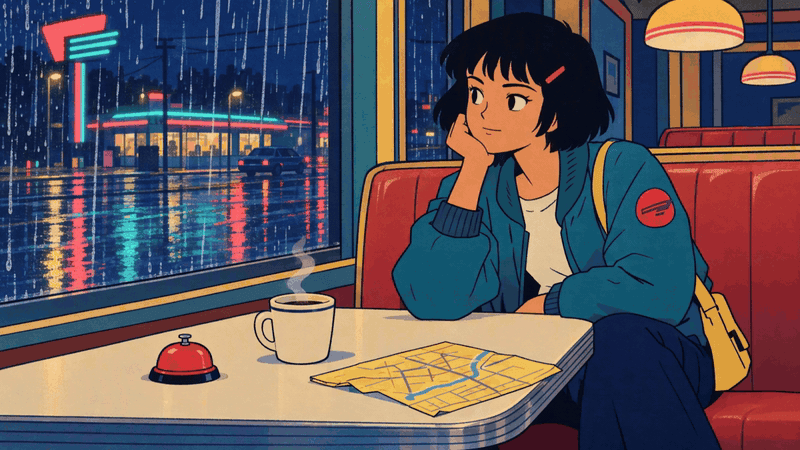
Mara's approved diner keyframe with the rain window, red bell, coffee cup, and yellow map
Base frame 1: the diner props, rain window, and Mara's teal jacket establish the look before animation.
Shot 1: Bell and Rain
Upload the approved frame to Kling V3.0 Turbo Image-to-Video. Set 16:9, 10 seconds, 1080p, and audio off for this silent GIF example. The action has a cause and a result: Mara notices the rain, presses the bell, then reaches for the map.
plaintext1Use the supplied image as the exact visual source and preserve Mara’s face, short black bob, coral hair clip, teal bomber jacket, coral sleeve patch, yellow messenger bag, diner booth, red bell, cream coffee cup, rain-streaked window, limited teal-coral-cream palette, hand-inked outlines, flat cel shading, and halftone texture. 2 3Create a 10-second retro-cartoon sequence with three deliberate beats: 40 to 3 seconds: wide shot, Mara notices rain intensifying outside and presses the small red bell once; steam curls from the coffee. 53 to 7 seconds: medium side shot, Mara turns her head toward the window; the neon reflection shimmers across the wet glass. 67 to 10 seconds: close three-quarter shot, Mara gives a determined half-smile and reaches for the yellow delivery map. 7 8Keep the action smooth and readable. Preserve the hand-drawn 1980s cel-animation look. No extra characters, no costume changes, no text, no captions, no logos, no morphing, no sudden camera jumps, no photorealism.
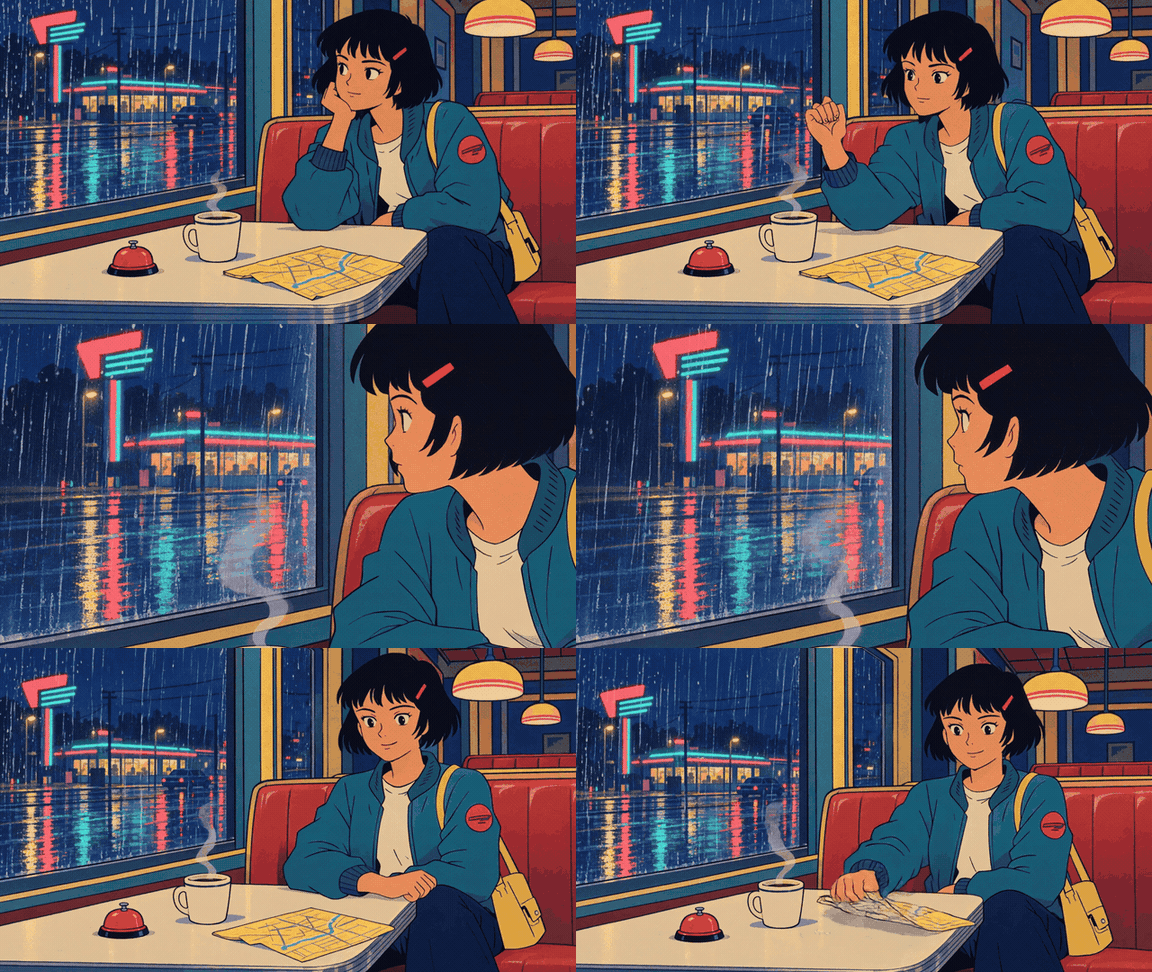
Mara at the diner table as she turns toward the rain window and reaches for the map
Result 1: Mara turns from the rainy window toward the table and reaches for the map. The bell stays visible, but the finished clip does not clearly show a bell press.
Shot 2: Window Reflection
Make a new matching base frame using the full character bible. Change only the staging: Mara stands at the diner door, holds the yellow map and bag strap, and the teal scooter waits outside on wet pavement.
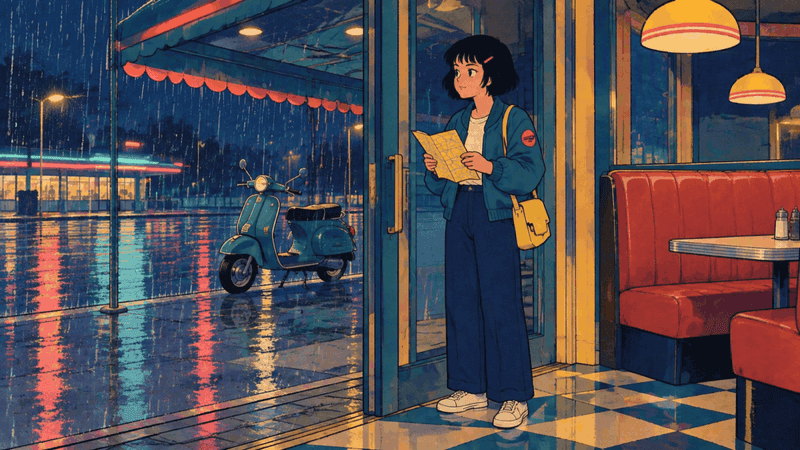
Mara at the diner doorway with her map and teal scooter outside
Base frame 2: the same jacket, sleeve patch, bag, and rainy palette carry into a new staging.
plaintext1Use the supplied image as the exact first frame. Preserve Mara’s short black bob, coral hair clip, teal jacket, coral sleeve patch, yellow bag, yellow map, diner doorway, teal scooter, wet pavement, retro hand-inked linework, flat cel shading, halftone texture, and limited teal-coral-cream palette. 2 3Create a 10-second sequence: 40 to 3 seconds: medium interior shot, Mara folds the map once and looks through the rain-streaked door glass. 53 to 7 seconds: exterior medium-wide shot, Mara steps out under the diner awning and places the folded map into her yellow bag. 67 to 10 seconds: low side shot, Mara swings one leg onto the teal scooter; rain ripples in a shallow puddle and neon reflections move across it. 7 8Keep Mara’s design stable. Make every action physically connected. No new characters, no text, no captions, no logos, no style change, no abrupt montage, no photorealism.
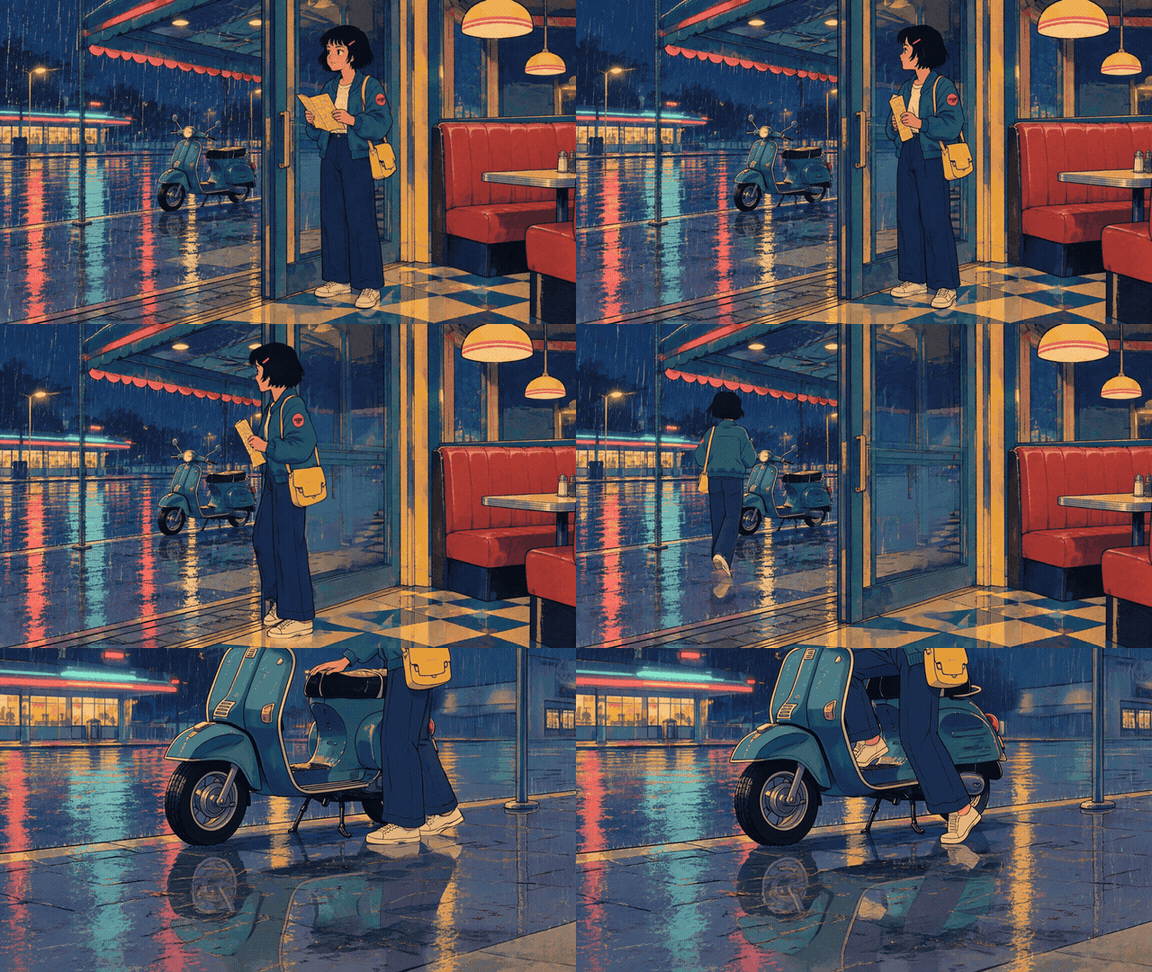
Mara leaves the diner and mounts her teal scooter in the rain
Result 2: Mara walks out to the scooter and mounts it. The movement is readable; the requested map fold is not clearly visible in the finished clip.
Shot 3: Scooter Departure
Generate a third matching base frame. Keep Mara unchanged on the teal scooter outside the diner, map tucked into the bag, and a paper receipt near the curb. Compose lateral space to the right.
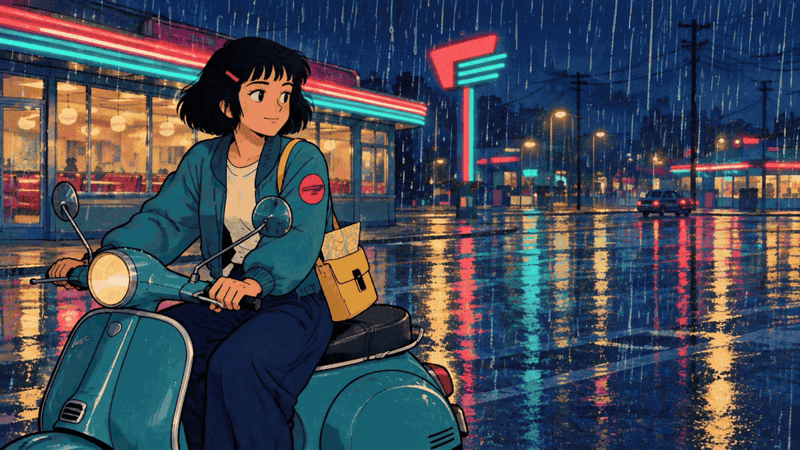
Mara on her teal scooter outside the rainy neon diner
Base frame 3: the scooter and wider wet street give the departure shot room to move.
plaintext1Use the supplied image as the exact first frame and preserve Mara, her teal jacket, coral patch, yellow bag, teal scooter, diner architecture, neon palette, wet pavement, hand-inked outlines, cel shading, and halftone texture. 2 3Create a 10-second retro-cartoon departure: 40 to 3 seconds: medium-wide shot, Mara starts the scooter and its headlight softly illuminates rain droplets. 53 to 7 seconds: side-tracking shot, Mara rides smoothly from left to right past the diner; the paper receipt lifts, circles once, and falls behind her. 67 to 10 seconds: wider rear three-quarter shot, the scooter turns gently down the rain-glossed street while the diner neon remains visible in the background. 7 8Keep the same character proportions and style from beginning to end. No extra riders, no text, no captions, no logos, no sudden camera jump, no morphing, no photorealism.
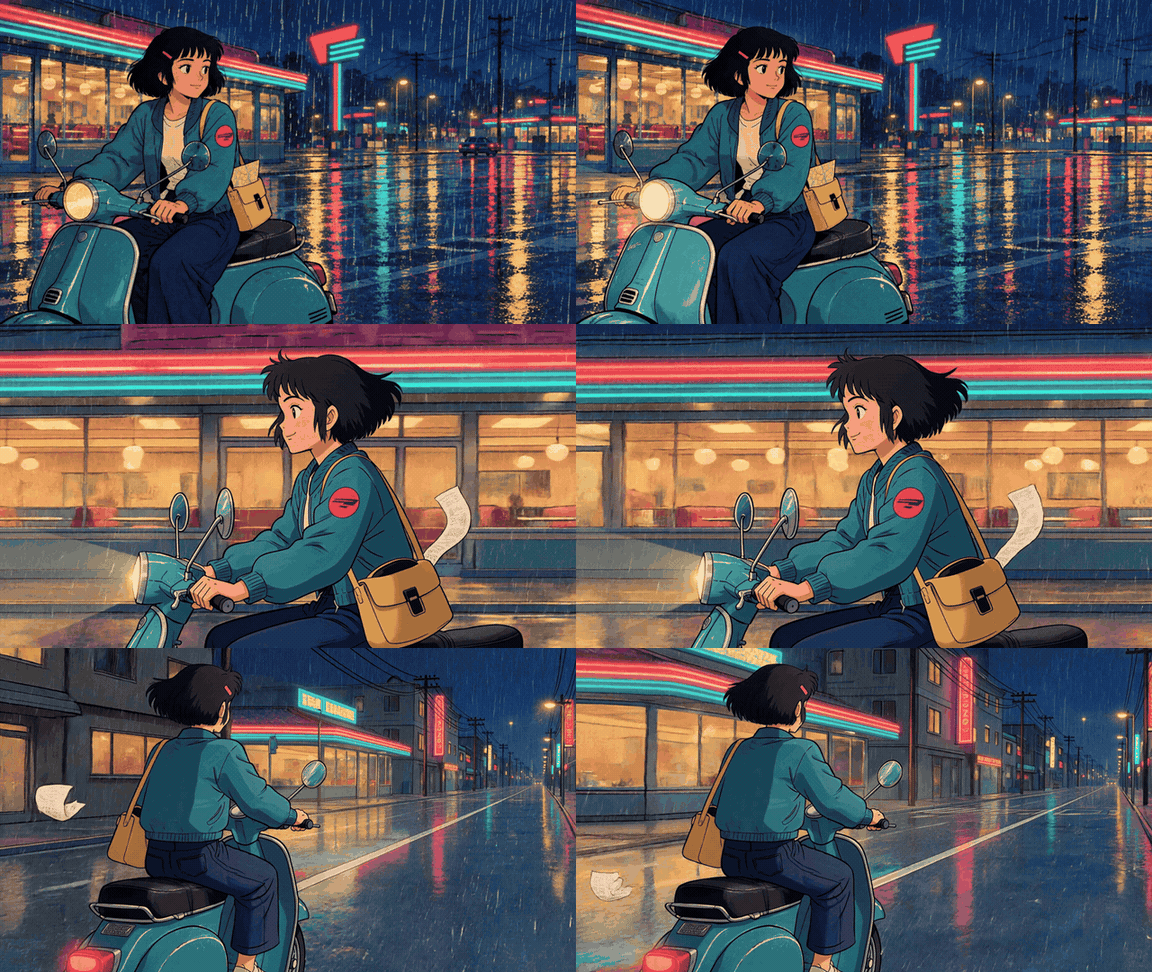
Mara rides away from the diner on her teal scooter as a receipt lifts in the rain
Result 3: Mara rides past the diner and away down the wet street while a paper receipt lifts beside her. Her teal jacket, coral patch, and yellow bag remain recognizable.
Kling 4 Flash vs a Live Atlas Fallback
Use the route that matches the job, not a model-ranking contest.
| Need | Recommended route |
|---|---|
| Confirmed Flash access and a quick 720p stylized test | Reuse the same approved base frame and 3-shot prompts in Flash |
| A reproducible workflow today | GPT Image 2 base frame plus Kling V3.0 Turbo Image-to-Video |
| Stronger first-to-last transition control | Confirm a live route that exposes first/last-frame controls before committing |
| A 4K deliverable | Confirm the model-specific settings; Flash is not the default 4K assumption |
The live Atlas route is useful because you can create the first frame and the Kling clip in one workspace while iterating. It is a fallback for this workflow, not Kling 4 Flash hosted on Atlas.
Kling 4 Flash Price and a 10-Second Budget Snapshot
As of October 2026, Atlas Cloud’s model catalogue lists Kling V3.0 Turbo Image-to-Video at $0.095 per second, shown as a 15% discount from $0.112 per second. A 10-second test is therefore $0.95 at that listed rate. Treat this as a planning snapshot: confirm the live model page, resolution, duration, and price before a production batch. (Atlas Cloud Models, October 2026)
Fix Kling 4 Flash Retro Cartoon Video Problems
The Character Changes Between Shots
Reuse the approved base image when the location allows it. For a new location, repeat the full character bible. Do not shrink “short black bob, coral clip, teal jacket, coral patch, yellow bag” into “same girl” and expect the model to retain it.
Kling 4 Flash Adds Random Cuts or a Style Shift
Name 3 beats, give each a framing, and remove conflicting camera language. “Single continuous take,” “rapid montage,” and “multiple angles” should not share one prompt. Put cel shading, ink thickness, halftone texture, and palette preservation in the base frame and the video prompt.
Motion Looks Like a Slow Zoom
Give Mara a physical task with a visible effect: press bell, fold map, swing onto scooter, ride past diner. Add one environmental reaction, such as steam, rain ripples, or the receipt circling. This turns motion into a short story instead of camera drift.
Is Kling 4 Flash Worth Using for Retro Cartoon Videos?
Kling 4 Flash is worth testing when you already have access and need a short, stylized clip at its published limits. The repeatable advantage comes from the image-first storyboard and locked character bible. You can validate that process with the live Atlas fallback now, then run the same kling 4 flash for retro cartoon videos shot plan after Flash access is confirmed.
Frequently Asked Questions
Is Kling 4 Flash available to everyone yet?
No. Kling describes Flash as a limited early-access rollout. Confirm the model picker in your own account before promising it in a client workflow.
Can Kling 4 Flash create retro cartoon videos from one image?
Its official release lists image-to-video support. A designed first frame is the safer route for a recurring retro character because it pins down the costume, palette, linework, and set.
What is the best Kling 4 Flash prompt for a consistent cartoon character?
Use a full character bible in every base frame, then a short motion prompt with 3 timed beats. Preserve the same named clothing, props, setting, ink treatment, palette, and camera framing.
Should I use text-to-video or image-to-video for retro animation?
Use image-to-video when continuity matters. Text-to-video can help explore ideas, but it gives the model more decisions to make about character design and style.
Why does my Kling cartoon video add random cuts or change the character’s clothes?
The prompt is likely leaving too much open or giving contradictory camera direction. Supply an approved first frame, describe only the intended action, and specify framing for each beat.
What can I use today if I do not have Kling 4 Flash access?
Use the same image-first sequence with a live image-to-video model. The practical route shown here is GPT Image 2 for the keyframe and Kling V3.0 Turbo Image-to-Video for each 10-second shot.





