Poproś AI o podsumowanie
A generated photo can pass a quick glance and still fall apart when you trace a bicycle chain around its gears or inspect light through a glass bottle. MiniMax H3-Image prompts need those physical relationships to hold up under a closer look. For a credible everyday photo, describe a specific moment, a plausible camera position, one main light source, and a few ordinary imperfections. Then inspect the actual output at 100% before you publish it.
MiniMax H3-Image was announced on November 11, 2026. MiniMax says it can produce a 4096 × 4096 image in under 10 seconds. That is the company's speed claim, not a guarantee for every interface or local machine. Its own published chart reports a 10.3-second median for 4K Highspeed text generation, so even the vendor's figures need their test context. The four photo prompts and four-panel edit below give you concrete results to inspect, followed by a repeatable way to judge them.
Key takeaways
- Write the scene as a photograph someone could have taken, with a camera position and a consistent source of light.
- Inspect hands, contact shadows, reflections, background people, and any visible lettering at 100%.
- Change one failed relationship at a time instead of adding a long list of style adjectives.
- Treat 4K as room to inspect and crop, not proof that the scene is believable.
What MiniMax H3-Image Actually Does
MiniMax H3-Image generates and edits still pictures. The separate MiniMax H3 video model creates clips with motion and audio; its listings do not identify a MiniMax H3-Image still-image endpoint. This matters when you choose a tool and when you label a sample. A frame from a MiniMax H3 video does not demonstrate how the separate image workflow handles a product label or a hand.
The MiniMax H3-Image model card describes text-to-image and reference-based editing in one checkpoint. Its published output sizes are around 16 megapixels, with 4096 × 4096 at 1:1 and wide formats at similar pixel counts. MiniMax also documents up to 16 reference images. Six sampling steps describe its released inference setup, not a setting every online user needs to enter.
| Published capability | What a creator still needs to check |
|---|---|
| Roughly 16 MP native output | Whether fine detail remains physically coherent at full size |
| Text generation and reference editing | Whether a requested change preserves the rest of the scene |
| Up to 16 references | Whether each reference has a clear role rather than conflicting instructions |
| Open model weights | Whether hardware and license terms fit the intended use |
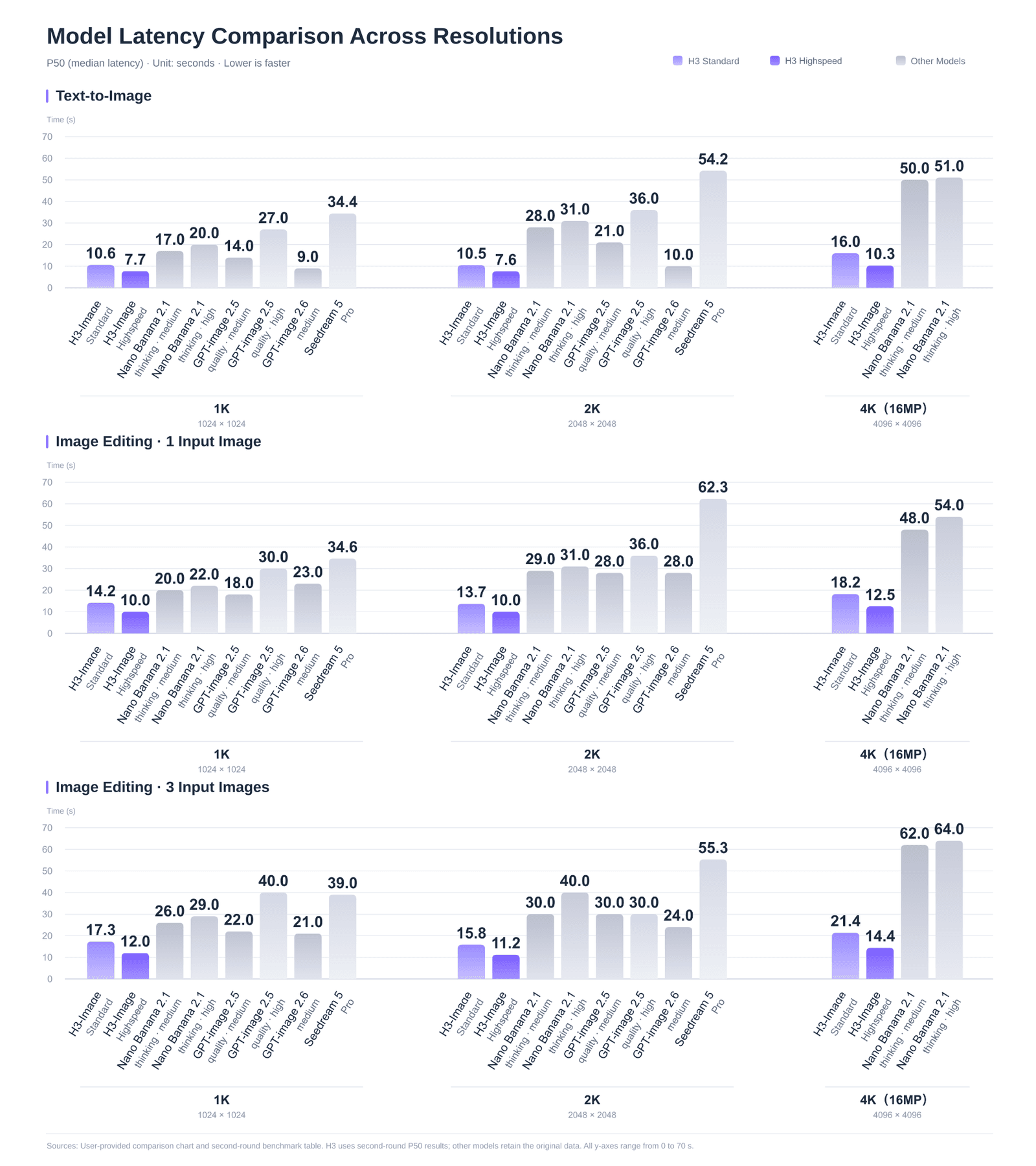
MiniMax's published latency chart is a vendor-reported claim. Online queue time and local hardware can change the experience.
The distinction between output size and photographic credibility shapes the rest of this guide. More pixels reveal both convincing texture and errors. A large file gives a designer latitude to crop for a social post, but it cannot repair a pump that joins a bottle at the wrong angle or a reflection that belongs to a different light source.
What Makes a MiniMax H3-Image Photo Look Real?
The word "photorealistic" gives a model a broad style target. A useful prompt instead specifies evidence a camera could record. Start with a visible event: a person gripping a cup, a bottle resting on a shelf, or someone passing flowers across a counter. The event gives the viewer physical relationships to assess.
Light is the first relationship. If a window on the left is the main source, the lit edge of the face, the cup, and the nearby wall should agree. A second bright rim without a source can make an otherwise ordinary image feel staged. Skin and materials are next. Fine pores, flyaway hair, small marks on stone, glass thickness, and fabric wrinkles make sense only if they follow the scene's scale and light.
Hands and contact points are more revealing than isolated objects. Fingers must wrap around a cup or support a bundle without merging into it. The object's weight should show up in the pose and shadow. Background detail deserves the same scrutiny. A distant pedestrian can be soft because the camera focused nearby; an extra limb or a face with scrambled features is a different problem.
Depth of field and exposure should also be explainable. A phone snapshot with uneven framing, ordinary light, and broad focus calls for different cues than a close film portrait with a shallow focus plane. MiniMax's published real-world examples use those different photographic conditions. That is a useful prompting principle, while the selected examples remain vendor material rather than independent performance evidence.

Official MiniMax examples show different texture and depth cues in a rooftop scene, a close portrait, and wildlife. Inspect each as a sample, not as this article's test result.
For your own work, keep a simple standard: could a photographer explain the light, camera position, and moment of contact in one sentence? If that explanation needs several incompatible light sources or impossible anatomy, revise the brief before adding more descriptive words.
4 Copyable MiniMax H3-Image Prompts for Realistic Photos
Open the official MiniMax Design tool for MiniMax H3-Image, choose still-image generation, and paste one prompt at a time. Its published options include 1K, 2K, and 4K output and aspect ratios from 1:3 to 3:1. Choose 4K for the final inspection, save the original file, and record the settings the interface actually shows. An online run and a local run can have different latency, so keep their timings separate.
The four briefs below cover a person working with a mechanical object, a transparent product, wildlife at different distances, and an ordinary phone snapshot. Each case pairs a copyable prompt with the generated result and specific details to inspect at full size.
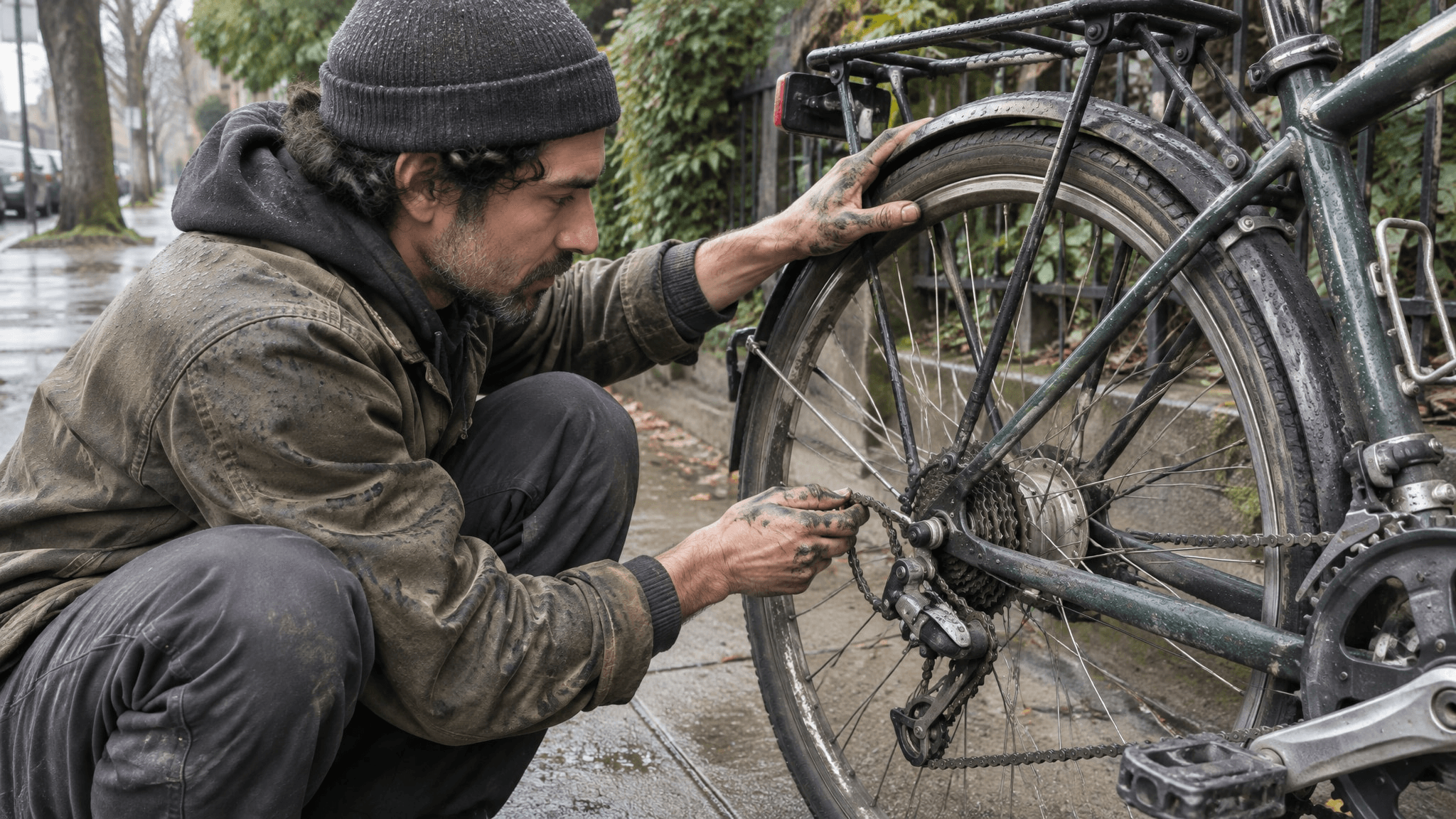
1. Street-side bicycle repair, 16:9
Use this documentary-style scene to test whether a person, an everyday machine, and the surrounding light obey the same physical logic. The hands must visibly connect to the repair rather than merely pose near the bicycle.
plaintext1An unposed editorial photograph of an adult bicycle mechanic crouching beside a commuter bike on a quiet sidewalk after light rain. One hand steadies the rear wheel while the other guides the loose chain onto a rear sprocket; show both hands, the rear hub, derailleur, and the section of chain being repaired. Compose a wide 16:9 frame from a three-quarter side angle at the mechanic's eye level, with the mechanic's face in profile and the bicycle filling the foreground. Overcast daylight comes from frame left, creating one soft shadow on damp concrete and restrained reflections on the metal. Include grease in the finger creases, worn tire rubber, small water beads, natural fabric folds, and a believable chain path around the gear teeth. Documentary color, ordinary depth of field, no staged glow or readable signage.
At 100%, trace the chain around the sprocket and derailleur, then check where each hand touches the wheel or chain. The grease, wet pavement, and metal highlights should agree with the same overcast light. If the chain path fails, revise the repair action before changing the whole scene.
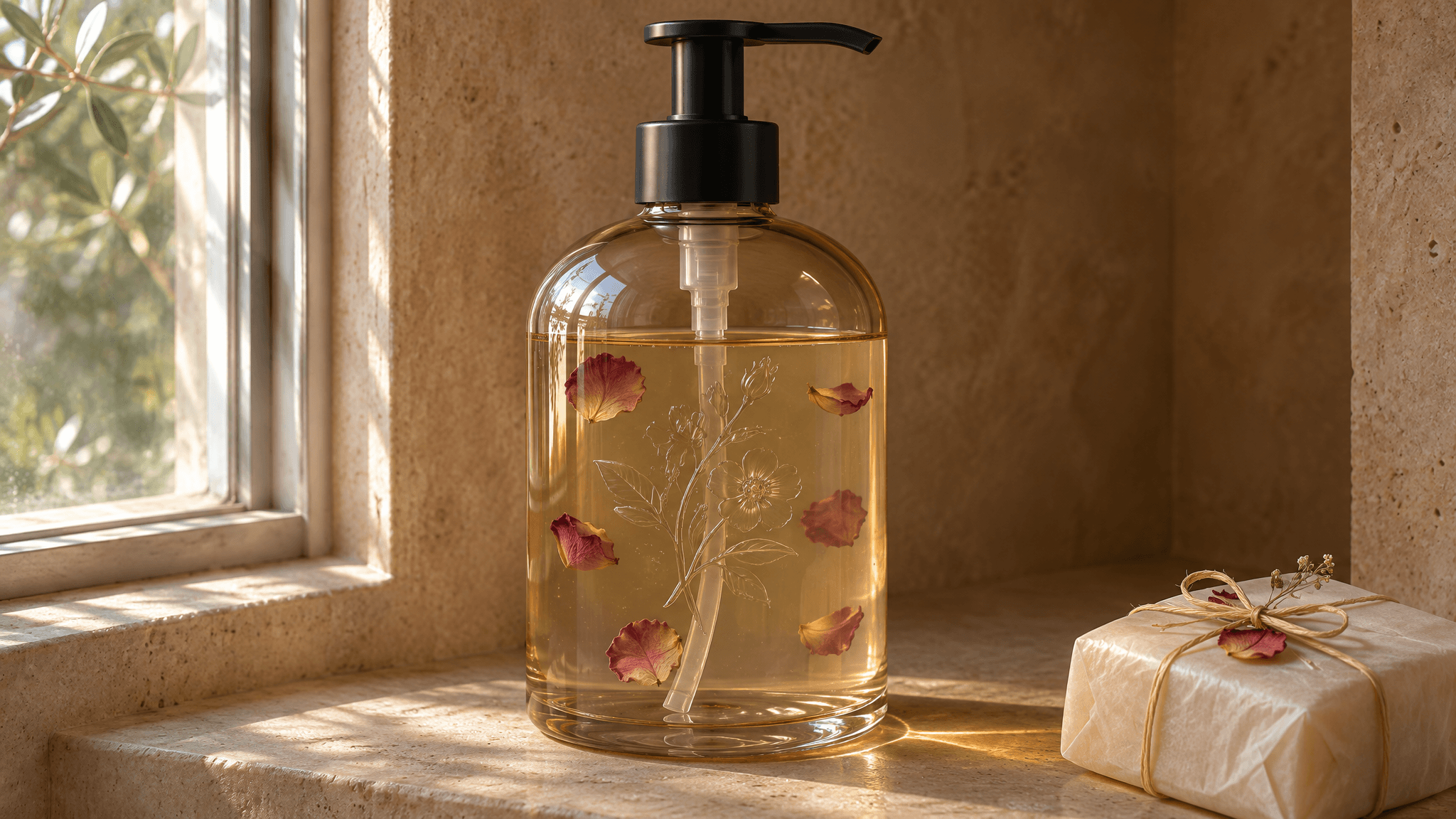
2. Unbranded product photo, 16:9
A translucent bottle adds a useful material test: petals must appear behind the glass and within the liquid, while a subtle floral relief should follow the bottle's curved surface. Keep the wrapped soap bar on the shelf so this result can also become Picture 1 for the reference-edit exercise below.
plaintext1An editorial bathroom product photograph in a 16:9 frame: exactly one unlabeled amber-tinted glass hand-soap bottle with a black pump stands on a warm beige stone niche shelf. The bottle is three-quarters filled with translucent pale honey-colored soap, with six small dried rose petals suspended at different depths inside the liquid. A faint, transparent floral relief is molded into the front glass; it becomes visible where the window light catches its curved edges, without looking like a printed label. A single wrapped bar of soap rests in the lower-right foreground. Shoot from near shelf height, keeping the entire bottle and pump visible. Soft daylight enters from the window on the left; the niche stays warmer and dimmer on the right. Show a straight liquid level, plausible glass thickness, a pump tube visible through the soap, petals refracted by the curved bottle, a grounded contact shadow, and reflections consistent with the window. Natural color, no additional bottles, logos, or added text.
Inspect whether the petals sit at distinct depths inside the soap, the floral relief follows the glass curve, and the liquid line remains level. Then check the pump-to-neck connection, the bottle's contact shadow, and whether the wrapped bar rests on the same shelf plane. If an extra bottle appears, tighten only the count constraint: "Exactly one bottle in the entire frame."
3. Flamingos in shallow water, 16:9
A wide wildlife scene gives you a different realism test: several birds at different distances, thin legs in water, and reflections that should belong to the birds above them. Keep the scene observational rather than staged.
plaintext1A quiet wildlife photograph of several flamingos wading through a shallow salt lagoon at sunrise. One bird in the near foreground lowers its curved beak into the water; others stand farther back at smaller scale. Shoot from low on the shore with a level horizon and a wide 16:9 frame. Pale pink morning light skims the water. Show fine ripples around each visible leg and broken reflections directly beneath the birds, with natural feather detail and no dramatic color grading or text.
Check each leg where it enters the water, the scale of the distant birds, and whether the ripples disturb the reflections. If the water looks like a perfect mirror, change only the surface description to "small overlapping ripples across otherwise calm water."

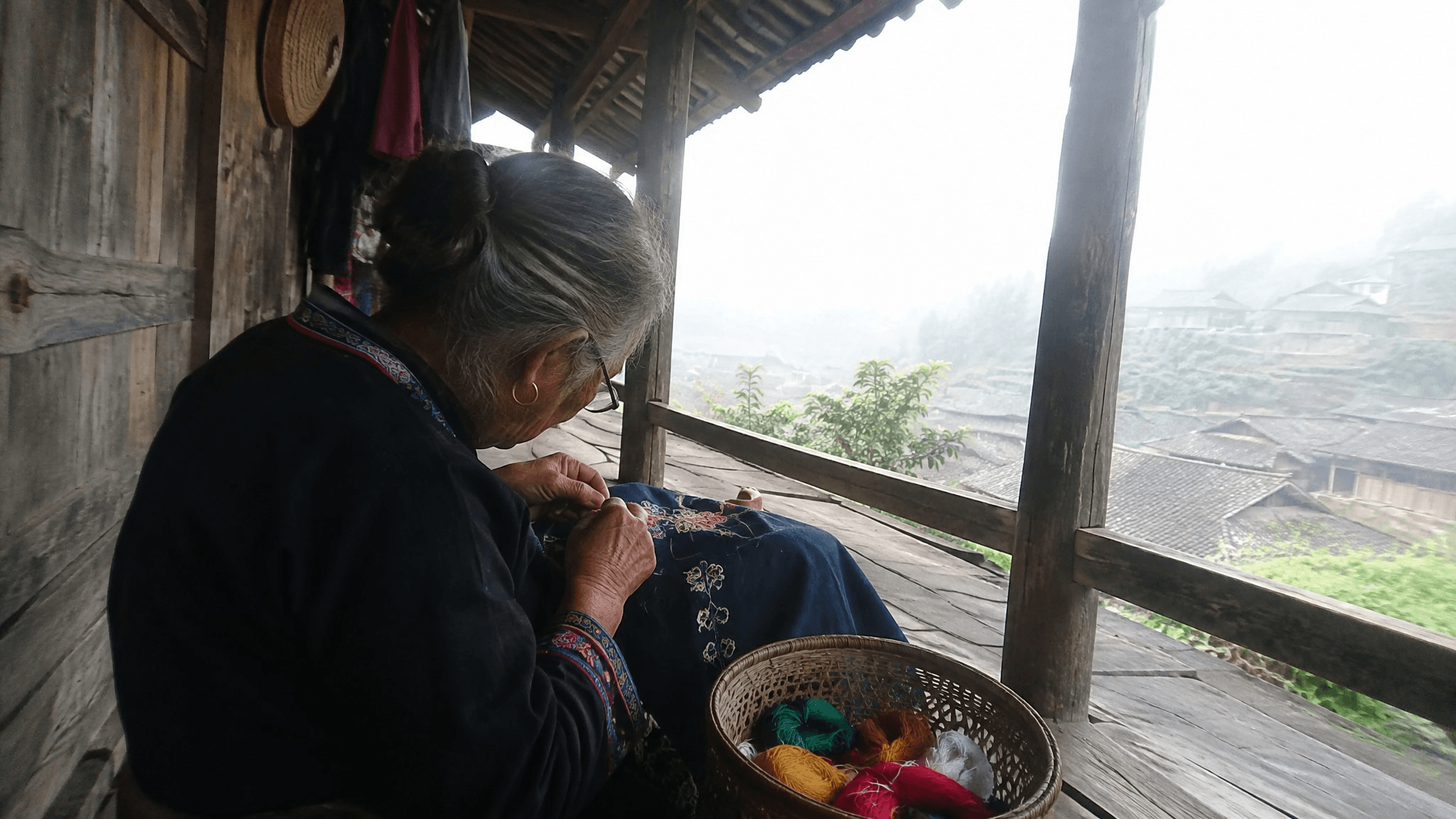
4. Old-phone documentary snapshot, 16:9
An ordinary task photographed on a phone gives you a test of uneven exposure and casual framing. Include concrete cues for the hands, fabric, and morning light without turning the scene into a polished studio portrait.
plaintext1A candid rear-camera smartphone photograph of an elderly woman embroidering a dark blue cloth beneath a wooden veranda at dawn. She leans over the fabric with both hands close to the stitching; a basket of colored thread rests beside her. Include part of the timber wall and the misty village beyond the veranda. Hold the phone sideways, frame a little imperfectly, let the bright mist run slightly overexposed, and keep shadow detail naturally dark. Ordinary color, broad focus, no studio lighting or added text.
Inspect the needle, thread, and hand positions before worrying about grain. The dawn mist can be bright, but it should not erase the subject or turn the dark veranda into a second light source.
One Reference Image, Four Controlled Edits
Upload the soap-bottle result from case 2 as Picture 1. A single 2×2 comparison sheet can show how one source scene responds to three small edits: removing the wrapped bar, adding petals to the shelf, and replacing the bar with a soap dish. Ask for one finished image with four equal panels, not four unrelated product photographs.
plaintext1Using <Picture 1> as the exact reference, create ONE photorealistic image laid out as a clean 2x2 grid of four equal panels with thin white gutters. Each panel repeats the same 16:9 bathroom view from the source: the same amber-tinted pump bottle, liquid level, suspended rose petals, transparent floral relief, warm stone niche, left-side window, camera angle, and daylight. Keep the bottle in exactly the same position and scale in all four panels. Change only the specified shelf detail in each panel: 2 3Top left: reproduce the source scene with the wrapped soap bar unchanged. 4Top right: remove only the wrapped soap bar; reconstruct the exposed stone shelf with matching texture, light, and shadow. 5Bottom left: keep the wrapped bar and add exactly three loose dried rose petals on the empty shelf to the left of the bottle, with natural contact shadows. 6Bottom right: replace only the wrapped bar with a low white ceramic soap dish holding one unwrapped ivory soap bar in the same location; match the perspective and contact shadow. 7 8The four panels must look like closely matched versions of one photograph. Preserve all other objects and reflections. No extra bottles, no labels, no captions, no panel numbers, and no changes to the bottle or window light.
Compare the bottle, pump, petals inside the liquid, glass relief, and window reflections across all four cells. They should remain stable while the specified shelf detail changes. In the removal panel, inspect the rebuilt stone for repeated texture or a leftover shadow; in the addition and replacement panels, check that the new objects sit on the shelf and follow the existing light.
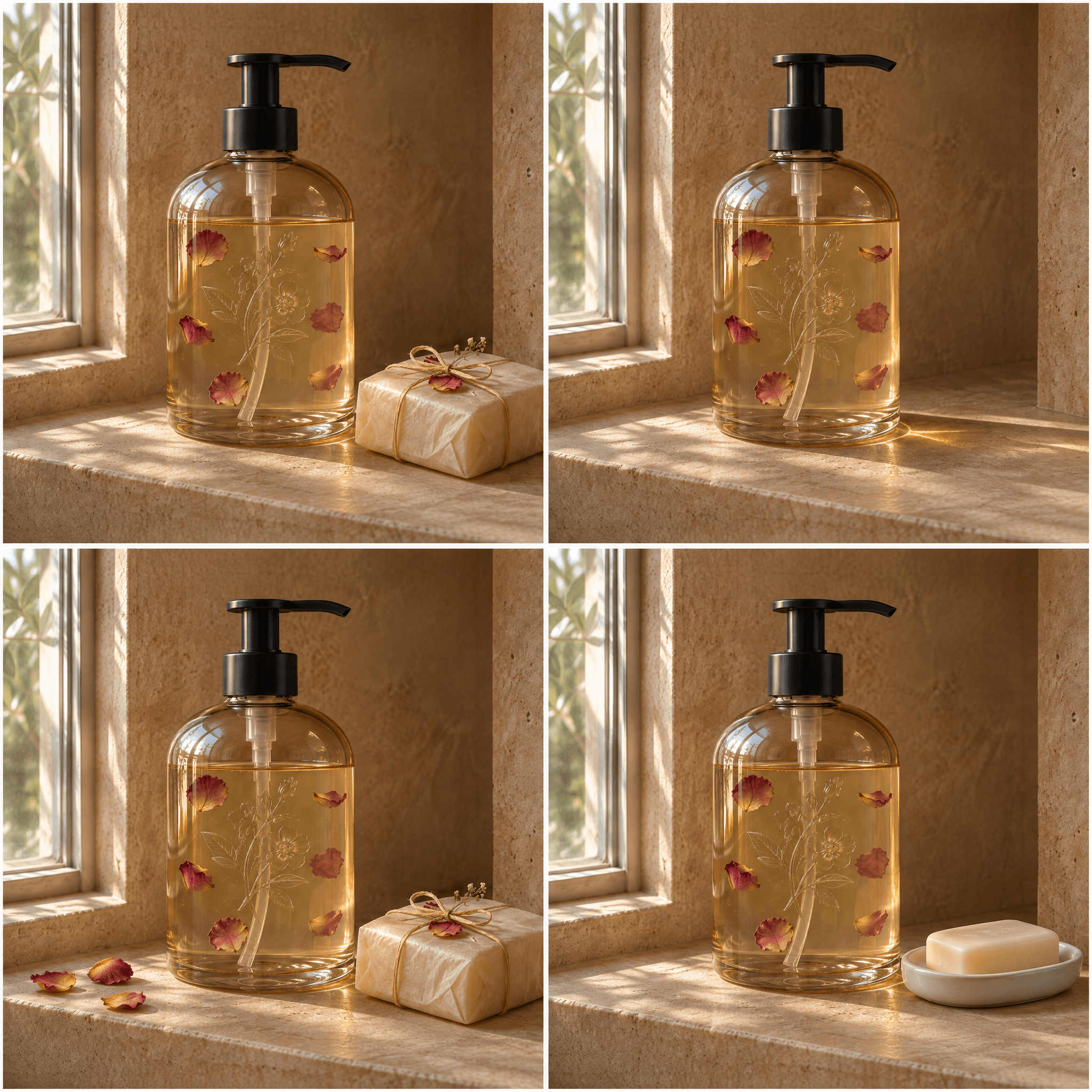
Save the 2×2 image as one file. If the bottle or camera angle drifts between cells, tighten the preservation instruction or make the three edits separately before assembling the comparison.
A 100% Zoom Check Before You Publish
Inspect the downloaded file, not a compressed preview in a browser card. Start at the intended crop, then zoom to 100% and scan from foreground to background. Record the failure as a visible relationship, such as "pump neck merges with cap," rather than "looks AI." That description tells you whether a local edit is plausible.
| Inspect | Failure sign | Next action |
|---|---|---|
| Face and skin | Repeated texture or waxy patches beside sharp hair | Ask for ordinary skin texture; regenerate if facial anatomy is wrong |
| Hands and contact | Extra fingers or a grip that does not support the object | Regenerate the action with visible hand positions |
| Glass and reflections | Reflections disagree with the stated window or lamp | Edit the reflection if the rest is sound; otherwise regenerate |
| Product structure | Pump, lid, or handle joins at an impossible angle | Regenerate when the object itself is structurally wrong |
| Background | Distant figures gain limbs or ignore perspective | Crop only if the needed story survives; otherwise regenerate |
| Text and signs | Words are misspelled or misleading | Replace in a design tool or exclude the image |
A local fix works when one contained region is wrong and its surroundings already make sense. A full regeneration is better when the pose, object structure, or light is inconsistent across the frame. Never publish a generated scene as a record of an actual event or a real person or product without the appropriate disclosure and permission. Photographic style does not make a synthetic image documentary evidence.
This checklist also keeps model comparisons fair. One community post may point out an odd background face in a particular output, but it cannot establish a general win or loss for a model. Judge the images made for your own brief, at the size where readers will see them and again at full resolution.
Where to Use MiniMax H3-Image and When to Compare an Alternative
MiniMax Design is a direct route for trying MiniMax H3-Image online; the model card supplies weights and deployment information for teams with the hardware and technical capacity. Check the live tool for account access, current controls, and charges before you start. Local inference needs substantial model files and a suitable GPU setup, so the online route is simpler for a content creator who just needs to evaluate a photo brief.
As checked on November 12, 2026, the Atlas Cloud model catalog and endpoint index did not show a verified MiniMax H3-Image still-image endpoint. Listings for "MiniMax H3" there concern video. If you want an image-model comparison on Atlas Cloud, the available GPT Image 2.6 Sunburst Text-to-Image page provides a separate model to test against the same soap-bottle brief. That is a comparison of your own outputs, not an Atlas-hosted MiniMax H3-Image run.
Copy the entire product prompt unchanged. For comparable framing, select a 16:9 size supported by the Atlas page, such as 3840 × 2160 if the interface offers it, and record the actual committed dimensions. Use its max quality and high complexity options if available, then note that quality tiers can have different costs. The catalog showed a discounted starting price in November 2026, but that starting figure does not establish the charge for max quality. Check the displayed quote before running.
A like-for-like review uses the same prompt and display dimensions, then inspects bottle geometry, amber glass, contact shadow, and reflections. Do not infer a general model ranking from one image. For commercial work, verify the current MiniMax H3-Image Community License before local deployment or redistribution. Its stated excluded territories include the United States, United Kingdom, European Union, and Republic of Korea, and it has further conditions. Online service terms and rights to any reference photos deserve separate checks.
For a MiniMax H3-Image photo workflow, the practical next move is to run one of the four briefs, save the original, and mark every failed relationship on the zoom checklist. Keep the strongest file only after it passes at the size and context where you intend to publish it.
Frequently Asked Questions
Is MiniMax H3-Image the same as the MiniMax H3 video model?
No. MiniMax H3-Image creates and edits still images. MiniMax H3 video listings concern moving clips and may include audio. Check the exact model and task label before using a page or screenshot as evidence of still-image performance.
Does a 4K MiniMax H3-Image output guarantee photorealism?
No. Pixel count gives you detail to inspect and room to crop. It can expose malformed hands, inconsistent reflections, or background errors just as clearly as it shows fine texture.
Can I run MiniMax H3-Image locally?
The weights and deployment instructions are public, but the model card lists large downloads, including the image checkpoint and its associated text encoder. Assess GPU memory, storage, setup time, and the current license before choosing local inference.
What should I check before commercial use?
Check the current MiniMax license or online service terms for your location and workflow. Confirm rights to reference images, label synthetic scenes appropriately, and do not use a generated image as evidence of a real person, product, or event.


