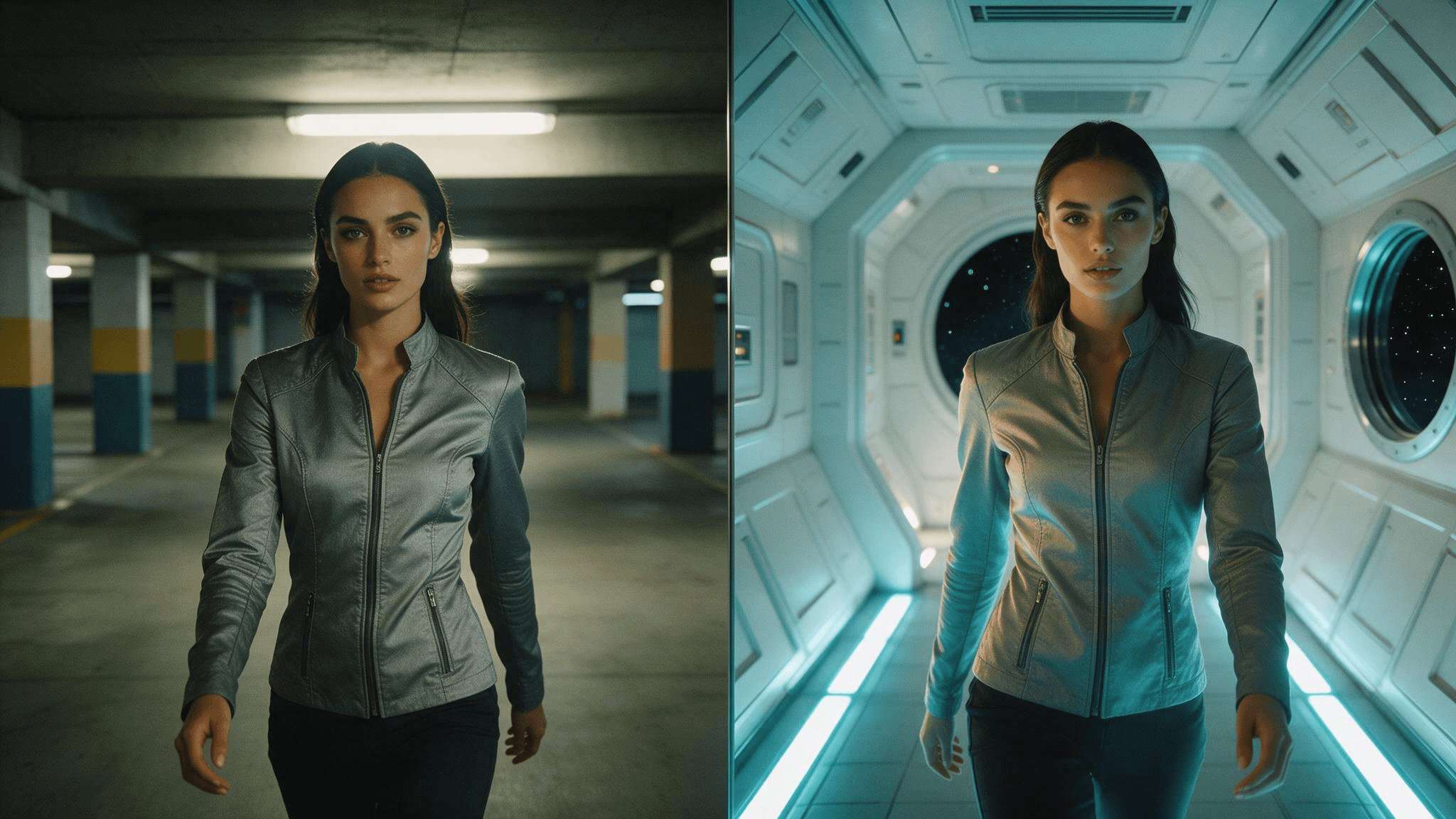
A director shoots a rehearsal in a parking garage, then decides the scene belongs on a spaceship. A year ago that meant a reshoot or a compositor with a week to spare. Now it means one sentence and a source clip.
That is the pitch behind Luma Modify Video, the video-to-video mode of Luma AI's Ray model line. You hand it footage you already have, describe the new look, and it re-renders the clip while holding on to the motion, framing and performance you filmed. Since June 2025 the feature has changed names, models and pricing more than once, so this guide pins down the current state: which model runs it, what the nine strength presets do, what a clip costs on Luma's own API, and how to run the same Ray 3.2 model on Atlas Cloud next to seven other video editors.
Key Takeaways
- Luma Modify Video is the video-to-video mode of Luma's Ray 3.2 model. The consumer app now labels it "Video To Video", and the API calls it a video_edit request.
- Nine strength presets in three bands decide how much of the source survives: adhere keeps motion and structure, flex balances, reimagine lets the prompt take over.
- Output keeps the source clip's aspect ratio and runs at 540p, 720p or 1080p in 5 or 10 second lengths. The Atlas Cloud endpoint returns it as silent video.
- Luma's own API caps a source clip at 18 seconds and 200 MB, and Ray 3.2 lets you pin up to 64 guide images along the clip.
- You can run the same Ray 3.2 video-to-video model on Atlas Cloud's video generator, with one API key that also covers Seedance, Kling and Wan.
What Is Luma Modify Video?
Luma announced Modify Video on June 2, 2025, as a feature inside its Dream Machine app. The launch post described the goal as letting you "keep what matters and evolve everything else": turn a garage into a spaceship, shift day to night, or age an actor in-scene, all without a green screen or manual tracking. Under the hood the model reads performance signals from the source, and Luma names pose, facial expression and scene structure, then uses them to decide what to preserve and what to reinvent.
Three things have changed since that first release:
- Thenamesplitintwo. Luma's product page now calls the consumer feature "Video To Video", while the API documentation and changelog keep using Modify Video. They point at the same capability.
- The model changed. The 2025 release ran on Ray 2 and Ray Flash 2. Luma's current API documentation lists Ray 3.2 as the model behind every video_edit request.
- Ray3 Modify arrived on December 18, 2025. That update brought start and end frame control to the video-to-video workflow for the first time, plus character reference controls.
Luma published its own blind evaluation alongside the June 2025 launch. External raters compared Modify Video output against Runway's video-to-video mode without knowing which was which, and Luma reports its model was preferred on most of the six criteria. The chart below is Luma's own; the axis carries no numeric labels, so treat it as a direction of preference rather than a measured margin.
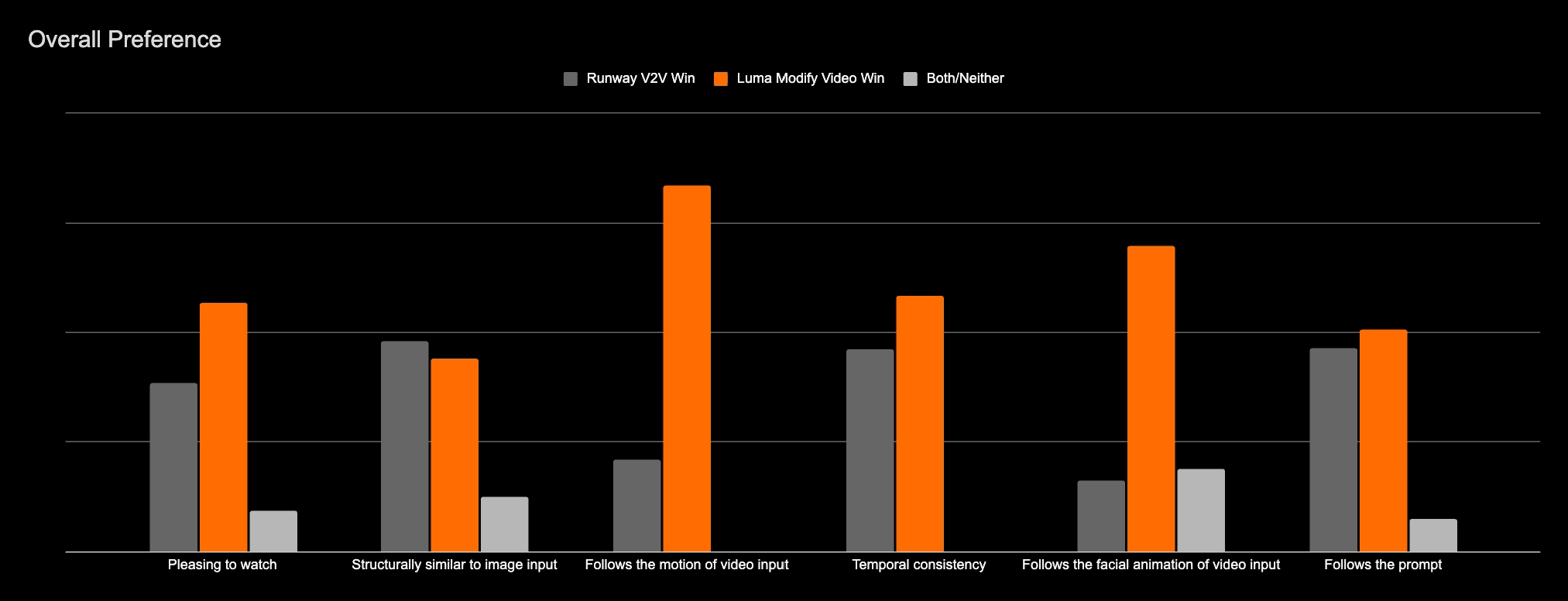
Source: Luma AI, Introducing Modify Video , June 2025
Adhere, Flex, or Reimagine: Which Luma Modify Video Mode to Use
Every Modify Video request carries a strength preset, and the preset matters more than the prompt for how recognisable the result stays. Luma groups nine values into three bands. The launch post defined the bands in plain language, and the API documentation for Ray 3.2 keeps the same nine wire values.
| Band | Wire values | Luma's definition (June 2025 launch post) | Ray 3.2 docs, September 2026 | Reach for it when |
|---|---|---|---|---|
| Adhere | adhere_1, adhere_2, adhere_3 | "Closely follows the original video's look and structure, mainly prioritizing retexturing." | adhere_1 "closely preserves source motion, composition, and structure"; adhere_3 is the strongest in the band | Changing a shirt colour, a sky, or surface materials while the shot stays the shot |
| Flex | flex_1, flex_2, flex_3 | "Balances model creativity with input fidelity." | flex_1 "preserves motion, lets the prompt reshape style and content"; flex_2 is the "common default for most edits" | Turning live action into an animation style, or relocating a scene while keeping the blocking |
| Reimagine | reimagine_1, reimagine_2, reimagine_3 | "Prioritize creative freedom. Enable full-scene reinterpretation, including mapping humans to non-humanoid forms" such as monsters or creatures | reimagine_1: "the prompt drives most of the output; source provides loose grounding"; reimagine_3 is the strongest | Making the actor a creature, or keeping only the camera path from the original |
Within each band the number is a dial. Luma's documentation says lower numbers are lighter and higher numbers stronger, so adhere_3 still counts as an adhere edit but pushes further than adhere_1. The default on both Luma's API and Atlas Cloud is flex_2.
One practical consequence: the same prompt at adhere_2 and reimagine_2 produces two different videos, and neither is wrong. If the client wants to recognise the location, start in adhere. If the location is the thing being replaced, start in flex and only move to reimagine when flex keeps too much of the source.
Atlas Cloud: Run Luma Ray 3.2 Video-to-Video Alongside 7 Other Edit Models
Atlas Cloud hosts the current Ray 3.2 video-to-video endpoint as luma/ray-3.2/video-to-video, with the same nine strength presets, the 540p, 720p and 1080p tiers, and the 5 or 10 second output lengths Luma prices on its own API. It sits in the same account as the Video Edit tab, where Seedance 2.5, Seedance 2.0, Gemini Omni Flash, HappyHorse-1.0, Wan 2.7, Kling Video O3 Pro and an xAI model handle instruction-based edits. So if one model's take on a clip is not the one you need, the same source and the same instruction can go to another model without leaving the account, and every run draws from one balance.
Here is the model at work at its default setting, flex_2. Left is the source clip, right is the output from one instruction asking for a rainy Tokyo street at night: the woman, her stride and the camera move carry over, the lockers do not.
The strength preset is where the result forks. A 5-second shot of a woman walking past a wall of white lockers went through the model three times with the same prompt, asking for a rainy night street in Tokyo while keeping the person, her walk, the framing and the camera path. Only the strength changed.
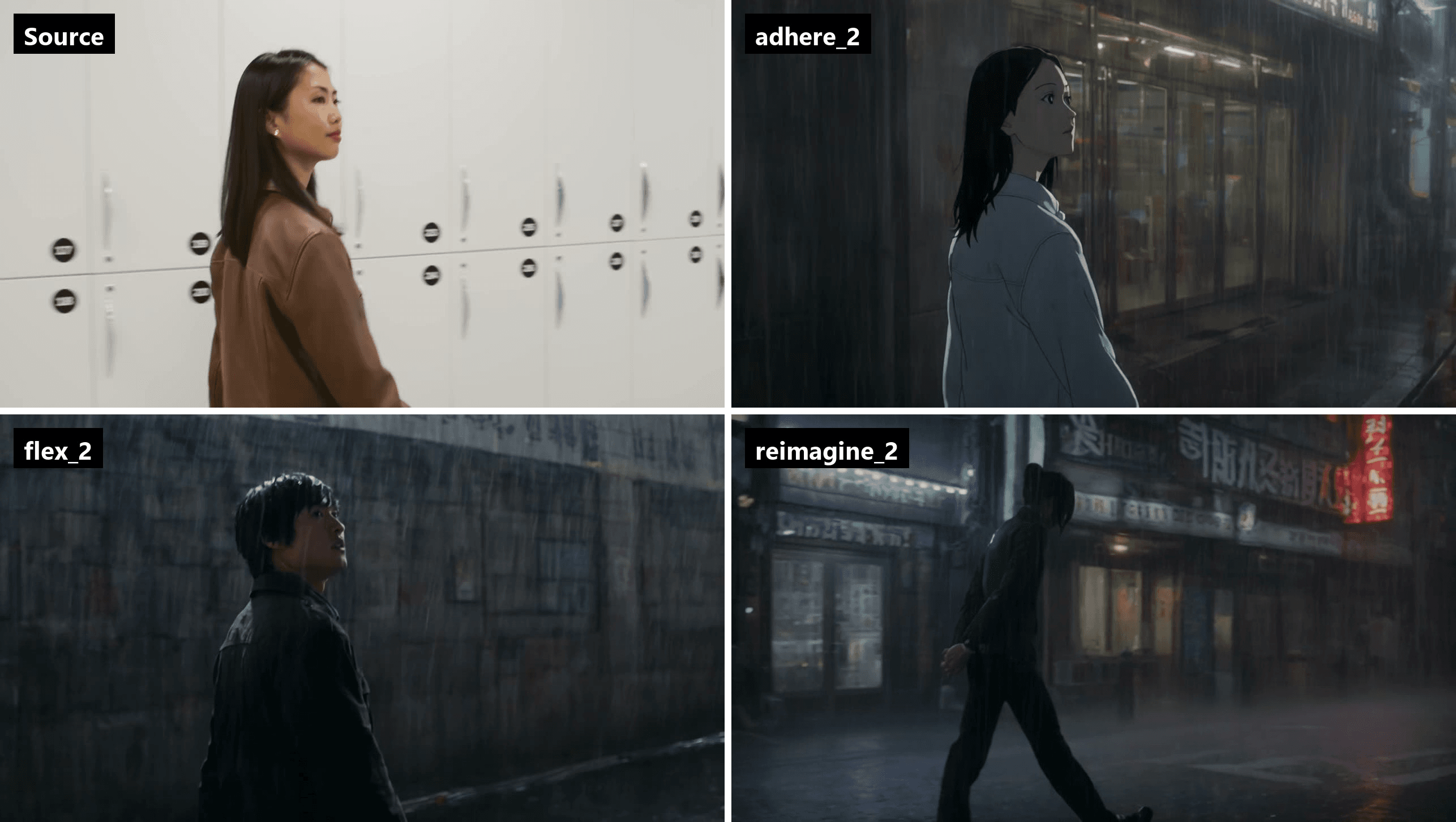
The frames come from the same moment, 2.5 seconds in. At adhere_2 the woman's face, hair and stride survive and the lockers become a rain-streaked storefront, rendered with a hand-drawn edge. At flex_2 the framing and the walk hold while the model recasts the figure and swaps the wall for wet brick with a neon sign at the end of the shot. That recast is not fixed: three flex_2 runs on this clip changed the person twice and kept her once, and the video above is the run that kept her, so plan on a second pass when the face matters. At reimagine_2 the camera itself moves: the shot becomes a wide street view with signage across the top and the figure crossing the frame. All three came back at 1280 by 720 and 5 seconds, silent, roughly three minutes per run.
A second pass does not have to be another Luma run. The same locker clip and the same sentence also went to Seedance 2.5, one of the models in the Video Edit tab, and the two models read the instruction differently. Luma's flex_2 run kept the walk and the framing inside a dark, rain-soaked side street with posters on the wall. Seedance kept the woman's face, her long hair and the brown leather jacket from the source, and built a brighter neon avenue with reflections across the wet road. Both came back at 1280 by 720 and silent, so either result drops into the same edit.
Method 1: Restyle a Clip From the Model Playground
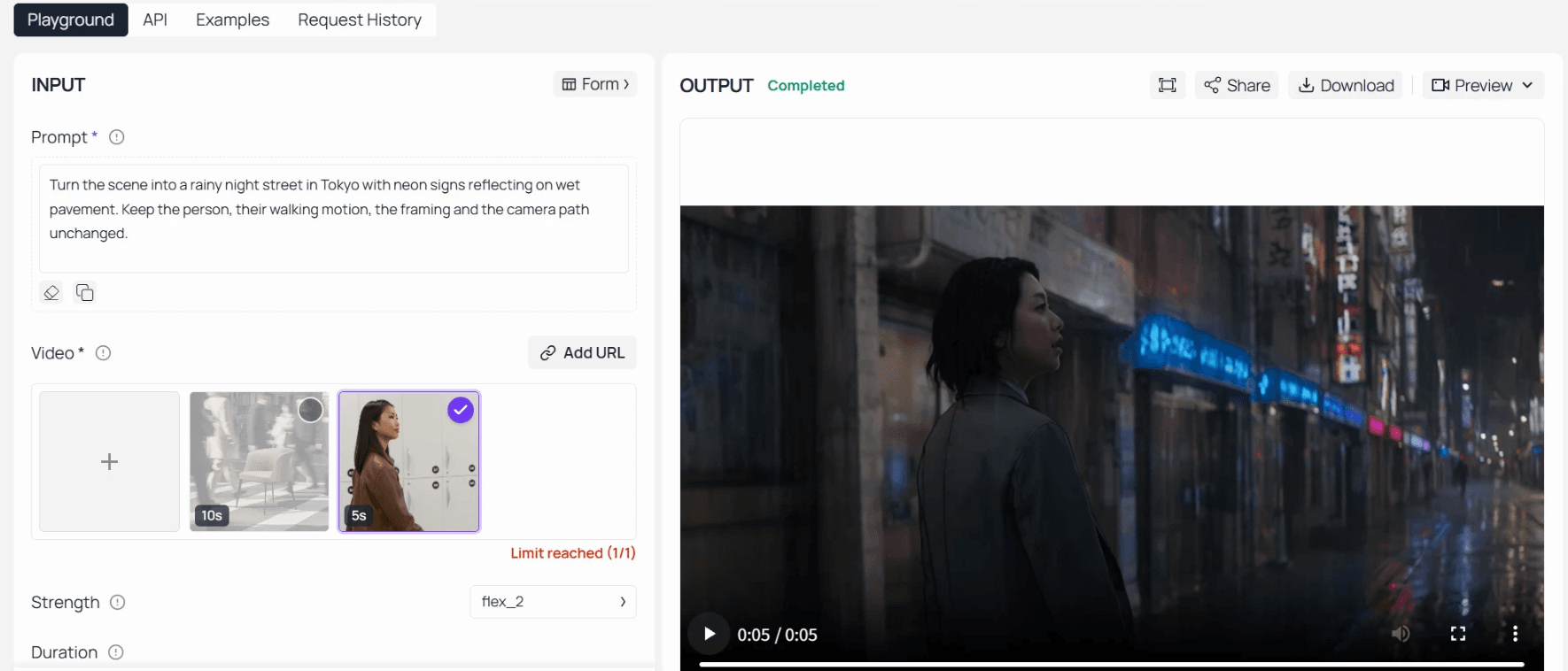
- Log in and open the Luma Ray 3.2 video-to-video playground. The Prompt field ships with a sample instruction and a sample clip already loaded; clear both.
- Upload your source clip or paste a public MP4 link with Add URL. The Video field takes one clip per run.
- Write the instruction as one sentence about the new look plus one sentence about what must stay. Naming the motion and camera explicitly gives the model something to hold.
- Pick a Strength preset. Leave flex_2 for a first pass, then move up or down a band based on what came back.
- Set Duration to match the clip, 5 or 10 seconds, choose 540p, 720p or 1080p, and press Run. The finished video appears in the Output panel with a Download button, and past runs are kept under Request History.
Method 2: API Access in 3 Steps
Step 1: Get your API key. Create one in the Atlas Cloud console and copy it.
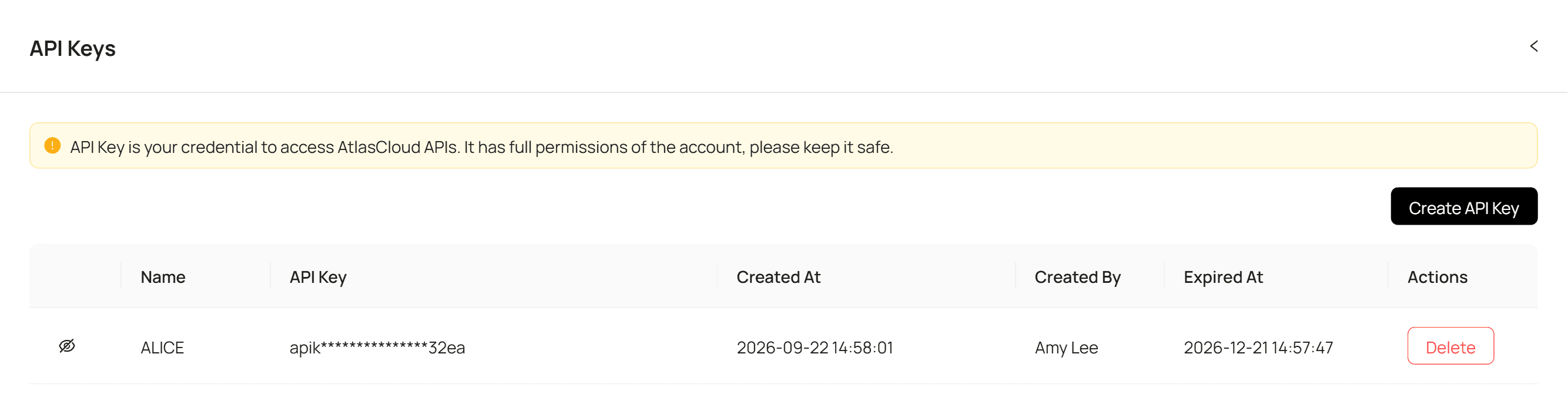
Step 2: Check the API docs. Parameters, accepted formats and duration limits live in the API documentation.
Step 3: Make your first request. Submit the clip and the instruction:
plaintext1curl -X POST https://api.atlascloud.ai/api/v1/model/generateVideo \ 2 -H "Content-Type: application/json" \ 3 -H "Authorization: Bearer $ATLASCLOUD_API_KEY" \ 4 -d '{ 5 "model": "luma/ray-3.2/video-to-video", 6 "video": "<public_https_url_to_your_clip.mp4>", 7 "prompt": "Turn the scene into a rainy night street in Tokyo with neon reflections on wet pavement. Keep the person, their motion and the camera path unchanged.", 8 "strength": "flex_2", 9 "duration": 5, 10 "resolution": "720p" 11 }'
Poll the job until it finishes:
plaintext1curl https://api.atlascloud.ai/api/v1/model/prediction/<prediction_id> \ 2 -H "Authorization: Bearer $ATLASCLOUD_API_KEY"
The video field wants a publicly reachable HTTPS MP4 link, and the finished file is transferred to Atlas Cloud storage before the URL comes back, so the link you receive is an Atlas Cloud address rather than Luma's one-hour presigned URL. The same endpoint, the same header and the same polling loop drive the video models on Atlas Cloud. Swap the model string to bytedance/seedance-2.5/reference-to-video or Kling O3 and nothing else in the integration moves.
Luma Modify Video Pricing: Per-Clip Rates on Luma and on Atlas Cloud
Luma prices video-to-video on its API by the clip, with separate rates for 5 and 10 second outputs, and the video-edit tier is priced differently from text-to-video. These are the figures on Luma's API pricing page in September 2026, for Ray 3.2 in standard dynamic range:
| Luma API, Ray 3.2 video-to-video | 540p | 720p | 1080p |
|---|---|---|---|
| 5-second output | $0.72 | $1.44 | $2.16 |
| 10-second output | $1.08 | $2.16 | $4.32 |
HDR output doubles the base rate, and HDR with EXR export triples it, according to the same page. Under the Ray 2 generation, Luma billed Modify Video per million pixels instead, with a 720p 5-second example quoted at $1.75, so the switch to per-clip pricing is part of the Ray 3.2 change rather than a like-for-like update.
Atlas Cloud prices the hosted luma/ray-3.2/video-to-video endpoint per run as well, and the price scales with both the resolution tier and the output length. Rates checked on the model's pricing calculator on September 28, 2026, with no discount active:
| Atlas Cloud, Luma Ray 3.2 video-to-video | 540p | 720p | 1080p |
|---|---|---|---|
| 5-second output | $0.792 | $1.188 | $2.376 |
| 10-second output | $1.584 | $2.376 | $4.752 |
Turning HDR on at 720p and 5 seconds brings the run to $2.376. Prices on Atlas Cloud are shown on the Run button before you commit, so the number you see in the playground is the number you pay.
Duration, Resolution, and Source Video Limits
Luma's marketing copy for the Ray 3.2 API says video-to-video runs "at up to 20 seconds". The developer documentation is stricter, and that is the version to plan around:
| Luma video_edit rule | Documented limit |
|---|---|
| Source clip by URL or inline upload | Up to 200 MB and 18 seconds |
| Source from a prior Luma generation | No upload size limit |
| Output resolution | 360p draft tier, 540p, 720p or 1080p; 720p default |
| HDR | 720p or 1080p only; EXR export requires HDR |
| Aspect ratio | Inherited from the source; any aspect_ratio you send is silently ignored |
| Guide images | Up to 64 keyframes with matching frame indexes, or one start frame |
| Prompt | 1 to 6,000 characters |
| Result link | Presigned MP4 URL that expires after one hour |
On Atlas Cloud the Ray 3.2 endpoint accepts a public HTTPS MP4 as the source, outputs 5 or 10 seconds at 540p, 720p or 1080p, and exposes the strength preset plus an HDR switch that works at 720p and 1080p in the 5-second length. The output arrives as silent video, so plan to lay the original audio back in your editor once the restyled picture is done.
Audio is a detail Luma's own announcements skip. Neither the June 2025 launch post nor the Ray3 Modify update says whether the consumer app keeps the source soundtrack, so if sound matters for your delivery, test a clip before committing to a workflow.
Luma Modify Video API: Keyframes, Controls, and What Changed From Ray 2
Developers who integrated Modify Video in mid-2025 wrote against a different interface. The original endpoint took media, model and mode, the model options were ray-2 and ray-flash-2, and there was an optional first-frame image to guide the look. Ray 3.2 rebuilt that surface.
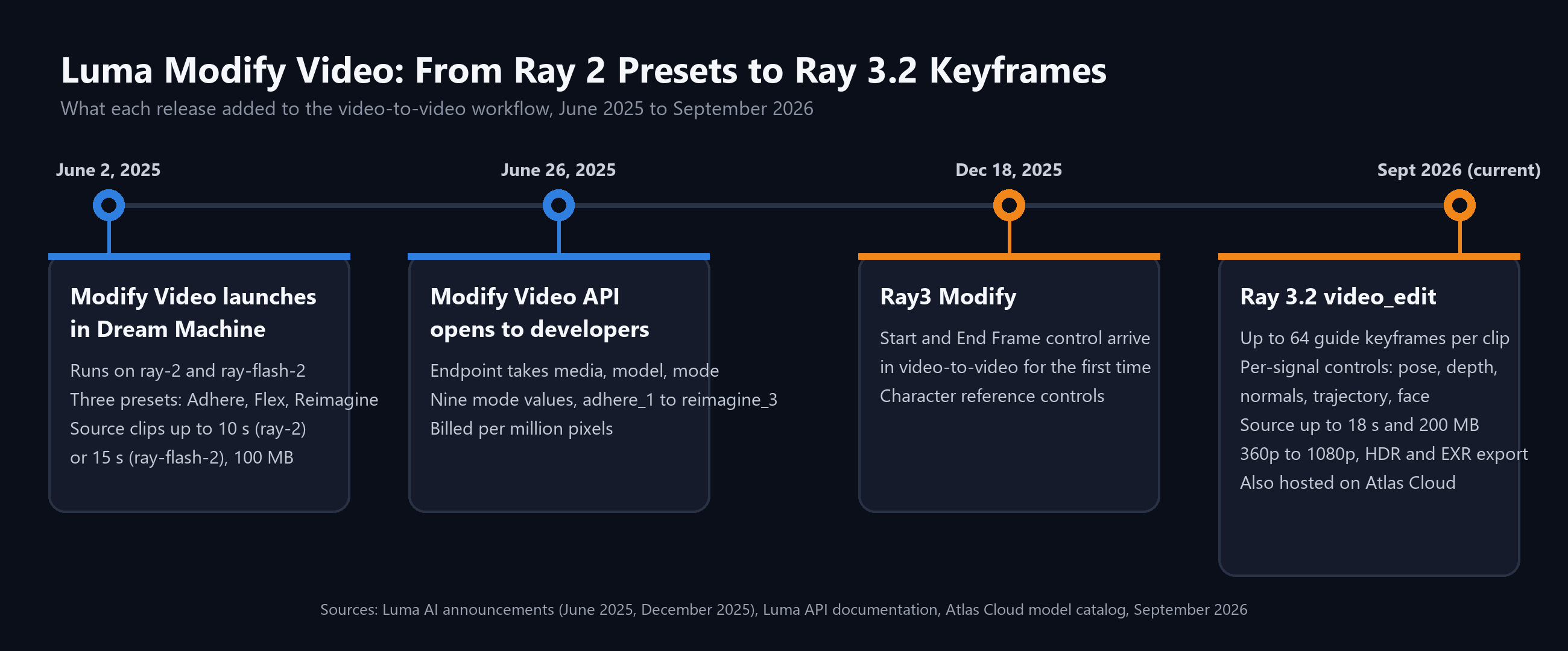
Three additions matter most for anyone rebuilding an integration:
- Keyframes replaced the single first frame. A video_edit request can carry up to 64 guide images, each pinned to a frame index in the source. Luma's documentation calls keyframes "the single biggest lever on output quality" for non-trivial edits. The one-image shorthand still exists as start_frame.
- Per-signal controls sit under the strength preset. Instead of one dial, you can enable pose, depth, normals, trajectory and face conditioning individually, each with its own tuning value. This cannot be combined with the automatic mode, which derives the schedule from the source.
- Reframe split off into its own request. Changing aspect ratio is now video_reframe, billed per second, and it is also hosted on Atlas Cloud as luma/ray-3.2/reframe.
One thing carried over unchanged: the nine strength values. Code that already passes flex_2 as a mode string only needs the field renamed. Another carried over from Luma's API terms: Luma states it will not use API inputs or outputs to "train, fine-tune, or otherwise develop" its models, a commitment written into Luma's API Terms of Use. The API pricing page lists a "No-train guarantee" among its enterprise-tier features as well.
For a look at how a different vendor structured the same job around a single endpoint and a fixed per-second rate, our Runway Aleph guide walks through Aleph 2.0's credits and clip caps.
Luma Modify Video Prompt Tips That Match the Strength Setting
A prompt written for reimagine will disappoint in adhere, and the reverse is just as true. The strength preset decides how much of your sentence the model is allowed to act on, so write to the band you picked.
In adhere, describe surfaces and light, not scenes. "Make the concrete walls weathered red brick and shift the light to late afternoon" gives the model retexturing work, which is what Luma says adhere prioritises. Asking adhere to move the actor to a beach will produce a beach-coloured garage.
In flex, name the new setting and then lock the performance in the same breath. Luma's Ray 3.2 documentation describes flex as preserving motion while letting the prompt "reshape style and content", so the second half of the sentence is what keeps the walk cycle and the camera path intact.
In reimagine, the prompt carries most of the weight and the source supplies "loose grounding", in Luma's wording. Treat it like a text-to-video prompt that happens to inherit a camera move. Describe what the subject becomes and let the source handle the camera.
Two other habits help across all three bands. Keep one edit per request, since a clip that changes location and wardrobe and time of day in one sentence gives the model three competing targets. And move the number one step at a time, then look, because the dial inside a band travels further than the name suggests. On the locker clip, flex_1 kept the woman's face and a live-action look in front of a poster-covered wall. flex_3, same prompt and same source, kept the framing and the walk but redrew the figure as a different character in a hand-drawn style.
Is Luma Modify Video Free?
Luma's pricing page lists three individual plans, Plus at $30 a month, Pro at $90 and Ultra at $300, billed monthly, with up to 20% off on yearly billing. No free plan appears on the page in September 2026. Each plan comes with a credit allowance, and the page's cost table puts Ray 3.2 video-to-video at 48 credits per second at 540p, 72 at 720p and 144 at 1080p, with HDR doubling the figure.
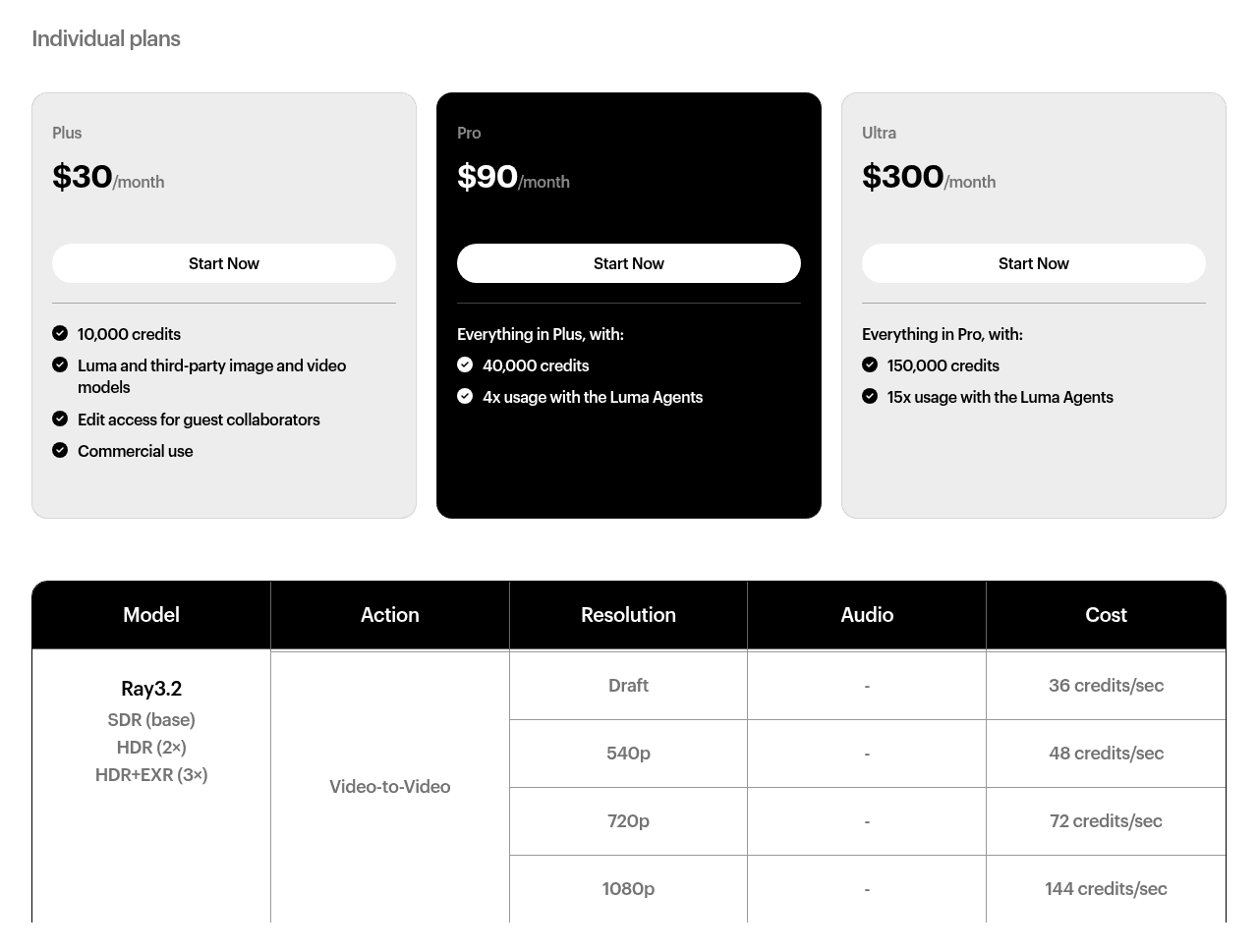
Screenshot from Luma's official pricing page, September 2026
Run the arithmetic and a 5-second 720p restyle costs 360 credits inside the app, so the Plus plan's 10,000 credits cover roughly 27 such clips a month before anything else is generated. Luma's API is separate from the subscription and bills per clip at the rates in the pricing section above.
Atlas Cloud takes the pay-per-run route for the same model. There is no monthly plan to hold, and the same balance covers the other video editors in the Video Edit tab, so a Luma restyle and a Seedance clean-up draw from one account.
FAQ
Is Luma Modify Video the same as Luma Video to Video?
Yes. Luma's consumer product page now carries the heading "Video To Video", while the API documentation and the original announcements use Modify Video. Both describe a Ray model re-rendering an existing clip from a text instruction while preserving its motion. The API accepts Ray 3.2 only, while the app's cost table lists Ray 3.2 as the top video-to-video engine with a Ray 3.14 tier beneath it.
What happened to Ray 2 Modify?
Luma's older Modify Video documentation still lists ray-2 and ray-flash-2 with 10 and 15 second caps, but the API pricing page quotes Ray 3.2 alone for video-to-video, so treat the Ray 2 figures as historical. If you have clips generated under Ray 2 that you want to re-edit, a completed Luma generation can be passed as the source by its generation ID, and that path has no upload size limit.
Does Luma Modify Video keep the audio?
On Atlas Cloud the Ray 3.2 video-to-video endpoint returns silent video, so you re-attach the original track in your editor after the restyle. Luma's own launch posts and Ray3 Modify announcement do not address audio for the consumer app, which is why a short test clip is the safest way to find out how the Dream Machine version treats sound.
How much does one Luma Modify Video clip cost on Atlas Cloud?
A 5-second run at 720p costs $1.188 with no discount active, and the 10-second version doubles that. The 540p and 1080p tiers and the HDR surcharge are in the pricing table above. Because the playground shows the figure on the Run button before you submit, a mismatch between clip length and the duration setting is visible before it costs anything.
Conclusion
Modify Video started as a three-preset restyle tool inside Dream Machine and has grown into a full video-editing request with nine strength levels, per-signal controls and up to 64 guide keyframes. The name on the button has changed, the model underneath has changed twice, and the billing moved from pixels to clips. What has not changed is the core promise from the June 2025 launch: the motion and performance you filmed survive, and the world around them is up for negotiation.
If you want to try it without a subscription, the same Ray 3.2 model runs on Atlas Cloud's playground and API with the same presets and resolution tiers, priced per run and sitting one click away from Seedance, Kling and Wan for the edits Luma Modify Video is not built for.





