


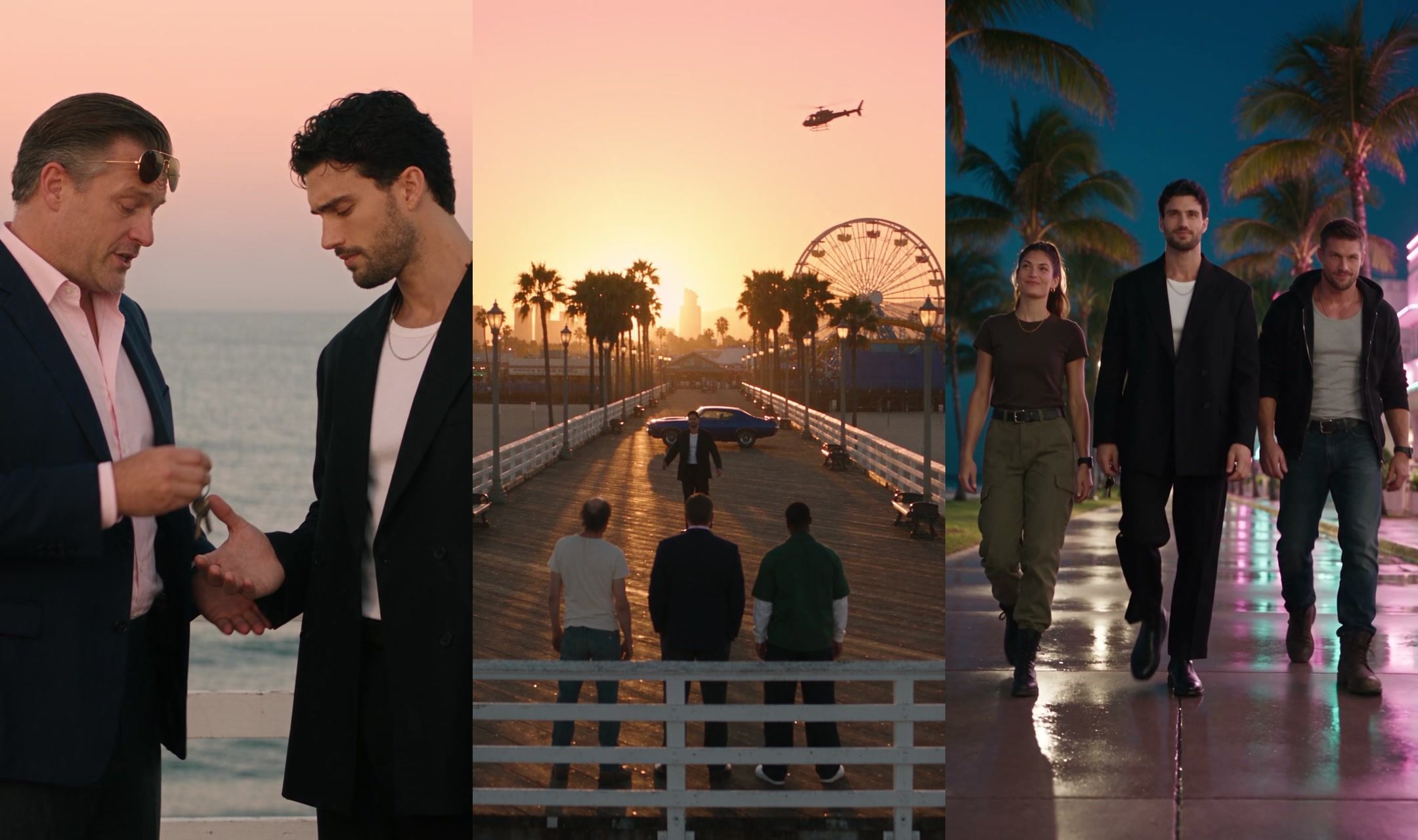
A man in a suit, a balding wild card and a young driver stand on a pier at sunset. A kid they have known for thirteen years walks up, gets a hug from each, and leaves. Then two strangers show up to take him somewhere new.
That is the whole plot of the goodbye GTA 5 AI video, and TikTok watched it millions of times in the run-up to GTA VI's launch. This guide breaks down the script the viral versions follow, sorts out the seven CapCut templates, then shows how we shot our own 30-second version with six original characters and two prompts.
Key Takeaways
- The viral goodbye GTA 5 AI videos share one script: the GTA V trio says goodbye, then the GTA VI pair takes over.
- Seven CapCut templates carry the GTA 5 goodbye trend, and every one of them pastes in Rockstar's own characters.
- You can shoot your own version in the Atlas Cloud video generator with Seedance 2.5 and six character cards.
- Two 15-second clips tell the whole story: a sunset farewell on a pier, then an arrival on a neon boulevard.
- Keep the silhouettes and change the faces, and original characters still read as GTA without copying Rockstar.
What Is the GTA 5 Goodbye Trend?
GTA V came out on September 17, 2013. GTA VI followed on November 19, 2026, on PS5 and Xbox Series X|S. That gap is the joke and the heartbreak: thirteen years with Michael, Franklin and Trevor, and now the game is moving on without them.
The AI versions turn that feeling into a short film. The cast, the settings and the gift change from video to video, but the beats don't:
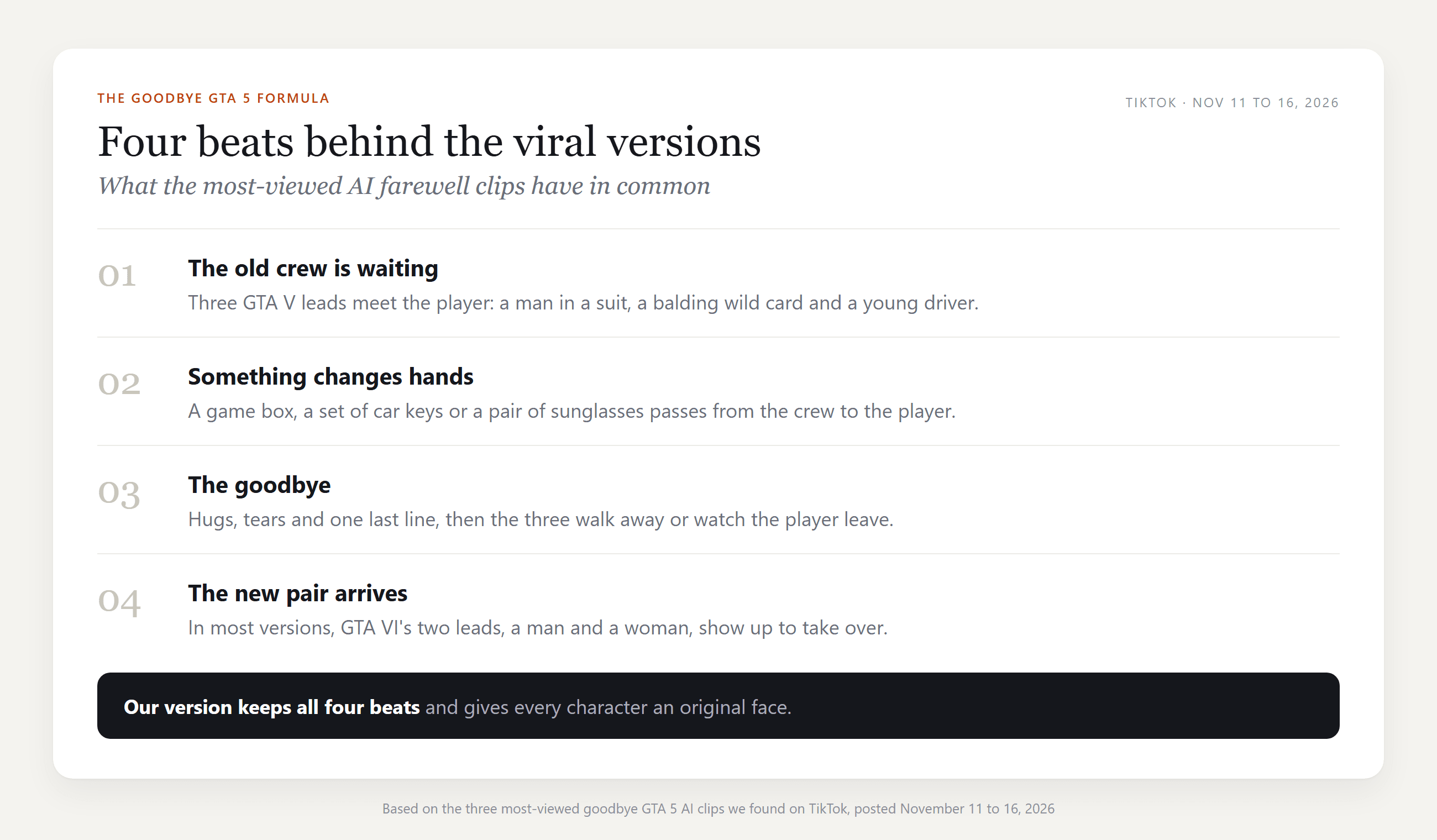
The earliest AI farewell we found is a 30-second clip by @derdenniso1, posted November 11. A young man meets the three GTA V leads on a pier at sunset, gets a copy of GTA VI and a set of keys, and drives off in a pink sports car while they watch.
Five days later the format exploded. @realconner's version moves it to a rainy neon diner, sends the trio out into the rain, then lets a man and a woman walk in and take their seats. @youneszarou's version starts with a boy on a bridge in 2013 and ends on a beachfront in 2026, where the new pair runs out of a cloud of smoke to hug him.
| Posted (UTC) | Version | Plays on Nov 20 | Saves on Nov 20 |
|---|---|---|---|
| Nov 11, 19:26 | Sunset pier, game box and keys, pink sports car | 1.9 million | 54,000 |
| Nov 16, 09:48 | Rainy diner, the new pair walks in, labeled as AI | 4.2 million | 81,600 |
| Nov 16, 23:05 | 2013 bridge to a 2026 beachfront | 3.1 million | 58,000 |
The third creator's original sound did its own traveling: by the morning of November 20 more than 700 videos used it, many of them template tutorials. If you came here from the loading-screen edit instead, that one has its own GTA filter guide.
GTA 5 Goodbye Template on CapCut: Which One Is Which
Search for a GTA 5 goodbye template and you get seven CapCut results with similar names. Here is what each one actually shows, read from the template pages on November 20, 2026:
| Template | Creator | Uses | Length and shape | What is on screen |
|---|---|---|---|---|
| trend video | Beyond726 | 122,401 | 39.9 s, landscape | Sunset pier with a Ferris wheel: a game box, a handshake, hugs, then a drive down a sunset boulevard, with yellow subtitle lines |
| GTA5 to GTA6 2 | ArtemisCC | 66,893 | 13 s, 9:16 | A beach goodbye to the GTA V leads, then a pink and violet neon street with GTA VI's pair, with both games' logos on screen |
| Hh | Esme70275 | 31,439 | 28.1 s, 4:3 | A boy meets the trio in 2013, says goodbye as a grown man in 2026, then cuts to gameplay and the GTA V logo |
| GTA 5 Goodbye | The Unfluencers | 12,294 | 15 s, 9:16 | Handshakes at a city lookout, then a group photo with the new pair beside a teal convertible on an Art Deco street |
| trend | Beyond726 | 8,516 | 25.3 s, 4:3 | The last ride: the three leads drive off in separate cars under the caption "THANK YOU, LOS SANTOS." |
| Ai | jk xin900 | 1,909 | 30.1 s, 4:3 | The 2013 to 2026 story with a girl in place of the boy |
| Farewell GTA5 | ArtemisCC | 850 | 15 s, 9:16 | A hilltop over the city: a game box, a fist bump, a hug, then GTA VI's pair in a red convertible |
The top template, trend video, retells the sunset pier clip almost shot for shot. GTA5 to GTA6 2 sits behind a "try this filter" post that passed 595,000 plays, and it climbed from 1,776 uses on November 16 to more than 66,000 four days later.
What they share is the catch. All seven drop Rockstar's own characters into your clip, and four of them also put a game logo or game box on screen. That is fine for a personal post. For a channel, a brand page or anything you want to keep up, it helps to own every face in the frame.
How to Make a Goodbye GTA 5 AI Video With Your Own Cast
On Atlas Cloud, Seedance 2.5 takes several character photos at once, and in our runs it kept each face on the right person through every hard cut. We used that to shoot both halves of the story with six original characters. Here is the finished 30 seconds:
Each half is a separate 15-second run with its own reference photos, and the sound, dialogue included, comes out of the same runs. Everything happens on the Video Generation tab of the AI video generator.
Method 1: Shoot Both GTA 5 Goodbye Clips in the Atlas Cloud Video Generator
You need six full-body character cards first: the player, the three-man crew and the new pair. A plain backdrop and head-to-toe framing work best. Ours came from Seedream, some from a photo and some from text alone, and the last section shows what each one wears.
Then follow the numbers on the screenshot:
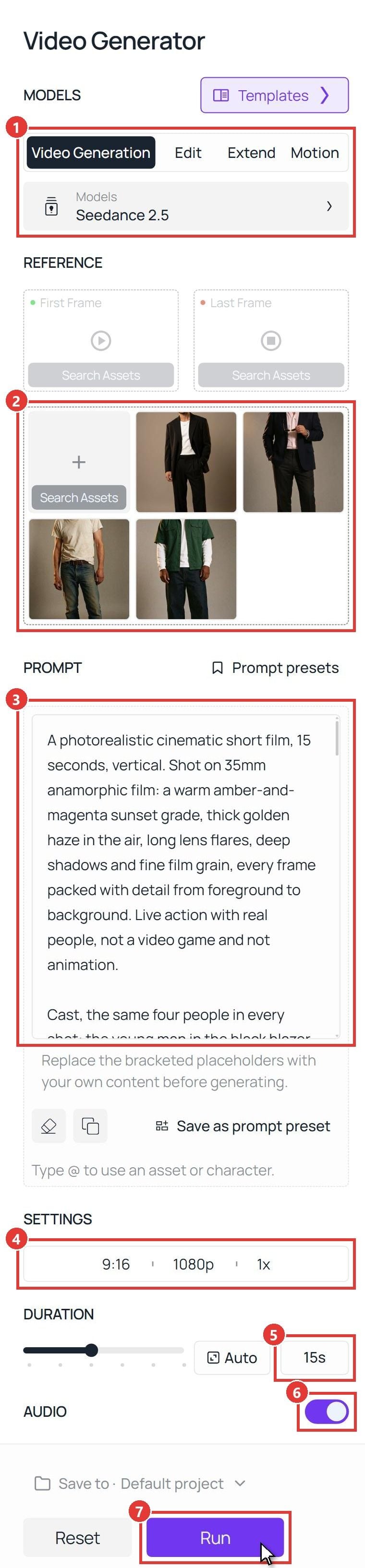
- Model: open Video Generation and keep Seedance 2.5.
- References: in the box below First Frame and Last Frame, add the four Clip 1 cards in this order: the player, the man in the suit, the wild card, the driver. Leave First Frame and Last Frame empty.
- Prompt: paste the Clip 1 prompt from the next section. @Image1 to @Image4 follow the upload order.
- Settings: pick 9:16 and 1080p, with one output.
- Duration: set 15 seconds.
- Audio: leave it on.
- Run. The clip lands in the panel on the right.
For Clip 2, clear the references and upload three cards instead: the player, then the woman, then the man from the new pair. Paste the Clip 2 prompt and keep every setting the same. Put the two clips back to back in any editor, farewell first, and add your music there.
Method 2: Send the GTA 5 Goodbye Prompt to the Seedance 2.5 API
Making one farewell for every member of a gaming community, each starring that person as the player? The API takes the same cards and the same prompt, so you can loop over a list of player photos.
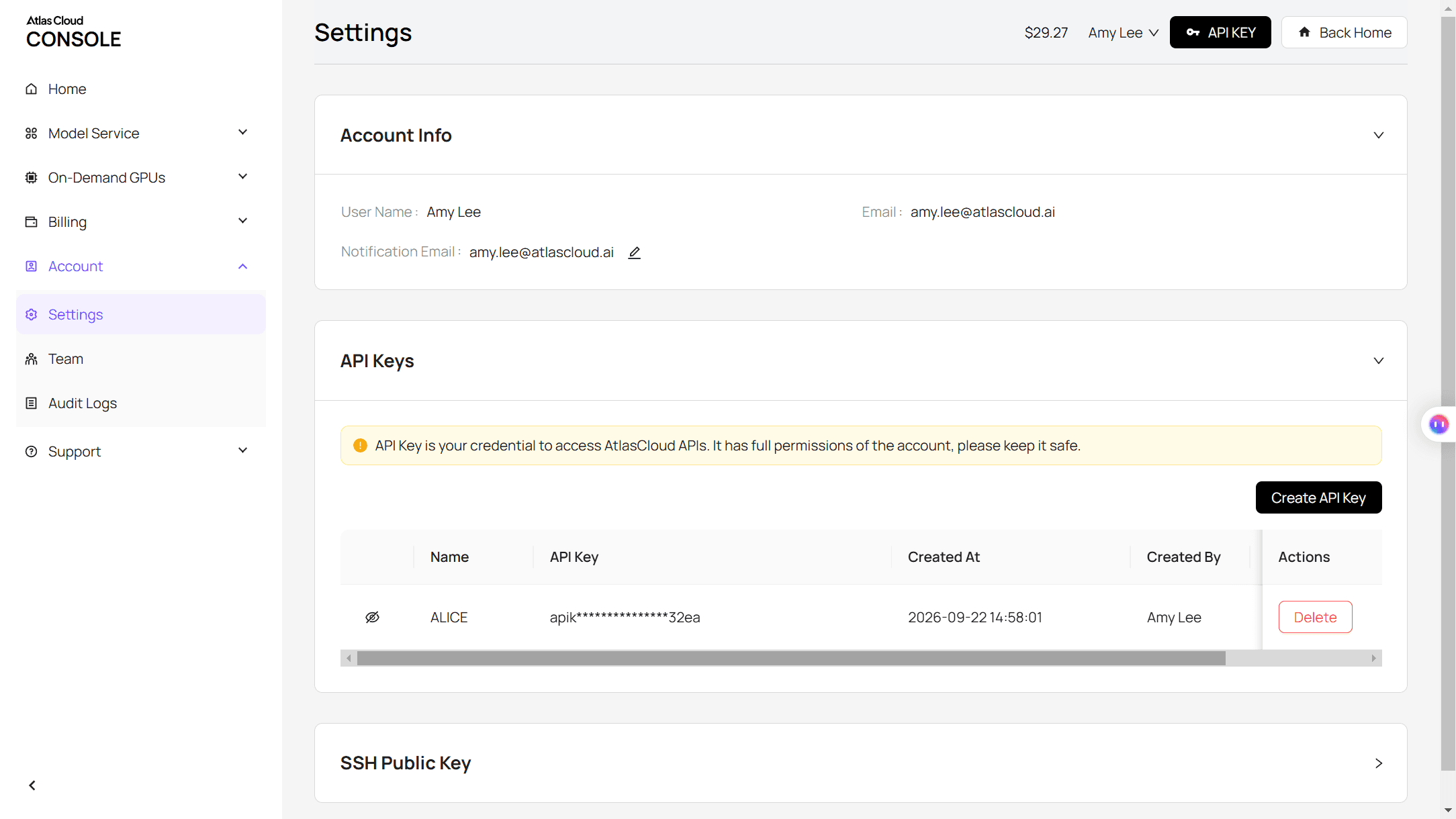
Step 1: Create an API key. In the console, open Settings and create a key under API Keys.
Step 2: Check the request format. The Atlas Cloud API docs cover authentication, and the API tab on the Seedance 2.5 reference-to-video model page lists the request fields.
Step 3: Send the request and poll. The cards go in the reference_images array as public URLs, and their order decides who is @Image1, @Image2 and so on:
Poll the returned prediction ID until the status reads completed, then download the clip from the outputs array:
The endpoint and the key stay the same for every video model on Atlas Cloud. To try another one, change the model string.
GTA 5 Goodbye Prompt: Two Clips, One Handover
Both prompts follow the same pattern: a camera and film-stock line, a Cast paragraph that ties every person to a photo, a Setting paragraph, four timed shots joined by hard cuts, and a Sound line. Swap in your own people and places, but keep that skeleton.
Clip 1 Prompt: The Trio's Farewell on the Pier
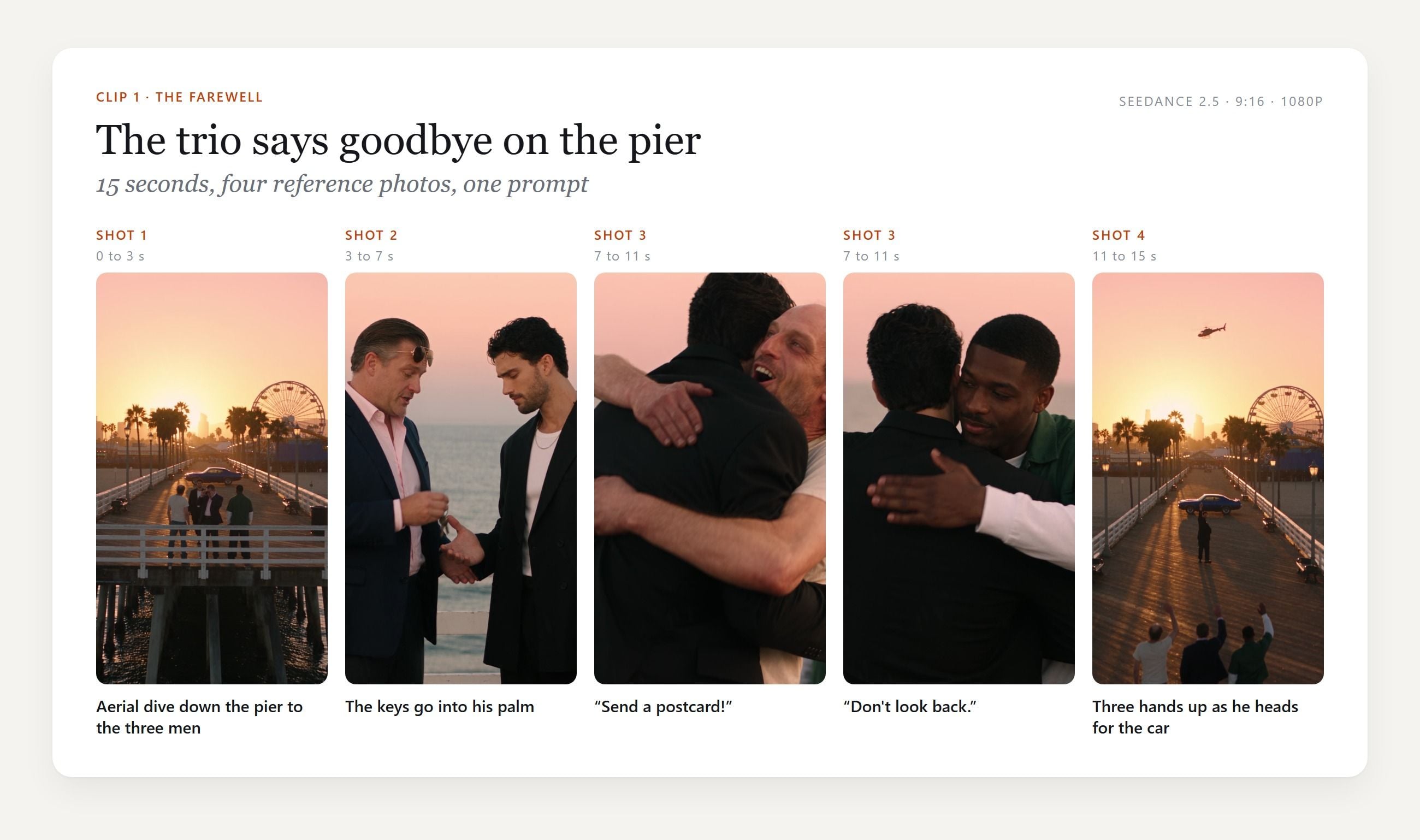
Three lines carried most of the weight:
- Outfit tags instead of names. Each man is "the man in the pink shirt" or "the balding man" every time he appears. With two blazers in the cast, the shirt color is what kept the older man and the player apart.
- Fixed positions in Shot 1 and Shot 4. Naming who stands left, middle and right made the final wave land as three clean silhouettes in a row, the image the whole trend is built around.
- A head count. "Exactly these four people. Nobody else is on the pier." kept strangers out of a public location that would normally be full of them.
Clip 2 Prompt: The New Pair Takes Over
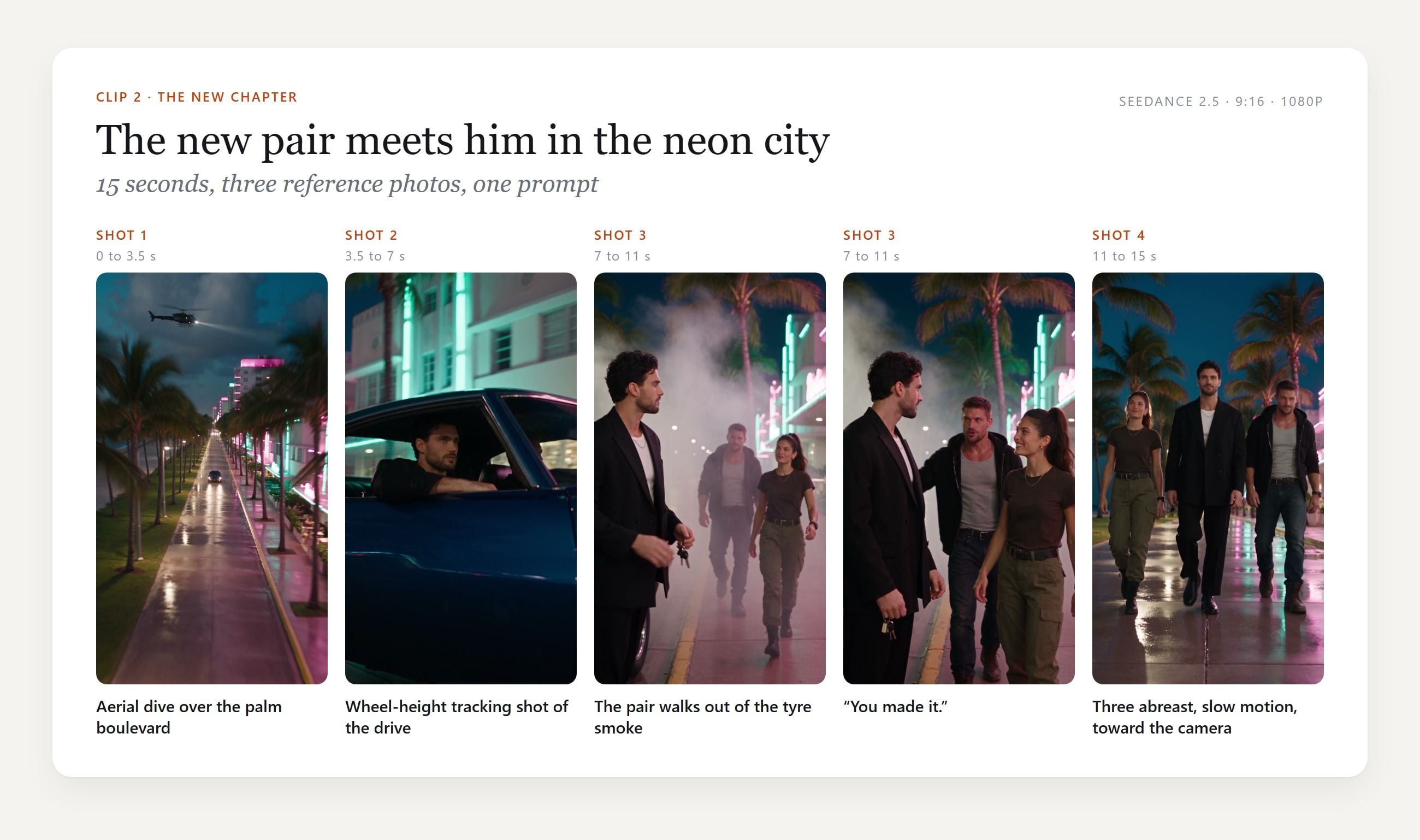
Quick story: our first arrival clip played out on an empty rooftop car park, and it looked like a stock video. Moving it to a palm boulevard with an aerial dive, a skid, a siren and a helicopter is what made it read as the next game. The same blue coupe ends Clip 1 and opens Clip 2, so the cut between them feels like one drive.
Both prompts end with "No music, no singing." The clips come back with ambience and dialogue only, which leaves the soundtrack to you when you edit.
GTA 5 Farewell AI Video Look: Keep the Silhouettes, Change the Faces
Here's the thing: the GTA V crew is easy to spot by outline alone. A suit, a stained T-shirt and a green shirt standing in a row on a pier are enough. So our cards copy the outlines and invent everything above the collar.
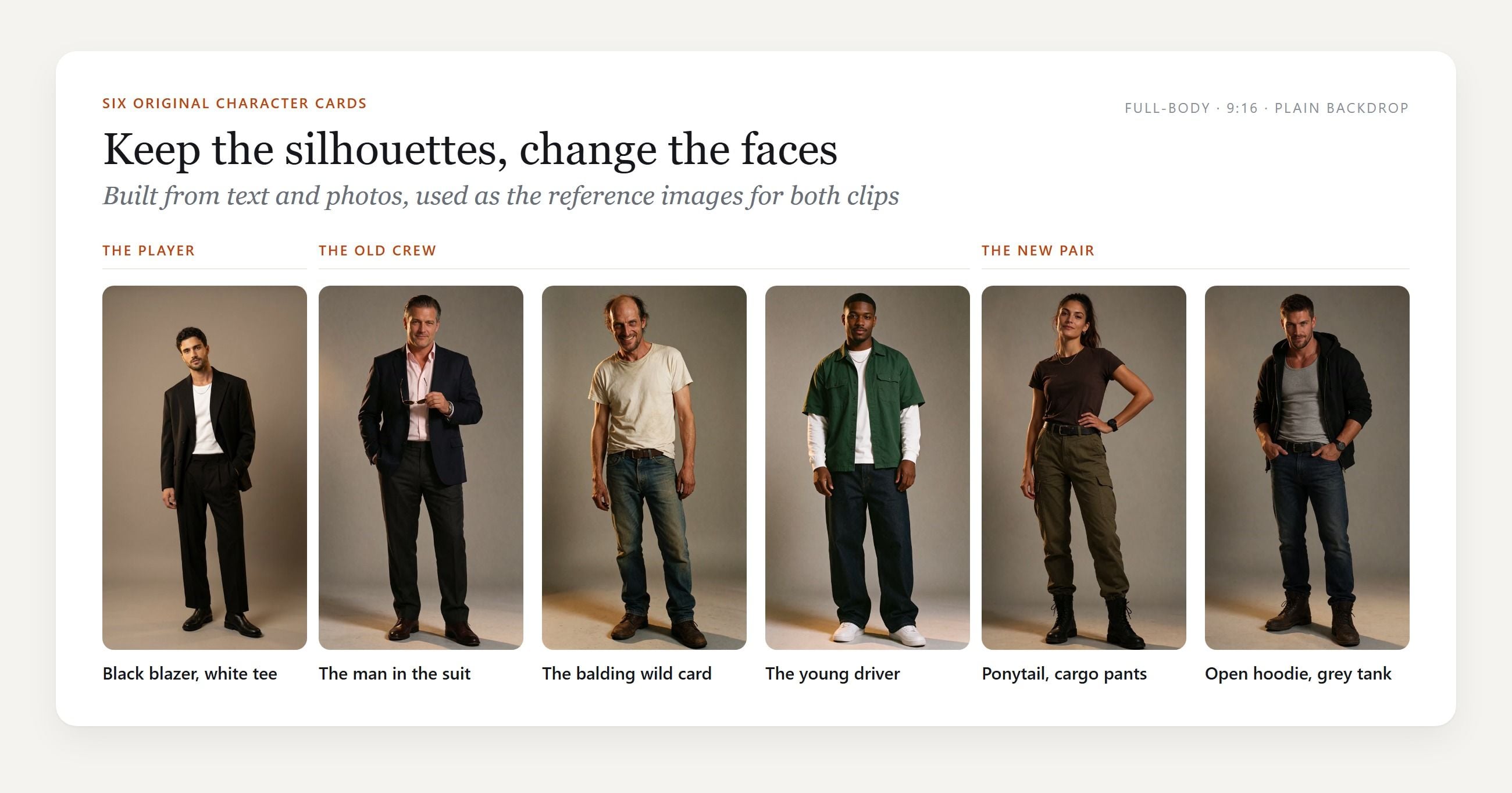
| Role | What we kept, so it reads as GTA | What we changed, so it stays yours |
|---|---|---|
| The man in the suit | Mid-forties, dark hair slicked back, navy blazer over an open pink shirt, aviators | A new face, no name |
| The wild card | Balding, gaunt and grinning, stained white T-shirt, old jeans | A new face, no tattoos |
| The young driver | Late twenties, dark green short-sleeved shirt over a white long-sleeved tee, baggy jeans, white sneakers | A new face |
| The new pair | A ponytail with a dark tee and olive cargo pants; an open black hoodie over a grey tank | Both faces new |
The world does the rest. Goodbye GTA V scenes belong in a sun-baked coastal city: a pier with a Ferris wheel, palm silhouettes, smog over the hills. The new chapter belongs in a neon beach town with Art Deco fronts and wet streets. Small cues add up too: an aerial dive at the top of each clip, a helicopter in the sky, police lights crossing a face, a 1970s muscle car.
Leave out the things that belong to Rockstar: logos, game boxes, the on-screen map and wanted stars, character names, and photos of the actors who played them. If you want an actual gameplay look instead of live action, our Seedance 2.5 GTA 6 guide covers that route.
Frequently Asked Questions
Who are the characters in the goodbye GTA 5 videos?
The three men are Michael De Santa, Franklin Clinton and Trevor Philips, the playable leads of GTA V. The man and woman who show up at the end are Jason and Lucia, the two leads of GTA VI. The young person they say goodbye to stands in for the player.
Can I use Michael, Franklin and Trevor in my own AI video?
Rockstar owns all three, and each face is modeled on the actor who played him. Fan clips that copy them still circulate on TikTok, but that does not move the rights to the person posting. Cast cards with the same silhouettes and faces of your own give you the look without borrowing either.
What song do the goodbye GTA 5 videos use?
The most-viewed AI version we found is set to a slowed-down "Midnight City" by M83, as TikTok credits it. Many template posts use another creator's original sound instead. Whatever you pick, add it in the edit and check the platform's music rules for your account type.
Why do so many goodbye GTA 5 videos jump from 2013 to 2026?
Those are the two launch years. The bridge clip and the Hh and Ai templates open on a kid meeting the crew in 2013, then cut to the same person as an adult in 2026, so the goodbye plays as thirteen years of growing up.
Why split a goodbye GTA 5 AI video into two clips?
One Seedance 2.5 run can last up to 30 seconds and take up to 30 reference images, so a single clip is possible. We split ours because the two halves share only one person. Each 15-second clip carries just the cards it needs, the light and location change completely at the cut, and you can rerun one half without touching the other.
How much does a 30-second goodbye GTA 5 AI video cost on Atlas Cloud?
A 15-second Seedance 2.5 clip at 1080p with audio costs about $8.90, which is 20% off the $11.12 list price, as of November 20, 2026. Two clips like ours come to about $17.79. No end date is listed for the discount, so check the Run button, which shows the exact price before you generate.
Conclusion
The goodbye GTA 5 trend works because everyone already knows the cast. Three silhouettes on a pier say thirteen years of late nights, and two new faces say the next ten. The templates hand you that feeling with Rockstar's characters pasted in.
Building it yourself takes six character cards and two prompts. Keep the four beats, give every person a face of your own, and your goodbye GTA 5 AI video can live anywhere you post it.




