


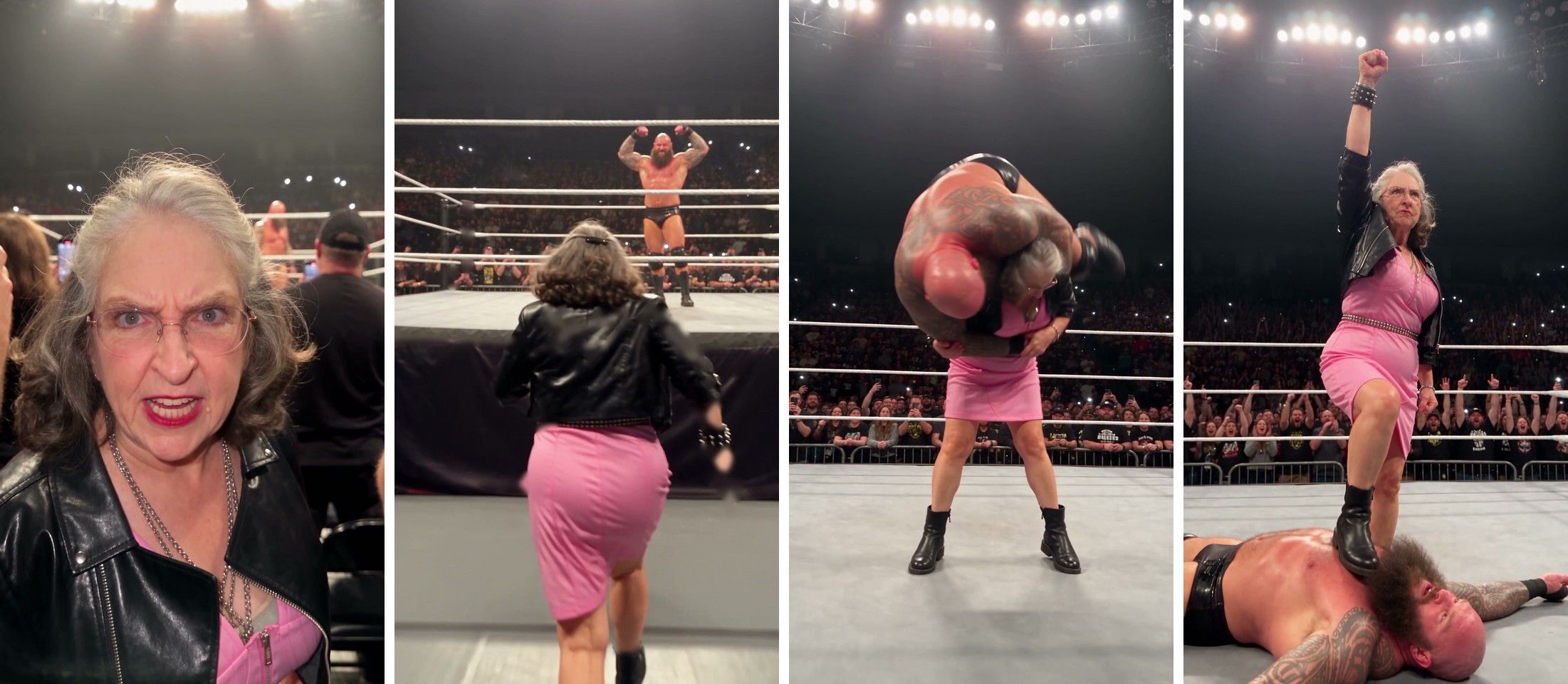
A grandma in a pink dress glares into a fan's phone and snaps, "You're nothing!" Then she pushes through the crowd, crawls into the ring and throws a bearded wrestler twice her size over her hip. A ringside commentator loses his mind. Fifteen seconds, one shot.
That is the AI WWE video, the wrestling trend of late November 2026. One CapCut template behind it passed 2.5 million uses in nine days. This guide shows which template it is and how to use it, then rebuilds the whole clip from one photo, commentary included, with a prompt you can copy.
Key Takeaways
- The AI WWE video drops you, a grandparent or a pet into a pro wrestling ring to flatten a wrestler twice your size.
- Its biggest CapCut template, "WWE SmackDown," went up on November 15, 2026 and passed 2.5 million uses in nine days.
- An earlier template from September had people, cats and toddlers flipping an Undertaker lookalike instead.
- The trend's audio runs on one commentary script, from "He's had enough!" to "What a finisher!" and "He's out!"
- One photo and a timed 15-second prompt rebuild the clip, commentary included, in the AI video generator.
What Is the AI WWE Video Trend?
You upload one photo. Out comes a vertical clip shot like a fan's phone at a live show: you storm out of the front row, get into the ring, put a pro wrestler on his back and stand over him while a commentator yells. It looks like a real arena. Nobody in it ever stepped into one.
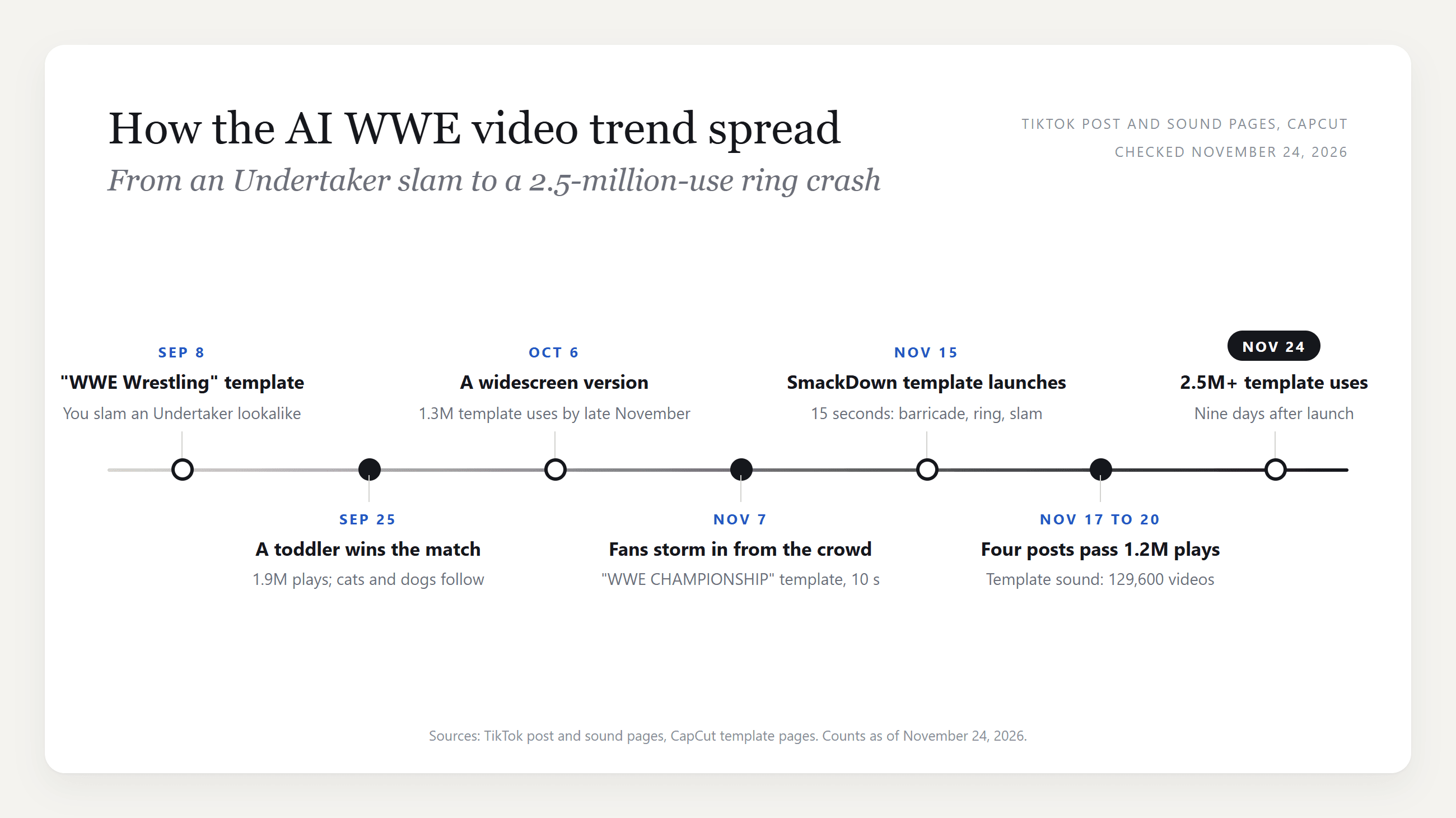
The trend came in two waves. The early one ran on a CapCut template called "WWE Wrestling," which put people in the ring against an Undertaker lookalike. A toddler version from September 25 reached 1.9 million plays, and pet owners followed with their cats and dogs. A widescreen take on the same fight, from another creator, has 1.3 million uses.
The second wave is the one on your feed now. It started on November 7 with a template where a fan jumps in from the crowd, and a week later the same creator posted the longer "WWE SmackDown" version compared below.
That one took off fast. The biggest SmackDown post we found, a man in a gray kurta from November 20, has 1.5 million plays, and three more passed 1.2 million between November 17 and 20. The template's sound sits under about 129,600 videos.
WWE SmackDown Template vs Undertaker Template
Both are one-photo AI templates in CapCut. They stage different fights:
| WWE SmackDown template | WWE Wrestling template | |
|---|---|---|
| Creator | Dark-AI (SN) | ArtemisCC |
| Went up | November 15, 2026 | September 8, 2026 |
| Uses on November 24 | 2.56 million | 40,985 |
| You upload | 1 photo | 1 photo |
| Length | 15 seconds, 9:16 | 10 seconds, 9:16 |
| The fight | You come from the front row, crawl into the ring and slam a tattooed wrestler | You are already in the ring and flip an Undertaker lookalike |
| Stars in the top posts | Grown-ups of every age, plus pets | Toddlers, cats, dogs |
The template titles name the show, not the stunt. That is why "undertaker template" and "smackdown template" searches land on the same trend.
Make an AI Wrestling Video From One Photo
The template drops your photo into a fixed scene. A prompt lets you choose the star, the outfit and every line of commentary, and you still start from one photo. Here is our run on Atlas Cloud, with sound on:
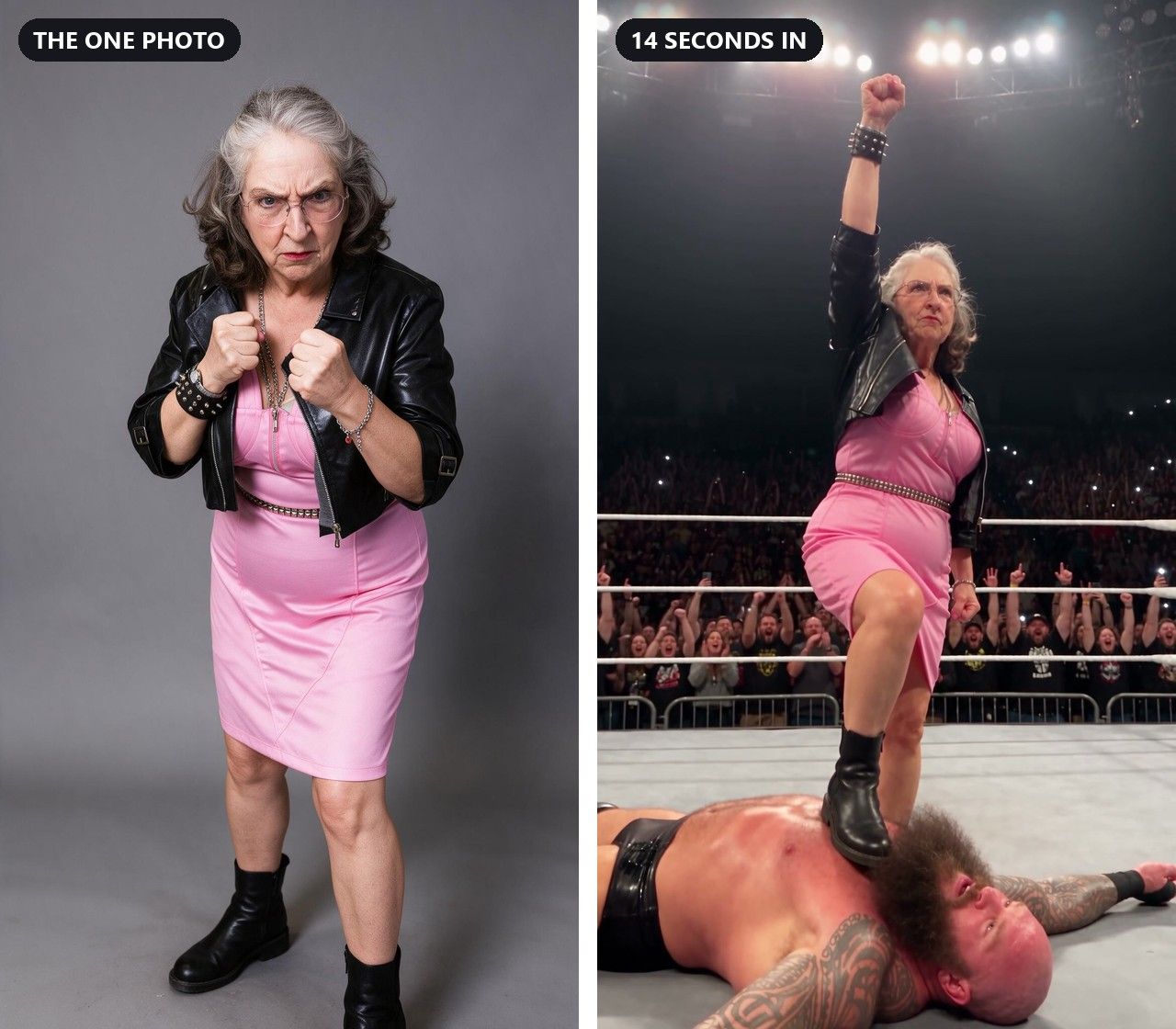
The reference started as a Pexels stock photo, extended to a full-body shot with an image edit.
The model is Seedance 2.5. From a single photo, it kept her glasses, gray curls, jacket and studded belt the same from the front row to the final pose. Her shout, the commentator, the crowd and the thud on the mat all came out of the same run, landing on the beats we wrote.
Think of it as an AI wrestling video generator, or a WWE AI generator without the WWE part: you describe the arena, the wrestler and the lines, so nothing in the clip belongs to anyone else. Everything happens in the video generator, on the Video Generation tab.
Method 1: Make the AI WWE Video in the Atlas Cloud Video Generator
Follow the numbers on the screenshot:
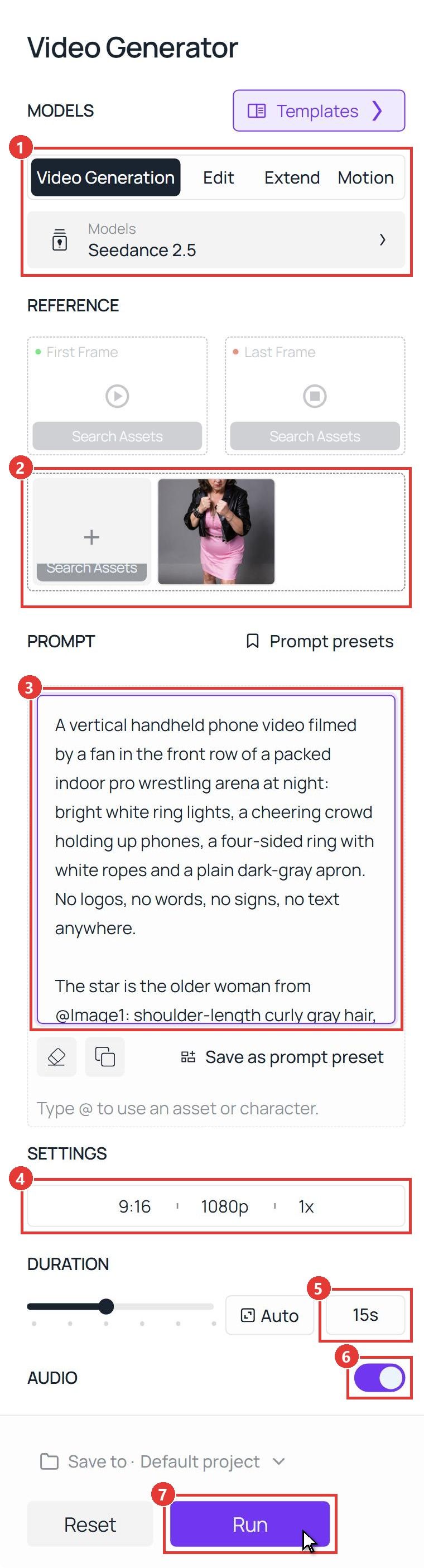
- Model: open Video Generation and keep Seedance 2.5.
- Reference: upload your photo under Upload other references. Leave First Frame and Last Frame empty, or the clip will open on your photo instead of the crowd.
- Prompt: paste the prompt below. To show @Image1 as a tag, type @ in the box and pick the photo.
- Settings: pick 9:16 and 1080p, with one output. 720p is cheaper for a test run.
- Duration: set 15 seconds.
- Audio: leave it on. The commentary is half the joke.
- Run. The clip shows up in the panel on the right.
plaintext1A vertical handheld phone video filmed by a fan in the front row of a packed indoor pro wrestling arena at night: bright white ring lights, a cheering crowd holding up phones, a four-sided ring with white ropes and a plain dark-gray apron. No logos, no words, no signs, no text anywhere. 2 3The star is the older woman from @Image1: shoulder-length curly gray hair, thin round wire-rim glasses, red lipstick, black leather biker jacket, fitted pink satin knee-length dress, silver studded chain belt, studded black wrist cuffs, chunky black ankle boots. Keep her face and outfit the same in every second. 4 5The opponent is one original pro wrestler: a huge bald man with a thick black beard, tribal tattoos on both arms, black wrestling trunks, black knee pads and black boots. He is not any real or famous wrestler. 6 7An excited male ringside commentator is heard off-screen, never shown, in a loud TV wrestling broadcast voice. 8 9One continuous take. The fan's phone follows her the whole time and never cuts: 10[0-3s] Close on her in the crowd. She turns to the phone, glares into the lens, scowls and shouts right at the camera: "You're nothing!" Then she lets out a short, mean laugh: "Ha ha ha." Behind her, in the ring, the wrestler flexes and taunts the crowd. 11[3-6s] She shoves past two fans, climbs over the metal barricade, stomps to the ring and rolls under the bottom rope onto the mat. Commentator: "She's had enough! She's coming into the ring!" 12[6-9s] She stands up and faces the wrestler. He laughs, towers over her and grabs her by the jacket. She hits him with two fast punches to the gut. Commentator: "What a combination!" 13[9-12s] She grabs his arm, ducks under it and throws him over her hip. He flips through the air and slams flat on his back on the mat with a loud thud. Commentator: "Oh my god! What a finisher!" 14[12-15s] He lies flat and dazed. She steps over him, plants one boot on his chest and raises a fist to the crowd. Commentator: "He's out!" The crowd goes wild, phones in the air. 15 16Sound: the commentator's lines above, her shout, a roaring crowd, a ring bell, a heavy thud when he hits the mat. No music.
To make it yours, rewrite the star paragraph (hair, glasses, outfit) and switch "She's" to "He's" in the commentary if needed. Keep the beats and the timing.
Method 2: Send the Prompt Through the Seedance 2.5 API
Running a ring crash for every guest at a birthday party? The API takes the same photo and the same prompt.
Step 1: Create an API key. In the console, open Settings and create a key under API Keys.
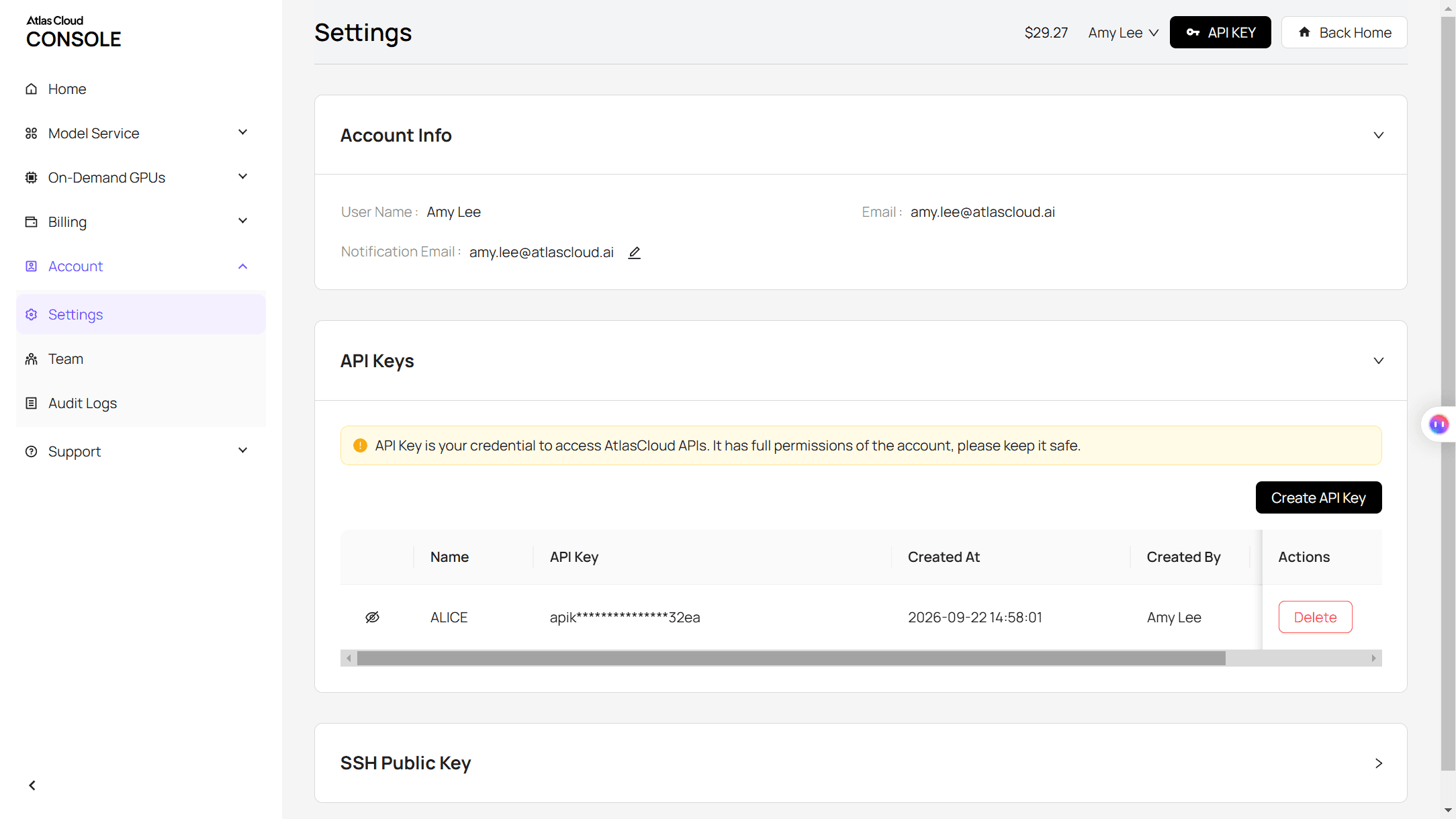
Step 2: Check the request format. The Atlas Cloud API docs cover authentication, and the API tab on the Seedance 2.5 reference-to-video model page lists every field.
Step 3: Send the request and poll. The photo goes in the reference_images array as a public URL:
plaintext1curl -X POST https://api.atlascloud.ai/api/v1/model/generateVideo \ 2 -H "Authorization: Bearer $ATLASCLOUD_API_KEY" \ 3 -H "Content-Type: application/json" \ 4 -d '{ 5 "model": "bytedance/seedance-2.5/reference-to-video", 6 "prompt": "<paste the ring crash prompt here>", 7 "reference_images": ["https://your-cdn.com/your-photo.jpg"], 8 "ratio": "9:16", 9 "resolution": "1080p", 10 "duration": 15, 11 "generate_audio": true 12 }'
Poll the returned prediction ID until the status reads completed, then download the clip from the outputs array:
plaintext1curl https://api.atlascloud.ai/api/v1/model/prediction/<prediction_id> \ 2 -H "Authorization: Bearer $ATLASCLOUD_API_KEY"
The endpoint and the key stay the same across every video model on Atlas Cloud. Trying another one means changing the model string.
How to Use the CapCut WWE Template
Prefer the original? The WWE SmackDown template in CapCut takes one photo and does the rest.
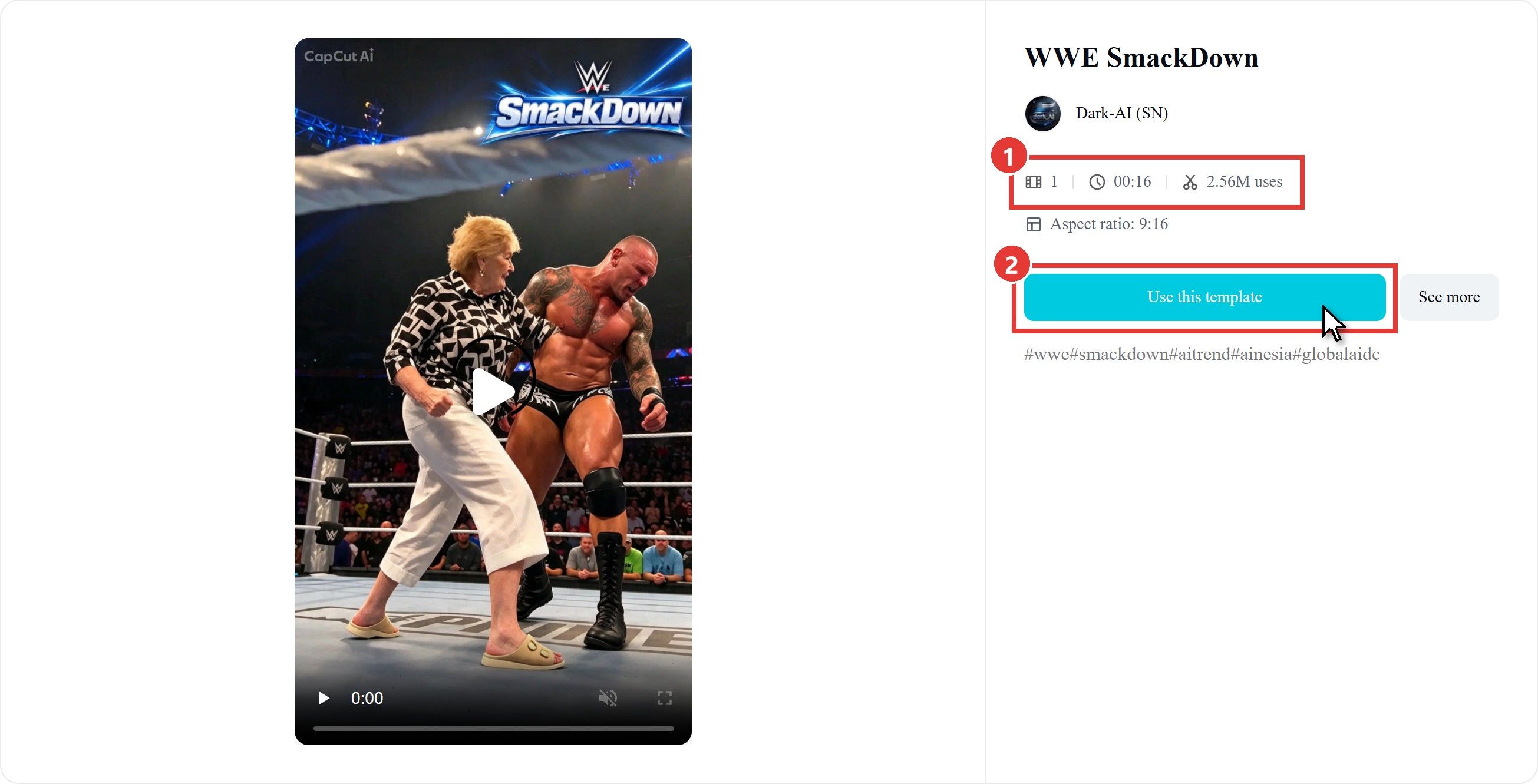
Screenshot: CapCut template page, November 24, 2026.
- Find it. On TikTok, open any post from the trend and tap the CapCut "Try this template" link at the bottom left. The template's creator is Dark-AI (SN).
- Check it. The page should show one photo slot and a use count in the millions. Other creators have posted look-alike templates, so check the creator name.
- Use it. Tap Use this template and pick one clear photo. A full-body shot gives the AI your outfit to work with.
- Wait. The creator's own profile warns that "the AI template process takes a while" and says you can run it again if the result misses. Then export and post with the template's sound.
The template is not offered in every region. If it will not open where you are, the prompt route above makes the same clip.
Write the AI Fight Video Prompt: A 15-Second Ring Crash
Any AI fighting video lives or dies on timing.
We transcribed the audio of the template preview and six top trend posts, and they share one commentary script: "He's had enough," "He's coming into the ring," "What a combination," "What a finisher," "He's out." Some posts skip a line and the wording shifts a little, but the order never changes. Two of the million-play posts also open with the star yelling "You're nothing!" into the camera.
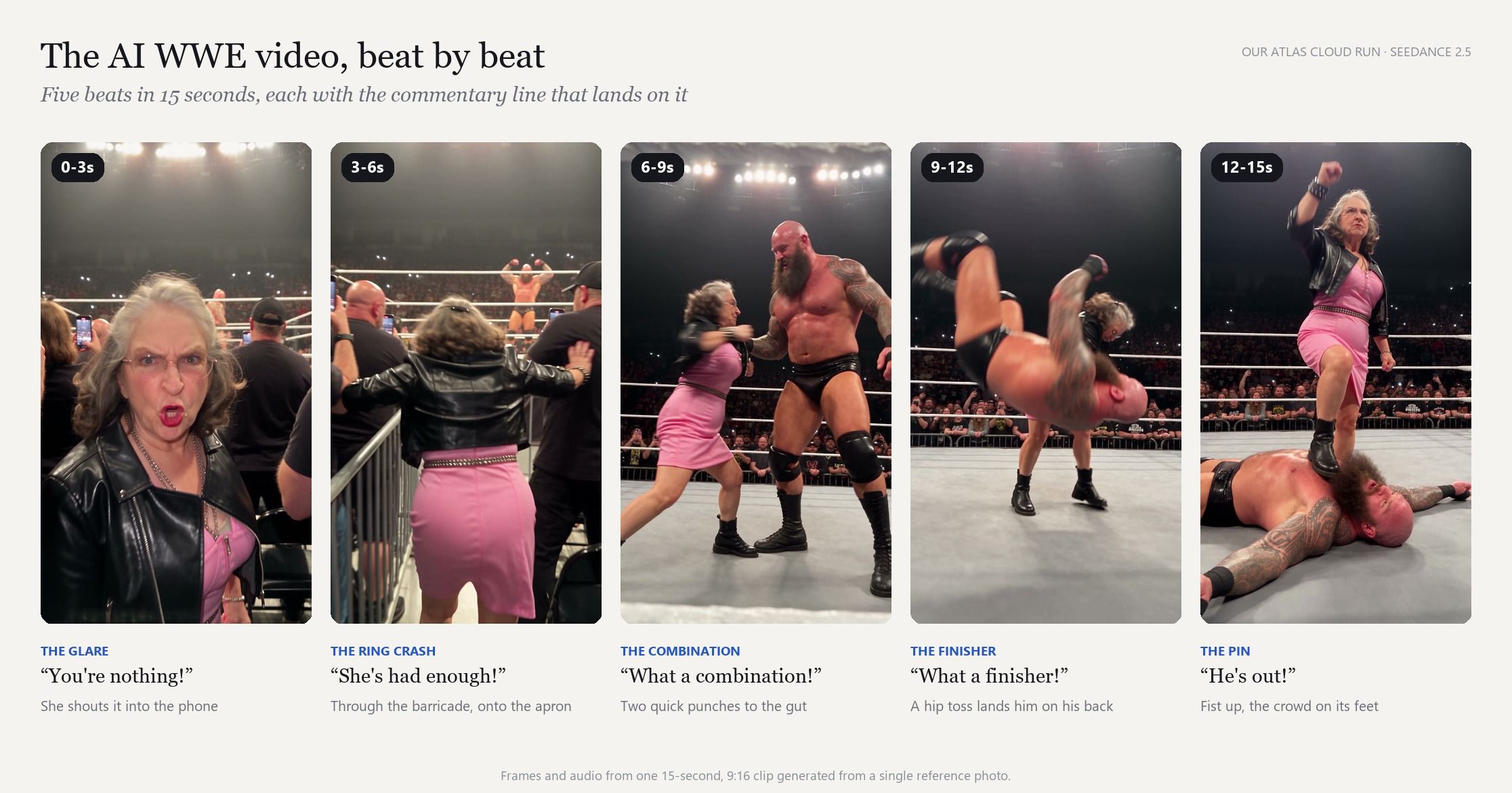
So the prompt writes each line inside the beat it should land on. In our run, all five landed within a second of their marks, and the clip matches the trend's rhythm without borrowing its audio.
A few lines in the prompt do most of the work:
- "Heard off-screen, never shown" keeps the commentator a voice, so no announcer desk appears in the shot.
- "One continuous take" from a fan's phone carries the crowd-to-ring move in a single shot. The same one-take approach held our tiger fight AI clip together.
- An original wrestler with a build, a beard and tattoos gives the model someone specific to draw, and "not any real or famous wrestler" keeps it that way.
- "No music" leaves room for the voices. Add a track later in the app if you want one.
Pick Your Star: Grandma, Dad or the Dog
The joke works best when the star looks like the last person who should win. Here is who carried the biggest posts we opened, with plays as of November 24, 2026:
| Star | Where we saw it | Plays | Photo tip |
|---|---|---|---|
| A grandparent | The SmackDown template's own preview; an older man's post from November 16 | 538,200 | Full body, so the outfit makes it into the ring |
| You or a friend | A man in a black hoodie, November 17 | 1.3 million | Face toward the camera, clear and sharp |
| A cat | A Maine Coon against the Undertaker lookalike, September 27 | 343,200 | Describe breed, fur and markings in the prompt |
| A dog | A pug in the post behind the template's sound, November 15 | 18,300 | Swap the punches for a pounce |
If your photo stops at the knees, extend it to a full-body shot with any image model first. We did that with our grandma, which is why she wears the same boots in every shot. CapCut has run this kind of one-photo sports template before: the AI dunk trend works the same way on a basketball court.
WWE AI Clips Without the Trouble: Real Wrestlers, Logos and Labels
The trend borrows a real show's name, and that is where it can go wrong. A wrestling ring is also a spot where real brand marks tend to slip in, whatever tool you use. Before you post, scrub through your clip with these in mind:
| Do | Don't |
|---|---|
| Describe an original wrestler: build, beard, tattoos | Name a real wrestler or ask for his face |
| Ask for a plain ring apron and plain corner pads | Ask for WWE, RAW or SmackDown logos |
| Check every second for stray logos before posting | Post the first render unchecked |
| Get a yes from whoever goes into the ring | Put a stranger or a celebrity in the ring |
| Tag the post with the AI-generated label | Pass it off as phone footage from a real show |
For where the AI label switch sits on TikTok and Instagram, see our he is nonchalant guide.
Frequently Asked Questions
Is the AI WWE video real footage?
No. The clips in this trend come from one-photo AI templates or prompts, so the arena, the crowd and the wrestler are all generated. The handheld fan's-phone look is what makes it funny, so label it as AI when you post.
Why does the CapCut WWE template take so long?
Each run renders a fresh AI video from your photo, which takes longer than a template that only cuts your own clips together. A sharp, well-lit photo with your face toward the camera leaves the AI less to guess, which can save you a rerun.
How much does a 15-second AI WWE video cost on Atlas Cloud?
A 15-second clip with audio from one reference photo costs about $4.52 at 720p, which is 20% off the $5.65 list price, as of November 24, 2026. Our 1080p clip costs about $11.19 against a $13.98 list price. The discount is time-limited, so check the Run button, which shows the price before you generate.
Can I add a wrestler's entrance music?
Skip it in the prompt. Entrance themes are copyrighted songs, and the trend's own audio is built around the commentary anyway. If you want a track, add one from the app's sound library when you post, under the generated commentary.
Can I change what the commentator says?
Yes. Each line sits in quotes inside its beat, so swap in your own, like "Grandma's had enough!" or a friend's name. Keep every line short enough to say in a second or two, because the beat it belongs to is only three seconds long.
Conclusion
The trend works because nothing about the star says "wrestler": a grandma in a pink dress, a man in a kurta, a pug. The commentary does the rest, and the same script runs through the posts we checked.
To make your own AI WWE video, pick a sharp full-body photo, keep an original wrestler and a plain ring in the prompt, and let the commentator call the finisher. Then check the frames and turn on the AI label before you post.







