


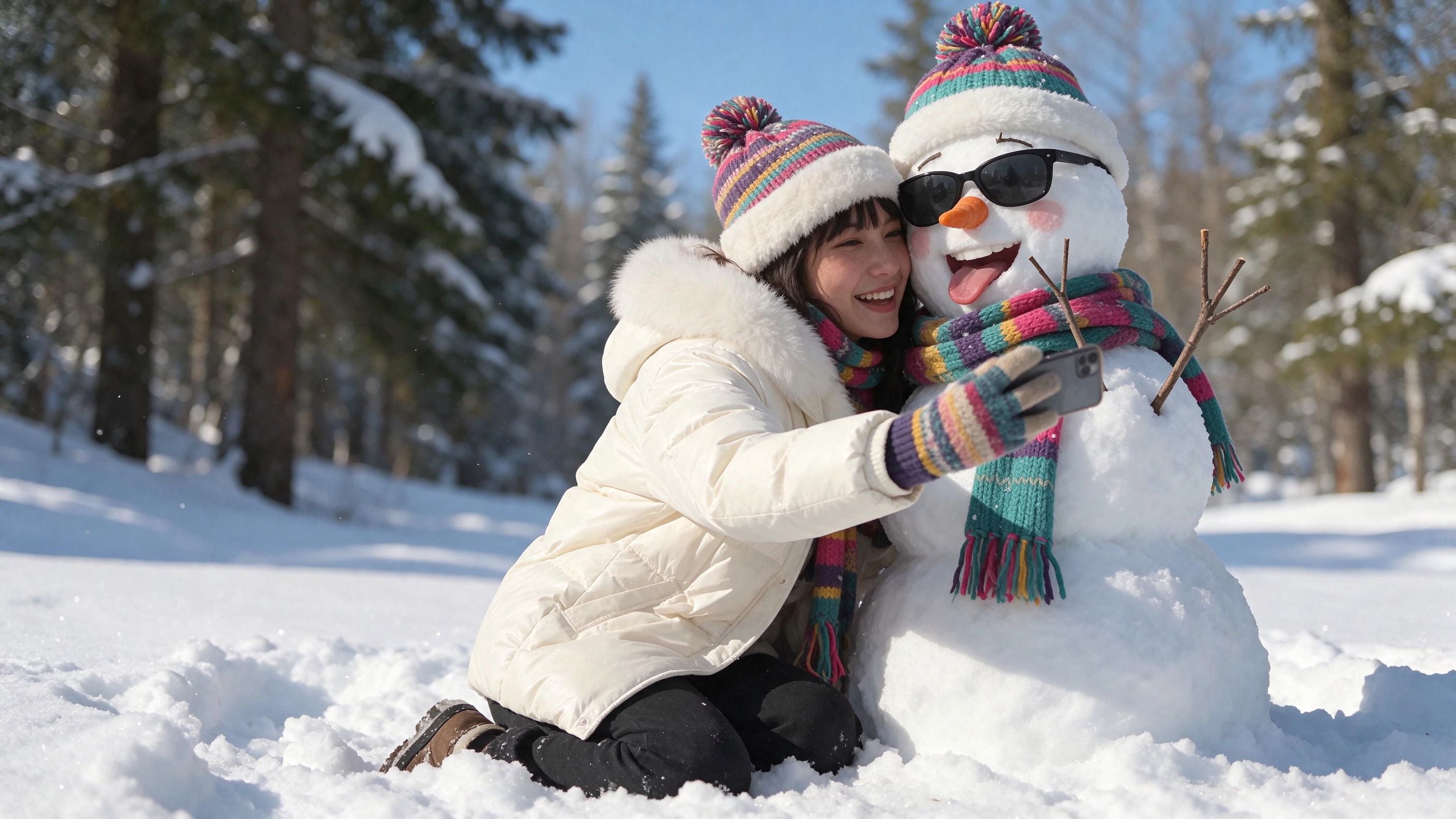
She winks at the phone and pushes her lips into a kiss. Next to her cheek, a snowman in black sunglasses hangs his tongue out and holds up two twigs in a peace sign. Their hats match. So do their scarves.
That picture is the snowman bestie trend, and it starts with one long prompt that people paste into ChatGPT along with a selfie. This guide gives you that prompt, shows which CapCut template is the real one, and then takes the picture one step further: our snowman moves, and the clip comes with a laugh and two spoken lines.
Key Takeaways
- The snowman bestie trend is an AI winter selfie: you, cheek to cheek with a snowman in sunglasses sticking his tongue out.
- The long ChatGPT prompt behind it appeared in a TikTok caption on November 17, 2026; the main CapCut template followed four days later.
- One CapCut template called Snowman, built on November 21, sits behind most of the template posts we checked; several lookalikes copy it.
- Seedance 2.5 in Atlas Cloud's AI video generator turns the finished selfie into a clip where the snowman actually moves.
- Change one block of the prompt to swap in your dog, a real best friend or your team's colors.
What Is the Snowman Bestie Trend?
It is a selfie that never happened. You upload one photo of yourself, and an AI model returns a close-up of you and a goofy snowman pressed cheek to cheek in a snowy pine forest. The snowman wears big sunglasses and a carrot nose, sticks his tongue out and throws a peace sign with a twig hand.
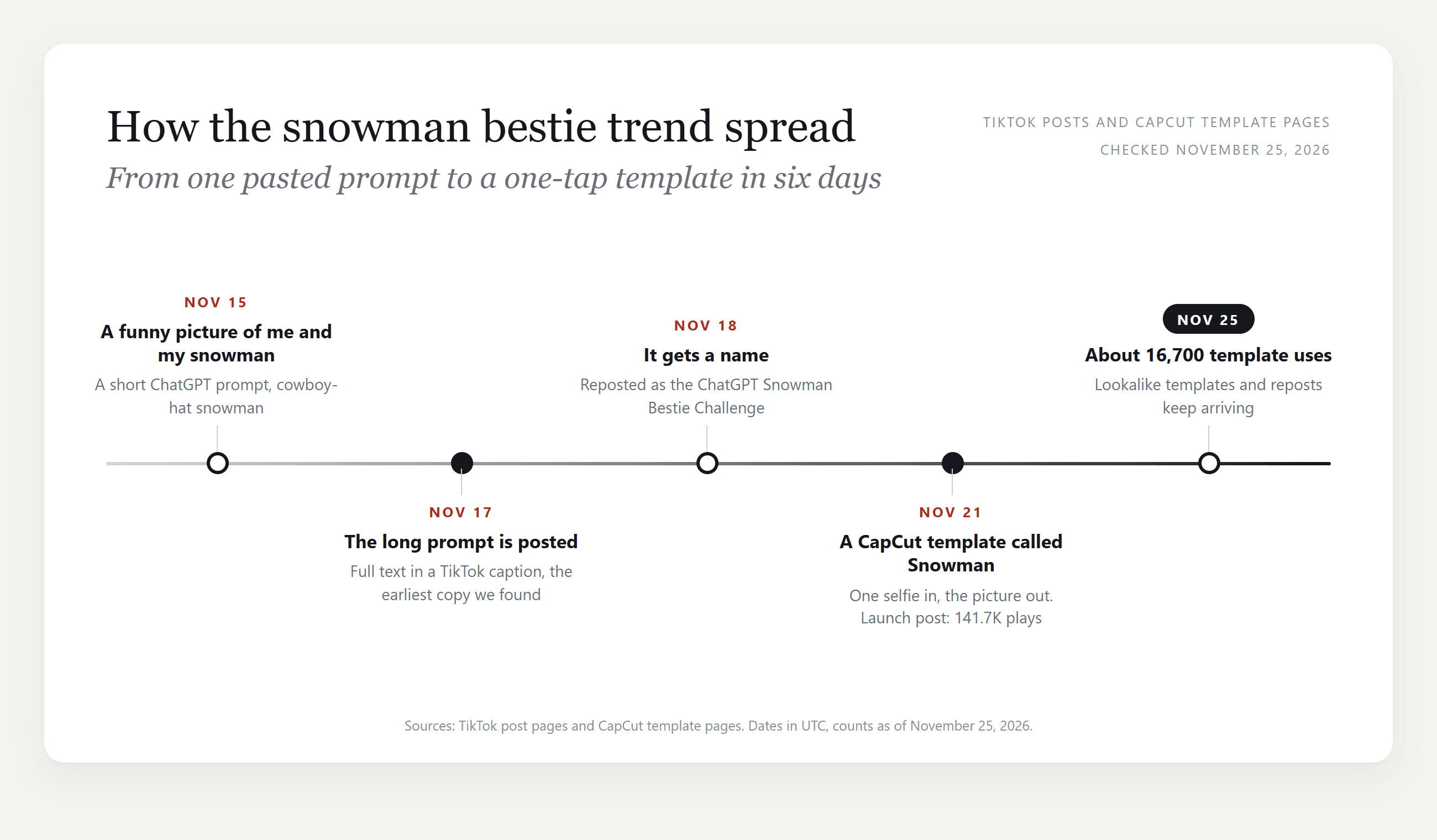
The idea showed up in two steps. By November 15 a shorter request was already going around, a funny picture of me and my snowman, and the posts we saw show a snowman in a cowboy hat. Then a TikTok caption posted on November 17, 2026 carried the full long prompt. It is the earliest copy we found.
A day later the same text was reposted under a name, the ChatGPT Snowman Bestie Challenge, with an instruction to copy and paste. By November 21 a CapCut creator had packed the look into a one-photo template, and the picture no longer needed a prompt at all.
So this Christmas AI trend has two doors. One is the prompt, which works in any tool that takes a photo and a text request. The other is the template, which is one tap but lives inside CapCut.
The ChatGPT Snowman Bestie Prompt, Copy and Paste
Here is the wording from that November 17 caption, with the emoji and bullet marks removed and line breaks added. The words are unchanged.
plaintext1Using my uploaded photo as a facial reference, create a hilarious, adorable, ultra-realistic winter selfie of ME and my mischievous snowman best friend! 2 3THE SCENE: 4Place us outside in a magical, snow-covered winter wonderland with beautiful evergreen trees and softly falling snow. Make it look like we're taking the funniest best-friend selfie ever! 5 6MY SNOWMAN BESTIE: 7Give my snowman a huge, hilarious personality! Add oversized sunglasses, a carrot nose, a goofy smile, and a tongue sticking out. Have him throwing up a peace sign with his twig fingers. Dress him in a colorful winter hat and matching scarf. Make him look like he's my crazy partner in crime! 8 9MY WINTER LOOK: 10Preserve my recognizable facial features, natural eye color, skin tone, hairstyle, and age. Dress me in an adorable, colorful winter hat, matching scarf, cozy coat, and gloves. Let my winter accessories coordinate with my snowman's outfit. Give me a funny, playful expression, such as duck lips, a wink, or a silly face. Make us look like we're having the time of our lives! 11 12THE FUNNY DETAILS: 13Surprise me with extra hilarious details that make the image unique! Give my snowman an outrageous personality and make our friendship look completely ridiculous but adorable. 14 15IMAGE STYLE: 16Ultra-realistic photography with a playful, slightly cartoonish touch, vibrant colors, realistic snow textures, beautiful winter lighting, and incredible facial details. Vertical composition, perfect for sharing on social media. 17 18IMPORTANT: 19Keep me recognizable from my uploaded photo, but make the entire scene completely new. Make the finished image FUNNY, FABULOUS, COLORFUL, and full of personality!
In ChatGPT it takes three moves:
- Start a new chat and attach one clear selfie, head and shoulders, face to the camera.
- Paste the prompt and send it.
- Ask for changes in plain words, such as a different hat color or a bigger grin on the snowman.
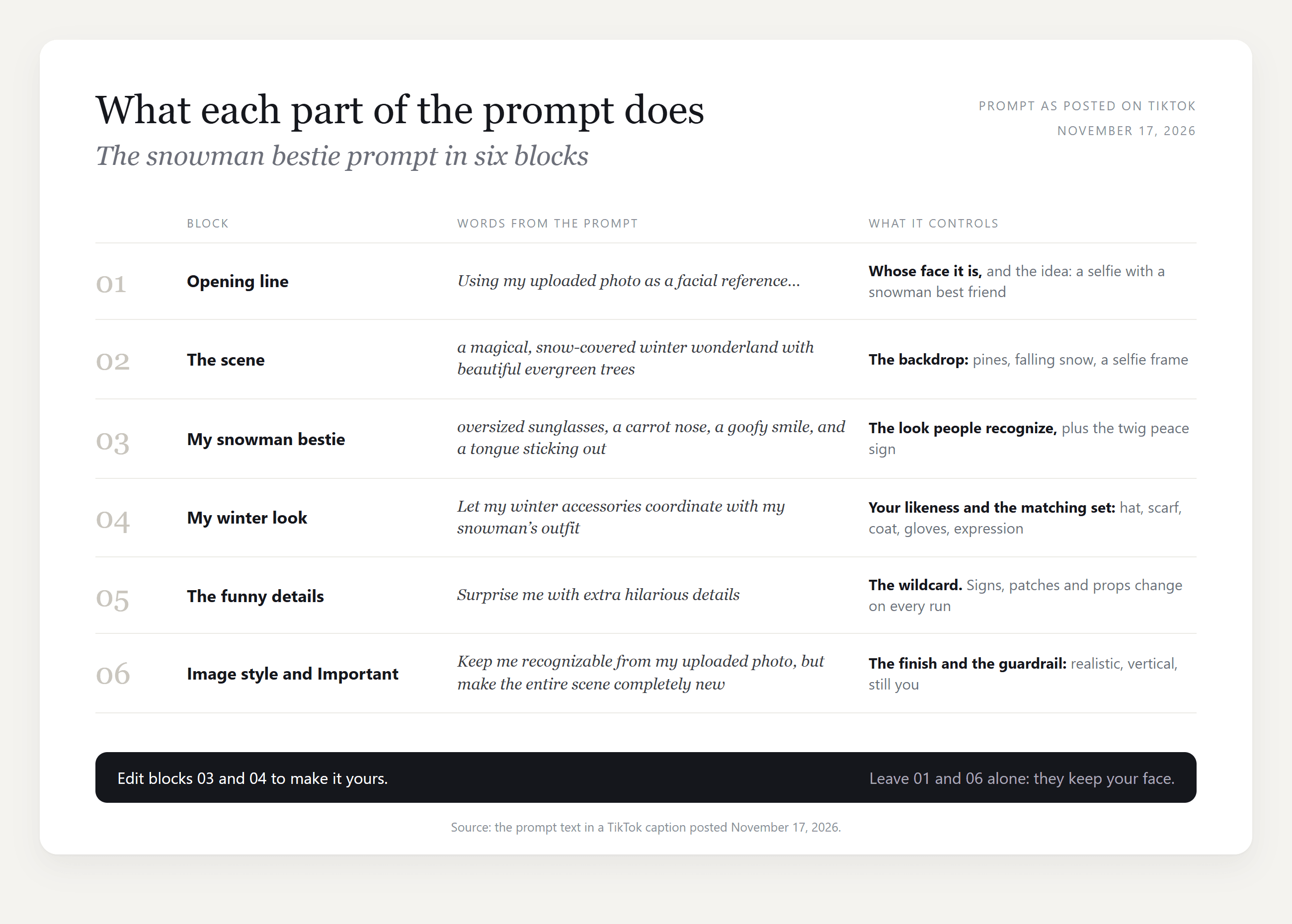
The chart groups the prompt into six blocks, and you only need to touch two of them. Blocks three and four hold the snowman's look and your own, so that is where colors, expressions and outfits go. The opening line and the last block protect your face, so leave them as they are.
For studio portraits, candy canes and family cards, our AI Christmas photo guide has a separate set of ChatGPT Christmas photo prompts.
Turn the Snowman Selfie Into an AI Snowman Video
The template posts we watched are slideshows of stills. We took ours one step further on Atlas Cloud and let the snowman break the pose.
Sound on. Her laugh and both spoken lines were generated with the picture. We laid a short music loop under them afterward.
The model is Seedance 2.5. It takes the selfie as the first frame, so the faces, hats and scarves in the clip are the ones in your picture, and it writes the sound in the same pass. In our run she holds the wink for the first few seconds while his sunglasses slip down his nose. Then she opens her eye and cracks up, he tips his head into hers, and the clip ends on two peace signs. The two spoken lines, "Stop it! Hold still!" and "Besties!", came back word for word when we ran the audio through speech-to-text.
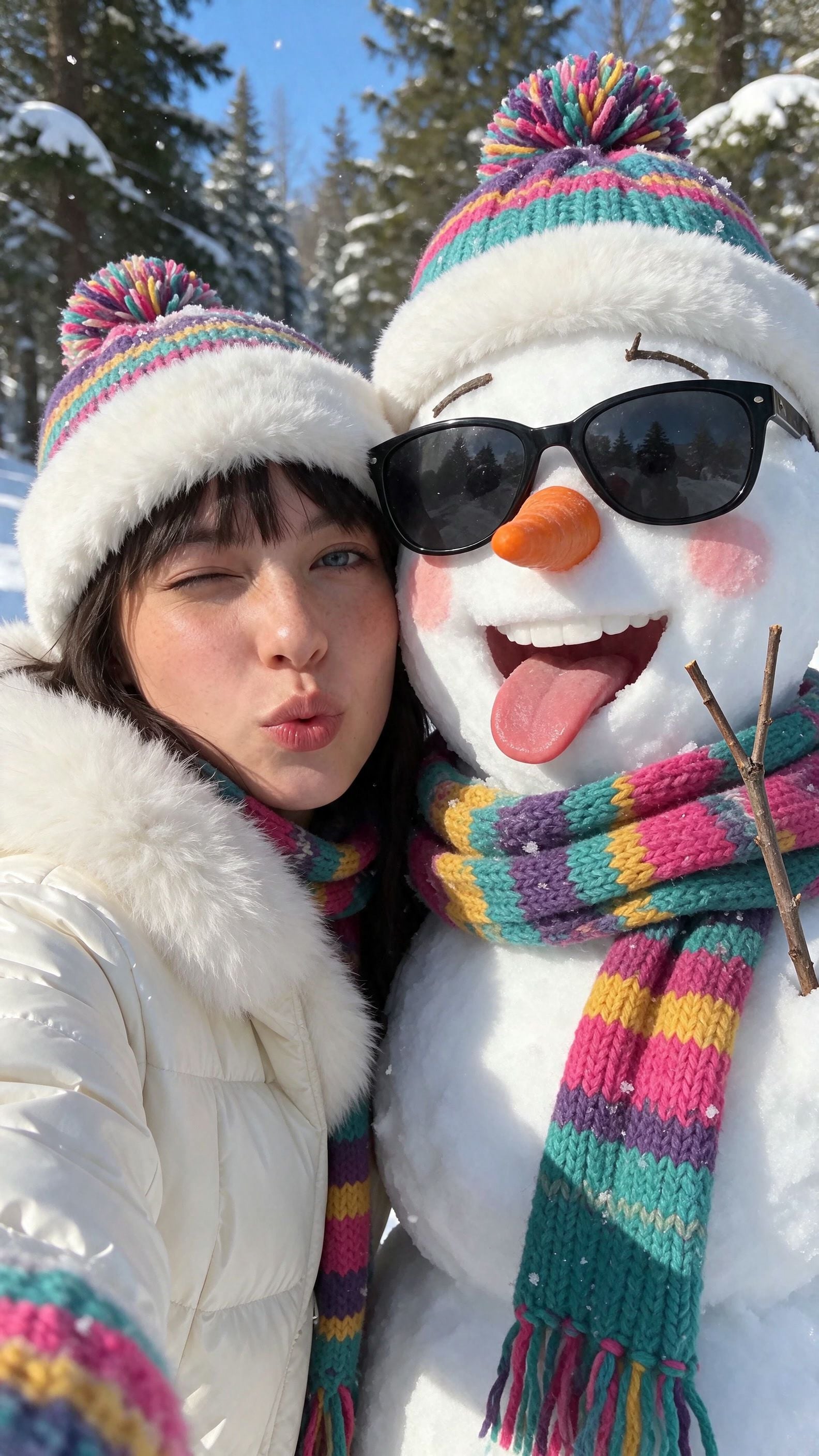
That first frame is our own snowman selfie. It came from one portrait photo in the Image Edit tab of the image generator, with Seedream 5.5 selected. We kept the structure of the viral prompt and added three things that made the biggest difference in our runs: a sunny day, named knit colors and a tight close-up. This is the version we settled on, and a fresh run of it returned the same look in one pass.
plaintext1Using my uploaded photo as a facial reference, create a hilarious, adorable, ultra-realistic winter selfie of ME (the young woman in the photo) and my mischievous snowman best friend! 2 3THE SCENE: A bright, sunny winter day in a snow-covered pine forest: blue sky showing between the trees, warm golden sunlight on our faces, sparkling snow, a few snowflakes in the air. It looks like a candid phone selfie of two best friends goofing around, not a posed photo shoot. 4 5FRAMING: Tight close-up. Our two faces are pressed cheek to cheek and fill most of the frame; my arm stretches toward the camera as if I am holding the phone. Only a little forest shows behind us. 6 7MY SNOWMAN BESTIE: He is bursting with joy, like he is caught mid-laugh. A giant open-mouth grin stretches across his whole face, with a big pink tongue flopping out to one side, round rosy cheeks, and little twig eyebrows raised high above oversized black sunglasses that reflect the snowy trees. Bright orange carrot nose. His head tilts into mine. One thin twig arm is raised beside his face; the branch forks into two slim twigs in a V, a peace sign made of sticks, with no hand and no fingers. He wears a chunky knit pom-pom hat with a fluffy white faux-fur brim and a long scarf. 8 9MY WINTER LOOK: Preserve my recognizable facial features, blue eyes, freckles, skin tone and age. Keep my dark brown hair with full straight bangs; the bangs and long hair stay visible under the hat. I wear a chunky knit pom-pom hat with a fluffy white faux-fur brim, a scarf and knit gloves that match my snowman's, plus a glossy ivory-white puffer jacket with a big white faux-fur collar. 10 11MY EXPRESSION: Relaxed and playful, as if I am trying not to laugh: one eye closed in a cheeky wink, the other eye bright and smiling, lips in a kissy pout pushed toward the camera, eyebrows lifted, head tilted toward the snowman so our cheeks squish together. Natural skin texture, no stiff or blank stare. 12 13COLORS: Bold and saturated. Our matching knitwear is striped in hot pink, purple, turquoise and sunny yellow, with fluffy multicolor pom-poms. Crisp contrast, rich color, glowing skin, bright white snow. Nothing gray, dull or overcast. 14 15IMAGE STYLE: Ultra-realistic photography with a playful, slightly cartoonish touch, incredible facial details, vertical 9:16. 16 17IMPORTANT: Keep me recognizable from my uploaded photo, but make the entire scene completely new. No text, no signs, no letters on the hats or scarves, no watermark.
Swap the hair, eye and freckle details for your own, and the jacket for one you would wear. To change a single detail afterward, run a second pass in the same tab with the finished picture as the reference. Describe only what changes and say that everything else stays.
The video itself is made in the Atlas Cloud video generator, on the Video Generation tab.
Method 1: Animate the Selfie in the Atlas Cloud Video Generator
Follow the numbers on the screenshot:
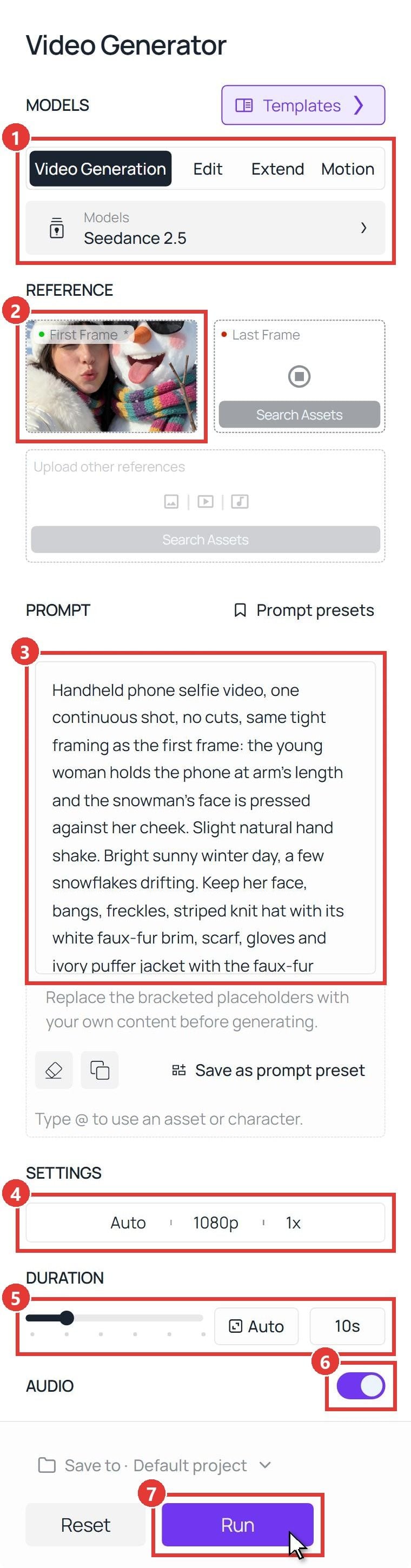
- Model: open Video Generation and keep Seedance 2.5.
- First Frame: upload your snowman selfie to the First Frame slot. Leave Last Frame empty.
- Prompt: paste the prompt below.
- Settings: pick 1080p, with one output. The ratio stays on Auto and follows your picture.
- Duration: set 10 seconds.
- Audio: leave it on.
- Run. The clip shows up in the panel on the right.
plaintext1Handheld phone selfie video, one continuous shot, no cuts, same tight framing as the first frame: the young woman holds the phone at arm's length and the snowman's face is pressed against her cheek. Slight natural hand shake. Bright sunny winter day, a few snowflakes drifting. Keep her face, bangs, freckles, striped knit hat with its white faux-fur brim, scarf, gloves and ivory puffer jacket with the faux-fur collar, and the snowman's matching fur-brimmed striped hat, scarf, black sunglasses, carrot nose and rosy cheeks exactly as in the image. The snowman is a real snowman made of packed snow that has come alive: his head and body stay round and solid, his arm is a thin bare branch that forks into two twigs, he has no human hand and no fingers. 2 3[0-2s] Both hold the selfie pose from the first frame like a photo: she keeps the wink and the kissy pout, he keeps his big open grin with his tongue out and his twig V up. Only the snowflakes move. 4[2-4s] The snowman breaks the pose first. His sunglasses slide down his carrot nose, showing two small black coal eyes; he glances sideways at her, wiggles his tongue and waggles the twig V at the camera. 5[4-6s] She opens her winking eye, notices him, drops the pout and bursts out laughing, looking at him. She says, laughing, with natural lip movement: "Stop it! Hold still!" 6[6-8s] The snowman nudges his sunglasses back up with his twig, bumps his head against hers, and a little snow falls off his hat onto her scarf. He says in a goofy, squeaky voice: "Besties!" 7[8-10s] She laughs harder and leans into him; they both grin at the camera, and she throws up a peace sign in her knit glove next to his twig V. Hold the final pose. 8 9Audio: outdoor winter ambience, soft wind, her real laugh, the two spoken lines. No music. 10Only the woman and one snowman appear. No other people, no subtitles, no on-screen text, no logos.
The first two seconds are the joke. Holding the pose "like a photo" makes the clip open as the picture everyone has already seen, so the moment the snowman moves lands as a surprise.
To make it yours, rewrite the first paragraph to match what is in your picture: your hair, your hat, your coat. Then change the two spoken lines. Keep each one short and inside quotation marks, and say who speaks it and in what kind of voice.
Method 2: Send the Same First Frame Through the Seedance 2.5 API
Making one for everybody in the group chat? The API takes the same picture and the same prompt.
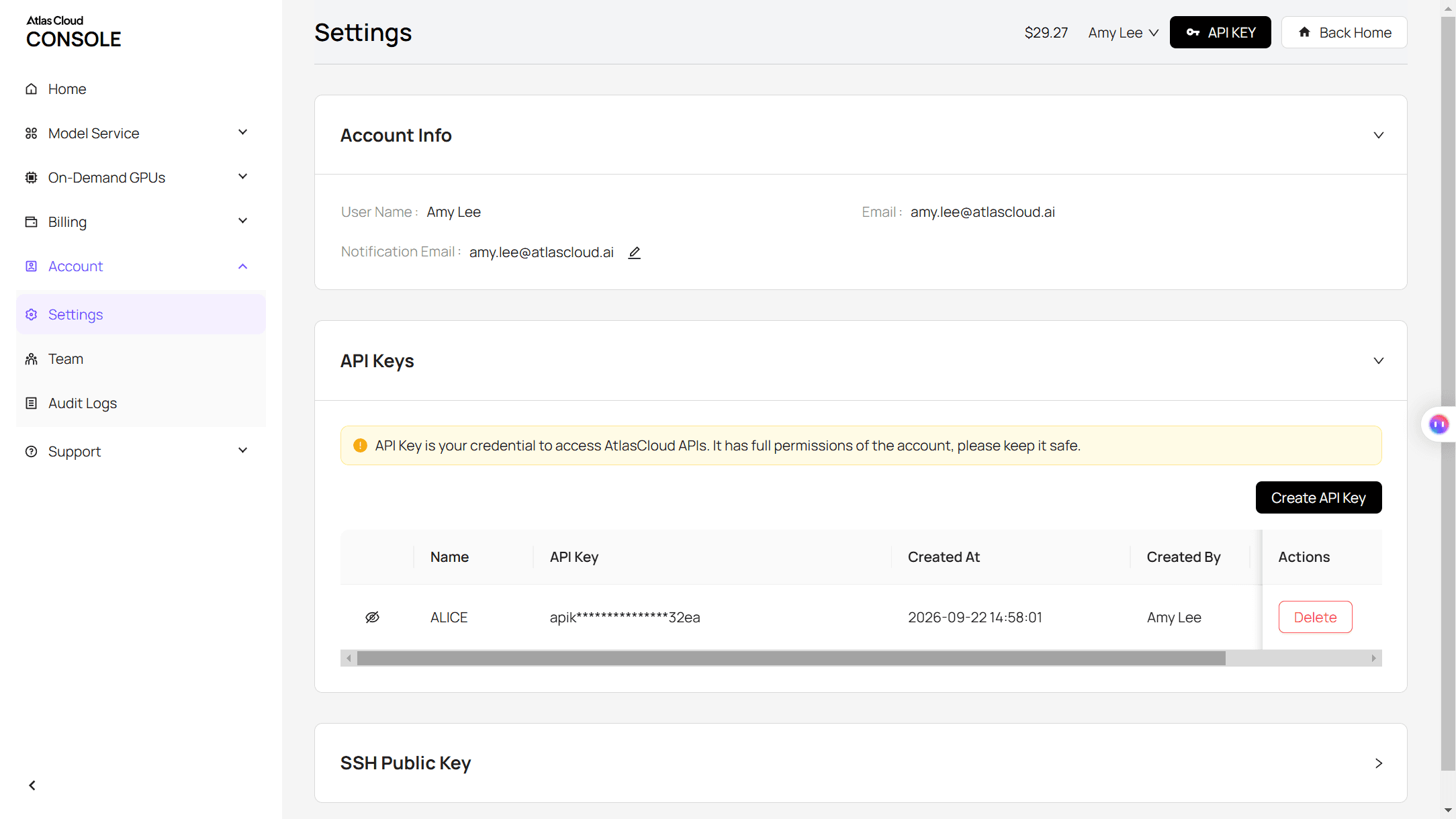
Step 1: Create an API key. In the console, open Settings and create a key under API Keys.
Step 2: Check the request format. The Atlas Cloud docs cover authentication and the video endpoint, and the API tab on the Seedance 2.5 image-to-video model page lists the fields. Duration accepts 4 to 30 seconds.
Step 3: Send the request and poll. The selfie goes in the image field as a public URL:
plaintext1curl -X POST https://api.atlascloud.ai/api/v1/model/generateVideo \ 2 -H "Authorization: Bearer $ATLASCLOUD_API_KEY" \ 3 -H "Content-Type: application/json" \ 4 -d '{ 5 "model": "bytedance/seedance-2.5/image-to-video", 6 "prompt": "<paste the selfie video prompt here>", 7 "image": "https://your-cdn.com/your-snowman-selfie.jpg", 8 "resolution": "1080p", 9 "duration": 10, 10 "generate_audio": true 11 }'
Poll the returned prediction ID until the status reads completed, then download the clip from the outputs array:
plaintext1curl https://api.atlascloud.ai/api/v1/model/prediction/<prediction_id> \ 2 -H "Authorization: Bearer $ATLASCLOUD_API_KEY"
The same key and endpoint run the other video models on Atlas Cloud as well. Switching is a change to the model string.
Snowman Bestie CapCut Template: Which One Is the Real One?
Search the hashtags and you will find several snowman templates sitting side by side. They do different things.
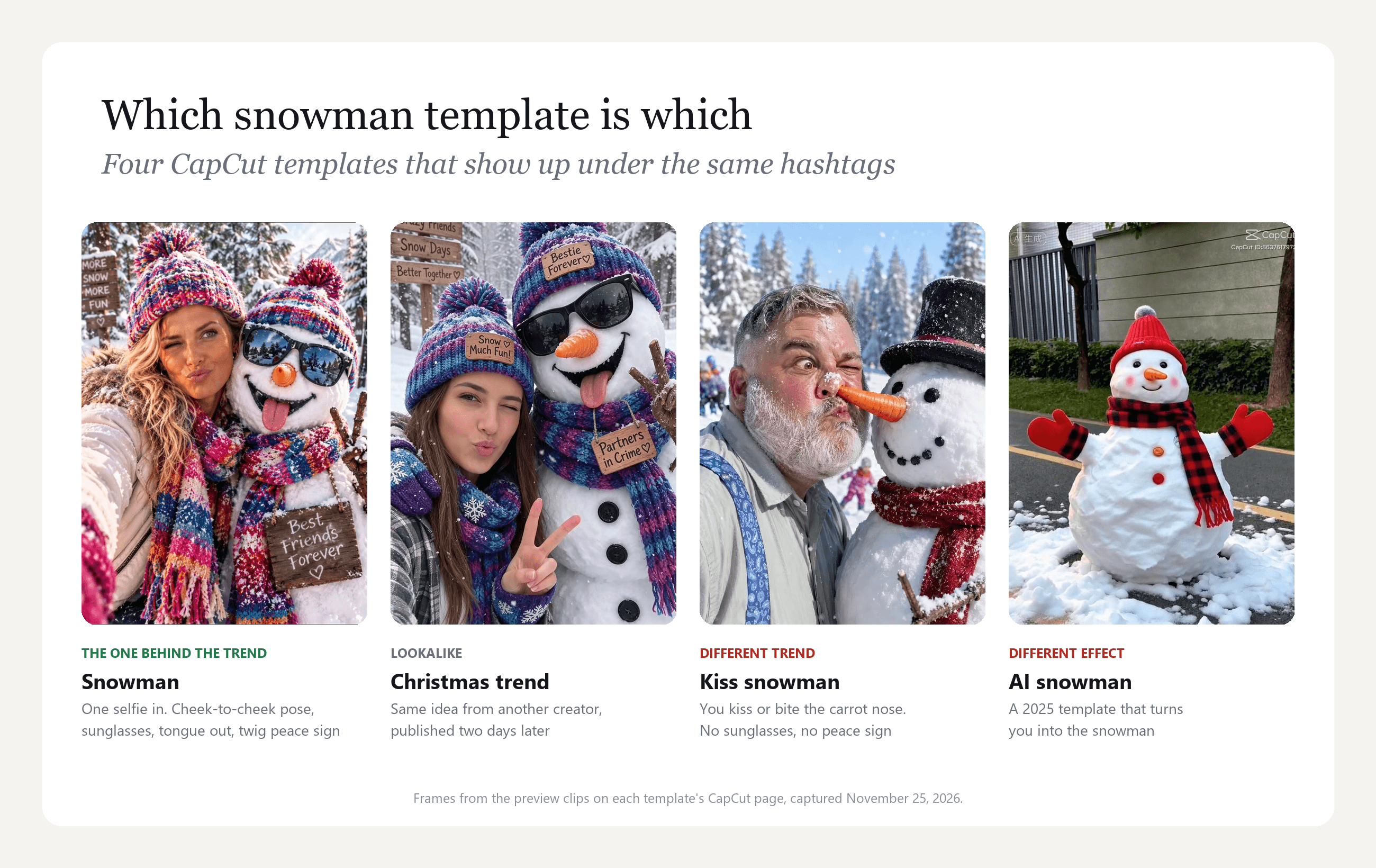
Frames from the preview clips on each template's CapCut page.
| Template name on CapCut | Created | Uses, as of November 25, 2026 | What you get |
|---|---|---|---|
| Snowman | November 21, 2026 | About 16,700 | The snowman bestie selfie from one photo |
| Christmas trend | November 23, 2026 | 65 | The same idea from another creator |
| Kiss snowman | November 11, 2026 | About 930 | You kissing or biting the snowman's carrot nose |
| AI snowman | December 15, 2025 | About 179,000 | A clip that turns you into a snowman |
The first row is the one to look for. The Snowman template takes one photo and returns a 4-second clip that holds a single AI picture. Of the 152 posts we pulled from eight snowman hashtags, 34 link it. The most-linked lookalike has 6.
The last row has the biggest number and is the easiest mistake. It is almost a year older, and it replaces you with a snowman instead of putting one beside you.
The launch post walks through the real one in four steps:
- Open a TikTok post that uses it, such as the launch post from November 21.
- Tap the CapCut label on the post that says Try this template.
- In CapCut, tap Use template, pick one selfie and tap Next.
- Wait for the AI picture, then export.
Template availability varies by region, and this one was not available in ours when we checked. If it will not open for you, the prompt route makes the same kind of picture.
Snowman Bestie Prompt Ideas: Your Dog, Your Real Bestie, Your Team Colors
The prompt is built for one person, but each block can be swapped. These three came out of the image editor, starting from our version of the prompt above.
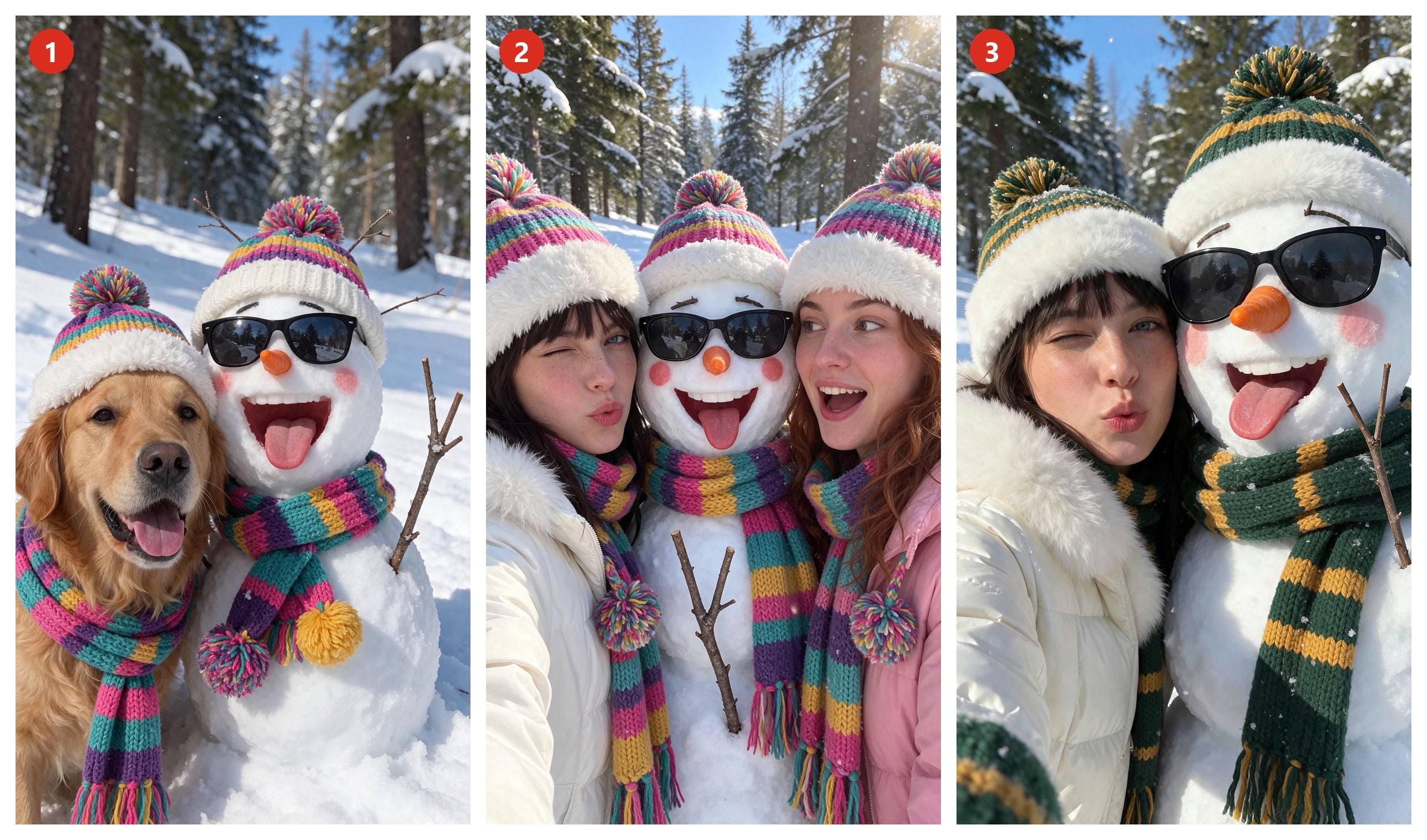
- Your dog. Upload a photo of the dog and replace the opening line and the winter look block:
plaintext1Using my uploaded photo as a reference, create a hilarious, adorable, ultra-realistic winter photo of MY DOG (the golden retriever in the photo) and his mischievous snowman best friend! 2 3MY DOG'S WINTER LOOK: Keep my dog's face, golden fur, ears and eyes exactly as in the photo, with the natural body of a dog on four legs, no human hands and no human clothes. He wears only a chunky knit pom-pom hat with a fluffy white faux-fur brim and a scarf that match the snowman's. His mouth is open in a happy pant with his tongue hanging out, copying the snowman.
Name the breed in the brackets, and end the prompt with a head count: exactly one dog and one snowman, no people.
- Your real bestie. Upload two photos and number them. The line that matters is the one that keeps the two faces apart:
plaintext1Using my two uploaded photos as facial references, create a hilarious, adorable, ultra-realistic winter selfie of ME (the young woman in image 1), MY BEST FRIEND (the young woman in image 2) and our mischievous snowman best friend! Exactly two women and one snowman. 2 3FRAMING: Tight close-up. The snowman is in the middle with one of us pressed against each cheek; I am on the left with my arm stretched toward the camera as if I am holding the phone, and my best friend is on the right. Three faces fill most of the frame. 4 5OUR WINTER LOOK: Keep my face, blue eyes, freckles and dark brown hair with full straight bangs exactly as in image 1. Keep my best friend's face, hazel eyes and curly auburn hair exactly as in image 2. Do not blend our features. All three of us wear the same chunky knit pom-pom hat with a fluffy white faux-fur brim and a matching scarf. I wear a glossy ivory-white puffer jacket with a big white faux-fur collar; she wears a soft pink puffer jacket.
- Your team colors. This one is an edit of a finished picture, so it is short:
plaintext1Keep this photo unchanged: both faces and expressions, her bangs, the fur brims, the ivory puffer jacket with its fur collar, the snowman's sunglasses, carrot nose, grin and twig peace sign, the sunny lighting and the framing. Change only the knitwear colors: the striped knit on both hats, both scarves and her glove becomes forest green and gold stripes only, like matching fan gear in team colors, with green and gold pom-poms. No logos, no letters, no text, no watermark.
Ask for colors and leave the logo out. A plain two-color stripe reads as fan gear on its own.
Planning to use the result as a profile picture through December? Our Christmas PFP guide has the crop sizes for each app.
Frequently Asked Questions
Is the snowman bestie trend the same as the Snowman challenge?
No. The Snowman challenge and the snowman dance are both set to Sia's song Snowman, and people film them for real: one is a singing challenge that goes back to December 2020, the other a dance for couples and friends. They share hashtags with the AI selfie, so all three show up side by side.
Does the snowman bestie prompt work outside ChatGPT?
It is plain English with no model-specific syntax, so any image model that accepts a reference photo can read it. Our pictures in this guide came from the image editor on Atlas Cloud, and the CapCut template needs no prompt at all. Whichever tool you use, attach the photo first and keep the opening line.
Can the snowman talk in the video?
Yes. Write his line inside quotation marks and describe the voice, as in our prompt: he says "Besties!" in a goofy, squeaky voice. Keep each line to a few words so it fits inside a two-second beat. Leave the Audio switch on, or the clip comes out silent.
How much does a snowman bestie video cost on Atlas Cloud?
A 10-second clip at 1080p with audio comes to about $7.52, which is 20% off the $9.39 list price, as of November 25, 2026. At 720p the same clip is about $3.04. Making the selfie first adds about $0.03 per picture. The discount can change, and the Run button shows the estimate before you generate.
Conclusion
A wink, a carrot nose, two twigs in a V. The picture took six days to go from a pasted prompt to a one-tap template, and each element is easy to recognize at thumbnail size.
To join the snowman bestie trend, copy the prompt, attach one clear photo and edit the two middle blocks until the hats are yours. Then give the picture ten seconds and a line of dialogue, and see what your snowman does when the pose breaks. If Santa is next on your list, our doorbell Santa guide uses the same video model.







