Key Takeaways
- The gender swap filter with the biggest numbers on TikTok is a native effect called Gender Swap, not a CapCut template.
- You can turn your own photo into its opposite-gender version with Seedance 2.5 in the Atlas Cloud video generator.
- Gender Swap Ai by rizky is the CapCut template behind most of this year's tutorial posts we found.
- The TikTok effect keeps your clothes and background;theCapCuttemplateswe checked wipe or morph from your face to the swapped one in a few seconds.
- A front-facing photo with your hair fully in frame gives the cleanest male to female or female to male result.
A woman is talking to her phone from the driver's seat. Ten seconds in, the face looking back at the camera belongs to a man with her eyes, her eyebrows and a short brown quiff. She breaks into laughter, and 11.6 million people have watched her do it. That clip is the loudest answer yet to a question people have been typing for years: what would I look like as a girl, or as a guy?
The TikTok effect does it live in the camera, a handful of CapCut templates do it with a wipe, and an AI video model does it on any photo you already have. We tested the third route on one man and one woman and got both swaps in 10-second clips. Here is what powers the trend, which template is which, and the prompts we used.
What Is the Gender Swap Filter on TikTok?
Two different things share the name, and they behave differently.
The first is a native TikTok effect called Gender Swap, published under the creator account @techtjnr, with just over 419,000 videos on its effect page when we checked on November 2, 2026. It runs inside the TikTok camera: a short countdown, a processing ring, then your face and hair become the opposite-gender version while your clothes and background stay put.
Bridey Drake's driver's-seat clip from June 2026 is one of them, posted with no caption and no template link, and a post from October 21 had passed 4.8 million plays by November 5.
The second is a family of CapCut AI templates that take one photo and wipe from your face to the swapped version, usually under a caption like "Would you date the opposite gender of you?" The one behind most of this year's tutorial posts we found is Gender Swap Ai, by rizky, created in February 2026: 710,381 uses on November 2, and a tutorial post from August built on it reached 1.3 million plays.
A sister template called Gender swap, by m.b01, has 919,611 uses, and a Spanish one, Cambio de género, has 2.44 million.
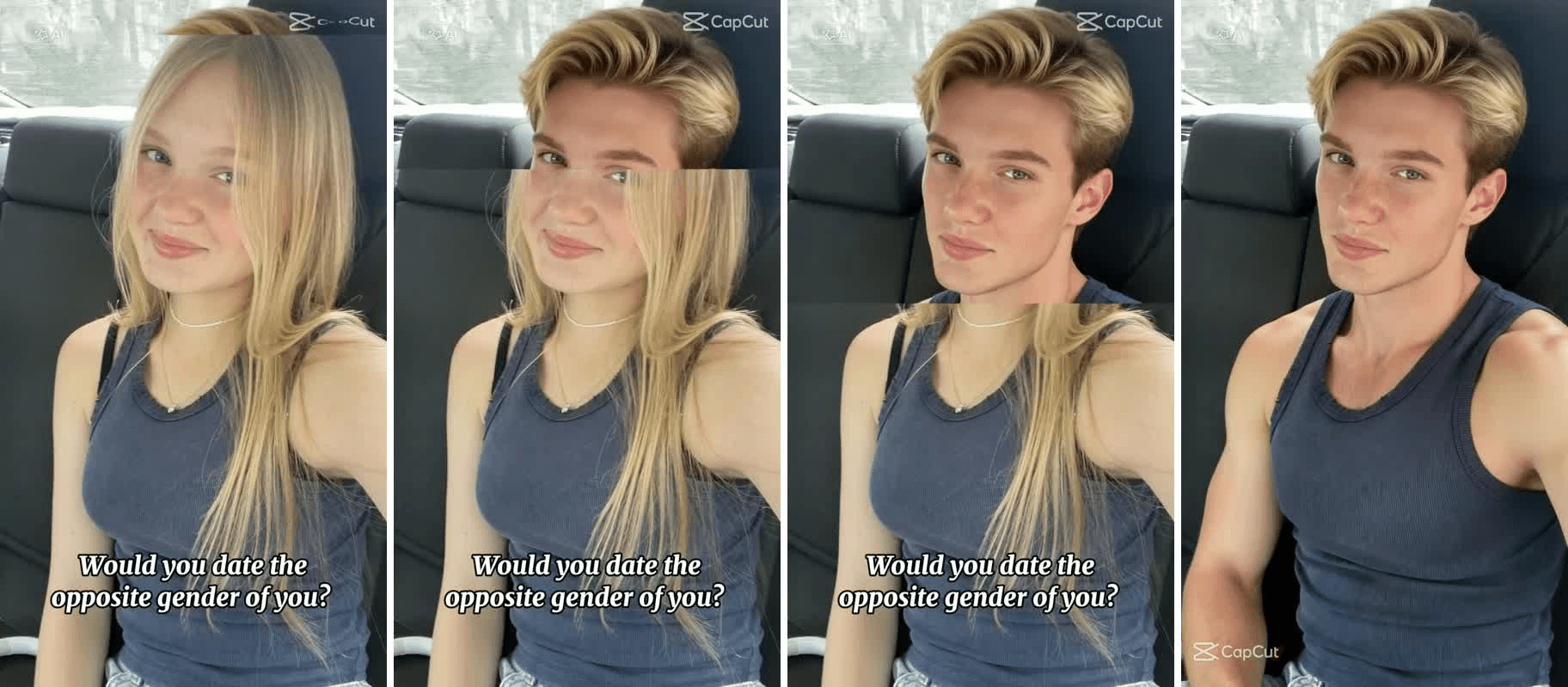
Frames from the preview of the CapCut template Gender Swap Ai by rizky, retrieved November 2, 2026.
How to See What You Would Look Like as a Girl in 10 Seconds
The effect lives inside the TikTok camera and the templates lock you into their wipe and timing. For the swap on a photo you already have, with the reaction you choose, you need a prompt.
Atlas Cloud runs Seedance 2.5, which takes a first-frame photo and a time-coded prompt and returns a 1080p clip with sound.
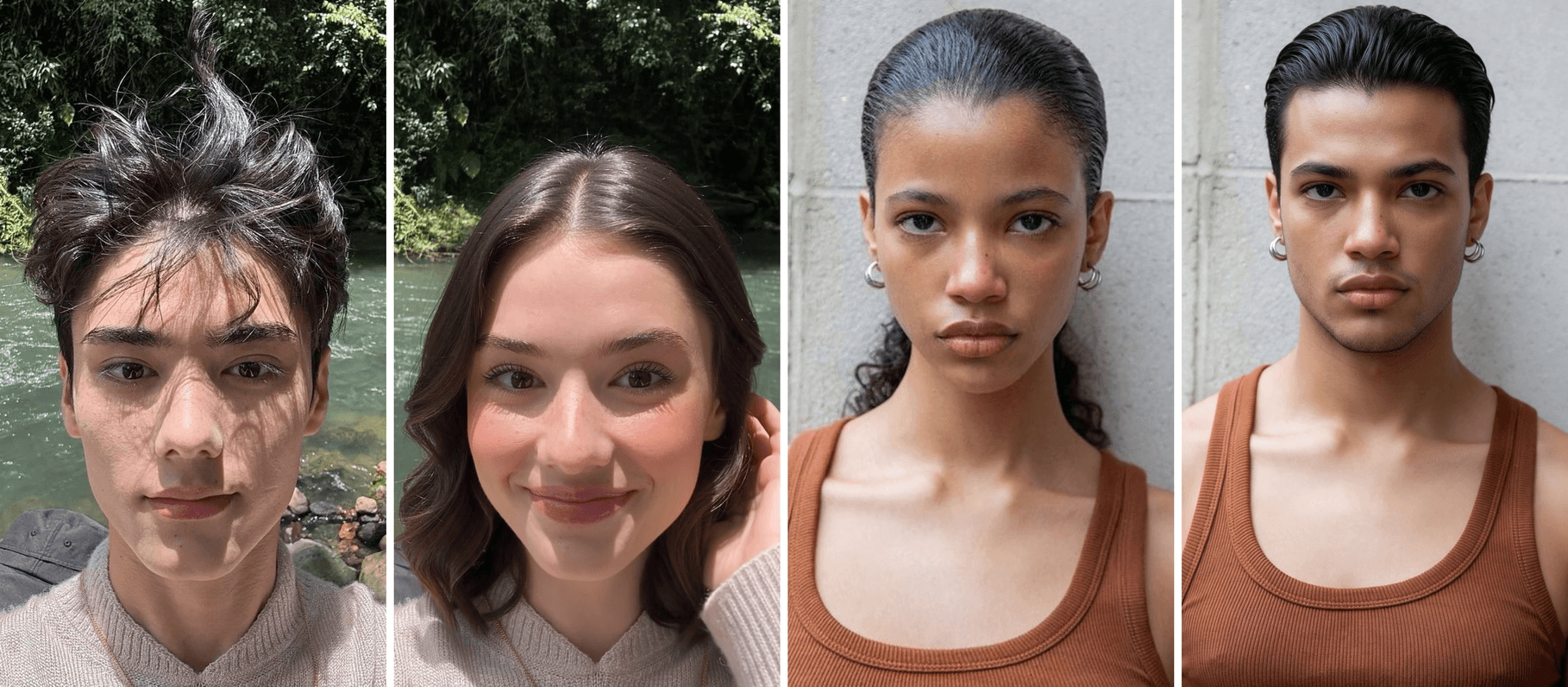
We gave it a river selfie of a young man with messy dark hair and a cream sweater:
At 3 seconds the jaw is narrower and the brows thinner. By 4 the hair has grown into dark waves, and by 5 the swap is done. She widens her eyes at 7, laughs at 9 and runs a hand through the new hair at 10. The sweater, the gold chain, the river and the sun patches on the face never move, which is what sells it.
Method 1: Swap Genders in the Atlas Cloud Video Generator
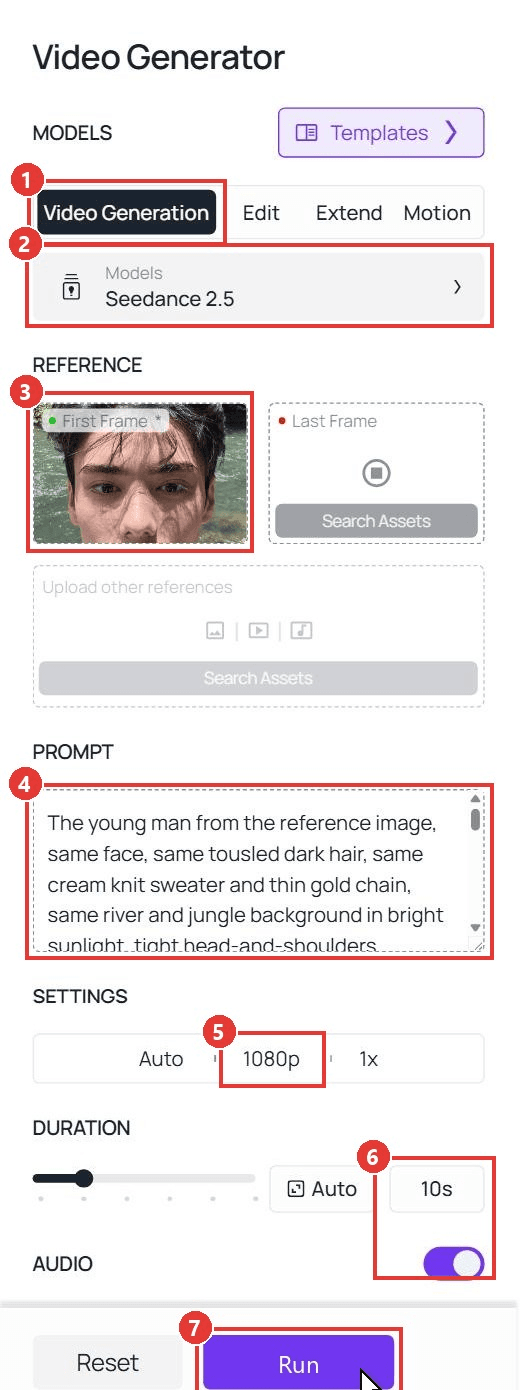
Sign in, open the Video Generation tab and follow the numbers on the screenshot:
- Stay on the Video Generation tab.
- Keep Seedance 2.5 under Models.
- Upload your photo to First Frame. Crop it to 9:16 first so the clip comes out in portrait. Leave Last Frame empty for this one.
- Paste the prompt below into the Prompt box.
- Under Settings, pick 1080p.
- Set Duration to 10 and keep Audio on.
- Click Run.
This is the prompt behind the clip above:
plaintext1The young man from the reference image, same face, same tousled dark hair, same cream knit sweater and thin gold chain, same river and jungle background in bright sunlight, tight head-and-shoulders framing, the camera does not move. 0-2s: he looks straight into the camera with a small, relaxed smile. 2-6s: his face gradually turns into a female version of himself with the same skin tone, the same dark eyes and the same freckles of light on his cheeks: the jawline narrows, the brows become thinner and arched, the lashes fuller, the lips slightly fuller, and his hair grows into soft shoulder-length dark waves. The sweater, the chain, the background, the lighting and the framing stay exactly the same. 6-8s: she raises her eyebrows in surprise and tilts her head. 8-10s: she laughs, touches her new hair with one hand, and the female version stays exactly like this until the final frame. Realistic skin and hair texture, no text on screen. Sound: flowing river water and birds, then a short surprised laugh.
Swap the hair, the clothes and the background for whatever is in your photo and keep the time codes. Our guide to writing Seedance 2.5 prompts explains why the line "stays exactly like this until the final frame" matters more than any adjective.
Method 2: Run the Same Clip Through the Seedance 2.5 API
Adding a gender swap preview to your own app? The API takes the same photo and the same prompt in one request.
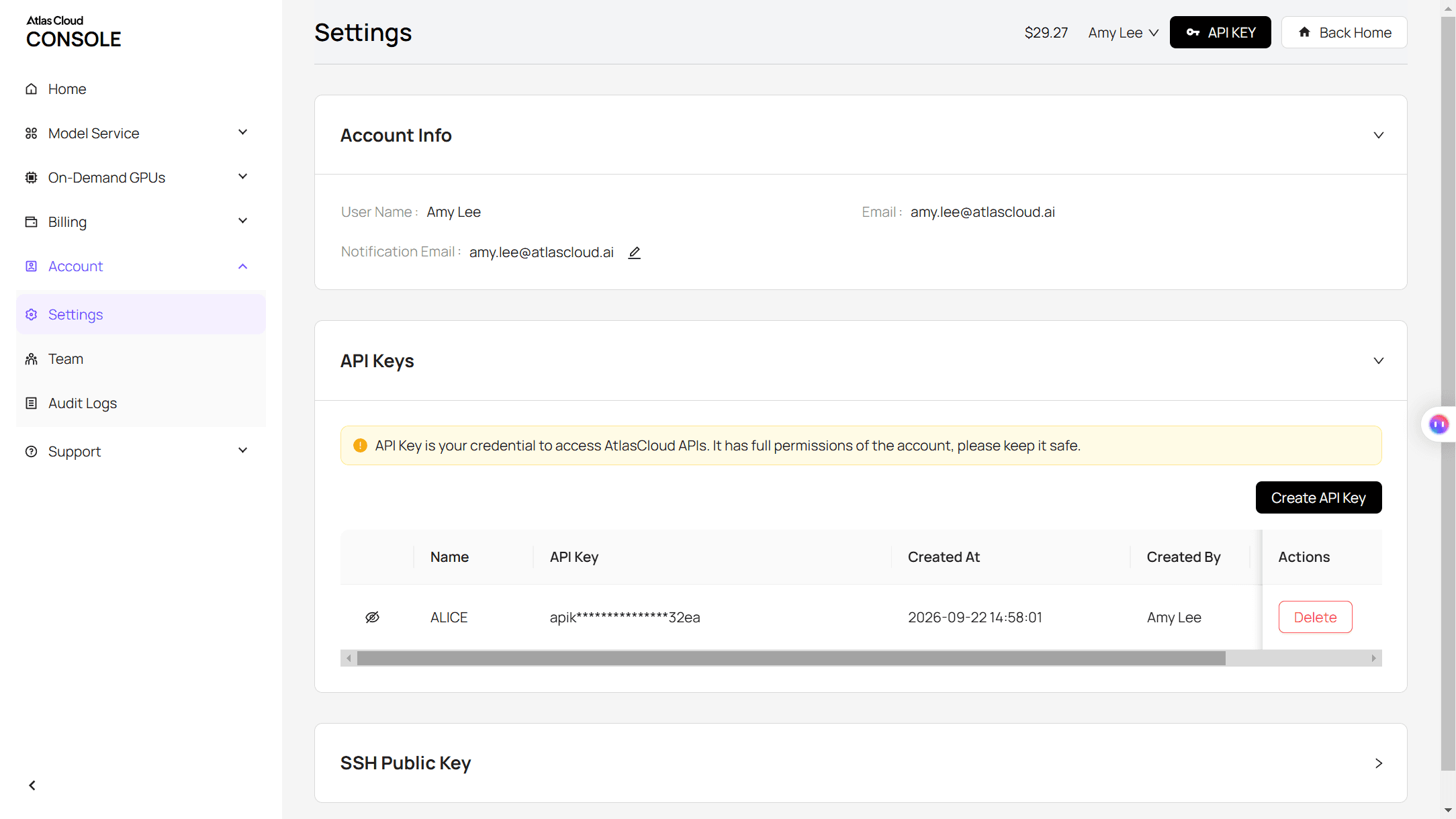
Step 1: Create an API key. In the console, open Settings and create a key under API Keys. One key covers every model on the platform.
Step 2: Check the request format. The Atlas Cloud API docs cover authentication and the video endpoint.
Step 3: Send the request and poll. Put a public URL of your 9:16 photo in the image field:
plaintext1curl -X POST https://api.atlascloud.ai/api/v1/model/generateVideo \ 2 -H "Authorization: Bearer $ATLASCLOUD_API_KEY" \ 3 -H "Content-Type: application/json" \ 4 -d '{ 5 "model": "bytedance/seedance-2.5/image-to-video", 6 "prompt": "<paste the Method 1 prompt here>", 7 "image": "https://your-cdn.com/your-photo-9x16.jpg", 8 "duration": 10, 9 "resolution": "1080p", 10 "generate_audio": true 11 }'
The response returns a prediction ID. Poll it until the status reads completed, then download the MP4 from the outputs array:
plaintext1curl https://api.atlascloud.ai/api/v1/model/prediction/<prediction_id> \ 2 -H "Authorization: Bearer $ATLASCLOUD_API_KEY"
Same endpoint and same key for every video model, so trying the swap on another model is a one-line change to the model string.
Male to Female Filter Prompt and the Photo That Makes It Work
The prompt above does three jobs.
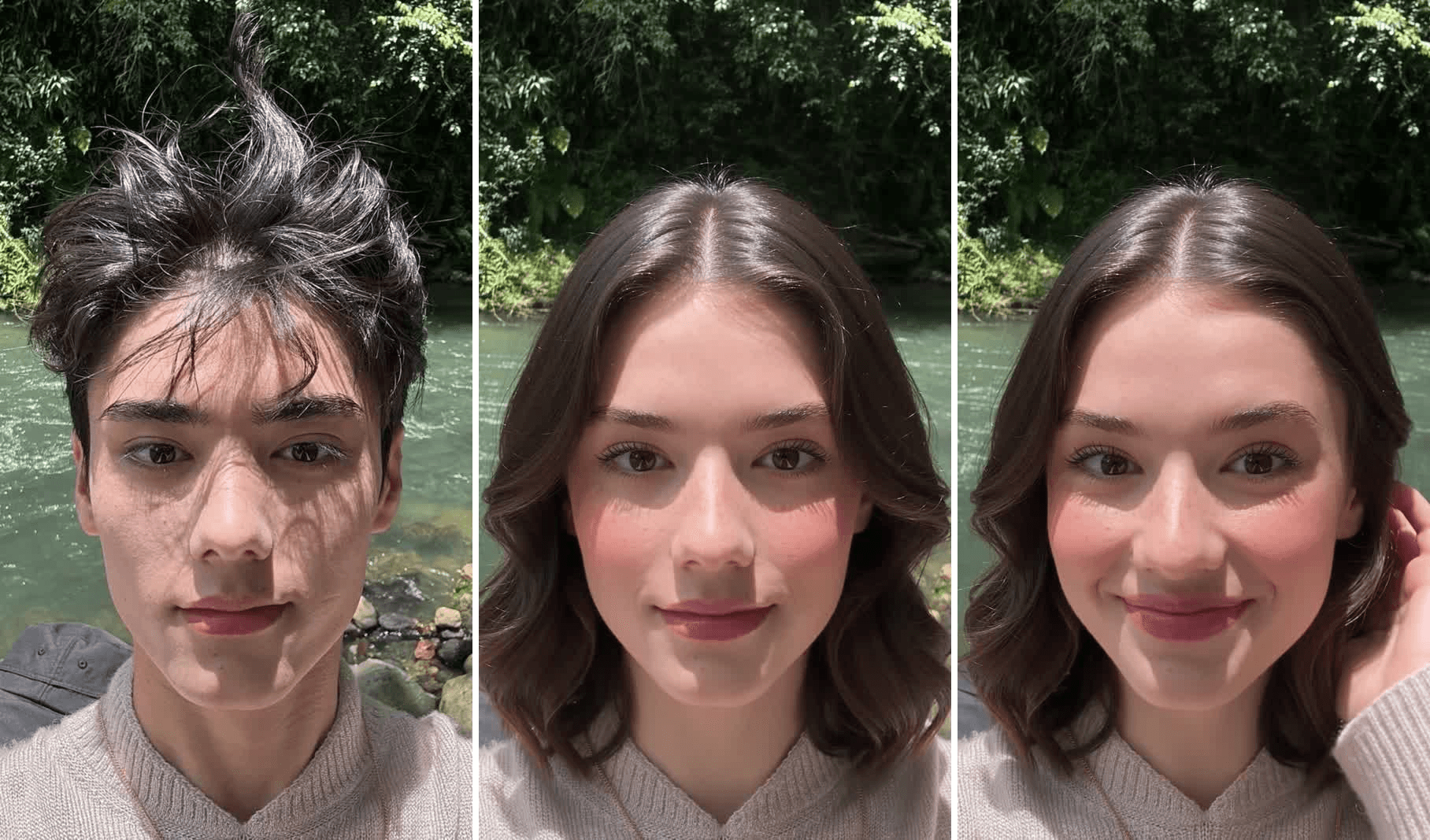
The identity lock comes first: every "same" in the opening sentence tells the model that only the face and hair are up for negotiation, which is what the TikTok effect does automatically. Then the change list, narrower jaw, arched brows, fuller lashes and lips, longer hair, because "make him a girl" leaves the model to guess. Last comes the hold, the line that keeps the female version on screen until the final frame.
The photo matters as much as the words. The river selfie's dappled sun patches stayed on the woman's face in the same places because the prompt described the light, but a few things do break the swap:
| Works | Causes trouble |
|---|---|
| Face straight to camera, eyes open | Three-quarter angle or looking away |
| Hair fully inside the frame, hat off | Hair cut off at the top edge, hats, hoods |
| Even daylight or a soft studio key | Harsh backlight, heavy shadow across the face |
| One person, head and shoulders | Groups, full-body shots, tiny faces |
| Cropped to 9:16 before upload | Landscape photos that leave the clip squat |
What Would I Look Like as a Guy? Run the Opposite Gender Filter in Reverse
The same pipeline answers the other half of the search, what would I look like as a man, or the male version of me. This is the female to male filter run, and it started from a portrait of a woman with slicked-back hair, hoop earrings and a rust-brown tank top against a concrete wall.
By 3 seconds the jaw has squared off. At 4 the ponytail is gone, replaced by a short slicked-back cut and light stubble. He raises an eyebrow at 7, smirks at 8 and settles back into her calm stare by 10. The skin tone, the broad nose and the full lips carry straight across, so he reads as her brother rather than a stranger.
That resemblance is the part worth controlling, and the Last Frame slot is the control knob. We made the male version as a still first with Seedream v5.0 Pro Edit (the instruction was "as if this were her own brother photographed in the exact same spot"), checked the skin tone and features, and dropped it into Last Frame with her photo in First Frame.
Seedance then has to travel from one face to the other, the same first-and-last-frame trick we used for the aging filter clips.
The prompt for this one refers to both frames:
plaintext1The young woman from the first frame, same medium-brown skin tone, same dark hair slicked back into a low ponytail, same silver hoop earrings, same rust-brown ribbed tank top, same gray concrete wall in soft daylight, tight head-and-shoulders framing, the camera does not move. 0-2s: she looks straight into the camera with a calm, neutral expression. 2-6s: her face gradually turns into the man in the last frame, her own brother: exactly the same medium-brown skin tone, the same dark eyes and brows, the same broad nose and full lips, while the jaw becomes broader and squarer, the brow ridge heavier, the neck and shoulders slightly wider, a light dark stubble appears along the jaw and upper lip, and the ponytail becomes his short slicked-back haircut. The earrings, the tank top, the wall, the lighting and the framing stay exactly the same. 6-8s: he raises one eyebrow and gives a small smirk. 8-10s: his face relaxes back into the calm, neutral look of the last frame and holds there until the end. Realistic skin and hair texture, no text on screen. Sound: quiet room tone, then a short amused exhale.
The reaction sits in the middle because the final second has to match the last frame, so put the eyebrow and the smirk before the hold. One photo plus a time-coded prompt is also how we built the beard filter clips, if you want a smaller change than a full swap.
Which Gender Swap Filter Template or Effect Is Behind Each Video?
Captions rarely say which tool made a clip, but the picture does. Here is how to read the gender swap filter videos you scroll past, from the TikTok effect to the gender swap filter CapCut templates we pulled apart frame by frame.
| Name | Where it lives | Made by | What you see | Tell-tale sign |
|---|---|---|---|---|
| Gender Swap | TikTok effect | techtjnr (creator account) | Countdown, processing ring, then face and hair change | Clothes and background untouched; no wipe line |
| Gender Swap Ai | CapCut template | rizky | Horizontal wipe moving top to bottom over a photo | Caption "Would you date the opposite gender of you?"; clothes unchanged |
| Gender swap | CapCut template | m.b01 | Block wipe moving down the frame | Caption "Would you date your opposite self?"; outfit changes with the face |
| AI Gender Swap | CapCut template | Lacezmeme | Wipe moving left to right | Same "opposite self" caption; clothes unchanged |
| Cambio de género | CapCut template | veka_plantillas | Continuous morph while the subject moves her head | Spanish caption; "AI generated" end card |
| TikTok Trend | CapCut template | Chor | Hard cut at about 4 seconds | Caption "My girl version won't even look at me"; no AI label |
The effect works on a live recording, which is why the big reaction videos use it. The templates start from a still, so the reactions are cut in afterwards. An AI gender swap video from your own photo sits between the two: a still goes in, but the reaction is generated in the same shot.
The trend is older than any of these. Snapchat shipped male and female face-swap lenses in May 2019, loudly enough for Global News to cover the backlash within a week of its launch, and FaceApp carried it through 2020 and a 2023 CapCut wave. What changed in 2026 is that the swap became a 10-second video, and the video can come from a prompt.
Frequently Asked Questions
Is there a gender swap filter on TikTok?
Yes. The effect is named Gender Swap, published under the creator account techtjnr, and its page listed more than 419,000 videos in early November 2026. A guide that sends you to a separate app instead is describing the 2023 version of the trend.
How do I get the gender swap filter on TikTok?
Open any video that uses it and tap the effect name above the caption, or search the Effects tab for "Gender Swap" and pick the techtjnr version. To start from a photo you already have, use the Atlas Cloud video generator route above and choose your own reaction.
What is the filter that turns you into a girl?
Searches for a girl filter, turn me into a girl or a gender swap app land on three different things: the TikTok Gender Swap effect, which works in both directions; community-made Snapchat lenses with similar names that run in the live camera; and photo apps that return a single still. The AI video route above gives you the still and the reaction in one clip.
Is there a gender swap filter on Snapchat?
The Snapchat gender swap filter is where the trend started, in May 2019, with lenses that swapped male and female versions of your face live. Lenses rotate, so the 2019 ones may not be in your carousel today, but community-made gender swap lenses show up in the lens gallery and work in the Snapchat camera, not on saved photos.
Does the AI gender swap keep my clothes and background?
It does when the prompt says so. Both of our clips kept the sweater, the tank top, the jewelry and the setting because each prompt lists them as "same" and only changes the face and hair. The TikTok effect behaves the same way; the m.b01 CapCut template is the one that swaps the outfit too, so say so in the prompt if you want that.
Which direction works better, male to female or female to male?
Both of ours landed in one 10-second clip. The male to female clip came from a single first frame and a prompt. For the female to male clip we also placed a generated male still in Last Frame, which locked the skin tone and features to the face we chose. When the resemblance matters, supply a last frame in either direction.
Conclusion
The gender swap filter trend runs on two engines: a native TikTok effect that swaps your face live and keeps everything else, and CapCut templates that wipe from a photo to its opposite-gender twin. Knowing which is which tells you what a video can and cannot do, and the table above lets you name the tool from the picture alone.
If you want the swap on your own terms, one photo and a time-coded prompt in Seedance 2.5 give you the swap, the setting and the reaction in a single 10-second clip, and a last frame pins the result when the resemblance matters. Keep the "same" list honest, and you will have a real answer to what would I look like as a girl.


