The download bar hits 65 GB, the fans spin up, and the real question lands: will it actually load? The short answer to GPT-OSS-120B memory requirements is about 61 GB for the weights plus a few more for working space, which is why OpenAI pitches it as a single 80GB GPU model.
Below, we split that number into parts, show the hardware that has run it with measured speeds, and cover the hosted route for when yours falls short.
Key Takeaways
- GPT-OSS-120B ships as a 60.8 GiB MXFP4 checkpoint, which is why OpenAI targets a single 80GB GPU.
- Context length adds little memory: the KV cache reaches only about 4.5 GiB at the full 131K tokens.
- With less than 80GB of VRAM, llama.cpp can offload expert layers to system RAM and still run it.
- Macs with more than 96GB of memory and 128GB mini PCs can hold the full modelonone box.
- No suitable hardware? Call Qwen3.5 122B A10B on Atlas Cloud through one OpenAI-compatible API.
GPT-OSS-120B Memory Requirements: Weights Plus KV Cache
OpenAI released gpt-oss-120b on August 5, 2025, under the Apache 2.0 license. It is a mixture-of-experts model, so only 5.1B of its 116.8B parameters work on each token. That helps speed, not memory: every expert still has to sit in memory ready to be picked.
The trick that keeps it small is MXFP4. According to the gpt-oss model card, the expert weights, which make up over 90% of the parameters, are stored at 4.25 bits each. A 16-bit copy of the same model would need roughly four times the space.
| Spec | GPT-OSS-120B |
|---|---|
| Total parameters | 116.8B |
| Active parameters per token | 5.1B |
| Layers and experts | 36 layers, 128 experts, 4 active per token |
| Weight format | MXFP4 for expert layers, BF16 for the rest |
| Checkpoint size | 60.8 GiB |
| Context window | 131,072 tokens |
How the Context Window Changes GPT-OSS-120B Memory
Every token leaves a key and a value behind in each attention layer. That store is the KV cache, and when every layer attends to the full context, it grows in step with context length.
GPT-OSS-120B dodges most of it. Half of its 36 layers use a sliding window that only looks back 128 tokens, and each layer stores just 8 KV heads of 64 dimensions. Only 18 layers keep the whole context. We worked the KV cache out from the model's config and it matches the measured totals in the llama.cpp gpt-oss guide.
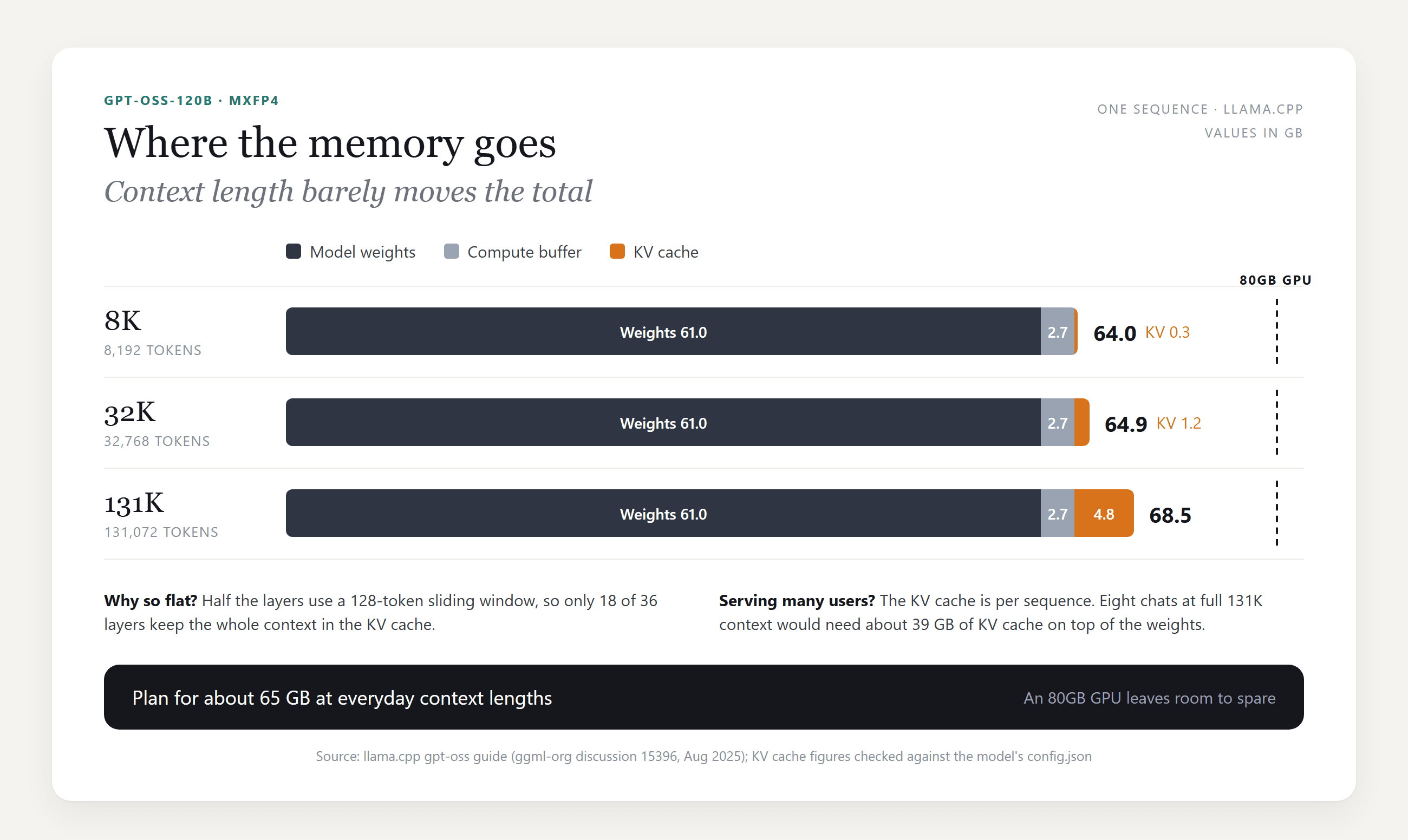
Going from 8K to the full 131K costs under 5 GB. Where it adds up is concurrency: the KV cache is per conversation, so a server holding eight full-length chats needs roughly 39 GB on top of the weights.
Can I Run GPT-OSS-120B Locally? Hardware Requirements by Setup
Yes, if you can park about 65 GB somewhere fast: one big GPU, a GPU plus system RAM, or a box with unified memory.
GPT-OSS-120B GPU Requirements
The simplest case is one 80GB data center card. The vLLM recipe for gpt-oss says the 120b model "will fit on a single A100 (80GB)", and that splitting it across more GPUs helps throughput.
Below 80GB, the llama.cpp guide offers a way out. Its --n-cpu-moe flag keeps some expert layers in system RAM and the rest on the GPU. The guide puts the minimum at about 8GB of VRAM, as long as GPU and system memory together still hold the model.
| Setup | Where the weights live | Reported generation speed |
|---|---|---|
| RTX Pro 6000, 96GB | All on the GPU | 196 tokens/s (llama.cpp guide) |
| A100 or H100, 80GB | All on the GPU | Fits on one card (vLLM recipe) |
| RTX 5090, 32GB, plus system RAM | 21 expert layers kept in system RAM | About 30 tokens/s at zero context (llama.cpp guide) |
One Windows trap from the same guide: the driver can quietly spill into system RAM when VRAM runs out, so the model loads and then crawls. Watch GPU Memory in Task Manager and raise the offload count until it stays under your card's size.
Running GPT-OSS-120B on a Mac or 128GB Mini PC
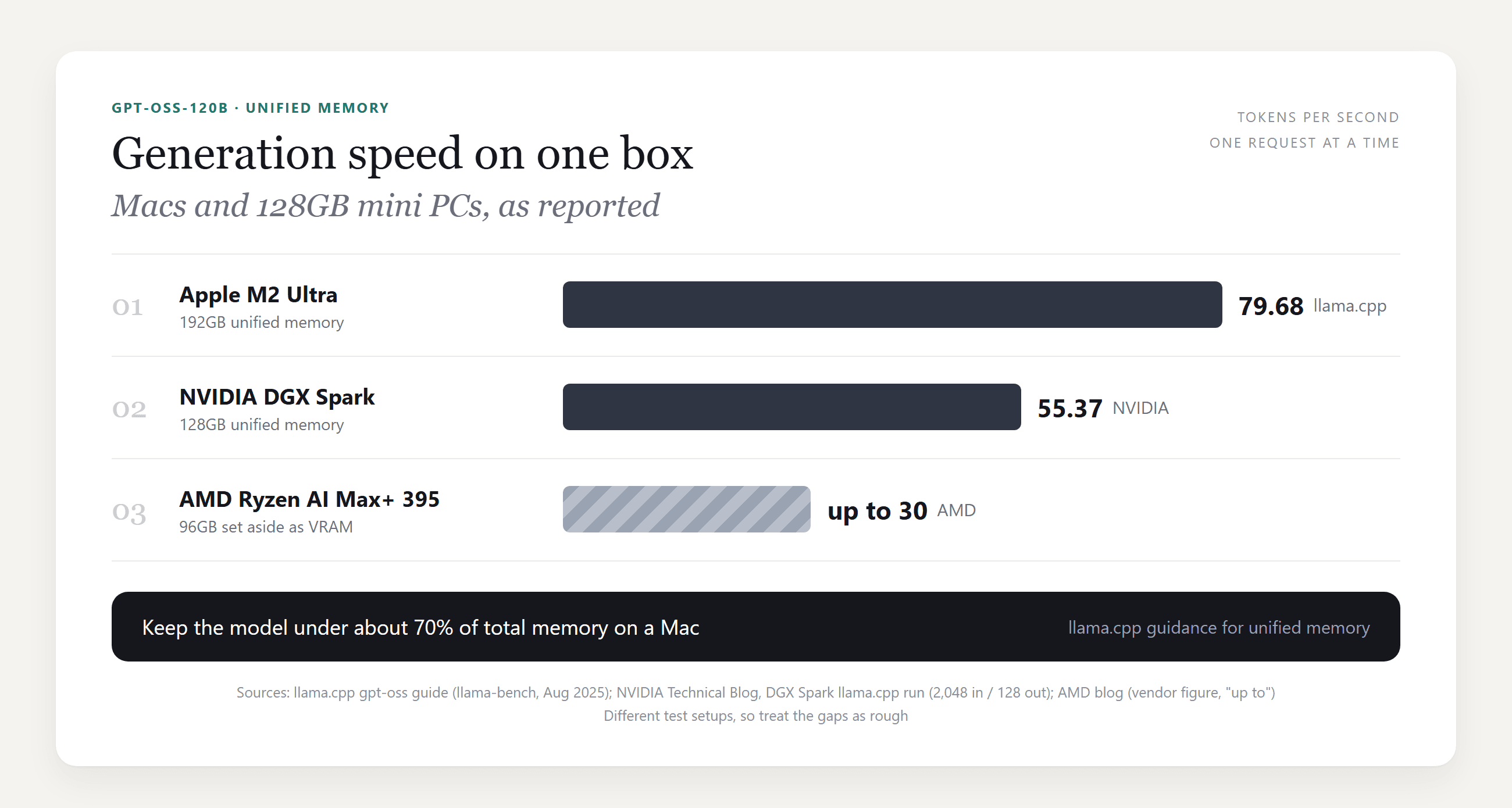
Unified memory removes the GPU and RAM split. The llama.cpp guide says Macs with more than 96GB of RAM, such as M2 Ultra or M3 Max machines, can run the model at full context, and it advises staying under about 70% of total memory.
macOS caps how much memory the GPU can wire by default. On a 192GB machine, the guide raises that cap from 154GB to 180GB with one command:
plaintext1sudo sysctl iogpu.wired_limit_mb=184320
The new 128GB mini PCs land in the same class. NVIDIA reports 55.37 tokens/s for gpt-oss-120b on a DGX Spark running llama.cpp. AMD says a Ryzen AI Max+ 395 machine with 96GB set aside as VRAM reaches "up to 30 tokens per second", which is the company's own figure.
Not Enough Memory? Use a Hosted Open-Weight Model Through an API
If none of those machines is on your desk, a hosted open-weight model skips the hardware question entirely.
Atlas Cloud serves Qwen3.5 122B A10B, part of its Qwen model lineup. On paper it is a close match for gpt-oss-120b: an Apache 2.0 mixture-of-experts model from Alibaba's Qwen team, with 122B total and 10B active parameters. It reads up to 262,144 tokens of context.
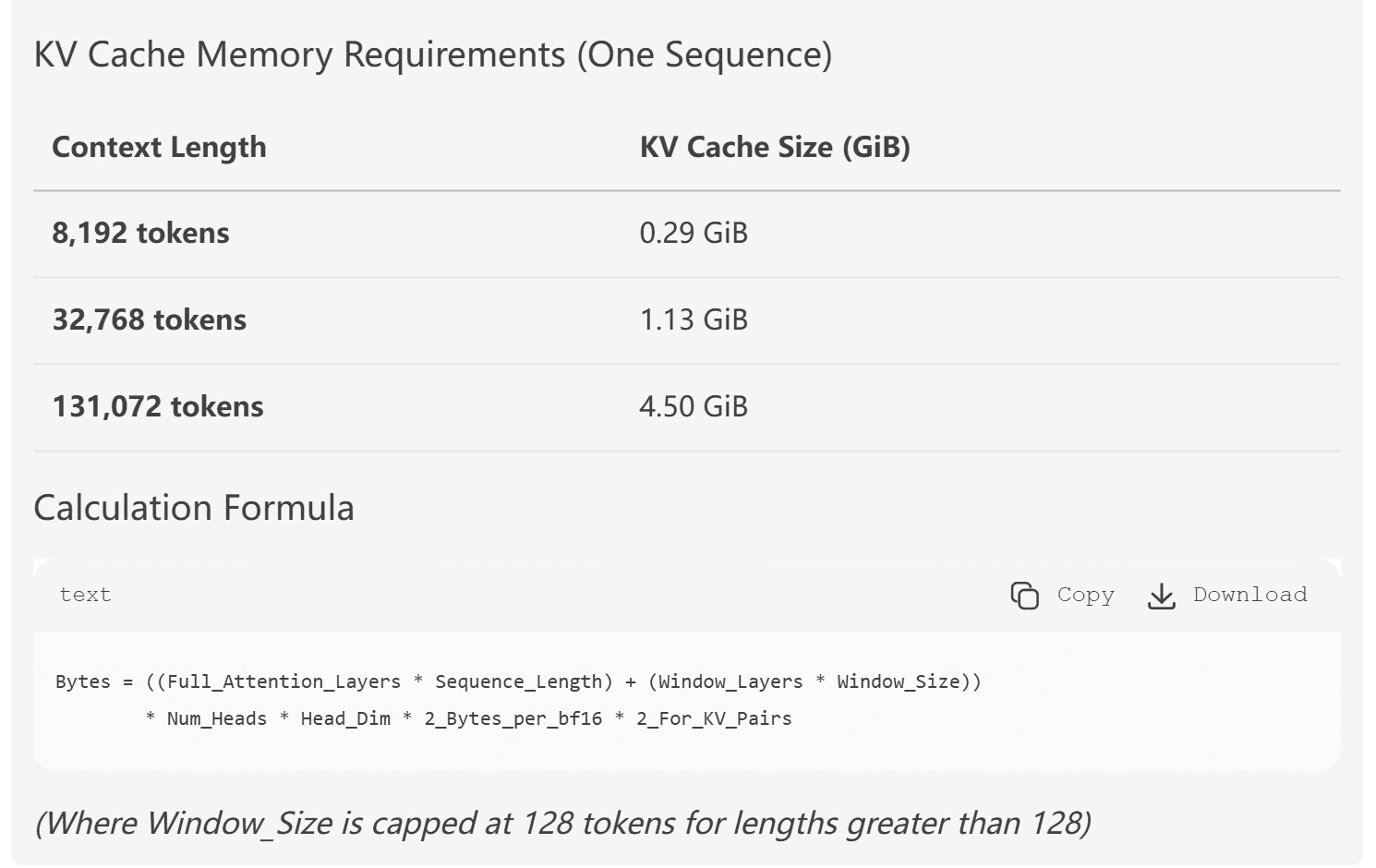
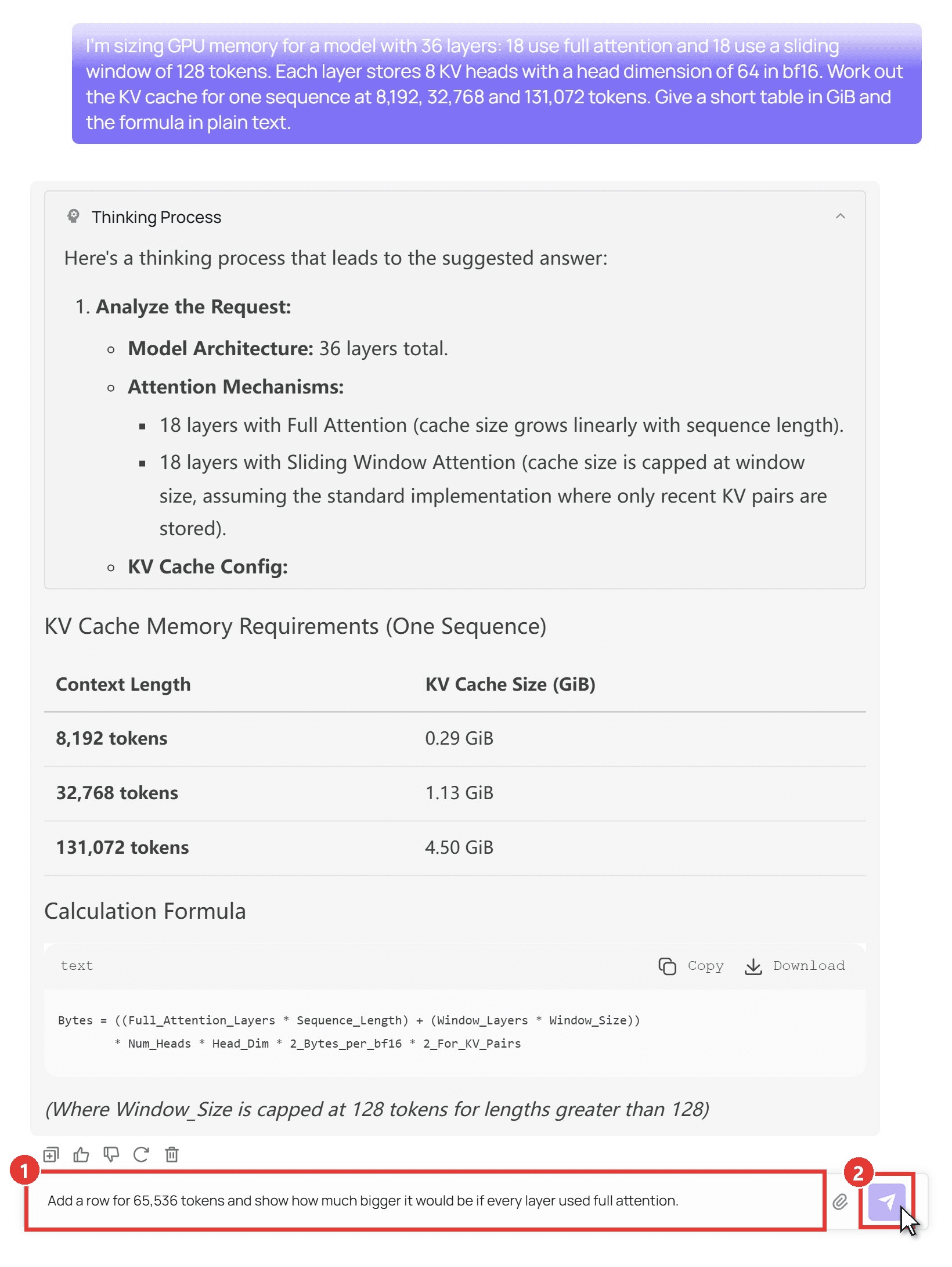
We gave it the attention layout from the gpt-oss config and asked for the KV cache at three lengths. Its table matched our own math to two decimals. If you later want a Qwen for your own machine, our guide to the best Qwen model for local coding sizes them by RAM.
Method 1: Try Qwen3.5 122B A10B in the Playground
Sign in and open the Qwen3.5 122B A10B playground, then:
- Type your question in the message box.
- Click the send arrow. The reasoning appears in a Thinking Process panel above the answer.
Method 2: Call Qwen3.5 122B A10B With the Atlas Cloud API
For scripts and apps:
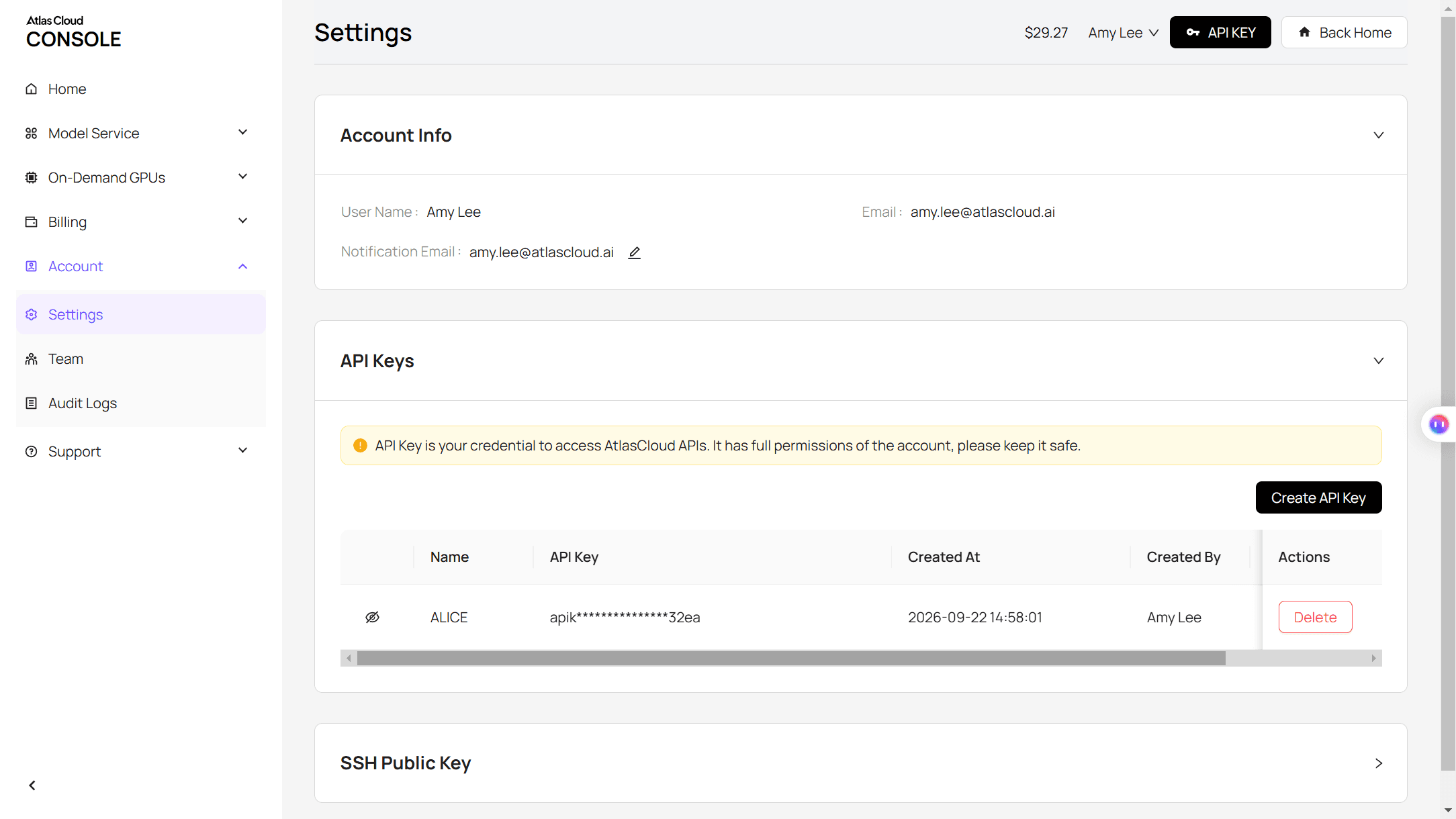
Step 1: Create an API key. Open Settings in the console, go to API Keys, and click Create API Key. Keep it on the server side.
Step 2: Check the request format. The API docs cover the chat completions format, and the model page has an API tab with a ready-made example.
Step 3: Send your first request.
plaintext1curl -X POST "https://api.atlascloud.ai/v1/chat/completions" \ 2 -H "Authorization: Bearer $ATLASCLOUD_API_KEY" \ 3 -H "Content-Type: application/json" \ 4 -d '{ 5 "model": "qwen/qwen3.5-122b-a10b", 6 "messages": [{"role": "user", "content": "Review this llama-server log and tell me which flag to change if VRAM runs out: ..."}], 7 "max_tokens": 4000 8 }'
The answer comes back in choices[0].message.content. Because the endpoint follows the OpenAI format, code written for a local gpt-oss server usually needs only a new base URL, key and model string. The same key also works across the other chat models on the platform, as our piece on a unified LLM API gateway walks through.
GPT-OSS-120B vs GPT-OSS-20B: Memory and Benchmark Trade-Off
The smaller sibling needs a fifth of the memory. gpt-oss-20b has 20.9B parameters with 3.6B active, and OpenAI says it runs on "as little as 16GB memory". The question is what you give up.
| | GPT-OSS-120B |
GPT-OSS-20B
| | -------------------------------- | ------------ | ------------------------ | | Memory at 8K context (llama.cpp) | 64.0 GB | 14.9 GB | | MMLU | 90.0 | 85.3 | | GPQA Diamond (no tools) | 80.1 | 71.5 | | SWE-Bench Verified | 62.4 | 60.7 | | Codeforces Elo (no tools) | 2463 | 2230 | |
HealthBench
plaintext1 | 57.6 | 42.5 |
Scores come from the model card at high reasoning effort. The coding gap is under two points on SWE-Bench Verified, while the knowledge gap is about 9 points on graduate-level science and 15 on HealthBench. For mostly code on a 16GB to 24GB card, 20b is the sensible pick. Need the extra knowledge? That is where 120b earns its memory bill.
GGUF, Ollama, or vLLM: Picking a Runtime for Your Memory Budget
Each runs the MXFP4 weights OpenAI released; they differ in where those weights can live.
| Runtime | Download | Best fit |
|---|---|---|
| Ollama (gpt-oss:120b) | 65 GB | One user on a machine that holds the whole model |
| LM Studio | 65 GB | A desktop app on a Mac or Windows PC |
| llama.cpp (ggml-org GGUF) | About 63 GB | Less than 65 GB of VRAM, with expert layers offloaded to RAM |
| vLLM | About 65 GB of safetensors | Serving many users from one or more data center GPUs |
For a quick start on a big-memory machine:
plaintext1ollama run gpt-oss:120b
For a smaller GPU, use llama.cpp and tune the offload number:
plaintext1llama-server -hf ggml-org/gpt-oss-120b-GGUF --ctx-size 0 --jinja -ub 2048 -b 2048 --n-cpu-moe 21
All four handle OpenAI's harmony chat format, which the model needs to work properly. It matters only if you write your own serving code.
FAQ
Is GPT-OSS-120B better than GPT-5 or Gemini 3 Pro?
They sit in different categories: GPT-5 and Gemini are closed models you reach through an app or API, while gpt-oss-120b runs on your own hardware. Gemini 3 Pro Preview was also shut down on March 9, 2026, and its name now points to Gemini 3.1 Pro Preview. If local control matters, Google's open-weight line is the Gemma 4 family.
Why do some sites say GPT-OSS-120B needs 255 GB?
Those figures assume 16-bit weights: roughly 117B parameters times 2 bytes, plus overhead. The checkpoint OpenAI publishes is already MXFP4, so the realistic download is in the 61 GB range.
Does reasoning effort change memory use?
Not for the weights. The low, medium and high settings change how long the model thinks. High effort writes more reasoning tokens, which fill the context window and grow the KV cache, so long sessions creep toward the larger totals in the chart above.
Why do people say GPT-OSS-120B struggles with text-based games?
The evidence is anecdotal. On the model's Hugging Face discussion page, some users report refusals when writing violent fiction, while others say role-play works fine. For interactive fiction, test your own prompts before buying hardware for it.
How much does a hosted 120B-class model cost?
As of October 2026, Qwen3.5 122B A10B costs $0.3 per million input tokens and $2.4 per million output tokens on Atlas Cloud. That is a 25% discount on its regular $0.4 and $3.2 rates. Our sizing question used about 5,000 output tokens once the reasoning was counted, roughly one cent at the discounted rate.
Conclusion
GPT-OSS-120B is easier to fit than its parameter count suggests. Plan on about 65 GB at everyday context lengths and under 70 GB at the full 131K. One 80GB GPU, a Mac with more than 96GB, or a 128GB mini PC will hold it, and smaller cards can run it by moving expert layers into system RAM.
If those numbers rule out your machine, drop to gpt-oss-20b for mostly coding work, or call a hosted open-weight model when you need the bigger brain without buying hardware. Either way, the gpt oss 120b memory requirements stop being a guessing game once you know the weights take 61 GB and the rest is headroom.





