

You save the shot. A jar floating over a stone counter, almonds frozen mid-air, a shadow so sharp it looks drawn on the wall. Then you look at your own product on the kitchen table, and the distance between the two feels like a studio, a stylist and a day you don't have.
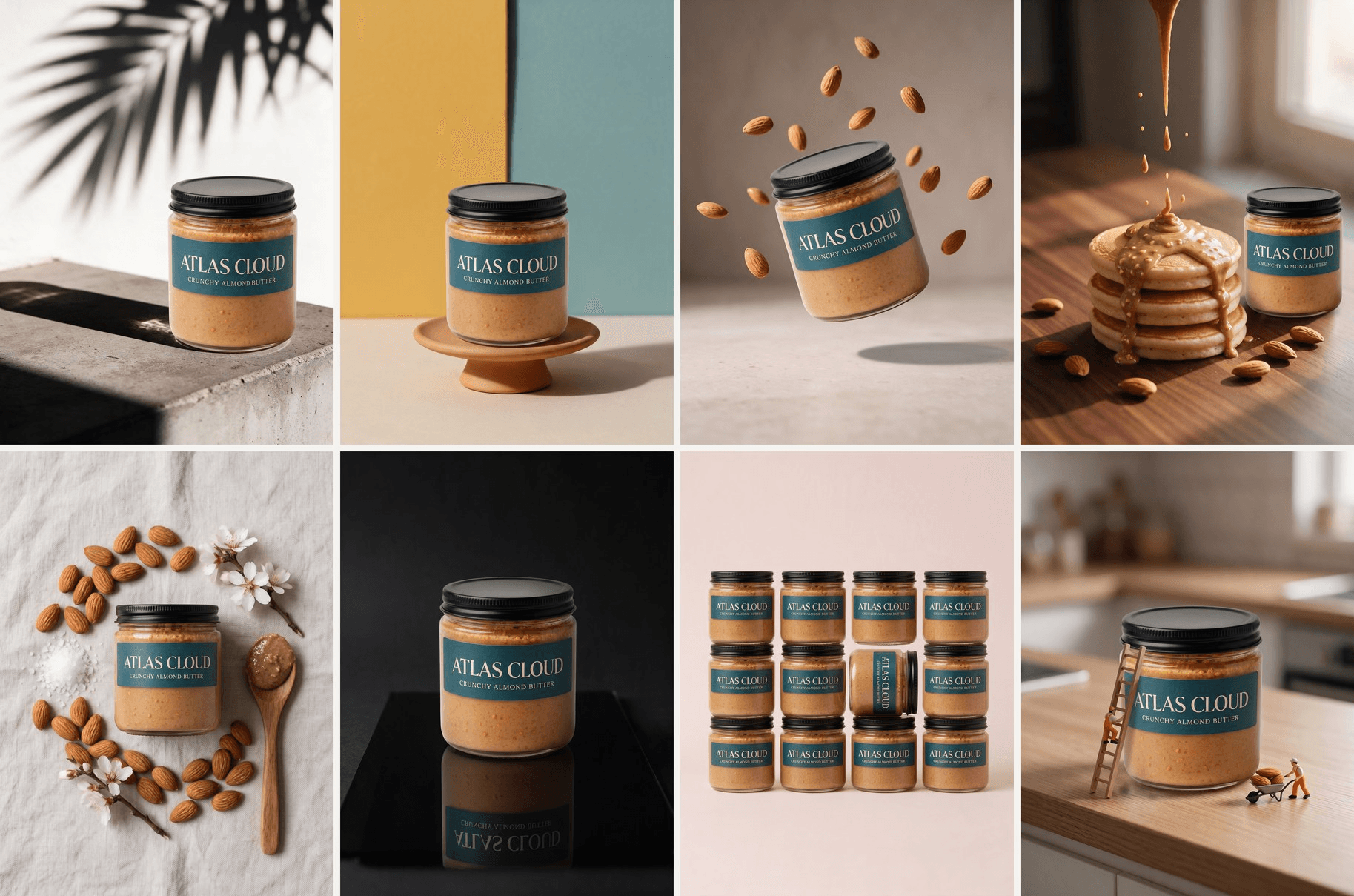
This list of product photography ideas closes that distance in a way the idea galleries we read while planning it don't. Every idea below is shown twice: the reference shot, and the same idea rebuilt around one jar of almond butter with Image Clone on Atlas Cloud. One product photo went into all eight clones.
The first section explains the two cloning modes, because the mode you pick decides whether an idea copies cleanly or needs a sentence of direction.
Key Takeaways
- Every product photography idea below is shown twice: the reference shot and the same idea rebuilt around one jar.
- Exact Clone keeps the composition, light and background and only swaps the product; Reference Clone follows your prompt to change the scene.
- Composition-driven ideas such as hard shadows clone exactly, while scene-driven ideas such as splashes need a prompt.
- The U.S. Copyright Office says copyright protects the photograph, not its subject, so recreate the setup with your own reference.
- One clean product photo plus a reference is all the Image Clone workflow needs to place your product into any of these setups.
How to Copy Any Product Photography Idea With Image Clone
Image Clone takes two pictures: a photo of your product and the reference shot you want to copy. It rebuilds the reference around your product and returns a new image at up to 4K. The one decision you make is the Visual type, and the three frames below show what that decision does to the same reference.
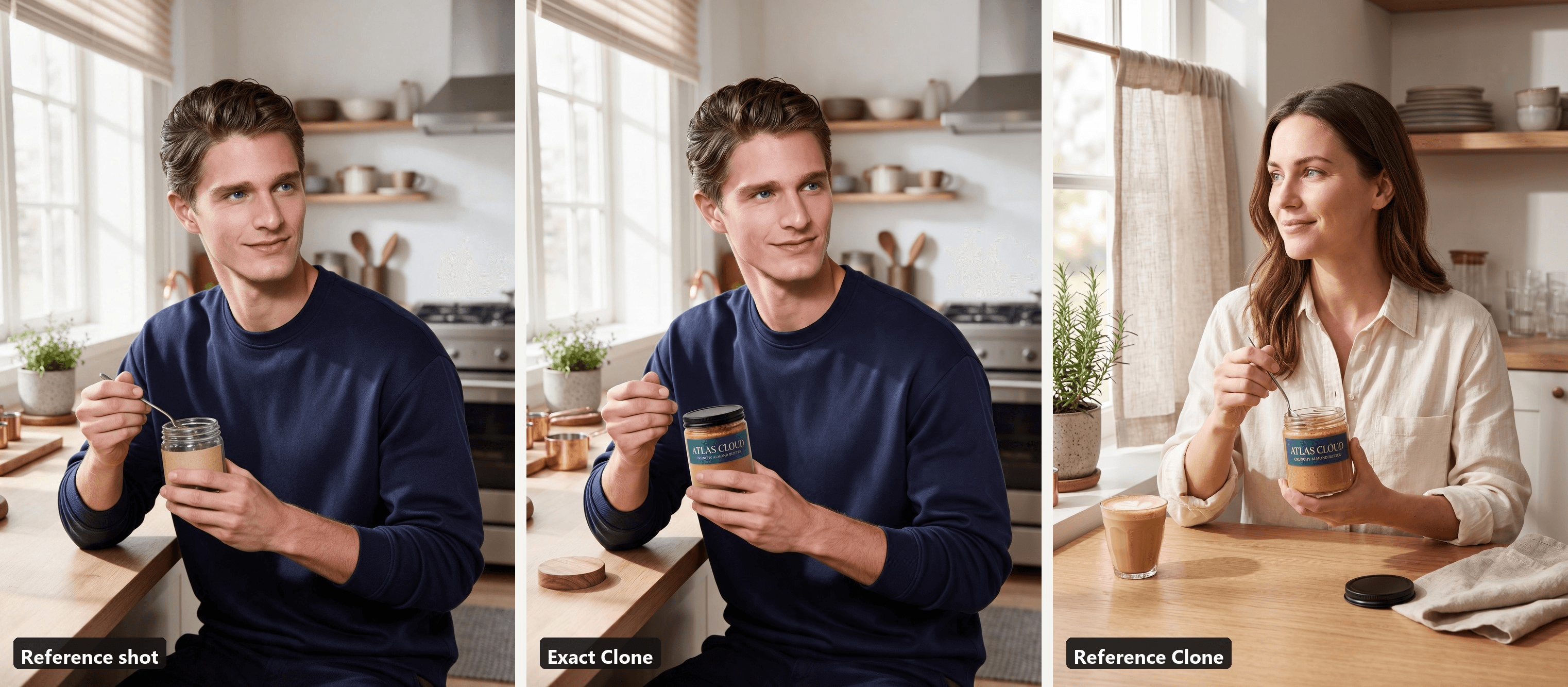
Exact Clone treats the reference as a locked set. The man, his pose, the kitchen and the window light stayed where they were, and the jar in his hand is what changed. Reference Clone treats the reference as a mood board. The prompt asked for a woman in a linen shirt at a cafe window, and the output kept the half-body framing and the jar-in-hand gesture while rebuilding everything else around the product.
| Exact Clone | Reference Clone | |
|---|---|---|
| What stays | Composition, lighting, shadows, background, props | The overall style and framing of the reference |
| What changes | The product only | Whatever the prompt asks for: people, setting, props, liquids |
| What the prompt does | Names the swap in one line | Carries the creative direction |
| Pick it when | The idea lives in the composition and the light | The idea lives in a scene that has to match your product |
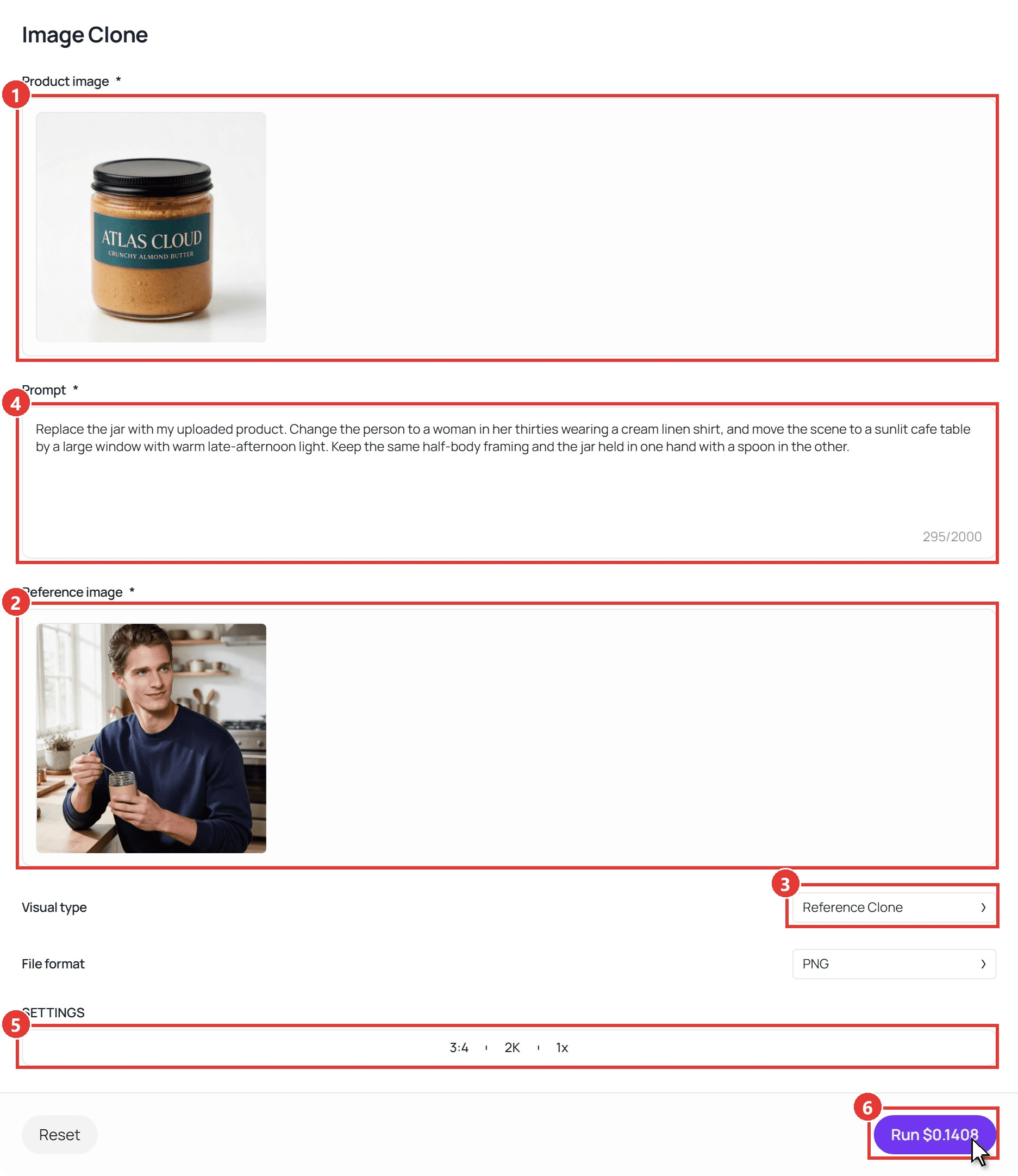
Six clicks cover a run, numbered on the screenshot below:
- Upload your product photo under Product image. A plain shot on a white or neutral background, product centred and in focus, gives the model the clearest read of label, shape and material.
- Upload the shot you want to copy under Reference image.
- Pick the Visual type: Reference Clone is the default, Exact Clone is the other option.
- Write the prompt. For Exact Clone, one sentence that names the swap and asks to keep everything else is enough. For Reference Clone, describe what should change.
- Set the aspect ratio, resolution and number of images in SETTINGS. Every clone in this article ran at 3:4 and 2K, one image per run.
- Click Run. The button shows the price of the run before you commit, and the output appears below the form.
Two notes on inputs. The product photo carries the result, so if you shoot it yourself, the phone product photo guide covers the one-window setup that produces it.
The reference can be any image you have the right to use: your own earlier shots, licensed stock, or a scene you generate yourself. Every reference below was made with Seedream 5.0 Pro from a text description of a plain jar with a blank kraft label, which turns any idea into a product photo template you own outright.
8 Creative Product Photography Ideas, Each Rebuilt Around One Jar
The jar is a mock almond butter, and its packshot on white was generated for this article rather than shot, which is the one place where your workflow will differ: you upload a real photo. The ideas run from the simplest tabletop setups to full staged scenes, and each pair is labelled with the mode that produced it.
Hard Shadows Turn a Plain Product Photo Into a Graphic One
The usual advice is to soften your light. This idea does the opposite. A single hard source, direct sun or a bare bulb, throws a crisp shadow that becomes a second subject, and a cut-out leaf or a window frame between the light and the wall draws the pattern for you. It suits anything with a strong silhouette: jars, bottles, boxes, sunglasses.
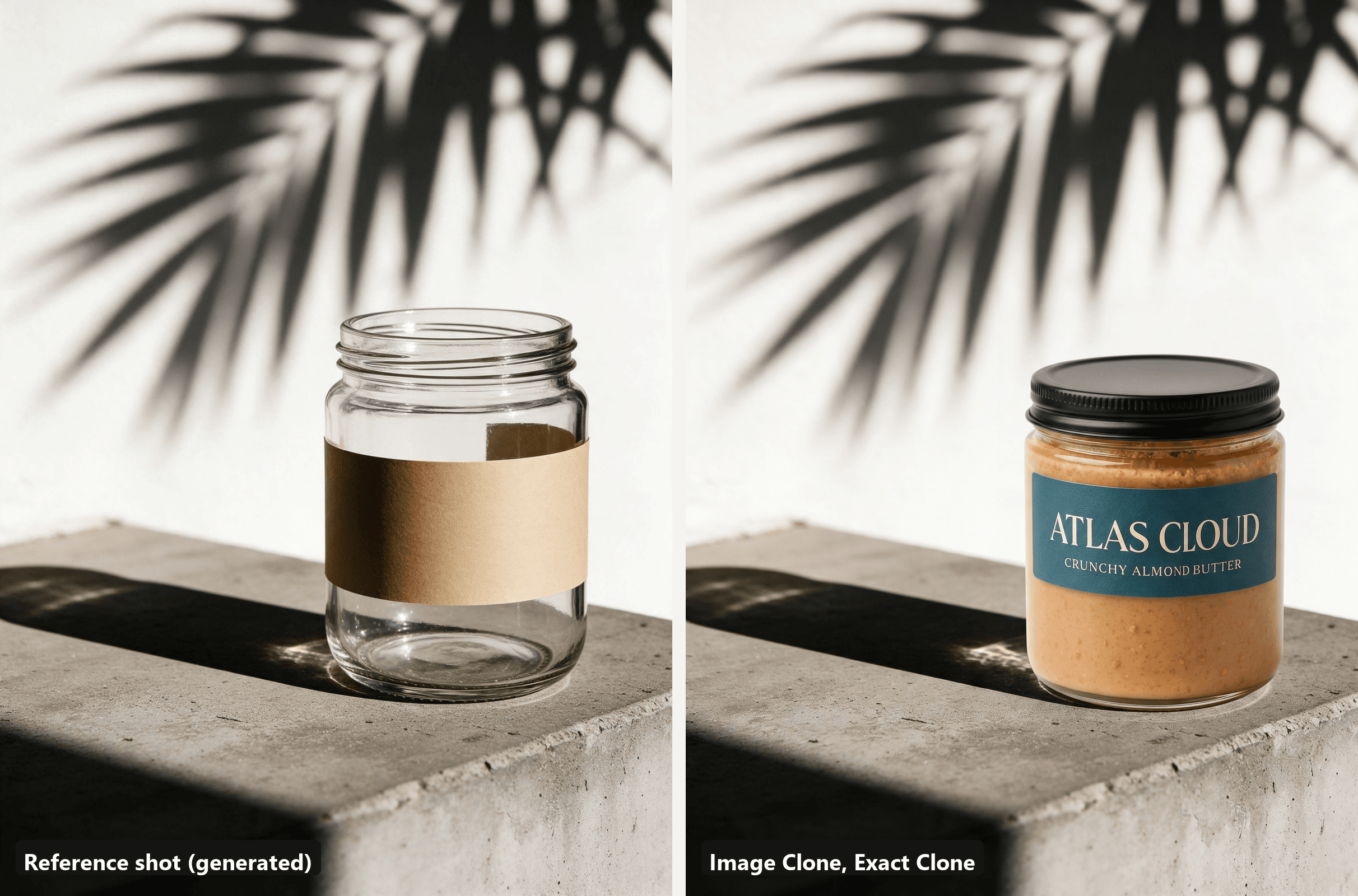
Exact Clone kept the leaf shadow, the ledge and the direction of the sun, and dropped the full label into that light without flattening it. To build the real setup, the one-light section of our product photography lighting guide explains where the source goes.
Color-Block Backdrops Pulled From the Label
Two flat panels meeting behind the product, in colours taken from the packaging or chosen to clash with it, give you a graphic frame for the price of two sheets of card. The seam works as a vertical guide, and a small plinth lifts the product off the floor so it reads as the hero rather than something left on a shelf.
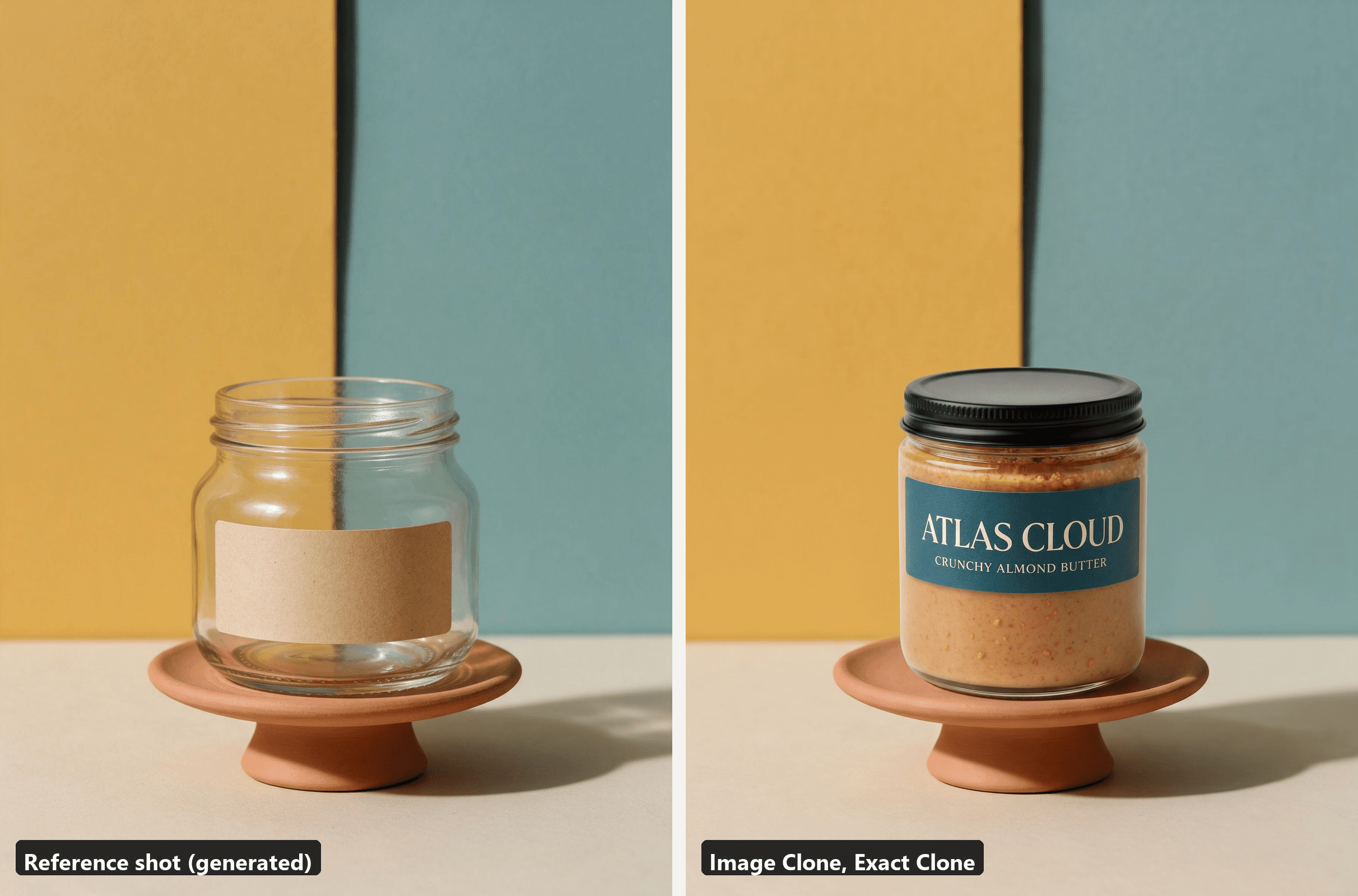
The reference panels were chosen to echo the teal on the label, and Exact Clone kept them as they were while swapping the jar. Repaint the panels in the reference and the same jar gets a new campaign frame.
A Floating Product Shot With the Ingredients Mid-Air
Levitation shows up in five of the six idea lists we checked, because it works for any product that looks dull on a shelf. In a studio it takes fishing line, a stand and a retouching pass, or a burst of frames with the product tossed into shot. Scatter the contents or a signature ingredient around it and the floating object gets a reason to float.
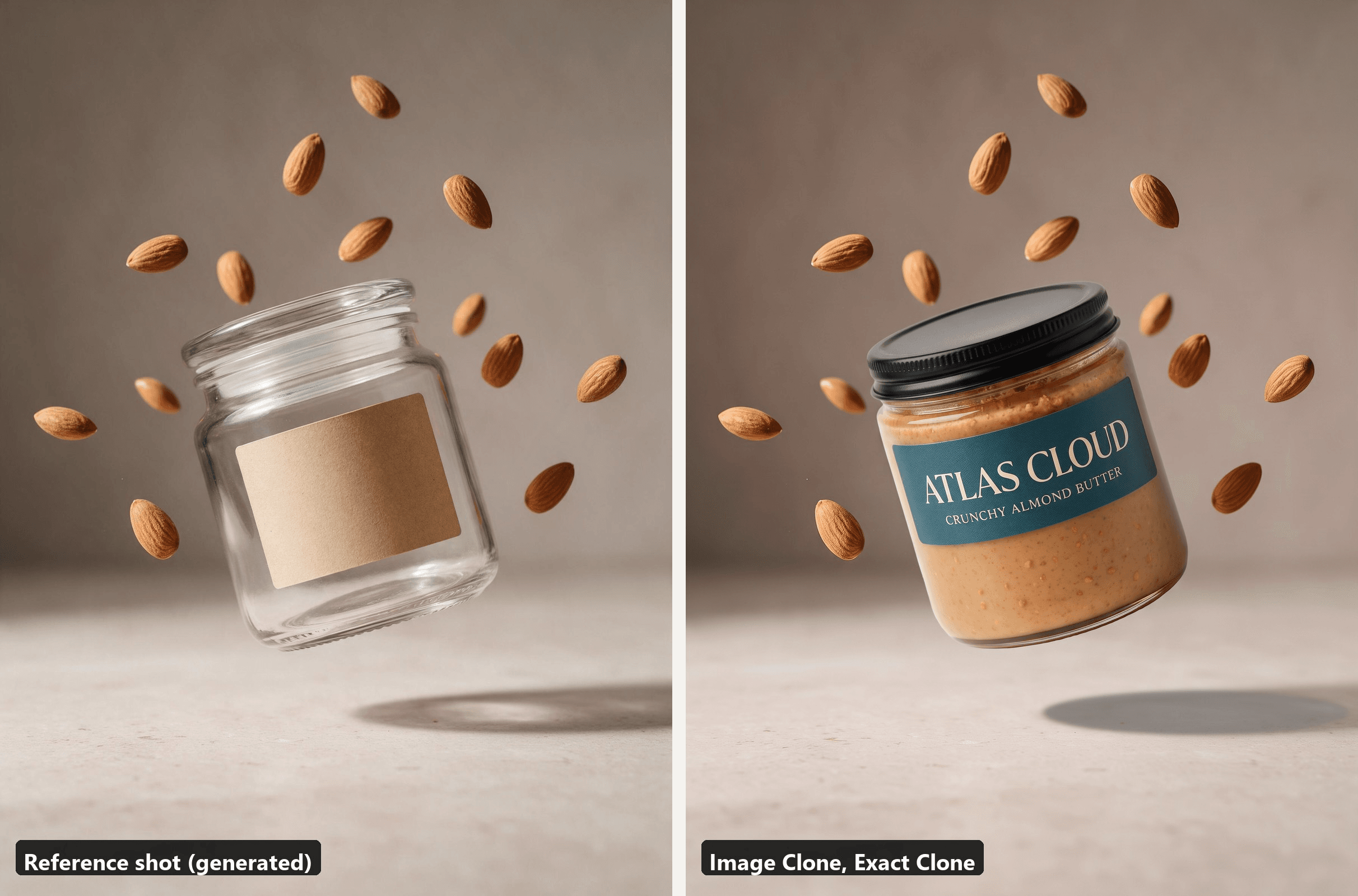
The almonds stayed where the reference put them, and the soft shadow under the jar kept its distance from the floor, which is the detail that sells a float.
Splash and Pour Product Photography for Anything Liquid
Pours and splashes are among the hardest of these to shoot for real, because they are frozen motion: a fast shutter or a flash, a dozen attempts and a lot of paper towels. They are also the first idea where Exact Clone is the wrong tool. The liquid in the reference belongs to the reference product, so the prompt has to say what the new liquid is.
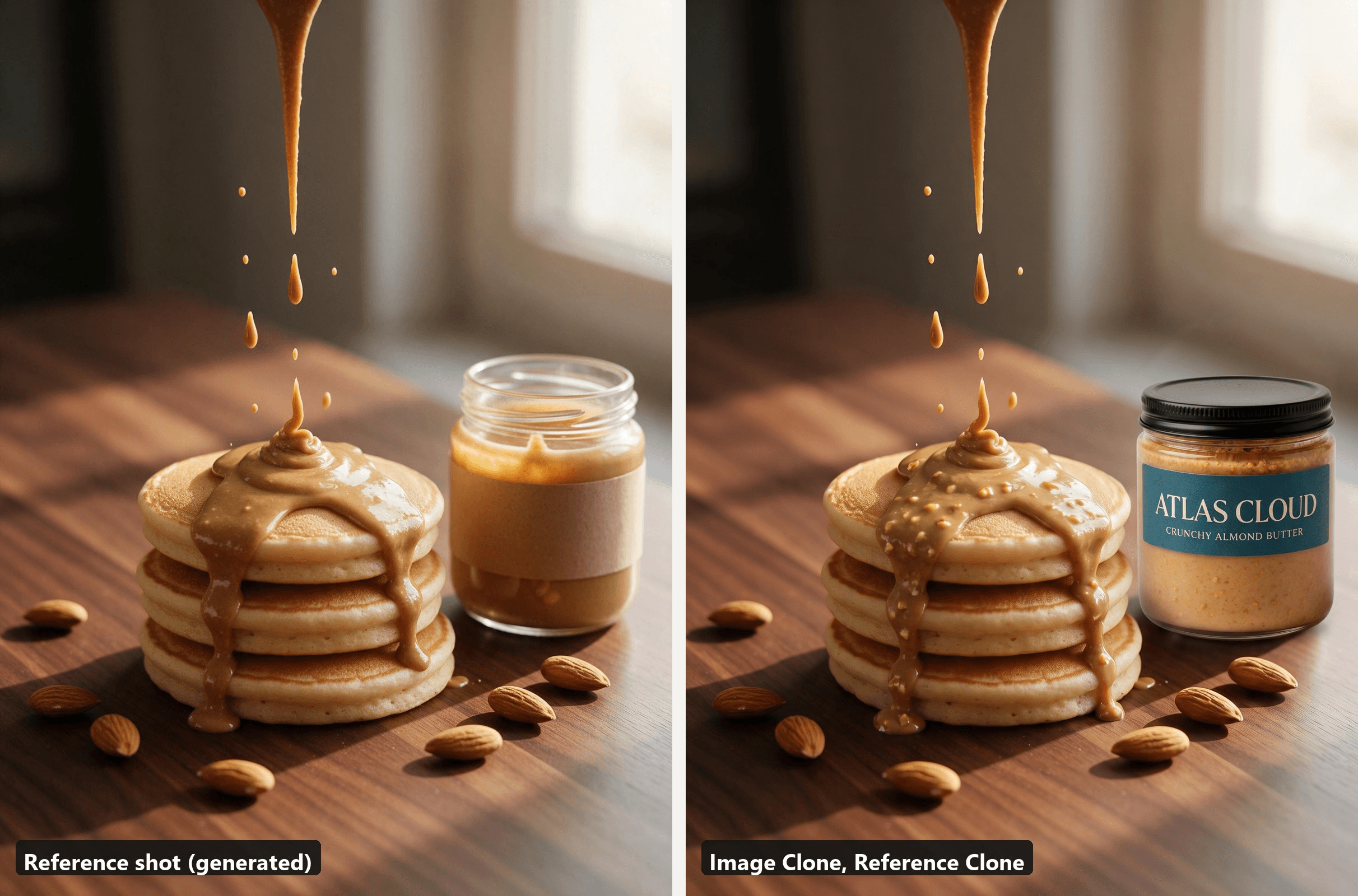
plaintext1Replace the jar with my uploaded product. Keep the pancakes, the pour and the morning window light exactly as in the reference, and make the pouring sauce look like crunchy almond butter, the same colour as the butter inside the jar.
The pour changed colour and texture to match what is in the jar, while the pancakes, the window light and the scattered almonds stayed. For a sauce, a syrup, a serum or a drink, write the liquid into the prompt the same way.
Ingredient Scatter Product Photo Ideas for Food and Skincare
Deconstructing the product around itself answers a question buyers have about anything edible or anything they put on their skin: what is actually in this? A top-down flat lay, the product in the centre and a loose ring of ingredients, one tool and one textural element such as salt or a blossom, tells that story without a line of copy.
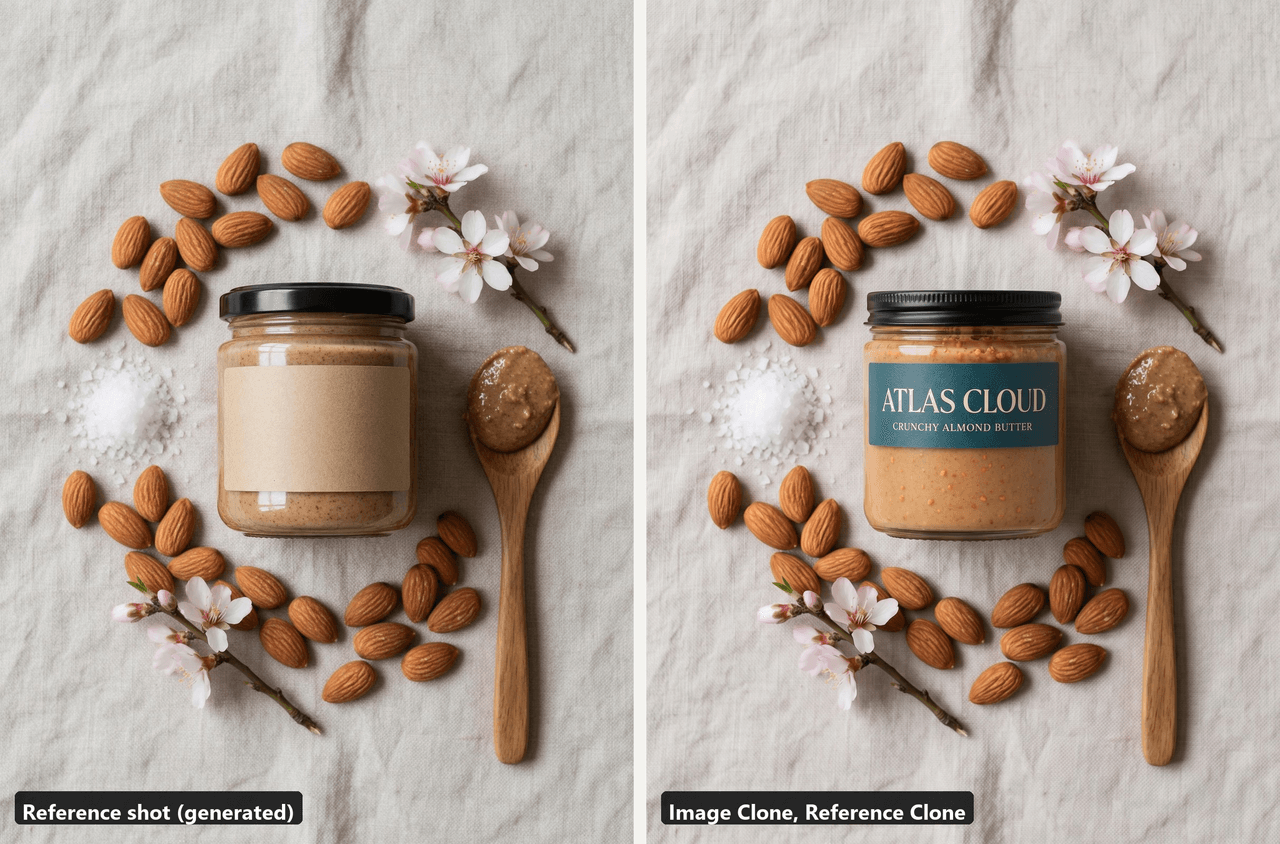
plaintext1Replace the jar with my uploaded product. Keep the top-down flat lay, the linen cloth and the soft overhead light exactly as in the reference. Keep the almonds, the sea salt and the blossom sprigs, and make the scoop on the wooden spoon look like crunchy almond butter.
This one also ran in Reference Clone because the spoon holds the product, not just the packaging. If your ingredients differ from the reference, name the new ones in the prompt and the ring is rebuilt around them.
Mirror Reflections That Double the Product
A sheet of black acrylic, one narrow light grazing from the side and a dark backdrop give you a reflection that doubles the product and adds a premium feel. The trap is the reflection itself: glass and glossy labels mirror the room and the camera.
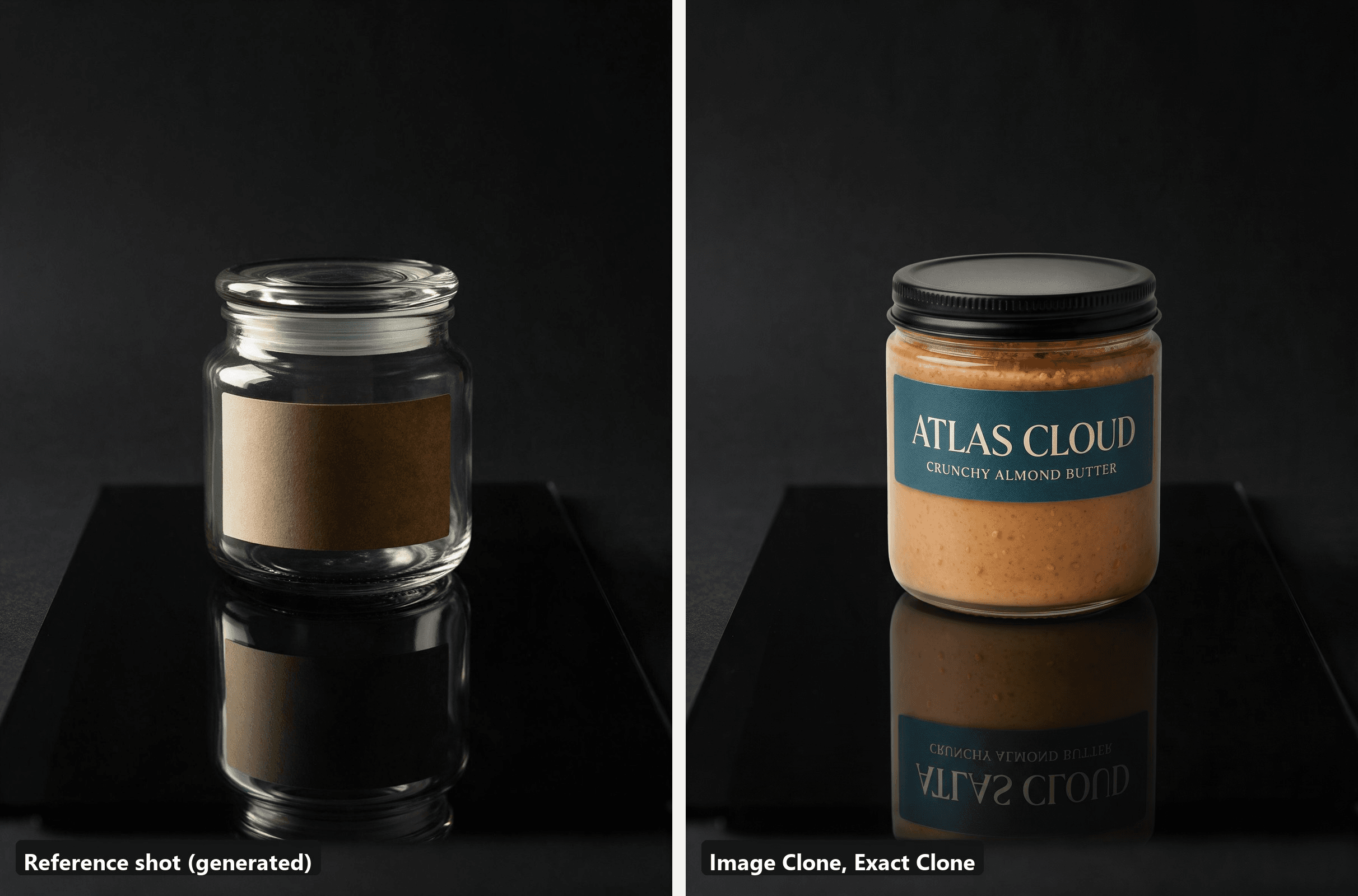
The clone mirrored the new label in the acrylic, upside down and dimmed the way a real reflection would be. When you shoot the reference yourself, the reflection-control tricks in our guide to photographing jewelry apply to any shiny product.
A Repetition Grid With One Odd Jar Out
Twelve identical units in a tight grid read as a pattern, and one unit turned the other way breaks it, which is where the eye lands. It is a cheap idea when you own the stock and a tedious one to light evenly. This was the pair we expected to fail, because Exact Clone had to replace twelve products instead of one.
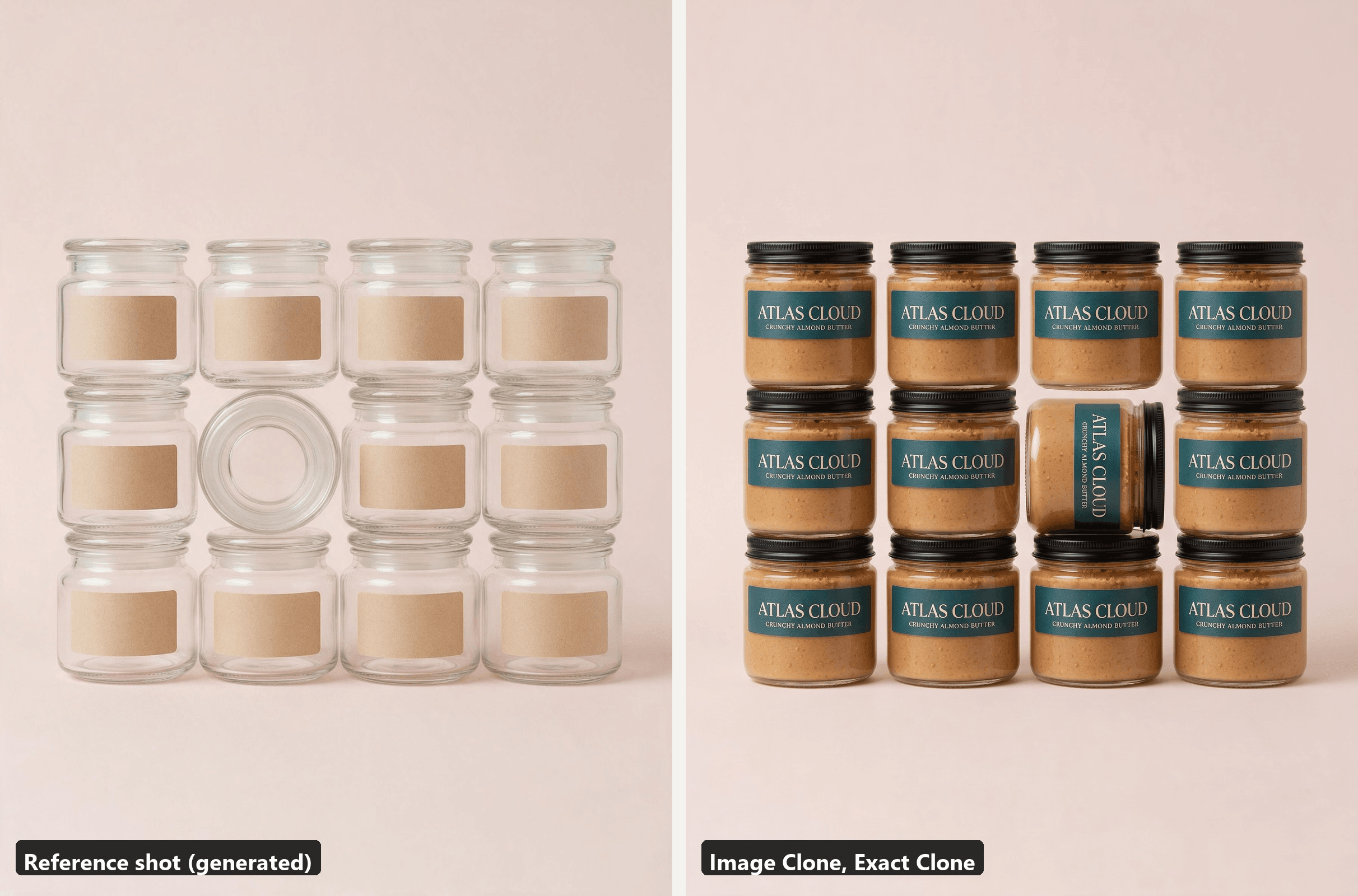
the turned one
All twelve jars came back as the almond butter, including the turned one, which shows the label from the side. Use it for multi-pack listings, a flavour range, or a feed post where the odd jar out is the new flavour.
Miniature Scenes, the Creative Product Photography Idea the Lists Skip
The idea lists we read while planning this article skip miniatures entirely, which is a reason to use them. Model-railway figures turn any product into a landmark, and the scale joke gives people a reason to stop scrolling. It needs a macro lens or a phone in macro mode, and a story: workers climbing the jar, a tiny wheelbarrow of whatever is inside.
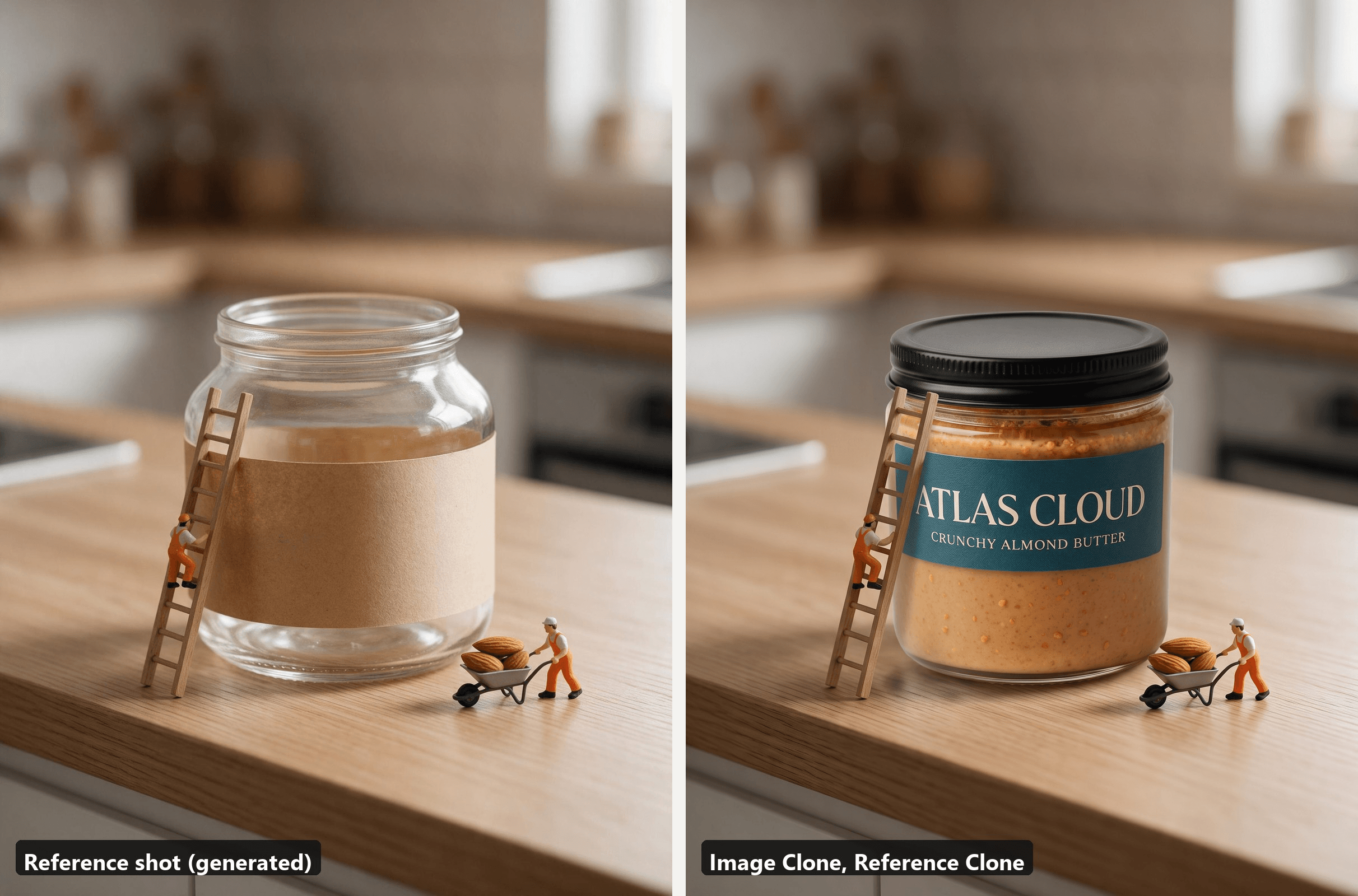
plaintext1Replace the jar with my uploaded product. Keep the miniature scene exactly as in the reference: the tiny workers in orange overalls, the wooden ladder leaning on the jar, the wheelbarrow of almonds, the oak counter and the soft window light.
Reference Clone was the safer mode here because the figures interact with the product, and the prompt had to say that the ladder stays leaning on the new jar. The output kept the worker on the ladder, the wheelbarrow of almonds and the shallow focus of the macro shot.
FAQ
Is it legal to copy someone else's product photography idea?
Copying an idea and copying a photograph are different acts, and the U.S. Copyright Office's FAQ on what copyright protects draws the line between them in two sentences: "Copyright does not protect ideas, concepts, systems, or methods of doing something," and "Copyright law protects the original photograph, not the subject of the photograph."
The practical line for this article: recreate the setup yourself, or use a reference you own or have licensed, and do not upload a competitor's photo as the reference. If a campaign depends on how close you can get to one specific image, that is a question for a lawyer rather than a blog post.
What makes a good reference image for AI product placement?
One hero product of roughly the same size and shape as yours, a clear light direction and a composition you can describe in a sentence. A reference with three products, a hand covering the label, or a product category far from yours gives the model less to anchor on. The same test you would apply to a product photo template applies here.
Where do you find product photography inspiration without copying a competitor?
Your own back catalogue first: older shots with a composition you liked but a product you no longer sell make ideal references, because the rights are already yours. Licensed stock works when the licence allows derivative use. The route this article took, generating the reference from a text description with Seedream 5.0 Pro, gives you unlimited compositions with no rights question at all, and you can tune the reference until it matches your product's proportions.
How much does it cost to recreate a product photography idea with Image Clone?
The Run button on the Image Clone page shows the price before you commit. At 3:4, a single 1K image is $0.1008, 2K is $0.1408 and 4K is $0.1808, and a second 1K image in the same run brings the total to $0.1808. A sensible pattern is one 1K run to check that the reference and the mode are right, then one 2K or 4K run for the file you will actually publish.
Is Image Clone the same as photo style transfer?
No. Photo style transfer repaints an entire image so it looks like another image: the colours, the brushwork, the film grain. Image Clone keeps the reference's composition and light and swaps the product, which is closer to a reshoot than a filter. Reference Clone borrows the style and framing of the reference, but it still builds a new photograph around your actual product instead of restyling an existing one.
Conclusion
Idea lists usually end where the problem starts: you have the inspiration and still have to build the set. Showing each idea next to its clone changes what the list is for. Hard shadows, colour blocks, levitation, reflections and repetition all copied exactly from a reference, and the three ideas that involve what is inside the product, the pour, the ingredient ring and the miniature crew, needed one sentence of direction in Reference Clone.
Pick the idea that fits your product, make or license a reference that matches its shape, and let the mode do the rest. One plain product photo was enough for every clone on this page, which is the practical point about product photography ideas: once you can copy them, you can afford to try all eight.





