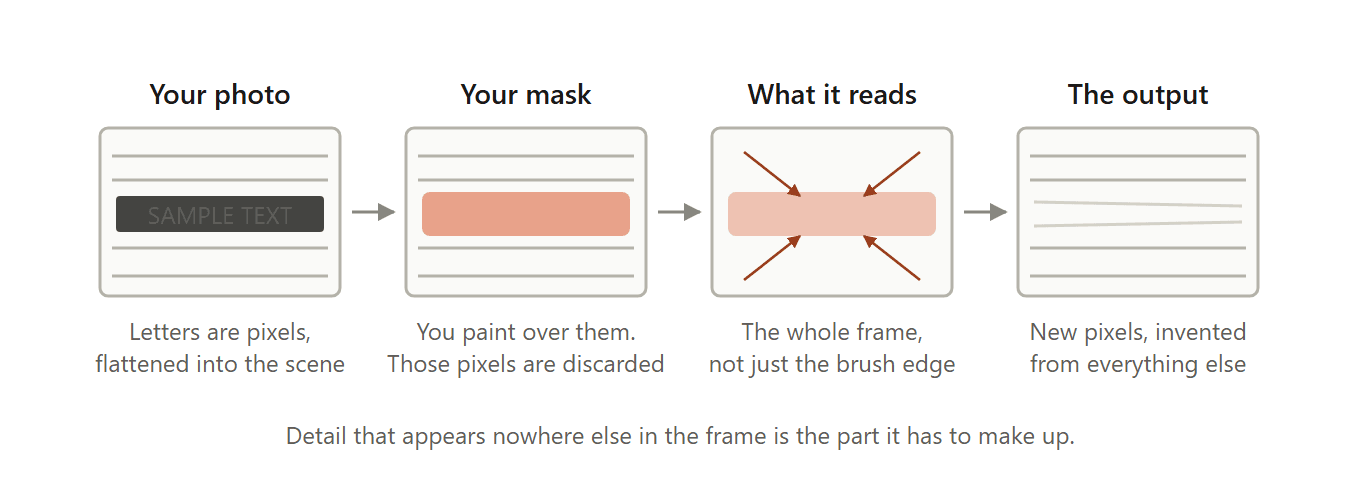
ในที่สุดคุณก็ได้ภาพที่ต้องการ แต่กลับมีชื่อสตูดิโอประทับอยู่ด้านล่าง หรือวันที่ถูกเบิร์นลงไปโดยกล้องที่ไม่มีใครใช้มาตั้งแต่ปี 2009 คำเหล่านั้นไม่ได้อยู่ในเลเยอร์ที่ปิดได้ พวกมันคือพิกเซล ไม่ต่างจากผนังหรือพื้นหญ้าที่มันทับอยู่
ดังนั้นเมื่อคุณลบข้อความออกจากไฟล์ภาพ เครื่องมือไม่ได้ลบอะไรทิ้งไป มันแค่ทาสีทับรอยholeนั้นแล้วเดาว่าเดิมทีมีอะไรอยู่ตรงนั้น การเดานั้นจะผ่านหรือไม่ เกือบทั้งหมดขึ้นอยู่กับว่าตัวหนังสือวางอยู่บนอะไร และแทบไม่เกี่ยวเลยว่าคุณเลือกยี่ห้อของยางลบแบบไหน
เรานำเรื่องนี้ไปทดสอบที่คุณตรวจสอบเองได้ ข้อความสีขาวหนึ่งบรรทัด พื้นหลังสี่แบบที่ต่างกัน ลบหนึ่งรอบ แล้วเปรียบเทียบทีละพิกเซลกับต้นฉบับที่ไม่ได้แตะต้อง ช่องว่างระหว่างกรณีดีที่สุดกับแย่ที่สุดออกมาอยู่ที่ประมาณเก้าต่อหนึ่ง
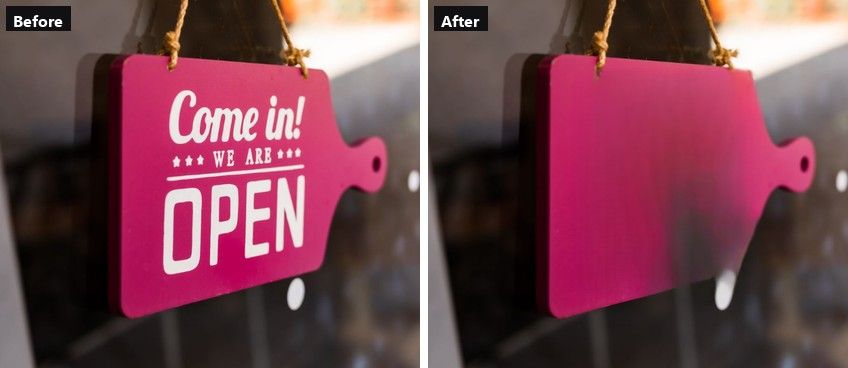
ข้อความพิมพ์สามบรรทัดถูกลบในรอบเดียว ภาพต้นฉบับจาก Pexels ลบในเบราว์เซอร์เมื่อวันที่ 20 กันยายน 2026
ประเด็นสำคัญ
- ข้อความในภาพคือพิกเซล ไม่ใช่เลเยอร์ ตัวลบข้อความใดๆ ต้องสร้างสิ่งที่อยู่ข้างหลังตัวหนังสือขึ้นมาใหม่
- ตัวลบภาพในเบราว์เซอร์ของ Atlas Cloud ทำงานทั้งหมดบนเครื่องของคุณเอง ภาพจึงไม่เคยออกจากอุปกรณ์
- สีทึบเรียบและพื้นเบลอๆ กลับมาสะอาด ส่วนหญ้าหนาทึบและอิฐจะเหลือรอยที่สังเกตได้
- การลบข้อความกับการลบพื้นหลังเป็นงานสองอย่างที่ได้ผลลัพธ์ต่างกัน
- ภาพของคุณเอง ภาพหน้าจอ และตราประทับวันที่เป็นเรื่องที่ทำได้ ส่วนลายน้ำของคนอื่นไม่ใช่
ทำไมตัวลบข้อความในภาพต้องสร้างพื้นหลังขึ้นมาใหม่
เปิดภาพใดก็ได้ในโปรแกรมแก้ไขแล้วลองเลือกตัวหนังสือดู จะไม่มีอะไรให้เลือก ตัวอักษรถูกแบนรวมเข้าไปในภาพตั้งแต่ตอนบันทึก ซึ่งเหลือทางเดียวให้ตัวลบข้อความในภาพ นั่นคือคุณทำเครื่องหมายบริเวณหนึ่ง โมเดลโยนพิกเซลเหล่านั้นทิ้งไป แล้วสังเคราะห์พิกเซลใหม่ขึ้นมา
ส่วนที่น่าสนใจคือพิกเซลใหม่มาจากไหน โมเดล inpainting สมัยใหม่ไม่ได้แค่ป้ายสีที่แตะขอบแปรงของคุณเข้ามา
แนวทางหนึ่งที่ถูกอ้างอิงกันกว้างขวางในงานวิจัยด้านนี้ ตีพิมพ์ในปี 2021 ในชื่อ Resolution-robust Large Mask Inpainting with Fourier Convolutions สร้างขึ้นบน convolution ที่มี "receptive field ครอบคลุมทั้งภาพ" เลเยอร์เดียวสามารถรับภาพทั้งเฟรมพร้อมกันได้ แทนที่จะดูแค่บริเวณรอบๆ รู
การออกแบบนี้เองที่ทำให้การลบคำหนึ่งคำออกจากผนังอิฐได้อิฐกลับมา ไม่ใช่โคลนสีเบจ ส่วนที่เหลือของผนังอยู่ตรงนั้นในเฟรม โมเดลจึงมีอิฐให้เรียนรู้ลวดลายได้มากมาย
มันยังอธิบายโหมดล้มเหลวได้ด้วย เมื่อบริเวณที่ถูกปิดทับมีรายละเอียดที่ไม่ปรากฏที่อื่นในเฟรมเลย ก็ไม่มีอะไรให้คัดลอก โมเดลจึงเลือกใช้สิ่งที่เรียบเนียนและดูสมเหตุสมผล และความเรียบเนียนที่ดูสมเหตุสมผลนั่นแหละคือสิ่งที่ตาคุณจับได้ทันที
วิธีลบข้อความออกจากภาพในเบราว์เซอร์
ป้ายที่ด้านบนของบทความนี้เปลี่ยนจากข้อความสามบรรทัดเป็นแผงสีชมพูว่างเปล่าในรอบเดียว และแผงนั้นยังคงไล่เฉดสีและขอบที่สึกหรอไว้ได้ นี่คือสภาพของแคนวาสหนึ่งวินาทีก่อนที่สิ่งนั้นจะเกิดขึ้น
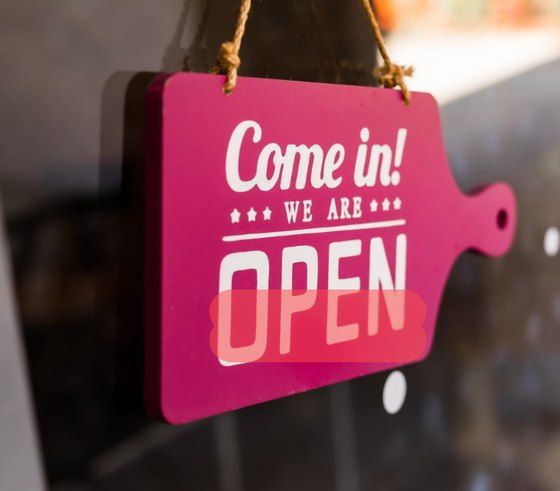
การเลือกด้วยแปรงทับข้อความหนึ่งบรรทัด สีแดงคือสิ่งที่ถูกทิ้งและสร้างใหม่
โหลดภาพเข้าตัวลบภาพ AI ฟรี แล้วคุณจะได้สองวิธีในการทำเครื่องหมายตัวอักษร การเลือกแบบ Lasso เร็วกว่าเมื่อข้อความอยู่ในบล็อก เพราะคุณลากเป็นวงรอบทั้งหมดแล้วมันจะเติมให้เมื่อปล่อย
โหมดแปรงเหมาะกับข้อความบรรทัดเดียว สไลเดอร์ Brush Size ตั้งแต่ 6 ถึง 64 พิกเซล คุณจึงปรับขนาดแปรงให้พอดีกับความสูงของตัวหนังสือได้
ลากขนาดขึ้นจนกว่าหนึ่งรอบจะคลุมตัวอักษรบวกกับพื้นที่หายใจอีกไม่กี่พิกเซล ระบายทับทุกคำที่ต้องการลบ แล้วกด Run Free Clear selection จะล้างมาสก์ถ้าคุณลากเกิน
วิธีลบข้อความออกจากภาพโดยไม่ลบพื้นหลัง
หลายคนที่ตั้งใจจะลบข้อความออกจากไฟล์ภาพมักเพิ่มคำว่า "โดยไม่ลบพื้นหลัง" ในการค้นหา ซึ่งบอกได้ว่าพวกเขาเคยเจ็บมาก่อน อัปโหลดภาพเข้าเครื่องมือผิด แล้วคุณจะได้ตัวแบบลอยอยู่บนตารางหมากรุกโปร่งใส โดยที่ฉากหลังหายไปพร้อมกับคำบรรยาย
สองงานที่ต่างกัน สองผลลัพธ์ที่ต่างกัน:
| ตัวลบข้อความ | ตัวลบพื้นหลัง | |
|---|---|---|
| สิ่งที่คุณทำเครื่องหมาย | แค่ตัวหนังสือ | ไม่ต้องทำอะไร มันตรวจจับตัวแบบเอง |
| สิ่งที่ถูกลบ | พิกเซลที่ทำเครื่องหมาย | ทุกอย่างนอกตัวแบบ |
| สิ่งที่กลับมา | ฉากเดิม สร้างใหม่ตรงที่ข้อความเคยอยู่ | แค่ตัวแบบ |
| เอาต์พุตทั่วไป | PNG หรือ JPG ทึบแสง | PNG ที่มีช่อง alpha |
| เหมาะกับ | ตราประทับวันที่ คำบรรยาย ป้ายราคา ลายน้ำของคุณเอง | ภาพตัดสินค้า ภาพโปรไฟล์ รายการอีคอมเมิร์ซ |
ตัวลบจะปล่อยฉากที่คุณไม่ได้ระบายทับไว้ตามเดิม จากการทดสอบของเรา ส่วนของเฟรมที่ไม่ได้แตะต้องกลับมาอยู่ในระดับความสว่างต่างกันประมาณหนึ่งจาก 255 ซึ่งต่ำกว่าเกณฑ์ที่จอภาพหรือสายตามนุษย์จะแสดงให้เห็น
ถ้าจริงๆ แล้วตารางหมากรุกคือสิ่งที่คุณต้องการ นั่นเป็นเครื่องมืออีกตัวในคอลเลกชันเครื่องมือ AI ฟรีเดียวกัน และเราได้จัดอันดับสิบตัวตามจุดที่แพ็กเกจฟรีสิ้นสุดลงในคู่มือตัวลบพื้นหลัง AIของเรา
พื้นหลังแบบไหนที่ตัวลบข้อความสร้างกลับมาได้จริง
นี่คือการทดสอบ เราสร้างภาพขนาด 886 คูณ 606 หนึ่งภาพจากภาพสต็อกสี่ภาพ ได้แก่ ผนังทาสีเรียบ ฉากหลังสีเทาที่เบลอ หญ้าหนาทึบ และผนังอิฐ ข้อความสีขาวตัวหนา 30 พิกเซลแบบเดียวกันถูกวางทับทั้งสี่ช่องในตำแหน่งเดียวกัน แปรงหนึ่งรอบต่อช่องที่ 44 พิกเซล กด Run หนึ่งครั้ง ลบสี่จุดในรอบ forward เดียว
จากนั้นเราสร้างภาพคอมโพสิตแบบเดียวกันขึ้นใหม่โดยไม่มีข้อความ นั่นให้ค่า ground truth ซึ่งเป็นสิ่งที่คู่มือที่ติดอันดับการค้นหานี้มักข้ามไป นอกแถบที่ถูกแปรง เวอร์ชันไม่มีข้อความกับอินพุตตรงกันที่ผลต่าง 0.000 ดังนั้นช่องว่างใดๆ ภายในแถบจึงเป็นผลงานของโมเดลล้วนๆ
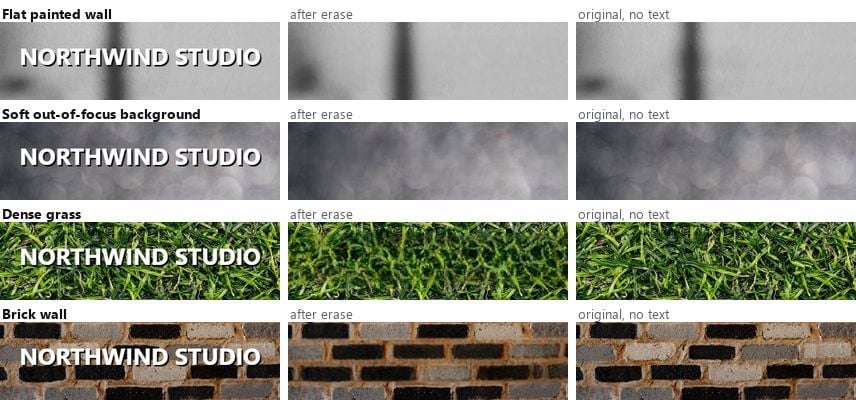
ตัวอักษรเดียวกัน แปรงเดียวกัน รอบเดียวกัน ภาพสต็อกจาก Pexels ทดสอบเมื่อวันที่ 20 กันยายน 2026
การวัดแถบที่ถูกลบเทียบกับต้นฉบับให้ตัวเลขบนสเกลความสว่าง 0 ถึง 255:
| พื้นหลัง | ค่าความคลาดเคลื่อนเฉลี่ยในแถบที่ลบ | คำตัดสิน |
|---|---|---|
| ผนังทาสีเรียบ | 6 | มองไม่เห็น |
| ฉากหลังเบลอแบบนุ่มนวล | 9 | มองไม่เห็นที่ขนาดปกติ |
| ผนังอิฐ | 39 | ลายสร้างกลับมา แต่แนวไม่ตรง |
| หญ้าหนาทึบ | 53 | เห็นรอยเบลอชัด |
ตรงไหนที่ข้อความกลับมาสะอาด
สีทึบ ท้องฟ้า ฉากหลังเบลอ ตัวรถ พื้นโต๊ะ และอะไรก็ตามที่มีรายละเอียดน้อย ล้วนจัดอยู่ในกลุ่มเดียวกัน ช่องผนังได้ค่าความคลาดเคลื่อน 6 จาก 255 ซึ่งต่ำกว่า 3% และต่ำกว่าจุดที่จอภาพจะแยกแยะออก
ฉากหลังเบลอได้ 9 สิ่งเดียวที่บอกใบ้คือวงแสงนุ่มๆ ภายในแถบกลับมาแบนกว่าแสงที่อยู่เหนือขึ้นไปเล็กน้อย
พิมพ์ ถ่ายภาพหน้าจอ หรือครอปสิ่งเหล่านี้ แล้วจะไม่มีใครหาแนวรอยต่อเจอ ถ้าข้อความของคุณวางอยู่บนผนัง ท้องฟ้า เสื้อ หรือพื้นหลังเบลอ หยุดอ่านแล้วไปลบมันเลย
ตรงไหนที่รอยปะโผล่ให้เห็นเสมอ
หญ้าได้ 53 แย่ที่สุดในสี่แบบ มองแถวที่สามของการเปรียบเทียบ แถบที่ถูกลบกลายเป็นสีเขียวเบลอ ในขณะที่ต้นฉบับมีใบหญ้าแต่ละใบ รายละเอียดสุ่มความถี่สูงเป็นกรณีที่ยากที่สุดสำหรับโมเดล inpainting เพราะใบหญ้าแต่ละใบในต้นฉบับไม่เหมือนกันเลย และไม่มีหน่วยซ้ำให้ยืมใช้
อิฐทำงานต่างออกไป และน่าทำความเข้าใจว่าทำไม ความคลาดเคลื่อนต่ำกว่าที่ 39 และแถบนั้นยังดูเป็นอิฐอยู่ แต่โมเดลสร้างแนวอิฐกลับมาผิดตำแหน่ง เส้นปูนที่ควรวิ่งตรงข้ามผนังกลับขึ้นๆ ลงๆ ตรงที่ข้อความเคยอยู่
ดังนั้นมีสองโหมดล้มเหลวที่มีสัญญาณบอกต่างกัน ลายที่เป็นระเบียบกลับมาอย่างมั่นใจแต่ผิด ส่วนพื้นผิวสุ่มกลับมาแบนราบ
ตัวอักษรพิมพ์บนวัตถุจริงจัดอยู่ในกลุ่มที่สามอีกกลุ่ม ป้ายเคลือบ enamel นี้มีตัวหนังสือที่พิมพ์จริง ไม่ใช่การซ้อนทับ บนแผงที่มีสนิม รอยขีดข่วน และไฮไลต์ที่ไม่สม่ำเสมอ
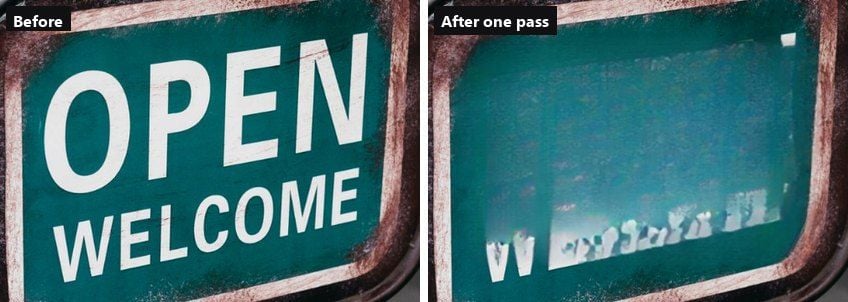
หนึ่งรอบทับทั้งสองบรรทัดด้วยแปรง 64 พิกเซล ตัวหนังสือหายไป แต่สี่เหลี่ยมที่สร้างใหม่ยังอยู่ ภาพต้นฉบับจาก Pexels ทดสอบเมื่อวันที่ 20 กันยายน 2026
ตัวหนังสือหายไป และความเป็นตัวตนของแผงก็หายไปด้วย สิ่งที่มาแทนคือสี่เหลี่ยมสะอาดที่สว่างกว่าสี enamel รอบๆ เล็กน้อย โดยที่ด้านล่างของคำว่า WELCOME ยังมองเห็นเป็นเศษสีขาวแตกระแหง ตัวอักษรขนาดใหญ่มากเป็นกรณีที่ยากด้วยเหตุผลง่ายๆ เมื่อมาสก์คลุมพื้นผิวไปครึ่งหนึ่ง ก็เหลือพื้นผิวให้เรียนรู้น้อยลง
ลบข้อความจากภาพหน้าจอโดยไม่ทำให้ส่วนอื่นเบลอ
ภาพหน้าจอเป็นกรณีที่ง่ายและเสี่ยงในเวลาเดียวกัน ง่าย เพราะข้อความในอินเทอร์เฟซเกือบ selaluวางอยู่บนสีทึบ และสีทึบคือกลุ่มที่ได้ค่า 6 แบนเนอร์แจ้งเตือน ป้ายบนทูลบาร์ หรือการประทับเวลา จะหายไปอย่างไร้ร่องรอย
เสี่ยง เพราะสิ่งที่คนมักต้องการลบ การลบที่สะอาดไม่ทิ้งร่องรอยว่าเคยถูกแก้ไข และนั่นเป็นคุณสมบัติที่ผิดเมื่อคุณกำลังซ่อนเลขคำสั่งซื้อในตั๋วสนับสนุนหรือชื่อในรายงานบั๊ก
| สิ่งที่คุณต้องการลบ | ลบทิ้งได้ | ปิดทับ |
|---|---|---|
| นาฬิกาแถบสถานะ แบตเตอรี่ ชื่อเครือข่าย | ได้ | |
| แบนเนอร์คุกกี้ แถบโปรโมชัน การแจ้งเตือนแบบ toast | ได้ | |
| ลายน้ำหรือตราประทับส่งออกของคุณเอง | ได้ | |
| อีเมล รหัสคำสั่งซื้อ ยอดเงินในบัญชี | ทำกล่องหรือเบลอ | |
| อะไรก็ตามในภาพหน้าจอที่ใช้เป็นหลักฐาน | ทำกล่องหรือเบลอ |
หลักง่ายๆ คือ ลบเมื่อข้อความนั้นเป็นตัวกวนสายตา ปิดทับเมื่อข้อความนั้นเป็นความลับ กล่องดำบอกว่า "ฉันลบบางอย่างตรงนี้" และไม่มีใครกล่าวหาคุณภายหลังได้ว่าปลอมแปลงบันทึกอย่างเงียบๆ
ทำอย่างไรเมื่อตัวลบข้อความทิ้งรอยเปื้อนไว้
มีสามอย่างที่ผิดพลาด และแต่ละอย่างมีวิธีแก้ต่างกัน
เศษตัวอักษรหลงเหลืออยู่เมื่อมาสก์ของคุณหยุดก่อนถึงหางตัวอักษรหรือเงาตกกระทบ ซึ่งเป็นสิ่งที่ทิ้งเศษสีขาวไว้บนป้าย enamel ข้างบน ลูบอีกรอบทับเฉพาะส่วนที่เหลือ ด้วยแปรงที่เล็กกว่า
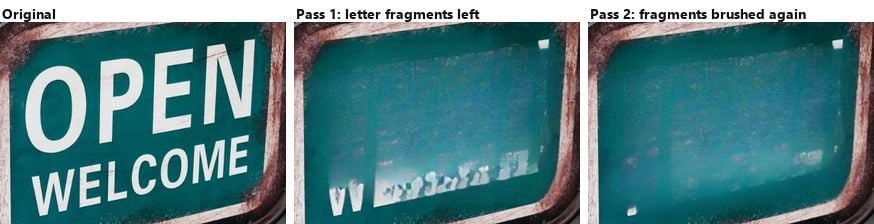
รอบที่สองลบเศษที่เหลือออกไป สี่เหลี่ยมที่อยู่ข้างหลังยังคงอยู่
สังเกตว่ารอบที่สองไม่ได้แก้อะไร สี่เหลี่ยมสว่างยังอยู่ตรงนั้น เพราะมันมาจากขนาดของมาสก์รอบแรก ไม่ได้มาจากหมึกที่หลงเหลือ เมื่อรอยปะขนาดใหญ่นั้นเกิดขึ้นแล้ว อีกรอบมักขยายมันออกไปแทนที่จะกลืนให้เนียน
รอยเปื้อนกว้างหมายความว่ามาสก์ของคุณใจกว้างเกินไป กด Undo แล้วลบข้อความเดิมในสองหรือสามรอบที่แคบลง แทนที่จะเป็นแถบกว้างแถบเดียว เพื่อให้โมเดลมีพิกเซลที่ไม่ได้แตะต้องให้อ้างอิงระหว่างรอบมากขึ้น
ลายน้ำซ้ำๆ ทั่วทั้งภาพคือกรณีที่ควรถอยออกมา การระบายทับลายที่เรียงต่อกันหมายถึงการมาสก์เกือบทั้งเฟรม และถึงจุดนั้นคุณกำลังขอให้โมเดลประดิษฐ์ภาพขึ้นมาใหม่ แทนที่จะซ่อมแซม หาไฟล์ต้นฉบับแทนดีกว่า
เมื่อการลบข้อความข้ามเส้น
เทคนิคนั้นเป็นกลาง สิ่งที่คุณเอาไปใช้ไม่ใช่
| สถานการณ์ | สถานะ |
|---|---|
| ตราประทับวันที่บนภาพครอบครัวของคุณเอง | ทำได้ |
| ลายน้ำสตูดิโอของคุณเองบนงานของคุณเอง | ทำได้ |
| ข้อความราคาเก่าหรือโปรโมชันบนภาพสินค้าที่คุณเป็นเจ้าของ | ทำได้ |
| ลายน้ำคลังภาพสต็อกบนภาพตัวอย่างที่ไม่ได้ซื้อลิขสิทธิ์ | ต้องห้าม |
| เครดิตของช่างภาพคนอื่น | ตัดการอ้างอิง มักละเมิดสัญญาอนุญาต |
| ข้อความบนใบแจ้งหนี้ บัตรประชาชน ตั๋ว หรือใบเสร็จ | ต้องห้าม ไม่ว่าเหตุผลใดก็ตาม |
หมายเหตุเพิ่มเติมสองข้อ ลายน้ำตัวอย่างของคลังภาพสต็อกมีไว้เพื่อทำเครื่องหมายไฟล์ที่ยังไม่ได้จ่ายเงิน และการลบมันไม่ได้ซื้อลิขสิทธิ์ให้คุณ และบนภาพที่สร้างด้วย AI การเอาแบดจ์มุมที่มองเห็นออกจะไม่แตะต้องสัญญาณที่มาที่ไปแบบล่องหนใดๆ เพราะสัญญาณประเภทนั้นถูกบรรจุอยู่ในข้อมูลพิกเซล ไม่ได้วาดทับอยู่ข้างบน
คำถามที่พบบ่อย
ฉันลบข้อความออกจากภาพได้ฟรีไหม?
ได้ และคำว่าฟรีในที่นี้หมายถึงไม่ต้องมีบัญชี ไม่ต้องใช้เครดิต และไม่มีขีดจำกัดรายวัน ซึ่งตัวลบของ Atlas Cloud ระบุไว้บนหน้าของมันเอง เงินแทบไม่ใช่สิ่งที่ตัดสินผลลัพธ์อยู่แล้ว สิ่งที่ตัดสินคือพื้นหลังข้างหลังตัวหนังสือของคุณ ซึ่งเป็นเหตุผลว่าทำไมเครื่องมือเดียวกันถึงทำได้ไร้ที่ติบนผนัง แต่กลับเห็นชัดบนสนามหญ้า
การลบข้อความทำให้ความละเอียดลดลงไหม?
ไม่ ทุกรอบในการทดสอบนี้คืนค่า PNG ที่มีขนาดเท่าอินพุตเป๊ะ ไม่มีการครอปและไม่มีการย่อขนาด พิกเซลที่เปลี่ยนไปคือพิกเซลที่คุณระบายทับ ดังนั้นถ้าคุณลบคำบรรยายออกจากภาพกว้าง 4000 พิกเซล คุณก็ยังได้ภาพกว้าง 4000 พิกเซลที่มีแถบสร้างใหม่หนึ่งแถบอยู่ในนั้น
ตัวลบข้อความ AI ใส่ข้อความใหม่กลับเข้าไปแทนได้ไหม?
ไม่ใช่แบบนี้ ตัวลบข้อความ AI เติมช่องว่างด้วยพื้นหลัง ซึ่งเป็นสิ่งที่คุณต้องการเมื่อเป้าหมายคือภาพเปล่าที่สะอาด เมื่อคุณได้ภาพเปล่าแล้ว ให้เพิ่มข้อความใหม่ในเครื่องมือจัดวางเลย์เอาต์ใดก็ได้ แล้วมันจะวางอยู่บนพื้นผิวที่ไม่ได้แตะต้อง แทนที่จะวางทับบนตัวหนังสือเก่าที่ซึมทะลุขึ้นมา
ฉันจะลบข้อความออกจากภาพบนมือถือได้อย่างไร?
เครื่องมือในเบราว์เซอร์เดียวกัน ขั้นตอนเดียวกัน แต่ใช้นิ้วสองนิ้วแทนเมาส์ หุบเพื่อซูมก่อนแปรง เพราะแปรง 44 พิกเซลวางผิดตำแหน่งได้ง่ายในระดับมือถือ ถ้าคุณอยากใช้สิ่งที่มีอยู่ในเครื่องอยู่แล้ว เราได้แนะนำเส้นทางที่มีมาให้และข้อกำหนดด้านโมเดลในคู่มือการลบวัตถุบน iPhoneของเรา
แล้วถ้าข้อความเป็นสิ่งเดียวที่ฉันอยากเก็บไว้ล่ะ?
ถ้าอย่างนั้นคุณต้องการเครื่องมือตรงกันข้าม การดึงคำออกจากภาพคือ optical character recognition (OCR) ซึ่งอ่านตัวหนังสือออกมาเป็นข้อความที่แก้ไขได้ โดยปล่อยภาพไว้ตามเดิม การค้นหาวิธีลบข้อความออกจากภาพจะให้ตัวลบกับคุณทั้งวัน ดังนั้นค้นหา OCR แทน แล้วคุณจะเจอคำตอบในกระโดดเดียว
บทสรุป
เครื่องมือสำคัญน้อยกว่าพื้นผิวมาก คำบรรยายบนผนัง ท้องฟ้า หรือฉากหลังเบลอ ลบออกที่ค่าความคลาดเคลื่อน 6 บนสเกล 255 จุด ซึ่งพูดได้ว่ามันลบออกได้อย่างสมบูรณ์แบบ คำบรรยายเดียวกันบนหญ้าลบออกที่ 53 และทิ้งรอยที่ใครก็เห็นได้ มองดูว่าตัวหนังสือวางอยู่บนอะไรก่อนที่คุณจะเริ่ม
เมื่อพื้นหลังให้ความร่วมมือ ทั้งหมดใช้แปรงหนึ่งรอบและคลิกหนึ่งครั้ง ระบายทับตัวหนังสือ กดรัน ดาวน์โหลด PNG ที่ขนาดต้นฉบับ นั่นคือเวอร์ชันที่สมจริงของสิ่งที่ต้องใช้ในการลบข้อความออกจากไฟล์ภาพ และบนภาพที่ตัวหนังสือวางอยู่บนสีทึบ ท้องฟ้า หรือพื้นเบลอ แค่นั้นก็เพียงพอ





