The clip renders, the motion looks right, the audio lands on the beat. Then you notice the small mark sitting in the bottom-right corner for the whole eight seconds, and now it's the only thing you can see.
A veo watermark remover is what most people search for at that point, and a dozen single-purpose sites will take your upload and hand back a clean export. That solves the file you already have. It doesn't answer the more useful question, which is why the mark showed up at all and whether you can stop it happening on the next render. This guide covers both: erasing a logo that's already baked in, and generating through a route where it never gets added.
Key Takeaways
- Google Flow stamps a small "veo" wordmark in the corner of videos from most accounts, while an invisible SynthID mark rides along in every clip regardless of tier.
- Flow has a "Visible watermarking" toggle under your profile picture that stops the logo on videos you generate after you flip it.
- For a clip you already downloaded, Atlas Cloud's Video Edit tab erases the static logo the same way it erases burned-in text.
- Generating throughAtlas Cloud's Veo 3.1skips the visible logo question from the start, per its own FAQ.
- SynthID and Content Credentials stay in the file either way. A clean corner isn't the same as an unmarked video.
Why Your Veo Video Has a Watermark in the First Place
Google puts three separate marks on a Veo clip, and they behave nothing alike.
One sits in the pixels themselves, invisible, and it doesn't care what you do to the file afterward. Google's own support page for Flow states it plainly: "All outputs generated in Google Flow using Veo, Omni, or Nano Banana include invisible SynthID watermarks." No tier exemption, no toggle. Every render carries it.
The other is the badge you can actually see, and that one is optional in a way it wasn't a year ago. The same Flow help page continues: "a visible watermark can be added to generated images and videos. You can control this with the 'Visible watermarking' toggle in the drop-down menu under your profile picture." Outside three countries, it's a setting, not a fixed rule.
The third rides in the file's metadata rather than its pixels: a Content Credentials record, the C2PA layer, logging that the clip was generated and by what.
| Layer | Visible | Can you turn it off | Survives editing |
|---|---|---|---|
| "veo" wordmark | Yes, bottom-right corner | Yes, via the Flow toggle | No, a crop or an eraser removes it |
| SynthID | No | No, embedded in every render | Designed to, per DeepMind |
| Content Credentials | No, lives in file metadata | Not directly | Often dropped on re-export |
Worth knowing this wasn't always how Flow worked. An August 2025 thread in Google's own Gemini Apps community has a reply quoting an older version of that same help page: "Videos generated by Google One Pro users will contain a visible watermark... Videos generated by Google One Ultra users will not contain this visible watermark." That was a tier rule, no toggle involved. The mechanism has since moved to a setting anyone outside the mandated regions can flip, which is one reason a page written a year ago can describe a Veo watermark differently than what you're looking at today.
Flip Flow's Visible Watermarking Toggle Before You Generate
If the video doesn't exist yet, this is the shorter path, and it's easy to miss if you go straight to a removal tool instead of checking your own account settings first.
- Open Google Flow and click your profile picture, top right.
- Find Visible watermarking in the dropdown.
- Switch it off.
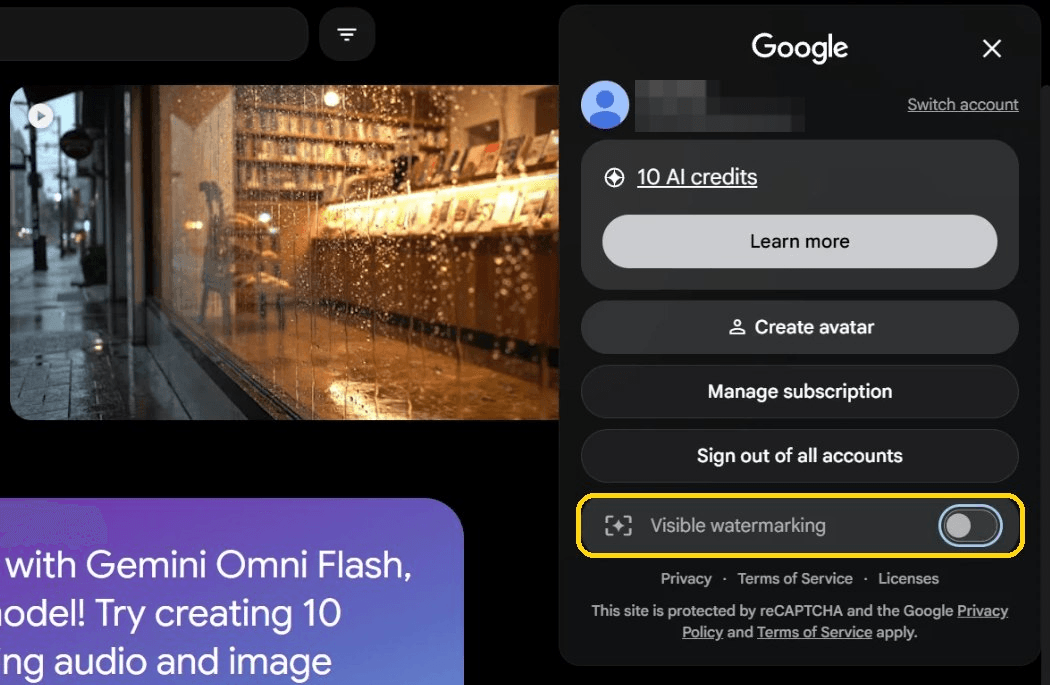
The switch has a short reach. It applies from the next render onward, so a project full of clips you made this morning stays exactly as marked as it was. It also isn't available everywhere: the Flow help page names India, South Korea, and Vietnam as places where the badge applies automatically regardless of the setting. A July 2026 community thread from a Google AI Ultra subscriber in South Korea backs that up: a volunteer Product Expert replying to the thread pointed to the country's AI labeling law as the reason, not a bug on Google's end.
Already Have the Watermark? Erase It in Atlas Cloud's Video Edit Tab
For a file that's already sitting on your drive, the logo has to be repainted out rather than switched off.
The "veo" wordmark stays in the same spot for the whole clip and doesn't move, which makes it a more forgiving edit than a moving subject or a caption that shifts every few seconds. Atlas Cloud treats it as a video editing task: upload the clip, describe the logo, and the model rewrites only that region. Seedance 2.5 is the default model behind the Video Edit tab, and it reads the source clip as a reference, so the output comes back at the source length. It's the same mechanism our guide to removing text from video walks through for burned-in captions.
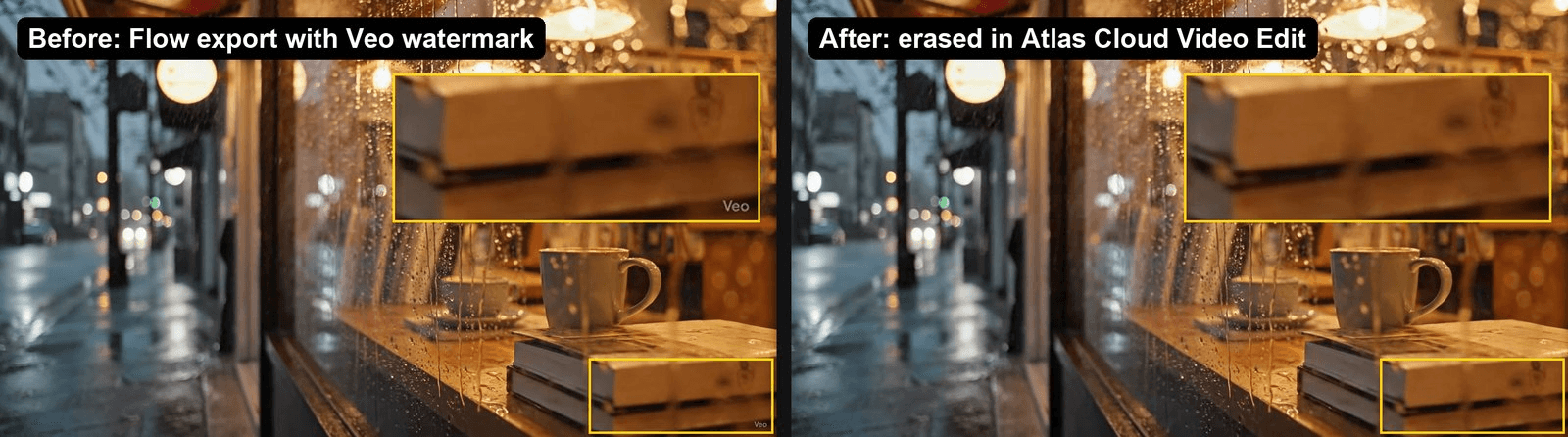
The clip below came out of Google Flow with the wordmark on, went through a single Video Edit pass, and came back with the ledge under the logo rebuilt.
Method 1: Erase the Logo in the Video Edit Tab
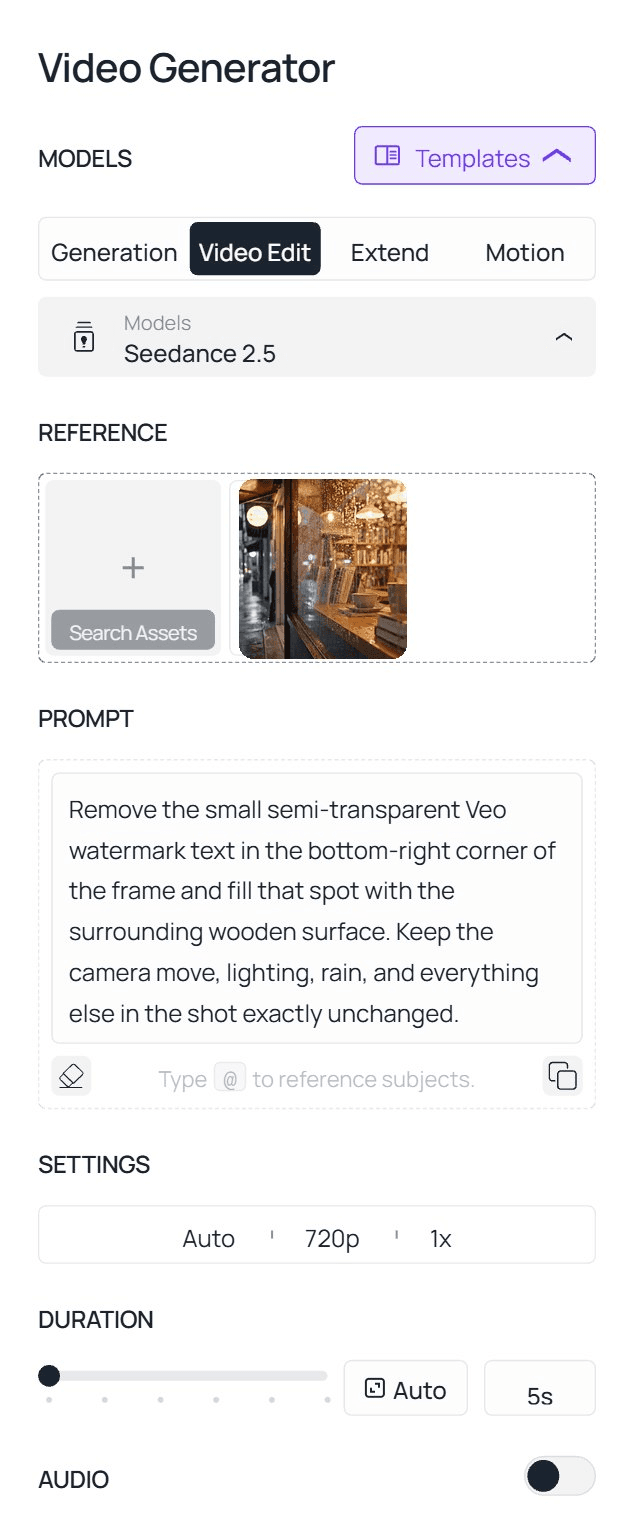
- Open the AI video editor and switch to the Video Edit tab. That tab is what tells the model to read your upload instead of generating from scratch.
- Upload the watermarked clip, the 720p or 1080p file Flow exported rather than a screen recording of it.
- Describe the target precisely: "Remove the small semi-transparent Veo watermark text in the bottom-right corner of the frame and fill that spot with the surrounding wooden surface. Keep the camera move, lighting, rain, and everything else in the shot exactly unchanged." Three things are doing the work in that sentence: the corner tells the model where to look, the wooden surface tells it what to paint, and the last clause draws a fence around the rest of the frame so a corner fix doesn't turn into a regrade of the whole shot.
- Run the job, then check the corner at full size rather than in the thumbnail. The wordmark is small enough that a leftover ghost hides easily at preview scale.
Method 2: Erase the Logo via the API
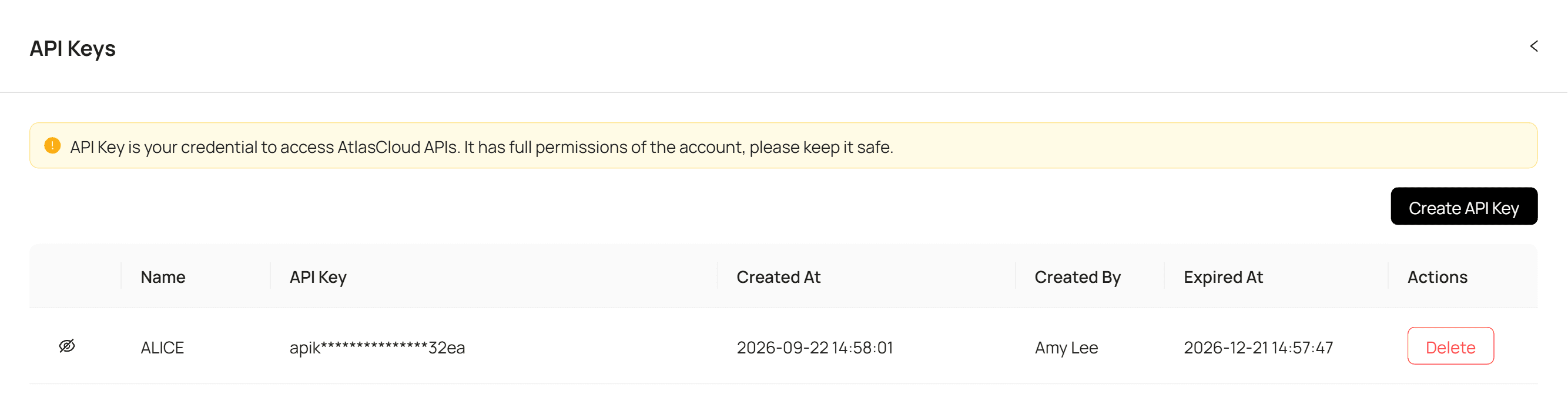
Step 1: Get your API key. Create one in the Atlas Cloud console and copy it.
Step 2: Check the API docs. Accepted formats, clip length limits and the reference-to-video parameters live in the API documentation.
Step 3: Make your first request. Submit the clip with the instruction:
plaintext1curl -X POST https://api.atlascloud.ai/api/v1/model/generateVideo \ 2 -H "Content-Type: application/json" \ 3 -H "Authorization: Bearer $ATLASCLOUD_API_KEY" \ 4 -d '{ 5 "model": "bytedance/seedance-2.5/reference-to-video", 6 "prompt": "Remove the small semi-transparent Veo watermark text in the bottom-right corner of the frame and fill that spot with the surrounding wooden surface. Keep the camera move, lighting, rain, and everything else in the shot exactly unchanged.", 7 "reference_videos": ["<your_clip_url>"], 8 "duration": -1, 9 "resolution": "720p" 10 }'
The -1 isn't a placeholder. It tells the model to keep the source clip's length instead of generating a fresh eight seconds, and an edit request sent with a fixed duration comes back rejected as a generation job.
Poll until it finishes:
plaintext1curl https://api.atlascloud.ai/api/v1/model/prediction/<prediction_id> \ 2 -H "Authorization: Bearer $ATLASCLOUD_API_KEY"
Nothing about this key or this loop is specific to Seedance 2.5. Point the same request at another model ID and the rest of the integration carries over untouched.
Skip the Watermark by Generating on Atlas Cloud
There's a second way to end up with an unmarked video, and it doesn't involve editing anything after the fact.
Atlas Cloud's Veo 3.1 runs the same Google model behind an API and a browser playground, and its own FAQ answers the watermark question in a single line: "All Veo 3.1 output carries Google's SynthID watermark... and it cannot be disabled." SynthID is the only mark the page mentions. Nothing there describes a visible logo added to the file, which is a different starting point than Flow's default.
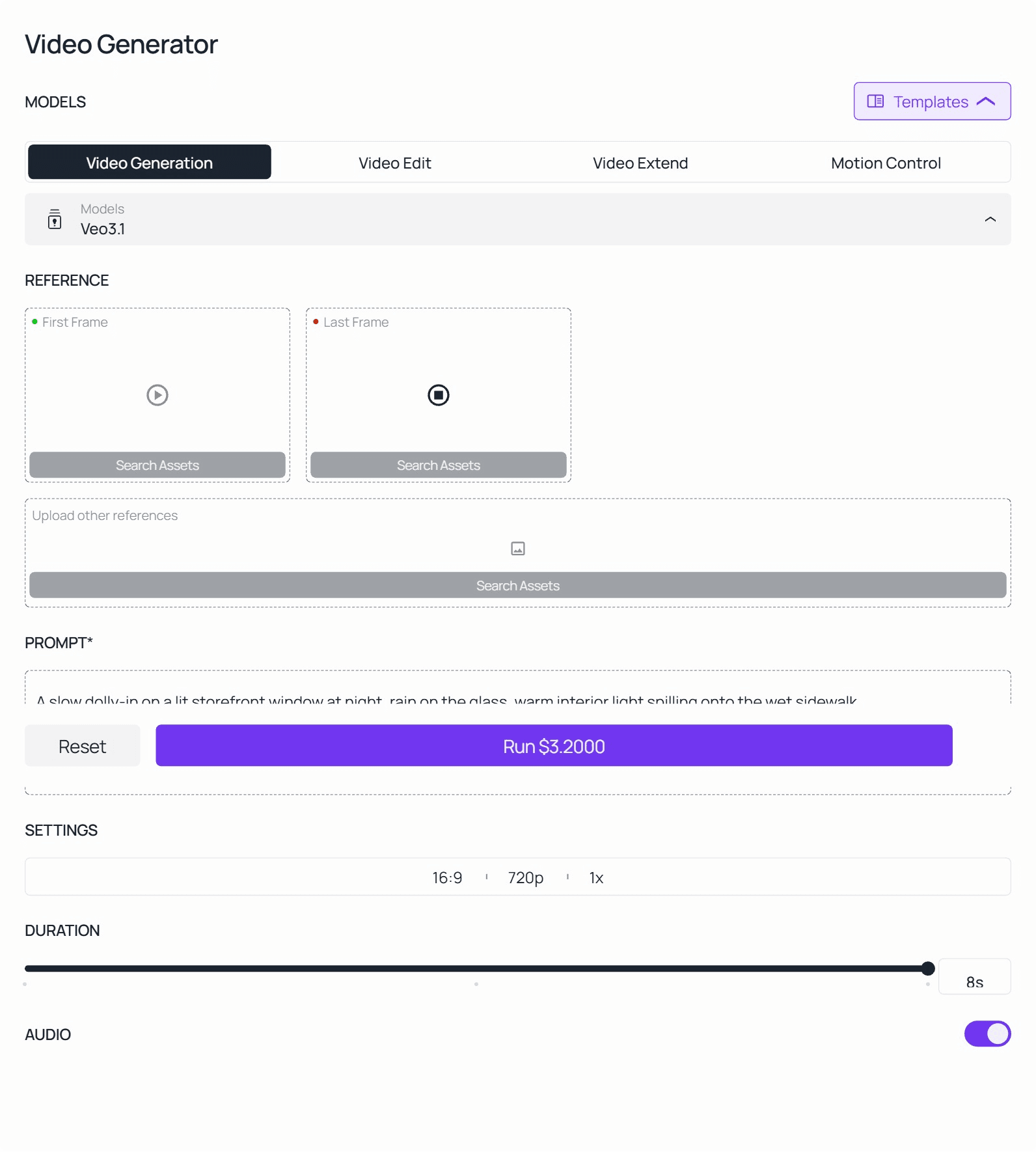
In the video generator's Video Generation tab, pick Veo 3.1, Veo 3.1 Fast, or Veo 3.1 Lite depending on how much render time you're willing to trade for cost, type the prompt, and run it. No separate export step to strip a logo afterward, since there isn't one on the file to begin with.
The API route reuses the key, the endpoint and the polling loop from the edit request above. Only the body changes:
plaintext1curl -X POST https://api.atlascloud.ai/api/v1/model/generateVideo \ 2 -H "Content-Type: application/json" \ 3 -H "Authorization: Bearer $ATLASCLOUD_API_KEY" \ 4 -d '{ 5 "model": "google/veo-3.1/text-to-video", 6 "prompt": "A slow dolly-in on a lit storefront window at night, rain on the glass, warm interior light spilling onto the wet sidewalk.", 7 "duration": 8, 8 "resolution": "1080p" 9 }'
Does Erasing the Logo Get Rid of SynthID Too?
No, and this is where several removal sites overreach. One page currently ranking for this search advertises stripping "invisible C2PA metadata" alongside the visible badge. Content Credentials, the C2PA layer, is genuinely fragile: it lives in file metadata and often doesn't survive a re-export. SynthID is a different animal, and the same split shows up on the image side of Google's products, covered in our look at Gemini's own watermark layers.
DeepMind's own description lists what the mark is built to withstand, and the list reads like a video editor's export menu: cropping, filters, "changing frame rates," lossy compression. Frame-rate changes only apply to moving pictures, a reminder that this version of SynthID was designed with re-encoded clips in mind. A repaint of one corner touches fewer pixels than any item on that list.
Set the three layers from the first table next to an eraser pass and only one of them is actually in reach. The wordmark goes, because that's the whole job. Content Credentials usually go too, but the re-encode does that, not the eraser, and an export from any editor would do the same. SynthID sits in the pixels of every frame, and a corner repaint is a smaller change than anything on the list Google says it survives.
A cleaner corner is a cosmetic result. Whether the file still reads as AI-made to a SynthID check is a separate question, and on a removal site's product page the answer is a sales claim until they show their work.
Is Removing the Veo Watermark Against Google's Rules?
Nothing in Google's rules turns on whether the corner logo is still there. The prohibited use policy is written around intent: it bars "misrepresenting the provenance of generated content by claiming it was created solely by a human, in order to deceive." A Flow clip with the wordmark painted out and posted as an AI test sits inside that line. The same clip captioned as footage you shot on location sits outside it, and it would sit outside it with the wordmark still on.
Who owns the clip isn't in doubt either. Google's terms of service say the company doesn't claim ownership of content you generate, so the file is yours to cut, regrade or repaint, and painting out one corner changes none of that.
| You post the de-badged clip as… | Where that lands |
|---|---|
| An AI test, or with an AI label of your own | Inside Google's rules, wordmark or not |
| Footage you claim to have shot yourself | The provenance clause applies, and it would apply with the wordmark still on |
| Anything at all, from India, South Korea or Vietnam | The visible mark is a legal requirement there, which is why Flow applies it regardless of your setting |
Treat that as a map of where Google's rules sit, not legal advice. Local labeling law, the kind South Korea already enforces, sits above all of it.
What Google's Own Support Forums Say About the Veo Watermark
Search Google's Gemini Apps community and the same question shows up dozens of times, usually from someone who assumed a paid tier meant a clean export.
| Thread | Date | Tier reported | What the reply said |
|---|---|---|---|
| "VEO watermark on my Veo videos" | Aug 2025 | Ultra | A volunteer Product Expert quoted the then-current rule: Pro got the badge, Ultra didn't |
| "Visible ✦ watermark appears on every Flow generated video" | Jul 2026 | Ultra, South Korea | A different volunteer pointed to South Korea's AI labeling law as the reason, not a bug |
Neither reply came from a Google employee. Both threads are volunteer Product Experts answering in the community, which is worth remembering before treating a forum post as an official policy statement. What the two threads agree on, a year apart, is that the badge tracks account tier and region rather than something you can wish away, and the specific rule has moved since the earlier thread was posted.
FAQ
Does Veo 3.1 still add a visible watermark in 2026?
On Google Flow, yes for most accounts, controlled now by the "Visible watermarking" toggle rather than a fixed tier rule, with visible watermarking forced on in India, South Korea, and Vietnam regardless of the setting. Generating through Atlas Cloud's Veo 3.1 API or playground is a separate path, and its own FAQ names only SynthID as unavoidable.
Is there a free way to remove a Veo watermark?
Turning off Flow's Visible watermarking toggle before you generate costs nothing beyond the render itself. Erasing a logo from a clip you already have is a paid edit, billed on the length of the clip that comes out, so an eight-second Flow export is charged as eight seconds and there's no plan to sign up for first. If the video doesn't exist yet, generating it through Atlas Cloud's Veo 3.1 works the same way, at the per-second rates further down this FAQ.
Does erasing the watermark lower video quality?
The repaint is confined to the patch under the wordmark, so what matters is what happens to sit there. In the clip used for this article the logo covered a rain-streaked wooden ledge, and the filled corner reads as the same ledge at full size, with no seam at the edge of the patch. A corner full of fine, moving detail, faces or small text, is where a second pass may be needed. Everything outside that patch comes back at the source resolution.
How much does generating with Veo 3.1 on Atlas Cloud cost?
Atlas Cloud bills Veo 3.1 per second of output: from $0.05 on the Lite tier, $0.08 on Fast, and $0.20 on the standard tier, with no subscription. Rates can change, so check the current numbers before a large batch.
Conclusion
Three routes, and the right one depends on when you're reading this. Before the render, Flow's toggle costs nothing. Generating through Atlas Cloud's Veo 3.1 sidesteps the badge without a toggle at all. For the clips already in a downloads folder, one Video Edit pass with a prompt that names the corner is the whole job, as the storefront clip above shows.
SynthID sits underneath all three and stays put. Google embeds it as the frames are generated and describes it as surviving heavier edits than a corner repaint. So use a veo watermark remover for what it is, a way to clean up the picture on your own footage, and keep labelling the clip as AI-made wherever that matters. The mark you can't see will still agree with you.





