Grok Imagine is xAI's built-in image and video generation product. It lives inside Grok on X and in the standalone Grok app. It runs on a Flux-based image stack for creating and editing pictures, plus the Aurora engine that powers image-to-video and video editing.
That single toolset covers a lot of ground. You can type a prompt and get a photo. You can hand it an image and ask for edits. You can turn a still frame into a short clip with sound. In 2026, that breadth is exactly why Grok Imagine has become a go-to creative surface for millions of X users who never opened a separate design app.
This guide is the hub for everything Grok Imagine. Below, we map the full workflow: image generation, editing, video, usage limits, content policy, the developer API, and how it stacks up against rivals. Each section links down to a deeper spoke article when you want the step-by-step.
Key Takeaways
- Grok Imagine combines text-to-image, image editing, and image-to-video in one product, powered by xAI's Flux image stack and the Aurora engine.
- Free and paid tiers set different daily generation caps, and quotas refill on a rolling window rather than a fixed midnight reset.
- In 2026, xAI loosened some content rules while keeping hard bans on illegal and harmful material, per xAI's published acceptable use policy.
- Developers can reach the same Flux image models through the xAI API, or through aggregators like Atlas Cloud.
What Is Grok Imagine and How Does It Work?
Grok Imagine is the creative layer of xAI's Grok assistant, and it handles four jobs: generating images, editing them, animating stills into video, and editing video. In 2026, xAI describes Grok's visual features as running on its Aurora system, an autoregressive engine built for photorealistic output and native audio, according to xAI's product notes.
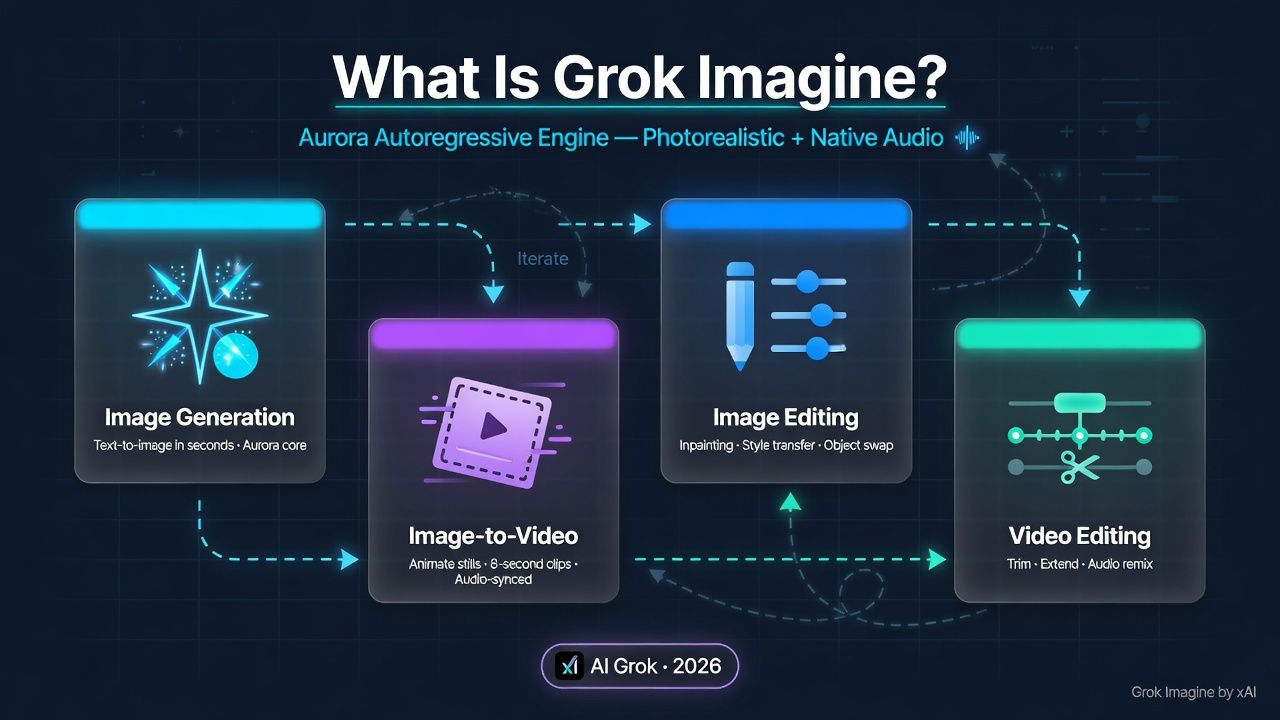
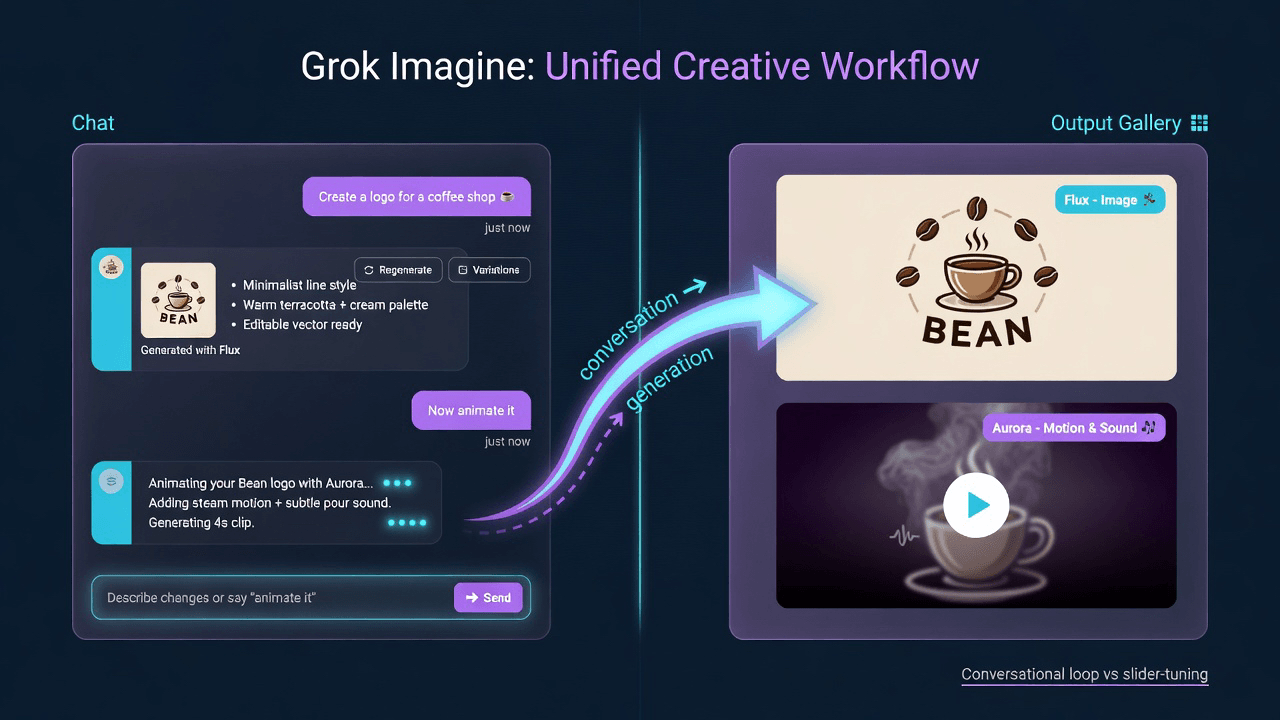
The workflow starts with a chat box. You describe what you want in plain language, and Grok returns options you can refine through follow-up messages. This conversational loop is the core difference from a traditional prompt-and-download tool. You are not tuning sliders. You are talking.
Under the hood, two engines split the labor. The Flux-based image stack handles still-image creation and edits with strong prompt adherence. Aurora takes over for motion, converting a frame into a clip and layering sound. Both are reachable from the same interface, so most users never think about which model fired.
Why does that matter? Because the unified surface removes the usual friction of hopping between apps. One thread can produce a logo concept, refine its colors, then animate it into a five-second promo. We've found that this end-to-end flow is what keeps casual creators inside Grok rather than exporting to Photoshop.
Citation capsule: In 2026, xAI's Grok Imagine runs visual generation on the Aurora engine, an autoregressive system designed for photorealism and native audio, per xAI's product documentation. It pairs with a Flux-based image stack, giving one chat interface control over text-to-image, editing, image-to-video, and video editing.
How Does Grok Imagine Image Generation Work?
Image generation is the entry point for most Grok Imagine users, and it starts from a text prompt inside the Grok chat. In 2026, xAI's image output leans on a Flux-based diffusion stack known for tight prompt adherence and clean text rendering, according to xAI's model descriptions. You type a description, Grok returns a set of images, and you iterate.
Prompt quality drives everything here. A vague request like "a dog" gives generic results. A structured prompt naming subject, setting, lighting, and style gives control. Flux models respond especially well to layered detail, so the payoff for a good prompt is large.
Building Prompts That Actually Work
Strong prompts follow a rough grammar: subject first, then context, then style and technical cues. For a deep breakdown of Flux prompt structure and copy-ready examples, see our guide to Grok xAI Flux image generation. It walks through why Flux rewards specificity and how to phrase lighting, lens, and composition terms.
Using Grok for Branding and Product Work
In our own tests, the most reliable business use was repeatable brand assets: social graphics, product mockups, and concept art. We documented seven of those workflows, from logo variations to ad creative, in Grok xAI image generation capability. The lesson that surprised us: consistency across a set improves when you keep one chat thread open and reference earlier outputs instead of starting fresh each time.
Most guides treat prompt length as the main lever. In practice, thread continuity mattered more. Grok's conversational memory let us hold a visual style across a dozen images, something a stateless generator cannot do without a seed lock.
Citation capsule: In 2026, Grok Imagine generates still images through a Flux-based diffusion stack praised for prompt adherence and text rendering, per xAI's model descriptions. Users refine results conversationally, and thread continuity helps maintain a consistent visual style across a set of related brand images.
How Do You Edit Images with Grok Imagine?
Editing is where the Aurora engine shows its range, letting you modify an existing image through plain-language instructions instead of layer masks. In 2026, xAI positions Grok's editing as multi-turn and iterative, meaning each instruction stacks on the last, according to xAI's feature notes. You upload or generate a picture, then tell Grok what to change.
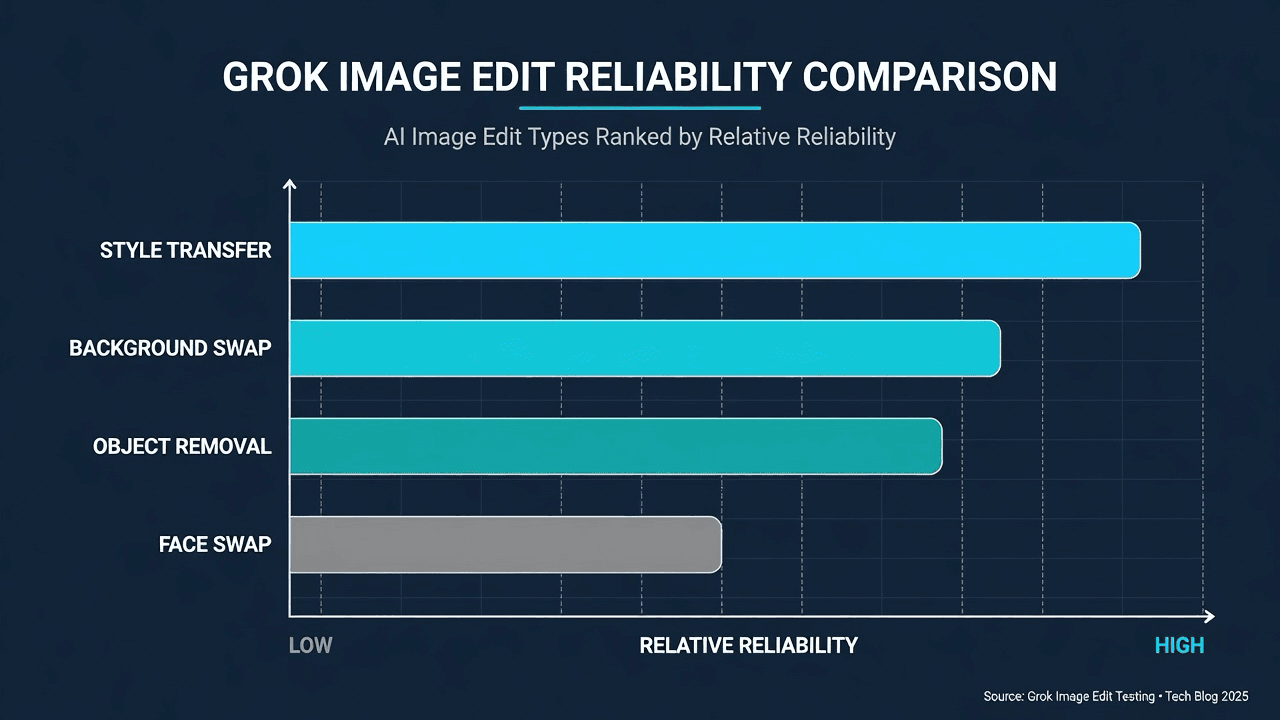
The editing toolkit covers style transfer, object addition and removal, background swaps, and face swapping. Because edits run as a conversation, you can chain them. Change the sky, then the lighting, then add a subject, all without redrawing from scratch. That chaining is the practical superpower here.
What Grok Image Editing Can Do
The full editing feature set, including style transfer, multi-turn refinement, and face swap, is cataloged in Grok xAI image editing capabilities. That case study breaks down which edit types hold up under scrutiny and which still show artifacts.
Step-by-Step Editing and Prompt Examples
New to it? Start with how to use Grok AI image editing, a walkthrough of the Aurora editing flow from upload to export. When you want phrasing that works on the first try, the copy-paste library in Grok Imagine edit image prompt example gives tested instructions for common edits.
Here's the thing about edit prompts: they need verbs, not adjectives. "Make it warmer" is weak. "Shift the color grade toward warm amber tones and soften the shadows" gives Grok something to act on. Precision beats politeness every time.
Citation capsule: In 2026, Grok Imagine edits images through multi-turn, conversational instructions powered by the Aurora engine, per xAI's feature notes. Supported edits include style transfer, object removal, background swaps, and face swapping, with each instruction building on the previous one across a single chat thread.
What Can Grok Imagine Do for Video Generation and Editing?
Video is Grok Imagine's headline feature, and it works two ways: text-to-video and image-to-video, both handled by Aurora with native sound. In 2026, xAI markets Grok's clips as short, cinematic, and audio-enabled out of the box, according to xAI's product announcements. You start from a prompt or a still image and get a moving clip back.
The image-to-video path is the more controllable of the two. You lock a composition as a still, then animate it, which avoids the randomness of generating motion from scratch. This is the workflow most creators reach for when they need a specific look.
From Prompt to Cinematic Clip
For the text-to-video route and how native sound gets applied, read Grok Imagine video generation. It covers clip length, motion control, and the audio layer that sets Grok apart from silent generators.
Animating a Still Image
The image-first workflow gets its own treatment in Grok image to video, which explains how Aurora interprets a static frame and adds motion. If you care about consistency, this is the path to learn first.
Editing Existing Video and Uploading Clips
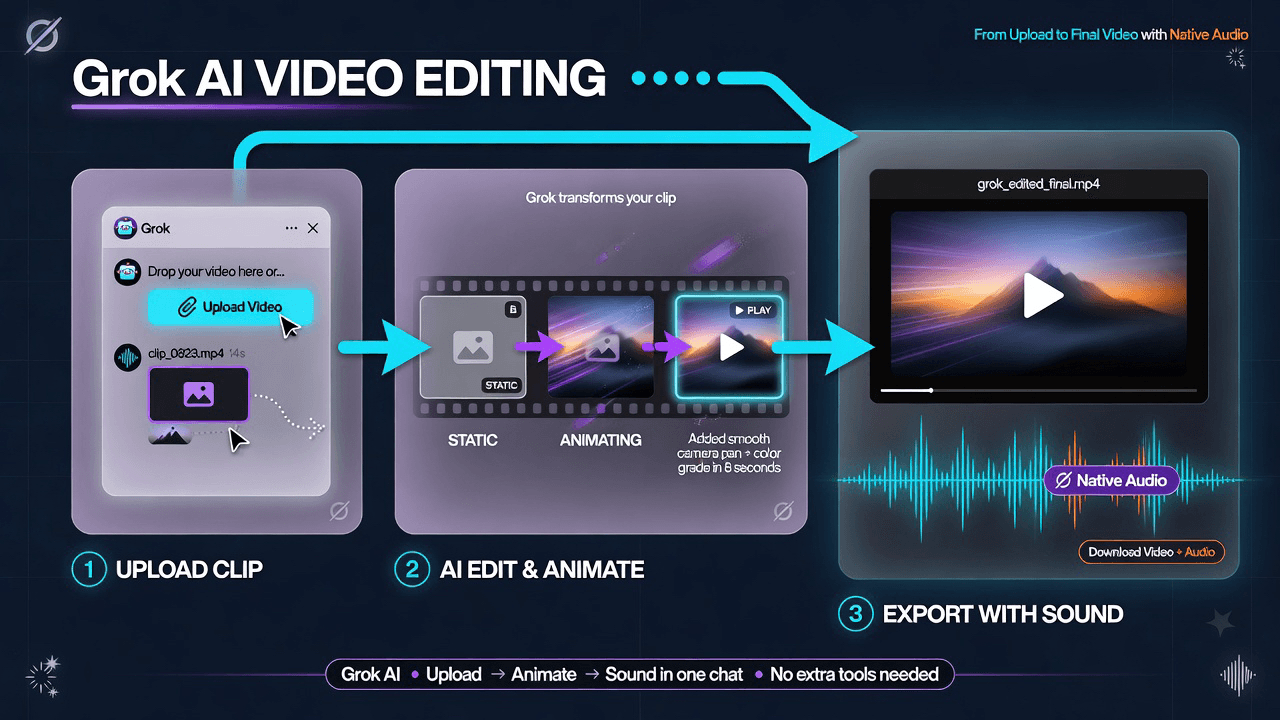
Grok also does video-to-video editing. The 2026 capabilities, including what transformations are supported, are detailed in Grok xAI video editing capabilities. Before any of that, you need your footage into the chat, and how to upload video to Grok xAI chat covers file formats, size limits, and the upload steps.
The native audio layer is underrated. Rivals often generate silent video and leave sound as a separate step. Grok's built-in audio, while short, removes an entire round of tooling for social clips where a few seconds of ambient sound is enough.
Citation capsule: In 2026, Grok Imagine produces short cinematic video with native audio through the Aurora engine, per xAI's product announcements. It supports both text-to-video and image-to-video generation, plus video-to-video editing, with the image-first workflow offering the most control over final composition.
What Are Grok Imagine's Usage Limits, Resets, and Downloads?
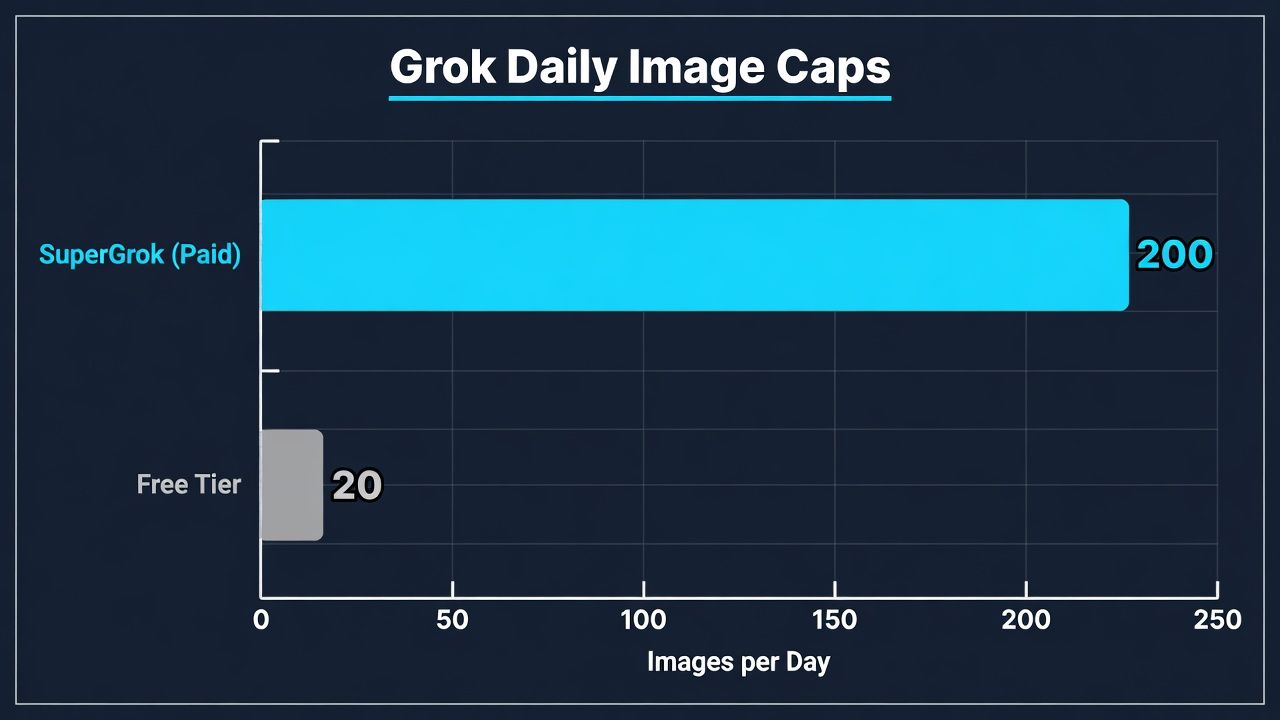
Usage limits shape how much you can create per day, and they differ by account tier. In 2026, free Grok accounts get a modest daily image allowance, while paid tiers like Premium and SuperGrok raise the cap substantially, according to xAI's plan documentation. The exact number depends on your subscription and can shift with product updates.
Understanding the cap is only half the picture. The other half is when it refills, and Grok does not use a simple midnight reset.
Daily Caps by Tier
The full tier-by-tier breakdown of who gets how many generations lives in Grok xAI image generation daily limit. It clarifies where free ends and paid begins, and what happens when you hit the ceiling.
How the Reset Window Actually Works
This trips people up constantly. Grok uses a rolling window, not a fixed daily clock. Your quota frees up gradually as older generations age out of the window. The mechanics, with examples of when your next slot opens, are explained in Grok image generation limit reset time.
Saving Your Images
Once you have a keeper, getting it off the screen and onto your device varies by platform. The desktop and mobile steps are in how to download image from Grok xAI chat, including the workarounds for saving at full resolution.
Citation capsule: In 2026, Grok Imagine sets daily image generation caps by account tier, with paid plans like SuperGrok allowing far more than free accounts, per xAI's plan documentation. Quotas refill on a rolling window rather than a fixed midnight reset, so capacity returns gradually as older generations age out.
What Is Grok Imagine's Content Policy and Moderation Approach?
Content policy defines what Grok will and will not create, and xAI takes a relatively permissive stance with firm exceptions. In 2026, xAI updated its rules to loosen some restrictions while keeping hard bans on illegal, exploitative, and clearly harmful content, according to xAI's acceptable use policy. The moderation runs automatically on both prompts and outputs.
Automatic moderation means false positives happen. A harmless prompt can get flagged, which frustrates creators who did nothing wrong.
What Is Actually Banned
The specifics of the 2026 policy changes, including which categories remain off-limits, are covered in Grok xAI NSFW image generation policy. It separates what changed from what stayed prohibited, so you know where the real lines are.
Fixing Moderation False Positives
If a legitimate request gets blocked, there are ways to rephrase and recover. Practical fixes for over-eager filters are documented in Grok image is moderated, which shows how small wording changes often clear a false flag.
We've hit moderation walls on prompts that were plainly benign, usually because of a single ambiguous word. Swapping that word for a more specific term cleared the block more often than not. The filter reacts to phrasing, not just intent.
Citation capsule: In 2026, xAI loosened parts of Grok Imagine's content policy while keeping firm bans on illegal and exploitative material, per xAI's acceptable use policy. Moderation runs automatically on prompts and outputs, and false positives on benign requests can often be cleared by rephrasing ambiguous wording.
How Do Developers Use the Grok Imagine API?
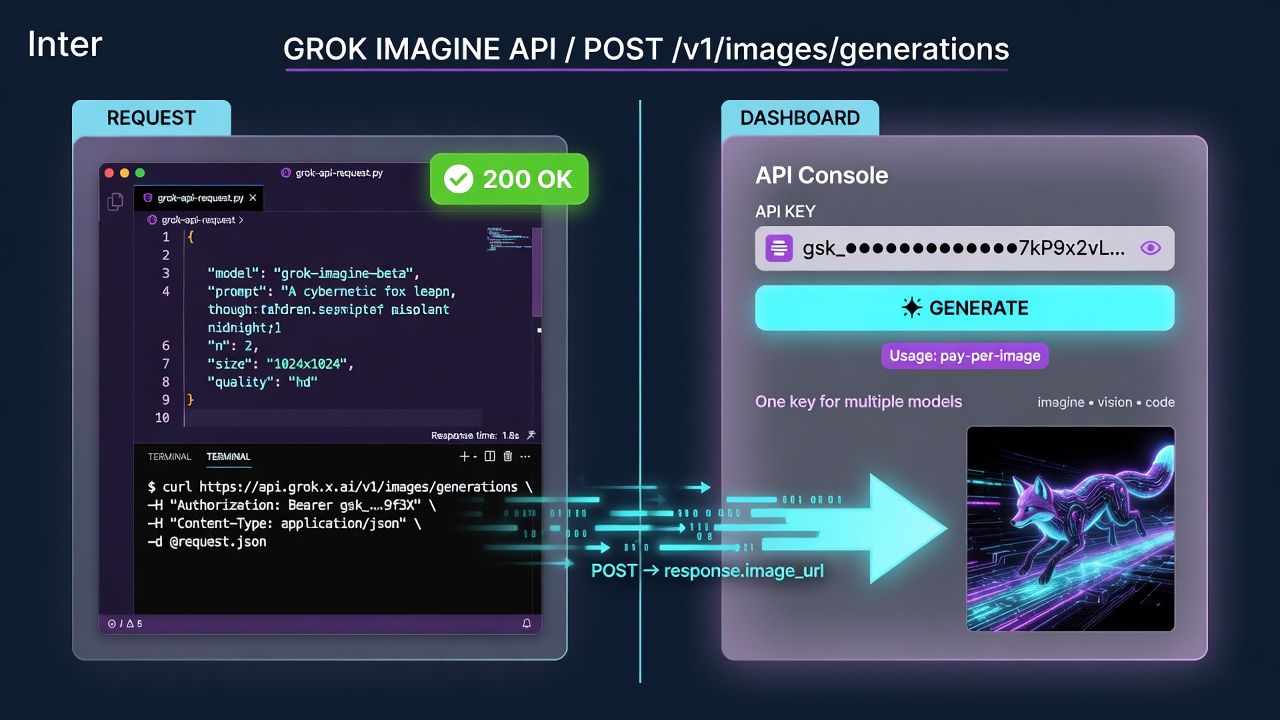
Developers do not have to work inside the chat. The same Flux image models are available programmatically through the xAI API. In 2026, xAI exposes image generation via a REST endpoint with token-based authentication and usage-based pricing, according to xAI's developer documentation. That lets teams bake generation into their own apps.
Setup follows the usual pattern: get an API key, send a prompt payload, receive image data. The friction is mostly in understanding rate limits and cost per image, which scale with volume.
The complete setup, including the Flux model options, request format, and pricing structure, is walked through in xAI Grok API image generation. It covers authentication and the first working call.
For teams that want one key across many model providers, aggregators are an option. Atlas Cloud, for instance, routes to Grok and other xAI models through a single API, which simplifies billing when you are testing several engines at once. That is the one place a broker earns its keep: comparison without juggling accounts.
Citation capsule: In 2026, xAI offers Grok Imagine's Flux image models through a REST API with token-based authentication and usage-based pricing, per xAI's developer documentation. Developers integrate generation into their own applications, and multi-provider aggregators can route to xAI models through a single key for easier cross-model testing.
How Does Grok Imagine Compare to Alternatives?
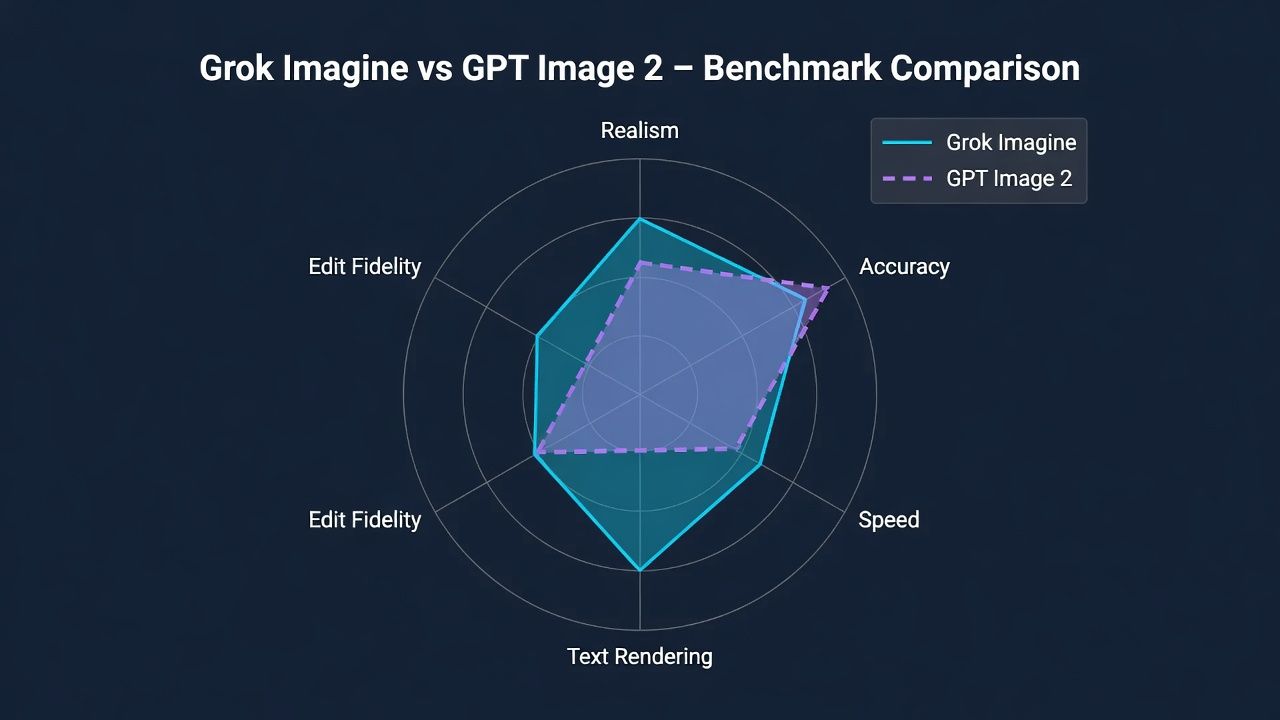
Comparison matters because Grok is not the only game in town, and its strengths are specific rather than universal. In 2026, head-to-head tests show Grok Imagine competing closely with OpenAI's GPT Image 2 on realism and prompt adherence, with each winning different categories, according to our benchmark testing. The right choice depends on your use case.
Grok's edge tends to be speed, conversational editing, and native video with sound. Rivals may lead on specific image-quality dimensions or ecosystem integrations.
Grok Imagine vs GPT Image 2
We ran a structured, prompt-matched benchmark between the two engines across realism, text rendering, and edit fidelity. The full results, including where each model won, are in GPT Image 2 vs Grok Imagine. The short version: neither swept every category, and the gap on most everyday prompts was smaller than the marketing implies.
Free Ways to Generate Similar Images
Not everyone needs Grok. If budget is the constraint, the top free tools that approximate Grok's output are ranked in free alternatives to Grok image generation. It weighs quota, quality, and licensing so you can pick a genuinely free option, not a trial in disguise.
Which should you pick? If you already live on X and want video with sound, Grok is the natural fit. If you need a specific image-quality edge or a free workflow, the comparisons above will point you.
Citation capsule: In 2026, prompt-matched benchmarks show Grok Imagine competing closely with GPT Image 2 on realism and prompt adherence, with each engine winning different categories, per our internal testing. Grok's distinct advantages are conversational editing and native audio video, while free alternatives can cover budget-limited image needs.
Frequently Asked Questions
Is Grok Imagine free to use?
Grok Imagine has a free tier with a limited daily image allowance, and paid plans that raise the cap. In 2026, free X accounts can generate a modest number of images per day, while SuperGrok and Premium tiers offer significantly more, according to xAI's plan documentation. Video features may vary by tier.
What is the difference between Flux and Aurora in Grok Imagine?
Flux and Aurora split the workload. The Flux-based stack handles still-image creation and editing with strong prompt adherence. Aurora, xAI's autoregressive engine, powers image-to-video, video editing, and native audio, per xAI's product documentation. In 2026, both run behind the same Grok chat interface, so users rarely pick manually.
How long does it take for Grok's image limit to reset?
Grok uses a rolling window, not a fixed daily reset. In 2026, your quota refills gradually as older generations age out of the window rather than all at once at midnight, according to xAI's usage documentation. That means partial capacity often returns before your full allowance does.
Can Grok Imagine generate video with sound?
Yes. Native audio is a defining feature. In 2026, Grok Imagine's Aurora engine produces short cinematic clips with built-in sound from both text prompts and still images, according to xAI's product announcements. This removes the separate audio step that many competing video generators still require for social content.
Can I access Grok Imagine through an API?
Yes. In 2026, xAI exposes its Flux image models through a REST API with token-based authentication and usage-based pricing, per xAI's developer documentation. Developers can integrate generation directly, and multi-provider aggregators like Atlas Cloud route to xAI models through a single key for cross-model testing.
Why does Grok say my image was moderated?
Grok runs automatic moderation on prompts and outputs, and it sometimes flags benign requests. In 2026, xAI keeps firm bans on illegal and harmful content while allowing broader creative use, per its acceptable use policy. Rephrasing an ambiguous word often clears a false positive, as our testing has repeatedly shown.
Conclusion
Grok Imagine has grown into a genuine one-stop creative surface. It generates images from text, edits them conversationally, animates stills into clips with sound, and even edits video, all inside a single chat. The Flux stack and Aurora engine do the heavy lifting while you just describe what you want.
The practical takeaways are simple. Learn the prompt grammar for images. Use thread continuity to keep a consistent style. Know your tier's rolling limit so you are not caught short. And when a prompt gets flagged, rephrase before you give up. In 2026, that workflow covers most creative jobs without a second tool.





